




More than 99% of password spray attacks use legacy authentication protocols, and more than 97% of credential stuffing attacks do the same, according to Microsoft's own guidance on blocking legacy authentication. Microsoft learned what one forgotten setting costs on its own estate: in late 2023 Midnight Blizzard password-sprayed a legacy, non-production test tenant account that did not have multifactor authentication enabled, took over a legacy test OAuth application with elevated access, and used it to reach corporate email accounts, including those of senior leadership, cybersecurity and legal staff. None of those steps needed a software vulnerability. Each one was a tenant configuration choice.
Quick answer: A Microsoft 365 security assessment is an expert review of one Microsoft 365 tenant that checks how identity, mail, file sharing, collaboration, devices, apps, logging and Copilot are configured, then tests whether the paths an attacker would use are actually closed. It is not a Secure Score export or a single automated scan. Use CISA's SCuBA baselines or the CIS Microsoft 365 Foundations Benchmark as the yardstick, insist on observed test evidence for identity and mail flow, and buy one after a phishing or business email compromise incident, before an audit, or after a tenant merger.
This guide is the hub for Stingrai's Microsoft 365 and Entra deep dives. It defines the assessment, sets out the scope by workload, lists the attack paths worth testing first, maps them to the current SCuBA policies, and covers hybrid identity, deliverables, duration and cost. One naming note: Microsoft 365 Certification penetration testing is a different topic. That is Microsoft's certification program for independent software vendors publishing apps into Microsoft 365, not a review of your own tenant. Every figure below links to its publisher, and baseline versions were checked on the publishers' own pages on 25 October 2026.
Key facts
The current federal baseline: CISA released ScubaGear v2.0.0 on 22 October 2026. Its seven Microsoft 365 baselines (Entra ID, Exchange Online, SharePoint Online and OneDrive, Teams, Security Suite, Power BI and Power Platform) hold 109 policies: 59 SHALL statements and 50 SHOULD statements, by Stingrai's count of the published baseline files.
Mostly automatable, not entirely: 101 of those 109 policies carry CISA's "Automated Check" label and 8 are manual, and CISA states that ScubaGear does not assess every Conditional Access condition value (CISA SCuBA Entra ID baseline).
The CIS alternative: the CIS Microsoft 365 Foundations Benchmark is at v7.0.0, announced in CIS's June 2026 update with 22 new recommendations, 68 updated, 12 moved in from the Azure benchmark and 2 removed (CIS Benchmarks June 2026 Update).
Secure Score is not a risk measure: Microsoft says Secure Score "isn't an absolute measurement of how likely your system or data could be breached", and each recommended action is worth 10 points or less (Microsoft Learn, Secure Score).
Defaults that need a decision: Intune treats a device with no compliance policy as Compliant by default, and Teams allows all external domains by default (Intune; Teams).
Logs run out: Audit (Standard) keeps records for 180 days, while SCuBA asks for audit logs searchable for 3 months and retrievable for 12 (Microsoft Purview; SCuBA Security Suite baseline).
What the mailbox is worth to attackers: business email compromise cost victims who reported to the FBI US$3.05 billion in 2025 across 24,768 complaints (FBI IC3 2025 Internet Crime Report).
What a Microsoft 365 security assessment is (and is not)
A Microsoft 365 security assessment is a scoped, expert-led review of a Microsoft 365 tenant's security configuration across identity, mail, collaboration, devices, applications, logging and AI features, combined with controlled tests that show whether the configuration actually blocks the attack paths that matter, delivered as prioritized findings with evidence and a retest.
The terms "Microsoft 365 security audit", "M365 security assessment" and "Office 365 security assessment" are used for the same purchase. Office 365 is the older name for the suite; the assessment now covers Microsoft Entra ID (formerly Azure Active Directory), which sits underneath every Microsoft 365 workload.
Four things are often sold under the same label, and they are not equivalent:
What you get | How it works | What it proves | What it misses |
|---|---|---|---|
Secure Score export | A list of Microsoft's recommended actions and points from the Defender portal | Which recommended features are switched on | Whether an attacker can still get in; Microsoft says the score is not an absolute measure of breach likelihood |
Automated baseline scan (ScubaGear, a CIS scanner) | A tool reads tenant settings and compares them with a baseline | Configuration matches or misses each policy | Condition values, exceptions, overlapping policies and how settings combine |
Microsoft 365 security assessment | Expert configuration review plus controlled tests of the riskiest identity, mail, sharing and app paths | Which paths are open, with evidence, priority and fixes | Real-world detection and response; that is a red team's job |
Microsoft 365 penetration test or red team | Tests that start from phishing, a stolen session or an assumed-breach account and try to reach an objective | How far an attacker gets and whether anyone notices | Breadth: it follows the paths it finds, not every setting |
The first row is where most "M365 security assessment" offers stop. Microsoft is explicit about its limits: points are awarded for configuring recommended features, for completing security tasks, and for marking an action as addressed by "a non-Microsoft application or software, or an alternate mitigation", and the recommendations "don't cover all the attack surfaces associated with each product" (Microsoft Learn). A score is a useful progress meter. It cannot tell you that a guest, a legacy client, an unmanaged device or a forgotten app registration takes a path the policy owner never modeled.
Stingrai's own test data shows why the gap matters. Across 55 penetration tests and 1,206 verified findings, authentication and session handling was the largest single class at 21.0%, and 35.2% of findings fell into classes defined by what a system is supposed to allow, which no signature can represent (State of Penetration Testing 2026). That dataset covers web application, network and other tests rather than Microsoft 365 tenants, so read it as a pattern, not a tenant benchmark: identity logic is where findings concentrate, and identity logic is what a settings export cannot evaluate.
What a Microsoft 365 security assessment covers
Scope is set per workload. The table below is the scope Stingrai uses as a starting point; each row links to the deep dive that covers that workload's test matrix.
Workload | What gets reviewed | Path tested | Baseline anchor (SCuBA v2.0.0) | Deep dive |
|---|---|---|---|---|
Entra ID identity and Conditional Access | MFA methods, phishing-resistant MFA for admins, legacy authentication, device code flow, exclusions and break-glass accounts, privileged roles and PIM | A synthetic user, guest or admin reaches a resource through a gap in policy coverage | MS.AAD.1.1v1, 3.1v1, 3.6v1, 3.9v1, 7.x | |
Exchange Online and mail flow | External forwarding, inbox rules, SMTP AUTH, SPF, DKIM and DMARC, mailbox auditing, external sender warnings | A compromised mailbox silently forwards mail outside the organization | MS.EXO.1.1v2, 2.2v3, 4.x, 5.1v1, 13.1v1 | |
SharePoint Online and OneDrive | Organization and site sharing levels, Anyone links, default link type and permission, guest expiry, domain restrictions | A sensitive file is reachable by an unauthenticated or unintended external user | MS.SHAREPOINT.1.x, 2.x, 3.x | |
Teams | External access by domain, unmanaged accounts, anonymous meeting join, lobby, app installation | An outside account starts a chat that carries a phishing lure or a malicious app | MS.TEAMS.1.x, 2.x, 5.x | This guide |
App registrations, consent and workload identities | User consent settings, admin consent workflow, who can register apps, app secrets and certificates, high-privilege Graph permissions, federated credentials | A consent grant or an app credential gives standing access to mail or files | MS.AAD.5.1v1 to 5.7v1 | |
Intune device compliance | Tenant compliance settings, platform policies, Conditional Access device requirements | An unmanaged or unenrolled device is treated as compliant | MS.AAD.3.7v1, 3.8v1 | |
Logging, alerting and audit retention | Unified audit log, retention by license, alert policies, SIEM forwarding | An intrusion leaves too little evidence to investigate | MS.SECURITYSUITE.4.x, 5.1v1, 5.2v1; MS.AAD.4.1v1 | This guide |
Copilot, connectors and AI agents | Oversharing that Copilot surfaces, Graph connector permissions, agent approval, risky agent controls | A user's prompt surfaces content they should never have had view rights to | MS.AAD.9.1v1 |
Two optional layers sit next to the core scope. Power BI and Power Platform have their own SCuBA baselines and belong in scope when business units build apps and flows on tenant data. Hybrid identity, covered in its own section below, belongs in scope whenever Entra ID synchronizes from or federates with an on-premises Active Directory.
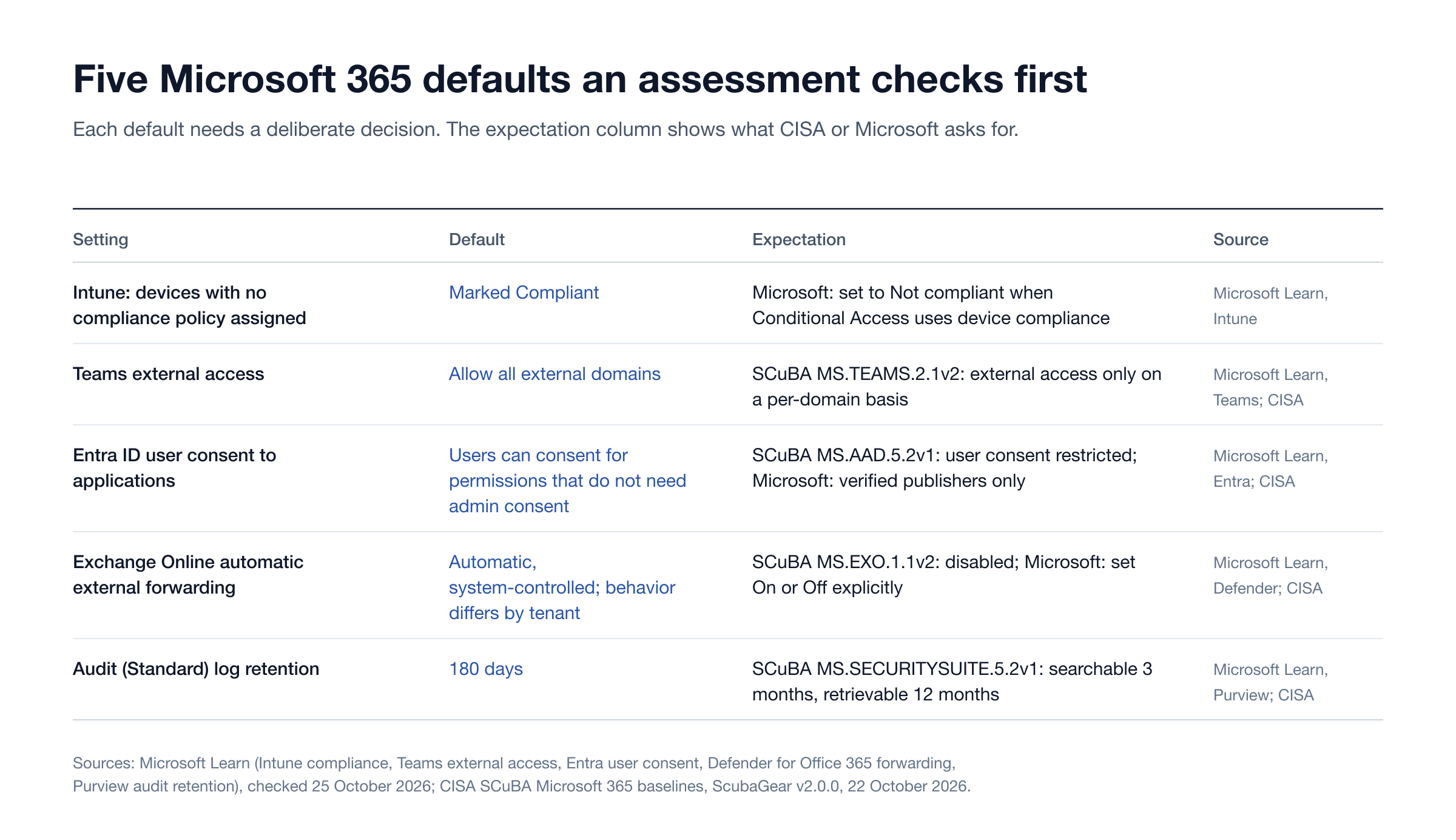
Figure 1: Five Microsoft 365 defaults that need an explicit decision. Sources: [Microsoft Intune](https://learn.microsoft.com/en-us/intune/device-security/compliance/overview), [Microsoft Teams](https://learn.microsoft.com/en-us/microsoftteams/trusted-organizations-external-meetings-chat), [Microsoft Entra user consent](https://learn.microsoft.com/en-us/entra/identity/enterprise-apps/configure-user-consent), [Defender for Office 365 forwarding controls](https://learn.microsoft.com/en-us/defender-office-365/outbound-spam-policies-external-email-forwarding), [Microsoft Purview audit retention](https://learn.microsoft.com/en-us/purview/audit-log-retention-policies) and [CISA SCuBA v2.0.0 baselines](https://github.com/cisagov/ScubaGear/tree/v2.0.0/PowerShell/ScubaGear/baselines).
Configuration review vs penetration test
A Microsoft 365 assessment uses both kinds of work, and the report should say which finding came from which.
Configuration review reads the tenant with a read-only role and compares every in-scope setting with the chosen baseline and with the organization's own stated intent. It is broad: every Conditional Access policy, every sharing setting, every app with high-privilege permissions. It produces a configuration artifact for each finding, such as the policy definition, its assignments and its exclusions as they stood on the test date.
Penetration testing in a tenant is narrow and deliberate. With owner-approved synthetic accounts and devices, the tester tries the paths the review flagged: a sign-in from a legacy client, a guest reaching a site, a consent prompt for a test application, a forwarding rule on a test mailbox. It produces a behavior artifact: the observed sign-in decision, the delivery result, the access that was or was not granted. CISA's own baseline makes the case for this second layer. It says ScubaGear does not assess every Conditional Access condition value and warns that conflicting or misaligned conditions can leave users or devices outside intended protection (CISA SCuBA Entra ID baseline).
Both stay inside Microsoft's rules. Microsoft's penetration testing rules of engagement allow testing within your own tenant and assets you are authorized to test, and they prohibit denial of service, phishing or social engineering of Microsoft employees, access to other customers' data and use of credentials that are not yours. A responsible assessment also leaves policy changes to the owner's change process: CISA recommends placing a new Conditional Access policy in Report-only mode while it is tested, because a careless change can lock out legitimate users.
When the question is "would anyone notice", the right purchase is a red team engagement that starts from a phishing lure or an assumed-breach account, not a wider configuration review. The differences between red teaming, penetration testing and continuous validation are covered separately.
The attack paths to test first
These ten checks find the most consequential gaps in a typical tenant. Each one is a defender's verification with synthetic accounts and owner approval, not an exploitation recipe.
Legacy authentication is blocked everywhere. Confirm a Conditional Access block covers all users and all resources, then observe a legacy client sign-in fail. Microsoft attributes more than 99% of password spray attacks to legacy protocols (Microsoft Learn). Baseline: MS.AAD.1.1v1.
Device code flow is blocked or tightly scoped. Microsoft recommends organizations "get as close as possible to a unilateral block on device code flow" (Microsoft Learn). Microsoft tracked a device code phishing campaign, Storm-2372, active since August 2024 against government, defense, health, energy and other sectors (Microsoft Threat Intelligence). Baseline: MS.AAD.3.9v1. Deep dive: device code phishing and ClickFix.
Admins use phishing-resistant MFA, and SMS, voice and email codes are off. SCuBA v2.0.0 requires phishing-resistant MFA for highly privileged roles (MS.AAD.3.6v1) and now requires SMS, voice call and email one-time passcodes to be disabled (MS.AAD.3.5v2). Test an admin sign-in with a weaker method and confirm it is refused. Related: adversary-in-the-middle phishing.
Users cannot consent their mail and files away. By default, Microsoft lets all users consent to applications for permissions that do not require administrator consent, such as access to their own mailbox. Microsoft recommends allowing user consent only for apps from verified publishers (Microsoft Learn); SCuBA requires user consent to be restricted and an admin consent workflow (MS.AAD.5.2v1, 5.3v1). Test with a harmless test application that requests mailbox read access.
Existing app grants and app credentials are reviewed. Changing consent settings only affects future consent; existing grants stay in place. List enterprise apps holding high-privilege Graph or Exchange permissions, app registrations with password secrets, and long-lived credentials. SCuBA v2.0.0 added MS.AAD.5.5v1 to 5.7v1: block app password addition, and keep app passwords to 180 days or less and certificates to 365 days or less. Midnight Blizzard's path ran through exactly this kind of legacy app.
Mail cannot leave the tenant automatically. The outbound spam policy's default, "Automatic - System-controlled", behaves differently by organization, and Microsoft advises setting forwarding explicitly On or Off (Microsoft Learn). SCuBA requires automatic forwarding to external domains to be disabled (MS.EXO.1.1v2). Create a forwarding rule on a test mailbox and confirm the message bounces.
Anyone links are off, short-lived or view-only. SCuBA limits SharePoint and OneDrive sharing to existing guests or the organization, restricts external sharing to approved domains or security groups, caps Anyone link expiry at 30 days and makes link permissions view-only (MS.SHAREPOINT.1.1v1 to 3.2v1). Microsoft notes that the OneDrive setting can be more restrictive than the SharePoint setting but never more permissive (Microsoft Learn).
Teams talks only to approved domains. "Allow all external domains" is the Teams default (Microsoft Learn); SCuBA requires external access on a per-domain basis and prohibits unmanaged Teams users from starting contact with internal users (MS.TEAMS.2.1v2, 2.2v2).
Non-compliant devices are actually refused. Intune's tenant-wide default marks devices with no compliance policy as Compliant, and Microsoft says organizations that use Conditional Access should change it to Not compliant (Microsoft Learn). Sign in from an unenrolled test device and confirm it cannot reach protected resources.
There is enough log to investigate, and Copilot only sees what users should see. Audit (Standard) keeps 180 days of records, and longer retention depends on per-user licensing (Microsoft Purview); SCuBA asks for logs searchable for 3 months and retrievable for 12 (MS.SECURITYSUITE.5.2v1). For Copilot, Microsoft states it "only surfaces organizational data to which individual users have at least view permissions" (Microsoft Learn), so every overshared site becomes an answer to a prompt. Microsoft has since renamed Microsoft 365 Copilot to Microsoft Copilot; the permission model is unchanged.
SCuBA baseline mapping
CISA's Secure Cloud Business Applications (SCuBA) project publishes secure configuration baselines for Microsoft 365 and the ScubaGear tool that checks a tenant against them (CISA SCuBA). Federal civilian agencies must follow them: Binding Operational Directive 25-01, issued on 17 December 2024, required agencies to deploy the assessment tools by 25 April 2025 and implement the mandatory policies by 20 June 2025. For everyone else they are a free, public, versioned yardstick, which is why Stingrai maps findings to them.
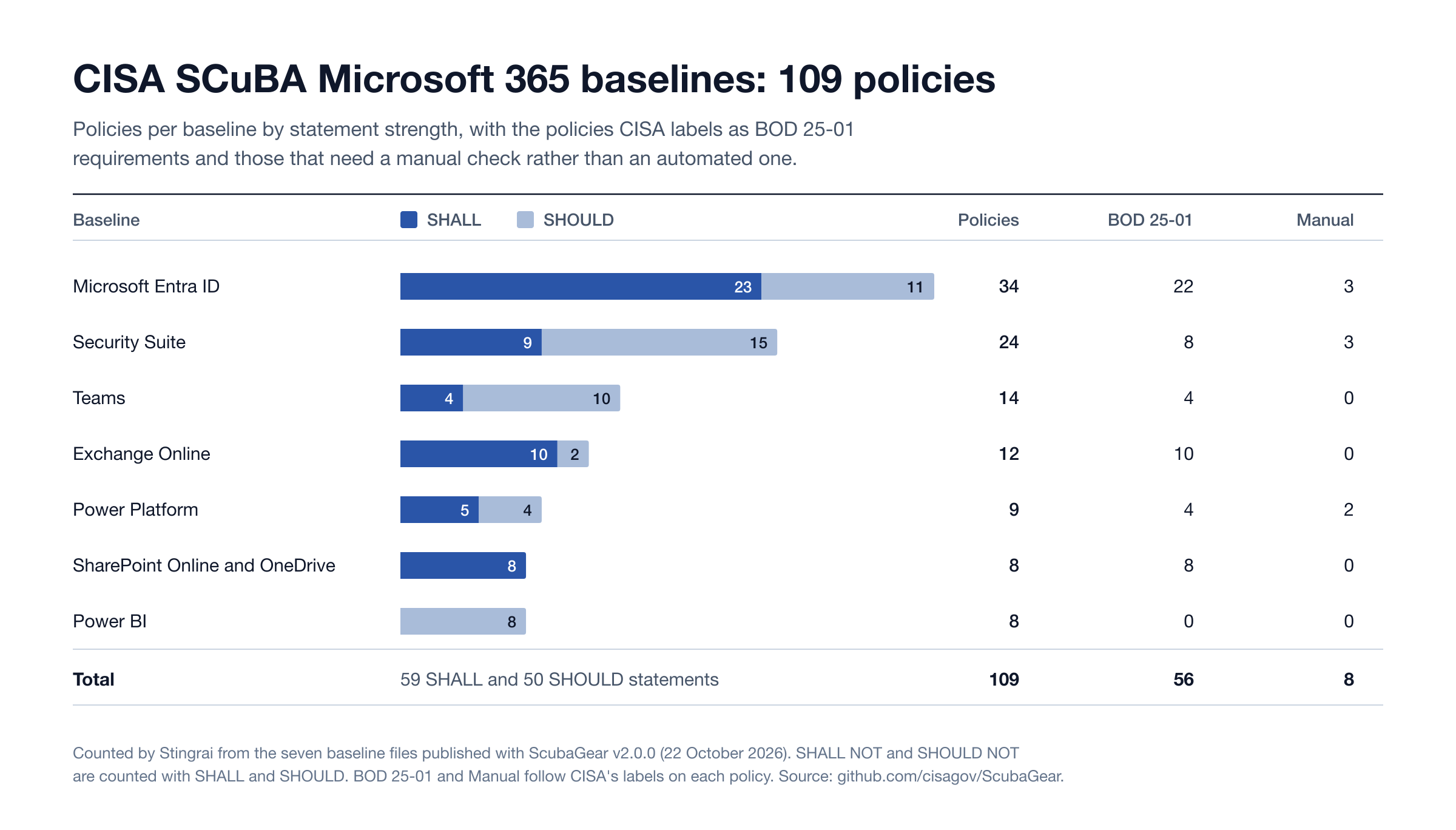
Figure 2: The 109 policies in CISA's SCuBA Microsoft 365 baselines as published with ScubaGear v2.0.0, by baseline and by SHALL or SHOULD statement, with the policies CISA labels as BOD 25-01 requirements and those that need a manual check. Counted by Stingrai from the [baseline files](https://github.com/cisagov/ScubaGear/tree/v2.0.0/PowerShell/ScubaGear/baselines) on 25 October 2026.
Version 2.0.0 is a large release. It retired the Defender baseline into a new Security Suite baseline, added the AI agent policy MS.AAD.9.1v1 ("Risky AI agents SHALL be blocked"), added SharePoint domain restriction and Anyone link limits, and made MS.AAD.3.2v2 require MFA for all users independently of the phishing-resistant MFA policy (ScubaGear v2.0.0 release notes). A report written against an older baseline will cite policy IDs that no longer exist, so the version and test date belong on the cover page.
The table maps the policies an assessment tests most often to the evidence a buyer should expect. Policy statements are CISA's; the test and evidence columns are Stingrai's synthesis.
SCuBA policy (v2.0.0) | CISA statement | What the assessment tests | Evidence to expect |
|---|---|---|---|
MS.AAD.1.1v1 | Legacy authentication SHALL be blocked. | Legacy client sign-in from a synthetic account | Policy scope and the denied sign-in record |
MS.AAD.3.1v1 | Phishing-resistant MFA SHALL be enforced for all users. | Sign-in with a weaker method for an in-scope user | Authentication method and Conditional Access result |
MS.AAD.3.6v1 | Phishing-resistant MFA SHALL be required for highly privileged roles. | Admin role activation with a non-resistant method | Role assignment snapshot and refusal |
MS.AAD.3.9v1 | Device code authentication SHOULD be blocked. | Device code sign-in attempt for a test user | Authentication flow condition and blocked result |
MS.AAD.5.2v1 | User consent to applications SHALL be restricted. | Consent prompt from a harmless test app | Consent policy and the request routed to admin review |
MS.AAD.5.5v1 | Application password addition SHOULD be blocked. | Inventory of app secrets and attempted secret addition on a test app | App management policy and credential list |
MS.AAD.7.4v1 | Permanent active role assignments SHALL NOT be allowed for highly privileged roles. | Review of active versus eligible assignments | PIM assignment export |
MS.AAD.9.1v1 | Risky AI agents SHALL be blocked. | Agent inventory and the policy that governs risky agents, where licensed | Agent list and Conditional Access policy |
MS.EXO.1.1v2 | Automatic forwarding to external domains SHALL be disabled. | Forwarding rule on a test mailbox | Outbound policy setting and the bounce |
MS.EXO.5.1v1 | SMTP AUTH SHALL be disabled. | Organization and per-mailbox setting review | Transport configuration |
MS.SHAREPOINT.1.1v1 | External sharing for SharePoint SHALL be limited to "Existing guests" or "Only people in your organization." | Organization and site-level sharing levels; external access to a test file | Sharing settings and the access result |
MS.SHAREPOINT.3.1v1 | Expiration days for "Anyone" links SHALL be set to 30 days or less. | Anyone link lifetime where Anyone sharing is allowed | Link policy and a sample link's expiry |
MS.TEAMS.2.2v2 | Unmanaged users SHALL NOT be enabled to initiate contact with internal users. | Inbound contact from an unmanaged test account | External access settings and result |
MS.SECURITYSUITE.5.2v1 | Audit logs SHALL be retained and searchable for a minimum of 3 months and retrievable for a minimum of 12 months. | Retention policy by license and SIEM forwarding | Retention policies and a retrieved test event |
CIS or SCuBA? Both are sound. The CIS Microsoft 365 Foundations Benchmark is the more common reference in commercial audits, and it changes materially between versions (v7.0.0 added 22 recommendations and moved 12 in from the Azure benchmark), so a report should name the exact version it used. SCuBA is free to read without registration, maps every policy to NIST SP 800-53 and MITRE ATT&CK, and labels which policies are automated or manual. A well-built assessment can report against either and should never mix versions in one report.
Hybrid identity: from on-premises Active Directory to Entra ID
Most mid-market and enterprise tenants are hybrid. Microsoft names the two primary threat vectors from on-premises infrastructure into Microsoft 365: federation trust relationships, where a stolen SAML token-signing certificate lets "anyone who has that certificate" impersonate any cloud user, and account synchronization, where an on-premises compromise modifies synchronized privileged users or groups (Microsoft Learn, Protect Microsoft 365 from on-premises attacks). Microsoft's rule is short: "No on-premises accounts should have administrative privileges in Microsoft 365." SCuBA states the same requirement as MS.AAD.7.3v1, cloud-only accounts for privileged users.
A hybrid leg of the assessment therefore checks four things: which synchronized accounts or groups hold cloud roles, directly or through nesting; whether federation is still in use and who can reach the token-signing infrastructure; how the Entra Connect or Cloud Sync servers are protected as tier-0 systems; and whether an on-premises domain compromise would let an attacker change cloud group membership that grants access.
The on-premises half is an Active Directory security assessment in its own right. Stingrai's research team built and open-sourced StingAD under the Apache 2.0 license, a single static binary for Active Directory assessment that maps how one low-privileged account can reach Domain Admin, which is exactly the question the on-premises leg of a hybrid engagement has to answer. The stakes are not abstract: in Stingrai's data, 92% of internal network findings were High or Critical (State of Penetration Testing 2026). If the domain falls and sync or federation carries that into Entra ID, the cloud tenant falls with it. Scoping across Azure subscriptions and Entra is covered in how to scope an Azure and Entra ID penetration test.
When to buy a Microsoft 365 security assessment
After phishing or business email compromise. A mailbox takeover usually leaves a forwarding rule, a consent grant or a registered device behind. Business email compromise cost reporting victims US$3.05 billion in 2025, the FBI says (IC3 2025). An assessment after the incident closes the doors the attacker used and checks for the ones they left open. Incident response comes first if the attacker may still be present.
Before an audit or a customer security review. Assessment evidence supports SOC 2, ISO 27001, HIPAA, PCI DSS, CMMC and NYDFS 500 programs, where Microsoft 365 holds the mail and files in scope. A dated report with baseline version and retest results is stronger evidence than a screenshot of a score.
After a merger, acquisition or tenant consolidation. Cross-tenant migrations bring guest accounts, trust settings, app grants and Conditional Access exclusions created for the move. Many are never removed.
Before a Copilot rollout. Copilot answers from whatever each user can already view. Fix oversharing before the prompt box makes it searchable.
After a license or administration change. Moving between E3 and E5, adding Intune or handing administration to a new team or managed service provider changes which controls exist and who owns them.
On a schedule. Tenants drift. CISA's own baselines changed substantially in one release this month. An annual assessment, or a continuous program that rechecks after major changes, keeps the evidence current.
Deliverables and retest
A Microsoft 365 security assessment report should let an external reviewer verify every finding without access to the tenant:
Executive summary of the tenant's exposure in business terms, with the three to five changes that remove the most risk.
Findings with two kinds of proof: the configuration artifact (setting, scope and exclusions on the test date) and, where tested, the behavior artifact (the observed sign-in, delivery or access result), each redacted of tokens and personal data.
Severity in context: an unintended path to a Global Administrator or to executive mailboxes ranks above an unusual but approved route to a non-sensitive site.
Baseline appendix naming SCuBA v2.0.0 or CIS v7.0.0, each in-scope policy, and a status of pass, fail, not applicable or not tested, with reasons.
Remediation guidance written for the admin who will make the change, including the Report-only step for Conditional Access changes.
Retest that records the fix and a fresh observed result for every remediated finding.
A sample of how Stingrai structures findings and evidence is in the penetration testing report sample. On Stingrai engagements, findings reach the PTaaS portal as they are confirmed, so remediation starts during the test, and an attestation letter stating scope and testing dates is issued with every human-led engagement.
How long it takes and what drives cost
Stingrai quotes Microsoft 365 assessments to scope. The number of testing days depends on the workloads in scope, the number of tenants, hybrid identity and how many Conditional Access policies and applications need testing; the schedule is fixed in writing at scoping, and pricing follows within 24 hours of a quote request. These factors set the number of testing days:
Cost driver | Why it changes the effort |
|---|---|
Workloads in scope | Each of Entra ID, Exchange, SharePoint and OneDrive, Teams, Intune, Power Platform and Copilot adds its own settings and tests |
Tenants and hybrid identity | Several tenants, cross-tenant sync, federation or an on-premises AD leg multiply the identity paths to analyze |
Conditional Access complexity | The number of policies, exclusions, named locations and break-glass arrangements drives the test matrix |
Applications and identities | Enterprise apps with high-privilege permissions, app registrations and workload identities each need review |
Licensing tier | E5 and Entra ID P2 features (risk-based policies, PIM, Audit Premium) add controls that must be verified |
Testing depth | Configuration review only, review plus controlled path testing, or a phishing-led or assumed-breach scenario |
Cadence | A one-time assessment or a continuous program that retests after tenant changes |
Stingrai quotes Microsoft 365 assessments to scope, and every quote includes the retest. For clarity on packages: Stingrai's fixed-price Autonomous Pentest (US$3,000 one-time or US$650 per month) and Hybrid Pentest (US$6,800 one-time or US$1,275 per month) cover one web application and associated APIs, as listed on the pricing page. Neither includes a Microsoft 365 tenant. Snipe, Stingrai's autonomous AI agent, tests web applications, their APIs and AI and LLM applications; Microsoft 365 work is human-led.
How Stingrai runs Microsoft 365 security assessments
Stingrai is a global CREST-accredited penetration testing services company founded in Toronto, Canada in 2021, trusted by companies from startups to enterprises to meet audit requirements for SOC 2, ISO 27001, CMMC, PCI DSS and HIPAA. OSCE³, OSWE, OSEP, CREST CRT certified penetration testers, who are also world-class security researchers and bug bounty hunters. Choose from fully human-led or hybrid (AI agents plus human penetration testers) engagements across web, API, mobile, AI and LLM, cloud, network, Active Directory and social engineering penetration tests and red team engagements.
Microsoft 365 and Entra ID assessments at Stingrai are human-led from start to finish. Two named penetration testers from a team holding OSCE³, OSEP, OSWE, CRTO, CRTE and CREST CRT certifications run each engagement, reviewed by a team lead with 16 years in penetration testing, red teaming and exploit development and by an engagement partner. The cloud penetration testing service covers Entra ID application registrations, service principals, consent grants, Conditional Access gaps and hybrid-join trust; the Active Directory service covers the on-premises leg; and phishing campaigns or a red team test whether people and detections hold when the lure arrives. Findings are posted to the PTaaS portal with evidence and remediation guidance, with live chat with the testers, Jira and Slack integration, redactable PDF reports, the retest and the attestation letter. Engagements run as one-time annual assessments or as continuous programs that recheck the tenant after major changes.
Next step: Cloud penetration testing | Get a quote | Book a scoping call
Frequently Asked Questions
What is a Microsoft 365 security assessment?
A Microsoft 365 security assessment is a scoped, expert-led review of a Microsoft 365 tenant's security configuration across identity, mail, collaboration, devices, applications, logging and AI features, combined with controlled tests that show whether the configuration actually blocks the attack paths that matter. It covers Entra ID and Conditional Access, Exchange Online, SharePoint and OneDrive, Teams, app consent, Intune, audit logging and Copilot, and it is usually measured against CISA's SCuBA baselines or the CIS Microsoft 365 Foundations Benchmark.
Is Microsoft Secure Score the same as a security assessment?
No. Secure Score awards points for switching on Microsoft's recommended features, and Microsoft says it isn't an absolute measurement of how likely your system or data could be breached. An assessment checks the settings behind the score, the exceptions and combinations the score cannot see, and whether the riskiest paths are actually closed, with evidence and a retest.
What is the difference between a Microsoft 365 security assessment and a penetration test?
An assessment is broad: it reviews every in-scope setting against a baseline and tests the riskiest paths with synthetic accounts. A penetration test or red team is narrow and deep: it starts from phishing, a stolen session or an assumed-breach account and shows how far an attacker gets. Many organizations run the assessment first, fix what it finds, then commission the penetration test.
How long does a Microsoft 365 security assessment take?
It is quoted to scope. The number of testing days depends on the workloads in scope, the number of tenants, hybrid identity and how many Conditional Access policies and applications need testing, and it is fixed in writing at scoping.
How much does a Microsoft 365 security audit cost?
Cost follows testing days, and testing days follow scope: workloads, tenants, hybrid identity, Conditional Access complexity, application count, licensing tier, testing depth and cadence. Stingrai quotes Microsoft 365 assessments to scope, includes the retest in every quote and returns pricing within 24 hours of a quote request. Its fixed-price Autonomous and Hybrid Pentest packages cover one web application and associated APIs and do not include a Microsoft 365 tenant.
Which baseline should a Microsoft 365 security assessment use?
Use either CISA's SCuBA baselines, currently published with ScubaGear v2.0.0 (22 October 2026) and holding 109 policies across seven Microsoft 365 baselines, or the CIS Microsoft 365 Foundations Benchmark v7.0.0. SCuBA is free to read, maps each policy to NIST SP 800-53 and MITRE ATT&CK, and is mandatory for US federal civilian agencies under BOD 25-01; CIS is the more common commercial reference. The report should name one version and its test date.
When should you get a Microsoft 365 security assessment?
Get one after a phishing or business email compromise incident, before an audit or customer security review, after a merger or tenant consolidation, before rolling out Copilot, and after a license or administration change. Tenants drift as settings, apps and people change, so an annual assessment or a continuous program keeps the evidence current.
Related reading
Microsoft Entra Conditional Access Validation Matrix: SCuBA Checks and Test Evidence and Intune Device Compliance and Conditional Access Test
Microsoft Entra App Registration Penetration Testing and Microsoft Entra Workload Identity Federation Test Plan
SharePoint Online External Sharing Penetration Test Scope and Microsoft 365 Copilot Connector Permission Testing
Device Code Phishing and ClickFix and How to Scope an Azure and Entra ID Penetration Test
Active Directory Security Assessment and StingAD: From One Low-Priv Account to Domain Admin
A different topic with a similar name: Microsoft 365 Certification Penetration Test, for app publishers
Stingrai services: Cloud Penetration Testing, Active Directory, Red Teaming
References
Cybersecurity and Infrastructure Security Agency (CISA). _ScubaGear v2.0.0 release and Microsoft 365 secure configuration baselines._ 22 October 2026. https://github.com/cisagov/ScubaGear/releases/tag/v2.0.0. Seven Microsoft 365 baselines and their policy statements; Stingrai counted 109 policies, 59 SHALL, 50 SHOULD, 56 labeled BOD 25-01 requirements and 8 manual checks.
CISA. _Secure Cloud Business Applications (SCuBA) Project._ https://www.cisa.gov/resources-tools/services/secure-cloud-business-applications-scuba-project. Purpose of the SCuBA baselines and the ScubaGear assessment tool.
CISA. _BOD 25-01: Implementing Secure Practices for Cloud Services._ 17 December 2024. https://www.cisa.gov/news-events/directives/bod-25-01-implementing-secure-practices-cloud-services. Federal civilian agency deadlines for SCuBA tools and mandatory policies.
Center for Internet Security (CIS). _CIS Microsoft 365 Foundations Benchmark v7.0.0_ and _CIS Benchmarks June 2026 Update._ 2026. https://www.cisecurity.org/benchmark/microsoft_365 and https://www.cisecurity.org/insights/blog/cis-benchmarks-june-2026-update. Current version and summary of changes.
Microsoft. _Microsoft Secure Score._ Microsoft Learn, updated 2026. https://learn.microsoft.com/en-us/defender-xdr/microsoft-secure-score. How points are awarded and the statement that the score is not an absolute measure of breach likelihood.
Microsoft. _Block legacy authentication with Conditional Access._ Microsoft Learn, 24 March 2026. https://learn.microsoft.com/en-us/entra/identity/conditional-access/policy-block-legacy-authentication. Share of credential stuffing and password spray attacks that use legacy authentication.
Microsoft. _Block authentication flows with Conditional Access policy._ Microsoft Learn, 24 March 2026. https://learn.microsoft.com/en-us/entra/identity/conditional-access/policy-block-authentication-flows. Device code flow blocking recommendation.
Microsoft Threat Intelligence. _Storm-2372 conducts device code phishing campaign._ 13 February 2025, updated 31 July 2026. https://www.microsoft.com/en-us/security/blog/2025/02/13/storm-2372-conducts-device-code-phishing-campaign/. Campaign timing, targets and mitigations.
Microsoft. _Configure how users consent to applications._ Microsoft Learn. https://learn.microsoft.com/en-us/entra/identity/enterprise-apps/configure-user-consent. Default user consent behavior and the verified publisher recommendation.
Microsoft. _Control external email forwarding._ Microsoft Learn, 18 August 2026. https://learn.microsoft.com/en-us/defender-office-365/outbound-spam-policies-external-email-forwarding. Outbound spam policy forwarding settings and defaults.
Microsoft. _Manage sharing settings for SharePoint and OneDrive._ Microsoft Learn, 30 June 2026. https://learn.microsoft.com/en-us/sharepoint/turn-external-sharing-on-or-off. Sharing levels and Anyone link controls.
Microsoft. _Manage external meetings and chat in Microsoft Teams._ Microsoft Learn, 19 November 2025. https://learn.microsoft.com/en-us/microsoftteams/trusted-organizations-external-meetings-chat. External access default and options.
Microsoft. _Device compliance policies in Microsoft Intune._ Microsoft Learn, 2 July 2026. https://learn.microsoft.com/en-us/intune/device-security/compliance/overview. The default for devices with no compliance policy.
Microsoft. _Manage audit log retention policies._ Microsoft Learn, 19 June 2026. https://learn.microsoft.com/en-us/purview/audit-log-retention-policies. Audit (Standard) and Audit (Premium) retention.
Microsoft. _Data, privacy, and security for Microsoft Copilot._ Microsoft Learn, 9 July 2026. https://learn.microsoft.com/en-us/microsoft-365/copilot/microsoft-365-copilot-privacy. Copilot's permission model and the product rename.
Microsoft. _Protect Microsoft 365 from on-premises attacks._ Microsoft Learn. https://learn.microsoft.com/en-us/entra/architecture/protect-m365-from-on-premises-attacks. Federation and synchronization threat vectors and privileged account isolation.
Microsoft Security Response Center. _Microsoft actions following attack by nation state actor Midnight Blizzard._ 19 January 2024. https://www.microsoft.com/en-us/msrc/blog/2024/01/microsoft-actions-following-attack-by-nation-state-actor-midnight-blizzard. Detection date and accounts affected.
Microsoft Threat Intelligence. _Midnight Blizzard: Guidance for responders on nation-state attack._ 25 January 2024. https://www.microsoft.com/en-us/security/blog/2024/01/25/midnight-blizzard-guidance-for-responders-on-nation-state-attack/. Test account without MFA, legacy OAuth application and mailbox access role.
Microsoft Security Response Center. _Microsoft Cloud penetration testing rules of engagement._ https://www.microsoft.com/en-us/msrc/pentest-rules-of-engagement. What customers may and may not test.
Federal Bureau of Investigation, Internet Crime Complaint Center. _2025 Internet Crime Report._ April 2026. https://www.ic3.gov/AnnualReport/Reports/2025_IC3Report.pdf. Business email compromise losses and complaints for 2025.
Stingrai. _The State of Penetration Testing 2026._ 2026. https://www.stingrai.io/blog/state-of-penetration-testing-2026. 55 penetration tests and 1,206 verified findings, segmented by test type.