




Across 55 penetration tests and 1,206 verified findings, 51 tests (92.7%) surfaced at least one High or Critical issue, and the median test produced 8 findings, according to Stingrai's State of Penetration Testing 2026. That is the raw material a report has to carry. Whether it carries it usefully is a different question, and it is the one this post answers, by walking a real report page by page instead of describing an imaginary one.
Quick answer: A good penetration test report opens with a cover that states the client, the assessment window, the report version and the named team; carries an executive summary a non-engineer can read, with a severity distribution and a plain-language statement of the key risks; prioritizes with a remediation timeline; indexes everything in a table of findings that includes a root cause and a remediation status per finding; and then gives each finding its own detail pages with a severity, a CVSS 3.1 base score and full vector string, a business impact paragraph, a technical description, the affected URL or host, an external reference such as CWE or OWASP, step-by-step proof of concept evidence, a concrete recommendation, and retest evidence once the fix lands. It closes with appendices naming the methodology it followed, defining the severity scale it used, and classifying findings by root cause.
The report shown below does all of that in 32 pages. The client is anonymized throughout as "Demo Client". Every page image on this post is a page from that report. The complete PDF is available if you request the full sample report.
The engagement behind the report
It was a one-shot Vulnerability Assessment and Penetration Testing engagement covering a web application and its API, plus the internal and external network. Testing ran from January 16 to February 16, 2026, using a combination of black-box and grey-box approaches. The report is version 1.0 and runs to 32 pages.
It produced five findings:
ID | Finding | Severity | CVSS 3.1 | Root cause | Status |
|---|---|---|---|---|---|
V01 | User role manipulation enables unauthorized administrative access | Critical | 9.9 | Design Flaws | Resolved |
V02 | Stored XSS and Broken Access Control Enable Token Theft via Malicious Log Entry | Critical | 9.0 | Coding Errors | Resolved |
V03 | Remote Code Execution via MSSQL Database | High | 8.0 | Misconfiguration | Pending fix |
V04 | Unconstrained Kerberos Delegation configured for MSSQL service accounts | Medium | 6.2 | Misconfiguration | Pending fix |
V05 | Server Information Disclosure via Error Response | Low | 3.2 | Coding Errors | Resolved |
Five findings on a test that covered a web application, an API and two network perimeters is not a thin result. Two of them were Critical, and the two Criticals were both authorization failures rather than anything a scanner would have flagged. That matches the wider pattern: in the same 1,206-finding dataset, web application testing is dominated by authentication and authorization classes, while internal network testing is dominated by outdated software and misconfiguration. This report contains one of each shape, which makes it a useful specimen.
Page 1: the cover, and what belongs on it
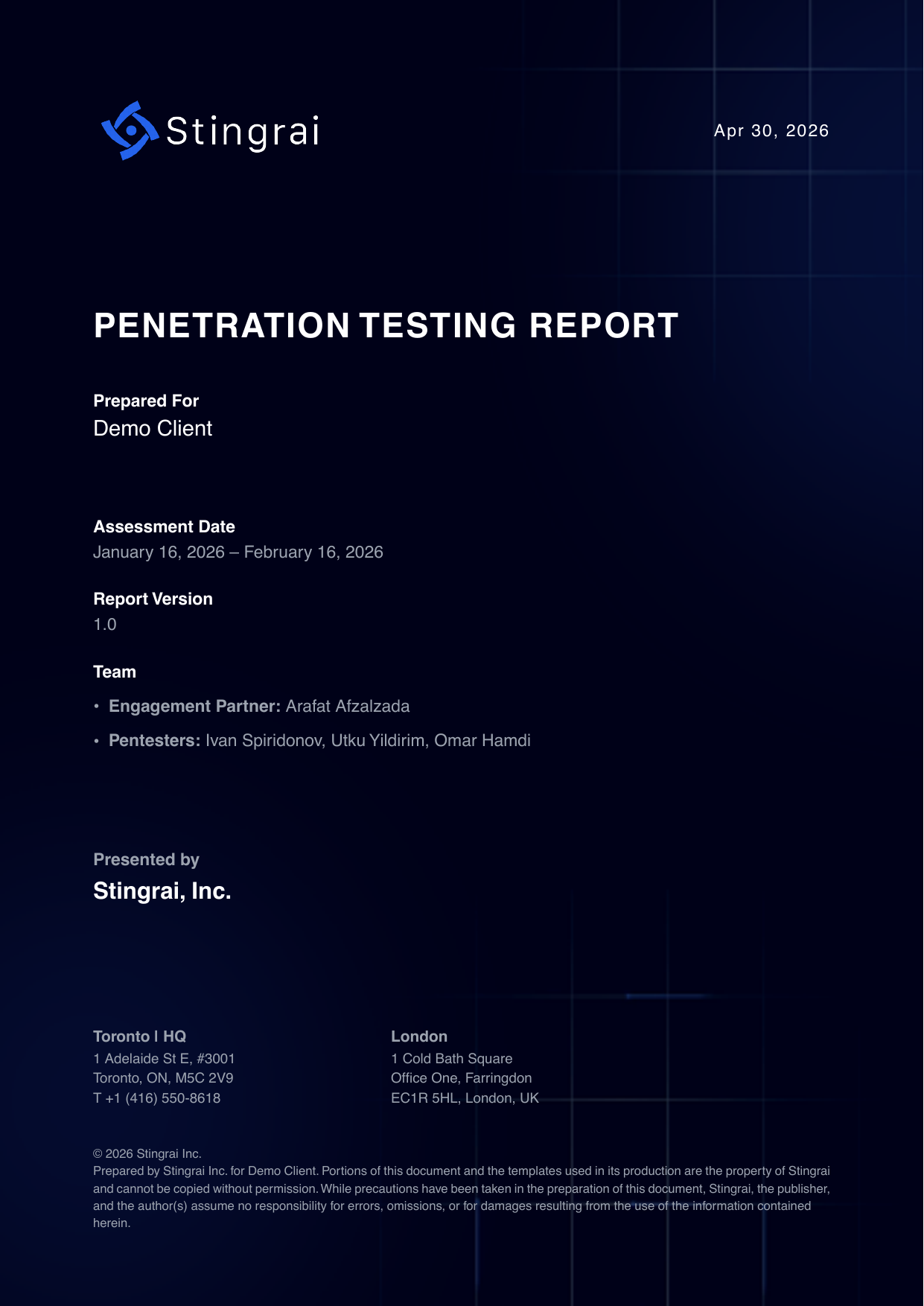
The cover is the page most likely to be screenshotted into a board deck, so it needs to answer four questions without being opened: who it is for, when the testing happened, which version of the document this is, and who did the work.
Prepared for. Named client. Here, "Demo Client".
Assessment date. A window, not a single date. January 16 to February 16, 2026. A report that gives only a publication date hides the age of the evidence, which is the single most important thing an auditor or a prospect's security team wants to know. If you are being asked how long that evidence stays good for, see is your pentest report still valid.
Report version. "1.0" here. Versioning matters because a retest usually produces a 1.1 or a 2.0, and you need to be able to tell an auditor which document they are holding.
Team. The engagement partner and the three penetration testers are named on the cover. Named people are accountable people. A report signed only by a company logo tells you nothing about who touched your environment.
The footer carries the office addresses and a short liability and copyright notice. That is boilerplate, but it is the boilerplate a procurement team looks for.
What is missing on purpose: no marketing copy, no logo wall, no "trusted by" strip. The cover of a technical deliverable is not a brochure.
Page 2: the table of contents
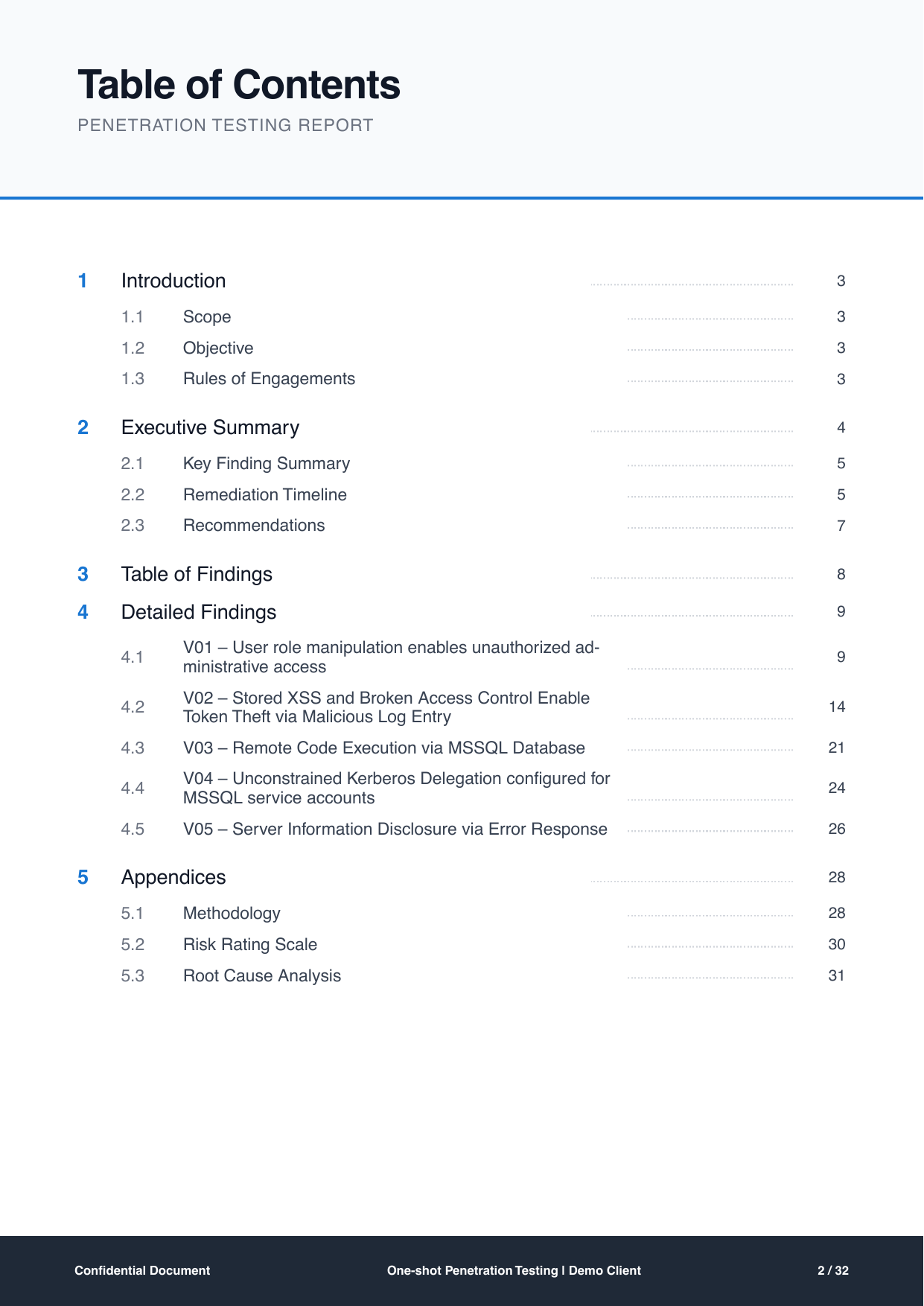
A contents page is a small thing that reveals a lot. This one shows the report's shape at a glance: Introduction on page 3, Executive Summary on page 4, Table of Findings on page 8, Detailed Findings from page 9 to page 27, Appendices from page 28.
Two structural signals to look for in any report's contents page:
Findings get most of the page count. Here, 19 of 32 pages are detailed findings. If a 40-page report gives findings 6 pages and gives company background 15, you are buying a brochure with a vulnerability list stapled to it.
Each finding is listed individually with its own page number. V01 to V05 each get a line. That means someone can be sent to page 21 rather than to "the report".
Page 3: scope, objective and rules of engagement
The introduction page is three short sections, and it is where most reporting disputes are actually settled.
Scope is a literal list of what was in play:
https://don1.stingrai.io
> > 189.208.x.x > > 10.10.0.0/24
A web host, an external IP range and an internal /24. Anything not on that list was not tested, and the report says so by omission rather than by implication.
Objective states what the test was trying to prove. In this engagement it was to "evaluate the application's resilience against real-world attack scenarios by simulating an authenticated user with partial knowledge of the system", which is a grey-box brief and sets the expectation that credentials were provided.
Rules of engagement is the section buyers skip and later regret skipping. It lists what was deliberately excluded:
- Authentication tests on login form managed by third-party - Intrusive tests or exploits that intentionally crash or disable a service - Extensive brute forcing on applications, systems, or consoles, outside of standard "blank" or default password checks - Denial of Service (DoS) attacks - Defacement of websites and systems
Every one of those exclusions is a gap in the assurance the report provides, and every one of them is defensible. The problem is not having exclusions. The problem is a report that has them and does not print them. If you are writing the statement of work that produces this page, how to scope a penetration test covers the same ground from the buyer's side.
The same page also records that the testing team was "set to alert the Client of any critical vulnerabilities found within 24 hours of discovery". That commitment belongs in the report, not just in the contract, because it is the sentence that tells a reader the two Criticals below were not sat on for a month.
Page 4: the executive summary
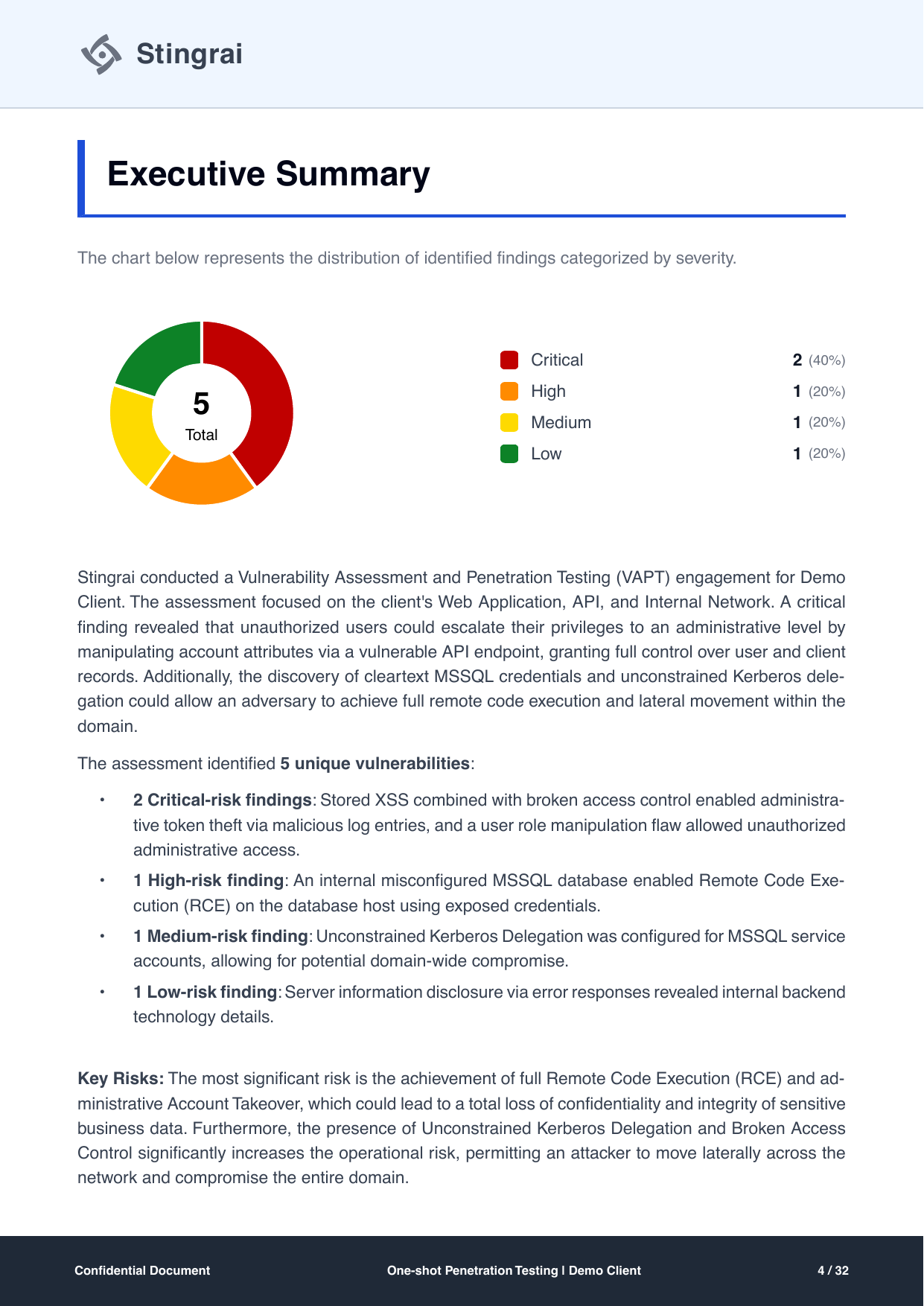
This is the page that gets read by people who will never read page 21. It does four things in one page.
A severity distribution. A donut showing 5 total: 2 Critical (40%), 1 High (20%), 1 Medium (20%), 1 Low (20%). A count and a percentage together, so nobody has to do arithmetic in a meeting.
A narrative paragraph in plain language. It names the attack in business terms before it names the technology: unauthorized users could escalate to administrator by manipulating account attributes through a vulnerable API endpoint, "granting full control over user and client records", and cleartext MSSQL credentials plus unconstrained Kerberos delegation "could allow an adversary to achieve full remote code execution and lateral movement within the domain".
A breakdown by risk level, one bullet per severity band, each summarizing the findings inside it. This is what lets a reader who stops here still say something accurate about the test.
A key risks paragraph that answers "so what":
The most significant risk is the achievement of full Remote Code Execution (RCE) and administrative Account Takeover, which could lead to a total loss of confidentiality and integrity of sensitive business data.
The test for this page is simple. Give it to someone who does not write code and ask them what the worst outcome was. If they can answer, the page works.
Page 5: the key finding summary
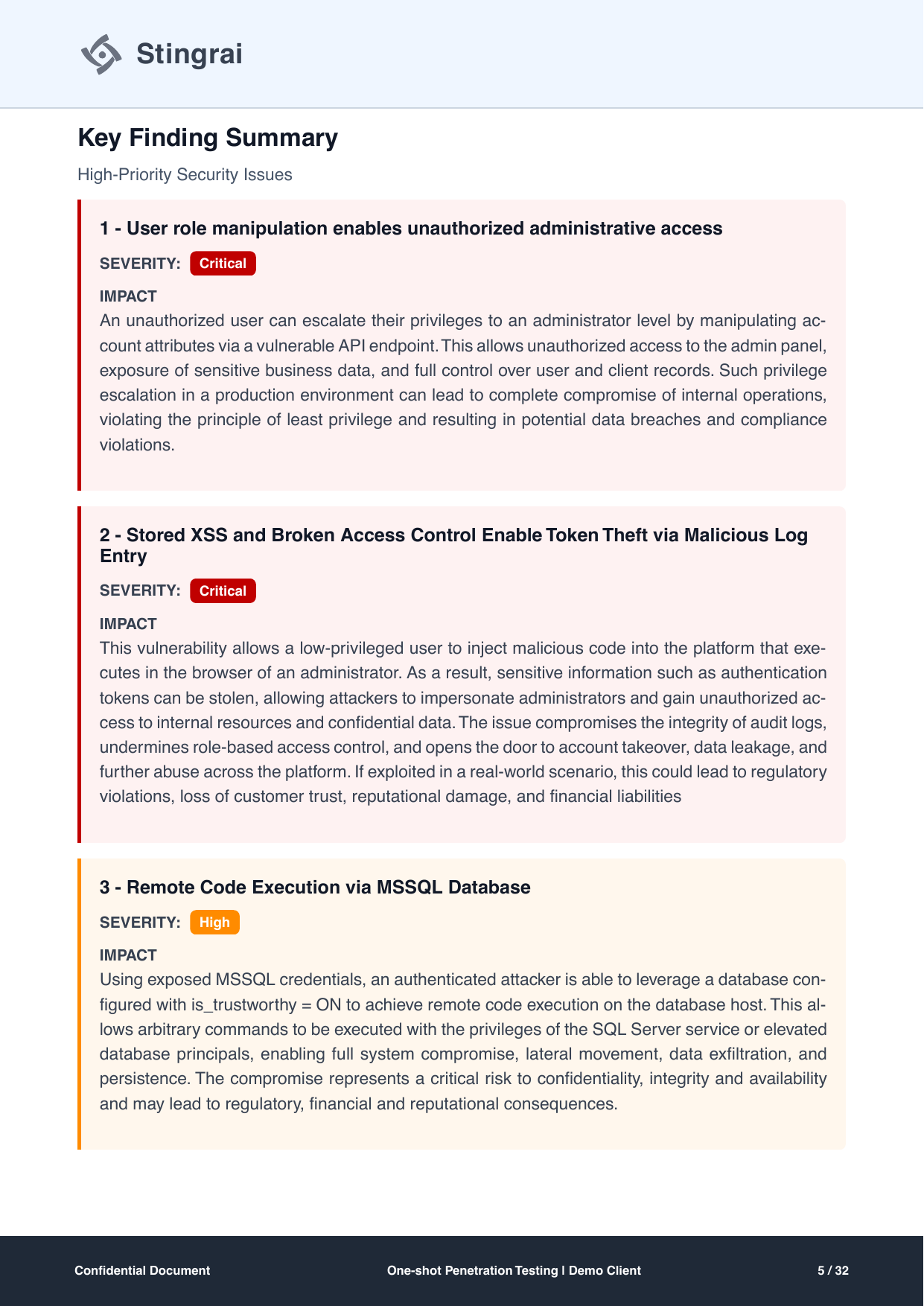
The key finding summary promotes the top three issues into their own cards, colour-coded by severity, each with a single IMPACT block and no technical detail at all. It is a deliberate duplication of content from the detailed findings, and it is worth the pages.
The reason is organizational rather than editorial. The person who decides whether to fund an emergency patching window reads three cards. The person who implements the fix reads pages 9 to 27. A report that only serves the second reader does not get the first reader's budget.
Notice what the cards contain: the finding title, the severity, and an impact paragraph written entirely in consequences. For V01 that consequence is "unauthorized access to the admin panel, exposure of sensitive business data, and full control over user and client records", closing on "potential data breaches and compliance violations". No payloads, no endpoints, no CVSS.
Page 6: the remediation timeline
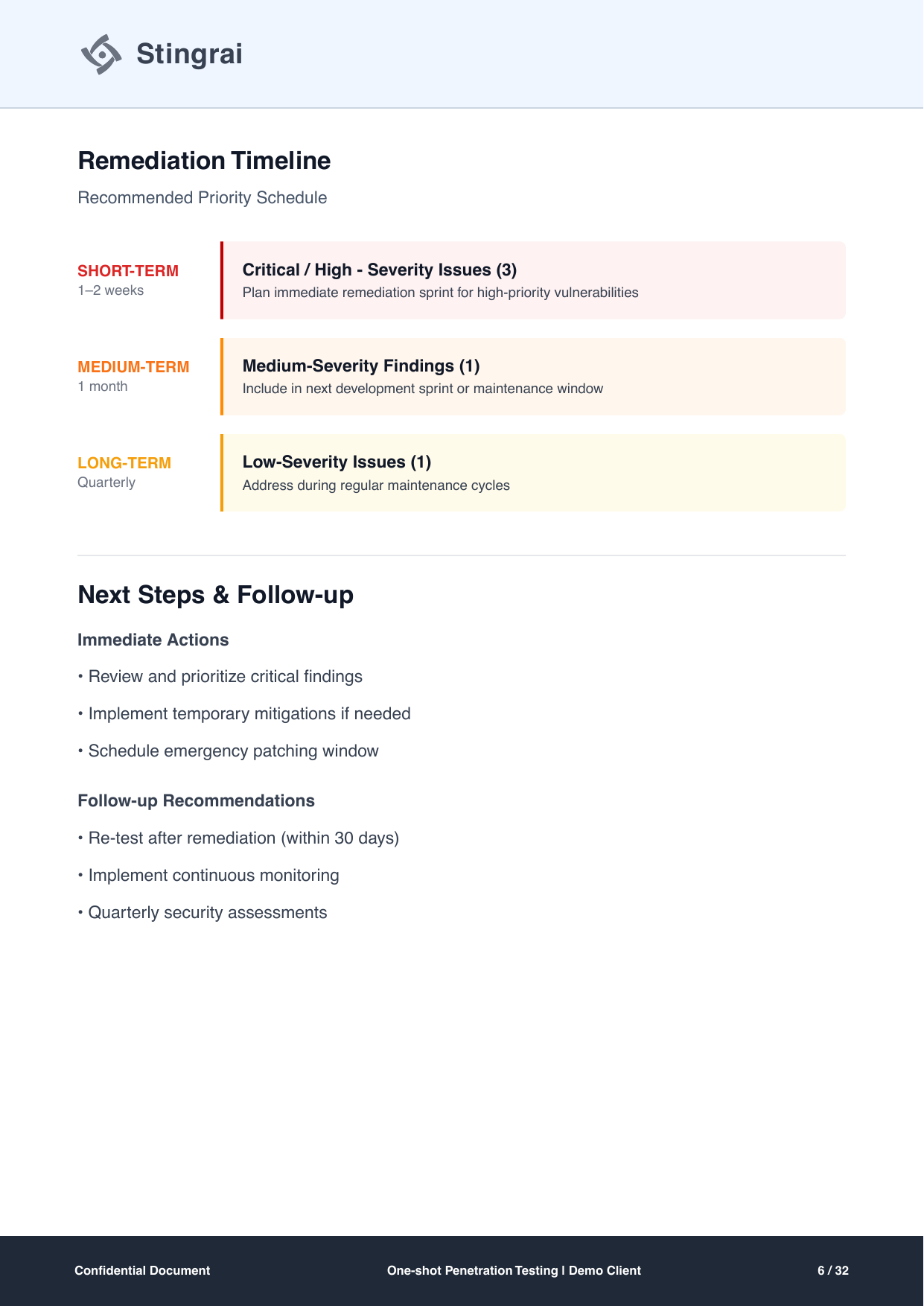
Prioritization tiers are the difference between a finding list and a plan. This page bins all five findings into three schedules:
Tier | Window | Contents | Instruction |
|---|---|---|---|
Short-term | 1 to 2 weeks | Critical and High severity issues (3) | Plan immediate remediation sprint for high-priority vulnerabilities |
Medium-term | 1 month | Medium-severity findings (1) | Include in next development sprint or maintenance window |
Long-term | Quarterly | Low-severity issues (1) | Address during regular maintenance cycles |
Three things make this tier table work rather than decorate.
The counts are printed next to the tiers. "Critical / High (3)" means the reader can reconcile the tiers against the five findings without flipping back to page 4.
The instruction is operational, not a severity restated. "Include in next development sprint or maintenance window" tells an engineering manager where the work goes. "Remediate promptly" would not.
The follow-up is dated. The Next Steps block on the same page commits to "Re-test after remediation (within 30 days)", which converts the report from a snapshot into a two-part deliverable. A vendor who never mentions a retest is selling you half of the engagement.
Page 7: recommendations, split tactical and strategic
The recommendations page separates what to do this fortnight from what to change permanently. The tactical list is specific enough to be actioned by name: disable the is_trustworthy property on user databases unless explicitly required, restrict the db_owner role for the low-privileged account, disable xp_cmdshell and restrict CLR assembly loading, disable unconstrained Kerberos delegation for the MSSQL service accounts, and rotate every credential found in cleartext on the SMB shares.
The strategic list addresses the reason the tactical list exists: move to resource-based constrained delegation, adopt group managed service accounts, integrate server-side HTML encoding and strict attribute validation into the development lifecycle, and adopt a formal vulnerability management SLA where Critical and High issues are addressed within 1 to 2 weeks, Medium within 30 days, and Low during regular maintenance.
That last item is the most valuable sentence on the page, because it is the one that outlives this report.
Page 8: the table of findings
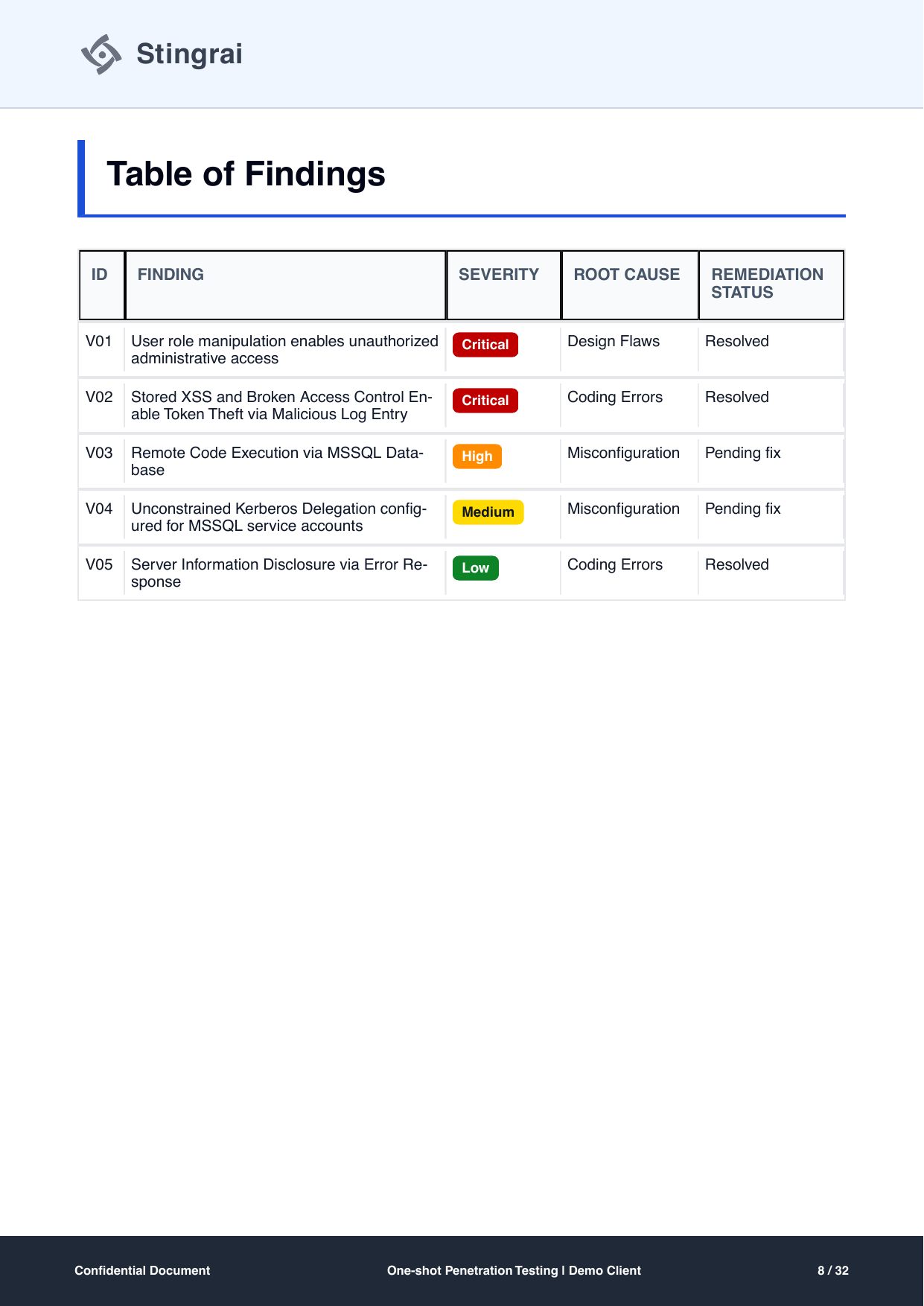
One row per finding, five columns: ID, finding, severity, root cause, remediation status. Two of those columns are the ones most vendor reports do not have.
Root cause. Design Flaws, Coding Errors, Misconfiguration. Five findings collapse into three structural causes, and the two Criticals have different causes, which tells you the fixes are not the same fix. This column is what turns a report into an input for engineering process rather than a ticket queue.
Remediation status. Resolved, Resolved, Pending fix, Pending fix, Resolved. The report is honest that two findings were still open at the time of writing. That honesty is the feature. A report where every row says "Resolved" either was written long after the test or is not tracking status at all.
This single page is the one to ask any prospective vendor for. If their sample cannot produce an equivalent, the rest of the document is unlikely to be better. For a fuller checklist on grading what you are handed, see how to evaluate a penetration test report.
Pages 9 to 13: the anatomy of a detailed finding
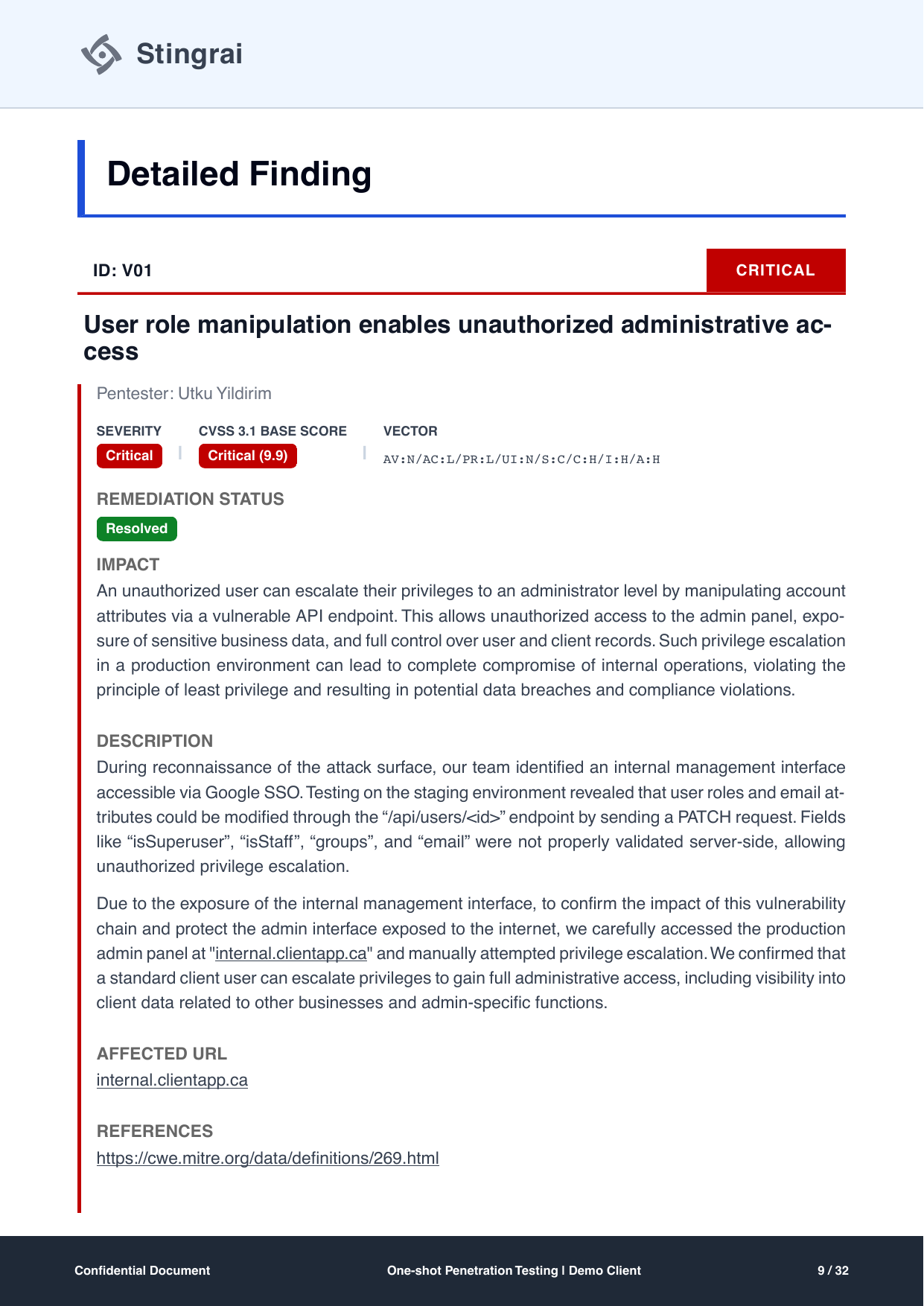
V01 is the template for every finding in the report, so it is worth taking apart field by field.
ID and severity banner. "ID: V01" on the left, "CRITICAL" in a red block on the right. The ID is what people will use in Jira. The banner is what people will see when they scroll.
Title, written as a consequence. "User role manipulation enables unauthorized administrative access". Not "Insecure Direct Object Reference" and not "API issue". The title states the flaw and the outcome in one line.
Named tester. The field label reads "Pentester: Utku Yildirim". A specific person owns the finding and can be asked about it.
Severity, CVSS 3.1 base score and the full vector. Critical, 9.9, and AV:N/AC:L/PR:L/UI:N/S:C/C:H/I:H/A:H. Printing the vector alongside the number is not a formality. The number is an opinion until the vector is shown; the vector is the working. Anyone can paste that string into the FIRST CVSS 3.1 calculator and check the arithmetic, and here the S:C (scope changed) is what carries a 9.x rather than an 8.x.
Remediation status. "Resolved", as a labelled field on the finding itself, not only in the summary table.
Impact. A business-consequence paragraph, repeated verbatim from the key finding summary so that both readers get the same statement.
Description. The technical narrative, in the order the work happened. Reconnaissance found an internal management interface behind Google SSO. Testing on staging showed that roles and email attributes could be modified with a PATCH request to the /api/users/<id> endpoint. Then the sentence that is the whole finding:
Fields like "isSuperuser", "isStaff", "groups", and "email" were not properly validated server-side, allowing unauthorized privilege escalation.
The second paragraph of the description does something reports rarely do well: it explains why the tester went further, and how carefully. Because the management interface was exposed to the internet, the team "carefully accessed the production admin panel" to confirm impact and manually attempted escalation, confirming a standard client user could reach full administrative access including data belonging to other businesses. That is a decision with blast radius, and the report documents it rather than hiding it.
Affected URL. One line, the specific host.
References. A link to CWE-269, improper privilege management. External classification means the finding can be mapped to a taxonomy your other tools already speak.
Evidence, as a proof of concept sequence. Five captioned steps across pages 10 to 12: initial login with a non-organizational Google account showing a blank UI, a GET to the user endpoint returning isSuperuser: false, the PATCH setting those flags to true and assigning a group with the server answering 200 OK, the front-end JavaScript that checks whether the user's email ends in a particular domain before rendering the admin menu, and finally changing the email through the same API call to trigger the admin UI. Each step is a screenshot with a one-line caption. That is the standard: a competent engineer on the client side should be able to reproduce the finding from this section alone.
Recommendation. Two specific instructions: enforce strict server-side role and attribute validation on all user update operations, and block modification of isSuperuser, isStaff, groups and email unless authorized through validated admin privileges. Named fields, named operations.
Retest evidence. The page that closes the loop:
The re-test confirms that the vulnerability related to unauthorized modification of user role/permissions via PATCH request has been mitigated. The backend correctly denies method access to non-admin users, and no bypass techniques (header overrides, method tunneling, or mass assignment) were successful during the test.
Read that carefully, because it is the model for what retest evidence should say. It states what was retried, names the specific bypass families that were attempted, and says they failed. "Verified fixed" on its own is an assertion. This is a result.
The second Critical: a chain, not a bug
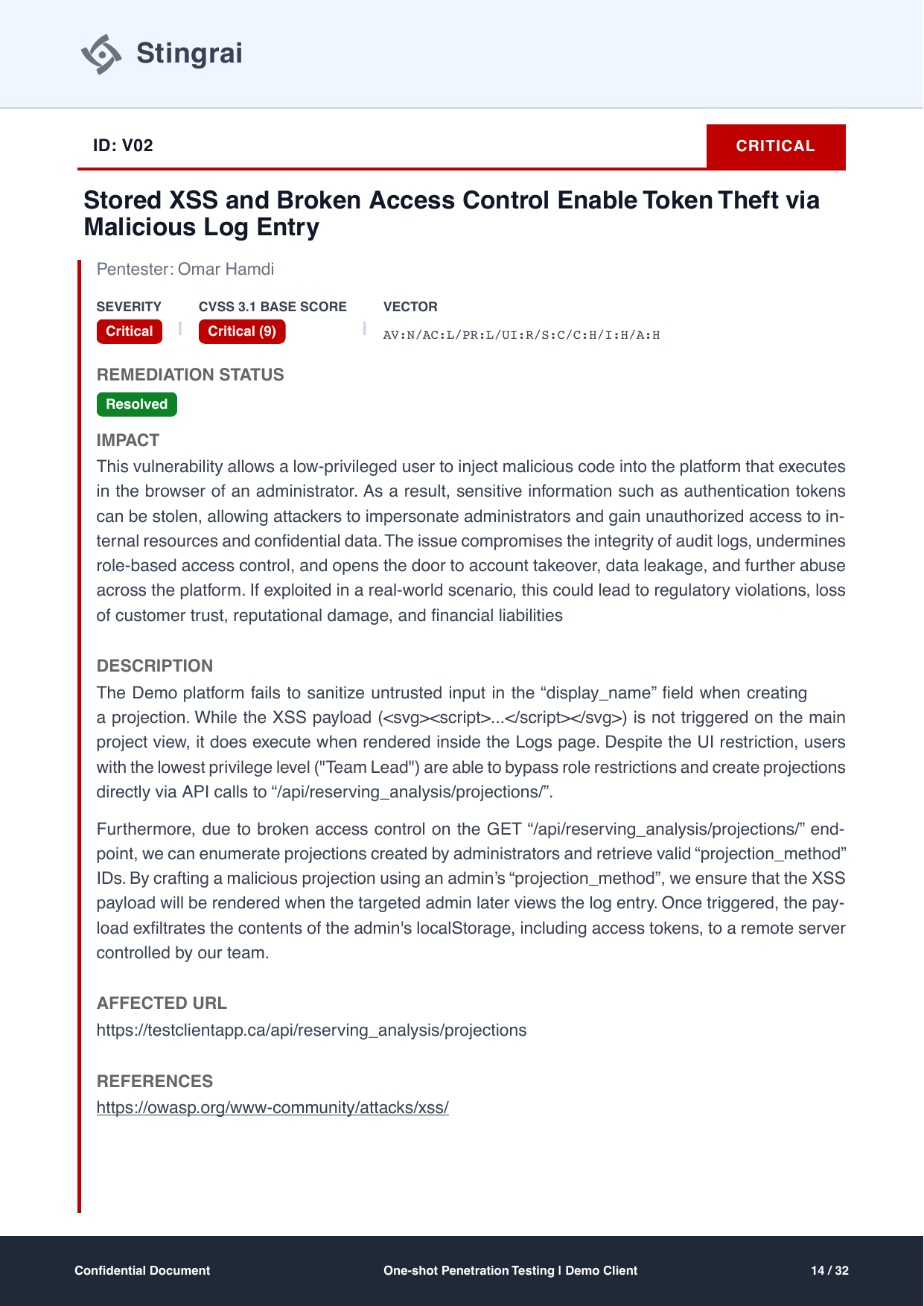
V02 scores 9.0 with the vector AV:N/AC:L/PR:L/UI:R/S:C/C:H/I:H/A:H, and the UI:R (user interaction required) is doing real work in that score: the payload needs an administrator to open a page.
The finding is worth reading because it is three weaknesses presented as one attack path:
The Demo platform fails to sanitize untrusted input in the "display_name" field when creating a projection. While the XSS payload (
<svg><script>...</script></svg>) is not triggered on the main project view, it does execute when rendered inside the Logs page.
Then the access control failure that makes it reachable: users at the lowest privilege level were blocked from creating projections in the UI but could create them by calling the API directly. Then the second access control failure that makes it targeted: a broken GET endpoint let the team enumerate projections created by administrators and retrieve valid projection_method IDs, so the malicious entry could be crafted to appear in an administrator's log view. The payload then exfiltrated the administrator's localStorage, including access tokens.
Six numbered evidence steps follow, ending with the decoded administrator access and refresh tokens. The recommendations address every link separately: sanitize output server-side, add a Content Security Policy with script-src 'self' and nonce-based enforcement, restrict the projection creation endpoint to authorized roles, stop keeping tokens in localStorage, and enforce server-side role checks across all API endpoints.
This is what a chained finding should look like in a report. A vendor that reports the XSS and the broken access control as two Medium findings on separate pages has technically told you the truth and practically told you nothing, because neither ticket, fixed alone, describes the Critical. The OWASP cross-site scripting reference cited in the finding covers the class; the chain is what the report adds.
The internal network finding: an exploitation chain, written out
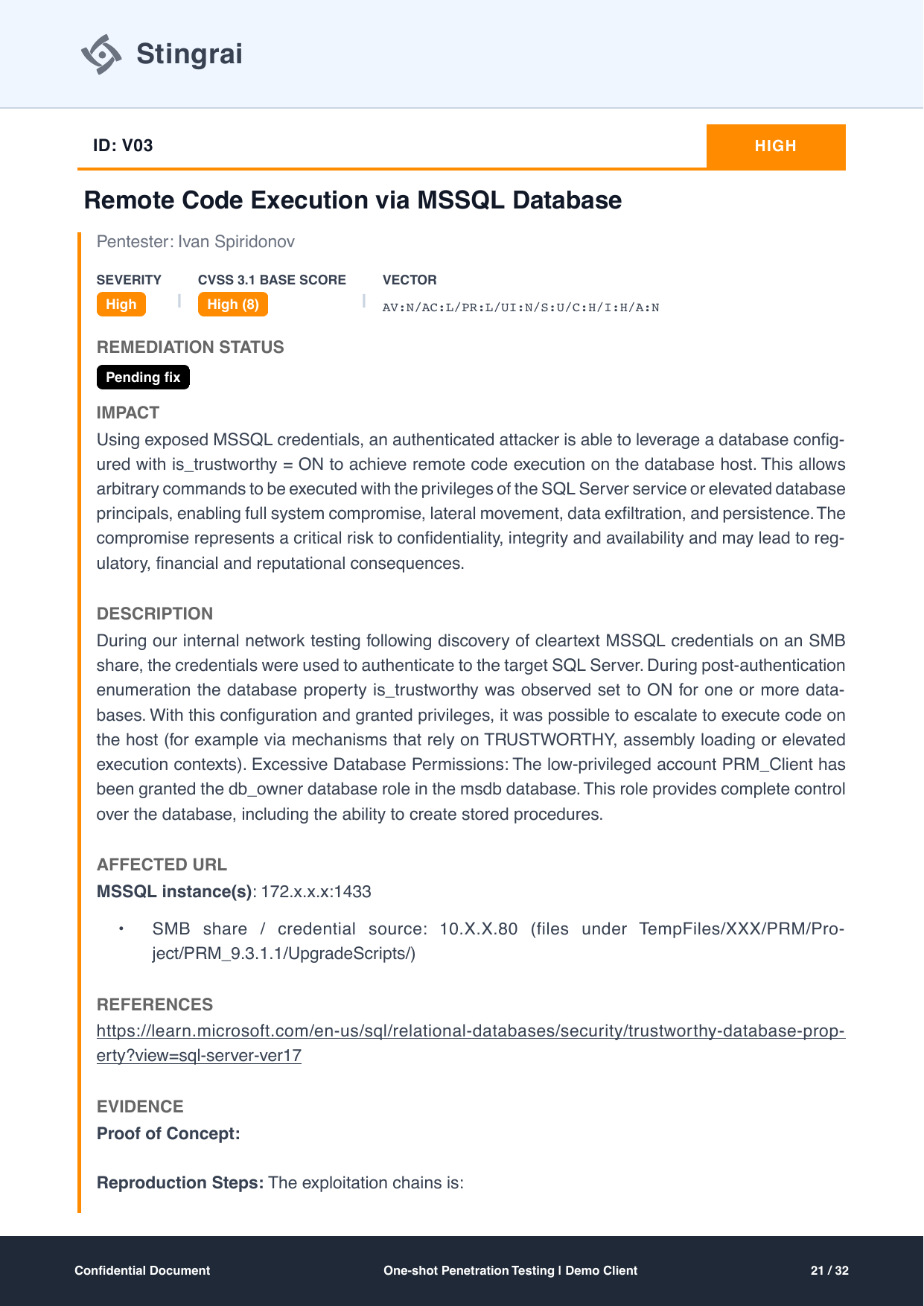
V03 is the report's internal-network specimen: High, CVSS 8.0, vector AV:N/AC:L/PR:L/UI:N/S:U/C:H/I:H/A:N, remediation status "Pending fix".
The path started with cleartext MSSQL credentials sitting on an SMB share. Those credentials authenticated to the SQL Server, where post-authentication enumeration found the is_trustworthy database property set to ON, plus a low-privileged account holding the db_owner role in msdb. The report links the Microsoft TRUSTWORTHY database property documentation as its reference.
The evidence section is the part to copy. It writes the exploitation chain out as an ordered list:
PRM_Client(low-privilege SQL login)db_ownerinmsdb(excessive permissions)Create stored procedure
WITH EXECUTE AS OWNERProcedure executes as
sa(database owner)Add
PRM_Clientto thesysadminserver roleSYSADMIN achieved, enable
xp_cmdshellRemote code execution on the SQL Server host
Seven steps, each one a permission or a configuration, ending in code execution. Screenshots of the authenticated session and the enumeration output showing is_trustworthy set to 1 back it up.
Written this way, the chain also shows where to break it. Any single step removed, the trustworthy flag, the excessive db_owner grant, or the cleartext credentials on the share, kills the path. That is why the recommendations attack three different links rather than only the last one. Internal findings like this are why internal and external network testing is scoped separately from the web application work.
The related Medium, V04, is the same environment seen from the domain: MSSQL service accounts registered with SPNs and configured for unconstrained Kerberos delegation, scored 6.2 with AV:L/AC:L/PR:L/UI:N/S:C/C:L/I:L/A:L. And the Low, V05, is the smallest finding in the report and still gets the full treatment: an X-Powered-By: Next.js header exposed by a malformed request, one recommendation ("Remove 'X-Powered-By' headers from all server responses to prevent disclosing internal technologies"), and a retest paragraph confirming the header no longer appears.
That consistency matters. A report that gives Criticals a full workup and Lows a one-line table entry is training you to ignore its own Lows.
Pages 28 to 29: methodology
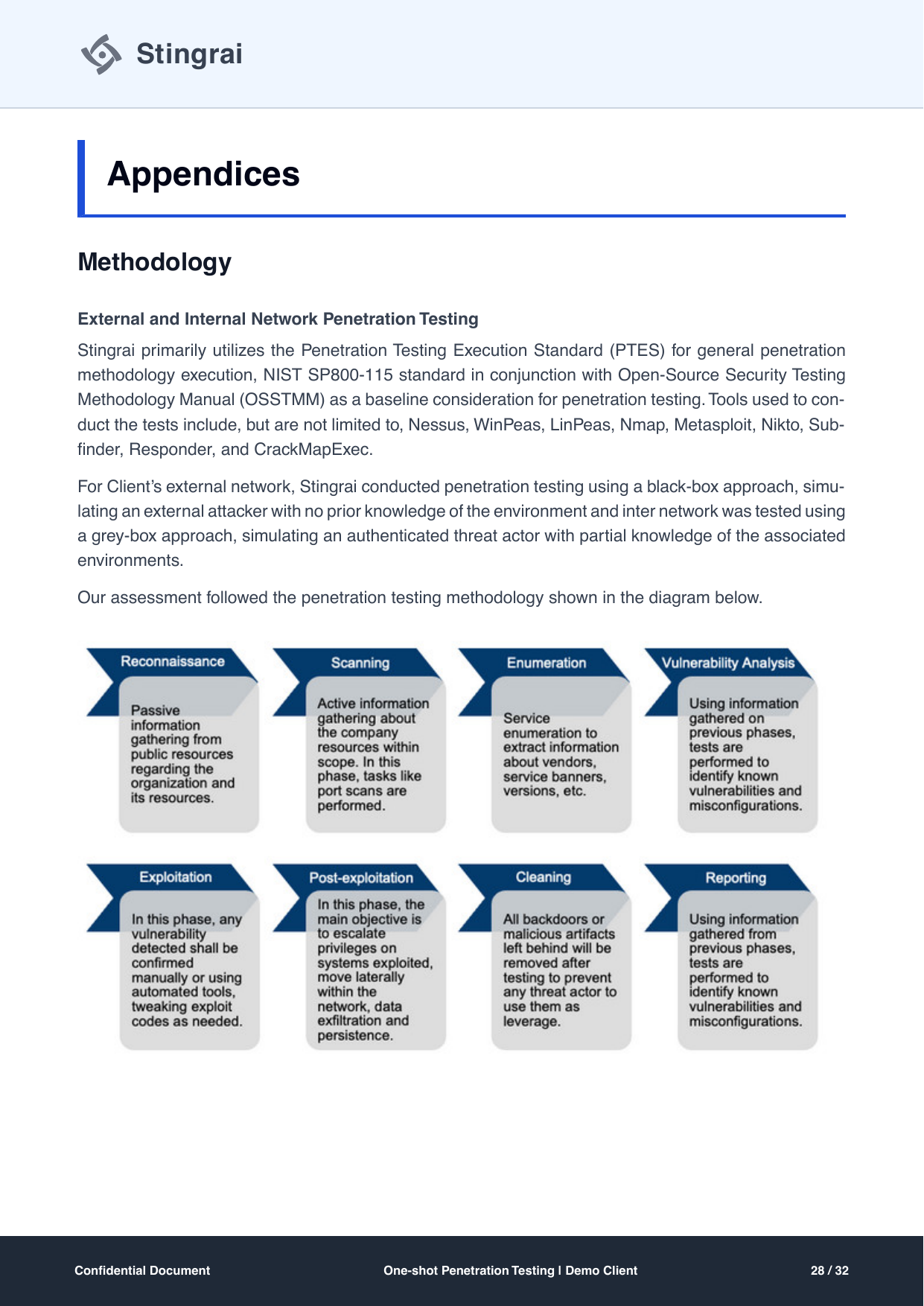
The methodology appendix is what separates a penetration test from a scan with commentary. This one names its standards explicitly, and it names different ones for different work.
For external and internal network testing: the Penetration Testing Execution Standard as the general methodology, with NIST SP 800-115 and the OSSTMM as baseline considerations. Tools named in the report include Nessus, WinPeas, LinPeas, Nmap, Metasploit, Nikto, Subfinder, Responder and CrackMapExec. The external network was tested black-box, simulating an attacker with no prior knowledge; the internal network grey-box, simulating an authenticated threat actor.
For web application and API testing: PTES as the foundation, the OWASP Testing Guide v4.2 together with the OWASP API Security Project, and NIST SP 800-115 as a baseline. Tools named include Burp Suite, FFUF, Nmap, Metasploit, Nikto, Subfinder, Httpx and Dnsdumpster. Testing started black-box and transitioned to grey-box once the client provided test credentials.
The page closes with an eight-stage diagram: reconnaissance, scanning, enumeration, vulnerability analysis, exploitation, post-exploitation, cleaning, reporting. The "cleaning" stage is easy to skim past and is the one a security team should care about, because it is the commitment that "all backdoors or malicious artifacts left behind will be removed after testing to prevent any threat actor to use them as leverage".
Why this page decides purchases. PCI DSS 4.0 requirement 11.4.1 asks for a penetration testing methodology that is based on industry-accepted approaches. A report that names PTES, NIST SP 800-115, OSSTMM and the OWASP guides satisfies that on its face. A report that says "our proprietary methodology" and stops does not.
Page 30: the risk rating scale
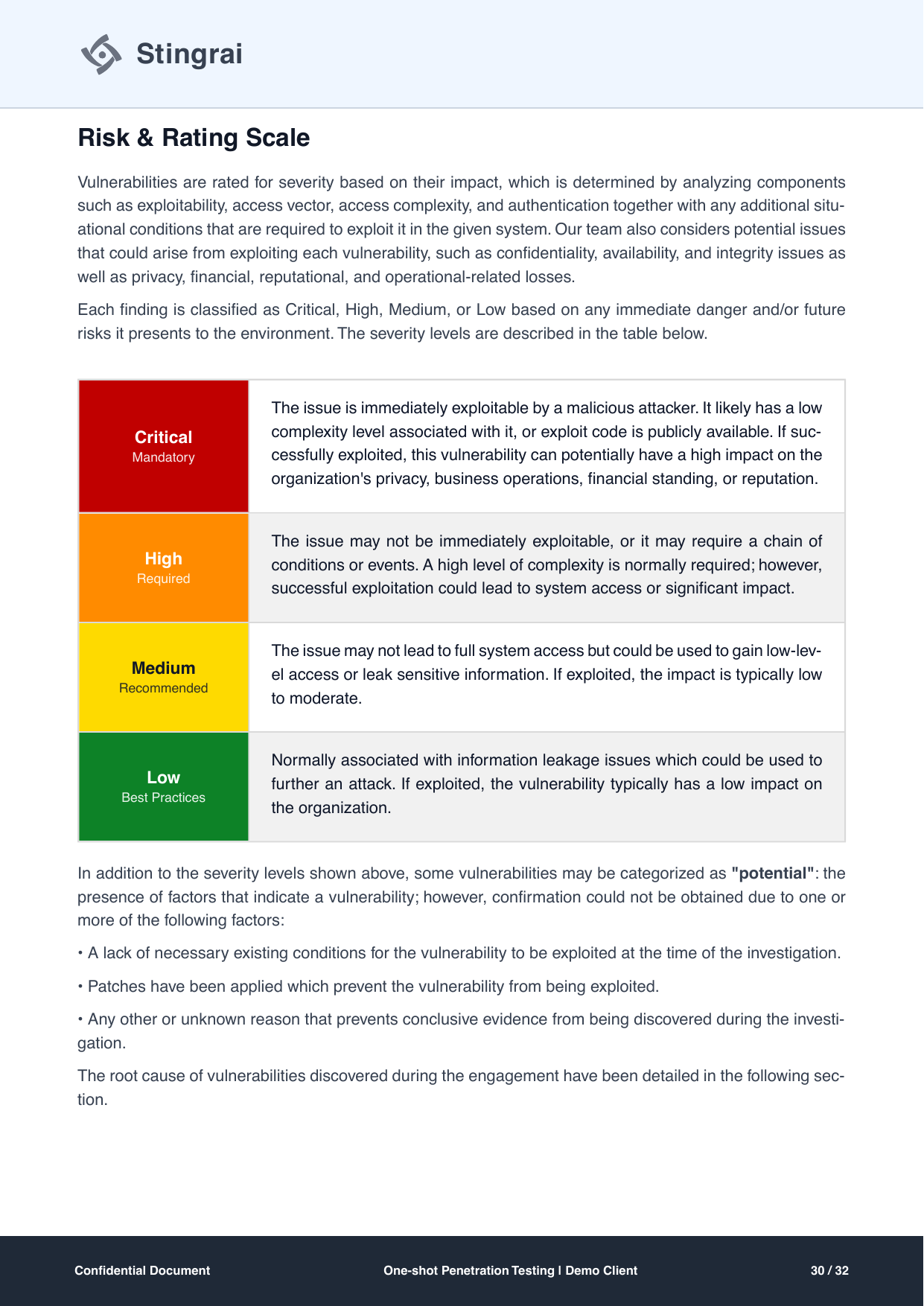
A severity label means nothing until the document defines it. This page defines all four, and it pairs each with an action word: Critical is Mandatory, High is Required, Medium is Recommended, Low is Best Practices.
The Critical definition is the one to read closely:
The issue is immediately exploitable by a malicious attacker. It likely has a low complexity level associated with it, or exploit code is publicly available. If successfully exploited, this vulnerability can potentially have a high impact on the organization's privacy, business operations, financial standing, or reputation.
Note that it is written in terms of exploitability and business consequence, not in terms of a score band. The CVSS number appears on each finding; the scale here is the human judgment layered on top, which is why the two can legitimately differ.
The page also defines the "potential" category, for findings where the indicators of a vulnerability are present but confirmation could not be obtained, whether because the preconditions were absent at the time, because patches prevented exploitation, or for another reason that prevented conclusive evidence. Reports without this category tend to solve the problem by quietly promoting unconfirmed issues to confirmed ones.
Page 31: root cause analysis
The last appendix defines the four root cause categories used in the table of findings, and it is the page that turns five tickets into three conversations:
Root cause | The report's definition, condensed | Findings here |
|---|---|---|
Design Flaws | Weaknesses in the scheme or structure of a system: non-authenticated access, failure to validate certificates, weak single-factor authentication, lack of encryption, root privileges granted to non-root accounts | V01 |
Coding Errors | Vulnerabilities in a code base which lead to insecure code, such as command injection and buffer overflows | V02, V05 |
Missing Patches | Failure to apply vendor updates that fix security vulnerabilities, bugs and deficiencies | None in this engagement |
Misconfiguration | Security settings not configured, implemented incorrectly, or left at default values: default credentials, overly permissive firewalls, vulnerable third-party applications | V03, V04 |
The appendix closes on the reason it exists: "Addressing root causes can help ensure many vulnerabilities are quickly remediated." Two of the five findings on this engagement share a single misconfiguration cause on the same MSSQL estate. Fixing that estate's configuration standard closes both and prevents the next two.
The report quality scorecard: 10 things to check on any vendor's sample
Take any vendor's sample report and grade it against these ten. This report scores 10 out of 10, which is the point of publishing it, but the scorecard is the transferable part.
# | Criterion | What a pass looks like | Why it matters |
|---|---|---|---|
1 | Reproduction steps per finding | Numbered proof of concept steps with screenshots, enough for your engineer to reproduce it unaided | Without it you cannot verify the finding or confirm your own fix |
2 | CVSS vector shown, not just the score | The full vector string printed next to the base score | The score is an opinion; the vector is the working, and it can be recalculated |
3 | Business impact stated in plain language | A consequence paragraph naming what an attacker gets, not a restatement of the vulnerability class | This is the text that gets remediation funded |
4 | Retest evidence | A paragraph naming what was retried and what failed, not "verified fixed" | Distinguishes a confirmed fix from an assumed one |
5 | Remediation status per finding | A per-finding status field and a status column in the summary table | Lets you hand the report to an auditor as a live remediation record |
6 | Methodology named | PTES, NIST SP 800-115, OSSTMM, OWASP WSTG, OWASP API Top 10 or equivalent, cited by name | Required in substance by PCI DSS 4.0 requirement 11.4.1, and it is how you tell testing from scanning |
7 | Scope and exclusions both listed | The in-scope hosts and ranges, plus a rules of engagement section listing what was deliberately not tested | Exclusions define the shape of the assurance you actually bought |
8 | Severity scale defined | A table defining each severity band in terms of exploitability and impact | Otherwise "High" is a private word with no shared meaning |
9 | Root cause classification | A root cause per finding, defined in an appendix | Turns a finding list into an input for engineering process |
10 | Executive summary readable by a non-engineer | A severity distribution, a narrative paragraph, and a key risks statement, all on one page | If the budget holder cannot read it, the findings do not get fixed |
Two more worth checking that are not strictly report content: whether critical findings were communicated during the test rather than at the end (this engagement committed to 24 hours from discovery), and whether the report is versioned so a retest produces a distinguishable document.
How this report is used as compliance evidence
Most penetration test reports are read twice: once by the engineering team that fixes the findings, and once, months later, by someone assembling an evidence file. The second reading is where report structure pays for itself.
Framework | What the program is looking for | The pages that carry it |
|---|---|---|
SOC 2 | Evidence that vulnerabilities are identified through periodic evaluation and that identified issues are tracked to resolution, per the Trust Services Criteria CC4 and CC7 series | Table of findings with a remediation status column, plus per-finding retest evidence |
ISO 27001:2022 | Management of technical vulnerabilities (Annex A 8.8) and security testing in development and acceptance (A 8.29), per ISO/IEC 27001 | Methodology appendix, detailed findings, root cause analysis |
PCI DSS 4.0 | Internal and external penetration testing to a documented, industry-accepted methodology, with findings corrected and testing repeated, per requirement 11.4 | Scope and rules of engagement, methodology appendix, retest evidence |
HIPAA Security Rule | Periodic technical evaluation of security safeguards, per the evaluation standard at 45 CFR 164.308(a)(8) | Cover with assessment dates, executive summary, severity scale, remediation timeline |
Stingrai's penetration testing supports SOC 2, ISO 27001, PCI DSS 4.0, HIPAA, NIST SP 800-53 and 800-171, DORA and NIS2 programs, and this report format exists because those programs consume specific pages. The assessment window on the cover, the named methodology in the appendix, the per-finding remediation status, and the retest paragraphs are the four elements that get asked for most often.
One practical note: many prospects and customers ask for a report you cannot hand over in full, because the detailed findings contain live exploitation detail about your environment. That is what a summary letter is for, and it is a different document with a different purpose. The tradeoff is covered in pentest completion letter vs full report.
What this sample is and is not
This is one engagement's report, anonymized as "Demo Client", published because the format is more useful to buyers than another abstract description of a format. It is not a template file to fill in. A report is the output of testing; copying its headings without doing the work produces a document that fails at criterion 1 on the scorecard and every criterion after it.
Read it instead as a benchmark. When a vendor sends you their sample, put the two side by side and check the ten criteria. Most of the difference between a report you will still be using in nine months and a report you will file and forget is visible on the table of findings page and the retest evidence paragraphs.
Frequently asked questions
What should a penetration test report include?
At minimum: a cover naming the client, the assessment window, the report version and the testing team; an executive summary with a severity distribution and a plain-language key risks statement; a table of findings indexing every issue with severity, root cause and remediation status; a detail section per finding containing severity, CVSS 3.1 base score and full vector string, business impact, technical description, affected URL or host, an external reference such as CWE or OWASP, reproduction steps with evidence, a specific recommendation, and retest evidence once fixed; and appendices naming the methodology followed, defining the severity scale used, and classifying findings by root cause. The 32-page report walked through in this post contains all of those.
How long is a penetration test report?
Length follows finding count and evidence depth, not page targets. The report in this post is 32 pages for five findings, of which 19 pages are detailed findings and their screenshots. That works out at roughly four pages per finding, which is typical when each finding carries a full proof of concept sequence. A 60-page report with 40 pages of company background is shorter than it looks, and a 12-page report with 15 findings is not giving each one reproduction steps.
Can I get a penetration testing report sample PDF?
Yes. The complete 32-page PDF of the report shown on this page is available through the sample report form on the Stingrai homepage: request the full sample report. Every page image in this post is taken from that document.
Do you get a retest report after fixing the findings?
You should, and it should be a distinguishable document. In this engagement the report commits to a retest within 30 days of remediation, and three of the five findings carry a retest evidence paragraph stating what was retried and what failed. Report versioning on the cover, 1.0 here, is what lets an auditor tell the original from the post-retest document.
What is the difference between a letter of attestation and a full penetration test report?
The full report contains the detailed findings, including live exploitation detail specific to your environment, which is why it is usually not shareable outside the company. A summary letter states that a test was performed, by whom, over what scope and window, and at what result level, without the exploitable detail, which is why it is the document that goes to customers and prospects. Most organisations need both. See pentest completion letter vs full report for the full comparison.
How do you read a CVSS 3.1 vector?
Each pair is a metric and its value. In V01's vector, AV:N/AC:L/PR:L/UI:N/S:C/C:H/I:H/A:H, AV:N means the attack is over the network, AC:L means low attack complexity, PR:L means low privileges are required, UI:N means no user interaction is needed, S:C means the scope changes (the flaw affects resources beyond the vulnerable component), and C:H/I:H/A:H mean high impact to confidentiality, integrity and availability. S:C is what lifts this finding to 9.9. Paste any vector into the FIRST CVSS 3.1 calculator to check the score, and read the specification document for the metric definitions.
Should you use a pentest report template?
A template is fine for the skeleton, the section order, the severity table, the root cause definitions. It cannot produce the parts that matter: the reproduction steps, the evidence screenshots, the retest results and the impact written for your business. Treat a template as a checklist for what must be present, then judge a report on what fills those sections.
Do you have to wait for the report to hear about critical findings?
No, and the report itself should say so. This engagement recorded in its introduction that the testing team was set to alert the client of any critical vulnerability within 24 hours of discovery, and that the team was available to support the client's engineers on remediation during testing. If a vendor's first mention of a Critical is the delivered PDF, that is a process problem, not a reporting style.
What does a remediation status of "Pending fix" mean?
It means the finding was still open when the report was written. In this report, V03 (remote code execution via MSSQL) and V04 (unconstrained Kerberos delegation) both carry "Pending fix", while V01, V02 and V05 read "Resolved". A report that shows open items is tracking reality. A report where everything is resolved either was written well after the test or is not tracking status at all.
How is severity decided in a penetration test report?
Two layers. The CVSS 3.1 base score gives a reproducible number from a published vector, and the report's own risk rating scale gives the human judgment: this one defines Critical as immediately exploitable with low complexity or public exploit code and high business impact, High as requiring a chain of conditions or higher complexity but leading to system access, Medium as low-level access or sensitive information leakage, and Low as information leakage that furthers another attack. Both layers should be visible so you can see where they agree and where they do not.
Does a penetration test report satisfy SOC 2, ISO 27001, PCI DSS or HIPAA?
The report is the evidence those programs consume. PCI DSS 4.0 requirement 11.4 asks for internal and external penetration testing to a documented, industry-accepted methodology with findings corrected and testing repeated. ISO 27001:2022 Annex A 8.8 and A 8.29 cover technical vulnerability management and security testing. The HIPAA Security Rule evaluation standard at 45 CFR 164.308(a)(8) asks for periodic technical evaluation. Stingrai's penetration testing supports all of those programs, and the pages that get requested most are the assessment window on the cover, the named methodology, the per-finding remediation status and the retest evidence.
Related reading
Get a report like this one
Stingrai is a global CREST-accredited penetration testing services company founded in Toronto, Canada in 2021, trusted by companies from startups to enterprises to meet audit requirements for SOC 2, ISO 27001, CMMC, PCI DSS and HIPAA. OSCE³, OSWE, OSEP, CREST CRT certified pentesters, who are also world-class security researchers and bug bounty hunters. Choose from fully human-led or hybrid (AI agents plus human penetration testers) engagements across web, API, mobile, AI and LLM, cloud, network, Active Directory and social engineering penetration tests and red team engagements, with findings posted to its PTaaS portal as they are confirmed, live chat with the assigned testers, Jira and Slack integration, retesting and an attestation letter with every human-led and hybrid report. Its reports document the agreed scope, findings, remediation guidance and retest results for one-time assessments or continuous testing programs. Snipe is Stingrai's AI agent for web application penetration testing, including the application's APIs. It is available for autonomous web testing or alongside penetration testers in a Hybrid web engagement.
To see the full document, request the full sample report. To scope your own web application penetration test or internal and external network test, current packages and prices are on the Stingrai pricing page.
Talk to Stingrai
Scoping a penetration test against what this guide covers takes one short conversation. Stingrai is a global CREST-accredited penetration testing services company founded in Toronto, Canada in 2021, trusted by companies from startups to enterprises to meet audit requirements for SOC 2, ISO 27001, CMMC, PCI DSS and HIPAA. OSCE³, OSWE, OSEP, CREST CRT certified pentesters, who are also world-class security researchers and bug bounty hunters. Choose from fully human-led or hybrid (AI agents plus human penetration testers) engagements across web, API, mobile, AI and LLM, cloud, network, Active Directory and social engineering penetration tests and red team engagements, delivered one-time or continuously through its PTaaS platform, with documented findings, remediation guidance and retesting included. Book a free scoping call, get a quote, or read the published pricing.