




Microsoft's connector permission guidance warns that choosing organization-wide visibility can overshare sensitive content. That is a concrete enterprise security question: after a connector is deployed, can the people who should see a record retrieve it, and can everyone else reliably not see it? A scoped test must follow the source permission through the connector, the index or live fetch, and the final answer.
Quick answer. A Microsoft 365 Copilot connector security assessment should use synthetic content and owned test identities to verify the effective access decision at each hop. For a tenant-configured synced connector, test visibility mode, item ACLs, group mapping and permission updates. For a federated connector, test the identity presented to the source and its live authorization result. Compare search and Copilot results for authorized and denied personas. Stingrai can run a human-led assessment of those boundaries and give the buyer evidence for rollout or remediation.
This guide focuses on retrieval and permission enforcement in customer-controlled, tenant-configured synced connectors and federated connectors. Microsoft also offers self-serve synced connectors in preview, where each user authenticates with their own source credentials and only their accessible content is indexed. Those need a separate per-user test design, not the tenant-wide connection matrix below. It is a buyer's test design, not a claim that a platform setting is vulnerable by default. It also does not treat Azure's penetration-testing permission as permission for Microsoft 365: Microsoft says the Azure process applies only to Azure. The tenant owner and assessor must confirm the applicable terms and written authorization for every service and source in scope.
First distinguish the connector data path
Microsoft's connector overview describes tenant-configured and self-serve synced connectors, which index external data into Microsoft Graph, and federated connectors, which fetch data from the source in real time through an MCP-based connection rather than indexing it. Tenant-configured synced items include content, metadata and an access control list (ACL). A test plan that says only “check Copilot permissions” conceals which system makes and refreshes the access decision.
For a tenant-configured synced connector, the buyer needs to understand source permissions, connector visibility, how source identities map to Microsoft Entra identities, the ACL on each external item, and when changes become visible in the index. For a federated connector, the buyer should focus on the user context carried to the source and the source's live authorization result. For a self-serve synced connector, start with each user's source credentials, indexed content and disconnection behavior, as Microsoft documents. Do not copy test cases from one model into another without checking the deployed connector's actual configuration.
Microsoft's admin-center access-permissions page names two visibility settings for a tenant-configured connection: only people with access to the data source, or everyone in the organization. That is a business decision with a security consequence. “Everyone” may be appropriate for genuinely public internal reference material; it is the wrong assumption for a mixed source containing HR, legal, finance or customer records. The test must document the setting that was selected and the data classes the owner intended to expose.
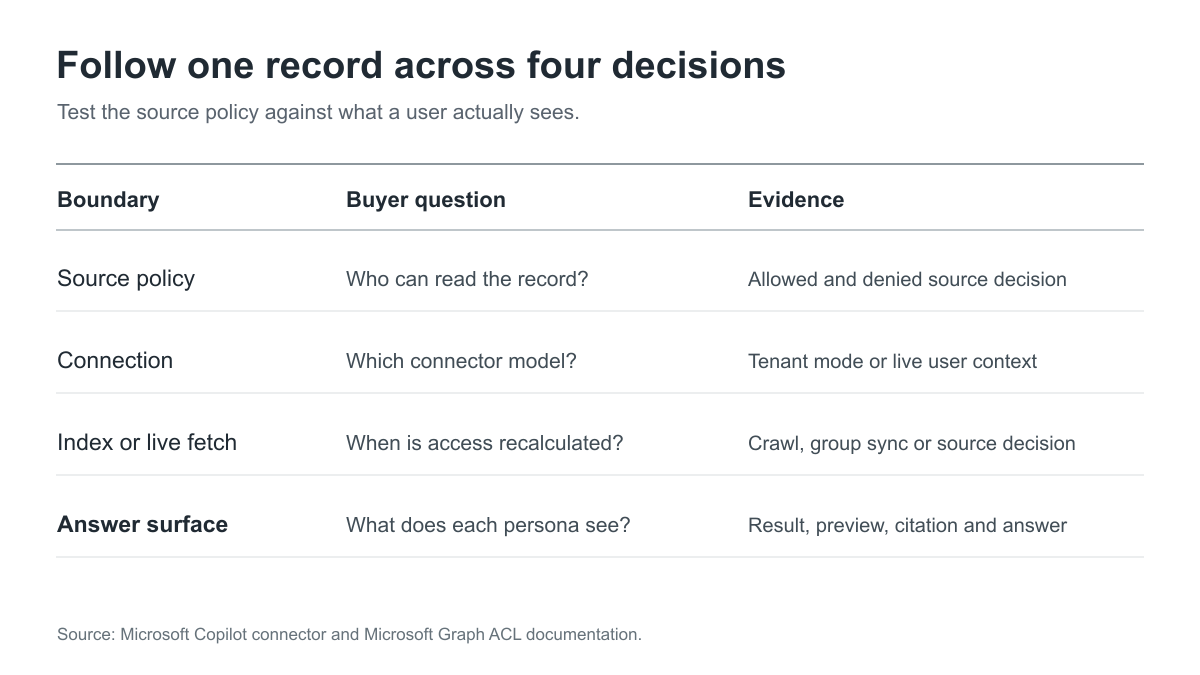
Figure 1: Follow one synthetic record from source authorization to final answer. The tenant visibility mode and Graph item ACL apply to tenant-configured synced connections; federated access depends on the live source identity and decision. Stingrai synthesis. Sources: Microsoft's connector overview, permission settings and Graph external-item ACL guidance.
The test fixture: synthetic people and records
Permission testing becomes vague when the assessor receives one administrator account and a live connector containing confidential data. Define a small fixture before kickoff. The following example is entirely synthetic and should be adapted to the organization's own policy:
Test identity | Intended access | Denied access |
|---|---|---|
General employee | Internal reference record | Restricted finance and HR records |
Finance-group member | Reference and finance records | HR record |
HR-group member | Reference and HR records | Finance record |
Former group member | Reference record after removal | The formerly permitted restricted record |
Connector administrator | Configuration inspection under an approved admin role | No assumption that admin setup equals end-user permission |
Seed the source with distinctive but harmless text in each record, using invented names and data. The unique marker helps the tester identify a result without using any customer or employee information. Include at least one record whose source permission changes during the test and one record that is deleted or made unavailable. Agree on the observation window for each connector's documented synchronization behavior; a result seen before a scheduled crawl is not automatically a permission failure.
The fixture should also specify where a result is measured. Microsoft says synced connector content can appear in Copilot and Microsoft Search experiences in its overview. Test the surfaces the organization plans to enable, including search results, previews, citations and generated answers where relevant. A user might be denied the source link yet still see a sensitive title or excerpt. The buyer's requirement should describe the allowed visibility for each of those outputs.
The buyer's connector permission matrix
This table is a statement-of-work aid. It turns Microsoft's documented permission controls into evidence requests. It does not claim a particular customer configuration is defective.
Decision | Test condition | Expected buyer evidence |
|---|---|---|
Connector access mode | Compare the deployed setting with the approved data classification | Screenshot or exported configuration plus owner approval |
Source ACL | One user is permitted; a matched user is denied | Source-side permission record and both observed results |
Identity mapping | A source identity maps to the intended Entra user or group | Mapping configuration and effective item ACL |
External group | A source-specific group member gains only assigned content | Group membership, ACL and user-visible result |
Explicit deny | A user with a broad grant also has a specific deny | Denied outcome consistent with Graph ACL precedence |
Permission change | Remove access at the source; observe index or live-fetch outcome after the agreed sync point | Before/after timestamps, crawl or group-sync evidence, result |
Record deletion | Remove a synthetic record or connection under approved conditions | Evidence that search and answer surfaces no longer expose it after the documented process |
Cross-source answer | Query a topic represented in both public and restricted sources | Authorized answer contains only permitted evidence for each persona |
Citation and preview | Inspect title, snippet, citation and linked source | No restricted metadata or content exposed to denied users |
The Microsoft Graph external-item documentation says an item contains ACL, properties and content, and that an explicit deny entry takes precedence over a grant. The matrix asks the assessor to verify that the customer's item and identity mapping produce the intended result. A configuration review alone cannot prove the end-user outcome; a successful answer alone cannot prove the denied path.
Connector access mode and initial visibility
For a tenant-configured synced connection, start with the connection detail, not with a prompt. Record the selected access-permission mode and its intended audience. Microsoft's management guidance says that changing an existing connection's access-permissions setting is not currently supported; its documented route is to delete and recreate the connection with the intended setting. That makes pre-rollout review important. A buyer should know whether a remediation would be a simple content change or a connection rebuild with an operational cutover.
The test should also examine connector-specific setup. Microsoft's deployment guidance advises validating with a subset of users before wider deployment. Use that pilot to prove both the expected allowed and denied cases. Do not equate “pilot users can query the source” with permission safety; the restricted fixture is what makes the test meaningful.
Item ACLs, groups and identity mapping
For synced content, each external item has an ACL. Microsoft documents Entra users and groups, the Everyone principal, and external groups for source-specific membership in its Graph item and external-group guides. Salesforce profiles, ServiceNow local groups and other application groups may not exist as Entra groups. A test must identify where those groups are represented, who maintains membership and what happens when membership changes.
Ask the tester to trace one allowed and one denied item all the way from the source principal to the final result. A connector administrator may understand a mapping formula, but the security owner needs evidence that the right user actually inherited the right item ACL. Include an explicit-deny scenario if the connector and data model use it, because Microsoft says deny wins over grant. The test should report the effective behavior, not merely reproduce the setting in a table.
Revocation and synchronization are acceptance tests
An enterprise buyer should put a stopwatch around removal of access, but only against a clearly documented expected behavior. For tenant-configured connectors using the admin-center deployment path, Microsoft's deployment guide says incremental crawls do not process permission updates and recommends periodic full crawls to maintain synchronization accuracy. That guidance should not be generalized to self-serve synced connectors, which use a per-user model and publish their own synchronization behavior. The assessor should record the configured full-crawl schedule, make an approved synthetic ACL change at the source, then check results after the expected update route. For a custom connector, also inspect how it sends ACL or external-group changes to Graph.
The report must not invent a universal revocation deadline. A buyer can define its own required limit based on the sensitivity of the source, then determine whether the chosen connector design meets it. If the access change is not yet due to synchronize under the documented design, record it as pending rather than a security finding. If a denied user still sees a restricted record after the agreed point, preserve the timestamps, source ACL, connection state and observed result for triage.
Record deletion and connection removal deserve a separate check. They are not the same as changing an ACL. Ask which system publishes the delete event, how it is processed, and when the item disappears from search, previews and answers. Use one seeded record with no personal data so every resulting trace can be shared with engineering and, if needed, the connector vendor without a confidentiality problem.
Federated retrieval follows a different identity path
Microsoft describes federated connectors as fetching content from the source in real time rather than indexing it into Graph in its connector overview. The buyer's test should ask whose identity reaches the source for each query, how the source makes its access decision, and whether the response can be cached or reused under a different user context. Use owned test users and a harmless record that one may read and another may not.
Do not apply the full-crawl test to a connector that does not crawl. Do not assume the live path automatically prevents every oversharing mistake either. Its permission decision depends on the source and the identity the connector presents. The result should be evidenced at both ends: source audit or access decision if available, and what Copilot or search actually showed the requester.
Procurement questions that change the quote
A proposal should answer more than “we will red team Copilot.” Ask the assessor to specify:
Which connection types and data sources are in scope? One synced connection and one federated connection are different tests. Name the deployed connector and source.
How many permission classes are tested? Count source roles, Entra identities, external groups, restricted records and the transition states that matter.
Which user surfaces are checked? Include the search and Copilot experiences the organization will actually enable, along with title, snippet, citation and answer visibility.
What change will be made during the test? A static access snapshot misses revocation and group-sync behavior. Schedule a synthetic change and the observation window.
Who authorizes the data source and tenant work? Document written permission for the owned tenant, connector, source and accounts. Microsoft's Azure no-preapproval guidance expressly does not extend to other Microsoft Cloud services.
How will the vendor handle restricted data? Require invented fixture records, redacted evidence, minimal retention and an agreed path for unexpected exposure.
What is the retest boundary? Remediation may alter a mapping, source ACL, crawl schedule, custom connector or the whole connection. Identify which tests must be repeated.
These inputs matter more than a generic number of prompts. The buyer is paying to validate an access-control claim across systems. The quote should budget the identity setup, source owner coordination, change window and result review needed to answer that claim.
What a useful report says
For each seeded record, the report should state the source permission, connection access mode, mapped identity or group, relevant sync or live-fetch event, observed end-user result, and the expected policy. Mark each outcome passed, failed, blocked or not applicable. Include denial evidence and timings. Keep the raw synthetic marker in the restricted project record only if it is needed to reproduce a finding; the executive report can use an abstract record label.
A finding should explain the actual exposure path and who could see what in the test fixture. It should avoid asserting that every corporate document was affected when only one seeded item was tested. A clean result should still list what was tested and what remained outside scope, especially other connectors, custom source mappings, content already broadly shared at the source, and actions beyond retrieval. The assessor should distinguish a connector configuration problem from a source ACL problem. The fix owner may be a different team in each case.
This work complements an application security test of a custom connector or source API. The RAG vector-store access-control guide covers generic retrieval boundaries; the MCP server assessment covers tool-server authorization. Here the deliverable is narrower and more concrete: prove that the deployed Microsoft 365 connector respects the enterprise's intended source permissions through the exact path users will query.
Where Stingrai fits
Stingrai is a global CREST-accredited penetration testing services company founded in Toronto, Canada in 2021, trusted by companies from startups to enterprises to meet audit requirements for SOC 2, ISO 27001, CMMC, PCI DSS and HIPAA. OSCE³, OSWE, OSEP, CREST CRT certified pentesters, who are also world-class security researchers and bug bounty hunters. Choose from fully human-led or hybrid (AI agents plus human penetration testers) engagements across web, API, mobile, AI and LLM, cloud, network, Active Directory and social engineering penetration tests and red team engagements.
For Copilot connectors, Stingrai can scope a human-led test around source permissions, identity mappings, synthetic restricted content and the observed answer. Findings are delivered with reproducible evidence and remediation guidance, followed by included retesting of fixes. A one-time pre-rollout engagement or a continuous program can be tailored to the enterprise's connector change cycle. Start with an AI and LLM penetration testing scope or Get a Quote; this assessment is custom quoted rather than a fixed web-app package.
Frequently Asked Questions
What should a Copilot connector permission test prove?
It should prove that an authorized synthetic user sees only the intended source record and a denied synthetic user cannot see its content, title, preview or answer. The evidence should connect the source ACL, connector setting, identity mapping and observed result.
Is a source-restricted connector automatically safe to launch?
No. The intended access mode is necessary, but the result also depends on item ACLs, identity mapping, source-group membership and the route by which changes reach the index or live source. A buyer should test those transitions with owned records and users.
How should revocation be tested for a synced connector?
Change access to a synthetic record at the source, record the configured permission-update path and observation window, then compare results for the former member before and after the expected update. The report should not invent a universal revocation deadline.
Do incremental crawls update connector permissions?
For tenant-configured connectors using Microsoft's admin-center deployment path, its guidance says incremental crawls do not process permission updates and recommends periodic full crawls. The buyer should verify the exact connector configuration and test its permission-update route rather than assume a content crawl refreshes access. Self-serve synced connectors follow a separate per-user model.
Is a federated connector tested the same way as a synced connector?
No. A federated connector fetches from the source in real time rather than indexing the item into Graph. The assessment should verify the user's identity at the source, the source authorization decision and the answer shown to that user.
Can the Azure penetration-testing policy authorize Microsoft 365 connector tests?
No. Microsoft's Azure guidance states that its no-preapproval process applies only to Azure, not other Microsoft Cloud services. The customer and tester must confirm the applicable Microsoft 365 terms and written authority for the specific tenant, connector and source.
Related reading
References
Microsoft. *Deploy connectors in the Microsoft 365 admin center.*
Microsoft Graph. *Create, update and delete items in a Graph connection.*
Microsoft Graph. *Use external groups to manage connector permissions.*
Talk to Stingrai
Need evidence that your Copilot connector preserves access boundaries before a broad rollout? Get a Quote or book a free discovery call to define the synthetic fixture, authorized scope and report acceptance criteria.