




Microsoft's SharePoint sharing overview says external sharing is governed at both the organization and site levels, with the more restrictive setting taking effect. That is the first boundary an enterprise buyer needs a penetration test to prove. The rest of the path can cross group membership, library and file permissions, guest invitations, sharing links and Microsoft Graph application grants. A settings export alone cannot show which authorized person or application can actually reach a particular document.
Quick answer. Scope a SharePoint Online external-sharing penetration test around an approved Microsoft 365 tenant, named sites, synthetic libraries and files, controlled internal and external identities, sharing links, and any in-scope app-only principal. Require an allowed-versus-denied permissions matrix and evidence that connects each outcome to the effective setting or grant. Microsoft's sharing model distinguishes site membership from item links; its Purview guide describes sharing audit events. Stingrai can quote a human-led, tenant-specific scope through its cloud penetration testing service.
This is a procurement and security design for SharePoint Online, also called SharePoint in Microsoft 365. It helps a tenant owner write a statement of work (SOW), prepare harmless test fixtures and define report acceptance criteria. It is not a request to enumerate production customer documents. SharePoint Server is a separately deployed product that Microsoft documents for on-premises use. Server patching, farm services, and product CVE exploitation need a different scope and rules of engagement. OneDrive appears here only where Microsoft couples its sharing settings or guest model with SharePoint.
What should the test prove?
The buying question is specific: can an approved person or app reach only the sites, libraries and files the organization intended, through the exact sharing path employees use? That requires positive cases and negative cases. A positive case proves collaboration still works for an approved partner. A negative case proves a different external recipient, another guest, or an app without an assigned resource grant is refused at the same boundary.
The assessor should identify the configuration that explains each result. For a denied Anyone link, that may be the effective site restriction. For a recipient who has only an item-specific grant and sees one file but not its sibling, it may be that narrow grant. For an app, it may be a Microsoft Graph Selected permission plus a resource assignment. Treating every accessible test item as a vulnerability would be a mistake when the business owner deliberately shared it. The finding is a mismatch between intended and observed access, supported by a safely bounded proof.
This scope differs from the adjacent Microsoft 365 Copilot connector permission test, which follows source ACLs through connector indexing or live retrieval to an answer. It also differs from an Entra app registration penetration test, which centers on the application object, service principal, consent, owners and credentials. SharePoint external sharing focuses on the effective content boundary in the tenant and the people or applications crossing it. The broader Azure and Entra ID scope guide helps if the engagement also covers cloud subscriptions and identity policy.
Map the control path before testing access
Microsoft describes four external-sharing options: Anyone, new and existing guests, existing guests, and only people in your organization. An organization-level setting establishes the ceiling. A site can be equally restrictive or more restrictive. The effective behavior therefore depends on both settings, not the site selection alone. Microsoft also notes that Teams and Microsoft 365 Groups guest settings can affect connected SharePoint sites, so the inventory must say what kind of site is being tested.
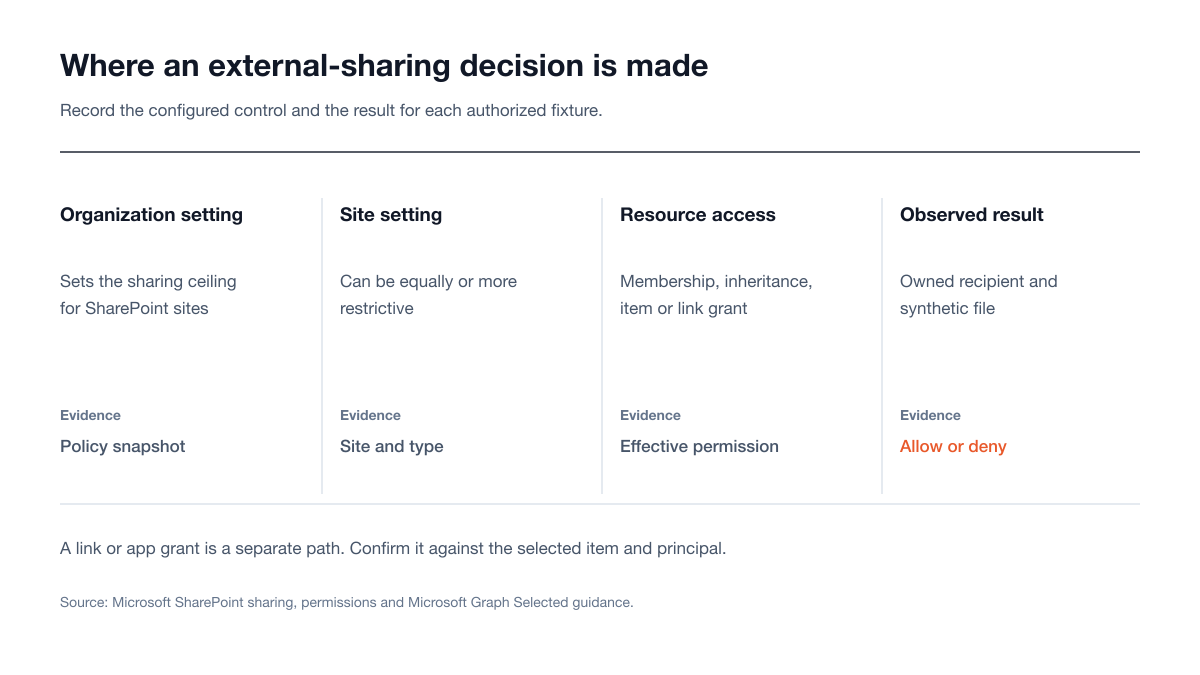
Figure 1: The buyer's evidence path from tenant policy to an observed recipient result. Sources: Microsoft, external-sharing overview, sharing permissions and Selected permissions.
Organization and site settings are different controls
Ask the SharePoint administrator for the organization sharing setting and each included site's setting, with the date collected. Microsoft's site settings guide says a SharePoint Administrator can change a site's external-sharing setting and that site owners cannot. The test should observe the current settings and use test items to confirm their practical effect. It should not change a production site's sharing level merely to create a finding. If a policy-change scenario is needed, put a disposable site and the authorized administrator in the SOW.
Collect relevant advanced settings as part of the same snapshot: external-sharing domain restrictions, the default link type, Anyone-link expiration or view-only restrictions, guest expiration and any group restriction on who may share externally. Microsoft describes these controls on its sharing settings page. A default link type is a user-experience setting; the result still needs to be checked against the site and item permissions. The assessor should record both the configured default and what an in-scope user can actually create.
The tenant owner should name the business rule before testing: for example, a collaboration site may allow authenticated partner access while a sensitive site must keep external sharing off. Microsoft recommends a site with external sharing disabled for information that should not leave the organization (external-sharing overview). A report can then say whether the observed result matches that rule instead of assuming every form of external sharing is unwanted.
Site type changes the membership path
For a group-connected team site, Microsoft says group owners become site owners and group members become site members. For private and shared channel sites, permission management happens in Teams; SharePoint displays those permissions read-only. Communication sites use SharePoint Owners, Members and Visitors groups (Microsoft, modern sharing permissions). The SOW should identify each site type and the system of record for membership. A screenshot of the SharePoint page alone can miss a Teams or group membership decision upstream.
The sample should include both a site shared with a guest through site membership and a site where the external party only receives a file link. Those are different access grants. Microsoft states that adding a guest as a site member gives that guest Edit permission under that role, while a file or folder link can be scoped to that item (external-sharing overview). The intended business outcome must say whether the partner needs the whole site or one deliverable. In the fixture, a site-member guest should normally reach inherited sibling files; a file-link-only recipient should be denied an unshared sibling. Test both paths with synthetic content.
Library and file permissions can break inheritance
SharePoint's permission-level documentation says libraries normally inherit from their site, while files inherit from their library; unique permissions can interrupt either relationship. Sharing a document with someone who lacks inherited access can stop inheritance for that document. This is why a test that checks the site root but never a library or individual file leaves a material gap.
Seed a small library with a shared file, an unshared sibling and, if the business case calls for it, a library with deliberately unique permissions. Ask for the effective permission view at each level and the actual user result. A narrow file grant may give a recipient limited navigation through the site without granting access to other content; Microsoft describes Limited Access as providing the context needed to reach one item, without extra content rights (permission levels). Do not flag the mere appearance of a site shell as exposure. For a recipient with only the file grant, confirm that the synthetic sibling's content and metadata remain inaccessible.
The permissions and evidence matrix
The following matrix is an example test fixture, not a claim about any tenant's default configuration. Replace the sample roles and expected results with the organization's approved access policy. Each row needs an owned account or principal, an owned resource, an expected action, an observed action and the evidence that explains any difference.
Principal and path | Site check | Library or file check | Required evidence |
|---|---|---|---|
Site owner in the approved tenant | Confirm full-control site role and whether external sharing is allowed by tenant and site policy | Create only preapproved test links or grants; verify access to the synthetic file | Site type, group or SharePoint role, effective settings, link or grant record, observed result |
Site member in the approved tenant | Confirm membership source and permitted sharing workflow | Compare an inherited file with a uniquely shared file; test allowed and denied link choices | Group or Teams membership, file permission view, link type and role, result for each fixture |
Existing guest with approved site membership | Confirm access to the intended site and denial at a separate excluded site | Open inherited synthetic sibling files within the approved site; test the excluded site with owned fixtures | Guest identity, membership grant, inherited-file access and excluded-site denial |
Named external recipient with a specific-people link | Do not assume site membership | Open the named synthetic file, then attempt only the approved denied sibling; compare with a different recipient | Link recipients and permissions, recipient sign-in or verification path, sharing audit event, observed result |
Holder of a test Anyone link, only if policy permits it | Do not treat the link as site membership | Test link access, link expiry or view-only behavior where configured, and revocation on the synthetic file | Effective site policy, link settings, |
App-only principal with a Selected grant, only if included | No assumed site access from consent alone | Test the explicitly assigned site, list or file and one unassigned synthetic resource | Consent, resource assignment, role, token or permission evidence, allowed and denied result |
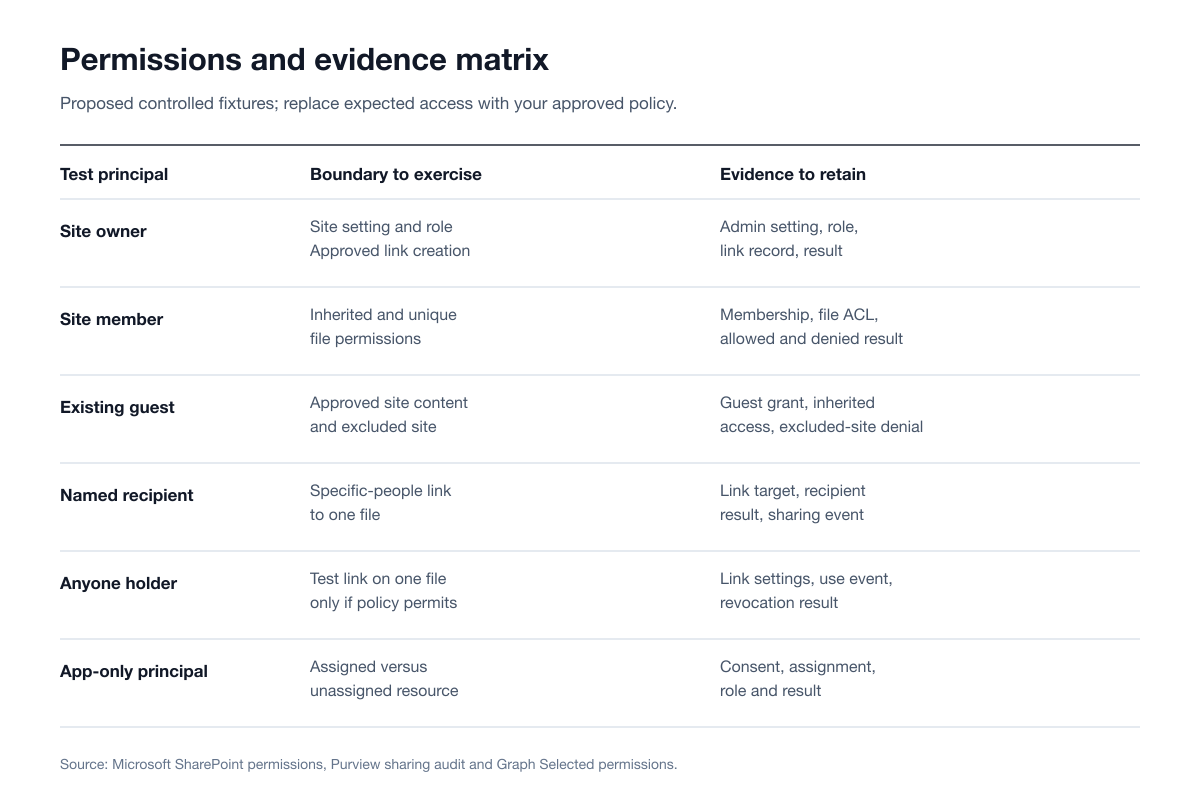
Figure 2: A compact view of the proposed test principals and evidence at site, library and file boundaries. Sources: Microsoft, modern sharing permissions, permission levels and Microsoft Graph Selected permissions.
The table is deliberately small. An enterprise estate may contain many sites, but adding more URLs without a clear access hypothesis does not improve proof. Choose representative site types, sensitivity classes and sharing patterns, then list every included site URL in the SOW. If the procurement goal is broad inventory as well as a penetration test, buy that inventory explicitly; do not infer that a sampled test certifies every site. The report should identify its sample and excluded sites by name.
Test link and guest paths separately
Microsoft distinguishes Anyone, people-in-your-organization and specific-people links. An Anyone link can be used by whoever possesses it without authentication. A people-in-your-organization link works for internal users, not guests. A specific-people link is meant for named recipients. These are different test cases even when they point at the same file. Record the link type, intended recipient, view or edit role, lifetime, and the result when an unintended owned test identity tries the link.
An Anyone link should be tested only on an approved synthetic file and only if the effective policy permits it. Microsoft says an organization can require Anyone-link expiry and restrict it to view permission (sharing settings). A buyer can ask the assessor to show whether a test link honors those configured restrictions and ceases to work when removed. The conclusion must be precise: link access is not the same as an authenticated guest account, and it should not be attributed to a named person based solely on the link.
Authenticated guest sharing needs its own path. Microsoft's external-sharing overview distinguishes SharePoint external authentication from Microsoft Entra B2B integration. Site sharing uses Entra B2B; for files and folders, a guest account is created when the integration is enabled, while a nonintegrated file-sharing flow need not create a new guest account. The assessor should record which model the tenant uses before drawing conclusions from the presence or absence of a guest object. A guest already created through another workflow can also be reused.
The SOW should identify whether the test recipient is an existing guest, a newly invited test guest or a named external recipient without prior tenant membership. Use controlled external mailboxes that the customer owns or authorizes. The evidence should show invitation or link creation, acceptance where relevant, effective permission, the content actually seen and the result after access is removed. Microsoft describes removing guest permissions or deleting an Anyone link as ways to stop sharing (external-sharing overview). Any live revocation check needs an agreed observation window and a fixture the business owner can safely withdraw.
The audit record is evidence, not a substitute for an access test
Microsoft Purview documents sharing events including SharingInvitationCreated, SharingInvitationAccepted, SecureLinkCreated, AddedToSecureLink, AnonymousLinkCreated and AnonymousLinkUsed (sharing audit guide). Its sharing schema includes target fields for recipient-specific actions. The buyer should require an export or a redacted record from the agreed test window, with operation, actor, resource, target where present and timestamp. Then compare that record with the assessor's observed allowed or denied access. A creation event alone does not prove the intended recipient opened the document.
There is an important limit. Microsoft's modern sharing guidance says Anyone-link holders do not authenticate and their access cannot be audited as a named person's access. Purview nevertheless describes AnonymousLinkCreated and AnonymousLinkUsed events. Both statements can be true: creation and use are observable events, but a forwarded unauthenticated link does not establish the holder's identity. The report should not call an Anyone-link use event proof that a particular external person accessed the file. For a specific-people link, request the matching target information, including AddedToSecureLink where applicable (Purview sharing audit guide).
If the tenant cannot provide audit records to the assessor, capture that as an evidence limitation rather than inventing a logging conclusion. The owner may prefer to export and redact records itself. Agree before kickoff which fields the assessor can receive, who retains raw logs and how the report will refer to synthetic identities. That keeps the evidence useful to security and procurement without placing production user data in the report.
App-only access is a separate permission path
An external-sharing scope may include an application that reads SharePoint content through Microsoft Graph. Do not fold that app into the guest rows. Microsoft's Selected permissions overview explains that Selected scopes can grant access at site, list, list-item, folder or file level, in delegated or application mode. For Selected scopes, admin consent alone does not provide access: the app also needs an explicit resource assignment and a valid token carrying the relevant Selected permission. A resource assignment alone is not sufficient either.
If app-only access is in scope, list the application identity, authorized grant, assigned resource, role and synthetic target in the SOW. Compare one assigned resource with one unassigned resource, and record the actual result. A report should not declare Sites.Selected safe simply because it sees the scope name, nor declare it broad simply because it sees admin consent. It must reconcile consent, resource assignment and effective access. Microsoft also notes that assigning application permissions at list, item, folder or file level breaks inheritance on that assigned resource (Selected permissions overview), so the report should identify that permission boundary.
Other Microsoft Graph grants may have different semantics. The engagement should inventory them and decide whether they belong in a wider Entra app registration assessment. This SharePoint test should not claim comprehensive app governance from one Selected-permission fixture. The useful buyer outcome is a clear statement of the app's permitted content reach and how that result was demonstrated with owned data.
Rules of engagement for a Microsoft 365 tenant
Microsoft's Security Testing Rules of Engagement apply to Microsoft Online Assets and to resource owners and their authorized agents. The rules prohibit accessing data or systems without explicit permission, using another party's secrets, denial-of-service testing and network-intensive fuzzing. They also say encouraged testing stays within an owned tenant or assets with explicit authorization. The SOW should therefore define the customer-controlled tenant, approved sites and fixtures, test identities, applications, allowed techniques, test window, contacts and stop conditions. It should also account for the applicable Microsoft service terms.
The tenant owner should authorize any external test mailbox and the account that operates it. Do not infer permission to test a partner's tenant from permission to share with that partner. Do not use a real recipient's forwarded link as a fixture. No test needs to enumerate unrelated production documents, probe another tenant, flood the service or collect actual client data. A safe proof can stop at a synthetic file whose expected and observed access differ. If an unexpected path reaches unauthorized data, the assessor stops and follows the reporting obligations in Microsoft's rules. This is a boundary test with controlled evidence, not an on-premises SharePoint Server exploit exercise.
The authorization should state whether administrators may temporarily alter any sharing configuration. For most production engagements, a read-only configuration review plus access tests on approved fixtures is the better default. A policy-toggle test can use a disposable site, the named administrator and an explicit rollback step. Procurement should ask how the assessor will avoid persisting new guest access or shareable links after the window closes.
Statement-of-work checklist
Use the following checklist as purchase language. Each item should appear in the SOW or its test plan, with the tenant owner filling in the actual names and values. The steps define preparation and evidence; they are not instructions for exploiting a service.
Name the authorized boundary. Record the Microsoft 365 tenant, site URLs, site types, libraries, synthetic files, internal owners and excluded sites. State that SharePoint Server farms and unrelated tenants are outside this engagement.
Record the intended sharing policy. For every included site, state the allowed external audience and whether the site, library or individual file may be shared. Provide the organization and site setting snapshots, plus relevant guest, domain, link and Teams or group controls.
Supply owned identities and content. Provide site owner and member accounts, controlled guest and external-recipient accounts, harmless files with unique markers, and the app-only principal only if that path is purchased. Define which identities must be denied which fixture.
Select the access cases. Include positive and negative site, library and file checks; inherited and unique permissions; relevant link types; guest acceptance and removal; and an assigned versus unassigned Graph resource where approved.
Set safe operating limits. Specify the window, request pace, customer and assessor contacts, permitted configuration changes, rollback owner, immediate stop rule and Microsoft ROE obligations. Forbid production-data collection and any test beyond written authorization.
Agree on evidence handling. Define the screenshots, permission exports, link or assignment metadata and Purview sharing records required for each case. Decide who exports raw logs, what is redacted and how synthetic identities are labeled.
Define finding and report acceptance. Require each material finding to name the affected resource, intended policy, observed action, grant or setting, business effect, narrow fix and retest result. Require a coverage appendix that lists every sampled site and any untested branch.
Close the fixture. Remove test links, guests, app assignments and synthetic content under the tenant owner's change process; confirm rollback and provide a final evidence inventory to the customer.
A quote should break out the number and type of sites, test identities, file-sharing models and apps, and whether the work includes configuration review, access proof, log analysis and retesting. That lets procurement compare like with like. A low quote that tests one administrator session and no external recipient is a different scope from the matrix above. Ask for a redacted sample finding that shows a denied case as well as an allowed case, because a report made only of configuration observations will not prove the collaboration boundary.
What a completed report should let you decide
The report should let the SharePoint and identity owners decide whether to retain, narrow or remove a sharing path. A useful result for each matrix row includes the approved policy, principal, resource, time, relevant settings, observed read or write outcome and audit record when available. The appendix should show which sites and link types were sampled, what was outside scope and where the assessor stopped for safety. An executive summary should separate demonstrated access, a configuration-based inference and an untested hypothesis.
Remediation should point to the narrowest relevant control. A too-open site may need its site sharing option changed by a SharePoint Administrator. A file with unique permissions may need its link or item grant removed. A group-connected team site may need a membership change in its group or Teams. An app may need its Selected resource assignment or consent reviewed. Microsoft's permission guidance and Selected-permissions guidance support these different ownership paths. The report should identify the control owner so procurement can track a fix and request retesting.
This evidence can support an organization's compliance program and audit preparation, but the report should preserve the limit of the sample. It should not say that all SharePoint content is protected when only a few named sites and test files were assessed. Ask for a retest that repeats the exact denied or allowed case after remediation, with the new observed result, rather than a screenshot showing a changed setting.
Where Stingrai fits
Stingrai is a proud CREST member and a CREST-accredited penetration testing service provider. Its public cloud service describes human-led Azure and Entra ID testing, written scoping under Microsoft's rules, findings with reproducible evidence and included retesting. A SharePoint Online external-sharing engagement should be quoted as a tenant-specific enterprise scope, with its sites, identities and permissions matrix agreed before testing. The public service description does not define a fixed SharePoint package, so procurement should request the exact coverage in the SOW rather than assume it from a cloud service label.
Stingrai offers one-time assessments and continuous programs through its delivery model. For this work, the immediate value is a human-led access-boundary test and evidence the organization can use for remediation and audit preparation. If the same engagement also includes application registrations or broader identity controls, the buyer can use the Entra app registration scope to define that additional line item. Request a custom quote through Get a Quote.
Frequently Asked Questions
What should a SharePoint Online external-sharing penetration test include?
It should include the approved tenant and sites, organization and site sharing settings, site membership, library and file permissions, applicable sharing links, controlled guest or external recipients, and app grants if purchased. It should prove allowed and denied access with synthetic content, then connect each result to configuration and audit evidence. Microsoft's external-sharing overview explains why the organization and site settings must both be checked.
Does an organization setting that allows Anyone links make every site public?
No. Microsoft says a site can be more restrictive than the organization and that the most restrictive setting applies. An Anyone link is a separate item-sharing action when the effective setting permits it. The assessor should capture the site setting and test a synthetic file rather than infer exposure from the organization setting alone (Microsoft, external-sharing overview).
Can an Anyone link be traced to a named outside recipient?
No. The holder does not authenticate, so a forwarded link does not establish a named recipient. Microsoft Purview describes AnonymousLinkCreated and AnonymousLinkUsed events, while Microsoft's sharing guidance says a holder's access cannot be audited as an identified person's access (Purview sharing auditing; modern sharing permissions).
Is a SharePoint guest always an Entra B2B guest account?
No. Microsoft says site sharing uses Entra B2B. For files and folders, guest-account creation depends on whether SharePoint and OneDrive integration with Entra B2B is enabled, and an account from another workflow may already exist. The test plan should record the tenant's model before it interprets guest objects (Microsoft, sharing settings).
Why test a library or file if the site permissions look correct?
Libraries inherit site permissions and files inherit library permissions unless unique permissions interrupt the chain. Microsoft notes that sharing a file can stop inheritance for that item. A site-level review can therefore miss a file grant; for a recipient with only a file grant, the assessor should test a shared synthetic file and an unshared sibling (Microsoft, permission levels).
Does Sites.Selected consent give an app access to every SharePoint site?
No. Microsoft says Selected scopes require an explicit resource assignment in addition to consent and a valid token carrying the relevant Selected permission. The test should compare an assigned synthetic resource with an unassigned one, and record the role and result (Microsoft Graph, Selected permissions).
Who should authorize a SharePoint Online penetration test?
The tenant and resource owner should provide written authority for the exact sites, identities and data used by its team or consultant. Microsoft's unified Rules of Engagement apply to Microsoft Online Assets and prohibit access to other customer systems or data without permission, denial-of-service testing and network-intensive fuzzing (Microsoft Security Testing Rules of Engagement).
Is SharePoint Server exploitation part of this test?
No. This scope covers SharePoint Online external sharing in Microsoft 365. Microsoft documents SharePoint Server as a separately deployable product, including on-premises deployments. A Server farm, its patches and product exploit research need a separate authorization and test plan (Microsoft, SharePoint Server getting started).
What should procurement require in the final report?
Require a site and fixture coverage appendix, the intended and observed outcome for each principal, relevant settings and grants, redacted sharing events where available, a clearly bounded finding and a retest result. The report should distinguish tested access from inferred impact and give the SharePoint, Teams or identity owner a specific control to change.
Related reading
References
Microsoft. *Overview of external sharing in SharePoint and OneDrive in Microsoft 365.*
Microsoft. *Manage sharing settings for SharePoint and OneDrive in Microsoft 365.*
Microsoft. *Sharing and permissions in the SharePoint modern experience.*
Microsoft Graph. *Overview of Selected permissions in OneDrive and SharePoint.*
Microsoft Security Response Center. *Microsoft Security Testing Rules of Engagement.*
Talk to Stingrai
Bring the tenant boundary, site inventory and sample matrix to Get a Quote, or book a free discovery call to define the authorized SharePoint Online scope and evidence your team needs.