





None of the three major clouds require you to ask their permission before you penetration test resources you own. AWS, Microsoft Azure, and Google Cloud all let you run a penetration test against your own infrastructure without provider pre-approval. That single fact surprises most buyers scoping a cloud engagement, because the folklore still says "you have to file paperwork with the cloud." You do not, for standard testing of your own assets. What you do have to get right is a narrow band of high-impact activities where each provider draws a hard line, plus the written authorization that flows from the asset owner to whoever runs the test.
This post is a per-provider reference for the cloud penetration testing rules of engagement in 2026. Every rule below links to the provider's own published policy so you can cite it in a statement of work, an internal approval, or a compliance file.
The short answer: what needs approval on each cloud
Here is the direct answer to the question most teams are actually asking. What penetration testing do AWS, Azure, and GCP allow without approval, and what needs written authorization?
AWS allows testing of your own resources across a defined list of permitted services with no advance approval. A separate set of activities (DDoS simulation, red or purple teaming that uses command and control, simulated phishing, and malware testing) requires you to submit AWS's Simulated Events form at least two weeks in advance.
Azure dropped its notification requirement on June 15, 2017. You can test your own Azure-hosted applications with no approval, but you remain bound by the Microsoft Cloud Unified Penetration Testing Rules of Engagement, and DDoS resilience testing must run through Microsoft-approved simulation partners.
GCP requires no approval and has no notification process. You can test your own projects freely, provided your tests only affect your projects and comply with the Google Cloud Acceptable Use Policy.
On all three, the authorization that legally matters is not a permission slip from the cloud. It is the written authorization from the resource owner to the tester. If a third party runs the test, that authorization has to exist in writing before any packet is sent. Denial of service and distributed denial of service are prohibited by default on all three clouds.
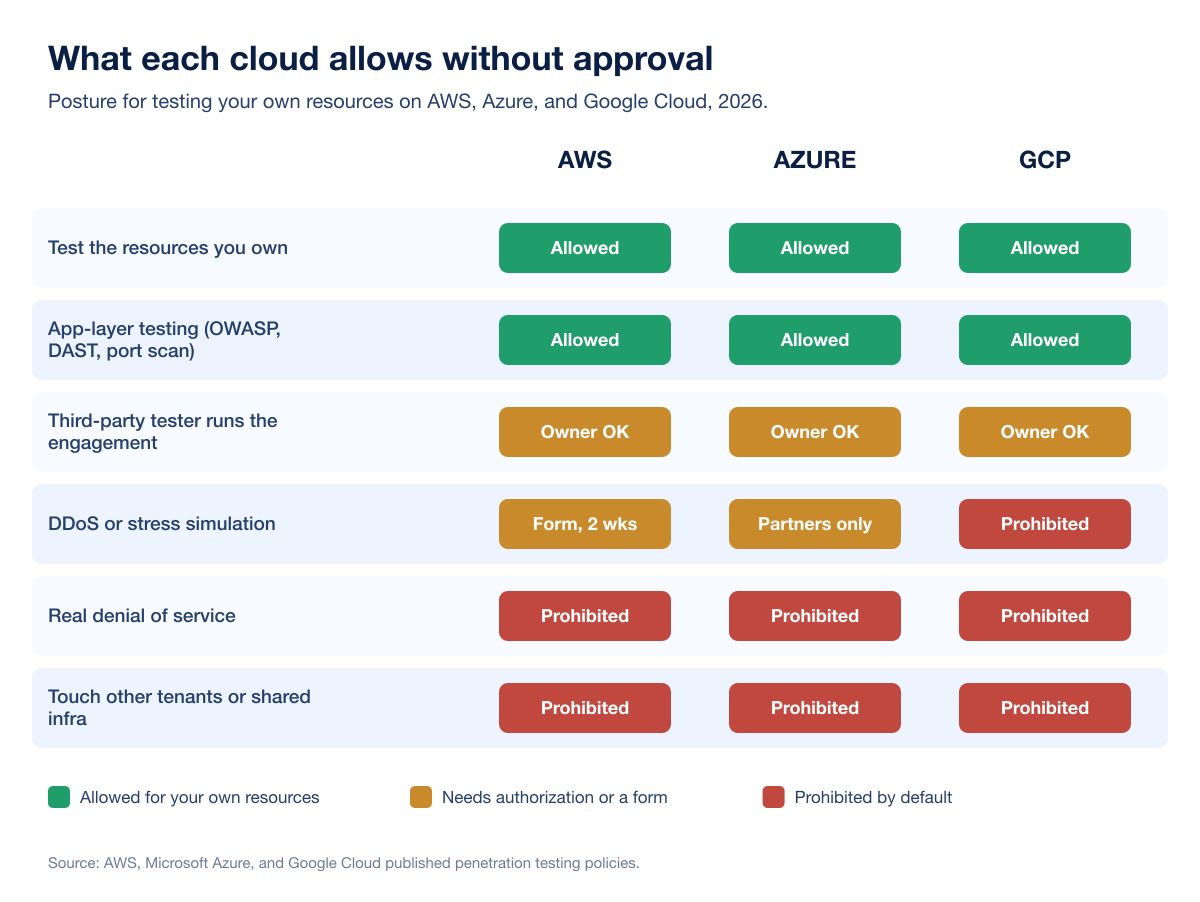
The rules of engagement at a glance
The table below is the reference. Each provider name links to its official published policy, and each cell summarizes that policy as of July 2026. Read the linked source before you finalize scope, because the providers update these pages and the linked text is authoritative.
Provider | Allowed without provider approval | Requires written authorization | Prohibited by default | Notification required |
|---|---|---|---|---|
Standard penetration testing of your own resources across the permitted services list (EC2, RDS, Aurora, CloudFront, API Gateway, AppSync, Lambda, Lightsail, Elastic Beanstalk, ECS, Fargate, OpenSearch, FSx, Transit Gateway, and more). | A Simulated Events form submitted at least two weeks ahead for DDoS simulation, red or purple teaming with command and control, simulated phishing, and malware testing. Third-party testers also need your written authorization. | DoS and DDoS, simulated DoS and DDoS, port flooding, protocol flooding, request flooding, DNS zone walking, DNS hijacking and pharming via Route 53, S3 bucket takeover, and subdomain takeover. | Vulnerabilities that are a direct result of AWS's own tools or services must be reported to AWS Security within 24 hours of testing. | |
Testing of your own Azure-hosted apps, VMs, App Service, Functions, and APIs: OWASP Top 10, DAST, fuzz testing, port scanning, container breakout, and AI system-boundary testing. | Third-party testers need explicit written authorization from the resource owner, documented in the service agreement. DDoS resilience testing must run through Microsoft-approved simulation partners. | DoS and DDoS of any kind including simulated, testing assets you do not own, retrieving credentials or secrets that are not yours, network-intensive fuzzing, and phishing Microsoft staff or using Azure to phish others. | None since June 15, 2017. Vulnerabilities found in Microsoft's own services must be reported through the Microsoft Security Response Center. | |
Testing of your own projects and resources: Compute Engine, GKE, Cloud Storage, Cloud Functions, and the rest of your project footprint. | Third-party testers need the project owner's written authorization. Google grants no authorization on your behalf. | DoS and DDoS, any test that affects other customers or shared multi-tenant infrastructure, and anything that breaches the Acceptable Use Policy or Terms of Service. | None. Vulnerabilities in Google's own services should be reported through the Vulnerability Reward Program. |
Two patterns jump out of the table. First, the prohibited column is nearly identical across all three: nobody lets you run availability-destroying traffic against shared cloud infrastructure. Second, the "requires authorization" column is dominated by things that look like an attacker rather than a scanner, namely denial of service, command and control, and phishing. Those are the activities that trip provider abuse detection, so they are the ones the providers gate.
AWS: test your own resources freely, gate the loud stuff
AWS publishes a Customer Support Policy for Penetration Testing that names the services you may test without asking. The list covers most of what a modern workload runs on, including EC2 instances, load balancers, NAT gateways, RDS, Aurora, CloudFront, API Gateway, AppSync, Lambda and Lambda@Edge, Lightsail, Elastic Beanstalk, ECS, Fargate, OpenSearch, FSx, and Transit Gateway. If your target sits on those services and you own it, you can test it.
The activities AWS gates are the ones that generate attack-shaped traffic or simulate an adversary. To run DDoS simulation, red, blue, or purple team exercises that use command and control, network stress tools, simulated phishing, or malware testing, you submit AWS's Simulated Events form at least two weeks before the engagement. The prohibited list is short and firm: real or simulated DoS and DDoS, port and protocol and request flooding, DNS abuse through Route 53, and takeover of S3 buckets or subdomains. One notification obligation is easy to miss: if your testing surfaces a vulnerability that is a direct result of an AWS tool or service, you have to tell AWS Security within 24 hours.
Azure: no notification since 2017, but the ROE still binds you
Microsoft removed the pre-approval requirement for Azure penetration testing on June 15, 2017. You no longer notify Microsoft before testing your own Azure resources. What replaced notification is the Microsoft Cloud Unified Penetration Testing Rules of Engagement, which is the authoritative document and which still applies to every test.
The permitted list is broad. You can run OWASP Top 10 testing, DAST, fuzz testing, and port scanning against your own endpoints, create test tenants for cross-tenant scenarios, generate traffic to test your own surge capacity, exercise your monitoring and detection, and even attempt to break out of shared containers or AI system boundaries, as long as you report responsibly and stop on success. The prohibited list is where red teams need to pay attention: no DoS or DDoS of any kind including simulated, no touching tenants or data you do not own, no retrieving credentials or secrets that are not yours, no network-intensive fuzzing that generates excessive traffic, and no phishing Microsoft employees or using Azure to phish anyone else. Resilience testing against DDoS protection has to go through Microsoft-approved simulation partners rather than a self-run flood. If Azure abuse detection flags legitimate testing, you resolve it by responding with your customer authorization and a scope description, which is one more reason to keep authorization documents within reach.
GCP: no approval, but stay inside your own projects
Google Cloud is the most permissive of the three on paper and the simplest to summarize. Per the Cloud Security FAQ, if you plan to evaluate the security of your Cloud infrastructure with penetration testing, you are not required to contact Google. There is no approval workflow and no notification process. You test your own projects, including Compute Engine, GKE, Cloud Storage, and Cloud Functions, at will.
The constraint is scope, not paperwork. Your testing must only affect your own projects and must comply with the Acceptable Use Policy and Terms of Service. That rules out anything that spills onto other customers, anything that targets shared multi-tenant infrastructure, and denial of service in any form. Vulnerabilities you find in Google's own services go to the Vulnerability Reward Program rather than into your report as an exploited finding.
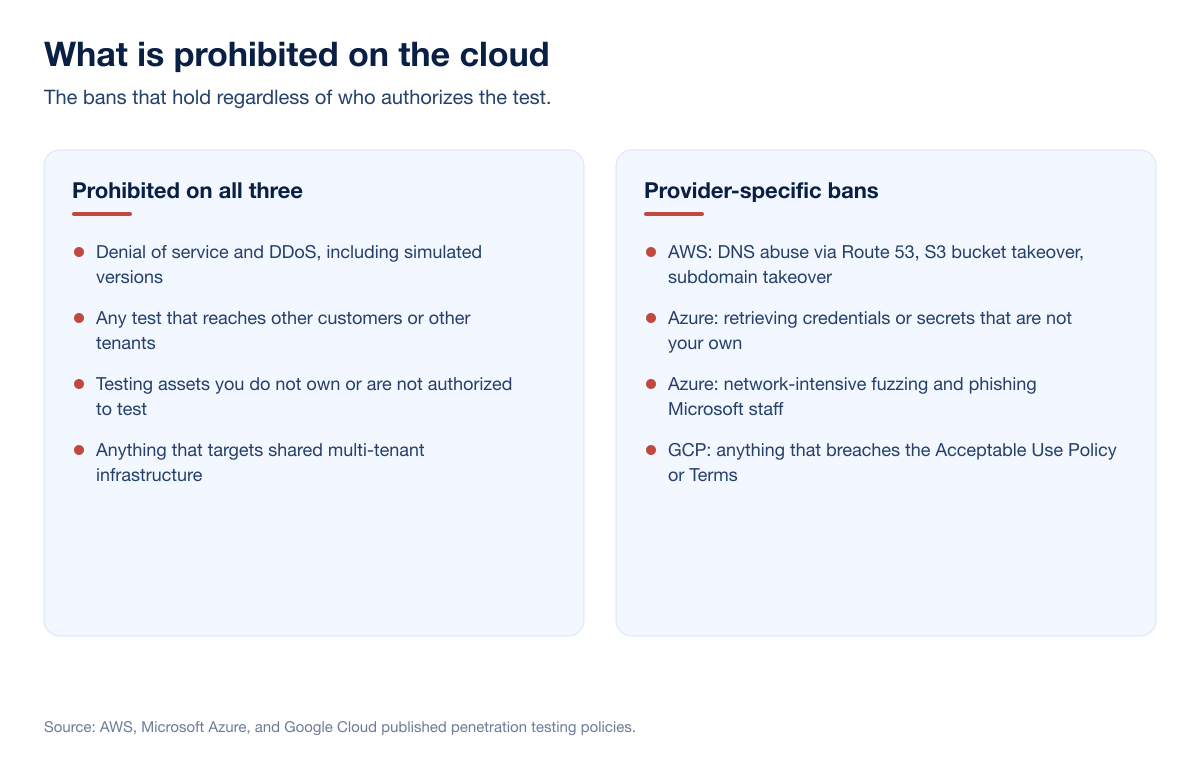
The rule the clouds do not write down: authorization flows from the owner
Every provider policy assumes one thing that none of them will do for you: authorization. AWS, Azure, and Google all state that a third party can test, but only with explicit written authorization from the resource owner, and none of them grant that authorization on the customer's behalf. This is the single most common gap we see in cloud scoping. A team confirms the cloud allows the test, then forgets that the tester still needs a signed authorization from whoever owns the account, the subscription, or the project.
The rule gets sharper in three situations. If you run on infrastructure a managed service provider operates, the provider, not you, may be the resource owner who has to authorize. If your test traverses a SaaS integration or a third-party API, that vendor's assets are out of scope unless separately authorized. And if you launch tooling from a cloud VM against systems hosted elsewhere, the source cloud's rules of engagement still apply to your use of it. Writing the authorization down, with named parties, dated scope, and source IP ranges, is what turns a flagged abuse notification into a two-minute reply instead of a paused engagement.
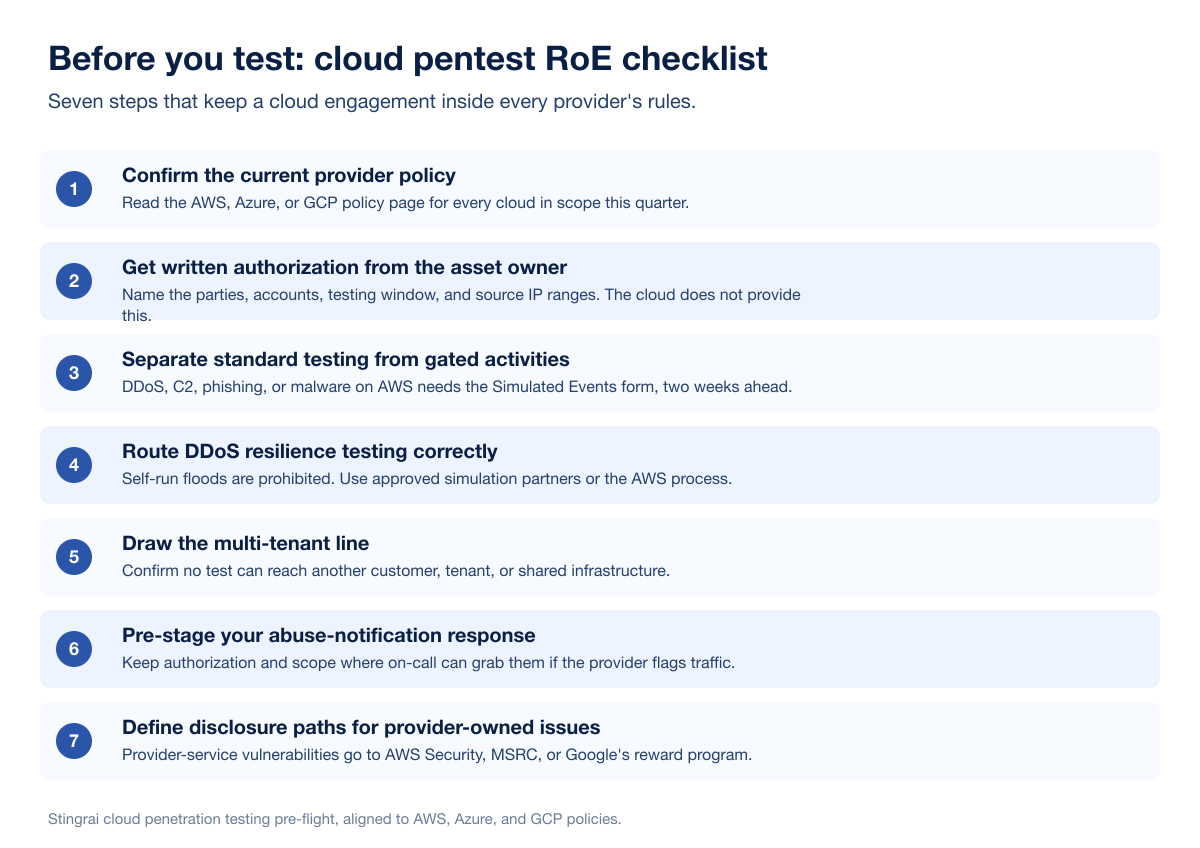
What to do before you test: a cloud pentest RoE checklist
Use this checklist before any cloud engagement kicks off. It maps directly to the rules above and keeps the loud, gated activities from surprising anyone.
Confirm the current provider policy. Open the AWS, Azure, or GCP policy page for every cloud in scope and read it this quarter. The pages change, and the linked source always wins over any summary, including this one.
Get written authorization from the asset owner. Name the parties, the accounts or subscriptions or projects, the testing window, and the source IP ranges. The cloud does not provide this. The owner does.
Separate standard testing from gated activities. Decide up front whether the engagement needs DDoS simulation, command and control, phishing, or malware testing. If it does and AWS is in scope, file the Simulated Events form at least two weeks ahead.
Route DDoS resilience testing correctly. Self-run floods are prohibited on all three. If you need to test DDoS defenses on Azure, use an approved simulation partner. On AWS, use the Simulated Events process.
Draw the multi-tenant line. Confirm that no test can reach another customer, another tenant, or shared infrastructure. That boundary is prohibited on every cloud regardless of authorization.
Pre-stage your abuse-notification response. Keep the authorization letter and scope summary somewhere the on-call engineer can grab them, so a provider abuse alert does not stall the test.
Define disclosure paths for provider-owned issues. Agree in advance that any vulnerability in the provider's own services goes to AWS Security, MSRC, or Google's reward program, and is reported within the provider's window rather than exploited further.
This is the same pre-flight we run before a cloud engagement, and it is why our reports never trigger a scope dispute after the fact. If you are still deciding what belongs in scope in the first place, our guide on how to scope a penetration test works through the boundaries in more depth.
How Stingrai tests inside these boundaries
Stingrai is a CREST-accredited offensive-security firm founded in 2021, headquartered in Toronto with a London office. Cloud rules of engagement are not an afterthought in our engagements. They are part of scoping, because they decide what a clean test looks like on AWS, Azure, and GCP.
Our human pentesters handle the cloud, IAM, and network layers within your authorized boundaries. That includes cloud identity and access reviews, privilege-escalation paths, and network segmentation testing that stays inside the permitted-service and own-project lines each provider draws. Our deeper writeups on cloud IAM penetration testing and scoping a cloud pentest for SOC 2 on AWS show how we translate these rules into a working test plan. On the application layer, our autonomous agent Snipe focuses on web application testing, hunting complex, high-impact issues such as IDOR, broken authorization, and business-logic flaws, and it stays within web-app scope while the human team covers the cloud infrastructure around it.
The output supports your compliance program. Cloud penetration testing evidence maps to SOC 2, ISO 27001, PCI DSS 4.0, and the cloud-security expectations in NIST SP 800-53, and our reports are written to sit directly in an audit file. You can see how the pieces fit through our penetration testing as a service model, our red teaming practice for adversary-emulation engagements, and our web application penetration testing service. Stingrai is a global CREST-accredited penetration testing services company founded in Toronto, Canada in 2021, trusted by companies from startups to enterprises to meet audit requirements for SOC 2, ISO 27001, CMMC, PCI DSS and HIPAA. OSCE³, OSWE, OSEP, CREST CRT certified pentesters, who are also world-class security researchers and bug bounty hunters. Choose from fully human-led or hybrid (AI agents plus human penetration testers) engagements across web, API, mobile, AI and LLM, cloud, network, Active Directory and social engineering penetration tests and red team engagements, with findings posted to its PTaaS portal as they are confirmed, live chat with the assigned testers, Jira and Slack integration, retesting and an attestation letter with every human-led and hybrid report. Package details and current pricing live on the pricing page.
Frequently Asked Questions
What penetration testing do AWS, Azure, and GCP allow without approval?
All three let you penetration test resources you own without provider pre-approval. AWS permits standard testing across a defined list of permitted services, Azure dropped its notification requirement in 2017, and GCP has no approval or notification process at all. The activities that need extra steps are high-impact ones such as DDoS simulation, command-and-control red teaming, phishing, and malware testing, and those vary by provider.
Do I need to notify AWS before a penetration test?
No, not for standard testing of your own resources across AWS's permitted services list. You do need to submit AWS's Simulated Events form at least two weeks in advance for DDoS simulation, red or purple teaming that uses command and control, simulated phishing, or malware testing. See the AWS Customer Support Policy for Penetration Testing.
Does Azure require approval for penetration testing?
No. Microsoft removed the pre-approval requirement for Azure penetration testing on June 15, 2017, so no notification is needed. You are still bound by the Microsoft Cloud Unified Penetration Testing Rules of Engagement, which prohibit DoS and DDoS, testing assets you do not own, and phishing Microsoft staff.
Is penetration testing allowed on Google Cloud?
Yes. Per Google's Cloud Security FAQ, you are not required to contact Google to test your own Cloud infrastructure. Your testing must only affect your own projects and must comply with the Acceptable Use Policy and Terms of Service, which prohibit denial of service and any impact on other customers.
Can I run a DDoS test against my own cloud resources?
Not directly. DoS and DDoS, including simulated versions, are prohibited by default on AWS, Azure, and GCP. To test DDoS resilience on Azure you use Microsoft-approved simulation partners, and on AWS you go through the Simulated Events process. Self-run floods against cloud infrastructure are off-limits on all three.
Who has to authorize a third-party cloud penetration test?
The resource owner, in writing, before testing begins. AWS, Azure, and Google all allow third-party testers such as consultancies and red teams, but none of them grant authorization on your behalf. The authorization has to name the parties, the scope, and the testing window, and it should be documented in the service agreement.
What cloud penetration testing activities are prohibited on all three providers?
Denial of service and distributed denial of service are prohibited on AWS, Azure, and GCP by default. All three also prohibit any test that reaches other customers, other tenants, or shared multi-tenant infrastructure. AWS additionally names DNS abuse through Route 53 and bucket or subdomain takeover in its prohibited list.
Does the cloud provider's rules of engagement replace a signed scope agreement?
No. The provider policy tells you what the cloud permits, but it does not authorize your specific test. You still need a signed scope and authorization between the asset owner and the tester. The two documents work together: the provider policy sets the outer boundary, and your scope agreement defines the test inside it.
Where can I read the official cloud penetration testing policies?
Go straight to the source: the AWS Customer Support Policy for Penetration Testing, the Azure penetration testing guidance and its Rules of Engagement, and Google's Cloud Security FAQ. These pages are authoritative and are updated by the providers.
Related reading
References
Amazon Web Services. Penetration Testing: Customer Support Policy for Penetration Testing. https://aws.amazon.com/security/penetration-testing/. Defines the permitted services list, the prohibited activities, the Simulated Events form process for DDoS, C2 red teaming, phishing and malware testing, and the 24-hour notification for AWS-tool-related findings.
Microsoft. Penetration testing (Azure security fundamentals). Updated May 15, 2026. https://learn.microsoft.com/en-us/azure/security/fundamentals/pen-testing. Summarizes permitted and prohibited testing on Azure and confirms that no pre-approval has been required since June 15, 2017.
Microsoft. Microsoft Cloud Unified Penetration Testing Rules of Engagement. https://www.microsoft.com/en-us/msrc/pentest-rules-of-engagement. The authoritative rules of engagement listing permitted and prohibited activities across Microsoft Cloud services.
Microsoft. Test through simulations (Azure DDoS Protection). https://learn.microsoft.com/en-us/azure/ddos-protection/test-through-simulations. Describes the approved DDoS simulation-partner path for resilience testing.
Google Cloud. Cloud Security FAQ. https://support.google.com/cloud/answer/6262505. States that Google does not require notification for penetration testing of your own Cloud infrastructure, and that testing must stay within your own projects.
Google Cloud. Acceptable Use Policy. https://cloud.google.com/terms/aup. The policy that cloud penetration testing on GCP must comply with, prohibiting denial of service and impact on other customers.