





Microsoft's Intune documentation explains the connection that an enterprise assessment must prove: compliance policies evaluate managed devices, and Microsoft Entra Conditional Access can enforce access based on the resulting status. A policy screenshot does not show that the right users, devices and applications actually receive the intended decision. The useful test is a repeatable access outcome with known device states and named exclusions.
Quick answer. Pick representative applications and user groups, then test compliant, noncompliant, unevaluated and deliberately excluded device scenarios with dedicated accounts and test devices. Trace each outcome through Intune policy assignment, device compliance status, Conditional Access assignment and sign-in evidence. Confirm that emergency access and rollout controls are intentional. Deliver a matrix that distinguishes a true denied path from a policy that never applied.
This guide addresses the customer's Intune and Entra configuration, not a claim of a Microsoft platform bypass. It is intended for identity and endpoint teams preparing an authorized assessment or procuring one across a mid-market or enterprise tenant.
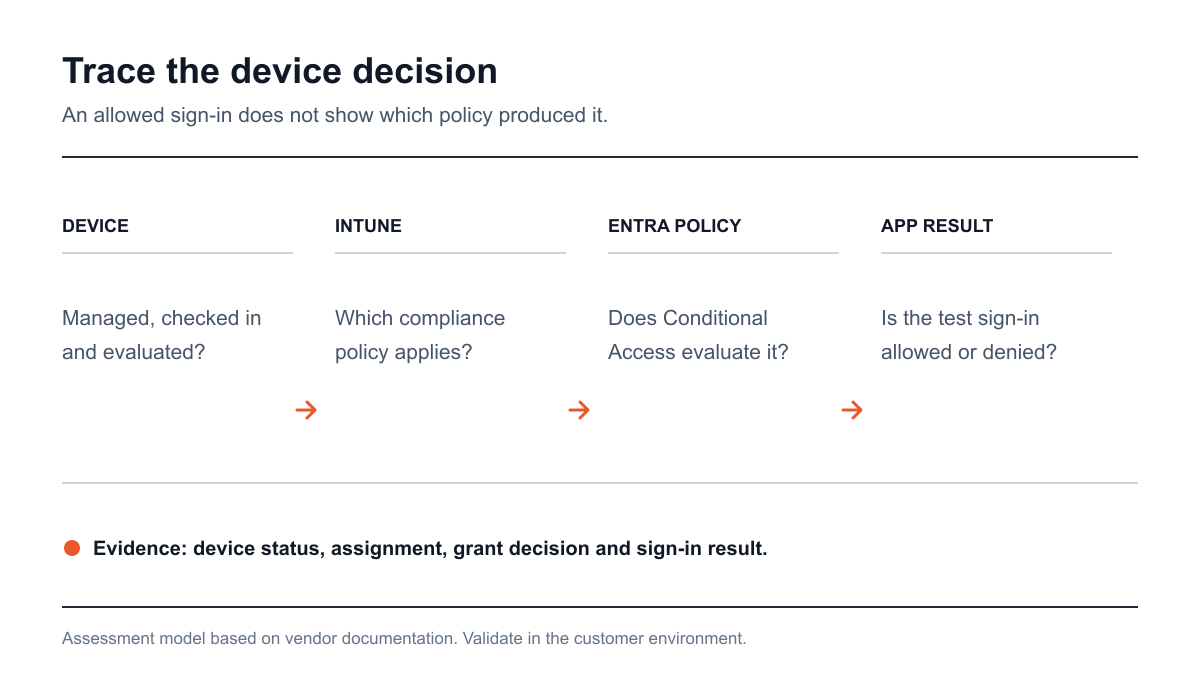
Figure 1: The policy decision crosses two control planes before a protected application responds. Sources: Microsoft Intune compliance overview and Microsoft's Conditional Access deployment guide.
The compliance state deserves its own test
An organization may say “we require compliant devices,” while Intune and Conditional Access are configured by different administrators. The Intune policy may not reach a device, may report a stale state, or may evaluate a different rule than the one a buyer expects. The Conditional Access policy may cover only some applications or exclude a group. A denied sign-in can also be caused by another control. The assessor must identify the specific policy and device state that produced each observed result.
Microsoft documents a tenant-wide default that treats devices without an assigned compliance policy as compliant, which it describes as that security feature being off. This is an important review item, but it is not enough to declare the tenant exposed. Conditional Access assignments, other grants and the actual device population determine the effect. The test should show whether an in-scope device lacking a compliance policy can reach a protected app under the customer's current design.
Intune also has a compliance status validity period that defaults to 30 days and can be configured from 1 to 120 days. That setting informs how stale state may persist. It does not mean every device remains compliant for 30 days after a violation, nor does it prove an attacker can use a specific device. A report should record the tenant's actual setting, relevant check-in behavior and a measured result from a controlled scenario.
Scope applications, identities and device states
Choose applications based on data consequence: an ordinary collaboration app, an administrative portal and a sensitive business application. Identify the relevant Conditional Access policies and groups for each. Include a test identity assigned to the intended policy, one deliberately excluded account and an emergency-access account that is only reviewed, not used for risky tests unless expressly approved. Document shared-device, contractor and mobile-device patterns if they matter to the organization.
Prepare test devices representing a compliant managed device, a managed device deliberately made noncompliant in a safe way, and an unmanaged or unassigned device where the use case requires it. Record platform and enrollment state. Do not force a production employee's endpoint into a noncompliant state or enroll a device into a tenant without approval. The test should use synthetic accounts and data so sign-in outcomes can be observed without exposing employee records.
Microsoft warns that a Conditional Access compliant-device grant will not function as intended without an Intune compliance policy. This is why the scope must include both control planes. Ask who owns the Intune assignment and who owns the Conditional Access rule. If they are different teams, name the handoff and ensure the report has enough evidence for each owner to act.
Four decisions to validate
Policy assignment and exclusions
Map the groups, users, applications, platforms and conditions that each relevant policy includes or excludes. Compare the intended population with real assignment. A broad exclusion may be required for emergency access; a stale project group may create unintended gaps. The assessor should not call every exclusion a vulnerability. It should show the reason, owner and access consequence for each exception.
Use a test account in each relevant group and record which policies evaluated. A login that succeeds because the rule was not assigned is different from a login that satisfied its compliant-device grant. Both can look like “access allowed” to an end user, but only one validates the compliance control. The report should include sign-in policy results and the account's group context, with personal identifiers redacted.
Device evaluation and freshness
Review the compliance rules assigned to the selected devices, their last check-in and their reported state. Choose a harmless condition for a test device to become noncompliant and observe when Intune changes status. Then test access to a designated application under the rules of engagement. Record timing as a measured result of that tenant and test, rather than a generic product guarantee. Restore the test device afterward.
The validity-period setting is part of this analysis. If the device does not report a fresh state, the assessor should determine whether the result follows the configured period, assignment or check-in behavior. Avoid treating a single stale device as evidence for every device class. Different platforms or enrollment models may need separate samples.
Conditional Access decision
For each scenario, record whether the policy applied, which grant was evaluated and whether access was allowed or denied. Review overlapping policies so a separate rule is not mistakenly credited with a compliant-device decision. Microsoft's deployment guidance recommends confirming settings with policy impact or report-only mode before turning the policy on. A buyer can use that approach to assess changes without unexpectedly locking out a workforce.
Do not flip a production policy to On as part of a test without customer change approval. A safe assessment can validate current enforcement and simulate the effect of proposed changes in report-only mode, then recommend a controlled rollout and retest. The final evidence should make clear which results were enforced and which were projections from report-only analysis.
Emergency access and recovery
Review excluded emergency accounts, enrollment recovery, service accounts and break-glass procedures. An emergency path is a resilience control when it is tightly managed; an unmanaged exception can become a persistent access route. The assessor should inspect ownership, monitoring and use conditions without attempting to take over an emergency account. Ask whether a Conditional Access rollout has a rollback owner and a tested recovery plan.
Recovery also matters for devices that fall out of compliance. The security team should know how a legitimate user remediates a failed check, how support can distinguish enrollment trouble from policy bypass and whether the temporary workaround expires. A penetration test can record that workflow without turning it into an unbounded help-desk social engineering exercise.
A policy-to-outcome evidence matrix
Scenario | Expected policy result | Evidence to collect |
|---|---|---|
Managed compliant test device | Protected app permits the assigned test user, subject to other controls. | Intune state, policy assignment and sign-in decision. |
Managed noncompliant test device | Protected app denies the compliant-device grant when policy applies. | Device state transition, evaluated grant and denial event. |
Unassigned or unmanaged test device | Outcome matches the documented tenant design, not an assumption. | Intune assignment setting, policy result and app response. |
Excluded test identity | Exclusion is intentional and monitored. | Exclusion owner, sign-in policy result and review date. |
Report-only candidate policy | Impact is measured before enforcement. | Report-only result, affected groups and change plan. |
These are proposed scenarios. The actual expected result must come from the organization's documented policy. A finding requires an observed mismatch or an unjustified exception with a defined impact. A screenshot of a policy's name is not enough.
Read an access result without guessing
Imagine a hypothetical noncompliant test device that still reaches a protected collaboration app. That outcome alone does not identify the cause. The test account may not be in the Conditional Access assignment, the app may be excluded, the device may still be reported compliant in Intune, or another grant may have satisfied a different rule. A report that declares a “device compliance bypass” from the final browser page would be premature.
The assessor should work backward from the sign-in. Confirm the account, app and time; record the policies evaluated and the grant result; then inspect the device record and the Intune compliance policy actually assigned. If the policy did not apply, the finding concerns assignment or exclusion. If it applied but the device was marked compliant, the finding concerns evaluation, freshness or the test setup. If it applied and denied access but the user still reached data through a separate session or app route, the scope needs to include that session or route. Each result has a different owner and fix.
Pair the denied scenario with a compliant device that can reach the app. A rule that blocks everything is not a successful compliant-device control. The buyer needs evidence that legitimate work continues under the intended state. In a distributed enterprise, repeat the pair on representative device platforms and enrollment models. A Windows corporate device, a managed phone and a contractor's device can be subject to different assignments; do not generalize one result across all of them.
Separate policy impact from enforcement
Microsoft's Conditional Access guide advises using policy impact or report-only mode before switching a compliant-device rule on. The report must keep those observations distinct. A report-only event tells the buyer what the candidate policy would have decided for a sign-in; it does not mean access was denied. The implementation plan should specify the group moved into enforcement, the change window, recovery account and rollback conditions. After the change, the same test identities and devices should produce enforced allow and deny decisions.
Use an exception register. For each excluded identity, app or platform, record the business reason, responsible owner, alternative control, review date and event source used to watch the exception. This is particularly useful for emergency access, legacy apps and service accounts. The assessment can then rank exceptions by actual sensitive application reach instead of counting them equally. A broad exclusion with no owner and access to an administrative app deserves different attention from a temporary test group with a named expiry.
How to describe severity to a business owner
Base impact on the data or administrative action the path reaches, the population that can use it and the controls still operating. A noncompliant test device reaching a low-sensitivity app under a documented exception is different from an unmanaged device reaching a privileged administration portal through an unowned exclusion. The report should show the sign-in outcome and route before making a severity claim.
The remediation should say whether Intune assignment, tenant default, Conditional Access targeting, device enrollment or exception governance must change. It should also state which team owns the change. “Enable device compliance” is too vague to be safe. An identity team might turn on a policy that the endpoint team has not deployed, precisely the dependency Microsoft warns about. A useful fix orders the prerequisites and tests their effect.
How to commission a useful assessment
The request for proposal should name Entra tenants, Intune device groups, protected applications, user personas and device platforms. Provide test accounts and devices, read-only policy access and an administrator who can interpret sign-in logs. State whether testing includes only current enforcement or also proposed report-only policies. Explicitly exclude employee devices and production policy changes unless authorized.
Ask for a report that includes an outcome matrix, the policies that did or did not apply, relevant device state, an explanation of exceptions and a fix owner. Ask the provider to retest the same account/device/application scenario after remediation. This is more useful than a generic “Conditional Access is enabled” finding because it supports a safe change plan.
Stingrai is a global CREST-accredited penetration testing services company, incorporated in 2021 and based in Toronto, Canada. Its human-led Azure and Entra cloud penetration testing can validate the identity and device-trust boundary when Intune and the protected applications are in scope. Two named penetration testers work on each human-led engagement, findings are posted as confirmed, and retesting is included. Stingrai offers one-time tests and continuous programs; the test evidence can support security and compliance reviews.
A controlled test sequence
Define outcomes. Select apps, user groups, device states and expected allow or deny decisions. Record policy owners and safe test identities.
Review configuration. Map Intune compliance assignment, tenant defaults, state validity, Conditional Access grants and exclusions. Mark report-only policies separately.
Run scenarios. Use designated devices and accounts to collect sign-in results for compliant, noncompliant and unassigned states. Correlate each outcome to the evaluated policy.
Change and retest. Adjust the policy through the customer's change process, validate impact in report-only mode where appropriate and repeat the original scenarios after enforcement.
The sequence creates evidence for both endpoint and identity owners. It also prevents a project from claiming a device control worked merely because a login succeeded or failed for an unrelated reason.
Frequently Asked Questions
Is an Intune compliance policy enough to block an unmanaged device?
No. An Intune compliance policy evaluates managed devices, while Conditional Access enforces an access decision for the assigned user and application. The assessment must trace both policy assignment and the sign-in outcome. Other controls or exclusions may change the result.
What does Intune do with devices that have no compliance policy?
Microsoft documents a default setting that considers devices without an assigned compliance policy compliant and describes that security feature as off. An assessor should verify the tenant's actual setting, then test whether the relevant Conditional Access policy covers the intended device and application.
How long is Intune compliance status valid?
Microsoft says the default validity period is 30 days and the configurable range is 1 to 120 days. That setting is only one part of a device's real access outcome. Test check-in, status and Conditional Access evaluation in the customer's own tenant rather than assuming a universal delay.
Should a new compliant-device policy be enabled immediately?
Microsoft recommends checking policy impact or report-only results before moving a Conditional Access policy to On. Production changes need a rollout owner, emergency recovery plan and retest. A pentest can examine proposed effects without changing enforcement unilaterally.
What should the report prove?
For each sampled account, device and app, it should show Intune state, policy assignment, Conditional Access evaluation and the observed allow or deny result. It should identify exclusions, test limits and the owner of each fix, then repeat the scenario after remediation.
Related reading
References
Microsoft. Use compliance policies to set rules for devices you manage with Intune. Accessed 21 October 2026. Device compliance evaluation, default and validity period.
Microsoft. Require device compliance with Conditional Access. Accessed 21 October 2026. Policy dependencies and report-only deployment guidance.
Talk to Stingrai
To test Intune and Entra device-trust outcomes with your own test accounts and devices, get a quote or book a free discovery call. List the protected applications and device platforms that matter most.