





Azure penetration testing is an authorized engagement in which penetration testers try to turn weaknesses in your Entra ID tenant, management groups, subscriptions and workloads into proven impact, inside Microsoft's rules and your written scope. Microsoft has not required pre-approval to penetration test Azure resources since 15 June 2017, but every test, whether you run it or hire a third party, must follow the Microsoft Cloud Unified Penetration Testing Rules of Engagement, which Microsoft's own Azure penetration testing guidance calls "the authoritative source."
Quick answer. You can penetration test your own Azure resources without notifying Microsoft, as long as you stay inside the Microsoft Cloud Unified Penetration Testing Rules of Engagement: no denial of service, no data or credentials that are not yours, no phishing from Azure and no post-exploit activity against Microsoft. A useful Azure test starts at identity (Entra ID and Azure RBAC), follows the paths through management groups, managed identities, Key Vault, storage, networking, AKS and App Service, and records what Defender for Cloud and Sentinel saw. Stingrai, a CREST-accredited penetration testing company in Toronto, runs these engagements with two named penetration testers and quotes them after a scoping call.
Azure differs from AWS and Google Cloud because the identity plane and the resource plane are separate systems joined by a few powerful bridges. For the directory side in depth, see our Entra ID penetration testing guide; for other clouds, the AWS penetration testing guide and the Google Cloud scoping guide.
What is an Azure penetration test?
An Azure penetration test is a time-boxed, authorized attempt to prove what an attacker could do with your Microsoft cloud: read data they should not reach, climb from a low-privilege identity to Owner or Global Administrator, move from one subscription into another, abuse a pipeline to deploy code, or switch off the logs that would reveal them. The output is a set of validated attack paths with evidence, not a list of failed policy checks.
Where a web application test starts at the login page, an Azure test also starts at the control plane: Entra role assignments, Azure RBAC, management group inheritance, resource firewalls and diagnostic settings. Most engagements combine three vantage points:
External exposure: what an unauthenticated attacker can reach, such as public storage endpoints or a Front Door origin that also answers directly.
Assumed breach: what an attacker can do from a realistic foothold, such as a standard user or a server-side request forgery flaw in an application running with a managed identity.
Configuration review with intent: read-only access to Entra ID, Azure RBAC, networking and diagnostic settings, used to find the chains an attacker would follow rather than to score a benchmark.
The cloud penetration testing buyer's guide compares the three main clouds side by side.
Microsoft's penetration testing rules of engagement in 2026
Two documents matter, in this order. The Microsoft Security Testing Rules of Engagement, hosted by the Microsoft Security Response Center (MSRC) and called the Microsoft Cloud Unified Penetration Testing Rules of Engagement in Azure documentation, is the binding text. The Azure penetration testing page on Microsoft Learn, last updated on 24 July 2026, summarizes it. Both were checked on 19 November 2026; reread them before signing a statement of work.
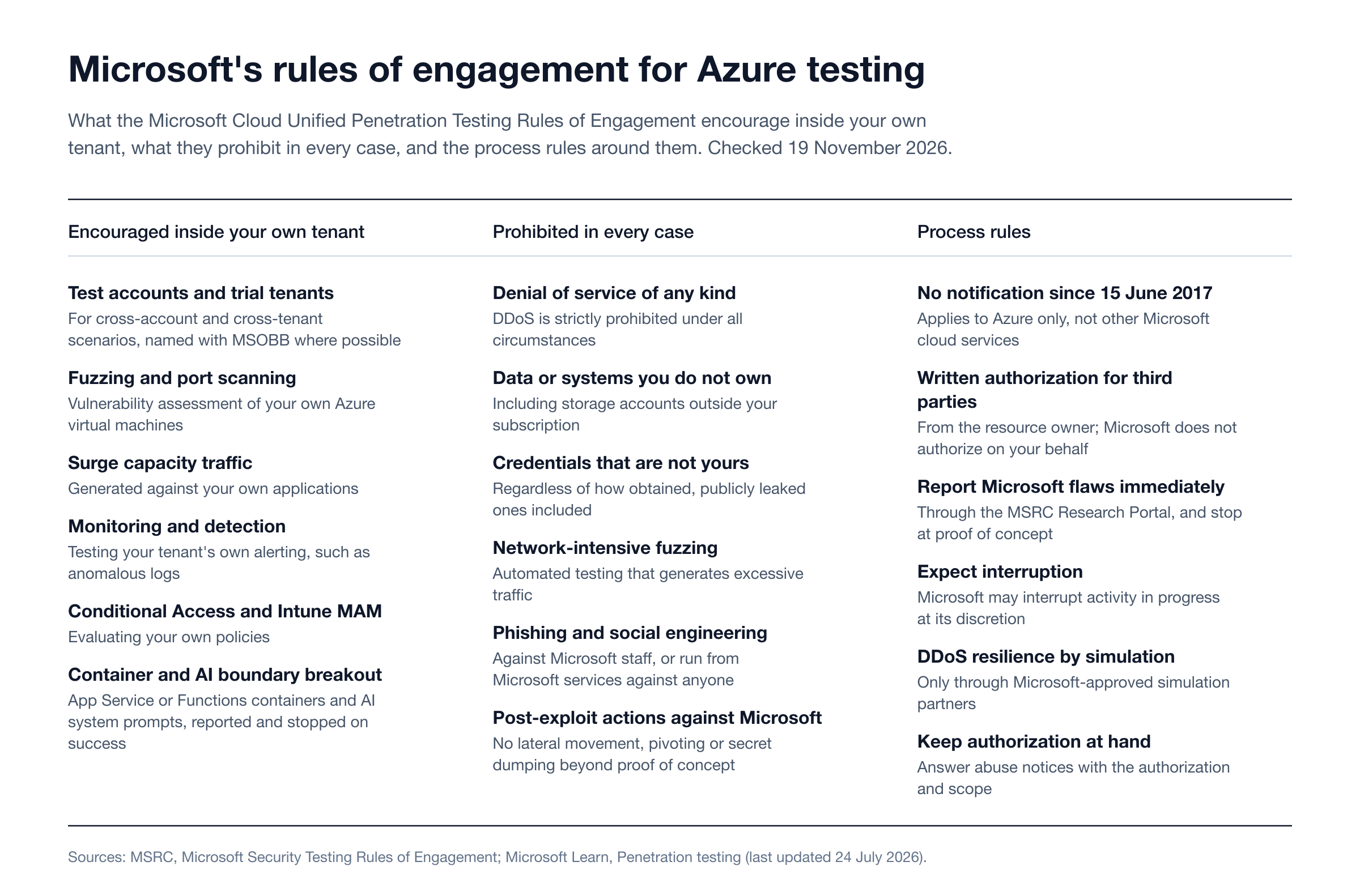
Figure 1: Microsoft's rules of engagement for Azure penetration testing, as checked on 19 November 2026. Sources: MSRC Rules of Engagement and Microsoft Learn, Penetration testing.
Do you need to notify Microsoft before an Azure penetration test?
No. Microsoft Learn states: "As of June 15, 2017, Microsoft no longer requires pre-approval to conduct a penetration test against Azure resources." The same passage carries a limit that buyers miss: the change "applies only to Microsoft Azure and doesn't apply to any other Microsoft Cloud Service." The unified rules themselves cover all "Microsoft Online Assets," Microsoft 365 included (LinkedIn, GitHub and Activision Blizzard have their own processes), so a Microsoft 365 test in the same engagement follows the same prohibitions. Our Microsoft 365 security assessment guide covers that side.
What replaced notification is authorization. Third parties such as consultancies and red teams can test "if they have explicit written authorization from the resource owner," documented in the service agreement, and "Microsoft doesn't grant authorization on the customer's behalf."
What Microsoft encourages you to test
The MSRC rules list activities Microsoft actively encourages, all of which "must be performed within your own tenant or assets" you are authorized to test:
Creating test accounts or trial tenants to evaluate cross-account or cross-tenant scenarios, using the string "MSOBB" in the account or tenant name where possible.
Fuzzing, port scanning or vulnerability assessments of your own Azure virtual machines.
Generating traffic to test surge capacity within your applications.
Testing your tenant's security monitoring and detection systems.
Evaluating Conditional Access or Intune mobile application management policies.
Attempting to break out of shared service containers such as App Service (Azure Websites) or Azure Functions, with responsible reporting and immediate cessation on success.
Attempting to break out of AI system boundaries, including bypassing system prompt restrictions.
For red teams, Microsoft Learn adds a useful clarification: "Within authorized scope, the ROE doesn't enumerate which adversary techniques are permitted, so the controlling text is the prohibited-activities list."
What Microsoft prohibits
These activities are not permitted, whatever the client authorizes:
Accessing customer or Microsoft data, or systems you do not own or have explicit permission to access.
"Using, accessing, or retrieving credentials or other secrets that are not your own," including publicly leaked ones.
Interacting with storage accounts outside your subscription.
Denial-of-service testing of any kind: "Distributed Denial-of-service (DDoS) attacks are strictly prohibited under all circumstances."
Network-intensive fuzzing or automated testing that generates excessive traffic.
Phishing Microsoft employees, or using Microsoft services, Azure included, to phish anyone else.
Post-compromise actions against Microsoft's own services beyond an initial proof of concept, such as "dumping secrets, executing additional code, performing lateral movement, or pivoting."
DDoS resilience is testable only through the Microsoft-approved simulation partners listed on the Learn page.
Report, stop and keep your authorization within reach
If testing surfaces a flaw in Microsoft's own service rather than your configuration, "a vulnerability must be reported immediately through the Research Portal," and testing of it stops at proof of concept. "Microsoft may, at our discretion, interrupt attacks in progress by you or your agents," and its abuse detection sometimes flags legitimate tests; Microsoft's advice is to answer any abuse notice "with your customer authorization and a description of the in-scope activity." Our cloud penetration testing rules of engagement guide compares these rules with AWS and Google Cloud.
Shared responsibility: which half of Azure you are testing
Microsoft's shared responsibility model is the clearest statement of what an Azure penetration test is for. "For all cloud deployment types, you own your data and identities." Regardless of service model, the customer always keeps data, endpoints, accounts and access management, which Microsoft defines as "implementing and managing access controls, including role-based access control (RBAC), multifactor authentication, and conditional access policies."
Responsibility area | IaaS (VMs, virtual networks) | PaaS (App Service, Functions, SQL, Storage) | SaaS (Microsoft 365) |
|---|---|---|---|
Customer data, configurations and settings, identities and users | Customer | Customer | Customer |
Applications | Customer | Shared | Shared |
Network controls | Customer | Shared | Microsoft |
Operating system | Customer | Microsoft | Microsoft |
Physical hosts, network and datacenter | Microsoft | Microsoft | Microsoft |
Table: the shared responsibility matrix, revised 24 August 2026. Source: Microsoft Learn, Shared responsibility in the cloud.
The test never targets Microsoft's rows. It targets yours: every role you assigned, identity you created, firewall rule you opened and log you did or did not route. Microsoft's own audit reports describe Microsoft's controls, not how your tenant is put together, a gap we cover in CSP compliance reports vs cloud pentest evidence.
What an Azure penetration test covers
These ten areas are where Azure compromises start and spread. For each, the question is not "is there a finding?" but "does this weakness connect to anything that matters?"
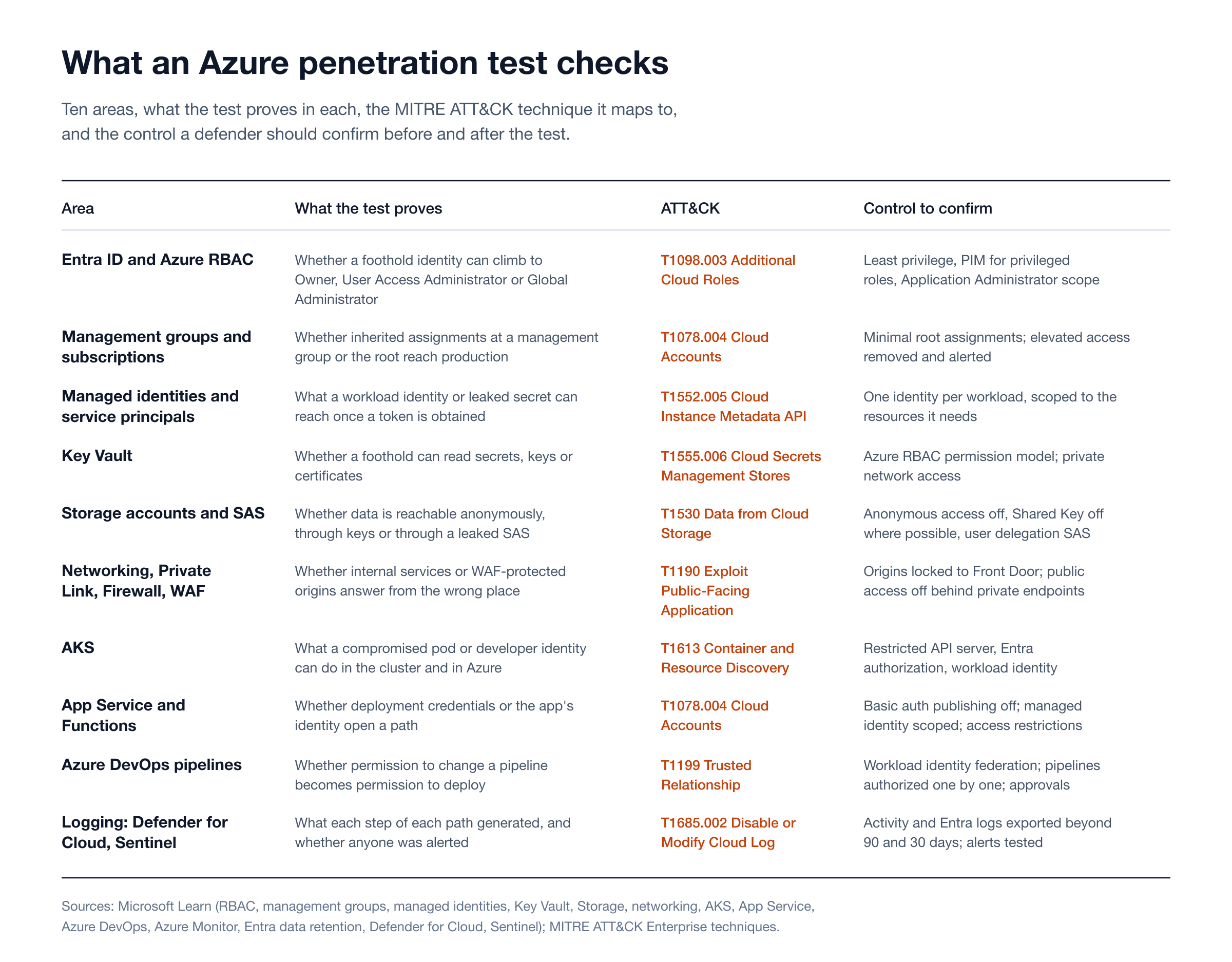
Figure 2: The ten areas of an Azure penetration test, with the MITRE ATT&CK technique each maps to and the control to confirm. Sources: Microsoft Learn and MITRE ATT&CK.
Entra ID and Azure RBAC
Azure has two authorization systems, and escalation lives in the seams. Microsoft is explicit that "Microsoft Entra role assignments do not grant access to Azure resources, and Azure role assignments do not grant access to Microsoft Entra ID." Then come the bridges. A Global Administrator can elevate access and is then "assigned the User Access Administrator role in Azure at root scope (/)," which lets them grant any Azure role anywhere in the tenant. In the other direction, an Azure role that can change a workload's identity or a pipeline's credentials can lead back into the directory.
The test maps which identities can reach which roles, then proves the shortest realistic chain. Two roles deserve a look in every tenant: Entra Application Administrator, whose holders "can add credentials to an application, and use those credentials to impersonate the application's identity," which Microsoft notes "may be an elevation of privilege"; and Azure Contributor, often treated as harmless but able to read storage account keys. ATT&CK records the end state as Additional Cloud Roles (T1098.003). Conditional Access, PIM and guest controls are covered hop by hop in the Entra ID penetration testing guide and the Conditional Access validation matrix.
Management groups and subscriptions
Management groups sit above subscriptions, and the governance conditions you apply to them "cascade by inheritance to all associated subscriptions." At the top, "any assignment of user access or policy on the root management group applies to all resources within the directory," and "no one has default access to the root management group" except Global Administrators who elevate themselves.
The test reads the hierarchy as an attacker would: who holds Owner, User Access Administrator or Contributor at a management group rather than one subscription, which inherited assignments nobody remembers, whether anyone still holds elevated root access, and whether a sandbox shares an identity or network path with production. Microsoft says elevated access should be removed "once you have made the changes you need to make at root scope," logs elevation in both Entra audit logs and the activity log, and ships an "Azure RBAC (Elevate Access)" analytics template for Sentinel. Confirming that alert fires is a cheap, high-value test.
Managed identities and service principals
Managed identities remove stored secrets but move the question from "where is the secret?" to "what can this workload's identity do?" A system-assigned identity belongs to one resource. A user-assigned identity "can be used by multiple resources," and Microsoft recommends that type for its services, so one over-privileged identity can be inherited by every VM, function or app it is attached to. Service principals with client secrets or certificates add credentials that leak from code, pipelines and laptops (Additional Cloud Credentials, T1098.001).
On virtual machines, the Instance Metadata Service hands managed identity tokens to code at the non-routable address 169.254.169.254, and only to requests that "must contain the header Metadata: true" and "must not contain an X-Forwarded-For header." Those rules block many naive server-side request forgery attempts, so the test checks the cases they miss, such as code that lets a user control request headers, and then what the identity can reach once a token is obtained (T1552.005). The fix is one identity per workload, scoped to what it needs. See non-human identity attacks and the workload identity federation test.
Key Vault
Key Vault's authorization model decides the blast radius of every role above it. Microsoft's Key Vault guidance warns that under the legacy access policy model, "users with the Contributor, Key Vault Contributor, or any role that includes Microsoft.KeyVault/vaults/write permissions can grant themselves data plane access." Azure RBAC is the recommended model and, from API version 2026-02-01, the default for new vaults, so existing vaults need checking one by one. The test inventories each vault's permission model, network exposure and readers (Cloud Secrets Management Stores, T1555.006), then proves whether a foothold can read a secret, such as a service principal secret with subscription-wide rights.
Storage accounts and SAS
"By default, anonymous access to your blob data is always prohibited," and Microsoft recommends keeping it disallowed at the account level, so exposure now comes from elsewhere. Owner, Contributor and Storage Account Contributor include the action that lists account keys, with which "a user can use the account access keys to access all data in a storage account." Static websites are a deliberate exception: "the $web container is always publicly accessible."
Shared access signatures are the harder problem. Of the three types, Microsoft recommends the user delegation SAS, secured with Entra credentials rather than the account key, and is candid about the rest: "It's not possible to audit the generation of SAS tokens," and "if a SAS is leaked, it can be used by anyone who obtains it." The test looks for SAS URLs in code, front-end bundles, logs and tickets, checks the expiry and permissions of any it finds, and checks whether Shared Key authorization can be disabled (Data from Cloud Storage, T1530).
Networking: NSGs, Private Link, Azure Firewall and the WAF
Every network security group ships with a default AllowVNetInBound rule that allows traffic from the VirtualNetwork service tag to the VirtualNetwork tag, and Microsoft defines that tag to include "all connected on-premises address spaces" and "peered virtual networks," so more can reach a subnet than its diagram suggests. Private endpoints give a service a private address, but Microsoft notes they "don't necessarily restrict public network access to it," so the test checks the public endpoint as well, and checks Azure Firewall egress rules the same way.
At the edge, Microsoft's Front Door guidance says to configure the origin "to block traffic that hasn't been sent through Front Door. Otherwise, traffic might bypass Front Door's web application firewall," and warns that "IP address filtering alone isn't sufficient," because other Azure customers share Front Door's addresses, so origins should also check the X-Azure-FDID header. Testing whether the origin answers directly is a standard item (Exploit Public-Facing Application, T1190).
AKS
Azure Kubernetes Service adds Kubernetes RBAC on top of Azure RBAC and Entra ID. By default, "the Kubernetes API server uses a public IP address," which authorized IP ranges or a private cluster can restrict, and Microsoft states that "Kubernetes environments aren't safe for hostile multitenant usage." The test checks who can reach and authenticate to the API server, how Entra identities map to cluster roles, whether pods use workload identity or can reach node credentials, and what a compromised pod can discover (Container and Resource Discovery, T1613). Our cloud and Kubernetes scoping guide covers how cluster count changes the work.
App Service and Functions
App Service and Functions move the operating system to Microsoft but leave identity, configuration, deployment and code with you. The rules of engagement encourage container breakout attempts here, reported and stopped on success, but the common findings are closer to home. App Service still offers basic authentication for FTP and Web Deploy, and Microsoft points enterprises to Entra ID instead. The test checks whether publishing credentials are enabled and exposed, what the app's managed identity can reach, and whether app settings hold secrets that belong in Key Vault. The applications' own business logic is a web application and API penetration test, scoped alongside.
Azure DevOps pipelines
Pipelines are where permission to change code becomes permission to change Azure. Microsoft's service connection guidance recommends workload identity federation, which "eliminates the need for secrets and secret management," and says that granting a connection to all pipelines "isn't recommended." The test follows the path from who can edit a pipeline, to its service connection, to the role that connection's identity holds in Azure, and checks whether approvals stand between a contributor and production (Trusted Relationship, T1199). Our Azure DevOps service connection assessment sets out the full matrix, and the GitHub Actions OIDC trust matrix covers the GitHub equivalent.
Logging and detection: Defender for Cloud and Sentinel
A path nobody detected is a finding in itself. The activity log records control plane changes, but "Azure retains activity log events for 90 days and then deletes them," it "doesn't typically capture read operations," and it "isn't an authentication or authorization audit log." Resource logs, such as Key Vault secret reads, "aren't collected by default and require configuration with a diagnostic setting." Entra audit and sign-in logs are kept for seven days on Entra ID Free and 30 days on P1 or P2 unless you export them.
Microsoft Defender for Cloud is a cloud-native application protection platform with free Foundational CSPM, and Defender for Storage covers "Shared Access Signature (SAS) token misuse." Microsoft Sentinel is Microsoft's cloud-native SIEM. The test records what each step generated, whether an alert reached a person, and whether a compromised identity could change diagnostic settings (Disable or Modify Cloud Log, T1685.002); purple teaming exercises the response live.
Azure configuration review vs penetration test
Most Azure buyers already have a posture tool, so the question is what a penetration test adds. Microsoft's own baseline is the Microsoft cloud security benchmark, now in a v2 preview that "supersedes" v1, with 12 security domains and "more than 420 Azure Policy built-in definitions," and Defender for Cloud includes it as a built-in standard. The Center for Internet Security lists the CIS Microsoft Azure Foundations Benchmark at version 7.0.0; with version 6.0.0, CIS moved its Entra ID recommendations to the CIS Microsoft 365 Foundations Benchmark, so an Azure baseline alone may not check the directory. Both are configuration baselines. Microsoft itself notes that mapping its controls to other standards "doesn't necessarily translate to the full compliance" of those standards.
Question | Configuration review (MCSB, CIS Azure Foundations, Defender for Cloud) | Azure penetration test |
|---|---|---|
What it answers | Does each setting match the baseline? | Can an attacker chain settings, identities and code into real impact? |
Identity depth | Flags risky roles and missing MFA one control at a time | Proves the chain from a foothold to Owner, Global Administrator or data |
Typical output | Pass or fail per control, secure score, remediation list | Validated attack paths with evidence, impact and fix order |
Business logic and code | Out of scope | Reachable where the application or pipeline is in scope |
Detection | Checks that logging is configured | Shows what logging and alerting actually caught during the attack |
Cadence | Continuous | Periodic, and after significant change |
Rules of engagement | Not needed (read-only) | Required: Microsoft's rules plus your written authorization |
Microsoft's benchmark expects both. Control PV-7, "Conduct regular red team operations," says to "simulate real-world attacks through red team operations and penetration testing" and to "adhere to Microsoft Cloud Penetration Testing Rules of Engagement," and Microsoft maps it to NIST SP 800-53 CA-8, PCI DSS v4 requirements 11.4.1, 11.4.2 and 11.4.6, and SOC 2 CC7.3 and CC7.4 (MCSB v2, Posture and Vulnerability Management). Run the posture tool continuously, fix what it flags, then test to prove which remaining weaknesses connect; see CNAPP blind spots in cloud penetration testing and the cloud security assessment guide.
What real Azure and Entra incidents teach an Azure penetration test
The public record for Azure is dominated by identity. Three documented cases show why a test spends most of its time there, and the KEV catalog shows why a patch-led view misses it.
Storm-0558: forged tokens and a logging tier
The US Cyber Safety Review Board's report of 20 March 2024 found that "in May and June 2023, a threat actor compromised the Microsoft Exchange Online mailboxes of 22 organizations and over 500 individuals" using authentication tokens "signed by a key Microsoft had created in 2016." The Board concluded "this intrusion was preventable and should never have occurred," and recorded that Microsoft found "a flaw in the token validation logic used by Exchange Online that could allow a consumer key to access enterprise Exchange accounts if those Exchange accounts were not coded to reject a consumer key." Microsoft's root cause post, updated on 12 March 2024, put it plainly: "Developers in the mail system incorrectly assumed libraries performed complete validation."
Customers could not patch Microsoft's key infrastructure, but two lessons transfer. A customer, not Microsoft, spotted the intrusion: the US State Department alerted on the MailItemsAccessed log, which the CSRB notes "was not accessible without that 'premium' service" at the time. Testing which identity logs you collect and alert on tests the control that worked. And any API you build on Entra ID should be tested for the same class of mistake: does it validate issuer, tenant and audience itself, or assume a library did?
Midnight Blizzard: a test tenant and an OAuth application
Microsoft's guidance for responders, published on 25 January 2024, describes how its own corporate environment was breached: a password spray (T1110.003) against "a legacy, non-production test tenant account that did not have multifactor authentication (MFA) enabled," followed by the compromise of "a legacy test OAuth application that had elevated access to the Microsoft corporate environment." Microsoft's first recommendation was to audit "the current privilege level of all identities, users, service principals."
The lesson: "non-production" tenants and forgotten app registrations are in scope if they hold rights over production. Our password spraying guide covers the entry step.
CVE-2025-55241: a critical Entra flaw with no customer patch
NIST's National Vulnerability Database lists CVE-2025-55241, "Azure Entra ID Elevation of Privilege Vulnerability," published on 4 September 2025, with a Microsoft CVSS 3.1 score of 10.0 (Critical); NIST's own assessment is 9.8. Microsoft's Security Update Guide marks it as not exploited and needing no customer action, and its CVE.org record carries the exclusively-hosted-service tag Microsoft uses for such fixes. The researcher who found it, Dirk-jan Mollema, reports that undocumented service-to-service "actor tokens," combined with the legacy Azure AD Graph API's failure to validate the originating tenant, could let a token from one tenant act in another. He reports notifying Microsoft on 14 July 2025 and a fix on 17 July 2025, and writes that "requesting Actor tokens does not generate logs." What customers can test is the residue, such as legacy Azure AD Graph permissions still granted to applications, and whether directory changes made under unusual service identities raise an alert.
What the CISA KEV catalog shows, and what it misses
We counted Azure and Entra entries in CISA's Known Exploited Vulnerabilities catalog on 19 November 2026. Method: we downloaded the catalog's JSON feed (version 2026.11.18, 1,786 entries, 391 of them Microsoft) and searched every field of every entry for "Azure" and, separately, for "Entra," "Azure AD" and "Azure Active Directory" as whole words.
Entra ID or Azure AD: zero entries.
Azure: four Microsoft entries, all for Open Management Infrastructure "within Azure VM Management Extensions": CVE-2021-38647 (remote code execution, which CISA marks as known to be used in ransomware campaigns), CVE-2021-38645, CVE-2021-38648 and CVE-2021-38649, all added on 3 November 2021.
The near-empty result is not reassurance. KEV lists only flaws with "reliable evidence" of exploitation and "a clear remediation action," and the CSRB noted that cloud providers "do not always register and publicly disclose" CVEs when the fix needs no customer action. Microsoft said in June 2024 it would "issue CVEs for critical cloud service vulnerabilities, regardless of whether customers need to install a patch"; CVE-2025-55241 is that kind of record, and it is absent from the 18 November 2026 catalog. So is CVE-2026-69836, a Microsoft Entra ID remote code execution flaw scored 10.0 and published on 20 August 2026, which Microsoft's Security Update Guide lists as needing no customer action and, after a correction on 21 August, as not exploited. Patch feeds describe Microsoft's half of the shared responsibility model. Your half, the roles, identities, keys and network paths, is what a penetration test measures.
How to scope an Azure penetration test
A precise scope produces a precise quote. Work through these steps with your provider before the statement of work is signed.
Name the tenants. List every Entra tenant in scope, including test, development and acquired tenants that hold rights over production, and any tenant trusted through B2B collaboration or multi-tenant apps.
Map the management group tree. Share the hierarchy from the root down, mark what is in scope, and flag inherited role and policy assignments.
List the subscriptions and Regions. Give each subscription's purpose (production, staging, shared services, sandbox), its Regions, and whether it holds regulated data.
Inventory identities. Count privileged Entra roles, PIM-eligible roles, app registrations and service principals with credentials, user-assigned managed identities and guests (the Entra ID penetration testing guide has the full directory inventory). Identity volume usually drives effort more than VM count does.
Inventory workloads. List AKS clusters, App Service and Function apps, VMs, Key Vaults, storage accounts, databases and Azure DevOps organizations, plus the edge services in front of them.
Agree starting points. Choose external, assumed breach or both, and define each foothold precisely: a standard user, a guest, a Reader on one subscription, a developer with pipeline edit rights, or a compromised workload identity.
Set the rules of engagement. Record that testing follows Microsoft's rules, list exclusions, set windows, name emergency contacts on both sides, and agree how a finding in Microsoft's own service is reported.
Decide on detection validation. Say whether the SOC is told and whether the test should record what Defender for Cloud and Sentinel saw.
Define evidence and retest. Agree the evidence points that prove a path without touching real data, the report format your auditors need, and the retest window.
The starting point is the decision that most changes results: external-only tests find exposed endpoints, while assumed-breach tests find the identity chains that the incidents above used. For tests after a migration, see our cloud red team exercise guide.
What you should receive: deliverables
The report should serve three readers: the engineers who fix, the security lead who prioritizes and the auditor or customer who asks for evidence. Expect:
An executive summary of the most serious attack paths in business terms: which identity reached which data or control, and from where.
Attack path narratives with each hop evidenced, and where a control would have stopped it.
Individual findings with severity, resource IDs, reproduction evidence, MITRE ATT&CK mapping and specific remediation, such as the role assignment to remove.
A detection review of what each step generated in the activity log, Entra logs, Defender for Cloud and Sentinel, and which steps went unseen.
A scope and methodology statement naming tenants, subscriptions, starting points, dates and the rules of engagement followed.
A retest of fixed findings, with the report updated to show status.
Our penetration testing report sample guide shows what each section should look like.
What drives the cost of an Azure penetration test
There is no standard price for an Azure penetration test, because two tenants with the same number of virtual machines can differ widely in identity complexity. These are the factors that move the effort:
Tenants and the management group tree: one tenant with flat subscriptions is a different job from several tenants with deep hierarchies and inherited assignments.
Identity volume and privilege: privileged roles, app registrations, service principals with credentials and managed identities, and how many hold rights above a single resource group.
Workload mix: AKS, App Service and Functions, VMs, data services and AI services each add configuration to review and paths to prove.
Pipelines: the Azure DevOps or GitHub organizations and service connections that can deploy into scope.
The application layer: whether the web applications and APIs on Azure are in the same engagement.
Starting points, detection validation and retest: each foothold, each SOC measurement and each pre-audit retest adds time.
Stingrai quotes Azure engagements after a scoping call through Get a Quote; see the cloud penetration testing service for what is covered. If you also run web applications on App Service or AKS, Stingrai's Hybrid Pentest covers one web application and associated APIs: Snipe tests the full application while Stingrai's certified penetration testers test the same application manually alongside it and validate Snipe's findings, at US$6,800 per assessment. The continuous plan is US$1,275 per month on a 12-month plan, with monthly Snipe testing, human-verified, and a quarterly deep dive by Stingrai's penetration testers (pricing).
How to choose an Azure penetration testing provider
These questions separate an Azure engagement from a network scan pointed at Azure IP addresses:
Question to ask | What a good answer includes |
|---|---|
Is the firm accredited? | Company-level accreditation that you can verify on the accrediting body's own register, not only individual certifications |
Who exactly will test? | Named penetration testers, their certifications and Azure experience, and confirmation the same people do the work |
Do they start from identity? | Entra roles, Azure RBAC, management group inheritance, managed identities and app registrations in the proposal, not only port scanning |
Do they know Microsoft's rules? | A clear account of what the rules of engagement allow and prohibit, how they handle a finding in Microsoft's own service, and how they avoid DoS behaviour |
What starting points do they propose? | Assumed-breach footholds defined in writing, with accounts you provision, alongside external testing |
How do they prove impact safely? | Agreed evidence points that show a path works without reading real customer data or touching availability |
Will they report detection? | A record of what the activity log, Entra logs, Defender for Cloud and Sentinel saw at each step |
Does the report fit your audit? | Scope, methodology, dates and an attestation letter your auditors and customers accept |
For a shortlist of firms, see our ranking of the best cloud penetration testing companies.
How Stingrai approaches Azure penetration testing
Stingrai is a CREST-accredited penetration testing company founded in Toronto in 2021. On the CREST Marketplace, Stingrai Inc holds two CREST accreditations, Penetration Testing and AI-Enabled Penetration Testing, and the company certification CREST AI Charter; we are proud to be a CREST member, and the marketplace is the place to verify it. Team members separately hold the CREST CRT certification.
For Azure, that means:
Named penetration testers: Azure engagements are run by two named penetration testers from a team holding OSCE³, OSWE, OSEP, CREST CRT and CISSP certifications, with the report reviewed by the team lead and an engagement partner.
Identity first, then workloads: app registrations, service principals and consent grants, Conditional Access gaps, hybrid-join and on-premises trust, management group and subscription RBAC, then storage, Key Vault, AKS and Functions, all within Microsoft's rules of engagement and your written scope.
Delivery through the PTaaS portal: findings are posted to the Stingrai PTaaS portal as they are confirmed, with proof of concept, remediation guidance, Jira and Slack integration and retesting, and every human-led and hybrid report ships with an attestation letter.
Audit evidence: reports written for auditors and enterprise customers, supporting SOC 2, ISO 27001, PCI DSS and HIPAA programs.
One-time or continuous: an annual Azure test for an audit cycle, or a continuous program that retests as tenants, subscriptions and pipelines change.
Frequently Asked Questions
Do you need Microsoft's permission to penetration test Azure?
No. Microsoft has not required pre-approval for penetration testing of Azure resources since 15 June 2017. You must still follow the Microsoft Cloud Unified Penetration Testing Rules of Engagement, test only what you own or are authorized to test, and give any third-party tester explicit written authorization, because Microsoft does not grant it on the customer's behalf.
What is Azure penetration testing?
Azure penetration testing is an authorized engagement in which penetration testers try to turn weaknesses in your Entra ID tenant, management groups, subscriptions and workloads into proven impact, such as escalating to Owner or Global Administrator, reading Key Vault secrets or deploying through a pipeline. It covers the half of Azure the shared responsibility model assigns to you.
What does Microsoft prohibit during an Azure penetration test?
Denial-of-service testing of any kind, data or systems you do not own, credentials that are not your own, storage accounts outside your subscription, network-intensive fuzzing, phishing Microsoft employees or phishing from Microsoft services, and post-exploit actions against Microsoft's own services beyond an initial proof of concept. DDoS resilience testing goes through Microsoft-approved simulation partners.
What should be in scope for an Azure penetration test?
The tenants, management group tree and subscriptions; Entra roles and Azure RBAC; app registrations, service principals and managed identities; Key Vaults and storage accounts; network controls and edge services; AKS, App Service and Functions; Azure DevOps service connections; and the logging that should detect an attack. Agree assumed-breach starting points before testing begins.
What is the difference between an Azure security assessment and an Azure penetration test?
A security assessment or configuration review checks settings against a baseline such as the Microsoft cloud security benchmark or the CIS Microsoft Azure Foundations Benchmark. A penetration test proves whether settings, identities and code chain into real impact, with evidence for each step. Microsoft's benchmark control PV-7 expects both.
Does Microsoft Defender for Cloud replace an Azure penetration test?
No. Defender for Cloud scores configuration, recommends fixes and raises threat alerts, and should run continuously. A penetration test shows which remaining weaknesses connect into an attack path, measures whether Defender for Cloud and Sentinel detected it, and gives auditors and customers independent evidence.
How much does an Azure penetration test cost?
There is no standard price. Cost depends on tenants and subscriptions, identity volume and privilege, the workload mix, the number of assumed-breach starting points, pipelines in scope, whether web applications are included and whether detection is validated. Stingrai quotes Azure engagements after a scoping call.
How often should you run an Azure penetration test?
Test at least once a year and after significant change, such as a new landing zone, a tenant merger or a move to AKS. Microsoft maps its benchmark control for red team operations and penetration testing to PCI DSS v4 requirements 11.4.1, 11.4.2 and 11.4.6 and SOC 2 CC7.3 and CC7.4, so audit cycles often set the minimum.
Can an Azure penetration test include Entra ID and Conditional Access?
Yes. Microsoft's rules of engagement explicitly encourage evaluating Conditional Access and Intune mobile application management policies and testing your tenant's monitoring. Identity is usually where an Azure test spends most of its time, because the paths to Global Administrator or subscription Owner run through Entra roles, app registrations, service principals and Azure RBAC.
Related reading
Cloud penetration testing rules of engagement: AWS, Azure and GCP
AWS Penetration Testing (2026): Policy, Scope, Methodology and Cost Drivers
Cloud Security Assessment (2026): What It Tests on AWS, Azure and GCP
References
Microsoft Security Response Center. Microsoft Security Testing Rules of Engagement. Checked 19 November 2026. https://www.microsoft.com/en-us/msrc/pentest-rules-of-engagement. The binding rules for testing Microsoft cloud assets.
Microsoft Learn. Penetration testing (Azure security fundamentals). Last updated 24 July 2026. https://learn.microsoft.com/en-us/azure/security/fundamentals/pen-testing. Summary of the rules for Azure, including the 15 June 2017 change.
Microsoft Learn. Shared responsibility in the cloud. Revised 24 August 2026. https://learn.microsoft.com/en-us/azure/security/fundamentals/shared-responsibility.
Microsoft Learn. Elevate access to manage all Azure subscriptions and management groups. https://learn.microsoft.com/en-us/azure/role-based-access-control/elevate-access-global-admin.
Microsoft Learn. Microsoft Entra built-in roles. https://learn.microsoft.com/en-us/entra/identity/role-based-access-control/permissions-reference.
Microsoft Learn. Organize your resources with management groups. https://learn.microsoft.com/en-us/azure/governance/management-groups/overview.
Microsoft Learn. Managed identities for Azure resources and Azure Instance Metadata Service. https://learn.microsoft.com/en-us/entra/identity/managed-identities-azure-resources/overview and https://learn.microsoft.com/en-us/azure/virtual-machines/instance-metadata-service.
Microsoft Learn. Azure RBAC vs. access policies (Key Vault). https://learn.microsoft.com/en-us/azure/key-vault/general/rbac-access-policy.
Microsoft Learn. Grant limited access to data with shared access signatures and Remediate anonymous read access to blob data. https://learn.microsoft.com/en-us/azure/storage/common/storage-sas-overview and https://learn.microsoft.com/en-us/azure/storage/blobs/anonymous-read-access-prevent.
Microsoft Learn. Network security groups overview, Azure service tags overview, What is a private endpoint?, What is Azure Firewall?, Introduction to Azure Web Application Firewall and Secure traffic to Azure Front Door origins. https://learn.microsoft.com/en-us/azure/virtual-network/network-security-groups-overview, https://learn.microsoft.com/en-us/azure/virtual-network/service-tags-overview, https://learn.microsoft.com/en-us/azure/private-link/private-endpoint-overview, https://learn.microsoft.com/en-us/azure/firewall/overview, https://learn.microsoft.com/en-us/azure/web-application-firewall/overview and https://learn.microsoft.com/en-us/azure/frontdoor/origin-security.
Microsoft Learn. Security concepts in Azure Kubernetes Service and Disable basic authentication for App Service deployment. https://learn.microsoft.com/en-us/azure/aks/concepts-security and https://learn.microsoft.com/en-us/azure/app-service/configure-basic-auth-disable.
Microsoft Learn. Use an Azure Resource Manager service connection. https://learn.microsoft.com/en-us/azure/devops/pipelines/library/connect-to-azure?view=azure-devops.
Microsoft Learn. Activity log in Azure Monitor, Microsoft Entra data retention, Microsoft Defender for Cloud overview and What is Microsoft Sentinel? https://learn.microsoft.com/en-us/azure/azure-monitor/fundamentals/activity-log, https://learn.microsoft.com/en-us/entra/identity/monitoring-health/reference-reports-data-retention, https://learn.microsoft.com/en-us/azure/defender-for-cloud/defender-for-cloud-introduction and https://learn.microsoft.com/en-us/azure/sentinel/overview.
Microsoft Learn. Microsoft cloud security benchmark v2 (preview) and Posture and Vulnerability Management. https://learn.microsoft.com/en-us/security/benchmark/azure/overview and https://learn.microsoft.com/en-us/security/benchmark/azure/mcsb-v2-posture-vulnerability-management.
Center for Internet Security. CIS Microsoft Azure Benchmarks and CIS Benchmarks May 2026 Update. https://www.cisecurity.org/benchmark/azure and https://www.cisecurity.org/insights/blog/cis-benchmarks-may-2026-update. The Azure Foundations Benchmark is listed at version 7.0.0; version 6.0.0 moved Entra ID recommendations to the Microsoft 365 benchmark.
Cyber Safety Review Board. Review of the Summer 2023 Microsoft Exchange Online Intrusion. 20 March 2024. https://www.cisa.gov/sites/default/files/2025-03/CSRBReviewOfTheSummer2023MEOIntrusion508.pdf.
Microsoft Security Response Center. Results of Major Technical Investigations for Storm-0558 Key Acquisition. 6 September 2023, updated 12 March 2024. https://www.microsoft.com/en-us/msrc/blog/2023/09/results-of-major-technical-investigations-for-storm-0558-key-acquisition.
Microsoft Threat Intelligence. Midnight Blizzard: Guidance for responders on nation-state attack. 25 January 2024. https://www.microsoft.com/en-us/security/blog/2024/01/25/midnight-blizzard-guidance-for-responders-on-nation-state-attack/.
NIST National Vulnerability Database. CVE-2025-55241. Published 4 September 2025. https://nvd.nist.gov/vuln/detail/CVE-2025-55241.
Microsoft Security Response Center. Security Update Guide: CVE-2025-55241 and CVE-2026-69836. https://msrc.microsoft.com/update-guide/vulnerability/CVE-2025-55241 and https://msrc.microsoft.com/update-guide/vulnerability/CVE-2026-69836. Exploitation status, customer action and revision history.
Dirk-jan Mollema. Obtaining Global Admin in every Entra ID tenant with Actor tokens. 17 September 2025. https://dirkjanm.io/obtaining-global-admin-in-every-entra-id-tenant-with-actor-tokens/. The original researcher's account.
Microsoft Security Response Center. Toward greater transparency: Unveiling Cloud Service CVEs. 27 June 2024. https://www.microsoft.com/en-us/msrc/blog/2024/06/toward-greater-transparency-unveiling-cloud-service-cves.
CISA. Known Exploited Vulnerabilities Catalog. JSON feed version 2026.11.18, downloaded 19 November 2026. https://www.cisa.gov/known-exploited-vulnerabilities.
MITRE. ATT&CK Enterprise techniques (T1098.003, T1078.004, T1098.001, T1552.005, T1555.006, T1530, T1190, T1613, T1199, T1685.002, T1110.003). https://attack.mitre.org/.
CREST. Stingrai Inc supplier profile. Checked 19 November 2026. https://marketplace.crest.org/supplier/stingrai-inc/.
Talk to Stingrai
Stingrai scopes Azure penetration tests around your tenants, subscriptions and identities, with two named penetration testers and a report your auditors can use. Get a Quote or book a free discovery call.