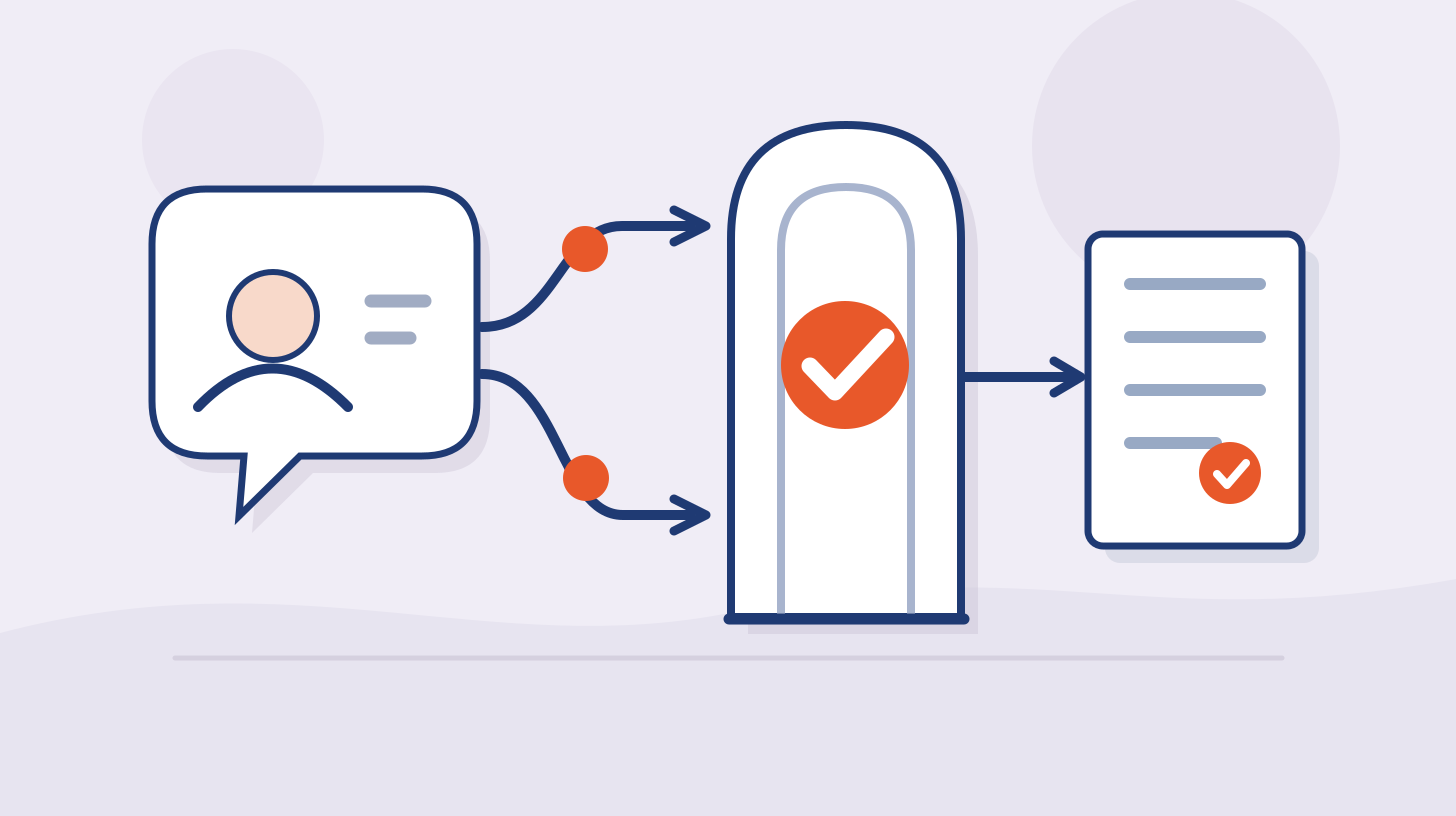





Supabase's own production security checklist states the risk at the centre of most AI-built apps in one sentence: a table without row level security and reasonable policies "lets any client read and change its data". The key that reaches that table ships inside the app, so anyone who opens the site can use it. That is the flaw behind CVE-2025-48757: a March 2025 scan of 1,645 projects built with Lovable, run by a researcher then at Replit, a competing platform, found 170 of them, about 10.3%, with inadequate row level security on at least one endpoint (Palmer, May 2025). Lovable disputes the CVE on the ground that each customer is responsible for protecting the data in its own application, which is exactly why the founder needs a checklist.
Quick answer. An app built with Lovable, Bolt, Cursor, Replit, v0 or Claude Code is secure enough to launch when five things are true: every database table has row level security (or Firebase Security Rules) that ties each row to its owner; a second test account cannot read or change the first account's data; no secret key is in the browser bundle, the repository or the build chat; every server function checks who is calling before it acts; and the framework and packages are patched. The 24 checks below cover those five and the settings around them. A checklist finds configuration mistakes. It does not find business logic flaws or authorization gaps across every role, which is what a penetration test is for.
This guide is written for founders and small teams who are not security specialists and who built most of their product by prompting, and for security leads at larger companies whose teams now ship internal tools and customer-facing apps the same way. Every claim links to the platform's own documentation, a CVE record or published research.
Why AI-built apps fail in the same few places
AI coding tools are very good at producing something that runs. Whether it is safe is a separate property, and the research measures the gap:
Working is not the same as secure. In the SusVibes benchmark, built by researchers at Carnegie Mellon University and partner institutions and published at ICML 2026, the best setup on functionality (SWE-agent with Claude 4 Sonnet) produced a functionally correct solution for 57% of 186 real feature requests, but a solution that was both correct and secure for only 11.8%. No setup in the paper exceeded 12.9% on that second measure. Adding security hints to the request did not fix it (Zhao et al.).
Newer models have not closed the gap. Veracode's 2026 GenAI Code Security Report puts the average security pass rate at 56% across more than 100 models and four testing rounds, while the same models produce code that compiles almost every time (Veracode, 28 July 2026).
The flaws show up in live apps. Escape scanned more than 5,600 publicly reachable apps built on vibe coding platforms, most of them on Lovable, and reported more than 2,000 vulnerabilities, over 400 exposed secrets and 175 exposures of personal data. Its scans were passive, so those are lower bounds (Escape, October 2025).
Secrets leak faster. GitGuardian counted 28.65 million new hardcoded secrets in public GitHub commits in 2025 and measured a 3.2% secret-leak rate in Claude Code-assisted commits against a 1.5% baseline, while noting that the developer still decides what gets committed (GitGuardian, March 2026).
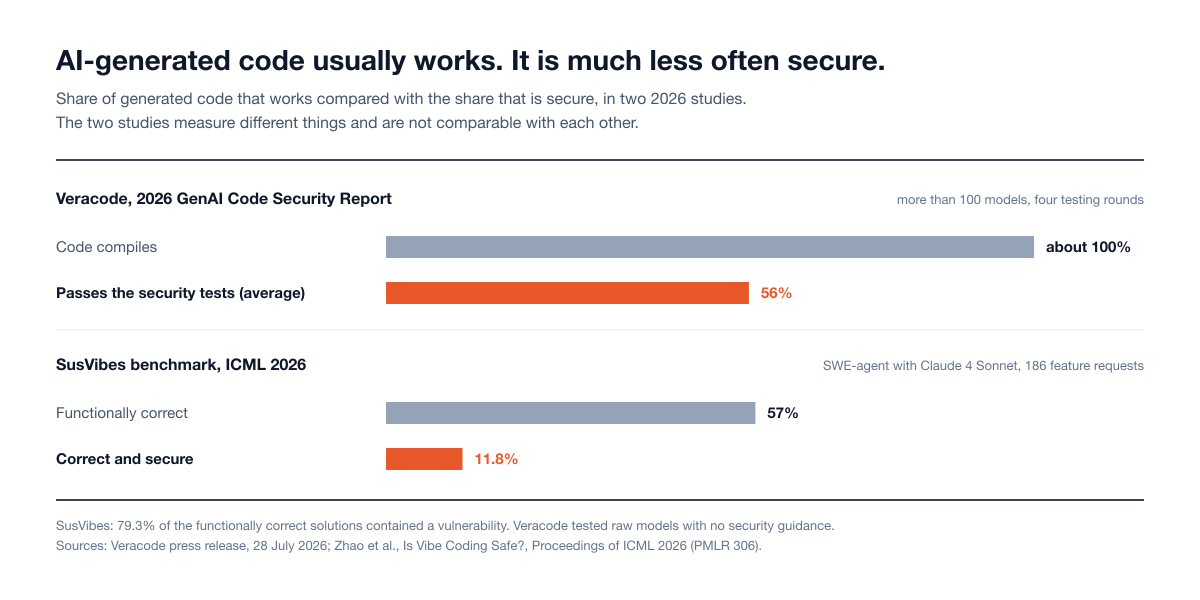
Figure 1: How often AI-generated code works compared with how often it is secure, in two 2026 studies. Sources: Veracode 2026 GenAI Code Security Report; Zhao et al., ICML 2026.
The reason is structural. Lovable's own guidance states it plainly: front-end code runs in the user's browser, where it can be inspected, changed or bypassed, so it should never make security decisions (Lovable security best practices). A prompt such as "only admins can see this page" can be satisfied by a page that merely hides a button. The rule has to live in the database or on the server, and that is where the checks below look. Our vibe coding security statistics post has the full data, and Do AI-coded apps need a penetration test? explains why language models reproduce these flaws.
How to use this checklist
Set aside an afternoon and prepare three things:
Two test accounts in your own app, created with two different email addresses, each with some data of its own. Call them A and B. If your app has roles (member, admin) or teams, create one account per role and two separate teams.
Access to your dashboards: the Supabase or Firebase console, your hosting provider, your code repository and the AI builder itself.
A list of what would hurt. Write down the five kinds of data or actions that matter most: customer emails, uploaded files, payment status, admin functions, anything health or finance related. Check those first.
Work through the seven parts in order, and do not skip Parts 1 and 2: they cover the failures documented most often in AI-built apps. Where a check fails, fix it, then repeat the two-account test in check 5, because a fix that the AI applies can loosen something else.
Part 1: Supabase security and Firebase rules (who can read and change data)
Supabase and Firebase both let the browser talk to the database directly. That is what makes them fast to build on, and it means the database rules are your access control. In Supabase the rules are row level security (RLS) policies. In Firebase they are Security Rules.
1. Row level security is on for every table. In Supabase, open Database, then Tables, and confirm RLS is enabled on every table in a schema the API exposes. Tables created in the dashboard get RLS by default, but tables created by SQL or migrations, which is how AI tools often create them, are not covered by that default unless you add the event trigger Supabase documents (Supabase security retro). This read-only query lists the tables in the public schema that are missing it (repeat it for any other exposed schema):
1select tablename
2from pg_tables
3where schemaname = 'public' and rowsecurity = false;
In Firebase, open the Rules tab for Firestore, Realtime Database and Storage and confirm none of them allows open read or write access. Firebase's documentation warns that with open rules, anyone who guesses your project ID can steal, modify or delete the data (Firebase: fix insecure rules).
2. Every policy names an owner. Turning RLS on blocks everything, the app stops working, and the quickest way to make it work again is a policy that allows everyone. Read each policy. A policy whose condition is simply true, or a Firebase rule that only checks request.auth != null, lets every visitor or every signed-in user reach every row. A correct policy compares the row's owner with the caller:
1create policy "Owners read their own profile"
2on public.profiles for select
3to authenticated
4using ( (select auth.uid()) = user_id );
The Firebase equivalent is allow read, write: if request.auth.uid == userId; on a path that contains the user's ID. Supabase's linter flags an always-true condition as a permissive RLS policy, and Bolt's database check shows the same finding as "RLS Policy Always True" (Bolt database security).
3. Writes are checked as carefully as reads. For each table, ask what a signed-in user could insert or change. In Supabase, write update policies with both clauses: using decides which existing rows a user may change, and with check decides what the changed row may look like, which is what stops a user from reassigning a row to someone else (Supabase RLS guide). Make sure neither is simply true. Look hard at columns such as role, plan, is_admin, credits and payment_status. In the Lovable disclosure, the researcher reported adding a record marked as paid to a Lovable-built site without going through its payment integration. Users should not be able to write those columns at all: set them from server code.
4. Views, functions, file storage and realtime follow the same rules. These are the side doors:
Views in Postgres bypass RLS by default. On Postgres 15 and later, set
security_invoker = trueon any view the API exposes.Functions marked
security definerrun with their creator's privileges. Supabase says never to create one in an exposed schema.Storage buckets are private by default in Supabase, but a bucket marked public serves a file to anyone who has its URL (Supabase Storage buckets). Keep user uploads in private buckets with policies.
Realtime needs RLS and policies on every replicated table that holds sensitive data, and Supabase notes that RLS does not filter delete events, so keep the most sensitive tables out of the publication.
5. The two-account test passes. This is the most valuable check on the list. Sign in as A in one browser and as B in another. As B, try to open A's records: paste A's page addresses, and anywhere an ID appears in the address bar, change it to one of A's. Try to edit and delete, not only view. Then sign out completely and try the same pages again. Every attempt should fail with an error or an empty result. If B can see or change anything of A's, you have found the flaw that OWASP ranks first in its Top 10:2025. Our IDOR vulnerability guide explains why it happens and how to fix it properly.
6. The platform's own advisor is clean. Supabase's Security Advisor checks for tables without RLS, permissive policies, exposed sensitive columns and policies that trust user-editable metadata. Run it and clear every security finding (Supabase production checklist). For Firebase, write rule tests with the Local Emulator Suite, which the Firebase security checklist recommends adding to your build. For key handling in depth, see Supabase anon key exposed? What is safe and what leaks.
Part 2: Keys and secrets
7. You know which keys are public and which are secret. Some keys are meant to be in the browser. The Supabase publishable key (and the older anon key) and the Firebase API key, when it is restricted to Firebase services, only identify your project, and the rules from Part 1 do the protecting (Supabase API keys, Firebase API keys). Others must never leave your server: the Supabase secret key (and the older service_role key), which bypasses every RLS policy; Firebase service account private keys; the Gemini Developer API key, which Firebase says should never be included in code or configuration files; and the secret keys for payments, email and AI providers.
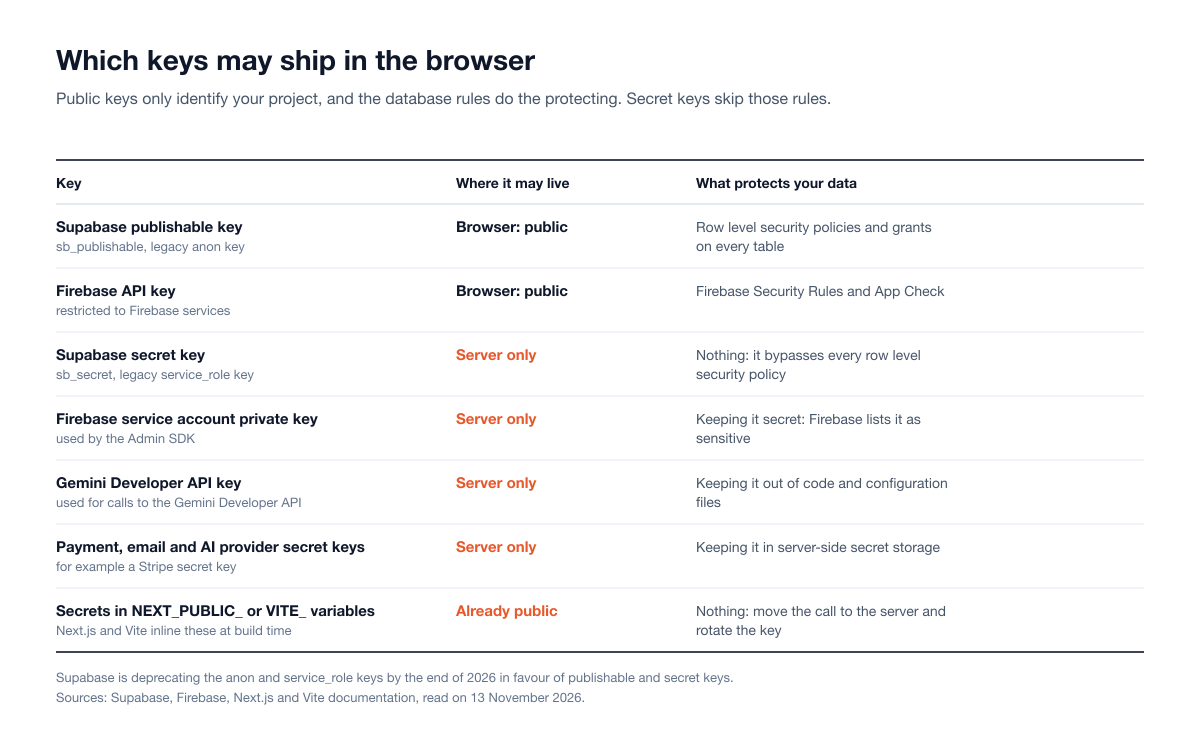
Figure 2: Keys that are public by design and keys that must stay on the server. Sources: Supabase, Firebase, Next.js and Vite documentation.
8. Nothing secret is in the browser bundle. Frameworks copy certain variables into the JavaScript every visitor downloads. In Next.js, any variable prefixed NEXT_PUBLIC_ is inlined into the browser bundle at build time (Next.js). In Vite the prefix is VITE_, and Vite's documentation says such variables "should not contain sensitive information such as API keys" (Vite). Open your environment variable list and confirm that only public values carry those prefixes. Then open your live site, view the page source and loaded scripts, and search for the first characters of each secret key. If a secret is there, move the call that uses it into a server function and rotate the key.
9. Nothing secret is in the repository, its history or the build chat. Search your code for hardcoded keys, and remember that deleting a key from a file does not remove it from version history. Turn on secret scanning and push protection in GitHub so that a push containing a known secret is blocked before it lands (GitHub). Treat the AI chat as a place where secrets can leak too. From 3 February to 20 April 2026, a regression at Lovable meant the chat history and source code of public projects could be read by any Lovable user with the project link (Lovable, 22 April 2026). Any key that was ever pasted into a prompt, committed or shared in a screenshot should be rotated. GitGuardian found that more than 64% of the secrets it confirmed as valid in 2022 were still valid in January 2026, so do not assume an old leak has expired.
10. Legacy and unrestricted keys are cleaned up. Supabase is deprecating the anon and service_role keys by the end of 2026 in favour of publishable and secret keys, which can be revoked individually and which Supabase revokes automatically when a secret key appears in a public GitHub repository. Migrate, then disable the legacy keys. In Firebase and Google Cloud, restrict each API key to the APIs it needs, and use a separate key for anything that is not a Firebase service.
Part 3: Sign-in and accounts
11. Sign-up is confirmed and links expire. In Supabase, enable email confirmations, set the one-time password and link expiry to 3,600 seconds or less, and remove any test phone numbers you added while building. These three items come straight from Supabase's production checklist.
12. Passwords and sign-in forms resist guessing. Set a minimum password length (Supabase advises against anything under 8 characters), turn on leaked password protection where your plan includes it (Supabase password security), and add CAPTCHA to sign-up, sign-in and password reset (Supabase production checklist). Check that your sign-in and reset screens do not reveal whether an email address has an account.
13. Roles and admin rights are decided on the server. Find where your app decides that someone is an admin or a paying customer. If that decision reads something the user can edit, it can be forged. Supabase warns that policies relying on the user_metadata claim are unsafe because signed-in users can modify it, and recommends app metadata, which users cannot change. Then test it: signed in as an ordinary user, type the address of an admin page directly and call an admin action. Hiding the menu item is not access control.
14. Your own accounts are protected. The accounts that can change the app are the shortest path to all of its data: the Supabase or Firebase console, GitHub, your hosting provider, your domain registrar and the AI builder. Turn on multi-factor authentication on each, and add a second owner to the organization so that one lost phone does not lock you out.
Part 4: Server code, API routes and functions
15. Every route and function checks who is calling. List every server function, edge function and API route. For each, confirm it verifies the caller's session and then checks that this caller may perform this action on this record. Lovable's guidance makes the point that a function running on the server can still be called by any client, so running server-side does not make it private. In Supabase Edge Functions, JWT verification is on by default. Search your configuration for verify_jwt = false: Supabase notes that turning it off to clear an error during development removes the platform's check (Supabase Edge Functions auth). Leave it off only for genuinely public functions, for webhooks that verify a signature, and for functions called only by your own backend with a secret key that the function itself validates.
16. Privileged code re-checks ownership. Server code that uses the Supabase secret key skips every RLS policy, and Firebase's server client libraries bypass Firestore Security Rules (Firebase). That is sometimes necessary, and it means the function itself must confirm the record belongs to the caller before reading or changing it. Never accept a user ID from the request body as proof of identity: take it from the verified session.
17. Authorization does not live only in middleware or front-end route guards. A redirect in the browser, or a check in one shared layer, is easy to miss or bypass. CVE-2025-29927, rated 9.1, let requests skip authorization in Next.js applications when the check happened in middleware. Vercel's postmortem says apps hosted on Vercel and Netlify were not affected, while self-hosted deployments were (Vercel). Put the check next to the data, in the route handler or the database policy, and keep the framework patched. Next.js Server Actions deserve the same review: see how hidden Server Actions can bypass access controls.
18. Payments and webhooks are verified on the server. Prices, discounts and plan changes must be computed by server code, never taken from the browser. Webhook endpoints must verify the provider's signature. Stripe's documentation warns that without verification an attacker could send fake events that fulfil orders or grant account access (Stripe). Test it yourself: confirm you cannot reach a paid feature by changing a value in the request.
19. Anything that costs money has a limit. Endpoints that call an AI model, send email or SMS, or run heavy queries can be hammered until the bill arrives. Add rate limits per user and per IP address, cap usage per account, and set budget alerts and spend caps with your providers. Firebase's checklist recommends limiting function instances and setting budget alerts for this reason.
Part 5: Dependencies and patches
20. The framework and packages are patched. AI-built apps sit on fast-moving frameworks. On 3 December 2025 the React team disclosed CVE-2025-55182, a remote code execution flaw in React Server Components rated 10.0 that needed no sign-in and affected frameworks including Next.js. CISA added it to its Known Exploited Vulnerabilities catalog two days later. Run npm audit, update the framework to a fixed version, and turn on automatic dependency alerts in your repository. Lovable's Quick scan and Replit's free Level 1 scan both check dependencies, so read their findings.
21. Every dependency is real and wanted. Open package.json and read the list. For anything you do not recognise, confirm on the registry that the package exists, is maintained and is the one the assistant meant. Remove packages that nothing uses. The research on invented package names is summarized in our statistics post.
Part 6: Lovable security scans, Bolt audits and the AI tools themselves
22. You ran the builder's own security scan and fixed what it found. Each tool below ships a check or publishes guidance. Use it, and read what the vendor says about its limits.
Tool | Built-in security check | What the vendor says about limits |
|---|---|---|
Lovable | Quick scan on every publish (database access rules, npm dependencies, exposed MCP server); Deep scan on demand reviews application code | The scans "do not replace a thorough security review", and you are responsible for your app's security (docs) |
Bolt | Security audit from the Publish menu on paid plans; database security check on all plans | Recommends a check at least once before publishing; some findings need action from you (docs) |
Replit | Security Center with three scan levels: dependency checks (free), an Agent review of your source code (paid plans) and a black-box test of the running preview; Agent cannot modify the production database | No scan guarantees that your app is secure, and scans should be used alongside code review and tests (docs) |
v0 | A "v0 Security Check" you ask for in chat (paid plans); warnings on | In larger projects it reviews the riskiest files, not every file (docs) |
Cursor | Security Review of pull requests, and a | Run modes are described as best-effort guardrails, not a hard security boundary (docs) |
Claude Code |
| Reviews should complement, not replace, existing security practices and manual code review (help center) |
Most of these scans read code and configuration. They are a good first pass, but Lovable and Anthropic say plainly that theirs do not replace a full review, and Replit says no scan guarantees that an app is secure. Supabase makes the same division of labour explicit: it secures the platform, and application-level security remains the customer's responsibility.
23. The agent cannot touch production, and you review what it runs. Give coding agents development credentials only. Replit now keeps separate development and production databases and states that its Agent cannot modify the production one (Replit). If your setup has one database, create a second project for development. Keep approval prompts on for terminal commands, read database migrations before they run, and commit to version control before each large change so you can undo it. Anthropic's Claude Code documentation is direct that the user is responsible for reviewing proposed code and commands before approving them (Claude Code security). Flaws in the tools themselves are covered in AI coding assistant CVEs 2026 and our MCP server security assessment guide.
Part 7: After launch
24. You would notice a problem and could recover from it. Confirm four things: backups exist and you know how to restore one; logs for the database, sign-in and server functions are kept and you know where to read them; billing and usage alerts are on; and there is a security contact address on your site, read by someone who can act, so that a person who finds a problem can tell you. Lovable's April 2026 incident shows why the second half matters: Lovable had a reporting channel, researchers used it from 22 February, and the reports were closed without reaching its security team until the issue became public in April. In Supabase, also turn on SSL enforcement and network restrictions for direct database connections. Finally, make sure error messages shown to users do not include database details or stack traces.
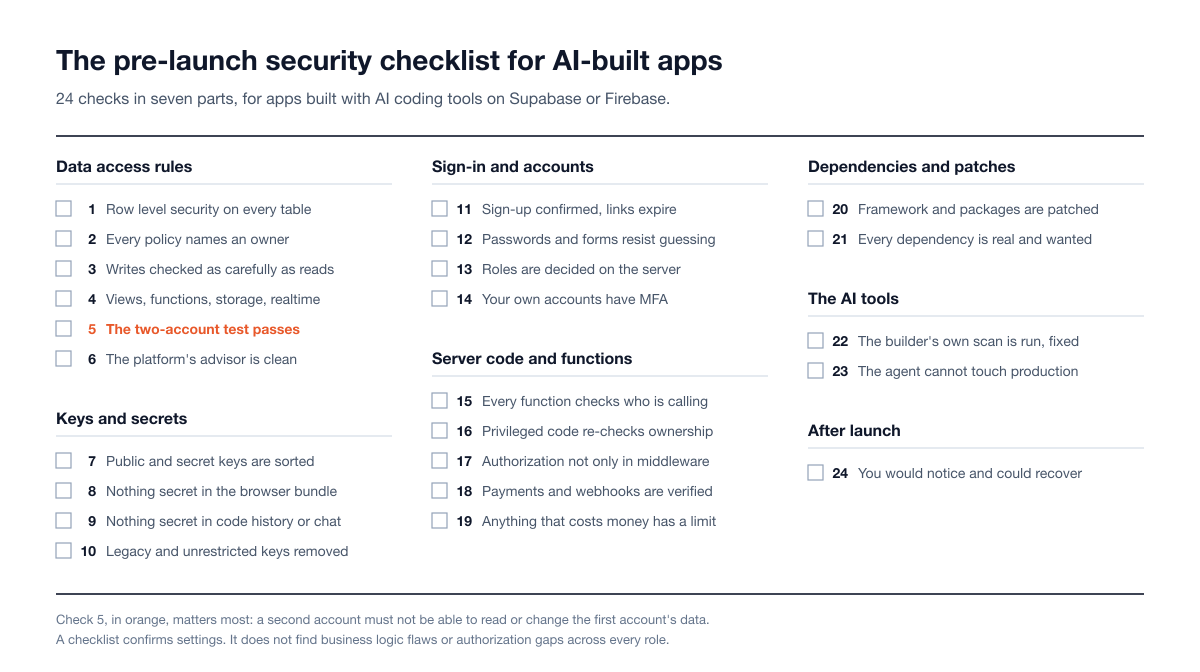
Figure 3: The 24 checks on one page.
What a checklist cannot find
A checklist confirms that known settings are in a safe state. It does not tell you whether your application's own rules hold. Supabase's production checklist ends by acknowledging this: after the shared settings, it asks you to work out how an attacker could abuse your particular app and to review the OWASP Top 10. Four kinds of problem sit outside any checklist:
Business logic. Using a coupon twice, skipping a required step, cancelling after a benefit is granted, inviting yourself into another team. Nothing is misconfigured. The rules of the product are simply not enforced.
Authorization at full depth. The two-account test samples a few records. A real application has many roles, object types and actions, and the gap is usually in the one export route or older API version nobody tried. This is why scanners miss BOLA and IDOR.
Chains. Three low-severity issues that combine into account takeover do not appear on any single line of a checklist.
Self-review. Asking the model that wrote the code to check it helps with obvious mistakes. SusVibes did not test self-review, but it found that telling the agent about security up front did not close the gap, so treat a clean self-review with the same caution.
Stingrai's own data shows how much of a real test falls in that territory. Across 55 penetration tests between October 2024 and August 2026, 35.2% of 1,206 verified findings were in classes that require understanding how the application is supposed to work, and 70% of the 40 web application tests that produced findings surfaced at least one High or Critical authentication or authorization finding (State of Penetration Testing 2026).
When a penetration test is the right next step
The checklist is enough for a prototype, an internal tool with no sensitive data, or a waitlist page. Book a penetration test when any of these is true:
The app stores personal, health or financial data or customer uploads, or it takes payments.
It is multi-tenant: several companies' data in one database.
A deal depends on it: an enterprise customer's vendor assessment asks for a recent penetration test report, or you are working toward SOC 2, ISO 27001, HIPAA or PCI DSS.
Your company is established, and teams have shipped internal tools or customer-facing apps built with AI coding tools that never went through the usual security review.
You are about to launch publicly, or an agent has just rewritten a large part of the code.
In a penetration test, the tester signs in as each role and tries to break the application's own rules. Budget and scoping guidance is in our web application penetration testing scope and cost guide and in Does your startup need a pentest?
How Stingrai tests AI-built apps
Stingrai is a CREST-accredited penetration testing company offering fully human-led and hybrid (human penetration testers plus AI agents) penetration tests, delivered by experienced penetration testers who are also world-class security researchers and bug bounty hunters. The team has 18 published CVEs, and its web application and API penetration tests are authenticated across every user role, covering broken authorization and IDOR, business logic, injection, and authentication and session handling, with source-assisted testing where repository access is given.
For one web application and associated APIs, published pricing is fixed:
Autonomous Pentest: US$3,000 per assessment, or US$650 per month on a 12-month plan. Snipe, Stingrai's autonomous AI agent for web applications and associated APIs, tests up to 200 API endpoints or dynamic pages and up to three user roles, black, white or grey box, including business logic and authorization flaws. It delivers a pentest report, automated retests and AutoFix pull requests.
Hybrid Pentest: US$6,800 per assessment, or US$1,275 per month. Penetration testers and Snipe test together throughout the engagement, and the human-validated report comes with an attestation letter for SOC 2, HIPAA, PCI DSS and similar audits. Choose this when the report is evidence for a customer's vendor assessment, an enterprise deal or an audit.
On hybrid and human-led engagements, findings are posted to the PTaaS portal as they are confirmed. Engagements run as one-time (annual) tests or as continuous programs. For an established company with several AI-built internal tools or customer-facing apps, or with mobile apps and cloud environments in scope, a human-led or hybrid engagement is scoped across the estate and quoted per engagement. Details are on the pricing page.
Frequently Asked Questions
What is vibe coding security?
Vibe coding security is the practice of checking and fixing the security of an application that was built mainly by prompting an AI tool such as Lovable, Bolt, Cursor, Replit, v0 or Claude Code. The code usually works, but research shows it is much less often secure, so the builder has to verify database access rules, secret handling, sign-in settings, server-side checks and dependencies before real users arrive.
What is the most important Supabase security setting?
Row level security. Supabase's production checklist says a table without row level security and reasonable policies lets any client read and change its data, because the publishable key that reaches the Data API ships inside the app. Enable row level security on every table in an exposed schema, write policies that compare each row's owner with the signed-in user, and keep the secret key, which bypasses every policy, on the server only.
Are apps built with Lovable secure?
They can be, but it is the builder's job to make them so. Lovable runs a Quick scan on every publish and a Deep scan on demand, and its documentation says these scans do not replace a thorough security review and that you are responsible for your app's security. CVE-2025-48757, which Lovable disputes, records the problem: a March 2025 scan found 170 of 1,645 Lovable-built projects with inadequate row level security.
Is it safe to put a Firebase API key in front-end code?
Yes, for keys restricted to Firebase services. Firebase states that these keys only identify your project and are not used to control access, which is done by Firebase Security Rules and App Check. Service account private keys and the Gemini Developer API key are different: they are secrets and must never appear in client code or configuration files.
Can I ask the AI to check its own code for security?
Yes, and you should, but treat the result as a first pass. Lovable, Bolt, Replit, v0, Cursor and Claude Code all offer a built-in security scan or review, and Lovable and Anthropic both say theirs does not replace a full security review. The SusVibes benchmark (ICML 2026) did not test self-review, but it found that adding security hints to the request did not close the gap between working code and secure code.
How long does this checklist take?
It is designed to be worked through in an afternoon for a typical app with one database and a handful of server functions. Parts 1 and 2, the database rules and the keys, deserve most of that time. Fixing what the checks find can take longer, and the two-account test should be repeated after every fix.
What can a security checklist not find?
A checklist cannot find business logic flaws, authorization gaps across every role and record type, or several small weaknesses chained together. Those depend on how your particular application is supposed to behave. In Stingrai's State of Penetration Testing 2026 data, 35.2% of 1,206 verified findings were in classes that require understanding the application.
When does an AI-built app need a penetration test?
When it holds personal, health or financial data, takes payments, serves several customers from one database, or when an enterprise customer's vendor assessment, an investor or an auditor asks for a report. Stingrai's Autonomous Pentest is US$3,000 per assessment for one web application and associated APIs, and the Hybrid Pentest, which adds penetration testers and an attestation letter, is US$6,800.
Related reading
IDOR Vulnerability: Real Examples, How Testers Find It and How to Fix It
OWASP Top 10 2025: The Full List, What Changed and How to Test Each Risk
Cross-Site Scripting (XSS): Real Examples, How Testers Find It and How to Fix It
Web Application Penetration Testing: What It Is, What It Tests and How It Works (2026)
References
Supabase. Production security checklist and Production checklist, updated 2 November 2026.
Supabase. Row Level Security, updated 3 November 2026.
Supabase. Understanding API keys, updated 2 November 2026.
Supabase. Supabase Security Retro: 2025, 7 January 2026, and Splinter lint 0024: permissive RLS policy.
Supabase. Storage buckets, Securing Edge Functions and Password security.
Google Firebase. Fix insecure rules, Learn about using and managing API keys for Firebase, Get started with Cloud Firestore Security Rules and Firebase security checklist.
Lovable. Security overview and Security best practices for Lovable apps.
Lovable. Our response to the April 2026 incident, 22 April 2026.
MITRE and NIST. CVE-2025-48757, published 30 May 2025.
Matt Palmer. Statement on CVE-2025-48757, 29 May 2025.
Bolt. Check your project's security and Database security settings.
Replit. Security scan levels, Security checklist and Development and production databases.
Vercel. v0 Security Check, v0 security, Next.js environment variables and Postmortem on Next.js Middleware bypass, 25 March 2025.
Cursor. Security Review and Agent security.
Anthropic. Automated security reviews in Claude Code and Claude Code security.
Vite. Env variables and modes.
GitHub. About push protection.
The React Team. Critical Security Vulnerability in React Server Components, 3 December 2025.
CISA. Known Exploited Vulnerabilities Catalog, version 2026.11.10.
NIST. CVE-2025-29927, published 21 March 2025.
OWASP. A01:2025 Broken Access Control, OWASP Top 10:2025.
Zhao et al. Is Vibe Coding Safe? Benchmarking Vulnerability of Agent-Generated Code in Real-World Tasks, ICML 2026.
Veracode. 2026 GenAI Code Security Report, press release, 28 July 2026.
Escape. Methodology: How we discovered over 2k high-impact vulnerabilities in apps built with vibe coding platforms, 29 October 2025.
GitGuardian. The State of Secrets Sprawl 2026, 17 March 2026.
Stingrai. State of Penetration Testing 2026.