




Is the Supabase Anon Key Safe to Expose?
Yes, and it is meant to be. The anon key is designed to ship inside browser code. What decides whether that is safe is Row Level Security. Supabase's documentation states that the publishable key, and the legacy anon key it replaces, is safe to expose with RLS enabled, because row access permission is checked against your access policies and the user's JSON Web Token.
Quick answer: Yes. The Supabase anon key is designed to ship in browser code, and it is only as safe as the Row Level Security policies behind it. The service_role key must never be exposed because it bypasses RLS entirely. In the new key system, the publishable key (sb_publishable_) replaces the anon key and the secret key (sb_secret_) replaces service_role, with legacy keys deprecated by the end of 2026.
The service_role key is the opposite case and there is no nuance to it. It uses PostgreSQL's BYPASSRLS attribute, which Supabase documents as skipping any and all Row Level Security policies you attach. It belongs on a server and nowhere else.
That distinction is the whole story of the assessment described below. The key we found in client-side JavaScript was the public one. It was doing exactly what it was designed to do. The database was exposed because nothing was enforcing policies behind it.
Does the service_role key bypass Row Level Security?
Yes, completely. Supabase authorizes a service_role request through a PostgreSQL role that carries the bypassrls attribute, so your policies are never evaluated at all rather than evaluated and passed.
That is not an edge case, it is the key's purpose. service_role exists so trusted backend code can reach rows no end user should: admin tooling, scheduled jobs, webhook handlers, data migrations. Its 2026 replacement behaves identically, because the secret key prefixed sb_secret_ authorizes that same role.
What that means in practice is worth stating plainly, because it is the difference between a leaked key and a breach:
Reads return everything. A
SELECTmade with service_role returns every row in the table, not the subset a policy would have allowed.Writes are unrestricted. The same credential can
INSERT,UPDATEandDELETEacross every table the Data API exposes.Attribution disappears. Requests carry no end-user identity, so your logs show the activity without a per-user trail to reconstruct it afterwards.
Policy quality stops mattering. The most carefully written policy in your project has no effect on a request that skips the policy engine entirely.
The new key system adds one guardrail here. Supabase's documentation states that you cannot use a secret key in the browser, because it matches on the User-Agent header and always replies with HTTP 401 Unauthorized. Treat that as a seatbelt rather than a fix: a leaked secret key still works perfectly from curl, from a script, or from any server an attacker controls.
Finding an exposed key is rarely the hard part of an assessment. Proving what it actually reaches is, which is why authorization testing belongs in scope for any application that talks to its database from the browser. Our guide to web application penetration testing services covers what that work involves.
Supabase API keys: anon vs service_role vs publishable (2026)
A Supabase project has exactly two classes of API key: a public one that belongs in client code, and a privileged one that belongs only on a server. Each class now carries a current name and a legacy name, because the publishable key (sb_publishable_) replaces the anon key and the secret key (sb_secret_) replaces the service_role key.
Key | Safe to expose | Runs as | Row Level Security | Status in 2026 |
|---|---|---|---|---|
Publishable key ( | Yes, ships in client code | anon, or authenticated with a user JWT | Fully enforced | Current public key |
Legacy anon key (JWT) | Yes, ships in client code | anon, or authenticated with a user JWT | Fully enforced | Deprecated by the end of 2026 |
Secret key ( | No, server side only | service_role | Bypassed via | Current secret key |
Legacy service_role key (JWT) | No, server side only | service_role | Bypassed via | Deprecated by the end of 2026 |
Four rows, two behaviours. Publishable and anon are the same public credential under two names, and secret and service_role are the same privileged credential under two names. The public one is meant to be discoverable and is protected by your policies; the privileged one is protected only by never leaving your server.
That distinction is the only question worth asking when a key turns up somewhere unexpected. A publishable or anon key sitting in a JavaScript bundle is expected behaviour and calls for an RLS review. A secret or service_role key in that same bundle is an incident. Teams shipping multi-tenant products on Supabase should also look at how SaaS penetration testing companies test tenant isolation, because in most Supabase applications the policy is the tenant boundary.
What changed in 2026: publishable and secret keys
Supabase has introduced a new API key system that replaces the two keys most existing projects still run on. The publishable key, prefixed sb_publishable_, takes the place of the anon key in client code. The secret key, prefixed sb_secret_, takes the place of the service_role key on the server. Supabase's documentation states the legacy keys will be deprecated by the end of 2026, so any project still on anon and service_role keys is now working against a deadline.
Two of the differences are security improvements worth knowing. Secret keys return an HTTP 401 if they are used from a browser, matched on the User-Agent header, which is a guardrail the JSON Web Token based service_role key never had. The new keys are also sent on the apikey header and cannot be sent in an Authorization Bearer header, so a key pasted into the wrong place fails loudly instead of working silently.
Migration is incremental rather than a cutover. Creating the new keys adds them alongside your existing anon and service_role keys without affecting them, and the legacy keys keep working until you deactivate them explicitly. The sequence Supabase documents is: create the new keys, swap the publishable key into client code, swap the secret key into backend code and Edge Functions, verify nothing still calls the legacy keys, then deactivate them.
The rule that has not changed
Migrating keys does not secure a project whose tables have no policies. A publishable key in front of an unprotected table exposes exactly as much data as an anon key did. Supabase's own warning is blunt about it: tables and views exposed through the Data API without RLS can be accessed by any role with matching grants. Because Supabase auto-generates a REST endpoint for every table, an unprotected table is reachable from a browser with no tooling at all.
What is Supabase
Supabase is an open-source backend service and a common alternative to Firebase. It is built on PostgreSQL and helps developers create and run applications without needing to build a backend from the beginning.
Supabase makes it easy to build apps by giving you a ready-to-use database, user login, and authentication, along with automatic APIs, file storage, real-time updates, and serverless functions. It even supports AI features like vector storage.
One of the main advantages of Supabase is that it gives developers more control. Unlike closed platforms, it is based on open standards and can be self-hosted. This means developers fully own their data and are not locked into one provider. Because it is easy to use and offers a free tier, Supabase is popular for web, mobile, and AI applications.
Tokens in Supabase and Their Roles
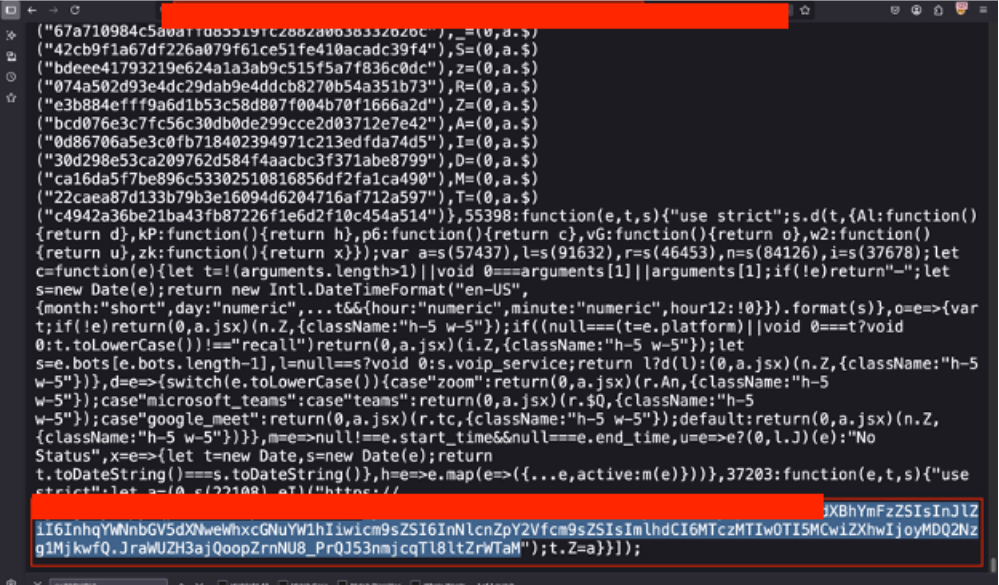
Supabase heavily relies on JSON Web Tokens (JWTs) for secure authentication and authorization. Here's an overview of the key tokens and their roles:
Access Token (JWT)
Service Role Key
This is a secret API key with very high permissions. It completely bypasses Row Level Security (RLS) and works as the service_role user in PostgreSQL. It should only be used on the server side when full access to the database is required.
Never expose this key in frontend or client code, as it grants full, unmitigated control over the database.
Anon (Anonymous/Public) Key:
This is a public API key used for requests that do not require a logged-in user. It works under the anon role and can only access data allowed by your RLS rules (for example, reading public data).
These keys allow Supabase services to communicate securely without keeping session state. To stay secure, always keep secret keys on the server, enable RLS on your tables, and use short expiration times for access tokens.
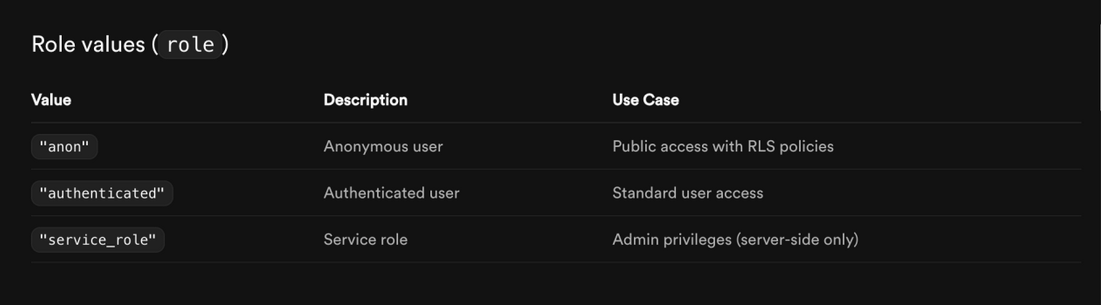
It All Started With JavaScript (JS)
During penetration testing, one of the first and most effective steps is reviewing JavaScript files. This includes downloading and analyzing all client-side scripts such as bundled files, source maps, and static assets. These files often contain information that developers may accidentally expose.
By carefully searching through JavaScript files, testers can find important details like API endpoints, configuration values, hardcoded secrets, API keys, authentication tokens, and backend URLs.
While going through the JavaScript code and related files, we found a Supabase project URL in the format https://<project-ref>.supabase.co along with its API key.
This finding shows how important it is to secure frontend code properly. Sensitive information should never be included in source code, and access to backend services must be controlled using server-side logic and strong security configurations.
What Next?
After carefully debugging and researching, including looking at online resources, developer blogs, and the official Supabase documentation, we were able to see how the exposed Supabase URL and API key in the JavaScript files could be used.
This research showed that the exposed URL and key allow direct access to the database through Supabase’s auto-generated REST API. Using this API, it is possible to interact with database tables by calling endpoints that follow common naming patterns, such as:
1GET /rest/v1/
2GET /rest/v1/users
3GET /rest/v1/calls
4GET /rest/v1/notifications
5GET /rest/v1/organizations
These endpoints usually map directly to database table names, which makes it easier for an attacker to discover and interact with backend data if proper security controls are not in place.
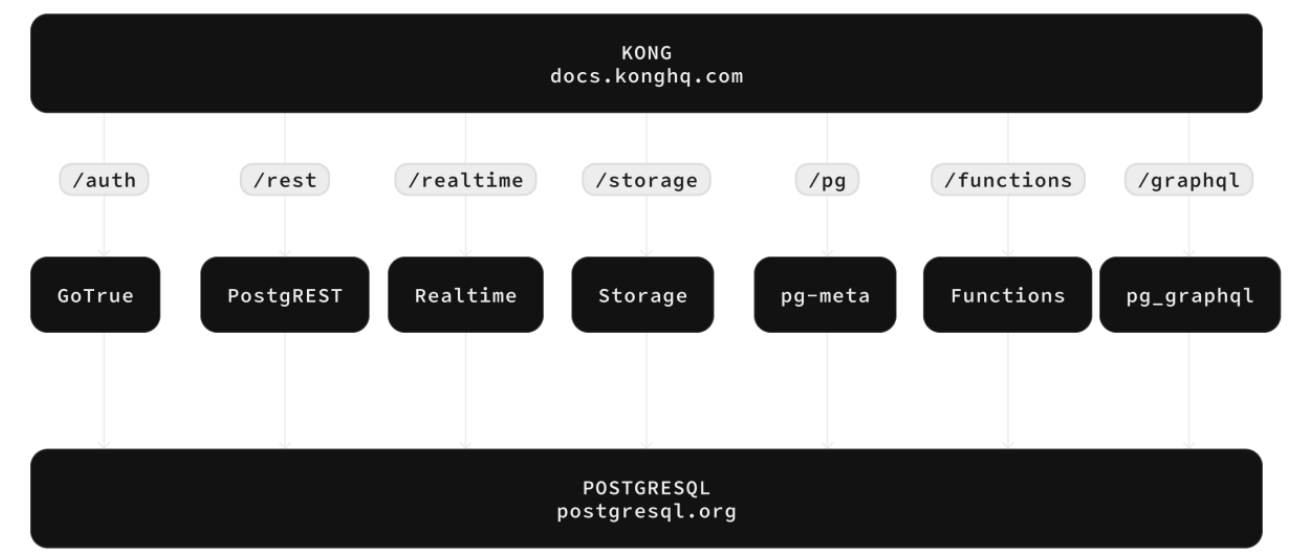
These endpoints follow the standard pattern:
GET https://<project-ref>.supabase.co/rest/v1/
To query these endpoints, requests must include the following headers:
Host: <project-ref>.supabase.co
apikey: <exposed-anon-key>
Authorization: Bearer <exposed-anon-key>
When these GET requests are sent in the correct format, they return JSON responses that contain data from the related database tables.
One important thing about Supabase is that it is designed to allow direct access to the database from the client side, including web browsers, using the exposed API key. This design allows developers to perform full database actions directly from frontend code, without needing a backend server.
These actions include:
Create (POST)
Read (GET)
Update (PATCH / PUT)
Delete (DELETE)
Because of this, the same requests can also be sent manually using tools like curl or directly from the browser’s developer console. If access rules are not configured correctly, this behavior can lead to serious security risks.
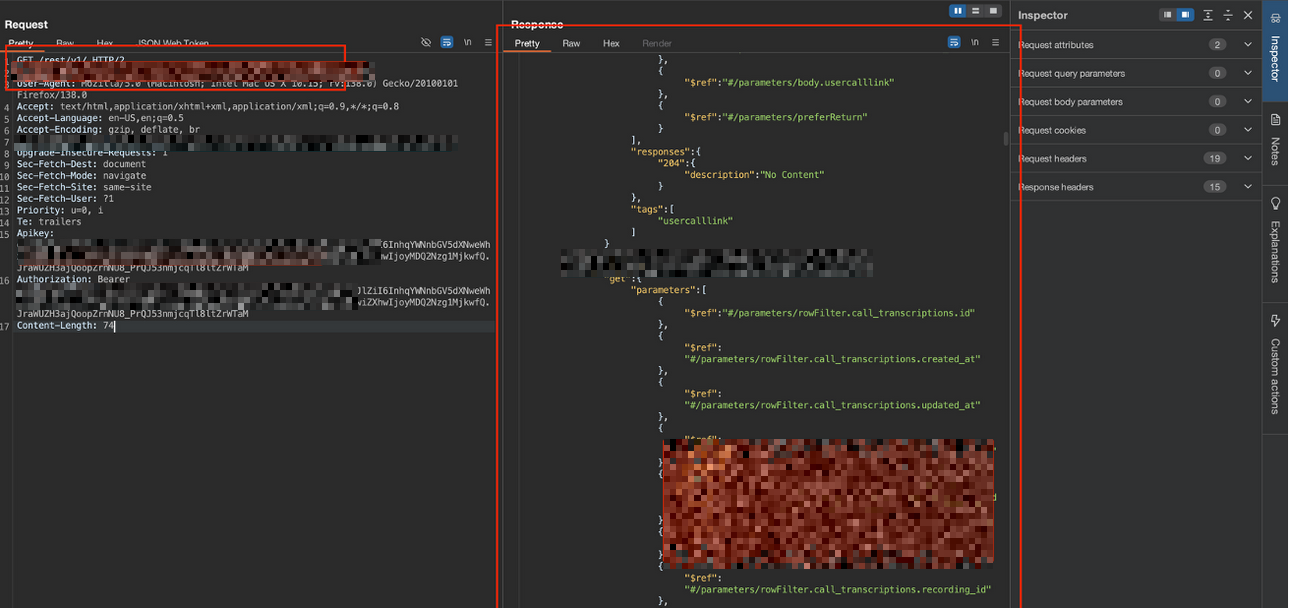
"This approach also allowed us to query the database schema. "
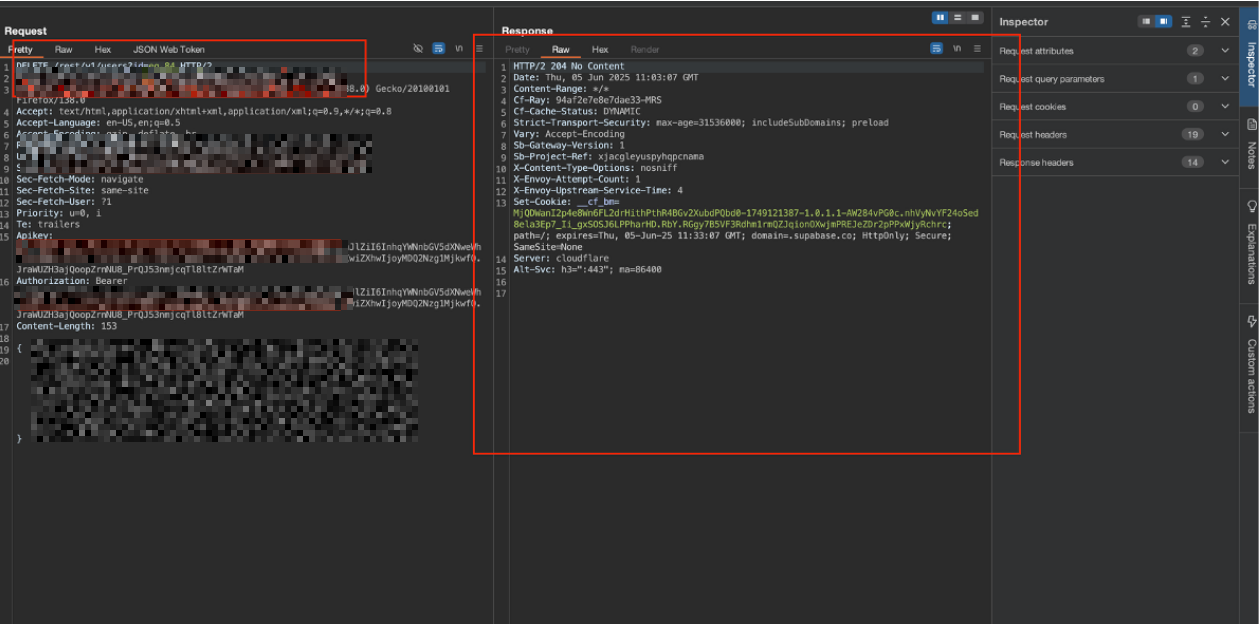
After reading further into the documentation of supabase, we found something called the select parameter.
Select all columns : select=*
Select specific columns : select=id,email,created_at
We repeated the same approach with different endpoints.
How to Fix
To fix these issues and apply security controls, we first need to define what RLS is.
Row Level Security (RLS) in Supabase?
Row Level Security (RLS) is a security feature built into PostgreSQL, which is the database used by Supabase. It allows you to control access to individual rows in a database table by using rules called policies.
In simple terms:
Without RLS, a user (or API key) with access to a table can potentially see or modify all rows in that table.
With RLS enabled, you define policies essentially custom SQL conditions that automatically filter which rows a query can read, insert, update, or delete.
These policies act like invisible "WHERE clauses" added to every query, enforcing restrictions at the database level.
Why RLS is Critical in Supabase
Supabase encourages direct client-side access to the database using the public anon key . This key is intentionally public and safe to use in browsers only if RLS is properly configured.
If RLS is disabled on a table: Anyone with the anon key can perform full CRUD operations on all data (huge vulnerability if keys/URLs are exposed).
If RLS is enabled but no policies exist: The table becomes completely inaccessible (even to legit users) queries return empty results.
If RLS is enabled with good policies: Access is restricted like users see only their own data, public data is readable by anyone, admins have broader access.
How it Works
Enable RLS: 1.
Create Policies 1.

Important Recommendations
To protect your data, the first step is to enable and properly configure Row Level Security (RLS). If any sensitive information was exposed, you should also rotate the affected API keys through the Supabase dashboard and check logs for any suspicious activity.
Enable Row Level Security (RLS) on All Tables:
Log in to your Supabase dashboard and go to the Database section. For each table (like users, calls, notifications, organizations), turn RLS on.
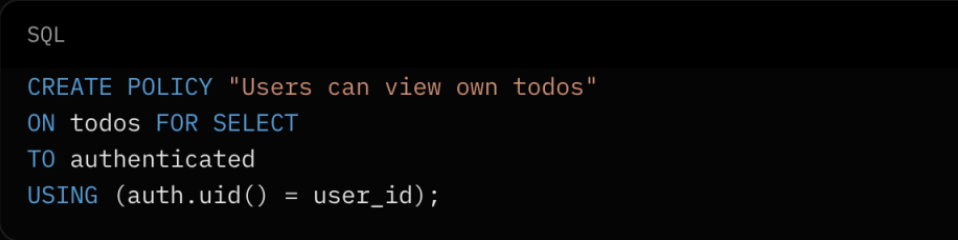
Define policies that control who can access each row.
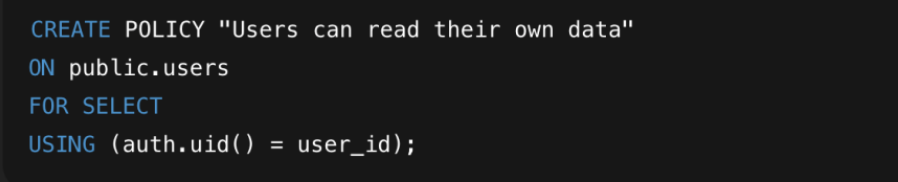
Example: Only allow authenticated users to read their own data:
Why this fixes it: RLS applies rules directly in the database, so even if an API key is exposed, unauthorized queries will be filtered or blocked.
Rotate Exposed Keys if Necessary:
Service Role Key (high-privilege, secret):
If it was exposed, make a new key in the Supabase dashboard and update your server code.
Anon Key (public-facing):
This key is meant to be public, but if it was over-shared, make a new one just to be safe.
Best Practices:
Always store keys in environment variables or a secure vault. Never put them in frontend code.
Minimize Exposed Keys:
Always remove or hide API keys from your JavaScript code when building your app. Use environment variables in frameworks like React or Vue instead of hardcoding them. Never put service keys in frontend code, because they bypass RLS and should only be used on the server.
This is the same class of finding as a mobile app that ships its secrets in the bundle. The credential is not hidden, so the only thing standing between an attacker and the data is what the backend enforces. We took the mobile version of that problem apart in our walkthrough of bypassing SSL pinning to read an app's traffic. If you want either checked against your own stack, that is web application penetration testing.
Supabase service_role key security best practices
The service_role key, and the secret key replacing it, is the most damaging credential a Supabase project can leak, because it ignores every policy protecting your tables. Work through this checklist in order, from where the key lives to what you do when it escapes.
Keep it server side, without exception. Use it only in backend services, already-secured admin APIs, Edge Functions and background jobs. There is no client-side use case for it.
Store it in a secrets manager or environment variable. Never in source, never in a committed config file, never baked into a container image layer.
Check what your build output actually contains. Environment variables prefixed for public exposure (
NEXT_PUBLIC_,VITE_,REACT_APP_) are inlined into the bundle at build time, so a secret assigned to one of those names is published rather than protected.Do not use it to paper over missing policies. Reaching for service_role because a query returns nothing is the most common way privileged access spreads into code paths that should have run as the user.
Write policies for every table in an exposed schema. Supabase's documentation is direct about the alternative: a table in an exposed schema without Row Level Security is readable and writable by any role with a grant on it.
Migrate to publishable and secret keys now. Creating them adds the new keys alongside the legacy pair without affecting it, so you can swap client code, then backend code, confirm nothing still calls the old keys, and only then deactivate them.
Scan git history, not just the working tree. A rotated key is still a live key for anyone reading an old commit, an old branch, or a fork.
Rotate on suspicion, not on proof. Rotation costs an afternoon. Rebuilding a customer database does not.
Review database logs after any exposure. Because the key bypasses Row Level Security and carries no end-user identity, those logs are the only record of what a holder of it did.
Test the policies, do not just review them. Row Level Security bugs are authorization bugs, and authorization bugs pass code review routinely.
That last point is where most Supabase projects come apart. A policy that reads auth.uid() = user_id on one table and is simply missing on the next looks fine in review and fails in production. Stingrai tests Supabase-backed applications for exactly that class of flaw, as a one-time engagement or as a continuous program, with senior pentesters and our AI agent Snipe working the application at the same time. Broken authorization, IDOR and business logic flaws are what Snipe is built to hunt, and the pentesters guide it into the paths that matter. See web application penetration testing for scope, our pricing for packages, or does your startup need a pentest in 2026 if you are still deciding on timing.
Frequently Asked Questions
Is the Supabase anon key safe to expose?
Yes, but only when Row Level Security is enabled and your policies are correct. Supabase's documentation states that the publishable key, and the legacy anon key it replaces, is safe to expose with RLS enabled, because row access permission is checked against your access policies and the user's JSON Web Token. The key is designed to sit in browser code. What makes it safe is the policy layer behind it, not secrecy. With RLS disabled, that same public key allows full read and write access to the table.
What is the Supabase anon key?
The anon key is a public API key Supabase issues for requests made without a signed-in user. It runs as the anon role in PostgreSQL and can only reach data your Row Level Security policies allow that role to reach. It identifies your project rather than authenticating a person, which is why it is not treated as a secret. In new projects it is replaced by the publishable key, prefixed sb_publishable_.
Does the service_role key bypass Row Level Security?
Yes. The service_role key uses PostgreSQL's BYPASSRLS attribute, which Supabase documents as skipping any and all Row Level Security policies you attach. It is a full-control database credential and belongs only on a server, in an environment variable or a secrets manager. It must never appear in frontend code, a mobile app bundle, or a public repository. Its replacement, the secret key prefixed sb_secret_, bypasses RLS in the same way.
How do I secure the Supabase service_role key?
Keep it on the server, in a secrets manager or an environment variable your build never inlines into client code, and use it only for backend services, Edge Functions and background jobs. Do not reach for it to work around a table that returns nothing, because that is how privileged access spreads into code paths that should run as the user. Enable Row Level Security with real policies on every table in an exposed schema, so the key is not the only thing standing between a request and your data. If it may have leaked, rotate it in the Supabase dashboard, review database logs for requests made with it, and check git history and build artifacts for the old value.
What is the difference between the publishable key and the anon key?
They serve the same purpose. The publishable key, prefixed sb_publishable_, is the current version of the public client-side key, and the anon key is the legacy JSON Web Token version of it. Supabase advises treating a legacy anon key exactly like a publishable key: it can identify your project, it is not a secret, and it must be paired with Row Level Security and least-privilege grants. One practical difference is transport, since publishable and secret keys are sent on the apikey header and cannot be sent in an Authorization Bearer header.
When are the legacy anon and service_role keys deprecated?
Supabase's documentation states the legacy keys will be deprecated by the end of 2026 and that projects should move to publishable and secret keys now. Creating the new keys adds them alongside the existing ones without affecting them, so the legacy keys keep working until you deactivate them explicitly. That makes it safe to migrate incrementally rather than in a single cutover.
What happens if Row Level Security is disabled on a Supabase table?
Anyone holding the public key can perform full create, read, update and delete operations on every row in that table. Supabase's documentation carries the warning directly: tables and views exposed through the Data API without RLS can be accessed by any role with matching grants. Because Supabase auto-generates a REST endpoint for each table, an unprotected table is reachable from a browser without any additional tooling.
How do I check whether my Supabase project is exposed?
Start in the Supabase dashboard and confirm Row Level Security is enabled on every table in the Database section, and that each table carries policies that actually restrict rows rather than a permissive catch-all. Then look at what your frontend ships, since the project URL and public key are visible in client-side JavaScript by design. The question that matters is not whether the key is discoverable. It is whether any table will answer a request that it should refuse.
What should I do if a service_role or secret key was exposed?
Treat it as a full database compromise. Rotate the key in the Supabase dashboard immediately and update your server code and Edge Function environment variables. Review database logs for requests made with the exposed key, because it bypasses Row Level Security and leaves no per-user trail. Then move the replacement into an environment variable or a secrets manager, and confirm no build output, container image, or repository history still contains the old value.
Put these numbers to work
The figures above describe the threat. A penetration test shows which of them apply to your own applications, cloud and network, with evidence your team can act on. Stingrai is a global CREST-accredited penetration testing services company founded in Toronto, Canada in 2021, trusted by companies from startups to enterprises to meet audit requirements for SOC 2, ISO 27001, CMMC, PCI DSS and HIPAA. OSCE³, OSWE, OSEP, CREST CRT certified pentesters, who are also world-class security researchers and bug bounty hunters. Choose from fully human-led or hybrid (AI agents plus human penetration testers) engagements across web, API, mobile, AI and LLM, cloud, network, Active Directory and social engineering penetration tests and red team engagements, delivered one-time or continuously through its PTaaS platform, with retesting included. Book a free scoping call, get a quote, or read the published pricing.
Related reading
Choosing a penetration testing provider in North America? Start with these guides: