




What is Next.js?
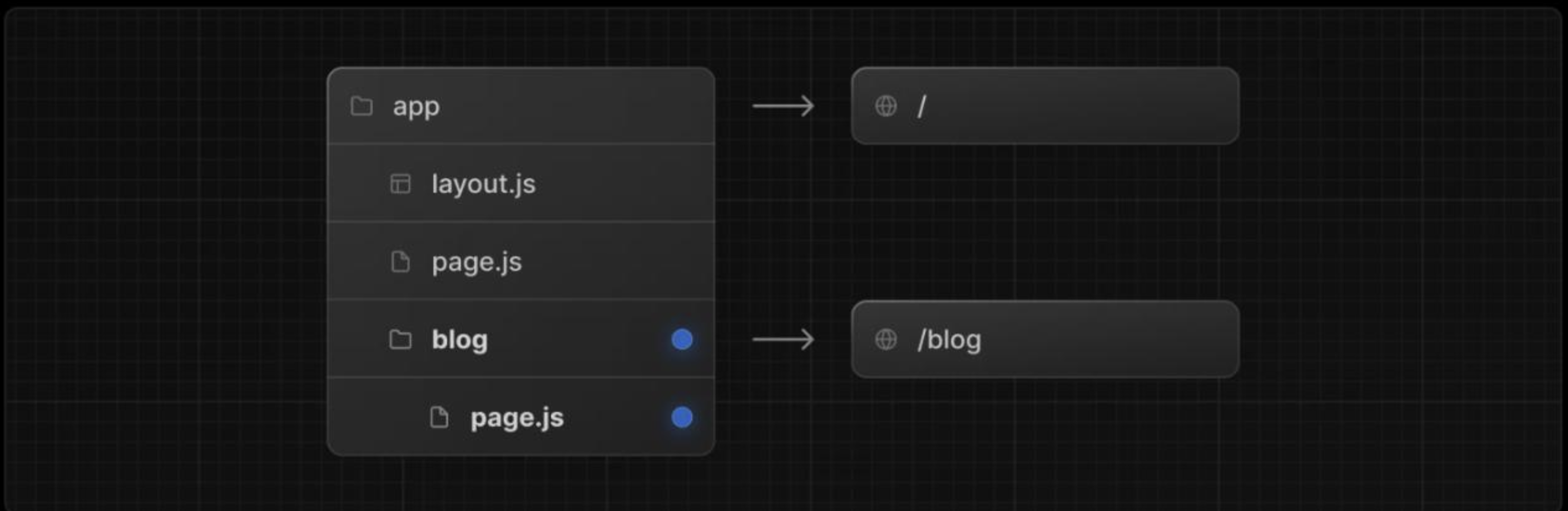
Next.js is a framework built on top of React that makes it easier to build modern web applications. It helps developers create fast websites by handling things like page rendering on the server and generating static pages when needed. One of its strengths is that it allows both frontend and backend logic to live in the same project, which simplifies development and deployment. Because Next.js manages requests, responses, and internal communication behind the scenes, it relies on special headers and internal logic to work correctly. If these parts are not properly secured, they can sometimes be abused and lead to security issues.
Key Features of Next.js
Server-Side Rendering (SSR)
Next.js can render pages on the server before sending them to the browser, which improves page load speed and search engine visibility.
Static Site Generation (SSG)
Pages can be generated at build time and served as static files, providing faster response times and reduced attack surface.
Built-in API Routes
Next.js allows developers to create backend API endpoints inside the same project, enabling frontend and backend logic to coexist.
Middleware Support
Middleware runs before requests are processed, allowing request filtering, authentication checks, and header-based access control.
Server Actions
Modern versions of Next.js introduce Server Actions, which let frontend components trigger server-side functions using internal request handling and special headers.
The Role of the next-action Header and Client-Side Exposure
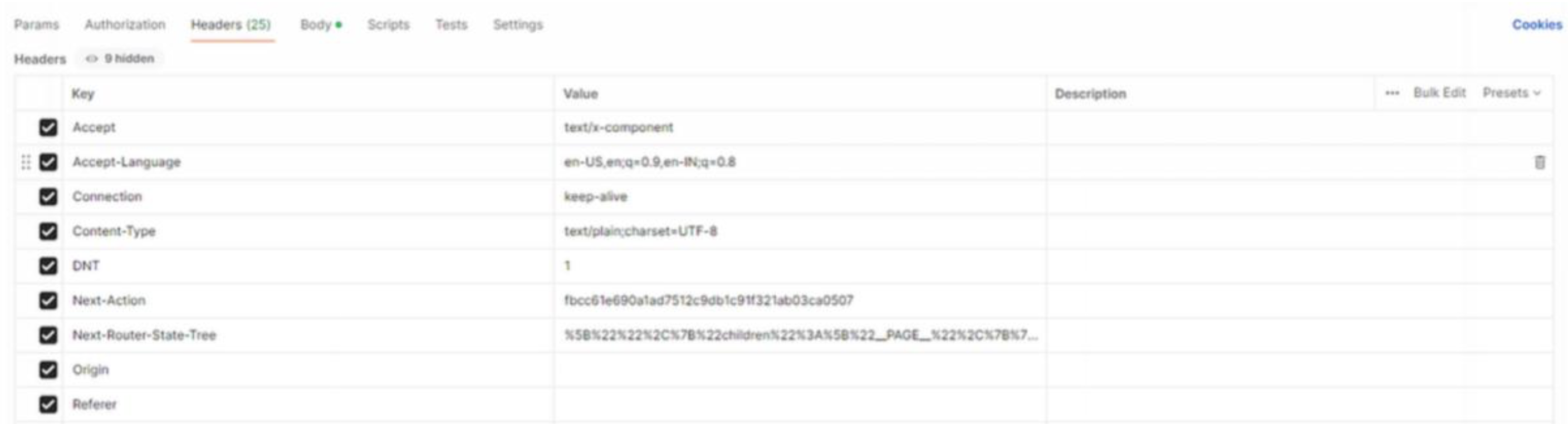
In modern Next.js applications, the next-action header is used to tell the server which server-side action should be executed. This header is automatically added by the framework when a user interacts with the application, such as submitting a form or clicking a button. Normally, users are not expected to know or care about this header, as it works behind the scenes. However, since it is part of the HTTP request, it can be viewed, intercepted, and even modified by anyone using browser developer tools or a proxy tool.
Another important point is that the values used for next-action are often stored in plain text inside frontend JavaScript files. These files are publicly accessible to anyone visiting the website, which means the action identifiers can be easily discovered by inspecting the source code. If the backend does not properly validate permissions or relies only on the next-action header for access control, an attacker could reuse these values to trigger server actions directly. This can lead to unauthorized actions being performed and, in some cases, serious security issues.
Identifying Actions via JS Analysis
While analyzing the application, the first indicator appeared in the front end JavaScript code. By inspecting the loaded .js files in the browser, it was possible to identify requests that included the next-action header. Once the value of this header was observed, it became clear that it was not dynamically generated per session, but instead referenced a fixed action identifier.
After identifying one next-action value, a deeper search was performed across all downloaded JavaScript files used by the application. Since these files are publicly accessible, it was possible to search for similar patterns and references related to server actions. Through this process, multiple next-action identifiers were discovered, all stored in plain text within the front end code. This made it possible to enumerate other server actions that were never intended to be directly accessible by users, increasing the attack surface of the application.
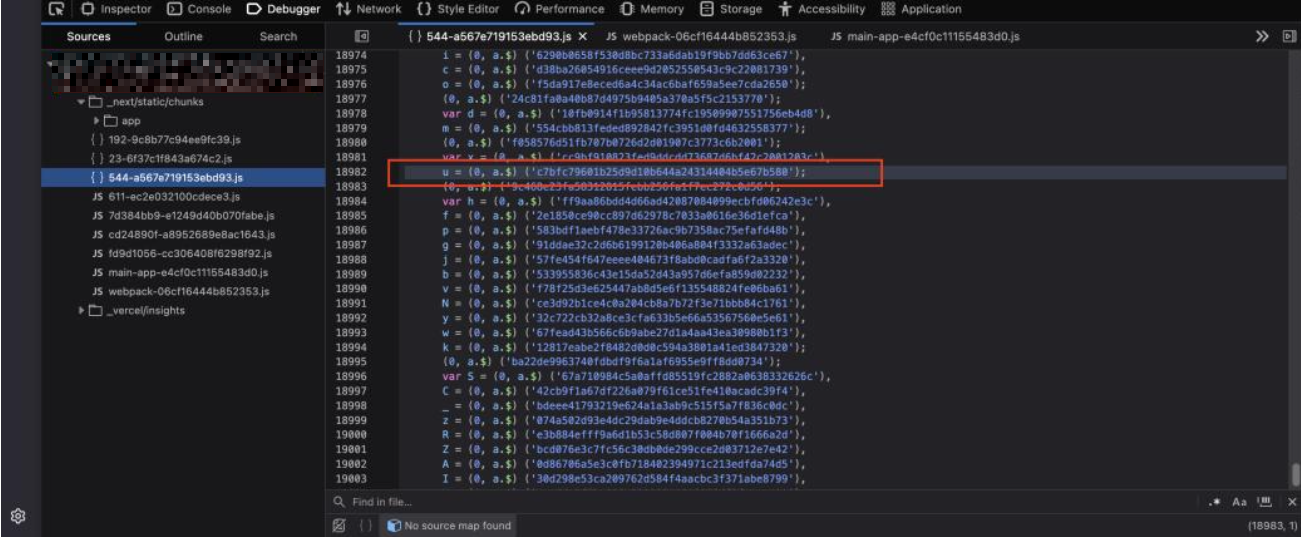
As shown above, after identifying a single Next.js server action from the request headers, a deeper search was performed across all frontend JavaScript files. Using this initial next- action value as a reference, it was possible to uncover multiple additional Next.js actions stored in plain text within the source code. This confirmed that these server action identifiers were exposed on the client side and could be discovered through simple inspection of the JavaScript files.
What is The Problem?
During testing, we tried to access a specific page that our user account should not have permission to view, such as /page. When accessing it directly through the browser, the application returned a 403 Unauthorized response, which is the expected behavior. This indicated that access controls were in place and that the page was protected from unauthorized users.
At first glance, everything seemed correct. However, this only applied to direct page access. When looking deeper into how the application handled internal requests, especially those related to Next.js server actions, it became clear that the authorization checks were not consistently enforced. This gap between page-level protection and back end action handling is what led to the underlying security issue.
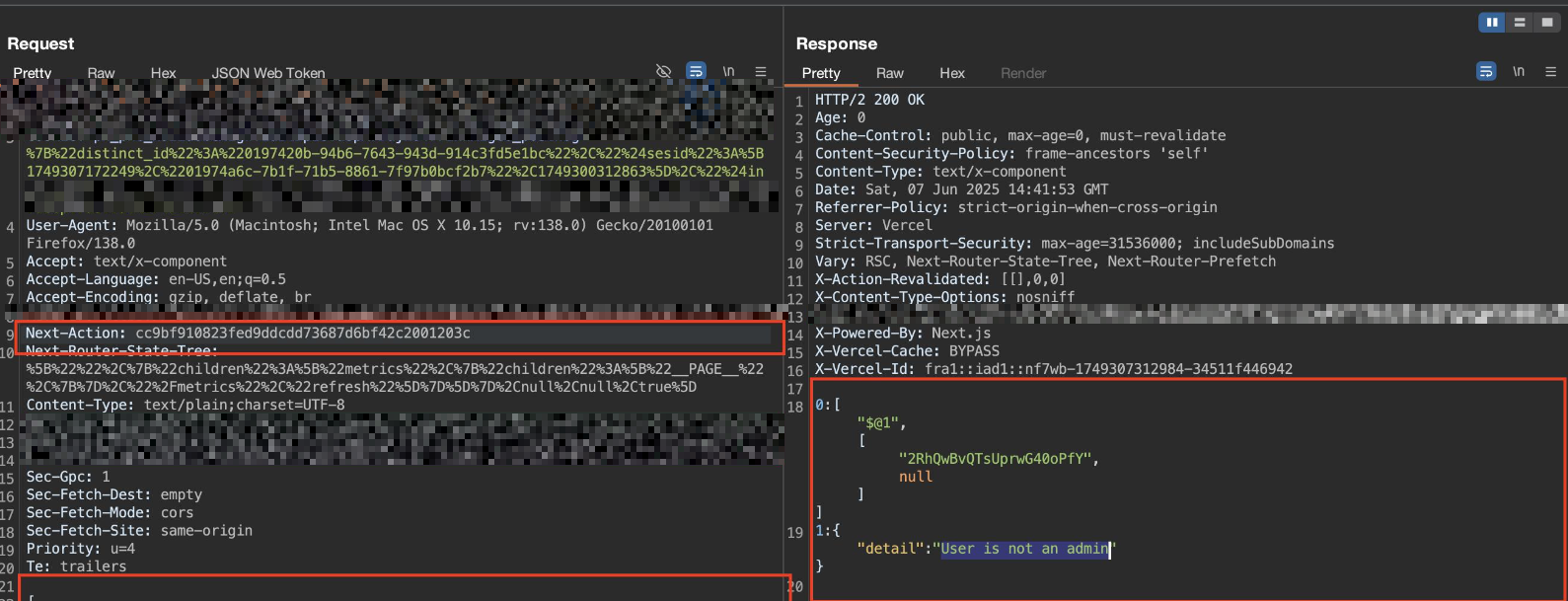
Bypassing Page-Level Access Controls
After hitting the 403 Unauthorized response, it was clear that direct access to the page was blocked. At that point, we looked at how the application handled requests internally instead of how it handled normal page navigation. Earlier, while reviewing the frontend JavaScript files, we had already identified several Next.js server action values that were exposed in plain text. Using those collected next-action values, we started testing how the backend responded when different actions were sent in the request headers. Most of the actions were rejected, which showed that some checks were in place.
However, one specific next-action value stood out. When this value was used, the server processed the request successfully and returned the protected content, even though the user did not have permission to access the page directly. This confirmed that while the page itself was protected, at least one server action was missing proper authorization checks. As a result, the access control could be bypassed by triggering the backend action directly, allowing unauthorized access to a restricted page.
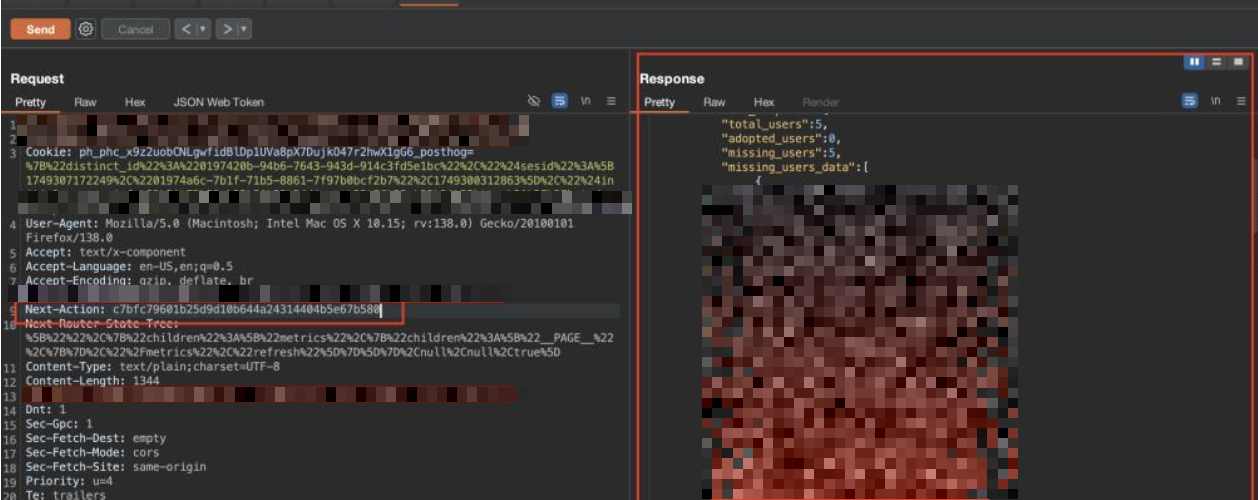
How to remediate this vulnerability?
To fix this issue, the main focus was on enforcing proper authorization at the server-action level, not just at the page level. While the application already blocked direct access to restricted pages, it was missing consistent permission checks when server actions were triggered through the next-action header. Each server action was updated to verify the user’s role and permissions before executing any logic, ensuring that only authorized users could access sensitive functionality.
In addition, the application was updated to avoid relying on client-controlled headers as a source of trust. Even though next-action values must exist in the front end code for the application to function, the back end was modified to treat them as untrusted input. Extra validation and logging were added to detect unexpected or unauthorized action calls. After applying these changes, attempts to trigger restricted actions without proper privileges were correctly rejected, and the bypass was fully resolved.
Also the JavaScript code was updated to avoid exposing meaningful or sensitive information in plain text. While Next.js requires certain action references to exist in the client code, the build process was adjusted to obfuscate the JavaScript output, making it harder to read and analyze. More importantly, any sensitive logic, identifiers, or security-related data were removed entirely from the front end and handled only on the server. These changes reduced the risk of action enumeration and ensured that even if the front end code is inspected, it cannot be used to bypass access controls.
Adopt a Zero-Trust Model for Client Input
To prevent issues like this in Next.js applications, it is important to avoid relying on frontend behavior for security. Any value coming from the client, including internal headers such as next-action, should always be treated as untrusted input. Authorization checks must be enforced on the server for every sensitive action, even if the related page or feature is already protected at the UI level.
Developers should also minimize what is exposed in frontend JavaScript files. Sensitive logic action identifiers tied to privileged operations, and internal workflows should never be stored or relied on in client-side code. While obfuscation can help slow down analysis, it should only be used as an additional layer and never as a replacement for proper backend validation.