




Cross-site scripting (XSS) is a vulnerability that lets an attacker run their own JavaScript in another person's browser, inside your application's origin, so the script can read what that user can read and do what that user can do. It is the most reported weakness in software: CWE-79 holds first place in MITRE's 2025 CWE Top 25, and OWASP counts more than 30,000 CVEs for it inside A05:2025 Injection. It is also still used in real intrusions. CISA's Known Exploited Vulnerabilities catalog maps 33 entries to CWE-79, and the four added in 2026 include a Microsoft Exchange flaw that was exploited before a security update existed.
CISA and the FBI put the engineering position bluntly in a Secure by Design alert in September 2024: "cross-site scripting vulnerabilities are preventable and should not be present in software products."
Quick answer. XSS happens when an application puts data it did not create into a page in a way that lets the browser treat that data as code. It is found by mapping every place untrusted data enters the application and every place it is displayed, then checking how each output context handles it, including stored content, administrator screens and client-side JavaScript. It is fixed by encoding output for its context, keeping framework defaults on, sanitizing user-authored HTML with a maintained library, and using safe DOM APIs. Content Security Policy, Trusted Types and cookie flags limit the damage when one of those fails; they do not replace them.
This guide is written for engineering and security leads who are responsible for web applications, and for anyone buying a web application penetration test. It covers the flaw in plain words, eight documented cases, where frameworks and browser controls stop helping, how a tester checks for XSS (the method and the evidence, not an attack recipe), and the fixes.
What is cross-site scripting (XSS)
Browsers keep websites apart. Code from one site cannot read another site's pages, cookies or storage, a rule known as the same-origin policy. XSS is the way around that rule. In MDN's words, "the attacker is able to subvert the same-origin policy by tricking the target site into executing malicious code within its own context, as though it were same-origin." From that point the injected code "can then do anything that the site's own code can do": read and change the content of the page and anything in local storage, and make HTTP requests with the user's credentials.
MDN reduces the cause to two conditions that must both be true. The site accepts "some input that could have been crafted by an attacker", and it includes that input in a page without ensuring "that it won't be executable as JavaScript." The second condition is the vulnerability. The harmless example below shows the difference between data that is displayed and data that is parsed.
1Stored value: Tom & Jerry <b>fans</b>
2
3Encoded on output: Tom & Jerry <b>fans</b> shown as text, exactly as typed
4Not encoded: Tom & Jerry <b>fans</b> the browser builds a bold elementA bold tag hurts nobody, but the browser handles a script-bearing element in exactly the same way. Whoever controls that stored value controls part of the page, and every visitor's browser runs it with that visitor's session.
The types of XSS
MITRE's CWE-79 entry notes that "there are many variants of cross-site scripting", all of which "indicate the same fundamental weakness". Three types are standard, and two more names come up in reports.
Type | Also called | Where the flaw is | How the script reaches the victim |
|---|---|---|---|
Reflected | Non-persistent, Type 1 | The server copies data from the request into the response | A crafted link or form that the victim opens |
Stored | Persistent, Type 2, second-order | The server saves the input and serves it later | The victim only has to view the page, message or record |
DOM-based | Type 0, client XSS | The page's own JavaScript passes data from a source to a sink | Often a link; the data may never reach the server |
Blind | A form of stored XSS | The input surfaces later in a back-office tool | A staff member opens the ticket, log or admin screen |
Mutation (mXSS) | A sanitizer approves markup that the browser then rewrites | Rich content such as email, comments and documents |
The OWASP Web Security Testing Guide calls reflected XSS "the most frequent type of XSS attacks found in the wild" and stored XSS "the most dangerous type", above all "in application areas where users with high privileges have access." DOM-based XSS is the one that grows with single-page applications: JavaScript obtains "user input through a source" and uses it "in a sink", and the attack can run "without the server being able to determine what is actually being executed."
OWASP describes blind XSS as "a form of persistent XSS" in which the input is saved and later shown to a back-end user, with a feedback form opened by an administrator as the example. Mutation XSS was named in a 2013 research paper by Mario Heiderich and colleagues, who reported placing stored mXSS in webmail products including Zimbra and Roundcube. The class is still being fixed in sanitizers today: the record for CVE-2025-26791 says DOMPurify before 3.2.4 had a flaw "sometimes leading to mutation cross-site scripting (mXSS)."
OWASP's page on the types of XSS offers a simpler split for assigning fixes: server XSS, where the server places the untrusted data in the HTML response, and client XSS, where it is used "to update the DOM with an unsafe JavaScript call." The two halves are fixed in different code, often by different teams.
Where XSS sits in the OWASP Top 10:2025 and the CWE Top 25
XSS had its own category in the OWASP Top 10 in 2017 (A7:2017), was folded into Injection in 2021, and stays there in the current list. The OWASP Top 10:2025 places it in A05:2025 Injection, which "falls two spots from #3 to #5". OWASP's summary of the category is worth quoting in full: "Injection includes Cross-site Scripting (high frequency/low impact) with more than 30k CVEs and SQL Injection (low frequency/high impact) with more than 14k CVEs." CWE-79 is one of the 37 weaknesses mapped to A05, alongside its narrower relatives CWE-80 and CWE-83. Our guide to the OWASP Top 10:2025 covers the other nine categories.
MITRE's 2025 CWE Top 25, built from 39,080 CVE records published between 1 June 2024 and 1 June 2025, ranks CWE-79 first with a score of 60.38, the same rank it held the year before. Seven CVEs in that dataset were in CISA's exploited catalog. The CISA and FBI alert adds a caution for anyone counting: "Many, but not all, cross-site scripting vulnerabilities are the result of CWE-79."
OWASP's "high frequency/low impact" label is an average over tens of thousands of records. The next section shows what the average hides.
How often XSS is found, how it is rated and where it is exploited
Stingrai's first-party numbers put XSS in the middle of the table by count and above the average for severity. Across 55 penetration tests and 1,206 verified findings logged between October 2024 and August 2026, 63 findings (5.2%) were cross-site scripting, according to our State of Penetration Testing 2026 report. Of those, 81.0% were rated High or Critical, above the 67.2% for all findings, but only 9.5% Critical, the lowest Critical share among the classes the report charts, against 56.5% for injection flaws such as SQL injection. In the report's words, "XSS fills the High tier and almost never tops a report." In web application tests specifically, the six largest classes run from authentication and session handling at 28.1% down to IDOR at 7.9%, and XSS sits outside those six.
Exploitation data tells a narrower story. CISA's Known Exploited Vulnerabilities catalog, at version 2026.11.10 with 1,779 entries, maps 33 entries to CWE-79. CISA names three of the 33 as command injection, spoofing or remote code execution, not XSS, and none of those three is webmail. Two entries under related weaknesses are not counted: a Roundcube XSS filed under CWE-80, and a Plex Media Server entry added on 20 October 2026 under CWE-84, which CISA does not name as XSS. Counting the 33 by product gives a pattern that the CVE totals do not show:
17 of the 33 are webmail products: nine in Zimbra Collaboration Suite, six in Roundcube, one in MDaemon and one in Microsoft Exchange's Outlook Web Access.
Nine of the 11 entries added since January 2025 are webmail, and all four added in 2026 are.
Five of the 33 carry CISA's flag for known use in ransomware campaigns.
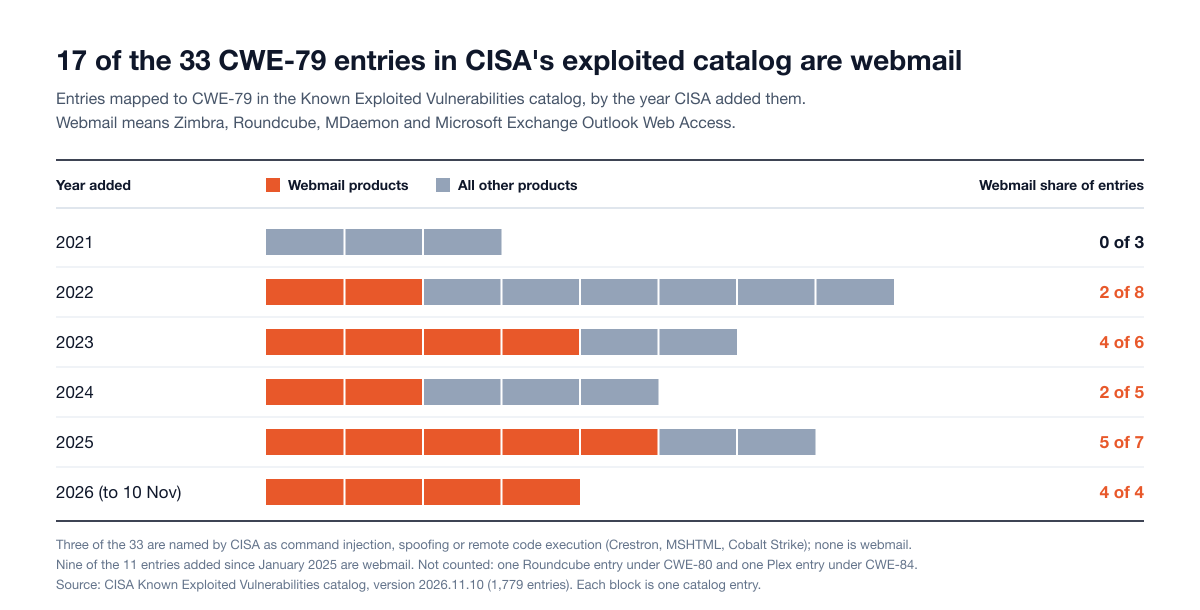
Figure 1: CWE-79 entries in CISA's Known Exploited Vulnerabilities catalog by year added, webmail products against all other products. Source: CISA KEV catalog, version 2026.11.10.
The concentration has a plain explanation. A webmail client exists to display HTML written by strangers, to a signed-in user, next to that user's mailbox. Any product takes on the same problem the moment it renders content from outside its trust boundary: support tickets, comments, uploaded documents, Markdown, calendar invitations, file previews or the output of a language model. The cases below start with webmail, where the exploitation evidence is, then move to the libraries, dashboards and frameworks most engineering teams ship. Wider figures are in our web application security statistics.
Eight documented XSS cases and what each one teaches
Every case below comes from a CVE record, the affected vendor's own advisory, a CISA catalog entry or a national CERT. One draws on Google's Threat Analysis Group, which discovered the exploitation it describes.
Case | Disclosed | Type | What it allowed | Primary source |
|---|---|---|---|---|
Microsoft Exchange Server, Outlook Web Access, CVE-2026-42897 | May 2026 | Delivered in an email; subtype not published | JavaScript execution in the reader's browser | Microsoft advisory, CISA KEV |
Zimbra Classic UI, CVE-2025-27915, CVE-2025-66376 and CVE-2025-48700 | March 2025 to January 2026 | Delivered in an email; two of the three records say stored | Script in the victim's session, including mail redirection | CVE records, Zimbra advisories, CISA KEV |
Roundcube Webmail, CVE-2024-42009 | August 2024 | Delivered in an email, through sanitizer post-processing | Stealing and sending the victim's email | Roundcube release notes, CERT Polska |
Zimbra Classic Web Client, CVE-2023-37580 | July 2023 | Reflected | Theft of email data, credentials and tokens | Google Threat Analysis Group, Zimbra advisory |
jQuery, CVE-2020-11023 | April 2020; added to KEV January 2025 | Client-side, in a library's DOM methods | Execution of untrusted code passed to DOM methods | jQuery advisory, CISA KEV |
Grafana, CVE-2025-4123 | May 2025 | Client-side chain | Arbitrary JavaScript through a rogue frontend plugin | Grafana Labs advisory |
Open WebUI, three advisories | May 2025 to May 2026 | Stored and DOM-based | Token theft, account takeover and code execution on the server | Open WebUI advisories |
Angular, CVE-2025-66412 | December 2025 | Stored, through a gap in the framework's sanitizer | Script execution in the application's origin | Angular advisory |
1. Microsoft Exchange Server: exploited before an update existed
On 14 May 2026 Microsoft published CVE-2026-42897, a cross-site scripting flaw in on-premises Exchange Server. The advisory explains the route: "An attacker could exploit this issue by sending a specially crafted email to a user. If the user opens the email in Outlook Web Access and certain interaction conditions are met, arbitrary JavaScript can be executed in the browser context." Microsoft's advisory lists the flaw as exploited, scores it 8.1 and gives it a Critical severity rating; the NVD's own analysis scores the same flaw 6.1. CISA added it to the Known Exploited Vulnerabilities catalog the next day with a two-week deadline. Exchange Server 2016, 2019 and Subscription Edition were affected, and Exchange Online was not.
The first fix was not a patch. The Exchange team's guidance said Microsoft "is working on and will release and announce a security update", and in the meantime delivered a mitigation automatically through the Exchange Emergency Mitigation Service. Microsoft then added a caveat that indicates what the mitigation rests on: it does not work in Internet Explorer or Edge in Internet Explorer mode, because "Internet Explorer does not support Content Security Policy (CSP)." It also had side effects, including calendar printing that "might not work" and inline images that "might not display correctly". Links to security updates were added to the advisory on 9 June, and on 14 July Microsoft recommended the July 2026 updates, after which the mitigation could be removed.
Lesson. A flaw that scores Medium on a generic scale was exploited in the wild against mail servers before any update existed. Severity follows the data behind the page. The case also shows browser policy used as an emergency brake: it bought time until the updates arrived, it cost features, and it did nothing for a browser without Content Security Policy support.
2. Zimbra Classic UI: three exploited XSS flaws in seven months
Between October 2025 and April 2026, CISA added three XSS flaws in the Zimbra Classic UI to its exploited catalog. Each one is triggered by viewing an email.
CVE-2025-27915 (added 7 October 2025). The CVE record describes "insufficient sanitization of HTML content in ICS files", the format used for calendar invitations. Viewing a message with a crafted calendar entry let an attacker "run arbitrary JavaScript within the victim's session, potentially leading to unauthorized actions such as setting e-mail filters to redirect messages to an attacker-controlled address."
CVE-2025-66376 (added 18 March 2026). The record describes "Classic UI stored XSS via Cascading Style Sheets (CSS) @import directives in an HTML e-mail message."
CVE-2025-48700 (added 20 April 2026). The record says the flaw "is triggered when a user views a crafted e-mail message in the Classic UI, requiring no additional user interaction." CISA gave US federal agencies three days to remediate it. The CVE record had been public since June 2025.
Zimbra's security advisories list the fixed versions for each.
Lesson. Every parser that turns outside content into HTML is an XSS input, including a calendar file and a style sheet. The damage can outlast the session: a forwarding rule planted by a script keeps working after the tab is closed. And all three flaws sit in the Classic UI, the older of Zimbra's two web clients.
3. Roundcube: the sanitizer worked, and then the output was changed
Roundcube's release notes for versions 1.6.8 and 1.5.8, published on 4 August 2024, describe CVE-2024-42009 in one line: "Fix XSS vulnerability in post-processing of sanitized HTML content". The CVE record calls it "a Desanitization issue" that "allows a remote attacker to steal and send emails of a victim via a crafted e-mail message." The NVD rates it 9.3 (Critical).
Ten months after the fix, on 5 June 2025, CERT Polska reported a spear phishing campaign against Polish organizations in which the attacker attempted to exploit it, and attributed the campaign with high confidence to a cluster of UNC1151 activity. "Opening the email message was all that was needed", the report says. The malicious code was built to register a Service Worker in the victim's browser, which would then capture credentials entered at the genuine login page. CISA added the CVE to its catalog four days later. CERT Polska's summary of the underlying problem applies well beyond webmail: the sanitization process "is surprisingly non-trivial, and new bypass methods are constantly being discovered in different products." Another Roundcube XSS, CVE-2025-68461, was fixed in December 2025 and added to the catalog in February 2026.
Lesson. Sanitization has to be the last thing that touches the markup, because any later edit can reintroduce what was removed. And a fixed XSS in software you host stays open until the update is installed: here the gap was ten months.
4. Zimbra again: a reflected flaw used by four groups
Reflected XSS is often dismissed because the victim has to open a link. Google's Threat Analysis Group documented what that looks like when the victim is signed in to a mail server. In June 2023 it discovered CVE-2023-37580, "a reflected cross-site scripting (XSS) vulnerability", being exploited against a government organization in Greece. It went on to observe "four different groups exploiting the same bug to steal email data, user credentials, and authentication tokens", with targets in Moldova, Tunisia, Vietnam and Pakistan.
The timeline is the instructive part. Zimbra pushed a hotfix to its public GitHub repository on 5 July 2023, published an advisory on 13 July and released the official patch on 25 July. Google notes that "Three of these campaigns began after the hotfix was initially made public". The fix itself was small: escaping one URL parameter before it was written into the page. The NVD scores the flaw 6.1.
Lesson. One unencoded parameter on one page was enough for four separate campaigns. A fix that is visible in a public repository before it reaches customers starts a race, and attackers read commit logs.
5. jQuery: a library flaw in the exploited catalog almost five years after its fix
The jQuery advisory for CVE-2020-11023 describes a flaw in the library's own DOM handling: "Passing HTML containing <option> elements from untrusted sources - even after sanitizing them - to one of jQuery's DOM manipulation methods (i.e. .html(), .append(), and others) may execute untrusted code." It affects versions from 1.0.3 up to, but not including, 3.5.0, which was released in April 2020.
CISA added the CVE to its exploited catalog on 23 January 2025. Its entry calls the flaw "a persistent cross-site scripting (XSS) vulnerability", although the weakness sits in client-side DOM methods, and carries a note that it "could affect an open-source component, third-party library, protocol, or proprietary implementation that could be used by different products."
Lesson. Client-side libraries are part of the XSS attack surface, and they age inside products long after the fix ships upstream. The phrase "even after sanitizing" matters too: input that was clean when checked became executable when a library rewrote it.
6. Grafana: a client-side chain, and a policy that blocks it only if it is switched on
Grafana Labs' advisory for CVE-2025-4123, published on 21 May 2025 and rated 7.6 (High), describes an XSS "caused by combining a client path traversal and open redirect. This allows attackers to redirect users to a website that hosts a frontend plugin that will execute arbitrary JavaScript." No editor permission was needed, and "if anonymous access is enabled, the XSS will work." Grafana's release post says successful exploitation "might result in session hijacking or complete account takeover", and that the fix was released a day early after the vulnerability "was leaked to public". The report had arrived through the company's bug bounty program on 26 April.
The advisory also states that "the default Content-Security-Policy (CSP) in Grafana will block the XSS though the connect-src directive." The release post words the same point as an action: operators "can also block this attack by adding the default Content Security Policy configuration as suggested in the Grafana docs." In Grafana's configuration reference, content_security_policy is a setting that an operator sets to true.
Lesson. In a single-page application, XSS is often a chain of two or three small client-side behaviors, none of which looks like injection on its own. And a policy that would have stopped the attack protects only the deployments where someone enabled it.
7. Open WebUI: a modern framework, a sanitizer library and stored XSS anyway
Open WebUI is a self-hosted platform for working with AI models, with a front end written in Svelte, a framework that escapes text expressions by default. Its advisories read like a catalog of the ways that default gets bypassed.
Raw HTML rendering. An advisory published in May 2025 (CVE-2025-46719) describes HTML in chat messages rendered through Svelte's
{@html}tag, so that injected code "will be executed in the user's browser every time that chat transcript is opened, allowing attackers to retrieve the user's access token and gain full control over their account." Against an administrator, the advisory continues, "it is possible to achieve Remote Code Execution on the server", because administrators can create server-side functions. The token was readable because it "is stored inside the user's localStorage, which is accessible by JavaScript."Sanitizing in the wrong order. A May 2026 advisory (CVE-2026-45665) traces a stored XSS to "an improper sanitization order (specifically, DOMPurify is executed before the marked library)". The input was clean Markdown when it was sanitized and unsafe HTML after it was converted.
Inconsistent coverage. Another May 2026 advisory (CVE-2026-45318) reports that the codebase used its sanitizer "in 9 out of 23
{@html}locations (39%)" and calls the result "a classic defense propagation failure: the sanitization primitive exists in the codebase but is not consistently applied to all rendering surfaces." The same advisory records a regression: the root cause had been fixed once and "was reintroduced" in a later version.
As of 13 November 2026, the GitHub Advisory Database lists 25 advisories for the open-webui package that are mapped to CWE-79. Nineteen of them were added to that database between May and September 2026, including some that the project first disclosed earlier.
Lesson. Framework auto-escaping and a good sanitizer are both present in this codebase. The vulnerabilities live in the gaps between them: an escape hatch used 23 times, a sanitizer applied before the step that produces the HTML, and a fix that did not survive later changes. Applications that render Markdown, uploaded files and model output have more of these paths than most. Our security checklist for AI-built apps covers the wider set of checks for that kind of product.
8. Angular: when the framework's own sanitizer has a gap
Angular treats every value as untrusted and sanitizes it on the way into the page. On 1 December 2025 the Angular team published an advisory for CVE-2025-66412, rated 8.5 (High), describing a stored XSS in the template compiler: "the compiler's internal security schema is incomplete, allowing attackers to bypass Angular's built-in security sanitization." Certain SVG and MathML attributes that can hold URLs were not classified as needing URL sanitization. The fix shipped in versions 21.0.2, 20.3.15 and 19.2.17; for versions 18.2.14 and earlier the advisory lists no patched release. Among its workarounds: "Configure a robust CSP header that disallows javascript: URLs."
Lesson. A framework's protection is software with its own bugs and its own patch cycle. Staying on a supported major version is an XSS control, and so is the second layer the Angular team points to in its own advisory.
Why modern frameworks reduce XSS but do not remove it
The OWASP Cross Site Scripting Prevention Cheat Sheet states both halves of the picture. First: "applications built with modern web frameworks have fewer XSS bugs, because these frameworks steer developers towards good security practices and help mitigate XSS by using templating, auto-escaping, and more." Then: "developers need to know that problems can occur if frameworks are used insecurely", and it lists the escape hatches by name. Each framework documents its own.
Framework | The safe default | The documented escape hatch | What the documentation says |
|---|---|---|---|
React | Values embedded in JSX are escaped before rendering |
| "Unless the markup is coming from a completely trusted source, it is trivial to introduce an XSS vulnerability this way." |
Angular | Values are treated as untrusted and sanitized | The | "Never create templates by concatenating user input and template syntax." |
Vue | Template content and attribute bindings are escaped |
| "User-provided HTML can never be considered 100% safe unless it's in a sandboxed iframe or in a part of the app where only the user who wrote that HTML can ever be exposed to it." |
Svelte | Expressions in markup are escaped |
| "Never render unsanitized content." |
Sources: the React reference (the default is described in React's legacy JSX documentation), the Angular security guide, the Vue security guide and the Svelte documentation. Together they show where XSS lives in a modern codebase.
In the escape hatches. Rich text editors, Markdown renderers, email previews and syntax highlighters all need real HTML, so they all call the escape hatch. Each call is a place where the framework has been told to stand down.
In URLs. Escaping a value does not make it a safe link. The Vue guide warns that a bound link is a security issue if the URL has not been sanitized to prevent script execution through a javascript: URL, and adds that "User-provided URLs should always be sanitized by your backend before even being saved to a database." OWASP notes that React 19 blocks such URLs in src and href, "but this does not replace application-specific URL validation".
Outside the framework. The Angular guide says it directly: "Unless you enforce Trusted Types, the built-in browser DOM APIs don't automatically protect you from security vulnerabilities." Code that reaches past the framework to the DOM, and third-party libraries that do the same, get none of the automatic protection. The jQuery case is this category.
On the server. Server-rendered pages, HTML email templates, PDF generators and error pages are often built with a different templating system from the main application. Vue's guide singles out one combination as a source of injection: mounting the framework on a page that already contains server-rendered user content.
In content your application did not write. Uploaded files, imported records, third-party API responses and language model output are all untrusted data. OWASP's guidance on improper output handling in LLM applications gives the scenario in one sentence: "JavaScript or Markdown is generated by the LLM and returned to a user. The code is then interpreted by the browser, resulting in XSS."
The cheat sheet's summary is the right mental model: "Coverage is what matters: an application that protects 99 places and misses one is still vulnerable."
What Content Security Policy and Trusted Types do and do not stop
Two browser features are regularly described as the end of XSS. Their own specifications are more modest.
Content Security Policy
A Content Security Policy (CSP) is a response header that tells the browser which scripts and other resources a page may load and run. The W3C specification sets the expectation in its introduction: "CSP is not intended as a first line of defense against content injection vulnerabilities. Instead, CSP is best used as defense-in-depth. It reduces the harm that a malicious injection can cause, but it is not a replacement for careful input validation and output encoding."
What it does well, when it is strict: MDN's CSP guide explains that a policy can disable inline script tags, inline event handlers, javascript: URLs and eval(), and allow only scripts that carry the right nonce or hash. MDN's recommended form, which it calls a strict CSP, is short:
1Content-Security-Policy:
2  script-src 'nonce-{RANDOM}';
3  object-src 'none';
4  base-uri 'none';
The nonce is a random value generated for every response and attached to the scripts the server intends to send. An injected script lacks it, so the browser refuses to run it. Hashes do the same job for static pages.
What it does not do:
It does not remove the injection. The attacker's markup is still in the page. MDN is explicit that "Setting a CSP is not an alternative to sanitizing input."
It fails quietly when it is loose. MDN warns that allowlist policies "are hard to get right" and often "inadvertently whitelist unsafe domains, and hence don't provide effective protection against XSS". A policy that allows inline scripts allows injected inline scripts too.
It depends on the browser and the deployment. MDN lists the header as widely available across browsers since August 2016, but the Exchange mitigation above did nothing in Internet Explorer mode, and the Grafana policy protected only the servers where it was enabled.
It can break features. The Exchange mitigation came with known issues in calendar printing and inline images until it could be removed. MDN describes report-only mode, in which "the policy is not enforced, but any violations are sent to the reporting endpoint", and that is how teams find those costs before an emergency.
OWASP's cheat sheet files CSP under additional controls for these reasons: "It's easy to make mistakes with the implementation so it should not be your primary defense mechanism."
Trusted Types
Trusted Types target DOM-based XSS specifically. The W3C specification explains the problem: "DOM XSS is prevalent in the web applications as there are over 60 different injection sinks", and it is hard to tell by reading code whether a string reaching one of them is attacker-controlled. With enforcement switched on through the CSP directive require-trusted-types-for 'script', those sinks stop accepting plain strings. They accept only typed values produced by a policy the application defines, which shrinks the code that needs security review to those policies.
The specification also lists what the feature is not for. Its first non-goal reads: "Prevent, or mitigate the result of injections into server-side generated markup". For those, the authors "recommend existing solutions like templating systems or CSP script-src". OWASP adds the practical limit: "Trusted Types does not sanitize input by itself: policies must apply suitable validation or sanitization, and overly permissive policies can undermine the protection."
Browser support changed this year. MDN marks the Trusted Types API as "Baseline 2026" and "Newly available": "Since February 2026, this feature works across the latest devices and browser versions. This feature might not work in older devices or browsers." That makes enforcement practical for applications whose users are on current browsers. In an older browser the directive is ignored and the application falls back on its other defenses, which is why Angular's guide still notes that Trusted Types "might not yet be available in all browsers your application targets." React accepts a TrustedHTML value in dangerouslySetInnerHTML, and Angular documents its own Trusted Types policies.
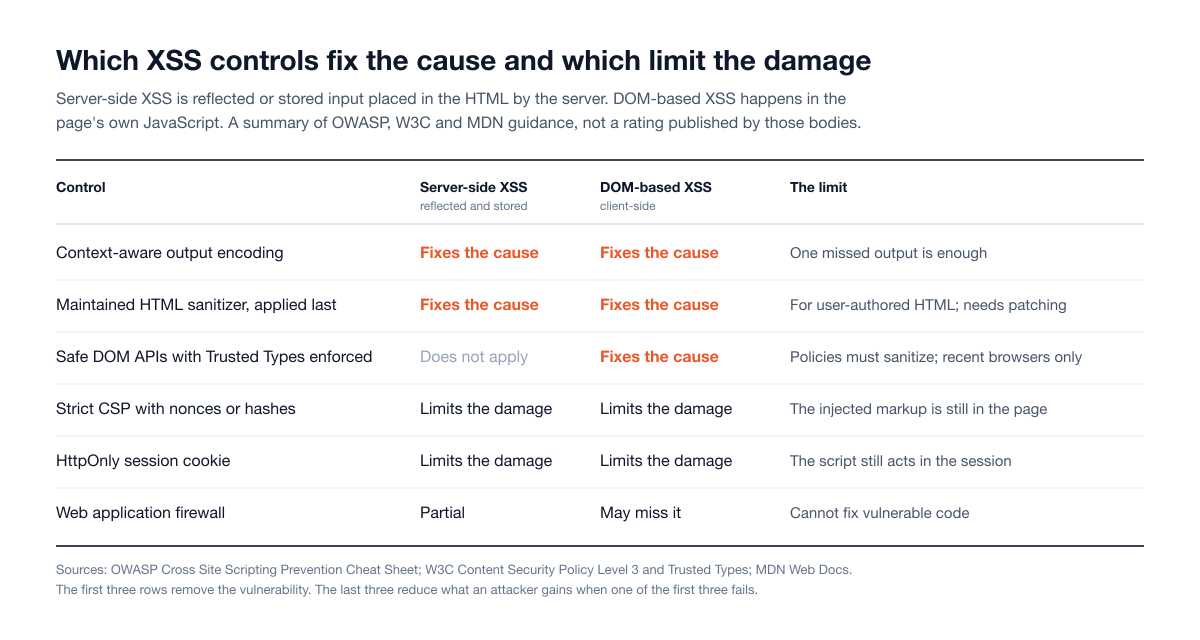
Figure 2: Which controls fix the cause of XSS and which limit the damage. A summary of the OWASP, W3C and MDN guidance cited in this section.
Cookie flags and token storage
The HttpOnly cookie attribute, per MDN, "forbids JavaScript from accessing the cookie". It stops the simplest outcome of XSS, copying the session cookie to another machine. It does not stop the script from using the session where it stands: MDN notes that such a cookie "will still be sent with JavaScript-initiated requests". OWASP's assessment of cookie attributes is that they "try to limit the impact of an XSS attack but don't prevent the execution of malicious content or address the root cause". A session token kept in local storage has no such protection at all, which is what turned the Open WebUI flaw into account takeover.
How a web application penetration test checks for XSS
The OWASP Web Security Testing Guide has a test for each main type: WSTG-INPV-01 for reflected, WSTG-INPV-02 for stored and WSTG-CLNT-01 for DOM-based XSS. The first two share an objective that summarizes the whole exercise: identify the input that is reflected, and "assess the input they accept and the encoding that gets applied on return (if any)." A thorough check follows the same eight steps on every engagement.
Map every input. The guide tells testers to find "all the web application's user-defined variables", including "hidden or non-obvious inputs". Today that list runs well past form fields: HTTP headers, file names and contents, imported spreadsheets, profile data from an identity provider, webhook bodies, inbound email and model output.
Map every output. For each input, the tester traces where the value is displayed: which pages, which roles see it, and which other channels carry it, such as notification emails, exported reports, PDF files and administrator consoles.
Identify the context of each output. The same value may land in HTML text on one page, inside an attribute on another, in a URL, inside a script block or in a style. The tester uses distinctive but harmless marker values to see how each context encodes them. The guide notes that such test input "is typically harmless" and exists to reveal how the page handles it.
Follow stored and second-order paths across roles. Input saved by a low-privilege user is viewed as a manager, a support agent and an administrator, in every screen that lists or previews it. For screens the tester cannot see, such as internal tools, a blind XSS check uses a marker that reports back to a tester-controlled endpoint when it is rendered, with the endpoint and data handling agreed in the rules of engagement.
Review client-side sources and sinks. For DOM-based XSS the guide is frank about tooling: "Automated testing has only very limited success at identifying and validating DOM-based XSS", because the flaw never appears in a server response. The tester reads the application's JavaScript for data that flows from sources such as the URL, stored state and cross-window messages into sinks that parse HTML or execute code. Source code access shortens this step considerably.
Examine rich content handling. Editors, Markdown, SVG and document uploads, file previews and HTML email are checked against the sanitizer's configuration, its version and the order of operations around it. This is where the Roundcube and Open WebUI flaws were.
Assess the controls that limit damage. The tester reads the Content Security Policy as an attacker would, checks whether Trusted Types are enforced, and records where session tokens are stored and which cookie attributes they carry. These decide what a confirmed XSS is worth.
Prove impact safely, report, then retest. A finding is demonstrated with a benign proof in a test account, never with real users' data. After the fix, the same inputs and outputs are checked again.
What proof of impact looks like in a report
A screenshot of a pop-up box is not evidence of impact, and a report that stops there leaves the client guessing at severity. A useful XSS finding records:
The input and the output. Where the value enters, where it is rendered, and the output context in which it executes.
Who is affected. Which roles can plant the content and which roles view it. Stored XSS that an ordinary user can aim at an administrator is a different finding from one a user can only aim at themselves.
What the script can reach. A demonstration, in the tester's own accounts, of a concrete action taken with the victim's session: reading a record the attacker should not see, changing a setting, or creating a user.
What the existing controls did. Whether the Content Security Policy blocked or allowed the proof, and whether the session token was readable.
A severity that follows from the above, and remediation written for the specific output context.
A flaw that lets any user run script in an administrator's session earns a High rating; a reflected flaw on a page with no session and a strict policy does not. For how this fits into a full engagement, see our guide to web application penetration testing methodology, and for the API side, where the same data enters, the API penetration testing checklist.
Reflected XSS in a server-rendered page is the part of this work that automation handles well. Stored paths across roles, client-side flows and rich content depend on understanding how the application is used. Snipe, Stingrai's autonomous AI agent for web applications and associated APIs, runs specialized agents for injection classes alongside those for authentication, access control and business logic, and tests authenticated across roles. In a Hybrid engagement, Stingrai's penetration testers and Snipe test at the same time: the testers direct its focus, extend the paths it opens, and pursue the context-heavy cases, such as content that only executes in a back-office screen.
How to fix XSS: the fixes that hold
OWASP's cheat sheet opens with the constraint that shapes everything else: "no single technique will solve XSS". The list below is ordered from the fixes that remove the cause to the controls that limit damage.
Encode output for its context, as late as possible. The right encoding depends on where the value lands, and using the wrong one "may introduce weaknesses or harm the functionality of your application."
Where the value lands | What to do | What to avoid |
|---|---|---|
HTML text between tags | HTML entity encoding, or assign with | Building markup by string concatenation |
A quoted HTML attribute | Attribute encoding, with the value always quoted | Unquoted attributes; untrusted event-handler code |
A URL in | URL-encode parameters, then validate the scheme against an allowlist | Accepting any scheme, including |
A string inside a script block | A maintained encoder documented for that location | Hand-written quote escaping; passing the value to |
CSS | Set a fixed property through the CSSOM with an allowlisted value | Interpolating untrusted data into style sheets or selectors |
User-authored HTML | A maintained HTML sanitizer | Regular expressions or home-made filters |
OWASP also lists dangerous contexts, such as directly inside a script, a comment, a tag name or an attribute name, where "even with output encoding, it will not prevent an XSS attack fully". Untrusted data should not be placed there at all.
Keep the framework's defaults and control the exceptions. Treat every use of dangerouslySetInnerHTML, bypassSecurityTrust, v-html or {@html} as a reviewed exception: wrap it in one shared component, sanitize inside that component, and add a lint rule that fails the build when the raw API is used anywhere else. The Open WebUI count, 9 sanitized uses out of 23, is what happens without that rule.
Sanitize user-authored HTML with a maintained library, and do it last. Where users need formatting, encoding would destroy it, so the HTML has to be sanitized. OWASP recommends DOMPurify and attaches three conditions: do not modify the content after sanitizing it, check that no library mutates it afterwards, and "regularly patch DOMPurify or other HTML Sanitization libraries that you use", because "bypasses are being discovered regularly." For Markdown, convert first and sanitize the resulting HTML. The browser's built-in HTML Sanitizer API is a future option; MDN currently lists it as having limited availability.
Validate URLs on the server. Allow only the schemes the feature needs, before the value is saved. This is requirement 1.2.2 in OWASP ASVS 5.0: "Ensure that only safe URL protocols are permitted".
Use safe DOM APIs, and enforce them with Trusted Types. The cheat sheet's advice is to "refactor your code to remove references to unsafe sinks like innerHTML, and instead use textContent or value."
1// unsafe: the string is parsed as HTML
2element.innerHTML = comment;
3
4// safe: the string is inserted as text and is never parsed
5element.textContent = comment;
The Trusted Types specification supports a report-only mode, delivered through the Content-Security-Policy-Report-Only header. Running it first produces a report for each place the application still passes a plain string to a dangerous sink, which is a fast audit of client-side XSS exposure.
Deploy a strict Content Security Policy. Use nonces or hashes, not a list of allowed domains, and begin in report-only mode. ASVS 5.0 requirement 3.4.3 sets the floor for Level 2: a policy that includes object-src 'none' and base-uri 'none' and "defines either an allowlist or uses nonces or hashes", with per-response nonces or hashes required at Level 3.
Protect the session. Set HttpOnly, Secure and an appropriate SameSite value on session cookies (ASVS 3.3.4 covers HttpOnly for tokens that scripts should not read), and keep session tokens out of local storage.
Patch the front end. Track client-side libraries and framework versions in the same dependency process as server packages. In two of the eight cases, jQuery and Angular, the flaw was in the library itself and the durable fix was an upgrade.
Do not lean on input validation or a firewall. Encode or sanitize at the point of display, whatever was done at the point of entry: input validation, in OWASP's words, "does not replace these protections." Web application firewalls "cannot reliably prevent all XSS attacks or fix vulnerable application code", and "may miss DOM-based XSS that occurs entirely in the browser."
Fix the class, then prove it. CISA and the FBI ask manufacturers to "identify and document the root causes of cross-site scripting vulnerabilities" and work toward "eliminating the entire class". In practice, one finding should trigger a search for the same pattern in every template and component, a regression test, and a retest of the original finding.
How to scope XSS testing in a web application penetration test
Whether a test finds the XSS that matters depends on what the tester can reach. Use this as a checklist when you brief a provider.
Accounts for every role, including internal ones. Stored XSS is a cross-role problem. The tester needs an ordinary user, a privileged user and access to the support or administrator console where user content is viewed.
Every surface that renders user content. The web application, the administrator panel, emails the application sends, exported files, embedded widgets and any customer-facing portal that shares the data.
Rich content features, named explicitly. Editors, Markdown, file upload and preview, templates, custom branding or theming, and anything that displays model output.
The front-end stack. Framework and version, the sanitizer in use, and the Content Security Policy as deployed in production, since policies often differ between staging and production.
Source access where possible. A source-assisted test finds DOM-based and escape-hatch issues that black-box testing can miss in the time available.
Agreement on blind XSS. Whether out-of-band markers may be used, where callbacks go and how any captured data is handled.
Evidence and retesting. Ask for the tested inputs, outputs and roles, not only the findings, and confirm that retesting of fixes is included.
Two questions separate providers quickly: "Will you test stored content as it appears to an administrator?" and "Will the report say what our Content Security Policy did to each finding?" Budget and timing guidance is in our web application penetration testing scope and cost guide, and a comparison of providers is in our ranking of web application penetration testing companies.
How Stingrai tests for XSS
Stingrai is a CREST-accredited penetration testing company offering fully human-led and hybrid (human penetration testers plus AI agents) penetration tests, delivered by experienced penetration testers who are also world-class security researchers and bug bounty hunters. The team has 18 published CVEs and includes a researcher with more than 400 Hall of Fame reports at companies including Apple, Google and Facebook. Its web application penetration tests are authenticated across every user role and cover injection, including stored, reflected and DOM-based XSS, alongside broken authorization and IDOR, business logic, and authentication and session handling. Testing is aligned to the OWASP Top 10 and ASVS and is source-assisted where code access is given.
Each human-led engagement is staffed by two named penetration testers from a team holding OSCE³, OSWE, OSEP and CREST CRT certifications. Findings are posted to the PTaaS portal as they are confirmed, each with a working proof of concept and prioritized remediation guidance, and retesting of remediated findings is included. Engagements run as one-time (annual) tests or as continuous programs that test every release.
For one web application and associated APIs, published pricing is fixed. The Autonomous Pentest, run by Snipe, is US$3,000 per assessment or US$650 per month on a 12-month plan. The Hybrid Pentest, where penetration testers and Snipe test together throughout, is US$6,800 per assessment or US$1,275 per month. Larger scopes, including mobile applications and multi-application estates, are quoted per engagement. Details are on the pricing page.
Key recommendations
Treat everything your application did not create as untrusted at the point of display: form input, files, imports, email, third-party APIs and model output.
Encode output for the context it lands in, and keep the framework's automatic escaping switched on.
Put every raw HTML escape hatch behind one reviewed component, and fail the build when it is used elsewhere.
Sanitize user-authored HTML with a maintained library, as the last step before rendering, and keep the library patched.
Validate URL schemes on the server before saving them.
Deploy a nonce-based or hash-based Content Security Policy, starting in report-only mode, and enforce Trusted Types where your users' browsers support them.
Set
HttpOnlyon session cookies and keep tokens out of local storage.Patch client-side libraries and frameworks on the same schedule as server packages.
Test stored content as every role that views it, including administrators and support staff, and retest every fix.
Frequently Asked Questions
What is cross-site scripting (XSS)?
Cross-site scripting (XSS) is a web application vulnerability in which an attacker gets their own JavaScript to run in another user's browser as if it came from the application itself. It happens when the application includes untrusted data in a page without encoding or sanitizing it, so the browser treats that data as code. The script can then read what the user can read and act with the user's session. MITRE tracks it as CWE-79, ranked first in the 2025 CWE Top 25.
What are the types of XSS?
There are three main types. Reflected XSS copies data from a request straight into the response, so it is delivered through a crafted link. Stored XSS saves the input and serves it to other users later. DOM-based XSS happens entirely in the browser, when the page's own JavaScript passes untrusted data to a function that parses HTML or runs code. Blind XSS is stored XSS that fires in a back-office screen, and mutation XSS (mXSS) is markup that a sanitizer approves and the browser then rewrites into something executable.
Is XSS still in the OWASP Top 10?
Yes, inside a broader category. XSS was a standalone entry (A7) in the 2017 list and has been part of Injection since 2021. In the OWASP Top 10:2025 that category is A05:2025 Injection, which maps CWE-79 among its 37 weaknesses. OWASP describes cross-site scripting there as high frequency and low impact, with more than 30,000 CVEs.
Is XSS still exploited in 2026?
Yes. CISA's Known Exploited Vulnerabilities catalog, at version 2026.11.10, maps 33 entries to CWE-79, four of them added in 2026: one in Roundcube, two in Zimbra and one in Microsoft Exchange Server (CVE-2026-42897), which Microsoft lists as exploited and CISA added to the catalog the day after it was published. Seventeen of the 33 entries are webmail products, where a script running in the reader's session has access to the mailbox.
Do React, Angular and Vue prevent XSS?
They prevent most of it by escaping or sanitizing values by default, and OWASP notes that applications built with modern frameworks have fewer XSS bugs. They do not prevent all of it. Each framework documents an escape hatch for rendering raw HTML (dangerouslySetInnerHTML in React, the bypassSecurityTrust methods in Angular, v-html in Vue), and XSS also arises from unvalidated URLs, direct DOM access, third-party libraries and server-rendered pages. Frameworks have their own flaws too, such as CVE-2025-66412 in Angular's template compiler.
Does a Content Security Policy prevent XSS?
A Content Security Policy limits the damage of XSS; it does not remove the vulnerability. A strict policy based on nonces or hashes stops most injected scripts from running, but the W3C specification says CSP is not intended as a first line of defense and is not a replacement for input validation and output encoding. Policies built on domain allowlists are often bypassable, and a policy protects only the deployments and browsers where it is enforced.
What are Trusted Types?
Trusted Types are a browser feature that locks down the JavaScript functions through which DOM-based XSS happens. When enforcement is enabled through a Content Security Policy directive, those functions reject plain strings and accept only typed values created by a policy the application defines. MDN lists the Trusted Types API as Baseline 2026, newly available across the latest browser versions since February 2026. Trusted Types do not address XSS in HTML generated on the server.
How do you prevent XSS?
Encode every piece of untrusted data for the context in which it is displayed, and rely on your framework's automatic escaping to do that by default. Where users must be able to write HTML, sanitize it with a maintained library as the last step before rendering. Use DOM APIs that treat data as text, validate URL schemes on the server, and keep front-end libraries patched. Then add a nonce-based or hash-based Content Security Policy, Trusted Types and HttpOnly session cookies to limit the damage if one of those measures fails.
How is XSS tested in a penetration test?
The tester maps every place untrusted data enters the application and every place it is displayed, then uses harmless marker values to see how each output context encodes them. Stored content is viewed as every role that can see it, including administrators, and client-side JavaScript is reviewed for data flowing from sources such as the URL into functions that parse HTML. A confirmed finding is demonstrated with a benign proof in test accounts and reported with the affected roles, what the script could reach and what the existing controls did.
How serious is an XSS vulnerability?
It depends on whose browser the script runs in and what that user can do. OWASP describes the class as low impact on average, and in Stingrai's State of Penetration Testing 2026 dataset 9.5% of XSS findings were rated Critical, while 81.0% were rated High or Critical. At the top of the range, the Roundcube flaw CVE-2024-42009 is rated 9.3 by the NVD, and a stored XSS in Open WebUI gave an attacker who reached an administrator code execution on the server.
A missing encoding call takes minutes to fix and can take years to surface. To have your application's inputs, outputs and client-side code tested across every role, book a 30-minute scoping call or get a quote.
Related reading
IDOR Vulnerability: Real Examples, How Testers Find It and How to Fix It
OWASP Top 10 2025: The Full List, What Changed and How to Test Each Risk
Web Application Penetration Testing: What It Is, What It Tests and How It Works (2026)
API Penetration Testing Checklist: What to Test, Prepare and Expect (2026)
Web Application Security Statistics 2026: Attacks, Vulnerabilities and Fix Times
Best Web Application Penetration Testing Companies in 2026 (Ranked)
References
CISA and FBI. Secure by Design Alert: Eliminating Cross-Site Scripting Vulnerabilities, 18 September 2024.
MITRE. CWE-79: Improper Neutralization of Input During Web Page Generation ('Cross-site Scripting').
MITRE. 2025 CWE Top 25 Most Dangerous Software Weaknesses and its methodology.
OWASP. A05:2025 Injection, OWASP Top 10:2025.
OWASP. Cross Site Scripting Prevention Cheat Sheet, DOM based XSS Prevention Cheat Sheet and Content Security Policy Cheat Sheet.
OWASP. Cross Site Scripting (XSS) and Types of Cross-Site Scripting.
OWASP. Web Security Testing Guide v4.2: WSTG-INPV-01, WSTG-INPV-02 and WSTG-CLNT-01.
OWASP. Application Security Verification Standard 5.0: V1 Encoding and Sanitization and V3 Web Frontend Security.
OWASP. LLM05:2025 Improper Output Handling, OWASP Top 10 for LLM Applications.
CISA. Known Exploited Vulnerabilities Catalog, version 2026.11.10.
Microsoft. CVE-2026-42897, Microsoft Exchange Server Spoofing Vulnerability, 14 May 2026, and the Exchange team's mitigation guidance.
Zimbra. Zimbra Security Advisories, with the CVE records for CVE-2025-27915, CVE-2025-66376 and CVE-2025-48700.
Roundcube. Security updates 1.6.8 and 1.5.8 released, 4 August 2024, and Security updates 1.6.12 and 1.5.12 released, 13 December 2025.
CERT Polska. UNC1151 exploiting Roundcube to steal user credentials in a spearphishing campaign, 5 June 2025.
Google Threat Analysis Group. Zimbra 0-day used to target international government organizations, 16 November 2023.
jQuery. GHSA-jpcq-cgw6-v4j6: Potential XSS vulnerability when appending HTML containing option elements (CVE-2020-11023), 29 April 2020.
Grafana Labs. CVE-2025-4123: XSS in Frontend Plugins in Grafana, 21 May 2025, and the security release post.
Open WebUI. Security advisories GHSA-9f4f-jv96-8766, GHSA-cqp4-qqvg-3787 and GHSA-hcwp-82g6-8wxc.
Angular. GHSA-v4hv-rgfq-gp49: Stored XSS Vulnerability via SVG Animation, SVG URL and MathML Attributes (CVE-2025-66412), 1 December 2025.
Heiderich, Schwenk, Frosch, Magazinius and Yang. mXSS Attacks: Attacking well-secured Web-Applications by using innerHTML Mutations, ACM CCS 2013.
React, Angular, Vue and Svelte documentation. Common components, Security, Security and {@html ...}.
W3C. Content Security Policy Level 3, Working Draft, 27 October 2026, and Trusted Types, Working Draft, 7 October 2026.
MDN Web Docs. Cross-site scripting (XSS), Content Security Policy (CSP), Trusted Types API and Set-Cookie.
Stingrai. State of Penetration Testing 2026.