





A "root detection bypass" or "jailbreak detection bypass" finding means the tester ran your app on a rooted Android or jailbroken iOS device and switched off, or slipped past, the check that was supposed to notice. It is not a vulnerability on its own: OWASP's mobile standard says of resilience controls that "The absence of these measures does not in itself constitute a vulnerability" (MASVS-RESILIENCE). It matters in proportion to what the bypass let the tester reach.
Quick answer. Root and jailbreak detection is a resilience control that raises an attacker's cost, not a security boundary: any check that runs on a device can be disabled by someone who controls that device. Our guidance: treat the finding as low severity or informational for most apps, and as a real control failure for banking, payment, licensed-media and competitive gaming apps. The fix that holds in 2026 is to let your server decide: verify Play Integrity verdicts on Android and App Attest assertions on iOS on the backend, tie sensitive actions to the result, and respond in tiers instead of only blocking.
This guide is for the engineering, mobile or security lead deciding what to do with this line in a penetration test or scanner report. It is the companion to our SSL pinning bypass article: the two findings often appear in the same mobile report and share one root cause, a control on the device asked to protect something from the person holding it. There are no bypass steps here.
What does "root detection bypass" or "jailbreak detection bypass" mean in a report?
Reports word this finding in several ways, describing two situations: the control is missing, or it exists and was defeated.
Wording in the report | What the tester observed | Where it sits in OWASP MAS |
|---|---|---|
Root detection not implemented, jailbreak detection missing, app runs on rooted device | The app worked normally on a rooted or jailbroken device; no check was found | MASWE-0051, "Root/Jailbreak Detection Not Implemented" |
Root detection bypass, jailbreak detection bypass | A check exists; the tester disabled or evaded it and kept using the app | MASWE-0051, mode "Naive or Single-Point Checks" |
Rooted device detected but no action taken | The app noticed and did nothing that mattered, or showed a warning the user can dismiss | MASWE-0051, mode "No Response Strategy" |
Device attestation not implemented, integrity verdict not verified server-side | The backend accepts requests with no proof of the device or app, or the app checks the verdict itself | MASWE-0054, "Device Attestation Not Implemented" |
All four map to MASVS-RESILIENCE-1: "The app validates the integrity of the platform." OWASP states its purpose: "This control tries to validate that the OS has not been compromised and its security features can thus be trusted." MASWE-0051 also maps to MASVS-RESILIENCE-4, anti-dynamic analysis.
As of 19 November 2026 the current releases are MASVS v2.1.0 (18 January 2024), MASTG v2.0.0 (30 June 2026) and MASWE v1.0.0 (17 August 2026), per the project's GitHub releases. Older reports cite the retired identifiers MSTG-RESILIENCE-1, MASTG-TEST-0045 or MASTG-TEST-0088 for the same thing.
What do rooting and jailbreaking change about the platform?
Both platforms sandbox apps. Google's Application Sandbox documentation says: "By default, apps can't interact with each other and have limited access to the OS." Apple's Platform Security guide says: "All third-party apps are sandboxed." NIST defines rooting as "the process of enabling users to gain privileged (root) access on the device's operating system (OS)" and notes that "the term jailbreaking is commonly used in industry to describe rooting an iOS device" (NIST SP 800-163 Revision 1, April 2019).
Rooting and jailbreaking remove the sandbox guarantee for whoever holds the privilege. The Android security overview states: "Encrypting data with a key stored on-device doesn't protect the app data from root users on rooted devices." Apple's iPhone User Guide says: "Jailbreaking your device eliminates security layers designed to protect your personal information and your iOS device." Privileged users and tools "can access the app's private data, instrument its process, and defeat its client-side controls" (MASWE-0051).
Three different people can hold that privilege
This distinction decides how much the finding matters:
An ordinary user who modified their own phone. They are your customer, not your adversary.
An attacker on their own device. A reverse engineer, fraudster or cheater studying and manipulating your app. Detection is aimed at this person.
Malware or a thief on a victim's device. Your real user's data on that phone is exposed.
OWASP's MAS Testing Profiles draw the same line. MAS-L2 assumes "The operating system cannot be trusted", but not that the user is the adversary. MAS-R assumes "The user of the device is an attacker, including reverse engineers and cheaters." Root and jailbreak detection belongs to MAS-R.
What is root and jailbreak detection for?
It makes analysis and tampering slower and more expensive, and gives your backend a signal. It does not decide who may read or change data; that is the job of authentication, authorization and encryption. OWASP is direct about the limits. Its testing guide says: "Like most other defenses, root detection is not very effective by itself, but implementing multiple root checks that are scattered throughout the app can improve the effectiveness of the overall anti-tampering scheme" (MASTG-KNOW-0027), and its jailbreak detection entry says the same of iOS. Its best practice sets the rule for when to use it: "It is a cost raising measure and it is bypassable, so it should be used only when rooted device risk materially impacts the app" (MASTG-BEST-0030). The OWASP Mobile Top 10 (2024) files the wider class under M7: Insufficient Binary Protections; our OWASP Mobile Top 10 guide covers how a test checks all ten risks.
Is root or jailbreak detection bypass a vulnerability?
Not on its own. Besides the MASVS sentence quoted at the top, OWASP's weakness list says "a weakness is not a vulnerability, but it can lead to the introduction of vulnerabilities" (MASWE). A bypass becomes part of a vulnerability when something else gives way behind it. Three patterns are worth looking for:
The app trusted the device with a secret. Tokens, keys or personal data sit in local storage that a privileged user can read. The storage flaw is the vulnerability; root access is how it is reached.
The app trusted itself with a decision. A paywall, limit, licence check or fraud rule is enforced only in the app. The missing server-side enforcement is the vulnerability.
The backend trusted the app. With detection and pinning out of the way, the tester replays API traffic and finds an endpoint that returns another customer's records. The broken authorization is the vulnerability, exploitable without the app at all.
In each case the detection bypass is a step in the path. Rate and fix the thing at the end of the path first.
How do penetration testers evaluate root and jailbreak detection?
As of 19 November 2026 the OWASP testing guide has a static and a dynamic test on each platform:
Platform | Static test | Dynamic test |
|---|---|---|
Android | MASTG-TEST-0324: References to Root Detection Mechanisms | MASTG-TEST-0325: Runtime Use of Root Detection Techniques |
iOS | MASTG-TEST-0240: Jailbreak Detection in Code | MASTG-TEST-0241: Runtime Use of Jailbreak Detection Techniques |
Static and dynamic analysis
In static analysis the tester unpacks the app and looks for what detection code typically checks: files and packages left by rooting and jailbreak tools, system properties, signs of a custom build and calls into detection libraries, and maps where each check lives and what it does when it fires. In dynamic analysis the tester runs the app on a rooted or jailbroken device under a dynamic instrumentation framework, which lets them observe function calls in the running app and change what they return. In concept, that is a bypass: the question "is this device modified?" is intercepted and answered "no", or the code that asks is removed from a repackaged copy.
Presence versus robustness
A scanner answers one question: is a check present? MASTG-TEST-0324 states: "This test does not cover robustness or effectiveness of root detection mechanisms", and MASTG-TEST-0325 says its results "should be interpreted as evidence of the presence of root detection logic, not as an assessment of its robustness or effectiveness."
A penetration test also measures how much work the bypass took. The earlier MASTG test listed the questions, still a sound template: "Can the mechanisms be easily bypassed with standard tools", was custom code needed, and "How long did successfully bypassing the mechanisms take?" Ask for those answers if your report lacks them. "Bypassed in minutes with a public tool" and "bypassed after two days of reverse engineering native code" describe very different controls.
Why a client-side check can always be bypassed
The check runs on hardware the attacker owns, inside a process they can inspect and modify. Apple says so directly: "You can't rely on your app's logic to perform security checks on itself because a compromised app can falsify the results" (Establishing your app's integrity). Google tells developers verifying hardware key attestation: "Don't complete the following validation process on the same device" (Android key attestation). A bypass is the expected outcome of a competent test; the useful information is how hard it was and what happened next.
How serious is the finding?
No primary source gives the class a CVSS score
CVSS is "an open framework for communicating the characteristics and severity of software vulnerabilities" (FIRST, CVSS v4.0 specification), and OWASP says a missing resilience control is not, in itself, a vulnerability. No standards body publishes a CVSS score for "root detection bypass" as a class, so a number on your report is the testing firm's judgement, and it is fair to ask how it was derived. The closest published rating is for the broader risk: the OWASP Mobile Top 10 (2024) rates M7 as exploitability "EASY", prevalence "COMMON", detectability "EASY", technical impact "MODERATE" and business impact "MODERATE", and adds that vulnerability to binary attacks "is highly specific to the given app."
Stingrai's suggested rating, built on the OWASP positions
This table is Stingrai's guidance for triage, built on the OWASP positions above, not copied from any one of them.
Situation | Suggested rating | Reasoning |
|---|---|---|
No secrets, money or licensed content in the app; resilience outside the threat model | Informational, or not reported | MAS-L1 and MAS-L2 do not include the control. Record the decision in the scope |
Sensitive personal data, and the bypass exposed nothing further | Low | Defense in depth; storage, transport and API controls held |
MAS-R app (banking, payments, licensed media, competitive games) with detection missing or beaten by a public tool in minutes | Medium | A control the threat model depends on did not raise the attacker's cost |
A contract, scheme rule or payment standard requires the control | A compliance gap, tracked separately | The obligation exists whatever the technical impact |
The bypass led to readable credentials, client-enforced business rules or an API flaw | Rate the downstream finding on its own impact, often High | The bypass is a step in the path |
When does a standard require root or jailbreak detection?
Rarely by default, and clearly in payments.
OWASP MAS. The requirement "The app detects if it runs on a rooted/jailbroken device and reacts appropriately" appears in the MAS-R profile (and the specialised EU Digital Identity Wallet profile), not in MAS-L1 or MAS-L2. OWASP says MAS-R "is meant to augment and not replace" the other two.
PCI SSC. PCI's Contactless Payments on COTS standard (CPoC v1.0, December 2019) required in 2.1.7 that the application "must implement methods for detecting and reporting" to the back-end monitoring system "COTS devices that have been rooted, jailbroken, or in developer mode", and told the laboratory tester to "attempt to bypass the detection and reporting methods". PCI SSC put CPoC into a sunset period on 1 May 2026. That period ended on 31 October 2026, and new CPoC submissions are no longer accepted, although listed solutions stay valid until their listings expire (PCI SSC bulletin). PCI SSC now points new solutions to its Mobile Payments on COTS (MPoC) standard, which builds on CPoC and SPoC. The changes PCI SSC listed when it announced version 1.1 on 26 November 2024 include "Clarification of requirements around detection and response of compromised platforms."
EMVCo. Its Software-Based Mobile Payment evaluation process evaluates attestation as a component: "Attestation mechanisms are used to verify that a device is in a secure state, before undertaking any sensitive operations" (EMVCo, 29 November 2022).
EU strong customer authentication. Where authentication runs on a phone, Article 9(3) of Delegated Regulation (EU) 2018/389 requires "mechanisms to ensure that the software or device has not been altered by the payer or by a third party" and "where alterations have taken place, mechanisms to mitigate the consequences thereof."
Managed enterprise devices. NIST lists the policy option to "Limit or prevent access to enterprise services based on the mobile device's OS version (including whether the device has been rooted/jailbroken)" (NIST SP 800-124 Revision 2, May 2023), usually enforced by the device management agent.
A customer questionnaire or card scheme rule can also make the control contractual. Check those before closing the finding as accepted risk.
Is root or jailbreak detection necessary for your app? A decision table
The app examples in the first column and the profiles in the third come from OWASP's own examples on the MAS Testing Profiles page, except where another source is named. The second column, and the advice in the third beyond the profile name, are our reading of the sources linked in the last column.
App type | Is root and jailbreak detection expected? | Recommended control level | Source |
|---|---|---|---|
News, calendar, brochure and other apps with public content and no sensitive function | No | MAS-L1. Spend the effort on storage, transport and the API | MAS Testing Profiles (L1+P example: news, calendar) |
Messaging, fitness and health apps with sensitive data and no business asset in the client | Optional | MAS-L2: protect the data itself. Add attestation if abuse or account takeover is a real cost | MAS Testing Profiles (L2+P example); MAS-L2 |
Banking, insurance and money-movement apps | Yes | MAS-L2 plus MAS-R: layered client checks and server-verified attestation gating sensitive actions | MAS Testing Profiles (L2+P+R example: banking, insurance) |
Apps that accept card payments on a phone, and software-based mobile payment apps | Yes. PCI CPoC, closed to new submissions since 31 October 2026, required detection and reporting of rooted and jailbroken devices, and its successor, PCI MPoC, covers detection and response of compromised platforms | The standard's requirements, evaluated by a PCI-recognized laboratory | PCI CPoC 2.1.7 and the 2026 sunset bulletin; PCI MPoC; EMVCo SBMP |
Payment apps authenticating EU customers on the phone | Yes, in effect | Detect alteration of the app or device and mitigate it | Regulation (EU) 2018/389, Article 9(3) |
Licensed media and competitive online games | Yes | MAS-R, with server-side checks of entitlements and game state | MAS-R (gaming example) |
Internal apps on managed devices | Enforced by device management | In-app checks only if unmanaged devices are allowed | NIST SP 800-124 Revision 2 |
Government and public-interest apps where openness matters | Often not | Verifiable design and server-side validation instead of client hardening | MASVS-RESILIENCE, "Transparency and Open Audit Perspective" |
On the last row, the MASVS warns that resilience measures "may not be ideal" there, partly because "The diversity of smartphone operating systems can lead to false positives, potentially excluding legitimate users". It also sets a rule for every row: "Anti-tampering or obfuscation techniques must not be used as a substitute for proper security architecture."
The fix that works in 2026: let the server decide
A stronger client-side check raises the cost of a bypass, but it does not change who makes the decision. The durable fix moves the decision to your backend, which the attacker does not control, and feeds it evidence signed by the platform instead of an answer the app gives about itself. OWASP's mitigation for MASWE-0051 reads: "Back local checks with server-verified device attestation", so "the backend can act on integrity signals even if local checks are bypassed." MASWE-0054 warns about a common half-measure: "client-side evaluation is another bypassable local check."
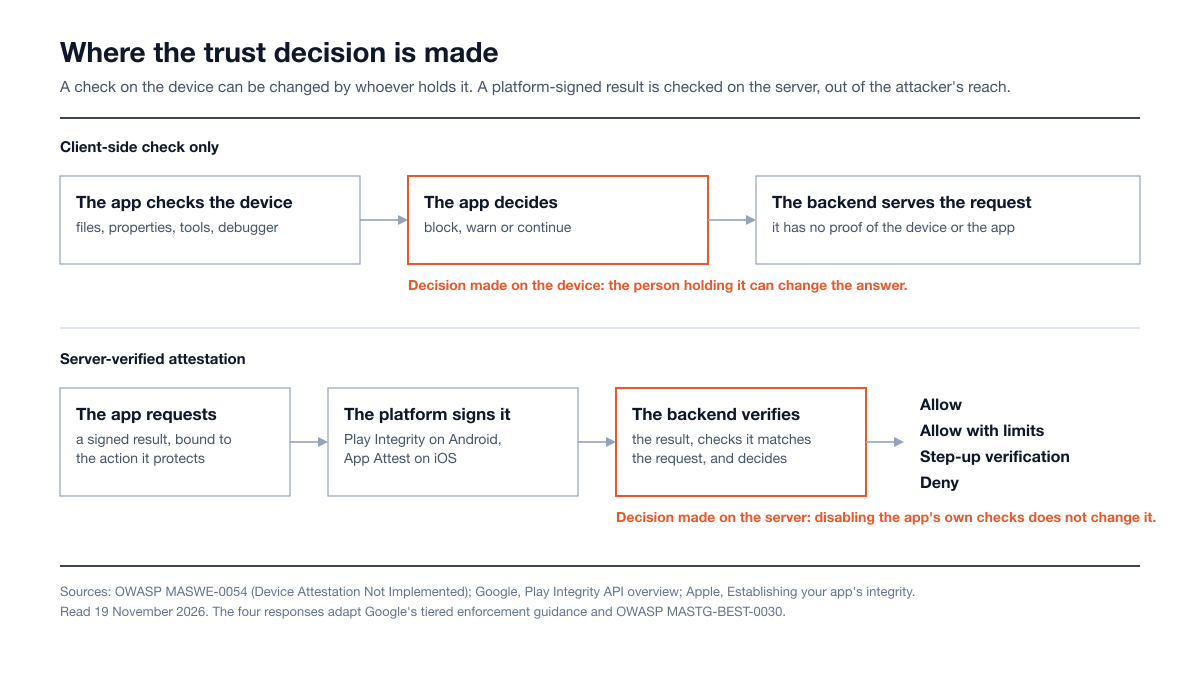
Figure 1: Where the trust decision is made. A client-side check can be changed by whoever controls the device; a server-verified attestation result is signed by the platform and checked where the attacker has no control. Sources: OWASP MASWE-0054, Google Play Integrity API, Apple App Attest and OWASP MASTG-BEST-0030.
Android: the Play Integrity API, which replaced SafetyNet
SafetyNet Attestation no longer works. Google's deprecation page stated: "The SafetyNet Attestation API was deprecated in 2022 and fully turned down in January 2025", and that calling it returns an error (archived copy of Google's deprecation timeline; as of 19 November 2026 that address redirects to the Play Integrity overview). An app that still ships SafetyNet attestation code has no working device attestation on Android.
The Play Integrity API "helps you check that user actions and server requests are coming from your genuine app, installed by Google Play, running on a genuine and certified Android-powered device." Your app sends an encrypted token to your backend, which has it decrypted and verified on Google's servers. The device integrity verdict comes back as a set of labels:
Label in | Google's definition | How to read it for root detection |
|---|---|---|
| "The app is running on a genuine and certified Android device with a recent security update." On Android 13 and higher it requires security updates in the last year | The highest tier. Fewer devices reach it |
| "The app is running on a genuine and certified Android device." On Android 13 and higher "there is hardware-backed proof that the device bootloader is locked and the loaded Android OS is a certified device manufacturer image" | The practical "not rooted, not a custom build" signal |
| "The app is running on a device that passes basic system integrity checks. The device bootloader can be locked or unlocked" | Not a no-root signal. Google states that "rooted devices are eligible to return meets-basic-integrity so long as key attestation is present" |
No label | The device "has signs of attack (such as API hooking) or system compromise (such as being rooted)", or is not a physical device | The lowest tier |
Three implementation points from Google's documentation:
Verdicts changed in May 2025. The hardware-backed requirement in the
MEETS_DEVICE_INTEGRITYrow dates from Google's May 2025 changes. Review risk rules written for the older verdicts.Two request types. Standard requests suit frequent checks, with replay protection handled by Google Play. Classic requests are for infrequent, high-value actions and need a server-generated nonce. Bind each request to the action it protects with the
requestHashornoncefield.The API only informs. In Google's words, "the Play Integrity API does not block access to any functionality itself." Your backend decides what each verdict means.
For apps distributed without Google Play services, OWASP points to hardware-backed key attestation, which "does not require Google Play services on the device", with your backend defining which boot states and patch levels it accepts (MASWE-0054).
iOS: App Attest and DeviceCheck, and what they do not say
Apple's DeviceCheck framework offers two services, and neither returns a jailbreak verdict. App Attest (iOS 14 and later) creates a key in the Secure Enclave, has Apple certify it, and signs requests with it, so that "your server can more confidently provide access to sensitive resources." DeviceCheck (iOS 11 and later) lets your server set and read "two binary digits of data per device", for example to flag a known fraudulent device.
Apple states the limit itself: "No single policy can eliminate all fraud. For example, App Attest can't definitively pinpoint a device with a compromised operating system" (DeviceCheck documentation). And: "A compromised version of your app running on a genuine, unmodified Apple device can't create valid assertions. However, an attacker that modifies the device's operating system might bypass restrictions" (Assessing fraud risk).
So on iOS, use App Attest to stop a modified copy of your app on an unmodified device, Apple's risk metric (the number of attested keys for a device over the past 30 days) to spot one compromised device serving many accounts, and client-side jailbreak checks as a supporting signal reported to the server.
What attestation can and cannot prove
Service | What a verified result tells your server | What it does not tell you |
|---|---|---|
Play Integrity device verdict | The request came from a genuine, certified Android device (see the label table) | That the user is honest, or that the result was not relayed from another device. Google warns that abusers "commonly generate valid attestation results from real devices and provide them to bots" |
Android key attestation | Hardware-signed boot state, OS version and patch level, judged against your own policy | A ready-made verdict. Your backend writes the policy |
Apple App Attest | The request was signed by a key Apple certified for a legitimate instance of your app on Apple hardware | Whether iOS itself is intact. Not every device supports the service |
Google's guidance carries the conclusion: Play Integrity "works best when used alongside other signals as part of your overall anti-abuse strategy and not as your sole anti-abuse mechanism."
Tie sensitive actions to the attestation result
Attestation at launch protects little, because the session that follows is not bound to it. Bind the check to the requests that matter: login, device enrollment, adding a payee, moving money, changing contact details, redeeming a promotion. OWASP's mitigation is the template: "Require valid attestation for high-risk API calls and degrade or deny service to unattested clients." On the server, that means a fresh, server-issued challenge for each protected request, verification of the signed result before the action runs, a check that it matches the request, and a logged decision.
Keep layered client checks, as a signal
Client checks still slow down analysis, and on iOS, where attestation says nothing about the operating system, they are your main signal about its state. OWASP's guidance is short (MASTG-BEST-0030): use several methods, placed near sensitive operations rather than one gate at startup; "Do not rely only on public signature lists or a single library default configuration"; pair root signals with integrity checks, anti-debugging signals and backend enforcement; and report what the checks see to the server, letting server policy decide.
Degrade gracefully instead of only blocking
A hard block tells the attacker which check to remove and locks out legitimate customers. OWASP notes that "Root detection can flag legitimate scenarios such as custom ROMs, enterprise test devices, and security research environments", and that "Aggressive blocking can push users to modified app builds, and can increase support costs." The alternative:
Tiers, not a switch. Google's guidance is to "Have a tiered enforcement strategy" with a range of server responses, "such as Allow, Allow with limits, Allow with limits after CAPTCHA completion, and Deny." OWASP's version: "Limit high risk operations first, add step up authentication, avoid full lockout when confidence is low."
Measure before you enforce. Google suggests "implementing the API without enforcement" first, to see what your real user base returns.
Handle devices that cannot attest. Apple notes that "Not all devices can use the App Attest service", and tells developers to "gracefully bypass the service" on those devices.
Give users a way to fix it. Play Integrity offers remediation dialogs for some verdict problems. Decide who a blocked customer calls and how support staff clear a false positive.
Plan for outages. Google tells developers to decide in advance how the backend behaves if Play Integrity is down.
For example, a financial app's server policy could allow balance viewing on any device, cap transfers on a weak verdict, require step-up verification to add a payee, and refuse card provisioning.
What not to do
Four mistakes are covered in the sections above: relying on one library check at startup, evaluating the attestation verdict in the app instead of on the server, treating detection as a substitute for fixing storage and API flaws, and blocking users with no support path. Three more:
Do not ask the tester to respect the control. "Our app blocks jailbroken devices" is a reason to test the bypass, not to skip it. An engagement that stops at the detection screen has not tested storage, runtime behavior or the API. Agree in the scope whether bypass is included, as our mobile testing services guide explains.
Do not cache verdicts or accept only the top tier. Request a fresh result for each protected action. Google notes that "Fewer devices are in the higher trust tiers", so accepting only the strongest verdict excludes real customers.
Do not forget who is excluded. The MASVS notes that reliance on Play Integrity or App Attest "may further reinforce lock-in and limit accessibility for certain user groups." Plan a path for users on devices without Google services.
How does this finding relate to the others in a mobile report?
The resilience findings are separate controls, and only some findings in a mobile report are security boundaries.
Finding | MASVS control and example weakness | Boundary or resilience? | How it relates to root and jailbreak detection |
|---|---|---|---|
SSL pinning bypass | MASVS-NETWORK-2, MASWE-0028 Insecure Identity Pinning | Resilience against the device holder; a real control against a third party on the network | On the tester's own rooted device, pinning is one more client-side check. See the SSL pinning bypass article |
Tamper or repackaging detection bypass | MASVS-RESILIENCE-2, MASWE-0056 App Attestation Not Implemented | Resilience | Same fix: let the server verify app integrity through attestation |
Debugger and instrumentation detection bypass | MASVS-RESILIENCE-4, MASWE-0064 Debugger Detection Not Implemented | Resilience | Often bypassed in the same session as root or jailbreak detection |
Insecure data storage | MASVS-STORAGE-1, MASWE-0001 Sensitive Data Stored Unencrypted in Private Storage | Security boundary | A real vulnerability. Root access is how the tester, or malware on a user's phone, reaches the data |
Broken API authorization | Server side, outside the app binary | Security boundary | Can be the highest-impact finding in the report, exploitable without the app |
The resilience findings describe how long your app held out; the storage and API findings describe what was lost. Our mobile app penetration testing cost guide explains how resilience depth affects the size of an engagement.
How to remediate the finding, step by step
Decide whether the control belongs in your threat model. Use the decision table. If it does not, record the decision and ask for the finding to be closed as accepted, with the reasoning in the report.
Fix what the bypass exposed first. Move secrets out of readable local storage, enforce business rules on the server and correct any API authorization flaw the tester reached.
Add server-verified attestation. Integrate Play Integrity on Android and App Attest on iOS, and verify every result on your backend with a fresh server-issued challenge.
Bind attestation to sensitive actions. Require a valid result for login, device enrollment, payments and other high-risk calls, not only at launch.
Layer the client checks. Use several methods in more than one layer, near sensitive operations, and report results to the server.
Define tiered responses and a support path. Allow, limit, step up or deny by verdict and action, run in monitor-only mode first, and let support staff resolve false positives.
Log and monitor. Record attestation failures and detection signals per account and device, so repeated failures become a fraud signal.
Request a retest. Send the tester the build, the list of gated actions and the expected server responses.
What does a retest look like?
A retest does not check that the bypass has become impossible; on a device the tester controls, it will not be. A sound retest answers five questions:
Did the local checks get harder to defeat? The tester repeats the original technique and records the extra effort.
Does the backend notice? With local checks defeated, a protected action from the modified device is refused or limited.
Can a result be replayed or borrowed? An old result, a missing one and one bound to a different request are each rejected.
Are the right actions gated? No sensitive action was missed.
Does the app degrade as designed? A device with a weak verdict gets the limited experience and a clear message, not a crash.
A retest can close the finding even though the client-side check can still be bypassed, provided the backend now refuses or limits the protected actions. If a customer or auditor will read the report, ask for the residual risk to be stated that way, so a bypass on a tester-controlled device is not mistaken for an open issue.
Where Stingrai fits
Stingrai is a proud CREST member, accredited by CREST for Penetration Testing and AI-Enabled Penetration Testing (CREST Marketplace), and founded in Toronto, Canada in 2021. Its mobile application penetration testing is human-led and covers the iOS build, the Android build and the backend API in one engagement, aligned to OWASP MASVS and MASTG. For the finding in this guide, that means:
The bypass is attempted, and testing continues behind it. On jailbroken and rooted devices, with static analysis of the IPA and APK and runtime instrumentation, including jailbreak and root detection, certificate pinning, anti-debugging, anti-tamper and emulator detection bypass attempts.
Device and server tested by the same people. Keychain and Keystore storage, exported components and the REST or GraphQL backend are in one engagement, so a weakness on the device is followed to the data it exposes. Backend-only scope is covered by API penetration testing.
Named testers. Two named penetration testers from a team holding OSCE³, OSWE, OSEP, CREST CRT and CISSP certifications, with 18 published CVEs across the team.
Findings your engineers can act on. Each finding is posted to the PTaaS portal as it is confirmed, with a proof of concept and prioritized remediation guidance. The report includes a MASVS coverage matrix per platform, and retesting of remediated findings is included.
Engagements run as one-time tests for an audit, a launch or a major release, or as continuous programs that test every significant build, quoted per engagement through Get a Quote. To compare providers, see our guide to the best mobile app penetration testing companies.
Frequently Asked Questions
What does root detection bypass mean in a penetration test report?
It means the tester ran your app on a rooted Android device or a jailbroken iPhone, disabled or evaded the check meant to detect that device state, and kept using the app. OWASP tracks the weakness as MASWE-0051, Root/Jailbreak Detection Not Implemented, under MASVS-RESILIENCE-1. The finding tells you how much effort your client-side check cost the tester; what it exposed is in the other findings in the report.
Is root detection bypass a vulnerability?
Not on its own. OWASP's MASVS states that the absence of resilience measures "does not in itself constitute a vulnerability." It becomes part of a vulnerability when the bypass exposes something that should have been protected another way, such as tokens in readable local storage, a business rule enforced only in the app, or an API that does not check authorization.
Is root or jailbreak detection necessary?
It depends on the app. OWASP lists the requirement in its MAS-R profile, not in the baseline L1 or L2 profiles, and gives banking, insurance, games and entertainment apps as MAS-R examples. PCI's mobile payment standards expect it: Contactless Payments on COTS, closed to new submissions since 31 October 2026, required detection of rooted and jailbroken devices, and its successor, Mobile Payments on COTS, covers detection and response of compromised platforms. A news or brochure app with no secrets and no sensitive function does not need it.
How do you fix a root detection bypass finding?
Move the decision to the server. Verify Play Integrity verdicts on Android and App Attest assertions on iOS on your backend, with a fresh server-issued challenge, and require a valid result for sensitive actions such as login and payments. Keep layered client-side checks as a signal, respond in tiers instead of only blocking, and first fix any storage or API flaw the bypass exposed.
Play Integrity API vs SafetyNet: what changed?
SafetyNet Attestation is retired. Google deprecated it in 2022 and fully turned it down in January 2025, and calls to it now return an error. The Play Integrity API replaced it, returning device, app and account verdicts that your backend has decoded on Google's servers. Since May 2025, the MEETS_DEVICE_INTEGRITY label on Android 13 and later requires a hardware-backed, positive verified boot verdict.
Does App Attest detect a jailbroken iPhone?
No. Apple states that App Attest "can't definitively pinpoint a device with a compromised operating system." It proves that a request was signed by a key Apple certified for a legitimate instance of your app on Apple hardware, which blocks repackaged copies of your app on unmodified devices. Combine it with Apple's per-device risk metric and client-side jailbreak checks that report to your server.
What severity should a root or jailbreak detection bypass finding have?
No standards body assigns the class a CVSS score, so the rating is a judgement for your app. In Stingrai's guidance, it is informational or low for most apps, and a medium-severity control failure for banking, payment, licensed-media and competitive gaming apps when the check is missing or trivially bypassed. If the bypass led to exposed credentials or an exploitable API flaw, that finding is rated on its own impact, often high.
Should our app block rooted and jailbroken devices?
Blocking everything is rarely the best design. OWASP warns that root detection can flag legitimate cases such as custom ROMs and enterprise test devices, and that aggressive blocking can push users to modified app builds. Google recommends tiered enforcement with a range of server responses, such as allow, allow with limits and deny. Restrict the highest-risk actions first, ask for step-up verification where confidence is low, and give blocked users a support path.
Related reading
Your App is Pinned. We Got in Anyway: The Real Story of SSL Pinning Bypass
OWASP Mobile Top 10 (2024): What Each Risk Means and How a Penetration Test Checks It
Mobile Application Penetration Testing Services (2026): Scope, MASVS Coverage and Cost
Mobile App Penetration Testing Cost (2026): Prices, Drivers and How to Compare Quotes
Best Mobile App Penetration Testing Companies (2026): 7 Compared for Security Leads
NowSecure Alternatives (2026): Pricing and Mobile App Penetration Testing Companies
IDOR Vulnerability: Real Examples, How Testers Find It and How to Fix It
References
OWASP. MASVS-RESILIENCE: Resilience Against Reverse Engineering and Tampering and MASVS-RESILIENCE-1, Mobile Application Security Verification Standard v2.1.0. Read 19 November 2026.
OWASP. MASWE-0051: Root/Jailbreak Detection Not Implemented, MASWE-0054: Device Attestation Not Implemented and the MASWE index, v1.0.0. Read 19 November 2026.
OWASP. Mobile Application Security Testing Guide v2.0.0: MASTG-TEST-0324, MASTG-TEST-0325, MASTG-TEST-0240, MASTG-TEST-0241, and the deprecated MASTG-TEST-0045 and MASTG-TEST-0088.
OWASP. MASTG-KNOW-0027: Root Detection, MASTG-KNOW-0084: Jailbreak Detection and MASTG-BEST-0030: Implementing Root Detection.
OWASP. MAS Testing Profiles, MAS-L2 and MAS-R.
OWASP. M7: Insufficient Binary Protection, OWASP Mobile Top 10 (2024).
Google. Play Integrity API: Overview, Integrity verdicts, verdict improvements and FAQ, standard requests and remediation dialogs. Read 19 November 2026.
Google. SafetyNet and the SafetyNet Attestation deprecation timeline, archived 21 October 2026.
Google. Android Open Source Project: System and kernel security and Application Sandbox. Android Developers: Verify hardware-backed key pairs with key attestation.
Apple. DeviceCheck, Establishing your app's integrity, Validating apps that connect to your server and Assessing fraud risk. Read 19 November 2026.
Apple. Unauthorized modification of iOS, iPhone User Guide, and Security of runtime process in iOS, iPadOS, and visionOS, Apple Platform Security.
PCI Security Standards Council. Contactless Payments on COTS (CPoC) Security and Test Requirements, Version 1.0, December 2019; Announcement of Sunset Periods for the PCI SPoC and PCI CPoC Standards, 1 May 2026; Mobile Payments on COTS (MPoC); and PCI MPoC Standard Version 1.1 Now Available, 26 November 2024.
EMVCo. Software-Based Mobile Payment Evaluation Process and EMVCo Issues Milestone 100th Security Evaluation Certificate for Software-Based Mobile Payment Solutions, 29 November 2022.
European Commission. Commission Delegated Regulation (EU) 2018/389, Article 9.
NIST. SP 800-163 Revision 1, Vetting the Security of Mobile Applications, April 2019, and SP 800-124 Revision 2, Guidelines for Managing the Security of Mobile Devices in the Enterprise, May 2023.
FIRST. Common Vulnerability Scoring System version 4.0: Specification Document.
Talk to Stingrai
Have a root or jailbreak detection finding to close, or a mobile release that needs testing on real rooted and jailbroken devices with the backend API in scope? Get a Quote or book a free discovery call.