




The OWASP Mobile Top 10 is OWASP's list of the top ten security risks in mobile applications, and the current edition is the 2024 final release, which replaced the 2016 list. It runs from M1 Improper Credential Usage to M10 Insufficient Cryptography, and OWASP rates all ten as common. This guide takes the list from owasp.org exactly as published, explains each risk in plain words, and shows how a mobile application penetration test checks it on iOS and Android, what evidence the report should carry, and the fix. One section covers MASVS, MASTG and MASWE, the OWASP standards a mobile test is actually planned and reported against.
The OWASP Mobile Top 10 (2024) at a glance
ID | Risk, as OWASP names it | In plain words | Change from 2016, per OWASP |
|---|---|---|---|
M1 | Improper Credential Usage | Keys and passwords are hardcoded in the app, or stored and sent carelessly | New |
M2 | Inadequate Supply Chain Security | Risk arrives through SDKs, libraries, the build pipeline or app signing | New |
M3 | Insecure Authentication/Authorization | The app or its backend fails to check who the user is or what they may do | Merges 2016's M4 and M6 |
M4 | Insufficient Input/Output Validation | Data from users, other apps, links or the network is trusted without checks | New |
M5 | Insecure Communication | Data in transit can be read or changed | Moved from M3 |
M6 | Inadequate Privacy Controls | Personal data is collected, kept or shared more than it needs to be | New |
M7 | Insufficient Binary Protections | The shipped app is easy to reverse engineer or tamper with | Merges 2016's M8 and M9 |
M8 | Security Misconfiguration | Unsafe build and platform settings: debug flags, exported components, backups, permissions | Reworded from M10 |
M9 | Insecure Data Storage | Sensitive data sits unprotected on the device | Moved from M2 |
M10 | Insufficient Cryptography | Weak algorithms, short keys or poor key handling | Moved from M5 |
OWASP's own pages carry two naming quirks worth knowing before you quote the list in a contract. The risk pages live under a 2023-risks path although the page is titled "OWASP Mobile Top 10 2024 - Final Release", and the list calls M7 "Insufficient Binary Protections" while its own page is titled "Insufficient Binary Protection". This guide uses the names from the list.
What changed from 2016 to 2024
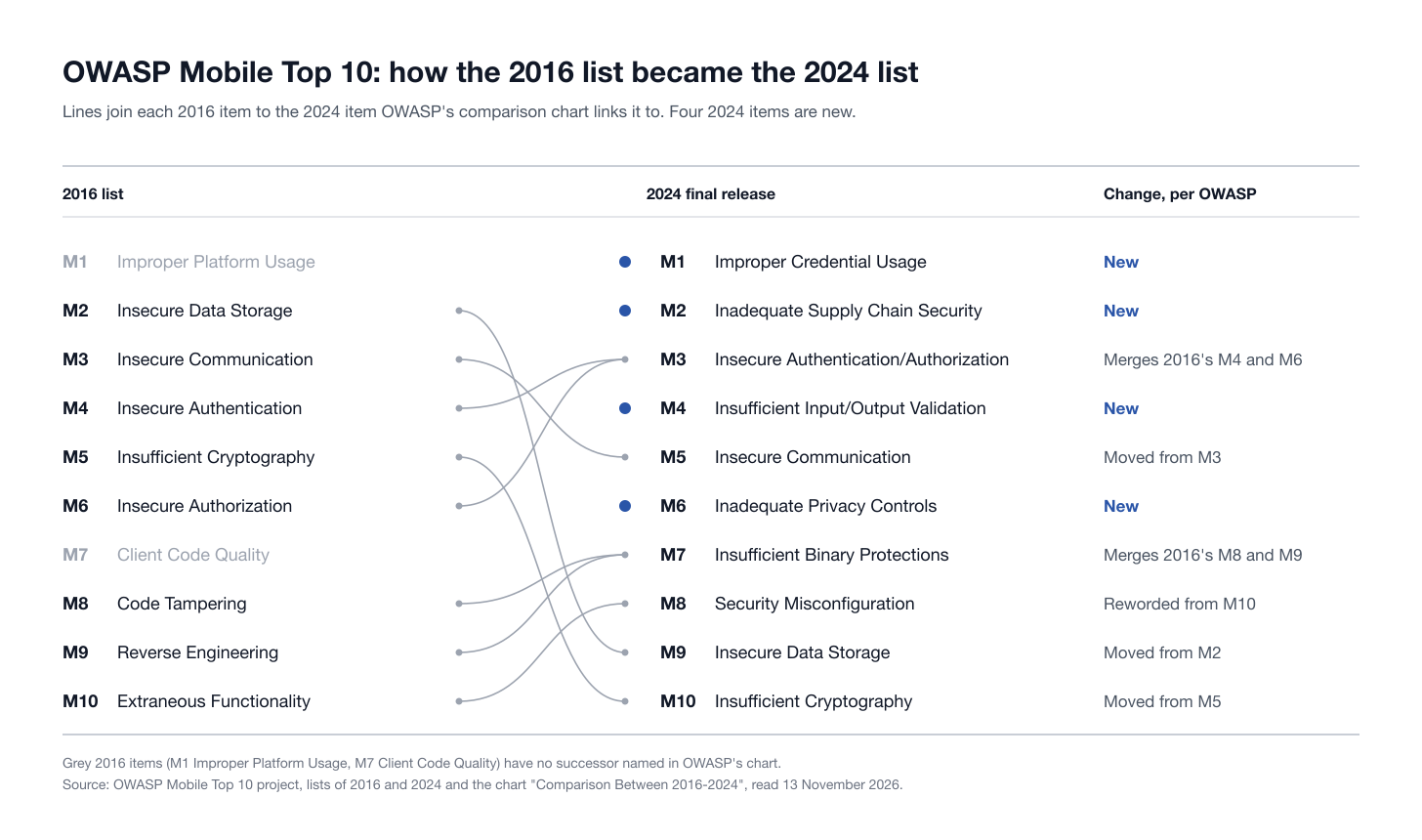
OWASP publishes a comparison chart on its Top 10 risks page. Read row by row, it says:
Four new items: M1 Improper Credential Usage, M2 Inadequate Supply Chain Security, M4 Insufficient Input/Output Validation and M6 Inadequate Privacy Controls.
Two merges: 2016's M4 Insecure Authentication and M6 Insecure Authorization became M3, and 2016's M8 Code Tampering and M9 Reverse Engineering became M7.
Three moves down the list: Insecure Communication from M3 to M5, Insecure Data Storage from M2 to M9, and Insufficient Cryptography from M5 to M10.
One rewording: 2016's M10 Extraneous Functionality is now M8 Security Misconfiguration.
The chart names no successor for 2016's M1 Improper Platform Usage or M7 Client Code Quality. Our reading is that their content is now spread across M4 and M8, which is how the sections below treat it.
OWASP also lists six candidates that did not make the final ten but may be considered in future: Data Leakage, Hardcoded Secrets, Insecure Access Control, Path Overwrite and Path Traversal, Unprotected Endpoints (Deeplink, Activity, Service) and Unsafe Sharing. A thorough test covers all six anyway, under M1, M3, M4, M8 and M9.
How OWASP rates the ten
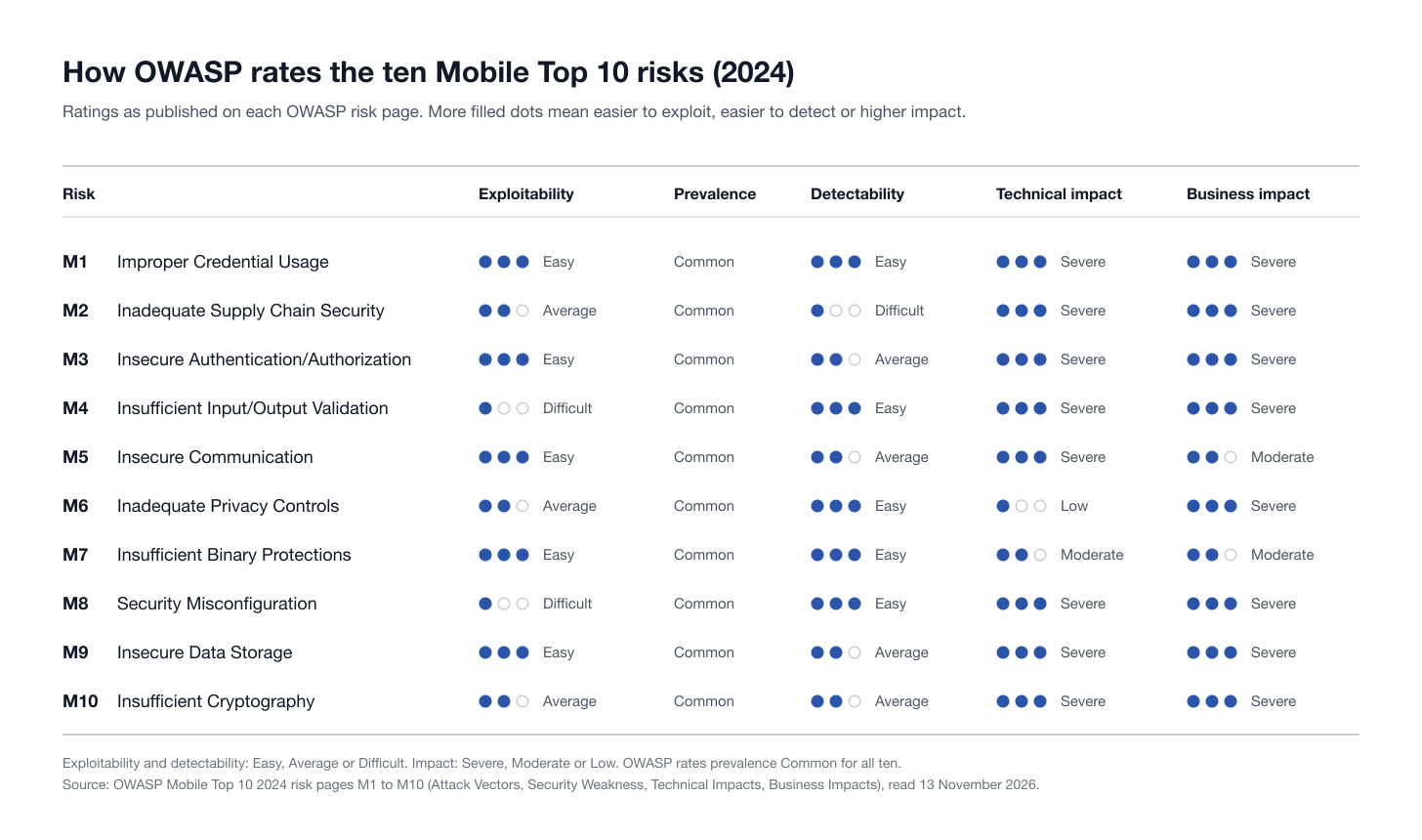
Each risk page rates exploitability, prevalence, detectability, technical impact and business impact. Three things stand out:
Every item is rated Common. Prevalence does not separate the ten; exploitability and impact do.
Five are rated Easy to exploit: M1, M3, M5, M7 and M9. Only M4 and M8 are rated Difficult.
M2 is the only one rated Difficult to detect. A supply chain problem does not show up by looking at your own code, which is why it needs its own controls.
Technical and business impact are Severe for eight of the ten. The exceptions are informative: M6 Inadequate Privacy Controls has a Low technical impact and a Severe business impact, because the damage arrives through regulators and users rather than through the system, and M7 Insufficient Binary Protections is Moderate on both.
How a mobile application penetration test reaches each risk
A mobile application penetration test works from four positions, and each of the ten risks is visible from one or more of them:
Static analysis of the release builds, the IPA for iOS and the APK or app bundle for Android: unpacking, decompiling and reading configuration, code and embedded files.
Runtime analysis on jailbroken iOS and rooted Android test devices, where the tester can inspect the app's storage and instrument the running process.
Traffic interception between the app and everything it talks to.
Backend API testing with test accounts for every role, because the server decides most of what matters.
iOS and Android are tested separately even when they share a codebase: storage, inter-app communication, network configuration and platform protections differ on each. Our guide to what a mobile application penetration testing service covers goes through scoping in detail. The sections below describe method and evidence, not exploitation steps.
M1: Improper Credential Usage
What it means. M1 covers two failures: credentials hardcoded in the app's code or configuration files, and user credentials that are stored, transmitted or checked insecurely. OWASP rates it Easy to exploit and Easy to detect, because anyone can download the app and read what ships inside it.
A documented case. On 22 October 2024, Symantec reported that several widely used apps contained "hardcoded and unencrypted cloud service credentials" for AWS and Azure Blob Storage, on both the Google Play Store and the Apple App Store, including two Android apps with over 5 million downloads each.
How a test checks it.
Both platforms: unpack the build and search code, resources and bundled files for API keys, cloud access keys, service account files, signing secrets and embedded passwords. For each secret found, confirm within the agreed rules of engagement what it can actually do, using read-only checks.
iOS: review
Info.plist, embedded property lists and configuration files, then watch where the app puts the password or token after login: the Keychain, or a plain file.Android: review
strings.xml, build configuration classes and bundled service files, then check whether tokens land in Keystore-backed storage or in plain SharedPreferences.At runtime: check that credentials do not appear in logs and are only ever sent over TLS.
Evidence in the report. The file or class where each secret sits, the privileges it holds, and one harmless authenticated call that proves it is live.
The fix. OWASP's guidance is direct: never hardcode credentials, do not store user credentials on the device, use "secure, revocable access tokens" instead, encrypt credentials in transit and rotate API keys. In practice, move third-party secrets behind your own API, restrict any key that must ship, and rotate every secret that has ever shipped in a build. Our Supabase case study shows what a public key plus one missing server-side rule leads to.
M2: Inadequate Supply Chain Security
What it means. M2 is risk that enters through something you did not write or do not fully control: third-party libraries and SDKs, the build pipeline, signing keys and the distribution process. OWASP rates it Difficult to detect, the only item with that rating.
A dated example. The maintainers of CocoaPods, the dependency manager used by many iOS builds including React Native and Flutter apps, have announced that the central trunk repository is planned to become read-only on 2 December 2026, after a test run on 2 to 6 November 2026. From then, "no new versions or pods will be added to trunk." Existing builds keep working, but a library consumed through trunk receives no further updates there, security fixes included. Any iOS team that still resolves dependencies through trunk has a supply chain decision to make this quarter.
How a test checks it. A penetration test sees the shipped app, not the pipeline, so be clear about what each access level covers.
Both platforms: list every embedded framework, SDK and native library with its version, compare the list against known vulnerabilities, and watch what each SDK does at runtime: which hosts it contacts and what data it sends.
iOS: inspect embedded frameworks and dynamic libraries, entitlements and the provisioning profile, and check that third-party SDKs carry the privacy manifests Apple requires for listed SDKs.
Android: identify libraries and native
.sofiles in the APK, verify the signing scheme, and look for leftover test or debug libraries.With source and pipeline access: review lockfiles, build scripts, how CI secrets are held and where signing keys are stored. Without that access, pipeline and signing-key custody are review items, not something a black-box test can prove.
Evidence in the report. A component inventory with versions and known vulnerabilities, plus a capture of each SDK's traffic.
The fix. OWASP recommends secure coding, code review and testing through the lifecycle, secure app signing and distribution, "only trusted and validated third-party libraries or components", controls on updates and releases, and monitoring for supply chain incidents. Add a locked dependency list and a software bill of materials per release, and protect signing keys with hardware-backed storage.
M3: Insecure Authentication/Authorization
What it means. M3 merges two 2016 items. Authentication establishes who the user is; authorization decides what that user may do. OWASP's rule for both is that "all client-side authorization and authentication controls can be bypassed by malicious users", so the server has to enforce them. Its indicators include insecure direct object references (IDOR), hidden endpoints, roles or permissions sent from the device, backend requests that work without a token, and passwords stored locally.
A documented case. In their joint advisory of 27 July 2023, CISA, the NSA and the Australian Cyber Security Centre wrote that IDOR flaws in web applications and web APIs "have resulted in the compromise of personal, financial, and health information of millions of users and consumers." A mobile backend is exactly that kind of API.
How a test checks it.
Backend: every request the app makes is replayed without a token, with another user's token and with a lower role's token; object identifiers are swapped across users and tenants; any role, price or flag the client sends is changed to see whether the server believes it.
iOS: check whether Face ID or Touch ID actually releases a secret held in the Keychain, or only returns a result the app trusts, which runtime instrumentation on a jailbroken device can override.
Android: the same question for the biometric prompt: is it bound to a key in the Keystore, or is it a callback?
Both platforms: offline modes, PIN screens, session lifetime, and whether logout and password change invalidate tokens on the server.
OWASP lists "Usage of Features like FaceID and TouchID" among the warning signs and, in the same page, tells developers to use them "to unlock biometrically locked secrets". Both are true: biometrics are safe when they guard a key and weak when they guard a boolean.
Evidence in the report. Request and response pairs showing account A reading or changing account B's data, and a recording of any local authentication bypass.
The fix. Enforce authentication and authorization on the server for every request, never trust roles sent by the device, issue device-specific tokens the user can revoke, bind biometric unlock to platform key storage, and require step-up authentication for sensitive operations. Our guides to IDOR vulnerabilities and the API penetration testing checklist cover the backend side in depth, and account takeover through deep links covers the mobile sign-in flows.
M4: Insufficient Input/Output Validation
What it means. M4 is the mobile form of injection: data from outside is used without validation. OWASP names SQL injection, command injection, cross-site scripting and path traversal. On a phone, "outside" is wider than a form field. It includes deep links, intents and files from other apps, QR codes, push payloads and web content loaded in a WebView.
Two documented cases. Microsoft's "Dirty Stream" research of 1 May 2024 found Android apps that trusted the file name supplied by another app when receiving a shared file, in "several vulnerable applications in the Google Play Store that represented over four billion installations", with Xiaomi's File Manager and WPS Office named as examples and fixed by February 2024. On 31 August 2022, Microsoft reported CVE-2022-28799 in TikTok for Android: an unvalidated deep link could force the app's WebView to load an arbitrary site and reach its JavaScript bridge. The NVD scores it 8.8; TikTok fixed it, and Microsoft found no evidence of exploitation in the wild.
How a test checks it.
Android: map every entry point (exported activities, services, broadcast receivers and content providers, intent filters, deep links and share targets) and send malformed and hostile input to each from a test app on the same device.
iOS: do the same for custom URL schemes, universal links, app extensions, document types and the pasteboard.
WebViews on both: what content can load, whether JavaScript is enabled, which native bridges are exposed and whether local files are reachable.
Backend: server-side injection tests on every parameter the app sends.
Evidence in the report. The entry point, the input sent and the resulting behaviour: a file written outside its intended directory, script running in a WebView, or data returned that should not be.
The fix. Validate input strictly by context, encode output, and use parameterized queries. For shared files, Microsoft's advice is to "completely ignore the name returned by the remote file provider" and generate your own. For WebViews, load only an approved list of trusted domains and never match that list with partial string comparison.
M5: Insecure Communication
What it means. M5 covers data in transit: cleartext traffic, deprecated protocols, accepting bad certificates, and TLS applied to some flows but not others. OWASP puts every channel here, including Bluetooth, NFC and SMS, not only HTTPS.
What the platforms already do. Both platforms are safe by default, and findings come from exceptions. On Android, cleartext support is disabled by default starting with Android 9 (API level 28), and only apps targeting Android 6.0 (API level 23) or lower trust user-added certificate authorities by default. On iOS, App Transport Security "operates by default for apps linked against the iOS 9.0 or macOS 10.11 SDKs or later", though it does not apply to lower-level networking interfaces.
How a test checks it.
Both platforms: place an intercepting proxy between the device and the backend without any bypass, and see whether the app accepts an untrusted certificate, a wrong host name or a fall back to HTTP. Then list every host the app and its SDKs contact.
iOS: read the App Transport Security exceptions in
Info.plistand any session delegate code that accepts every certificate.Android: read the network security configuration for cleartext permissions, user trust anchors and debug overrides, and look for custom trust managers or host name verifiers that accept everything.
Pinning: check whether certificate pinning exists, whether it covers every connection, and how much effort a bypass takes on a tester-controlled device.
That last point needs care. A tester bypassing pinning on their own rooted or jailbroken device is a measure of resilience, which belongs under M7. The M5 finding is traffic that can be read or changed by someone who does not control the device. Our SSL pinning bypass article walks through an engagement where the app had two networking layers, each pinned differently, and explains why pinning that covers only some requests gives false assurance.
Evidence in the report. Proxy captures, the configuration excerpts that allowed them, and a table of pinned and unpinned hosts.
The fix. Use TLS for every connection with no release-build exceptions, remove any code that accepts all certificates, and pin the public key, with a backup pin, for endpoints you control, across every network client in the app.
M6: Inadequate Privacy Controls
What it means. M6 concerns personal data: collecting more than the app needs, and leaking it through logs, backups, the clipboard, URL query parameters or third-party analytics. OWASP notes that "almost all apps process some kind of PII" and that many collect more than they need.
A documented case. On 17 May 2023 the US Federal Trade Commission charged the developer of the fertility app Premom over health data shared through third-party SDKs. The FTC said the company "failed to take reasonable measures to address the privacy and data security risks created by its use of third-party automated tracking tools known as software development kits (SDKs)", and the proposed order carried a US$100,000 civil penalty.
How a test checks it.
Both platforms: build an inventory of the personal data the app handles, then compare what the app actually sends, and to whom, with its privacy policy and store declarations. Capture traffic to every third-party host and note which identifiers and fields leave the device.
iOS: check the privacy manifest, the pasteboard, app snapshots taken when the app moves to the background, and what goes into device backups.
Android: check requested permissions against real use, log output, and backup contents.
Evidence in the report. Captures of personal data reaching a third party or a log, set beside the declaration that says otherwise.
The fix. OWASP's approach is minimization: ask whether each data item is necessary, whether it can be replaced with something less sensitive, reduced, anonymized or deleted after a period, and whether users can consent. Keep personal data out of logs and URLs, and review the default configuration of every SDK.
M7: Insufficient Binary Protections
What it means. M7 merges 2016's Code Tampering and Reverse Engineering. OWASP is frank about the limits: "All apps are vulnerable to binary attacks", and "there are no fully reliable mechanisms to prevent binary attacks." It is the only item rated Moderate for both impacts, so the effort should match what the binary protects: payment logic, licensing, game integrity or proprietary algorithms.
How a test checks it.
Both platforms: decompile or disassemble the build and judge how readable it is: obfuscation, stripped symbols, and whether secrets or business logic can be recovered.
iOS: test jailbreak detection, debugger and instrumentation detection, and whether the backend verifies App Attest assertions.
Android: test root, emulator and repackaging detection and signature checks, and whether the backend acts on Play Integrity verdicts.
The result is a measure of effort, not a pass or fail: how long each protection held, and whether the server still refused a tampered client. Apple's own documentation explains why the server matters: "You can't rely on your app's logic to perform security checks on itself because a compromised app can falsify the results."
Evidence in the report. For each protection, the class of technique that defeated it and the time it took, without a recipe, plus what the backend continued to enforce.
The fix. Keep secrets and decisions on the server, obfuscate what must ship, add integrity checks, verify attestation on the backend, and layer runtime self-protection where the risk justifies it. The fix section of our SSL pinning article covers that layering.
M8: Security Misconfiguration
What it means. M8 is unsafe configuration in the build and on the platform. OWASP's examples include debugging features left on in release builds, cleartext protocols allowed, default credentials, excessive permissions, exported activities meant for internal use, insecure file provider paths and Android backup mode.
What the platforms say. Some risky settings are defaults. Android's backup documentation states that apps targeting Android 6.0 (API level 23) or higher "automatically participate in Auto Backup" and that for android:allowBackup "the default value is true". Android's security guidance also warns that the debuggable flag "enables an attacker to debug the application".
How a test checks it.
Android: read the manifest for the debuggable flag, backup settings, cleartext permission, every exported component and its permissions, file provider paths and requested permissions, then confirm each exposure by calling the component from a test app.
iOS: read
Info.plist, entitlements and the provisioning profile for transport security exceptions, URL schemes, file sharing flags and debugging entitlements.Both platforms: look for staging endpoints, hidden test menus and verbose logging left in the release build, and check the cloud resources the app points to.
Evidence in the report. The manifest or property list excerpt, and a demonstration of what the setting exposes.
The fix. OWASP's list: secure defaults, no default credentials, least-privilege permissions, cleartext traffic disallowed, debugging disabled in production, Android backup mode disabled, and only the components that must be exported are exported.
M9: Insecure Data Storage
What it means. M9 is sensitive data left readable on the device: plain files, unencrypted databases, preferences, logs, caches and backups.
How a test checks it.
Both platforms: use every feature of the app with realistic test data on a rooted or jailbroken device, then examine everything the app wrote. Repeat after logout to see what survives.
iOS: check property lists and user defaults, SQLite and other local databases, caches and cookies, the protection class on files, and each Keychain item's accessibility setting.
Android: check SharedPreferences, local databases, internal against external storage, whether keys sit in the Keystore, and what the system backup contains.
Evidence in the report. The path and a redacted excerpt for each token, credential or personal record found, with a note on whether it survives logout and whether it lands in a backup.
The fix. Do not store what the app does not need. For the rest, OWASP points to the platform stores, "Keychain (iOS) or Keystore (Android)", and to strong encryption with securely stored and managed keys. Beyond OWASP's list, exclude sensitive files from backups and keep sensitive data out of logs.
M10: Insufficient Cryptography
What it means. M10 covers weak or outdated algorithms, short keys, poor key management, flawed home-made implementations, and weak or unsalted hashes.
How a test checks it.
Both platforms: find every cryptographic call in the decompiled code and record the algorithm, mode, key size and how initialization vectors and random numbers are produced. Trace each key to its origin: hardcoded, derived, downloaded or generated in hardware.
iOS: check that keys live in the Keychain or Secure Enclave and not in code or files.
Android: check that keys are generated in the Android Keystore, which lets an app use keys "with the key material remaining non-exportable".
At runtime: observe cryptographic operations to confirm what the static review suggested.
Evidence in the report. The code location, the algorithm and mode in use, and a demonstration that protected data can be recovered with material shipped inside the app.
The fix. Use the platform's cryptographic libraries and current algorithms with adequate key lengths, never custom cryptography, and keep keys in hardware-backed storage. OWASP's page names AES, RSA and elliptic curve cryptography as the accepted choices.
What the testers need from you for each risk
Risk | Main technique | What to provide |
|---|---|---|
M1 Improper Credential Usage | Static analysis of the IPA and APK, then a scoped check of each secret | Release builds, and permission to validate recovered keys |
M2 Inadequate Supply Chain Security | Component inventory from the binary and SDK traffic analysis | Release builds; lockfiles and build configuration for full coverage |
M3 Insecure Authentication/Authorization | Backend API testing across roles, plus runtime tests of local authentication | Two or more accounts for every role and tenant |
M4 Insufficient Input/Output Validation | Hostile input to every entry point | Release builds; a list of deep links and share targets helps |
M5 Insecure Communication | Traffic interception | An environment with production TLS and pinning settings |
M6 Inadequate Privacy Controls | Traffic and storage analysis against privacy declarations | Privacy policy, store declarations and the SDK list |
M7 Insufficient Binary Protections | Reverse engineering and runtime instrumentation | The protected production build, not a debug build |
M8 Security Misconfiguration | Manifest, property list and entitlement review, confirmed at runtime | Builds exactly as shipped to the stores |
M9 Insecure Data Storage | Inspection of the sandbox, Keychain, Keystore and backups after use | Test accounts with realistic data |
M10 Insufficient Cryptography | Static review of cryptographic calls, confirmed at runtime | Release builds; source for any custom cryptography |
Send the build your users run: a debug build has different protections, logging and configuration, so M5, M7 and M8 results from it describe an app nobody installs. With several apps or brands on one backend, list them all and say which share code. If you release every week or two, agree which build is frozen for the test and how later releases are retested. Cost drivers are in our guide to mobile app penetration testing cost.
MASVS, MASTG and MASWE: how they relate to the Top 10
The Mobile Top 10 and the standards below come from two different OWASP projects. The Top 10 is a lab project and an awareness list. The OWASP Mobile Application Security (MAS) project is a flagship project that publishes the standard a test is verified against. It has three parts, and all three have current versions as of 13 November 2026:
Document | Current version | What it is |
|---|---|---|
MASVS, the Mobile Application Security Verification Standard | v2.1.0, released 18 January 2024 | What a secure app must do: 24 controls in 8 groups (STORAGE, CRYPTO, AUTH, NETWORK, PLATFORM, CODE, RESILIENCE, PRIVACY). v2.1.0 added the PRIVACY group |
MASWE, the Mobile Application Security Weakness Enumeration | v1.0.0, released 17 August 2026 | What goes wrong: 78 weaknesses, numbered MASWE-0001 to MASWE-0078 and grouped by MASVS category |
MASTG, the Mobile Application Security Testing Guide | v2.0.0, released 30 June 2026 | How to test: atomic tests, techniques, tools and demos. Its test index listed 294 tests on 13 November 2026: 163 for Android, 129 for iOS and 2 network tests; 188 are current, 14 are placeholders and 92 are deprecated |
The three chain together. In the MAS project's words, the traceability runs "MASVS control → MASWE weakness → MASTG test → MASTG demo." MASTG v2.0.0 is described by the project as "the first stable, non-beta release of the fully refactored" guide, so 2026 is the first year a report can cite stable identifiers at every level.
The old MASVS verification levels are gone from the standard. Since v2.0.0 they have been replaced by MAS Testing Profiles: MAS-L1 (Essential Security), MAS-L2 (Advanced Security), MAS-R (Resilient Security) and MAS-P (Baseline Privacy), with a further profile for the EU Digital Identity Wallet.
OWASP's Top 10 pages link to MASTG chapters in places but do not map their items to MASVS controls, so the mapping below is ours. Use it to translate a Top 10 conversation into MASVS scope.
Mobile Top 10 (2024) | Closest MASVS control groups |
|---|---|
M1 Improper Credential Usage | MASVS-AUTH, MASVS-STORAGE, MASVS-CRYPTO |
M2 Inadequate Supply Chain Security | MASVS-CODE, MASVS-PRIVACY |
M3 Insecure Authentication/Authorization | MASVS-AUTH, with the server side under OWASP ASVS and the API Security Top 10 |
M4 Insufficient Input/Output Validation | MASVS-CODE, MASVS-PLATFORM |
M5 Insecure Communication | MASVS-NETWORK |
M6 Inadequate Privacy Controls | MASVS-PRIVACY, MASVS-STORAGE |
M7 Insufficient Binary Protections | MASVS-RESILIENCE |
M8 Security Misconfiguration | MASVS-PLATFORM, MASVS-STORAGE, MASVS-NETWORK, MASVS-RESILIENCE, MASVS-CODE |
M9 Insecure Data Storage | MASVS-STORAGE, MASVS-CRYPTO |
M10 Insufficient Cryptography | MASVS-CRYPTO |
Three practical rules follow for anyone buying a mobile test:
Ask for MASVS coverage, not "OWASP Mobile Top 10 coverage". Ten categories cannot show what was and was not tested. A coverage matrix against the 24 MASVS controls, per platform, can.
Name the profile. MAS-L1 is the baseline OWASP says every mobile app should meet; MAS-L2 is recommended for apps that handle high-risk sensitive data, such as health and financial apps; add MAS-R when the binary itself protects something, and MAS-P when privacy is in scope.
Scope the backend explicitly. MASVS v2 narrowed its scope to rely more on other standards such as OWASP ASVS, yet M3 findings usually sit in the API. Our API penetration testing checklist and API authorization test matrix cover that half. For the web equivalent of this list, see our guide to the OWASP Top 10 for web applications.
Where Stingrai fits
Stingrai is a CREST-accredited penetration testing company offering fully human-led and hybrid (human penetration testers plus AI agents) penetration tests, delivered by experienced penetration testers who are also world-class security researchers and bug bounty hunters. Founded in Toronto, Canada in 2021, it holds CREST accreditation for both Penetration Testing and AI-Enabled Penetration Testing.
Mobile work is human-led. Stingrai's mobile application penetration testing covers all ten risks above in one engagement:
Binary, runtime and backend together. Static and dynamic analysis of the IPA and APK, Keychain and Keystore storage, certificate pinning and jailbreak and root detection bypass, Frida and Objection instrumentation, exported components, and the REST or GraphQL backend, tested by the same penetration testers so that a weakness on the device can be followed to the data it exposes on the server.
Named testers. Two named penetration testers from a team holding OSCE³, OSWE, OSEP, CREST CRT and CISSP certifications, with 18 published CVEs across the team. The team includes a founding member of Uber's offensive security team with 15 years in web, mobile and LLM testing.
Reporting engineering teams can act on. Findings are posted to the PTaaS platform as they are confirmed, each with a proof of concept and remediation guidance, with Jira and Slack integration; the final report includes a MASVS coverage matrix.
Evidence for auditors and customers. Retesting of fixed findings is included, PDF reports are redactable for sharing with customers, and every human-led and hybrid report ships with an attestation letter: penetration testing evidence for your SOC 2, ISO 27001, PCI DSS and HIPAA programs.
Engagements cover one app or several across iOS and Android, as one-time tests for an audit, a launch or a major release, or as continuous programs that test every significant build. Mobile testing is scoped per engagement through Get a Quote. Stingrai's published fixed prices cover one web application and associated APIs only: the Autonomous Pentest is US$3,000 and the Hybrid Pentest is US$6,800 (pricing).
Frequently Asked Questions
What is the OWASP Mobile Top 10?
The OWASP Mobile Top 10 is OWASP's list of the top ten security risks in mobile applications. The current list is M1 Improper Credential Usage, M2 Inadequate Supply Chain Security, M3 Insecure Authentication/Authorization, M4 Insufficient Input/Output Validation, M5 Insecure Communication, M6 Inadequate Privacy Controls, M7 Insufficient Binary Protections, M8 Security Misconfiguration, M9 Insecure Data Storage and M10 Insufficient Cryptography. It is an awareness list, used to organize training, threat modeling and conversations about mobile app risk.
What is the latest version of the OWASP Mobile Top 10?
The latest version is the 2024 final release, published by the OWASP Mobile Top 10 project. It replaced the 2016 list. OWASP's risk pages sit under a path named 2023-risks, but the page is titled OWASP Mobile Top 10 2024, Final Release, and that is the edition to cite.
What changed between the 2016 and 2024 OWASP Mobile Top 10?
Four items are new: Improper Credential Usage, Inadequate Supply Chain Security, Insufficient Input/Output Validation and Inadequate Privacy Controls. Two are merges: Insecure Authentication and Insecure Authorization became M3, and Code Tampering and Reverse Engineering became M7 Insufficient Binary Protections. Insecure Communication, Insecure Data Storage and Insufficient Cryptography moved down to M5, M9 and M10, and Extraneous Functionality was reworded as M8 Security Misconfiguration.
Is the OWASP Mobile Top 10 the same as MASVS?
No. The Mobile Top 10 is an awareness list of ten risk categories. MASVS, the OWASP Mobile Application Security Verification Standard, is the standard a mobile app is verified against: version 2.1.0 has 24 controls in 8 groups. MASVS works with MASWE, a list of 78 weaknesses, and MASTG, the testing guide. A penetration test should be planned and reported against MASVS, with the Top 10 as a summary view.
Does a mobile application penetration test cover the whole OWASP Mobile Top 10?
A full mobile application penetration test covers all ten, but not all from the same position. Credential, storage, cryptography and configuration issues come from static and runtime analysis of the app. Communication and privacy issues come from traffic analysis. Authentication and authorization issues mostly come from testing the backend API with several accounts. Supply chain coverage is partial without access to source code and the build pipeline.
Do iOS and Android apps need separate tests?
Yes. Even when both apps share a codebase, the platforms differ in storage, inter-app communication, network configuration and binary protections, so each build is tested on its own platform. The backend API is shared, so it is tested once and the second platform adds less effort than the first.
Does the OWASP Mobile Top 10 cover the backend API?
Partly. M3 Insecure Authentication/Authorization includes server-side failures such as insecure direct object references, and M4 includes server-side injection. The detailed server requirements live in other OWASP documents, the Application Security Verification Standard and the API Security Top 10, so the backend API should be named in the scope of a mobile test.
Related reading
Mobile Application Penetration Testing Services (2026): Scope, MASVS Coverage and Cost
Mobile App Penetration Testing Cost (2026): Prices, Drivers and How to Compare Quotes
Your App is Pinned. We Got in Anyway: The Real Story of SSL Pinning Bypass
Full Account Takeover via Deeplinks: Mobile URL Handlers as ATO Vectors
API Penetration Testing Checklist: What to Test, Prepare and Expect (2026)
IDOR Vulnerability: Real Examples, How Testers Find It and How to Fix It
Best Mobile App Penetration Testing Companies (2026): 7 Compared for Security Leads
NowSecure Alternatives (2026): Pricing and Mobile App Penetration Testing Companies
Talk to Stingrai
Want your iOS and Android apps tested against all ten risks, with a MASVS coverage matrix and a retest? Stingrai scopes mobile application penetration tests as one-time engagements or continuous programs. Get a quote.