





Microsoft Entra sign-in logs identify the user, client and resource involved in a cloud sign-in. Microsoft 365 audit activities include SharePoint and OneDrive file and sharing events. A red-team exercise can connect those records to one safe tenant objective and ask whether the SOC recognized and contained the path.
Quick answer. A Microsoft 365 tenant red-team exercise starts with an approved cloud identity and tests a bounded route to a synthetic SharePoint or OneDrive document, or to a harmless administrative decision. The buyer measures the access control, recorded events, analyst investigation, escalation and authorized response separately. Stingrai's human-led red teaming can exercise that path under written tenant authorization. The rules of engagement should follow Microsoft's security testing rules and exclude other customers' data, unowned secrets and disruptive actions.
This guide is for a security leader who needs evidence about a cloud-only Microsoft 365 tenant. It does not cover an on-premises Active Directory starting point, a payment-diversion email or a catalog of every tenant setting. Those are different assessments. The question here is whether an authorized test identity could reach a clearly protected cloud objective, and whether the organization would understand and respond to the attempt.
Start with a business objective, not a tenant checklist
Choose an objective that represents a real risk while containing no real sensitive material. A synthetic document in a restricted SharePoint site can stand in for a board repository. A marked OneDrive file can represent an executive-owned item. A test administrative role request can represent a privileged control-plane decision. The white team should name one primary objective per scenario, identify the expected access decision and explain why that decision matters to the business. "Test Microsoft 365" does not tell a provider what success means.
For a collaboration-data scenario, an objective might be: from a normal test account with no membership in a protected site, determine whether an approved sharing or guest path permits access to a synthetic document and whether that action is logged and investigated. For an administrative scenario, it might be: from an eligible test administrator, determine whether a PIM role activation follows its expected approval and whether the SOC recognizes the resulting privileged action. These are separate paths. A proposal can include both, but each should have its own starting identity, target, safe action and conclusion.
The objective should have a positive defender success criterion. A denied file access with a clear authorization record may demonstrate that the data boundary held. A successful test file view with an alert and timely owner action shows that access was possible but visible. A successful test file view with no relevant event in the SOC may reveal a collection or detection gap. An analyst case without an owner able to revoke the test access reveals a response gap. Collapsing these outcomes into "breach" or "no breach" loses the operational answer.
Keep the cloud-only boundary explicit
The starting point should be an Entra cloud identity, approved guest identity or designated test application identity that the tenant owner controls. Exclude on-premises AD synchronization, workstation compromise, physical access, phishing and payment processing unless separately authorized. These can be important risks, but they change the scope and the meaning of the result. The existing hybrid AD and Entra red-team guide covers the on-premises-to-cloud question. The BEC payment-diversion exercise covers a finance workflow. This guide stays inside the cloud tenant's identity, sharing and response path.
Cloud-only does not mean "tenant-wide." Microsoft 365 contains several services, roles, sites, drives, groups and applications. Name the permitted tenant ID, test accounts, target site or drive, optional PIM role, monitoring tools and out-of-scope resources. If the organization has multiple tenants or subsidiaries, obtain approval for each one separately. A test identity's ability to see a link is not permission to open unrelated client documents.
The buyer should distinguish a red-team exercise from a Microsoft 365 security assessment. A broad assessment reviews tenant configuration, control coverage and prioritized findings. A red-team exercise follows a selected objective and measures the defender's decision. If the organization wants both, ask for two scopes and two conclusions. A narrow exercise cannot truthfully certify the configuration of every Microsoft 365 workload.
Choose a synthetic SharePoint or OneDrive target
The white team should create a test site or drive location that reflects the access model of the real protected content, while holding only synthetic data. The file can contain a harmless unique marker. The site owner should document expected membership, sharing policy, guest policy and link behavior. The red team should be told which identities and operations are allowed, but not necessarily where the marker sits if discovery is part of the approved scenario. The end condition is the access decision or safe marker observation, not export of a real document.
Microsoft's sharing documentation explains that organization-wide SharePoint settings apply broadly, while sites can be more restrictive; OneDrive sharing can be more restrictive than SharePoint but not more permissive. A high-level tenant setting therefore does not by itself prove the target site's decision. The exercise should capture the actual site or drive configuration and test identity outcome. A protected test document should remain inaccessible to an unapproved identity even if another site legitimately supports external collaboration.
The existing SharePoint Online external-sharing pentest guide goes deeper on link types, guest paths, site restrictions and file permissions. This red-team exercise may use one such path, but adds sign-in context, SOC triage and owner action. It should not imply a complete review of every site, library or user's OneDrive. Ask the provider to state which content locations were exercised and which were only inspected.
Use the least data necessary for proof. A test file view may be enough; downloading a file, changing a sharing link or modifying permissions should be separately authorized if needed. A synthetic document can be replaced or deleted after the test. Any unexpected access to live personal, customer or employee content should stop the exercise and follow the white team's incident and Microsoft reporting route. That is not a reason to keep exploring.
Treat a privileged objective as a separate scenario
An administrative objective should also be safe. Microsoft's PIM guidance explains that an eligible user activates a role when privileged action is needed, potentially for a defined period and subject to approval. A test can ask whether an approved eligible identity requests the right role, whether the activation is approved or denied as expected, whether a harmless admin action is possible, and whether the SOC can correlate the sign-in, activation and action. It should not grant a new production administrator role merely to make the exercise dramatic.
The PIM scenario requires a role owner and a rollback plan. The test role, scope and duration should be the smallest that can prove the decision. Microsoft documents PIM Resource audit logs for role assignment changes and activations. The white team should preserve the actual approval record and relevant Entra audit activity. A successful PIM activation may be completely legitimate; the question is whether an unusual request or downstream administrative action gets the right scrutiny and response.
Do not mix the file and privileged objectives into one indistinct "M365 compromise" claim. If an account could access a synthetic file through an overbroad sharing link, that is a data-boundary result. If a test admin activated a role under an approved workflow, that is a privileged-access result. Either can be a valid exercise objective, but their preventive controls and response owners differ.
Build a defensible evidence chain
The evidence plan should be agreed before testing. For the file scenario, record the starting identity, sign-in or token context, target resource, expected sharing decision, actual access decision, Microsoft 365 file or sharing audit event, SOC case and owner response. For the PIM scenario, replace the file decision with eligibility, activation request, approval, active role, harmless action and expiration or rollback. These stages should have synchronized timestamps and identifiers where available.
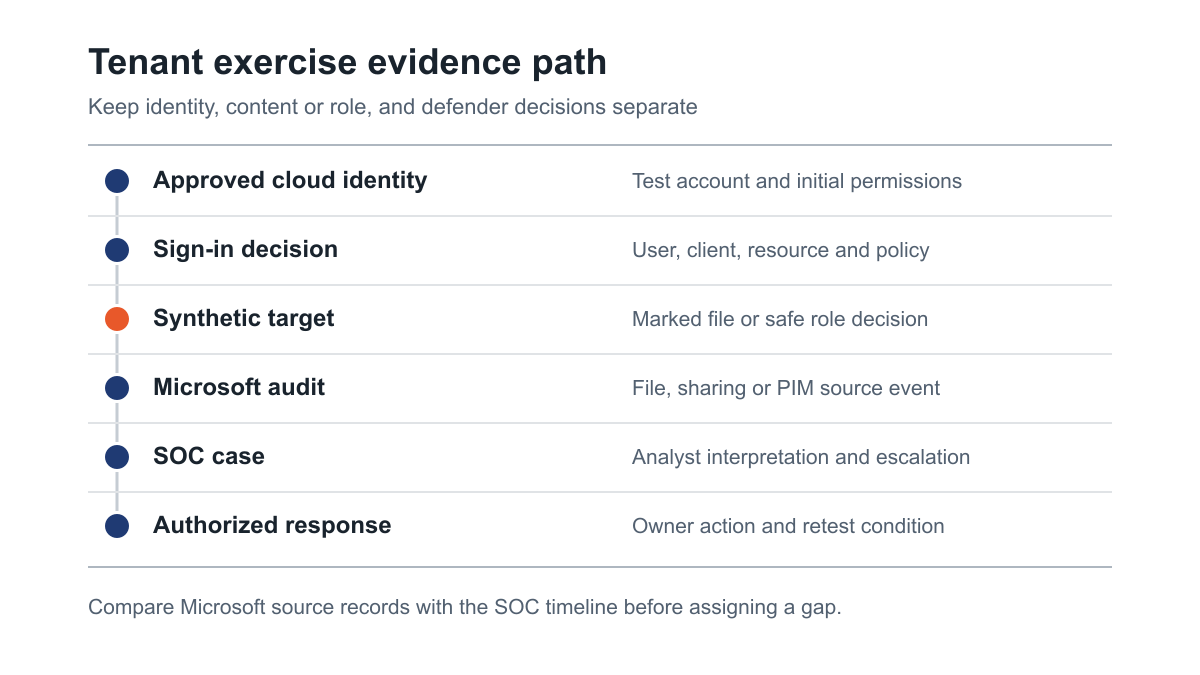
Figure 1: Evidence points from an approved tenant identity to a synthetic target and defender response. Source: Microsoft Entra sign-in activity details.
An Entra sign-in record is not an access verdict for every later operation. Microsoft's documentation describes who signed in, how, and which resource was requested; the Conditional Access tab shows which policies applied to that sign-in attempt. A "Success" status for a Conditional Access policy means the policy applied successfully, not that the user had permission to every file in a site. The exercise needs the file or role decision as a separate evidence point.
Microsoft Purview Audit provides activity data for investigation, and Microsoft's audit activity reference lists SharePoint and OneDrive file and sharing operations. The SOC still needs the relevant events collected, normalized and tied to an alert or hunt. The white team should preserve the underlying Microsoft records and compare them with the SOC's view. A missing source event, a missing collector, a missed detection, a mistaken triage and a failed handoff are different findings with different owners.
The final timeline should show both attacker and defender perspectives. The attacker view records what the test identity attempted and what the service allowed. The defender view records what telemetry arrived, what the analyst concluded, who was notified and what safe containment was authorized. If the test was blind, analysts should not receive the exact marker or timing before the run. If it was a collaborative purple-team replay, label it as such and do not present it as blind detection.
Write tenant-specific rules of engagement
The authorization should name the tenant owner, target tenant, test identities, permitted SharePoint site or OneDrive, optional administrative role, test window, safe marker, source locations, monitoring participants, data limits, stop authority and emergency contacts. It should define whether the provider may create sharing links, request role activation, change test permissions or only observe existing decisions. A provider should not infer permission from a broad Microsoft 365 license or from the fact that a link is technically accessible. Written owner consent applies to the precise assets under test.
Microsoft's unified security testing rules cover Microsoft online assets, including productivity services, and state that testing should remain within the tester's own or explicitly authorized assets. They prohibit accessing other customers' data and credentials that are not owned by the tester. They also prohibit disruptive activity. The white team should review the current rules and service terms before the test. If the exercise reveals a potential Microsoft service vulnerability rather than a tenant configuration or monitoring gap, stop at initial proof and use Microsoft's coordinated reporting path. The engagement is about the customer's authorized tenant, not testing Microsoft's shared infrastructure.
The plan should exclude broad password spraying, unapproved guest invitations, mail campaigns, mass file access and changes to live administrator privileges. These actions are unnecessary for a synthetic file or safe PIM decision. A cloud identity used for the exercise should be clearly distinguishable to the white team, even if the SOC analysts are initially blind to the exact account. The white team should hold the emergency disclosure details so it can identify and halt the activity if analysts treat it as a genuine incident.
Agree what to do if the red team encounters real content unexpectedly. Stop the access path, do not download or quote the content, and notify the white-team owner through the secure incident channel. The provider's report should use a redacted description of the control failure and the synthetic test result where possible. The public blog should never contain a customer's tenant ID, file names, staff identities or incident records. Those belong in the private engagement evidence packet with restricted access and retention rules.
Name who can contain the scenario
For a sharing scenario, containment may mean removing a test link, changing test-site access or disabling a designated test account. For a PIM scenario, it may mean denying a pending request, ending a test role activation or blocking the specific test identity. These actions should be approved in advance and limited to synthetic resources. The SOC may detect a concern but lack authority to change a SharePoint site or Entra role. The proposal should name the SharePoint, identity and incident-response owners who can act.
A good exercise measures the handoff. Did the alert identify the affected site or role? Did it reach the correct owner? Did the owner know whether the requested action was permitted and safe? Did the team preserve the audit trail before changing access? The response may be fast but ineffective if it removes a test link while the account retains another route. The report should separate the initial alert from the final control decision and include what was actually changed.
Compare proposals by outcome and evidence
A Microsoft 365 red-team quote can mean a few hours of sign-in tests or a coordinated tenant, SOC and application-owner exercise. Ask each bidder to price a defined objective and state which evidence it will collect. The buyer should not pay for a general claim of "full Microsoft 365 coverage" when the actual work follows one site and one identity. Conversely, a narrowly priced file objective should not be expected to cover every application consent, mailbox rule, guest account and admin role in the tenant.
Proposal item | Scope decision | Proof to request |
|---|---|---|
Starting identity | Member, approved guest, test app or eligible admin | Initial role and permission snapshot |
Tenant boundary | Named tenant, site or drive, optional role | Owner authorization and exclusions |
Synthetic objective | Marked file or harmless admin decision | Expected and actual access outcome |
Identity control | Sign-in and applicable Conditional Access decision | Correlated sign-in record |
Content or role event | File/share audit or PIM activation event | Microsoft source record and timestamp |
Defender response | Blind or collaborative SOC participation | Alert, analyst notes, escalation and action |
Deliverable | Narrative, engineering findings and retest | Evidence map and named fix owners |
Ask for a sample redacted finding. It should show the starting permission, exact synthetic target, attempted decision, service response and independent source event. Ask for a sample defender timeline that distinguishes source telemetry from a SOC alert and analyst action. The provider should also explain which Microsoft 365 logs it expects, which licensing or retention assumptions it makes and what happens if a required event is unavailable. Do not compare bids on day count alone if one includes a defender debrief and the other ends after a technical proof.
The number of services and identities drives coordination. A one-site file objective is simpler than an exercise covering member and guest identities, several sites and a PIM role. A fully blind exercise needs a white-team control group and an emergency route. A hybrid AD starting point adds a separate domain and identity path. A phishing or finance scenario adds people and process risk. Keep those options explicit in the request for proposal so the buyer can choose the path that answers its current board or security question.
What the final report should let you decide
The executive summary should state whether the synthetic objective was reached, blocked, detected, escalated and safely contained. The engineering detail should map each observation to the control owner: site sharing, file permission, guest access, Entra sign-in policy, PIM, Purview audit, SIEM collection, analytic or on-call procedure. A finding that says "harden Microsoft 365" does not tell an owner what to change. A useful report includes the tested identity and resource, expected result, actual result, evidence references, business consequence and retest condition.
The report should state its limits. A successful test access to one synthetic site does not prove all company data is exposed. A denied request at one site does not prove all OneDrive files are safe. An alert that analysts knew to expect in a purple-team replay does not prove normal blind detection. The sponsor should use the result to prioritize the tested boundary and choose whether a wider Microsoft 365 security assessment or SharePoint sharing penetration test is needed.
Make the defender debrief actionable
Bring the tenant owner, SharePoint or OneDrive owner, identity administrator and SOC into a controlled replay. Start with the expected access decision. Show the actual sign-in and content or role event. Ask the SOC what it received and why it did or did not create a case. Ask the owner what safe response it could take. The red team should supply its independent timestamped path, not an interpretation that erases a control that worked. A denied access attempt and an ignored successful access are very different findings.
Prioritize the fix closest to the tested path. Restrict a site or link if the synthetic file was reachable through an unintended sharing path. Review an eligible role or approval chain if the PIM decision was too broad. Repair log ingestion before tuning an alert that has no source event. Add context to a detection if an analyst saw a file event but could not tell that the site represented protected content. Update the on-call route if a credible case reached no one who could act. Then repeat the same safe objective and record what changed.
If the organization wants recurring evidence, a later exercise can use a different test identity, site or role. That is valuable, but it is a new scenario. Keep the original path as a retest first so the buyer can show that its specific control change worked. A one-time exercise can support a migration, procurement or board decision. A continuous program can revisit cloud paths as tenant permissions and SOC detections evolve. Both models should state which scenarios and retests are included.
Where Stingrai fits
Stingrai is a global CREST-accredited penetration testing services company founded in Toronto, Canada in 2021, trusted by companies from startups to enterprises to meet audit requirements for SOC 2, ISO 27001, CMMC, PCI DSS and HIPAA. OSCE³, OSWE, OSEP, CREST CRT certified penetration testers, who are also world-class security researchers and bug bounty hunters. Choose from fully human-led or hybrid (AI agents plus human penetration testers) engagements across web, API, mobile, AI and LLM, cloud, network, Active Directory and social engineering penetration tests and red team engagements.
For this cloud-only tenant question, Stingrai's human-led red team can agree a synthetic objective and test the identity, data or administrative decision with SOC response. A separate cloud penetration test can provide broader assessment of Azure and Entra identity and control-plane paths when the buyer needs coverage beyond one objective. The quote should list the tenant, test identities, target resource, monitoring participants and production exclusions. Stingrai's testing can produce documented evidence for a compliance program and a practical retest after remediation.
Frequently Asked Questions
What should a Microsoft 365 tenant red-team exercise include?
A Microsoft 365 tenant red-team exercise should include an authorized cloud identity, a named tenant and synthetic target, a written expected access decision, Microsoft sign-in and audit evidence, SOC investigation, owner escalation, safe containment and a retest condition. The final report should distinguish prevention, detection and response outcomes.
How is this different from a Microsoft 365 security assessment?
A Microsoft 365 security assessment reviews a defined set of tenant settings and attack paths for broad findings. A tenant red-team exercise follows one bounded objective, such as a synthetic file or harmless privileged decision, and tests whether defenders understand and act on the event. The two scopes answer different buyer questions.
Can the exercise avoid real customer and employee documents?
Yes. Use a synthetic SharePoint or OneDrive file with a harmless marker and a test identity. The white team can configure the same relevant sharing and monitoring boundary without using live content. Unexpected access to real content should stop the exercise and enter the agreed incident process.
Is a successful Entra sign-in proof that a SharePoint file was exposed?
No. The sign-in record identifies the identity, client and requested resource, while the file access decision depends on the content location and permissions. The exercise should preserve both records and show the actual synthetic file outcome. Conditional Access success is not a blanket verdict on every file permission.
Can PIM role activation be part of the scenario?
Yes, as a separately scoped administrative objective using an approved eligible test identity and a harmless action. The plan should specify the role, scope, approval, duration, audit record, SOC expectation and rollback. It should not grant broad production privilege merely to create a dramatic result.
What Microsoft 365 evidence should the SOC and white team retain?
Retain the correlated Entra sign-in, applicable Conditional Access result, SharePoint or OneDrive file and sharing audit records or PIM activation record, SOC alert, case, analyst notes, escalation recipient and safe response. Compare source and SOC timestamps before assigning a missed detection to an analyst.
Are Microsoft's own testing rules relevant to a customer tenant exercise?
Yes. Microsoft's unified security testing rules apply to Microsoft online assets and require activity within owned or explicitly authorized assets. They prohibit access to other customers' data and unowned secrets and require responsible handling of potential Microsoft service vulnerabilities. The tenant owner should approve the exact assets and actions in writing.
Does Stingrai use Snipe for Microsoft 365 red teaming?
No. Stingrai's tenant and cloud red-team exercises are human-led. Snipe is Stingrai's autonomous agent for web applications and associated APIs; its specialist sub-agent tests AI and LLM applications, including MCP servers, alongside named penetration testers. This cloud-only tenant objective is scoped for human operators.
Related reading
Talk to Stingrai
Share the tenant boundary, approved test identity, synthetic file or safe admin objective and SOC participation plan through Get a Quote, or book a free discovery call to shape a human-led Microsoft 365 red-team exercise.