




The Active Directory security best practices that matter most in 2026 are to keep Tier 0 accounts off ordinary machines, retire weak Kerberos and NTLM settings, require SMB and LDAP signing, lock down certificate templates and directory permissions, run Windows LAPS everywhere, log the events that reveal compromise, and treat the Microsoft Entra Connect server as Tier 0. Every check below traces to Microsoft's documentation or to joint guidance from Australia's ASD, CISA, the NSA, the Canadian Centre for Cyber Security and the New Zealand and UK national cyber security centres, first published on 25 September 2024 and revised on 15 September 2026.
That guidance warns that every user has enough permission "to both identify and exploit weaknesses". A penetration tester with an ordinary test account starts where an attacker with one phished account does.
Quick answer. An Active Directory security checklist should verify eight groups of controls: tiering and privileged accounts, Kerberos, NTLM with SMB and LDAP signing, AD CS certificate templates, GPO and ACL attack paths, Windows LAPS, auditing and detection, and Microsoft Entra Connect sync accounts. Each check below gives what to verify, why it matters, the fix and its MITRE ATT&CK v20 technique. Stingrai, a CREST-accredited penetration testing company, runs these checks from an ordinary domain account in its Active Directory penetration tests and retests the fixes.
The Active Directory security checklist at a glance
Group | Verify first | The fix | Main source |
|---|---|---|---|
1. Tiering and privileged accounts | Who holds Domain Admins and where those accounts sign in | No standing admin group members beyond the secured built-in Administrator; Tier 0 accounts only on Tier 0 systems | Microsoft, joint guidance |
2. Kerberos | SPN accounts, pre-authentication, unconstrained delegation, RC4, krbtgt age | Managed service accounts, pre-authentication everywhere, no unconstrained delegation, krbtgt rotation | Joint guidance, Microsoft |
3. NTLM and signing | SMB signing, LDAP signing and channel binding, LLMNR and NBT-NS, NTLMv1 | Require signing, disable legacy name resolution, refuse NTLMv1 and LM | AA23-278A, Microsoft |
4. AD CS templates | Templates that let a low-privileged user name any subject for an authentication certificate | Remove enrollee-supplied subjects, require approval, secure web enrolment, enforce strong mapping | Joint guidance, AA23-278A, Microsoft |
5. GPO and ACL paths | Who can write to Tier 0 objects, GPOs, replication rights and key credentials | Remove non-Tier 0 control, delete GPP passwords, set the machine account quota to zero | Joint guidance, MITRE |
6. LAPS | Devices whose local administrator password is shared or unmanaged | Windows LAPS everywhere, encrypted, with tight read rights | Microsoft, AA23-278A |
7. Auditing and detection | Whether domain controllers log the events that show compromise | Advanced audit policy, alerts and canary objects | Joint guidance, Microsoft |
8. Entra Connect | Who administers the sync server and what its account can do | Treat it as Tier 0, keep cloud admins cloud-only, block hard and soft match | Microsoft, joint guidance |
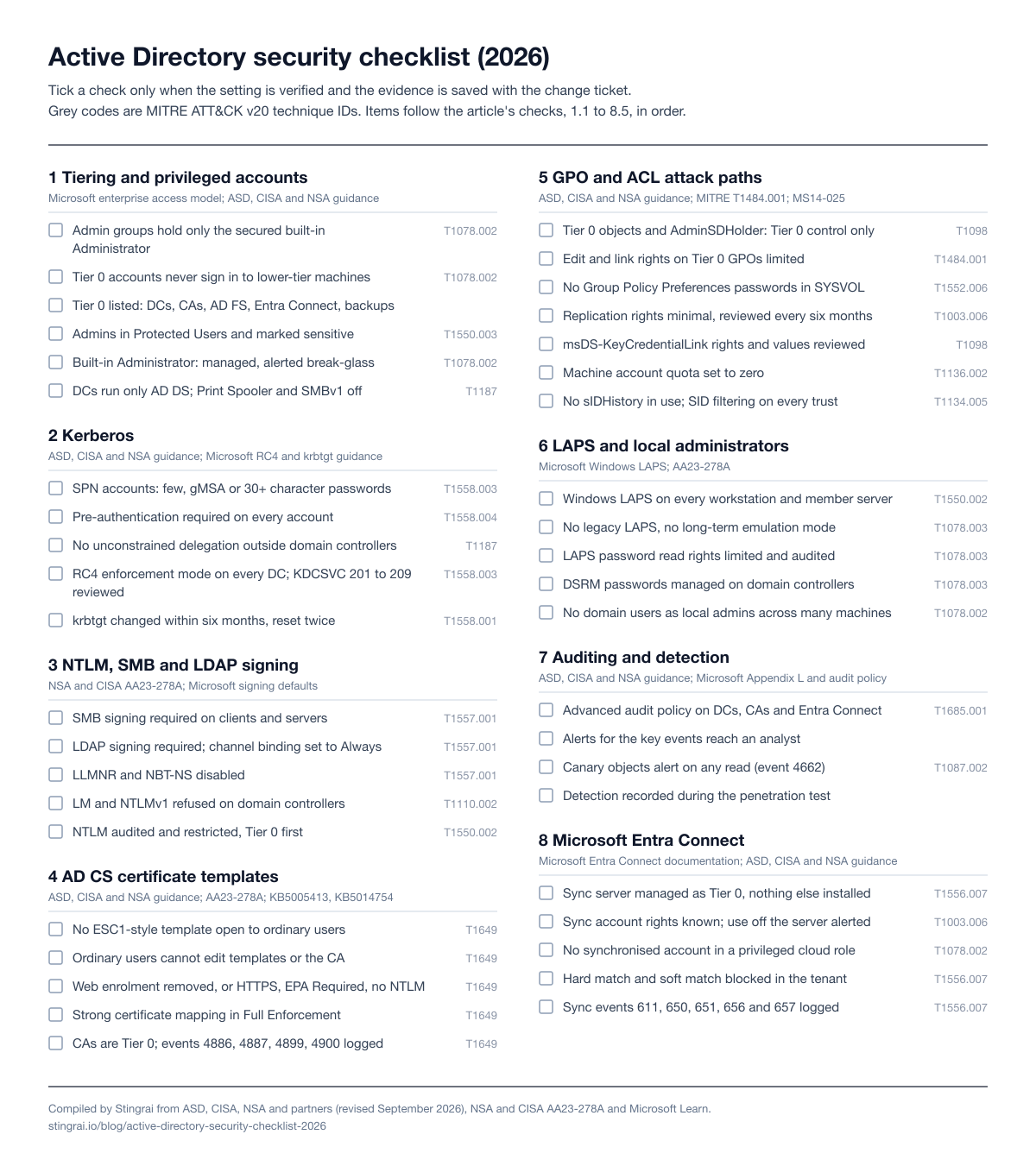
Figure 1: The full checklist on one page, for printing or for a change ticket. Compiled by Stingrai from ASD, CISA, NSA and partners, NSA and CISA AA23-278A and Microsoft Learn; technique IDs from MITRE ATT&CK v20.
How penetration testers work through Active Directory
Stingrai's Active Directory tests start from an assumed-breach position: one or two ordinary, unprivileged domain accounts. The joint guidance orders its techniques "in the sequence they are typically executed", from privilege escalation and lateral movement to persistence, and a test follows the same arc:
Read the directory. Any user can list users, groups, computers, SPNs and most permissions.
Find credentials anyone can read. NSA and CISA teams "regularly find drives containing cleartext credentials" for service accounts, web applications "and even domain administrators" (AA23-278A).
Test Kerberos. SPN accounts and accounts without pre-authentication give out material that can be cracked offline.
Look for relay paths where SMB or LDAP signing is not required.
Read certificate templates. One bad template can issue a certificate for an administrator.
Walk permission paths into Tier 0: nesting, object write rights, delegation and where administrators leave credentials.
The pace is the point. In AA23-278A, a team whose phished starting account had administrative permissions "compromised a domain in under a business day", and one team cracked over 80% of a domain's user passwords in 12 hours.
How to read the checks. Every "verify" step is read-only. Make fixes through change control, and where Microsoft offers an audit mode, audit before you enforce. Technique IDs are checked against MITRE ATT&CK v20 (13 October 2026). ATT&CK v19 split Defense Evasion into Stealth and Defense Impairment, renamed T1557.001 to "Name Resolution Poisoning and SMB Relay" and moved Clear Windows Event Logs from T1070.001 to T1685.005, so older mappings need updating.
1. Tiering and privileged accounts
The joint guidance calls securing privileged access "a top priority for all organisations" and points to Microsoft's enterprise access model, which builds on the AD tier model to "prevent control of higher planes from lower planes". Tier 0, now the control plane, is everything that can control identity.
Check: what to verify | Why it matters | Fix | Maps to |
|---|---|---|---|
1.1 Standing admin membership. List members of Domain Admins, Enterprise Admins and Administrators, including nested groups. | Microsoft names these as the highest-privileged built-in groups; AA23-278A found privilege creep through nested groups. | Microsoft says to remove all Domain Admins members except a secured built-in Administrator and grant temporary membership when needed. | T1078.002 |
1.2 Where Tier 0 accounts sign in. Check logon rights and recent logons of privileged accounts on workstations and ordinary servers. | Credentials typed on a lower-tier machine can be taken from it. Microsoft: "Never administer a trusted system from a less-trusted host." | Deny Tier 0 logons below Tier 0; use privileged access workstations, phishing-resistant MFA and Kerberos armoring; no email or browsing on admin accounts (AA23-278A). | T1078.002 |
1.3 The Tier 0 inventory. Confirm which servers and accounts are Tier 0. | The joint guidance lists domain controllers, the AD CS root CA, AD FS, Entra Connect, backup servers and backup administrators. | Manage Tier 0 only from Tier 0 via jump servers or secure admin workstations; encrypt backups and limit them to Backup Administrators. | Inventory |
1.4 Protected Users. Check that privileged people are in Protected Users and marked "Account is sensitive and cannot be delegated". | Members cannot use NTLM or RC4 pre-authentication, cannot be delegated and get a four-hour TGT. | Add privileged people after testing their tools; Microsoft says never to add service or computer accounts. | T1550.003 |
1.5 The built-in Administrator. Check its password age, use and alerting. | The joint guidance wants it used only as a monitored break-glass account. | A managed password of at least 30 characters (Microsoft's smart-card-required flag sets a random 120-character one), marked sensitive, alerted on every logon. | T1078.002 |
1.6 Domain controller roles. List roles, services and software on each domain controller. | The Print Spooler can be used to coerce a domain controller into authenticating elsewhere. | Run only AD DS; disable the Print Spooler and SMBv1 on domain controllers (joint guidance). | T1187 |
The Active Directory security assessment guide covers the clean source principle behind tiering, and the lateral movement guide covers how credentials move between tiers.
2. Kerberos: SPN accounts, AS-REP and delegation
Kerberos checks come early because they need nothing more than a domain account: per the joint guidance, any user, "including unprivileged users", can request a service ticket for an account with an SPN.
Check: what to verify | Why it matters | Fix | Maps to |
|---|---|---|---|
2.1 User accounts with SPNs. List them with owner, password age, groups and encryption types. | Their tickets can be cracked offline; AA23-278A calls Kerberoasting "a common technique". | Fewer SPN accounts; group Managed Service Accounts where possible, otherwise a managed password of at least 30 characters; no privileged groups. See the Kerberoasting guide. | T1558.003 |
2.2 Pre-authentication. Find accounts with "Do not require Kerberos preauthentication". | Any domain user can request a crackable reply for them. | Require pre-authentication everywhere; give any legacy exception minimum privileges and a long managed password. | T1558.004 |
2.3 Unconstrained delegation. List non-domain-controller computers trusted for it. | Each visiting user's TGT is stored on that host; with coercion, an attacker can capture a domain controller's TGT. | Remove it and use resource-based constrained delegation; protect privileged users as in 1.4. | T1187, T1550.003 |
2.4 RC4. Confirm domain controllers have the April 2026 or later updates for CVE-2026-20833 and review KDCSVC events 201 to 209. | Microsoft's RC4 change makes accounts without an explicit setting AES-SHA1 only, but honours RC4 set explicitly; event 205 flags an insecure domain-wide setting. | Remove explicit RC4 settings; Microsoft's Kerberoasting guidance says to change an account's password after moving it to AES. | T1558.003 |
2.5 krbtgt age. Read when the krbtgt password was last set. | Whoever holds the krbtgt key can forge tickets for any account (a Golden Ticket). | Change it every six months and after any suspected compromise, twice; Microsoft says to wait 10 hours between resets. | T1558.001 |
3. NTLM, SMB signing and LDAP signing
In 2023, AA23-278A said SMB's default configuration "does not require signing", and that missing signing plus name-resolution poisoning gave teams access "without needing to capture and crack any hashes". Defaults have moved since, but only on the newest versions. The NTLM relay guide covers each relay path in depth.
Check: what to verify | Why it matters | Fix | Maps to |
|---|---|---|---|
3.1 SMB signing. Read the effective client and server requirement on every server, workstation, storage device and printer. | Unsigned SMB accepts relayed logons. Microsoft's per-edition list: Windows 11 24H2 Enterprise, Pro and Education sign both ways and Windows Server 2025 requires outbound signing only, while its hardening page says both directions; domain controllers have long required it for SYSVOL and NETLOGON. | Require signing on clients and servers (AA23-278A); Microsoft does not recommend disabling it for third-party servers. | T1557.001 |
3.2 LDAP signing and channel binding. Read both on every domain controller; collect events 2887 and 2889. | Windows Server 2025 requires signing for new deployments; on 2022 and earlier it is optional. Channel binding defaults to "When supported" on new 2025 deployments and to "Never" on 2022 and earlier. | Fix the clients event 2889 names, require signing, then set channel binding to Always. | T1557.001 |
3.3 LLMNR and NBT-NS. Check whether they answer on user and server segments. | Poisoning them yields "domain hashes, system access, and potential administrative system sessions" (AA23-278A). | Disable both by Group Policy unless a documented need exists. | T1557.001 |
3.4 NTLMv1 and LM. Check the LAN Manager authentication level on domain controllers and whether LM hashes are stored. | NTLMv1 traffic can be brute forced (joint guidance); Microsoft removed NTLMv1 only from Windows 11 24H2 and Windows Server 2025. | Audit, then refuse LM and NTLMv1 and stop storing LM hashes. | T1110.002 |
3.5 NTLM use overall. Audit NTLM on domain controllers and list what depends on it. | Microsoft has deprecated all NTLM versions; the joint guidance lists disabling NTLM as a mitigation. Since the 10 November 2026 updates, Windows clients offer NTLM signing by default and servers log clients that do not; Microsoft plans to require it on servers from May 2027. | Restrict NTLM application by application, Tier 0 first. | T1550.002 |
4. AD CS certificate templates
AA23-278A says template mistakes can "escalate user privileges to domain administrator privileges", and the joint guidance adds that a fraudulent certificate "remains valid even if the user object specified in the certificate changes its password". The AD CS assessment guide covers scoping a full test.
Check: what to verify | Why it matters | Fix | Maps to |
|---|---|---|---|
4.1 ESC1-style templates. Look for templates combining low-privileged enrolment, a client authentication EKU, an enrollee-supplied subject and no manager approval. | The joint guidance calls this combination, ESC1, a common flaw: any user can request a certificate for an administrator. | Remove the Enrollee Supplies Subject flag on authentication templates, require manager approval where a subject must be supplied, narrow enrolment. | T1649 |
4.2 Template and CA permissions. Check write, FullControl and WriteDacl on templates, and the EDITF_ATTRIBUTESUBJECTALTNAME2 flag on the CA. | Whoever can edit a template can make it vulnerable; the flag allows a subject name on any template. | Remove those rights from low-privileged groups (AA23-278A) and clear the flag (joint guidance). | T1649 |
4.3 Web enrolment. Find any CA Web Enrollment or enrolment web service. | A coerced server's logon can be relayed to web enrolment for a certificate in that server's name (AA23-278A). | Remove it if unused; otherwise HTTPS only, Extended Protection set to Required and NTLM disabled (KB5005413). | T1649, T1187 |
4.4 Strong certificate mapping. Confirm Full Enforcement and watch mapping events 39, 40 and 41. | Weak mappings let a certificate stand in for the wrong account. Microsoft's Full Enforcement came with the February 2025 update; rollback ended with the 9 September 2025 updates. | Add strong mappings for any certificate the events name. | T1649 |
4.5 CA servers as Tier 0. Check who administers each CA and whether events 4886, 4887, 4899 and 4900 reach the SIEM. | The joint guidance classifies AD CS servers as Tier 0. | Tier 0 access only, AD CS as the only role, encrypted backups, central logging. | T1649 |
5. GPO and ACL attack paths
Many paths to Domain Admins are permissions rather than exploits, and the joint guidance says attackers exploit relationships "overlooked by organisations". Microsoft's AdminSDHolder process re-applies one set of permissions to every protected account and group every 60 minutes, so a bad entry there spreads.
Check: what to verify | Why it matters | Fix | Maps to |
|---|---|---|---|
5.1 Control of Tier 0 objects. List who can reset passwords, change membership, write attributes or take ownership of Tier 0 users, groups and computers, and AdminSDHolder. | One write permission can equal group membership and never shows in group lists. | Remove non-Tier 0 principals; review AdminSDHolder after every change. | T1098 |
5.2 GPO edit and link rights. Check who can edit or link GPOs applying to domain controllers, Tier 0 servers or the domain root. | MITRE notes GPO write access can be delegated, and a malicious GPO change can create scheduled tasks or accounts. | Limit those rights to Tier 0 administrators and review them, in line with MITRE's audit mitigation (identify and correct GPO permission abuse); alert on event 5136 for GPO objects. | T1484.001 |
5.3 Passwords in SYSVOL. Search SYSVOL for Group Policy Preferences passwords. | Every domain user can read them, and the key was published around 2012. MS14-025 (May 2014) stopped new ones but did not remove old ones. | Delete them, change every password they held and use LAPS instead. | T1552.006 |
5.4 Replication (DCSync) rights. List non-domain-controller principals with Replicating Directory Changes or Replicating Directory Changes All on the domain root. | Successful DCSync "signifies the complete compromise" of the domain (joint guidance). | Minimise; never on an SPN account; review every six months. Entra Connect holds them legitimately (section 8). | T1003.006 |
5.5 Key credentials. Check who can write msDS-KeyCredentialLink and whether any object has a key credential your passwordless service did not create. | A planted key credential lets an attacker sign in as the object and survives a password change, per the September 2026 revision. | Restrict Domain Admins, Key Admins and Enterprise Key Admins; minimise delegated write; review the attribute. | T1098 |
5.6 Machine account quota. Read ms-DS-MachineAccountQuota and the rights of Domain Computers. | By default users can join 10 machine accounts, which join Domain Computers. | Set the quota to zero; keep Domain Computers out of privileged groups and without write rights. | T1136.002 |
5.7 SID History and trusts. Find objects with sIDHistory; check SID filtering on every trust. | sIDHistory grants another SID's privileges without group membership, and the forest, not the domain, is the security boundary. | Clear it after migrations, check it weekly and enable SID filtering (joint guidance). | T1134.005 |
6. LAPS and local administrator accounts
Microsoft's Windows LAPS overview states the problem: local administrator accounts "often share the same password across many devices", which lets attackers move laterally. AA23-278A puts the fix plainly: "Do not reuse local administrator account passwords across systems."
Check: what to verify | Why it matters | Fix | Maps to |
|---|---|---|---|
6.1 Coverage. Compare devices with a managed local administrator password against all workstations and member servers. | One unmanaged image with a shared password turns one laptop into many. | Windows LAPS everywhere; it shipped in the 11 April 2023 updates for Windows Server 2019 and later and supported Windows 10 and 11. | T1550.002 |
6.2 Legacy LAPS. Find devices on legacy Microsoft LAPS or in legacy emulation mode. | Legacy LAPS is deprecated as of Windows 11 23H2; emulation mode stores passwords "only in clear-text form". | Migrate to native Windows LAPS with encryption and history. | T1078.003 |
6.3 Read rights. List who can read or decrypt LAPS passwords in each OU. | Reading the password is local administrator access to the device. | Limit readers to that tier's administrators and audit reads. | T1078.003 |
6.4 DSRM passwords. Check how each domain controller's Directory Services Restore Mode password is managed. | It is a local administrator credential on a Tier 0 server. | Let Windows LAPS manage it. | T1078.003 |
6.5 Local admin membership. Check whether domain users or broad groups are local administrators across many machines. | AA23-278A recommends against it. | Remove standing membership; use tiered admin groups and time-based access. | T1078.002 |
7. Auditing and detection
The joint guidance warns that some of the events it recommends "are not logged as part of the default Windows Audit Policy". AA23-278A describes a mature organisation that missed an assessment team's lateral movement and persistence "including when the team attempted noisy activities".
Check: what to verify | Why it matters | Fix | Maps to |
|---|---|---|---|
7.1 Audit policy. Read the effective advanced audit policy on domain controllers, CAs and Entra Connect servers. | Microsoft's recommendations cover Kerberos, security group management and directory service access and changes, the last two marked for domain controllers. | Enable them, add the SACLs the joint guidance asks for, forward to the SIEM. | T1685.001 |
7.2 Alerts. Test that each event below reaches an analyst. | Microsoft rates SID History changes as High: one occurrence "should be investigated" (Appendix L). | Build alerts for the table below, tuned to your baseline. | See table |
7.3 Canary objects. Check for a decoy object no one should ever read. | A deny-read canary raises event 4662 on enumeration, "does not rely on detecting the tooling" and catches Kerberoasting, AS-REP Roasting and DCSync (joint guidance). | Deploy canaries, knowing an attacker who targets only a few objects may never touch them. | T1087.002 |
7.4 Detection under test. Ask your tester to record what your SOC saw and when. | A setting proves only that an alert could fire. | Feed every missed technique into detection rules and retest. | All |
Event | What it shows | Source |
|---|---|---|
4728, 4732, 4756 | Member added to a security group (alert for privileged groups) | Microsoft Appendix L |
4765, 4766 | SID History added, or an attempt failed (rated High) | Microsoft Appendix L |
4768, 4769 | Ticket requests; bursts suggest Kerberoasting, and a 4769 with no matching 4768 can indicate a Golden Ticket | Joint guidance |
4662 | Operation on an object: replication requests from non-domain-controllers, or a canary read | Joint guidance |
5136 | Directory object modified: an SPN added to an account, a key credential written, or (with directory service change auditing on) a GPO or delegation setting changed | Joint guidance, Microsoft |
4741 | Computer account created | Joint guidance |
4886, 4887, 4899, 4900 | Certificate requested and issued; template or template security changed | Joint guidance |
2889 | Unsigned LDAP bind | Joint guidance, Microsoft |
611, 650, 651, 656, 657 | Password hash synchronisation on the Entra Connect server | Joint guidance |
1102 | Security log cleared (T1685.005) | Joint guidance, Microsoft |
8. Hybrid identity: Microsoft Entra Connect and its sync accounts
Microsoft says the Entra Connect server "must be treated as a Tier 0 component" (prerequisites), and the joint guidance says these servers "need to be afforded the same security as Domain Controllers". For password hash synchronisation the sync account holds Replicate Directory Changes and Replicate Directory Changes All, the rights DCSync uses, and an administrator on the server can recover its password.
Check: what to verify | Why it matters | Fix | Maps to |
|---|---|---|---|
8.1 The sync server. List its local administrators, software, remote access paths and backups. | Control of the server gives control of the sync accounts on both sides. | Tier 0 access only, Entra Connect as the only application, a LAPS-managed local administrator password of 30 characters or more, encrypted backups, central logging. | T1556.007 |
8.2 The sync account. Identify the AD connector account (prefixed MSOL_ in express installs), its rights and where it signs in. | It can replicate password hashes from domain controllers. | Treat it as Tier 0, never reuse it, and alert on its use anywhere but the sync server. | T1003.006 |
8.3 Synchronised administrators. Check whether any account synchronised from AD holds a privileged Entra ID or Microsoft 365 role. | A compromised domain then becomes a compromised tenant. Microsoft: "No on-premises accounts should have administrative privileges in Microsoft 365" (guidance). | Cloud-only accounts for privileged roles with phishing-resistant MFA; separate privileged accounts for AD and Entra ID. | T1078.002 |
8.4 Hard and soft match. Check whether both are blocked in the tenant. | With either open, an attacker who controls AD can take over or create matching cloud accounts (joint guidance). | Microsoft advises disabling both unless you need them to take over cloud-only accounts. | T1556.007 |
8.5 Sync server logs. Confirm events 611, 650, 651, 656 and 657 and PowerShell logging reach the SIEM. | The joint guidance lists them for spotting misuse of the sync server. | Forward and baseline them. | T1556.007 |
The hybrid Active Directory and Entra ID red team guide covers testing the boundary between the two directories.
What to fix first: a 90-day order
This is Stingrai's suggested order for a team with one or two Active Directory owners: read-only work and low-risk changes before anything that can break authentication.
When | Work | Checks |
|---|---|---|
Week 1 | Inventory Tier 0; list SPN accounts, pre-authentication exceptions, unconstrained delegation, replication rights, the machine account quota, GPP passwords and krbtgt age; turn on the audit policy | 1.3, 2.1 to 2.5, 5.3, 5.4, 5.6, 7.1 |
Month 1 | Delete GPP passwords and rotate what they held; set the quota to zero; disable the Print Spooler on domain controllers; fix ESC1-style templates; empty standing admin groups; close LAPS gaps | 1.1, 1.6, 4.1, 4.2, 5.3, 5.6, 6.1 |
Months 2 to 3 | Enforce SMB and LDAP signing after auditing; set channel binding to Always; finish RC4 work; roll out Protected Users and tiered logon restrictions; harden Entra Connect | 1.2, 1.4, 2.4, 3.1 to 3.4, 8.1 to 8.4 |
End of month 3 | Have the result tested, detection included, and retest the fixes | 7.4 |
How a penetration test checks this list
A checklist shows which settings are wrong. A penetration test shows which wrong settings connect: a readable password in SYSVOL, an SPN account, an edit right on a GPO and a cached administrator logon can each look minor and add up to the whole domain. Testers prove each path far enough to name the object and attribute behind it, within the rules of engagement.
Ask for a start from an ordinary domain account as well as from no credentials, as the internal network penetration testing guide describes, plus the detection record from check 7.4 and a retest of every fix. The network penetration testing checklist covers the network around the directory, and the password spraying guide covers lockout and password policy testing.
Where Stingrai fits
Stingrai is a CREST-accredited penetration testing company in Toronto, holding two CREST accreditations, Penetration Testing and AI-Enabled Penetration Testing, and the CREST AI Charter company certification. Its Active Directory penetration testing starts from the position of an ordinary domain user and reports every proven path with the object and attribute behind each hop, across Kerberos, ACL and delegation abuse, coerced authentication, AD CS, Group Policy, trusts and the Tier 0 boundary.
Who tests: two named penetration testers from a team holding OSCE³, OSEP, CRTO, CREST CRT and CISSP certifications.
Delivery: findings appear in the PTaaS portal as they are confirmed, with remediation guidance. Every human-led and hybrid report ships with an attestation letter, and the evidence supports SOC 2, ISO 27001, PCI DSS and HIPAA programs.
Retest: included in every quote.
Cost: Active Directory engagements are quoted per engagement. For a wider internal and external network penetration test, Stingrai's published typical range is US$5,000 to US$40,000 and above.
Cadence: one-time (annual) tests and continuous programs.
If you also run customer-facing web applications, Stingrai's Hybrid Pentest, in which Snipe and Stingrai's certified penetration testers test the same application together, is US$6,800 per assessment or US$1,275 per month on a 12-month plan, for one web application and associated APIs.
Frequently Asked Questions
What are the most important Active Directory security best practices in 2026?
Keep Tier 0 accounts off ordinary machines and out of standing admin groups, remove weak Kerberos settings, require SMB and LDAP signing, fix AD CS templates, remove dangerous permissions and GPP passwords, run Windows LAPS everywhere, log the events that reveal compromise, and treat Entra Connect as Tier 0. Each traces to Microsoft or to the joint ASD, CISA and NSA guidance revised on 15 September 2026; Stingrai's Active Directory tests check each one.
What should an Active Directory security checklist include?
Eight groups: tiering and privileged accounts, Kerberos, NTLM with SMB and LDAP signing, AD CS templates, GPO and ACL attack paths, LAPS, auditing and detection, and Entra Connect sync accounts. For each check, record what to verify, why it matters, the fix and the evidence that the fix is in place.
How often should Active Directory security be reviewed?
The joint guidance sets several cadences: check sIDHistory weekly, scan for cleartext credentials at least monthly, and review replication rights and change the krbtgt password every six months. Test the directory in your annual program and after major changes such as a migration, a merger or a new trust.
Is the Active Directory tier model still relevant?
Yes. Microsoft's enterprise access model builds on the AD tier model and expands Tier 0 into the control plane, and the joint guidance recommends it because it makes many attack techniques much harder. The rule is unchanged: lower tiers may use higher-tier services, but Tier 0 credentials never touch lower-tier systems.
Does Windows Server 2025 require SMB signing and LDAP signing by default?
Partly. Windows Server 2025 requires LDAP signing for new Active Directory deployments and after an upgrade with no signing policy set, while channel binding defaults to "When supported" on new deployments and to "Never" on Windows Server 2022 and earlier. For SMB, Microsoft's per-edition list says Windows Server 2025 requires outbound signing only while its hardening page says both directions, and Windows 11 24H2 Enterprise, Pro and Education require signing both ways. Check the effective setting on every host.
How do you find vulnerable AD CS certificate templates?
Look for the combination the joint guidance calls ESC1: low-privileged enrolment, a client authentication EKU, an enrollee-supplied subject and no manager approval. Then check who can write to templates and the CA, whether web enrolment lacks Extended Protection, and whether domain controllers enforce strong certificate mapping.
What is the difference between Windows LAPS and legacy Microsoft LAPS?
Windows LAPS is built into Windows since the 11 April 2023 updates and adds password encryption, password history, Entra ID backup and DSRM password management. Legacy Microsoft LAPS is deprecated as of Windows 11 23H2, and Windows LAPS in legacy emulation mode stores passwords in clear text, so treat emulation as temporary.
Which Windows event IDs should we monitor for Active Directory attacks?
Start with 4728, 4732 and 4756 for privileged group changes, 4765 and 4766 for SID History, 4768 and 4769 for Kerberos anomalies, 4662 for replication requests and canary reads, 5136 for key credential and GPO changes, 4741 for new computer accounts, 4886, 4887, 4899 and 4900 on certificate authorities, 2889 for unsigned LDAP binds and 1102 for a cleared Security log.
Should the Microsoft Entra Connect server be treated as Tier 0?
Yes. Microsoft says it must be treated as a Tier 0 component, and the joint guidance says it needs the same security as a domain controller. With password hash synchronisation its AD account holds the replication rights DCSync uses, and an administrator on the server can recover the sync accounts' passwords.
How much does an Active Directory penetration test cost?
Stingrai quotes Active Directory engagements per engagement, with the retest included. For a wider internal and external network penetration test, Stingrai's published typical range is US$5,000 to US$40,000 and above, driven by host count, Active Directory footprint, number of sites and start positions.
Related reading
Active Directory security assessment: what it covers, what it finds, what it costs
Kerberoasting explained: how the attack works, detection and fixes
NTLM relay attack explained: how it works, detection and fixes
Active Directory Certificate Services security assessment: a buyer scope
Best internal network and Active Directory penetration testing companies (2026)
Network Penetration Testing (2026): What It Is, What's Included, Types, Process and Cost
References
ASD, CISA, NSA, CCCS, NCSC-NZ and NCSC-UK. Detecting and Mitigating Active Directory Compromises. 25 September 2024, revised 15 September 2026. https://www.cisa.gov/resources-tools/resources/detecting-and-mitigating-active-directory-compromises
NSA and CISA. Top Ten Cybersecurity Misconfigurations (AA23-278A). 5 October 2023. https://www.cisa.gov/news-events/cybersecurity-advisories/aa23-278a
Microsoft. Enterprise access model. https://learn.microsoft.com/en-us/security/privileged-access-workstations/privileged-access-access-model
Microsoft. Best practices for securing Active Directory. https://learn.microsoft.com/en-us/windows-server/identity/ad-ds/plan/security-best-practices/best-practices-for-securing-active-directory
Microsoft. Protected Users security group. https://learn.microsoft.com/en-us/windows-server/security/credentials-protection-and-management/protected-users-security-group
Microsoft. LDAP signing. https://learn.microsoft.com/en-us/windows-server/identity/ad-ds/ldap-signing
Microsoft. SMB signing. https://learn.microsoft.com/en-us/windows-server/storage/file-server/smb-signing
Microsoft. KB5014754: Certificate-based authentication changes on Windows domain controllers. https://support.microsoft.com/en-us/topic/kb5014754-certificate-based-authentication-changes-on-windows-domain-controllers-ad2c23b0-15d8-4340-a468-4d4f3b188f16
Microsoft. Kerberos KDC usage of RC4 and CVE-2026-20833. 13 January 2026. https://support.microsoft.com/en-us/topic/how-to-manage-kerberos-kdc-usage-of-rc4-for-service-account-ticket-issuance-changes-related-to-cve-2026-20833-1ebcda33-720a-4da8-93c1-b0496e1910dc
Microsoft. What is Windows LAPS? https://learn.microsoft.com/en-us/windows-server/identity/laps/laps-overview
Microsoft. Appendix L: Events to monitor. https://learn.microsoft.com/en-us/windows-server/identity/ad-ds/plan/appendix-l--events-to-monitor
Microsoft. Microsoft Entra Connect prerequisites. https://learn.microsoft.com/en-us/entra/identity/hybrid/connect/how-to-connect-install-prerequisites
Microsoft. Protecting Microsoft 365 from on-premises attacks. https://learn.microsoft.com/en-us/entra/architecture/protect-m365-from-on-premises-attacks
Microsoft. MS14-025. 13 May 2014. https://learn.microsoft.com/en-us/security-updates/securitybulletins/2014/ms14-025
MITRE. ATT&CK v20 release notes. 13 October 2026. https://attack.mitre.org/resources/updates/
Talk to Stingrai
To have this checklist proved against your own forest, with every path named and every fix retested, Get a Quote or book a free discovery call.