




An NTLM relay attack is one in which an attacker sitting between a Windows client and a server forwards the NTLM authentication the client offers, in real time, to a different server, which then treats the attacker as that user or computer. No password is learned or cracked, because, as Microsoft's documentation puts it, NTLM "doesn't inherently bind the authentication to a specific connection". The subject is current: on 10 November 2026 Microsoft began a two-phase change to NTLM message signing aimed at "reducing exposure to relay attacks", and on the same day patched an exploited Outlook flaw, CVE-2026-124194, that discloses a user's NTLMv2 hash.
This guide covers why NTLM can be relayed, each relay path and Microsoft's fix for it, what Microsoft has changed and when, how a penetration test checks for it, how to detect it and how to shut it down. It stays at the level a defender needs and includes no attack commands.
Quick answer. An NTLM relay attack forwards a victim's live NTLM authentication to another server that does not check where it came from. It works against SMB servers that do not require signing, domain controllers that do not require LDAP signing and channel binding, and web services such as AD CS web enrolment and Exchange that run without Extended Protection for Authentication. The fix is to require those protections on every target, remove NTLMv1 and LM, audit and then restrict NTLM, and close the coercion paths that make servers authenticate on demand. Stingrai's internal network and Active Directory testing lists every relayable target in an estate and proves what each relay reaches.
NTLM relay at a glance
Question | Short answer |
|---|---|
What is it? | Forwarding someone else's NTLM authentication, as it happens, to a server of the attacker's choice. MITRE ATT&CK tracks it under T1557.001 and T1187. |
Does a strong password help? | No. Nothing is guessed, so a long random password relays exactly as well as a weak one. |
What does it give the attacker? | A session as the victim: files and code execution over SMB, directory changes over LDAP, a certificate from AD CS, a mailbox on Exchange. |
What does it leave behind? | An NTLM network logon on the target that comes from the attacker's address. |
What stops it? | SMB signing, LDAP signing and channel binding, Extended Protection for Authentication (EPA) on web services, and less NTLM. |
How an NTLM relay attack works
NTLM is the older of the two authentication protocols in a Windows domain. Kerberos is the default, and Windows falls back to NTLM when Kerberos cannot be used, for example when a client connects to a server by IP address. Microsoft describes NTLM as "an encrypted challenge/response protocol": the client sends a user name, the server sends a random 8-byte challenge, the client returns a response computed from the hash of the user's password, and a domain controller checks it.
Nothing in that exchange proves to the client which server it is talking to, or ties the response to one network connection. Microsoft's January 2026 roadmap lists the consequence as the protocol's first two risks: "No server authentication" and "Vulnerability to replay, relay, and pass-the-hash attacks". Microsoft's Security Response Center describes a relay as two steps, "Coercing a victim to authenticate to an arbitrary endpoint" and "Relaying the authentication against a vulnerable target". In full:
A user's or a server's machine is led, or forced, to start an NTLM logon to a host the attacker controls.
The attacker opens its own logon to the real target in the victim's name.
The target's challenge is passed to the victim unchanged.
The victim's response is forwarded to the target.
The domain controller confirms the response, and the target gives the attacker a session with the victim's rights.
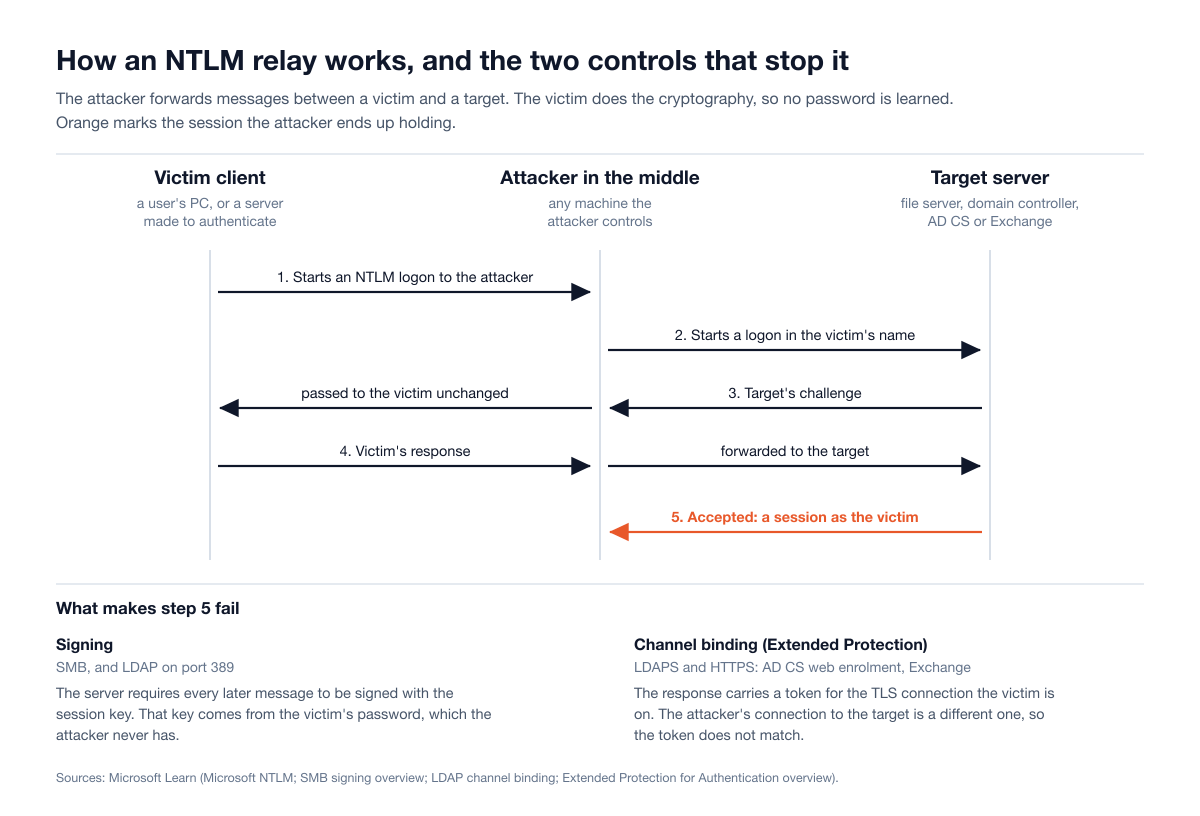
Figure 1: An NTLM relay in five steps, and the two controls that stop it. Sources: Microsoft, Microsoft NTLM and Microsoft, LDAP channel binding.
Three things follow. Password strength is irrelevant, because the victim does the cryptography. The attack only works live, which is why every relay starts with getting a machine to authenticate on demand. And the target decides the outcome: the same logon fails against a server that requires signing or channel binding, so relay exposure is a per-server setting that can be audited.
Why signing and channel binding break a relay
Signing. After a logon, client and server share a session key, and Microsoft's SMB documentation notes that "the session key itself is derived from your password", which the attacker never learns. The attacker can get the logon accepted but cannot sign what follows, so a server that requires signing gives a relayed session nothing to work with. Microsoft says the SMB signature "prevents relay attacks".
Channel binding. Inside TLS, as with HTTPS and LDAPS, Extended Protection for Authentication (EPA) has the client mix a token derived from its own TLS connection into the response. The victim's TLS connection ends at the attacker, and the attacker's connection to the target is a different one, so the token does not match. In Microsoft's words, this "lets the server detect the MITM attack and refuse the authentication request".
Every fix later in this guide is one of these two ideas applied to one protocol, or less NTLM.
NTLM relay vs pass the hash vs password cracking
All three involve "NTLM hashes", but they need different things and are stopped by different controls.
Point of comparison | NTLM relay | Pass the hash | Password cracking |
|---|---|---|---|
What the attacker holds | A victim's live challenge response, often called a Net-NTLMv2 hash | The stored password hash of an account, stolen from a machine | A captured response or a stored hash |
Needs the password? | No | No | It recovers the password |
When it can be used | Only while the victim is authenticating | Any time until the password changes | Offline, at any time |
Precondition | A victim made to authenticate, and a target without signing or channel binding | Prior access to a machine that holds the hash, and a target that accepts NTLM | A password weak enough to guess |
Stopped by | Signing, channel binding, EPA, less NTLM | Protecting stored credentials, the Protected Users group, tiering, less NTLM | Long random passwords |
MITRE ATT&CK |
Pass the hash, which ATT&CK defines as "a method of authenticating as a user without having access to the user's cleartext password", replays the stored hash itself. What crosses the network in an NTLM logon is a response computed from that hash and one challenge. Microsoft's incident responders drew the line in their guidance on CVE-2023-23397: a captured Net-NTLMv2 response "can either a) relay for authentication against other systems that support NTLMv2 authentication or b) perform offline cracking to extract the password", and "As these are NTLMv2 hashes, they cannot be leveraged as part of a Pass-the-Hash technique." Stingrai's guide to lateral movement covers pass the hash within a full intrusion.
Where NTLM relay sits in MITRE ATT&CK
ATT&CK has no single "NTLM relay" technique. The names below are as published in ATT&CK v20, released on 13 October 2026, with v20.1 current as of 19 November 2026.
Part of the attack | Technique | Note |
|---|---|---|
Answering a victim's name lookups, then capturing or relaying its logon | T1557.001, Adversary-in-the-Middle: Name Resolution Poisoning and SMB Relay | Current name since ATT&CK v19 (28 April 2026). Microsoft's Defender for Identity reference and older CISA advisories still use "LLMNR/NBT-NS Poisoning and SMB Relay". |
Making a machine authenticate on demand | T1187, Forced Authentication | Covers lure files and the calls behind PetitPotam. |
Obtaining a certificate through a relayed logon | T1649, Steal or Forge Authentication Certificates | Cited by CISA for relays to AD CS. |
Despite its name, T1557.001 is not limited to SMB: the relay step "may also be independent of" poisoning, and attackers carry the same exchange into "LDAP, MSSQL and HTTP".
How attackers get a machine to authenticate
A relay needs a victim who authenticates to the attacker. There are three ways to arrange that.
Name resolution poisoning. When DNS fails, Windows may ask the local network through LLMNR, NetBIOS name service or mDNS, and any host can answer. NSA and CISA list this among their top ten misconfigurations: attackers "use spoofing, poisoning, and relay techniques" to obtain "domain hashes, system access, and potential administrative system sessions".
Coerced authentication. Some Windows remote procedure calls tell a server to connect to another machine, so an attacker can make a server, including a domain controller, authenticate with its own computer account to an address the attacker chooses. The best known is PetitPotam, which its author describes as a tool "to coerce Windows hosts to authenticate to other machines via MS-EFSRPC". The print spooler and the Distributed File System namespace protocol have been used the same way. Microsoft has patched individual calls (CVE-2021-36942 in August 2021, CVE-2022-26925 in May 2022, CVE-2025-33073 in June 2025), but treats this as a class: "While we actively fix specific instances of NTLM authentication coercion, attackers often use these vulnerabilities to relay authentication against a vulnerable server". The durable control is at the relay target.
Files and messages. A document, shortcut or calendar item can point at a server the attacker controls, and Windows will try to authenticate to it. Seven entries in CISA's exploited vulnerabilities catalog, listed below, work this way, and this route can start outside the network, from an email.
The relay paths a defender must know, and the fix for each
Once a victim is authenticating, the attacker picks a target. This table is the part of the guide to keep.
Relay target | What the attacker gains | The control | Microsoft source |
|---|---|---|---|
SMB on servers and workstations that do not require signing | A session as the relayed account, and code execution where it is a local administrator | Require SMB signing on servers and clients | |
LDAP (port 389) and LDAPS (port 636) on domain controllers | The victim's rights in the directory, including changes to objects that account can write | Require LDAP signing, and set LDAP channel binding to Always | |
AD CS web enrolment (Certificate Authority Web Enrollment and the Certificate Enrollment Web Service), known as ESC8 | A certificate in the victim's name. Relayed from a domain controller, usually the domain | EPA set to Required with HTTPS only, or remove the HTTP enrolment roles. Disable NTLM on the CA server | |
Exchange Server on premises | The victim's mailbox, and operations on the server on the victim's behalf | Extended Protection: on by default from Exchange Server 2019 CU14, enabled by script on Exchange Server 2016 | |
Other web applications that use Windows authentication, and RPC certificate enrolment (ESC11) | Whatever the relayed account can do in that application | Extended Protection set to Require on each IIS application. Packet privacy on the CA's RPC interface | IIS Extended Protection, Defender for Identity certificate assessments |
SMB relay and SMB signing
NSA and CISA put the problem plainly: SMB's default configuration "does not require signing network messages", so "malicious actors can use machine-in-the-middle techniques, such as NTLM relay", and with name resolution poisoning they reach remote systems "without needing to capture and crack any hashes". The fix is to require signing through "Microsoft network server: Digitally sign communications (always)" and its client counterpart.
Domain controllers already require it, but before Windows 11 24H2 and Windows Server 2025 signing was required by default only "for connections to shares named SYSVOL and NETLOGON, and for clients of AD domain controllers". For Windows Server 2025 itself, Microsoft's per-edition list says it "requires outbound SMB signing only", while its hardening page describes signing in both directions. A relay targets the inbound side, so check the effective setting on each server, and on storage appliances and printers, rather than trusting the version.
LDAP relay, LDAP signing and channel binding
A relay to a domain controller's LDAP service can change the directory itself. Microsoft has described the weakness since August 2019 in ADV190023: unsafe defaults "could allow a man-in-the-middle attacker to successfully forward an authentication request to a Windows LDAP server". Two settings are needed because there are two ways to speak LDAP: "Domain controller: LDAP server signing requirements" set to Require signing protects sessions on port 389 without TLS, and "Domain controller: LDAP server channel binding token requirements" set to Always protects sessions inside TLS. Microsoft's channel binding documentation lists "LDAPS + SASL (no CBT)" as "Vulnerable to NTLM relay", so encryption alone does not help.
Windows Server 2025 changed the channel binding default only for new Active Directory deployments, and there it defaults to "When supported", under which domain controllers "don't reject clients that don't support CBT". LDAP signing is required by default on new deployments and on an upgraded domain controller that had no signing policy, but an upgrade keeps any existing policy, so a domain upgraded in place should be checked, not assumed. Before enforcing, collect Directory Service event 2889 (clients binding without signing) and events 3039, 3074 and 3075 (clients failing or omitting channel binding) for a few weeks, and fix what they name.
Relay to AD CS web enrolment (ESC8)
This is the path that made relay a route to the whole domain. In June 2021 Will Schroeder and Lee Christensen of SpecterOps published "Certified Pre-Owned", labelling it ESC8: the HTTP enrolment interfaces "are all vulnerable to NTLM relay attacks", because "none of them have any NTLM relay protections enabled by default". A month later PetitPotam gave a way to make a domain controller authenticate on demand without credentials. Microsoft's ADV210003 of 23 July 2021 called it "a classic NTLM Relay Attack". Microsoft rates the coercion flaw CVE-2021-36942 at CVSS 7.5 alone, notes that "the combined CVSS score would be 9.8" when it is chained with a relay to AD CS, and its Defender for Identity documentation says "Relay attacks can lead to complete domain takeover".
The fix in KB5005413 is to enable EPA on Certificate Authority Web Enrollment and the Certificate Enrollment Web Service, "Required being the more secure and recommended option", enable "Require SSL", and disable NTLM where possible, including the configuration file change it describes for the Certificate Enrollment Web Service. NSA and CISA recommend disabling NTLM on all AD CS servers. If nobody uses web enrolment, remove the role. The same Defender for Identity page covers the RPC enrolment interface, which "becomes vulnerable to relay attacks (ESC11)" when packet privacy is turned off. Stingrai's guide to an AD CS security assessment covers the rest of the certificate attack surface.
Relay to Exchange and other web services
Microsoft's advisory for CVE-2024-21410 (CVSS 9.8) lays out the chain: credentials leaked from "an NTLM client such as Outlook" "can then be relayed against the Exchange server to gain privileges as the victim client". Extended Protection has been optional for Exchange since August 2022 and is on by default from Exchange Server 2019 Cumulative Update 14 (13 February 2024); on Exchange Server 2016 it is enabled by script. It needs consistent TLS settings and no SSL offloading, so read Microsoft's Exchange guidance first. Every other web application that accepts Windows authentication needs the same IIS Extended Protection setting, or it is a relay target worth whatever the relayed account can do in it.
Evidence that NTLM relay is in real use
Date | Source | What it reported |
|---|---|---|
28 February 2023 | The team coerced a domain controller into authenticating to a compromised server configured for unconstrained delegation and, in CISA's words, "performed an NTLM-relay attack to obtain the DC's TGT". | |
24 March 2023 | A crafted Outlook reminder leaked the user's Net-NTLMv2 response with no user interaction, and attackers used "a Net-NTLMv2 Relay attack against Exchange Servers". Microsoft traced exploitation "as early as April 2022" and later attributed it to Forest Blizzard, a Russian state-sponsored actor. | |
13 February 2024 | Microsoft "was aware of targeted NTLM relay attacks back in 2023" against Exchange. CISA added the CVE to its exploited list two days later. | |
9 December 2024 | "Microsoft observed threat actors exploiting services that lack NTLM relaying protections": Outlook relayed to Exchange, LSARPC to AD CS and WPAD to LDAP. | |
May 2025 (corrected April 2026) | The unit "weaponized an Outlook NTLM vulnerability (CVE-2023-23397) to collect NTLM hashes and credentials". | |
30 October 2026 | Threat actors using an open-source agentic pentesting framework tried to move onto domain controllers with scripts including "Kerberos relay", a related relay technique. Google's advice against credential relay: "enforce SMB signing, and enforce LDAP signing and channel binding". | |
10 November 2026 | Opening a crafted message file can make Outlook connect to an attacker's server without the usual warning, which "discloses a user's NTLMv2 hash". CISA added it to its exploited list the same day. |
NTLM in CISA's Known Exploited Vulnerabilities catalog
We counted NTLM-related entries in the JSON feed of CISA's Known Exploited Vulnerabilities catalog on 19 November 2026 (catalog version 2026.11.18, 1,786 entries). A search of every field for "NTLM" returns five. Reading Microsoft's Security Update Guide record for every Microsoft entry that has one (310 of the catalog's 391 Microsoft entries) adds seven more, whose catalog text does not use the word but which Microsoft describes as NTLM relay, NTLM coercion or NTLM hash disclosure. That makes twelve.
CVE | Product | Added to the catalog | What it is |
|---|---|---|---|
CVE-2021-36942 | Windows (LSA) | 3 November 2021 | PetitPotam coercion. Marked by CISA as known to be used in ransomware campaigns |
CVE-2018-8581 | Exchange Server | 3 March 2022 | Relay target: a man-in-the-middle can "forward an authentication request to a Microsoft Exchange Server" (named in Microsoft's advisory). Marked by CISA as known to be used in ransomware campaigns |
CVE-2022-26925 | Windows (LSA) | 1 July 2022 | A second coercion flaw in the same interface |
CVE-2023-23397 | Outlook | 14 March 2023 | Leaks a Net-NTLMv2 response that "allows for a NTLM Relay attack against another service" |
CVE-2023-36761 | Word | 12 September 2023 | Discloses NTLM hashes through a file (named in Microsoft's advisory) |
CVE-2023-36563 | WordPad | 10 October 2023 | Discloses NTLM hashes through a file (named in Microsoft's advisory) |
CVE-2024-21410 | Exchange Server | 15 February 2024 | Relay target: Exchange without Extended Protection (named in Microsoft's advisory) |
CVE-2024-43451 | Windows | 12 November 2024 | NTLMv2 hash disclosure through a file |
CVE-2024-21413 | Outlook | 6 February 2025 | A crafted link leaks "local NTLM credential information" (named in Microsoft's advisory) |
CVE-2025-24054 | Windows | 17 April 2025 | NTLM hash disclosure through a file |
CVE-2025-33073 | Windows SMB client | 20 October 2025 | Coerces a machine to authenticate back to the attacker over SMB (named in Microsoft's advisory) |
CVE-2026-124194 | Outlook | 10 November 2026 | NTLMv2 hash disclosure through a message file (named in Microsoft's advisory) |
Ten of the twelve make a machine authenticate to the attacker; the other two, both Exchange Server, are relay targets. For the file-based flaws, Microsoft's advisory for CVE-2024-43451 says "selecting (single-click), inspecting (right-click)" a malicious file can be enough.
What Microsoft has changed, and when
Microsoft has moved from guidance administrators had to apply, to protections on by default, to a plan to retire NTLM.
Date | Change | Source |
|---|---|---|
13 August 2019 | ADV190023 recommends LDAP signing and channel binding. The March 2020 updates add the policy and audit events but "will not change" the defaults | |
23 July 2021 | ADV210003 and KB5005413: EPA for AD CS web enrolment, after PetitPotam | |
11 October 2023 | Microsoft sets the goal of "eliminating the need to use NTLM at all" | |
13 February 2024 | Exchange Server 2019 CU14 enables Extended Protection by default | |
June 2024 | All versions of NTLM, "including LANMAN, NTLMv1, and NTLMv2", are deprecated | |
1 November 2024 | Windows Server 2025 released: EPA on by default for AD CS, LDAP signing and channel binding defaults for new deployments, NTLMv1 removed (also in Windows 11 24H2) | |
29 January 2026 | Three-phase roadmap to disable NTLM by default | |
13 October 2026 | NTLMv1-derived credentials blocked for single sign-on by default on Windows 11 24H2 and later and Windows Server 2025 where Credential Guard is off. Enhanced NTLM auditing reaches Windows Server 2019 and 2022 | |
10 November 2026 | NTLM signing, phase one: Windows clients "begin offering NTLM signing on all connections by default". Servers still accept unsigned clients | |
May 2027 (planned) | NTLM signing, phase two: "Windows servers begin requiring NTLM signing by default" | |
Next major Windows Server release (no date given) | "Network NTLM will be disabled by default" |
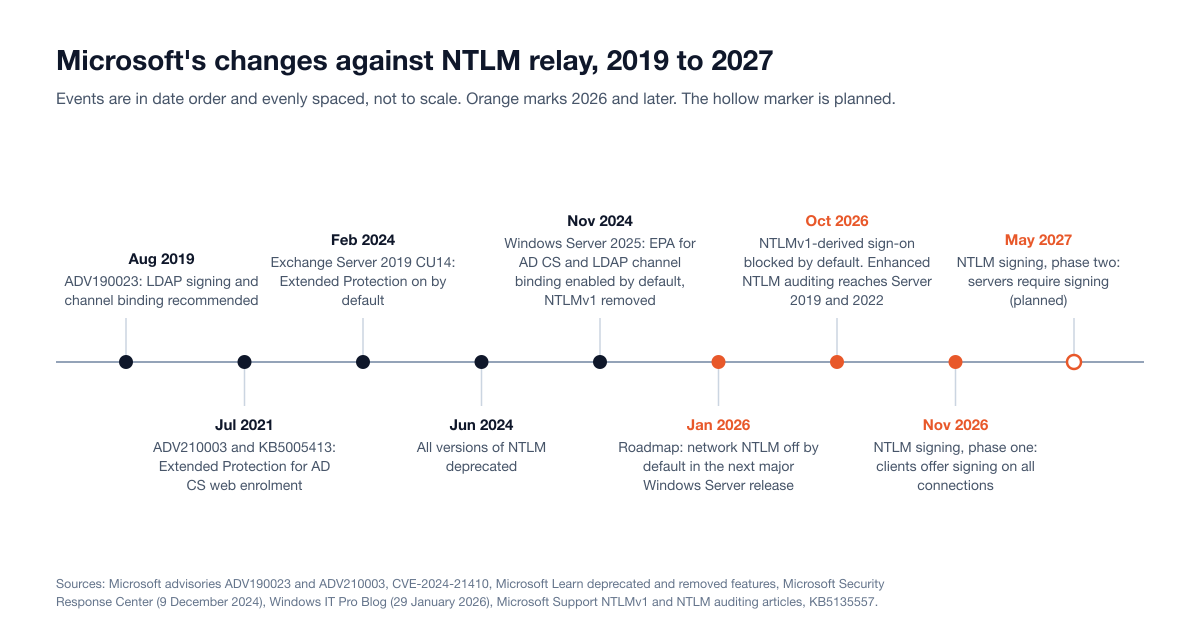
Figure 2: Microsoft's changes against NTLM relay, August 2019 to May 2027. Sources: Microsoft Security Response Center, Microsoft, Disabling NTLM by default and Microsoft, KB5135557.
The November 2026 NTLM signing change
KB5135557, published on 10 November 2026, starts a change Microsoft says will "help ensure that authenticated NTLM sessions always establish a cryptographic session key and negotiate real message signing, reducing exposure to relay attacks". The updates also "contain additional protections that address" CVE-2026-118737, a Critical Windows RPC runtime flaw (CVSS 8.1) that Microsoft does not list as exploited. Until now, applications that did not ask for integrity protection got a "Legacy 16-byte zero placeholder" in place of a signature. Clients now offer real signing on every non-anonymous connection, and from May 2027 servers are planned to reject clients that do not. Read the negotiated flags in NTLM events 4022 and 4023 to find unsigned clients, and set ServerRequireNtlmSign early once they are clean. This is NTLM's own signing, separate from SMB signing.
Where the NTLM retirement stands
As of 19 November 2026, NTLM is deprecated but works on every supported version of Windows: Microsoft's September 2026 FAQ says "In-market versions of Windows client and Windows Server will continue to support NTLM". Default disablement targets "the next major release of Server and Client (subject to change)", and even then, per the January roadmap, NTLM "can be explicitly re-enabled via policy". The two Kerberos features the roadmap's second phase relies on, IAKerb and a local Key Distribution Center, were "currently available in Windows Insider preview builds" in September; we found no announcement of general availability as of 19 November 2026.
What is on by default, by version
Protection | Windows Server 2022 and earlier, Windows before 11 24H2 | Windows Server 2025, Windows 11 24H2 |
|---|---|---|
SMB signing required | Domain controllers, and SYSVOL and NETLOGON connections | Windows 11 24H2 Enterprise, Pro and Education: both directions. Windows Server 2025: outbound only, per the per-edition list |
LDAP signing on domain controllers | Optional | Required for new Active Directory deployments, and after an upgrade where no signing policy was set |
LDAP channel binding | Never | When supported, for new Active Directory deployments |
EPA on AD CS web enrolment | Off unless configured under KB5005413 | Enabled, When Supported |
NTLMv1 | Accepted unless the LAN Manager authentication level refuses it | Removed |
The new defaults leave three gaps. Servers on Windows Server 2022 and earlier did not receive them through updates. Both EPA on AD CS and LDAP channel binding default to "When supported", which still admits a client that sends no token; Microsoft's Security Response Center calls "Always" the "stronger EPA security setting for enterprises who do not need to support legacy clients". And everything else that accepts NTLM is a separate decision: Microsoft says more default EPA changes "are currently in the pipeline for more Windows services".
How an internal penetration test checks for NTLM relay
An internal network penetration test treats relay as a question about settings across the estate, then proves the consequence on a few agreed targets. The tester starts from a network port or a standard domain account, listens passively for name resolution and proxy discovery requests, then audits every host, not a sample:
What is audited | Across | A finding is |
|---|---|---|
SMB signing requirement | Every host with SMB open, including storage appliances and printers | Any host that accepts an unsigned session |
LDAP signing and channel binding | Every domain controller | Signing not required, or channel binding set to Never or When supported |
HTTP certificate enrolment | Every AD CS server | Enrolment reachable over HTTP, or over HTTPS with NTLM and without EPA set to Required |
Extended Protection | Exchange and internal web applications that use Windows authentication | NTLM offered without Extended Protection |
NTLMv1 and LM acceptance | Domain controllers and member servers | Any system that still accepts or sends them |
Coercion surfaces | Domain controllers and other Tier 0 servers | Print spooler running, or other interfaces that can be told to authenticate outward |
Name resolution fallbacks | Workstations and servers | LLMNR, mDNS or NetBIOS name service answering |
The tester then works out which relays matter: a relayable file server no privileged account touches is hygiene, while a domain controller without LDAP signing or an enrolment page without EPA is a path to the directory. With written agreement on targets and timing, the tester performs one controlled relay to prove the outcome and stops; relays that write to the directory are agreed beforehand and reversed afterward. Agree too whether the security operations team is told, because whether anyone noticed a domain controller authenticating to a workstation is one of the most useful results.
What a finding looks like in the report
Each relay finding should name the setting and the hosts (the full list of hosts that do not require SMB signing, not "NTLM relay possible"), the proof (which account was relayed, from where, to which target, and what the session could do), the path to something that matters, the fix with its policy name and Microsoft source, and a severity that follows the path: the same missing setting can be Medium on an isolated host and Critical on a certificate authority. In Stingrai's State of Penetration Testing 2026 dataset (8 internal network tests and 408 findings, October 2024 to August 2026), internal network tests returned a median of 11 verified findings, and 92% of their findings were rated High or Critical.
What evidence shows the fix worked
Behavior, not a Group Policy report: each listed host refuses an unsigned SMB session; domain controllers reject unsigned binds and binds without a valid channel binding token (Directory Service event 2888 reports rejected unsigned binds daily, and event 3039 records a client that "failed the LDAP channel binding token validation"); the enrolment endpoints refuse the relay that worked before; and, if detection was in scope, the coercion attempt now raises an alert.
How to detect NTLM relay
A relayed logon is a real logon that the domain controller approves. What gives it away is context, mainly a logon from an address that does not belong to the account.
Signal | Where to look | Why it matters |
|---|---|---|
A computer account, especially a domain controller's or an Exchange server's, logging on over NTLM from an address that is not that computer | Event 4624 on the target: Logon Type 3, Authentication Package NTLM, an account name ending in | A server's computer account has no reason to log on from a workstation's address. |
NTLM validation at the domain controller | Event 4776 | Logged "every time that a credential validation occurs using NTLM authentication", with the source workstation only. |
Who used NTLM, from which process, to which target, and whether channel binding was supported | Events 4020 to 4023 (clients and servers) and 4030 to 4033 (domain controllers) in | Microsoft's enhanced NTLM auditing. Warning-level events flag NTLMv1, missing Extended Protection and a missing message integrity check. |
Unsigned LDAP binds and missing channel binding tokens | Directory Service events 2889, 3039, 3074 and 3075 | Also where a relay attempt against LDAP shows up once the settings are enforced. |
Coercion against a domain controller | Defender for Identity: "Suspected PetitPotam coercion attack" and "Suspected DFSCoerce attack using Distributed File System Protocol" (2426) | Documented in Microsoft's Defender-format and classic alert references. |
The result of a relay | Defender for Identity: "Suspected NTLM relay attack (Exchange account)" (2037), "Suspicious Domain Controller certificate request (ESC8)" (2432), "Suspected NTLM authentication tampering" (2039) | The ESC8 alert needs a sensor on the certificate authority. |
Outbound NTLM or SMB to the internet | Firewall and proxy logs | Microsoft's advice for CVE-2023-23397: hunt for "NTLM authentication involving untrusted or external resources". |
Name resolution poisoning | LLMNR (UDP 5355) and NetBIOS name service (UDP 137) answers from unexpected hosts | The detection ATT&CK lists for T1557.001. |
Detect the coercion and the outcome, not the forwarding, which happens on the attacker's machine. And treat Defender for Identity's posture assessments for unsigned LDAP, exposed enrolment endpoints and print spoolers on domain controllers as open relay paths.
Measure NTLM before you restrict it
Restricting NTLM breaks things silently, so measure first. The older Restrict NTLM audit policies, present in every supported Windows version, behave like their blocking counterparts "but it doesn't actually block any traffic". With "Audit incoming NTLM traffic" and "Outgoing NTLM traffic to remote servers" also set to audit, they write events 8001 to 8004, and Microsoft's guide to these events warns that analysis "could span months".
Enhanced NTLM auditing is far more useful: it records the account and process, why Kerberos was not used (for example a name that could not be resolved or no domain controller in reach) and the target. It shipped in Windows 11 24H2 and Windows Server 2025, and since the updates of 13 October 2026 it also covers Windows Server 2022 and 2019. Microsoft says the events are on by default, under the "NTLM Enhanced Logging" and "Log Enhanced Domain-wide NTLM Logs" policies. Collect several weeks, group by cause and fix causes, not machines. Microsoft's FAQ reports that some enterprises "have reported cutting NTLM usage by more than 90%"; that is Microsoft's account of its customers, not a benchmark.
How to shut NTLM relay down: a prioritized plan
The plan below is ordered for a mid-market team with one or two people who own Active Directory. Each step is audit first, then enforce.
Step | What to do | Why in this order |
|---|---|---|
1. Measure | Turn on LDAP diagnostic events, SMB signing auditing (events 3021, 3022, 31998 and 31999 from Windows 11 24H2) and NTLM auditing on domain controllers and servers. List every AD CS server and every web application that uses Windows authentication | Everything after this depends on knowing what will break |
2. Require SMB signing | Set the server and client "Digitally sign communications (always)" policies. Start with servers | Removes the classic relay target. Windows 11 24H2 Enterprise, Pro and Education already require it by default |
3. Require LDAP signing and channel binding | On every domain controller, move signing to Require signing and channel binding to When supported, clear the audit events, then set channel binding to Always | Closes the path to directory changes |
4. Turn on Extended Protection | AD CS web enrolment first (EPA Required, HTTPS only, or remove the role), then Exchange, then other internal web applications | AD CS is the shortest path to the whole domain |
5. Remove NTLMv1 and LM | Set the LAN Manager authentication level to "Send NTLMv2 response only. Refuse LM & NTLM" on domain controllers after auditing for NTLMv1 | Microsoft notes that EPA "does not apply to NTLMv1" |
6. Audit, then restrict NTLM | Put privileged accounts in Protected Users, deny incoming NTLM on Tier 0 servers, then widen | Each account and server that cannot use NTLM cannot be relayed |
7. Remove coercion and poisoning surfaces | Disable the print spooler on domain controllers, keep coercion patches current, turn off LLMNR, mDNS and NetBIOS name service, block outbound SMB at the perimeter | Takes away the attacker's supply of authentication |
8. Tier administration | Keep Tier 0 accounts and servers from authenticating to anything lower | Limits what a successful relay is worth |
9. Verify | Have the settings tested, and retested after changes | Confirms behavior, not policy |
If only two things can be done this quarter, do the AD CS part of step 4 and step 3: Microsoft says relay to AD CS "can lead to complete domain takeover", and LDAP relay changes the directory itself.
A few cautions from Microsoft's own pages. Do not switch SMB signing off for third-party devices that cannot sign: "We don't recommend disabling SMB signing as a workaround for third-party servers." At the default LAN Manager authentication level, domain controllers still "accept LM, NTLM, and NTLMv2 authentication", and EPA "does not apply to NTLMv1", so step 5 matters; check MS-CHAPv2 Wi-Fi and VPN dependencies first. Members of Protected Users cannot "Authenticate with NTLM authentication", though Microsoft's CVE-2023-23397 guidance warns this "may cause impact to applications that require NTLM". Disabling the print spooler on domain controllers stops the stale printer pruning the domain controller role uses it for. And under Microsoft's enterprise access model, a domain administrator who never authenticates to a workstation cannot be relayed from one.
When to bring in a penetration test
Relay exposure is configuration, so much of it can be checked internally. An outside test earns its cost before you restrict NTLM, to know which paths exist and which accounts they reach; after enforcing signing, channel binding and Extended Protection, to confirm behavior on every host; and after a domain controller or certificate authority upgrade, a merger or a new trust. An internal network penetration test shows which hosts are relayable and whether a relay forms part of a working path to critical systems. An Active Directory security assessment goes deeper on LDAP, AD CS and coercion. A red team or purple team exercise tests whether coercion and relay are noticed.
Questions worth putting to any provider:
Will every host that does not require SMB signing be listed, not only the ones used in an attack?
Is "When supported" for LDAP channel binding and EPA reported as a finding?
Which relays will be performed live, and how are directory changes reversed?
Is detection in scope, and is a retest of the fixed settings included?
Where Stingrai fits
Stingrai is a CREST-accredited penetration testing company offering fully human-led and hybrid (human penetration testers plus AI agents) penetration tests, delivered by experienced penetration testers who are also world-class security researchers and bug bounty hunters. It was founded in Toronto, Canada in 2021 and works with companies from startups to enterprises. Stingrai Inc is a proud CREST member, holding the CREST accreditations Penetration Testing and AI-Enabled Penetration Testing, as listed on the CREST Marketplace.
Network and Active Directory work is human-led. Stingrai's internal network testing covers credential relay, name resolution poisoning and cleartext protocols alongside lateral movement between hosts and VLANs. The Active Directory security assessment starts from an ordinary domain user and reports every path proved toward control of the directory, including coerced authentication and Active Directory Certificate Services, with data collected through PingCastle and BloodHound and validated manually.
Who does the work: two named penetration testers from a team holding OSCE³, OSEP, CRTE, CRTO and CREST CRT certifications, with 18 published CVEs across the team, reviewed by a team lead with 16 years in penetration testing, red teaming and exploit development and by an engagement partner.
How findings arrive: each confirmed finding is posted to the PTaaS platform with remediation guidance, so a relay path to a certificate authority does not wait for the final report.
What happens after: retesting is included, and every human-led and hybrid report ships with an attestation letter that gives your auditors penetration testing evidence for SOC 2, ISO 27001 and PCI DSS programs.
What it costs: a network penetration test typically costs US$5,000 to US$40,000 and above, and PCI DSS engagements that bundle internal, external and segmentation testing commonly land at US$12,000 to US$25,000. Each engagement is scoped individually and quoted as a fixed price.
Engagements run as one-time annual tests or as continuous programs. For teams that also run web applications, Stingrai's Hybrid Pentest, in which Snipe and certified penetration testers test the same application together, is US$6,800 per assessment for one web application and associated APIs, or US$1,275 a month on a 12-month continuous plan (pricing).
Frequently Asked Questions
What is an NTLM relay attack?
An NTLM relay attack is one in which an attacker forwards a victim's live NTLM authentication to a different server, which then accepts the attacker as that user or computer. No password is learned or cracked. It works because NTLM does not tie an authentication to a specific connection or prove the server's identity to the client. MITRE ATT&CK tracks it under T1557.001 and T1187.
How does an NTLM relay attack work?
The attacker gets a machine to start an NTLM logon to a host it controls, through name resolution poisoning, coercion such as PetitPotam, or a file or email that makes the client reach out. It then opens its own session to the real target, passes the target's challenge to the victim and forwards the victim's response back, so the target grants the attacker a session with the victim's rights.
What is the difference between NTLM relay and pass the hash?
Pass the hash reuses an account's stored password hash, stolen from a machine, at any time until the password changes. NTLM relay uses no stored hash: it forwards a challenge response while the victim is authenticating. Microsoft notes that a captured NTLMv2 response can be relayed or cracked offline but cannot be used for pass the hash.
Does SMB signing prevent NTLM relay?
It prevents relay to SMB on every server that requires it, because the attacker cannot sign messages without the session key. It does not protect other protocols: the same authentication can still be relayed to LDAP, AD CS web enrolment or Exchange, which need LDAP signing and channel binding or Extended Protection for Authentication.
How do you prevent NTLM relay attacks?
Require SMB signing on servers and clients, LDAP signing and channel binding set to Always on domain controllers, and Extended Protection for Authentication on AD CS web enrolment, Exchange and other web applications. Then remove NTLMv1 and LM, audit and restrict NTLM starting with privileged accounts and Tier 0 servers, disable the print spooler on domain controllers, turn off LLMNR, mDNS and NetBIOS name service, and block outbound SMB.
How do you detect an NTLM relay attack?
Look for a privileged or computer account logging on over NTLM from an address that is not its own, in event 4624 on the target with Logon Type 3 and Authentication Package NTLM. Add Microsoft Defender for Identity alerts such as Suspected PetitPotam coercion attack and Suspected NTLM relay attack (Exchange account), and Directory Service events 2889, 3039, 3074 and 3075 for LDAP.
What is PetitPotam?
PetitPotam is a coercion technique, public since July 2021, that makes a Windows server, including a domain controller, authenticate to a machine the attacker chooses through the Encrypting File System remote protocol. Microsoft tracks it as CVE-2021-36942 and called it "a classic NTLM Relay Attack" in ADV210003. Chained with a relay to AD CS web enrolment, Microsoft rates it CVSS 9.8. The lasting fix is Extended Protection on the relay target.
Is Microsoft disabling NTLM?
In stages. NTLM has been deprecated since June 2024, NTLMv1 was removed in Windows 11 24H2 and Windows Server 2025, and Microsoft plans to disable network NTLM by default in the next major Windows Server release, with a policy to turn it back on. Current versions still support NTLM, so relay protections must be configured now. LDAP channel binding also applies to Kerberos binds over TLS, so it stays useful after NTLM is off.
Does a penetration test check for NTLM relay?
An internal network penetration test audits the settings that decide whether a relay works on every host: SMB signing, LDAP signing and channel binding, Extended Protection on AD CS and Exchange, NTLMv1 and coercion surfaces. It then proves the consequence with one controlled relay against agreed targets. An Active Directory assessment goes deeper on the directory, and a red team or purple team exercise tests detection.
Related reading
Kerberoasting Explained: How the Attack Works, Detection and Fixes (2026)
Password Spraying: How the Attack Works, Detection and Defense (2026)
Lateral Movement Explained: Attack Paths, Detection and Testing (2026)
Active Directory Certificate Services Security Assessment (2026): A Buyer Scope
Active Directory Security Assessment: What It Covers, What It Finds, What It Costs
Internal Penetration Testing (2026): Scope, Delivery, Cost Drivers and Requirements
Best Internal Network and Active Directory Penetration Testing Companies (2026)
Talk to Stingrai
Want to know which of your servers would accept a relayed logon, and what it would reach? Stingrai scopes internal network tests and Active Directory security assessments with retesting, as a one-time annual engagement or a continuous program. Get a Quote or book a free discovery call.