





Citrix documents client drive mapping as a way for an endpoint's storage to become available inside a virtual session, while its clipboard guidance describes data moving between the endpoint and the session. These legitimate capabilities make the buyer's question more precise than “is the VDI gateway secure?” The test must establish what a signed-in user can do inside a restricted session, which host and network boundaries remain effective, and which data channels work in each direction.
Quick answer. A VDI breakout penetration test starts from an authorized, lower-privilege desktop or published application and validates the agreed restrictions on session escape, host access, internal network reachability, user separation and client redirection. Define safe test accounts and synthetic files before testing. Stingrai can scope the work as human-led internal network penetration testing, with the virtual desktop and endpoint flows named separately from any internet-facing gateway test.
This guide is for security leaders, EUC teams and procurement owners buying a post-login assessment of Citrix Virtual Apps and Desktops, Omnissa Horizon or Azure Virtual Desktop (AVD). It is not a guide to breaking into a VDI platform and does not provide escape techniques. “Breakout” is used here as a buyer's term for checking whether a user's effective session crosses an intended boundary. The exact products, releases, client devices and policies in the environment determine what must be tested.
Define what breakout means in your environment
A published application and a full virtual desktop present different expectations to a user. A restricted application might be intended to show only one business tool. A full desktop may permit a shell, browser and shared utilities while restricting administrator rights and access to protected networks. The buyer should write down those expectations before asking a tester to assess them. Otherwise a report may call an expected feature an escape, or miss a permission the organization actually meant to deny.
There are at least four distinct boundaries. First, can the user move beyond the assigned application or desktop restrictions into host functions the role should not have? Second, can data move between the virtual session and the client endpoint through drives, clipboard, file transfer, print or other enabled channels? Third, what internal systems can the session host reach after login? Fourth, can one user or session access another user's data, process context or administrative function? A proposal that says only “VDI pentest” leaves these decisions unstated.
The user journey starts after successful sign-in. The account is meant to access a defined session. This makes the article different from the broader enterprise remote-access assessment, which follows the gateway, authentication and admission decision. If the public Citrix Gateway, Horizon edge or AVD access path is also a concern, ask for an explicitly named external workstream. A post-login VDI test must not be reduced to an unauthenticated scan of the gateway.
The highest-value outcome is an effective boundary statement. For each role and session type, the report says what was intended, what was observed, what was reviewed without active proof, and what remained untested. This is more useful than a generic list of hardening settings. A configuration can look correct while an allowed client feature or a separate network route undermines the business rule. Conversely, a blocked action can be caused by a test setup issue rather than the intended control. The assessor should reconcile policy with observation.
Scope the session, endpoint and network together
The VDI environment spans more than the virtual desktop image. It includes the access service, client application or browser, assigned desktop or published application, session host, user profile and storage, and the internal networks the host can reach. A buyer need not test every layer deeply in one engagement, but the statement of work must identify which layers are in scope and where the trust decision occurs. This prevents a test of one published app from being described as a platform-wide assessment.
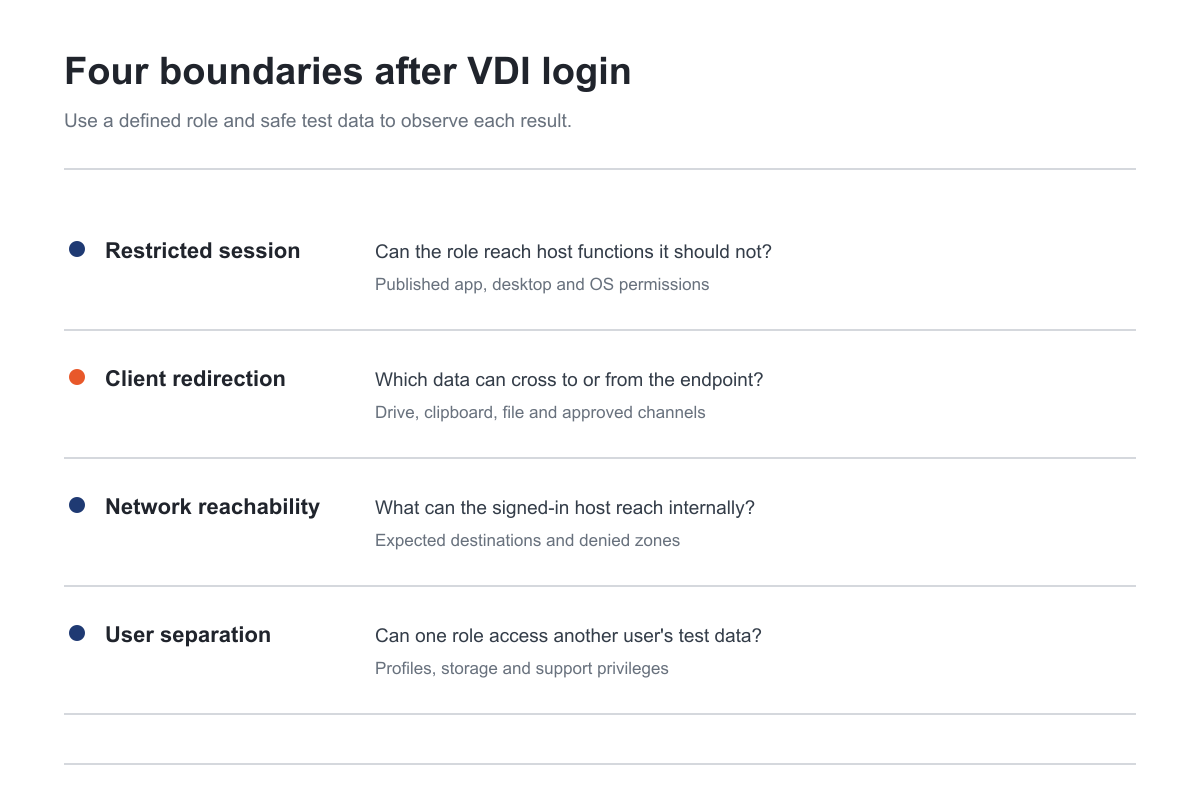
Figure 1: A VDI assessment separates the restricted session, client redirection, internal reachability and user or host separation. Source: Citrix client drive guidance, Microsoft AVD clipboard guidance, and NIST SP 800-125.
Build the scope around representative roles. A finance employee on a full desktop, a contractor restricted to a published app, a support operator with approved administration, and an ordinary employee on an unmanaged endpoint may face materially different policies. These are examples, not a mandate to create every role. The buyer should select identities that represent the policy decisions most likely to affect confidential information or privileged systems. Use synthetic accounts where possible and document which real entitlement each represents.
Client and session variants matter. A Windows client may handle drive and clipboard channels differently from a browser session or another operating system. A pooled desktop may have different persistence and profile behavior from a dedicated desktop. A published application may rely on host controls that are invisible to the end user. The proposal should name the client type, delivery type and session-host groups tested, then explain what those samples do and do not represent.
Do not assume the same settings or defaults apply across Citrix, Horizon and AVD. Citrix's file-redirection reference, Omnissa's client-drive guidance, and Microsoft's AVD clipboard guidance describe different control surfaces. The deployed release and policy source need to be recorded. The common buyer method is to compare the intended flow with the effective behavior for a specific role, not to apply one vendor's checklist to all products.
Boundary one: the restricted application or desktop
Ask the EUC owner what a lower-privilege user may do inside the assigned session. Can the user launch only the published application, or may they open a file picker, browser, help system or other approved component? Is access to host settings prohibited? Are scripts and command tools restricted by endpoint or application-control policy? The engagement does not need an exploit attempt to answer every question. It does need a clear distinction between an intended feature and an unintended route to a more powerful interface.
The report should preserve the user context. “A command interpreter was available” is not automatically a critical finding if the role was assigned a full general-purpose desktop. It may be material if the business rule promised a single-purpose published application with no host access. The assessor should cite the approved restriction, the starting app or desktop, the observed capability and the impact it creates in that specific environment. Avoid severity labels detached from the buyer's design.
Host permissions deserve a separate check from user-interface restrictions. Hiding a desktop surface does not itself determine what the Windows or Linux user account may read, execute or change. The tester should review effective operating-system privileges on an agreed test host and, where safe, validate representative access with a test file or disposable object. The organization can prohibit access to production data and still obtain useful evidence about the boundary. If a result is inferred from permissions rather than exercised, label it clearly.
Shared image and profile design also affect the result. Ask whether the tested host group is dedicated, pooled or shared among roles; where profile and application data are stored; and which accounts administer the image. The tester should not assume that one session host represents every image or policy group. A sample from a finance pool cannot establish the controls on an engineering pool with different installed tools and network paths. The final report should map each finding to the host group and role it actually affected.
Boundary two: client redirection and data flow
Client redirection is a business feature and a security boundary. Citrix's client-drive documentation says it can expose endpoint storage to a virtual session and support transfer in both directions. Citrix's clipboard documentation describes text, images and files moving between local and virtual applications. The buyer should specify which direction and content type is permitted for each role. “Clipboard disabled” is not a complete business rule if file transfer, mapped drives or another channel remains intentionally active.
The test should use synthetic information, such as a unique, non-sensitive marker file and a harmless sample string. The assessor can then show whether the marker moves from endpoint to session, session to endpoint, both ways or neither way, without copying customer records. The result should say which client, session type, account and policy were active. It should distinguish a blocked clipboard from a blocked drive mapping; those are separate controls and may have different owners.
Citrix's 2607 LTSR file-redirection settings include client drive mapping and file-transfer policies. Omnissa Horizon's 2603 documentation treats client drive redirection as a distinct feature and recommends enabling it only on desktops that require it. These sources support a practical vendor question: has the policy owner explicitly decided which endpoint storage and transfer functions a role needs? They do not prove any particular customer's current setting.
AVD adds a policy precedence consideration. Microsoft says the host pool RDP property and session-host policy through Intune or Group Policy can govern clipboard redirection, and the most restrictive setting takes effect. A buyer should therefore request the resultant behavior in the tested session, with the relevant policy sources recorded. A screenshot of one host pool property alone may not establish the final behavior. The assessor should also avoid applying an AVD policy conclusion to a Citrix or Horizon deployment.
Other channels should be named, not assumed. Printing, USB device redirection, browser downloads and app-specific export functions can move data for legitimate reasons. Microsoft's AVD security guidance discusses controls for local drives, USB, clipboard and screen capture. The statement of work can include the channels relevant to the organization's data policy. It need not test every possible feature if the buyer's decision concerns only a defined set, but it should make exclusions explicit.
The final report should distinguish policy exception from control failure. A service desk role may intentionally export a support file to a managed endpoint. A finance role may be prohibited from moving regulated data to a local device. The same technical capability has different significance under those policies. The tester should state the approved rule and the observed channel before recommending a change. Remediation should preserve necessary work while closing the unwanted flow.
Boundary three: network reachability from the session host
The signed-in desktop is an internal starting point. It may reach business applications, authentication services, management systems, file shares and cloud services that the original endpoint could not reach directly. That is often why organizations deploy VDI. The assessment should compare the host's effective network reachability with the role's intended application needs. A secure gateway alone does not establish that a restricted published app cannot reach an unrelated protected system from its session host.
Specify source and destination classes rather than a blanket “scan the internal network.” A buyer might choose an approved business app, a protected management service, an identity service and a synthetic sensitive-zone host. The tester uses low-impact observation from the authorized session. The report records which source host group and user role were in place, the expected path, the observed path and any limit caused by service availability. A failed connection is not proof of segmentation if the target was offline or the test account lacked a route for unrelated reasons.
Network policy may sit outside the VDI product. Firewalls, host rules, cloud network security groups and application controls can all contribute to the result. The vendor should map the actual boundary to an owner. If the VDI team cannot change a network rule, the finding still needs to identify the network owner and the business system affected. This is where a VDI breakout assessment joins internal network penetration testing, but it retains the crucial session-role context.
The scope should also state whether the test includes lateral movement from the VDI host group. A buyer may need to know whether a compromised session could reach another workstation or server. A production-safe test can begin with reachable-path evidence and controlled credential or privilege checks, stopping before disruptive actions. If the buyer needs a broader adversary simulation, commission a named red teaming workstream with separate objectives, permissions and detection goals. Do not let a VDI quote imply that a full enterprise red-team campaign is included.
Boundary four: user, host and administrative separation
VDI commonly serves more than one person or role through shared infrastructure. NIST SP 800-125 treats the hypervisor, guest operating systems, applications and storage as separate components whose security contributes to the whole virtualization solution. That supports the buyer's need to specify the separation it wants proved. The VDI engagement may assess user profiles and session boundaries on a host without becoming a full hypervisor penetration test. If the buyer wants underlying vSphere management included, name a separate vSphere assessment.
For user separation, define a safe synthetic test. Two authorized test accounts can have distinct non-sensitive profile files and application data. The assessor can check whether one can see or change the other's material through the session, shared storage or misassigned privileges. The goal is to prove the boundary without reading real employees' files. A finding should say whether the issue belongs to profile storage, file permissions, application configuration or session assignment. “VDI breakout” alone is too vague for remediation.
Administrative separation is another question. The EUC team may delegate image administration, help-desk shadowing, session reset or support functions to different roles. The test should ask which roles can access a user's session or change the host image, and whether that access is logged and limited to its purpose. Use a controlled test session for any support-role validation. The report should distinguish a documented support capability from an unintended privilege granted to an ordinary user.
The hypervisor and cloud control plane may be out of scope. Say so. A Citrix or Horizon session test does not automatically prove separation between virtual machines. An AVD session test does not automatically assess Azure subscription permissions. If those control planes are in the buyer's threat model, list the accounts, assets and safe proof required in a separate workstream. The report should never imply it tested an infrastructure layer it only observed indirectly.
Give bidders a usable VDI scope packet
The initial procurement packet can be redacted. It should define the policy decisions, not expose production credentials or confidential data. Ask vendors to return a scope and price that cover the selected boundary tests rather than a generic per-desktop scan. The packet can include:
The VDI products and deployed releases, including Citrix, Horizon or AVD components in scope.
Published application and desktop types, host groups, sites and material policy variations.
Representative user roles, support roles and synthetic test-account availability.
The intended application restriction for each selected role.
Allowed and denied client-data flows by direction and content type.
Endpoint client types and device conditions to be tested.
Representative internal network destinations and denied zones.
Profile, shared-storage and administrative boundaries that need proof.
Production exclusions, approved test files, change windows and stop contacts.
Desired report evidence, retest terms and any third-party permission needed.
The vendor should tell the buyer which results will be actively observed and which will be assessed through configuration or policy review. A published app test with one test account may be appropriate for a narrow decision. It cannot establish every client channel across all desktop pools. Conversely, a large sample of identical desktops may be less useful than a smaller sample of materially different policies. Ask for the rationale behind the sample.
Compare proposals by the test positions they offer. A quote that starts only from the public gateway is an edge assessment. A quote that receives only a VDI administrator account is a configuration review. A quote that uses an ordinary restricted session, a controlled endpoint and representative destination hosts can answer breakout questions. Some buyers need all three perspectives, but the statement of work should price and label them separately.
The acceptance criteria should be written in business terms. For example: a contractor can use the assigned published application, cannot export a synthetic marker to an unmanaged endpoint, cannot access a protected management host from the session, and cannot view another user's test profile. These are hypothetical criteria to adapt, not claims about an actual deployment. They give both the tester and the buyer a measurable definition of success.
Production safety and defensible evidence
VDI can host active business work on shared session hosts. Set rules for allowed accounts, host groups, test windows, network volume, changes to profiles or images, and who can stop testing. Use synthetic files and disposable sessions. Prohibit collection of real user data. Any check that might interrupt a shared host, force logoffs or alter a golden image needs separate approval and an operations plan. A useful assessment need not prove every conceivable escape by running disruptive techniques in production.
The tester should coordinate with monitoring and service desk teams without disabling detection by default. A controlled test can generate alerts that help the buyer understand visibility, but an alert is not itself proof that the boundary held. Conversely, a technical denial with no alert may be adequate for one control objective and insufficient for another. If detection is part of the purchase, write that success criterion separately and document the expected response path.
Evidence must preserve context. A screenshot of a file on a desktop is weak if it does not show which role, host group and client channel produced it. A strong record ties the test identity, session type, device, policy intent, marker, observed result and scope limitation together. For network paths, it adds source and destination roles. For user separation, it records the two synthetic accounts and the protected object. This level of detail lets the EUC, network and IAM teams act without publishing sensitive information.
After remediation, repeat the denied case and a legitimate neighboring case. If drive redirection is narrowed, confirm the unwanted export is blocked and any approved import still works. If a session-host network rule is changed, confirm the protected path is closed and the business application remains reachable. If profile permissions change, confirm one test user is isolated without breaking their own access. A retest of only the prohibited action can hide an operational regression.
What the final report should let you decide
The report should answer whether the chosen VDI restrictions held for the selected roles and sessions. It should identify the product and release, client type, published app or desktop, host group, tested identity, intended boundary, observed behavior and limitations. Findings should name a practical owner: EUC policy, endpoint management, network engineering, IAM, application team or platform operations. Generic advice to “harden VDI” does not enable a targeted fix.
Classify each conclusion as observed, configuration-supported or untested. The distinction is essential when a session restriction is inferred from a policy setting but was not exercised, or when a denial could be caused by an unavailable target. The executive summary should not claim “VDI is secure” from a narrow sample. It should state what material business outcome was tested and whether the evidence supports it. This also makes the report suitable for a customer assurance or compliance program without overstating coverage.
For each material finding, ask for a reproduction condition that the owner can safely retest. The report need not contain exploit payloads. It should preserve the starting role, expected restriction, observed access or data movement, affected host group, likely control owner and a safe validation criterion. A final summary should say what remains open, what was fixed, and which compensating or operational decisions the buyer has made.
Cost and timing depend on policy diversity
There is no reliable single price for VDI breakout penetration testing. Effort depends on the number of distinct published applications and desktop pools, roles, policy exceptions, client device types, redirection channels, network zones, administrative functions and deployed products. A Citrix estate with one restricted application is not equivalent to a mixed Citrix, Horizon and AVD estate with separate user populations. A per-host or per-user count alone does not describe those trust decisions.
Production safety can also affect timing. The team may need test accounts created by IAM, synthetic files in a representative application, a disposable session host, a controlled endpoint, and approved windows for network checks. Ask the vendor to separate access preparation, active testing, preliminary findings, final reporting and retesting in the schedule. A fast scan without those inputs may return vulnerability data but not the breakout evidence the buyer sought.
A fixed quote can be useful when its boundary is clear. It should state the sampled host groups, roles, client types, channels, network destinations and exclusions. Ask what changes if a policy variant or another delivery method appears during scoping. Compare the evidence and remediation terms as well as the fee. Stingrai provides a tailored quote for human-led VDI and internal network work through Get a Quote.
Where Stingrai fits
Stingrai is a CREST-accredited penetration testing company founded in Toronto. Its human-led internal and external network penetration testing can include post-login virtual desktop and published-application boundaries when they are explicitly scoped. The assigned testers and EUC owner can agree on representative roles, safe synthetic files, allowed and denied channels, internal destinations and production exclusions before work begins.
Two named penetration testers from a team holding OSCE³, OSWE, OSEP, CREST CRT and CISSP certifications work on every human-led engagement, with team-lead and engagement-partner review. Confirmed findings are posted to Stingrai's PTaaS portal with remediation guidance during the test and can be discussed through live chat. Reports are redactable, and retesting is included. The buyer can commission a one-time annual test or a continuous program if images, policies and client behavior change frequently.
This is human-led infrastructure and network testing. Snipe, Stingrai's autonomous agent, tests web applications and associated APIs; it is not a VDI session-breakout tester. A published application may also need a separate web application penetration test when the buyer wants its business logic evaluated. Naming each workstream avoids a report that is broad in title but shallow at the boundary that matters.
Frequently Asked Questions
What should VDI breakout penetration testing include?
VDI breakout penetration testing should start from an approved lower-privilege session and validate the intended application or desktop restriction, client redirection policy, internal network reachability, and user or host separation. The report should name the product release, user role, client type, host group, observed result and limitations for each boundary. It should use synthetic files and safe test accounts.
Is a VDI gateway penetration test the same as a breakout test?
No. A gateway test examines the externally reachable entry point and admission controls. A breakout test begins after an authorized user opens a virtual desktop or published application and checks what that session can access or transfer. Buyers can commission both, but the proposal should give each a separate starting position, scope and evidence standard.
Does a restricted published application need breakout testing?
Yes, when the business relies on the application restriction to contain a lower-trust user or protect data. The tester should compare the approved user experience with effective host permissions, client-data channels and network access. An available host feature is a finding only when it crosses the policy the buyer actually intended to enforce.
Can a tester validate clipboard and drive restrictions without using sensitive data?
Yes. The engagement can use a unique synthetic marker string and harmless file to test each approved direction between a controlled endpoint and session. The report should identify the client, role, session, policy and observed data flow. It does not need real customer records to establish whether a channel is permitted or denied.
Do Citrix, Horizon and AVD use the same redirection settings?
No. Citrix, Omnissa and Microsoft document different policy surfaces for drive or clipboard redirection. Microsoft also says AVD clipboard behavior can depend on host pool and session-host policy, with the most restrictive setting taking effect. The assessor should record the deployed product and release, then test the resultant behavior for the chosen role and client.
Does a VDI breakout test cover the underlying hypervisor?
Not automatically. A post-login session test can assess user, host and network boundaries without testing the hypervisor management plane. If vCenter, ESXi or another virtualization control plane is a buyer objective, name those assets and accounts in a separate workstream. The report should never infer hypervisor security from a successful user-session test.
How much does VDI breakout penetration testing cost?
There is no universal price. Quote the products and releases, published applications and desktop pools, representative roles, client types, redirection channels, network zones, administrative paths and safety limits. Compare the test positions, sampled policy variants, evidence, exclusions and retest terms rather than a simple host count.
What should a VDI breakout report prove?
It should show whether each selected role stayed inside the intended session, data and network boundaries. For each finding, require the starting role and client, session host group, intended rule, observed result, likely owner, limitation and safe retest condition. The summary should distinguish observed behavior from policy inference and untested paths.
Related reading
References
Citrix. Client Drive Mapping. Citrix Virtual Apps and Desktops 2311 documentation. Read 15 November 2026.
Citrix. Clipboard redirection overview. Read 15 November 2026.
Citrix. File Redirection policy settings. Citrix Virtual Apps and Desktops 2607 LTSR documentation. Read 15 November 2026.
Omnissa. Managing Access to Client Drive Redirection. Horizon Remote Desktop Features V2603 documentation. Read 15 November 2026.
Microsoft. Configure clipboard redirection over RDP for Azure Virtual Desktop. Read 15 November 2026.
Microsoft. Security, governance, and compliance for Azure Virtual Desktop infrastructure. Read 15 November 2026.
NIST. SP 800-125: Guide to Security for Full Virtualization Technologies. Final January 2011. Read 15 November 2026.
Talk to Stingrai
Share your VDI products and releases, restricted roles, client-data rules, network boundaries and safe test conditions through Get a Quote or book a free discovery call. Stingrai can scope human-led VDI breakout testing around the post-login outcomes you need to prove.