





PCI DSS v4.0.1 Requirement 11.2.1 requires that the presence of wireless access points is tested for, that all authorised and unauthorised access points are detected and identified, and that this happens at least once every three months. It applies even when policy prohibits wireless entirely (PCI Security Standards Council). NIST's SP 800-153, Guidelines for Securing Wireless Local Area Networks is more explicit still: WLAN security assessments "should be performed at least annually", plus "periodic assessments at least quarterly unless continuous monitoring of WLAN security is already collecting all of the necessary information about WLAN attacks and vulnerabilities needed for assessment purposes".
Quick answer: WiFi penetration testing, also written Wi-Fi or wireless penetration testing, is an authorised adversarial assessment of wireless networks performed by a tester within radio range of the sites in scope. Rather than only checking configuration against a baseline, it attempts to gain unauthorised access, cross from guest to corporate network space, and capture credentials from wireless clients, then reports proven access paths with evidence and remediation guidance. Published UK price bands start at £3,000 to £4,000 (about US$4,092 to US$5,456) for a single office with 1 to 5 access points, at 1 to 2 days of testing. Stingrai is a CREST-accredited offensive security company whose credentialed penetration testers deliver wireless assessments across applications, cloud, networks and people; wireless is quoted from your site list through get a quote and the Wi-Fi security assessment page, because the figures on the published pricing page are scoped to web application testing.

Both of those standards speak to detection cadence. Neither tells you whether someone in your loading bay can reach a file server from your guest SSID, or whether your warehouse scanner fleet will hand corporate credentials to a laptop parked outside. That is what a Wi-Fi penetration test answers. This guide is for the person deciding whether to buy one this quarter: a new office or distribution centre, a guest network nobody has reviewed since it was stood up, an audit finding about rogue access points, or a merger that added a wireless estate you have never seen. By the end you should be able to draft your own scope document and sanity-check the quote that comes back.
Survey, audit and penetration test are three different purchases
Many disappointing wireless engagements are the wrong product bought under the right name. Three distinct services get sold as "wireless assessment", with different practitioners, outputs and price points.
Wireless site survey | Wireless security audit | Wi-Fi penetration test | |
|---|---|---|---|
Question answered | Is coverage and roaming adequate? | Does config match a secure baseline? | Can someone get in, and how far? |
Who performs it | RF and network engineers | Security consultants, often remote | Offensive security testers, on site |
Inputs | Floor plans, AP placement, spectrum data | Controller export, SSID and EAP settings, RADIUS policy, MDM profiles | Live RF environment, client devices, guest and corporate access |
Output | Heat maps, channel plan | Gap list against a baseline | Proven access paths, evidence, risk-rated findings |
Proves exploitability | No | No | Yes, within agreed rules |
Remote delivery | Partly | Yes | No, a tester must be in radio range |
A fourth thing gets confused with all three: a recurring rogue access point sweep, whether via a wireless intrusion detection system or a walk-through. That is a compliance control on a quarterly cadence, not a test of your defences. Buy it separately and do not let it stand in for the penetration test. If the network is the real worry and Wi-Fi is one input, start from the broader network security service line, because guest-to-corporate findings only matter when someone follows the path onto the internal network.
What belongs in scope, and what does not
A wireless scope document is mostly a list of radios and addresses. "Test our Wi-Fi" produces a vague report. Write it down at this granularity.
Scope area | What to name in the document |
|---|---|
Corporate WPA2/WPA3-Enterprise SSIDs | Each SSID, EAP method, RADIUS platform, identity source |
Corporate WPA2/WPA3-Personal SSIDs | Each SSID, who holds the key, when it was last rotated |
Guest networks | SSID, captive portal type, intended egress, whether client isolation is expected |
BYOD and onboarding SSIDs | Provisioning SSID, certificate enrolment flow, MDM profile |
IoT, OT and legacy device SSIDs | Printers, badge readers, cameras, HVAC and building management, barcode scanners, forklift terminals |
Wireless client devices | Which device classes are testable, and whether staff laptops and phones are included |
Rogue and shadow access points | Whether the tester sweeps for and physically locates unknown transmitters |
Wireless management plane | Controllers, AP management interfaces, RADIUS servers, cloud management portals |
Physical sites | Full addresses, floors, buildings, outdoor yards and car parks |
Normally out of scope unless bought separately: sub-GHz industrial telemetry, Bluetooth and BLE, Zigbee and Z-Wave, cellular and private 5G, and RFID badge systems. Physical entry attempts belong in a physical security assessment. State the exclusions either way, so nobody assumes coverage that was never bought.
Two exclusions are non-negotiable. Neighbouring tenant and passer-by networks are recorded as observed in the RF environment and never touched. And your authorisation letter must name the physical addresses, because in a shared building the tester stands in space you may not fully control. In a multi-tenant tower, tell building management before test week.
The attack coverage buyers ask for by name
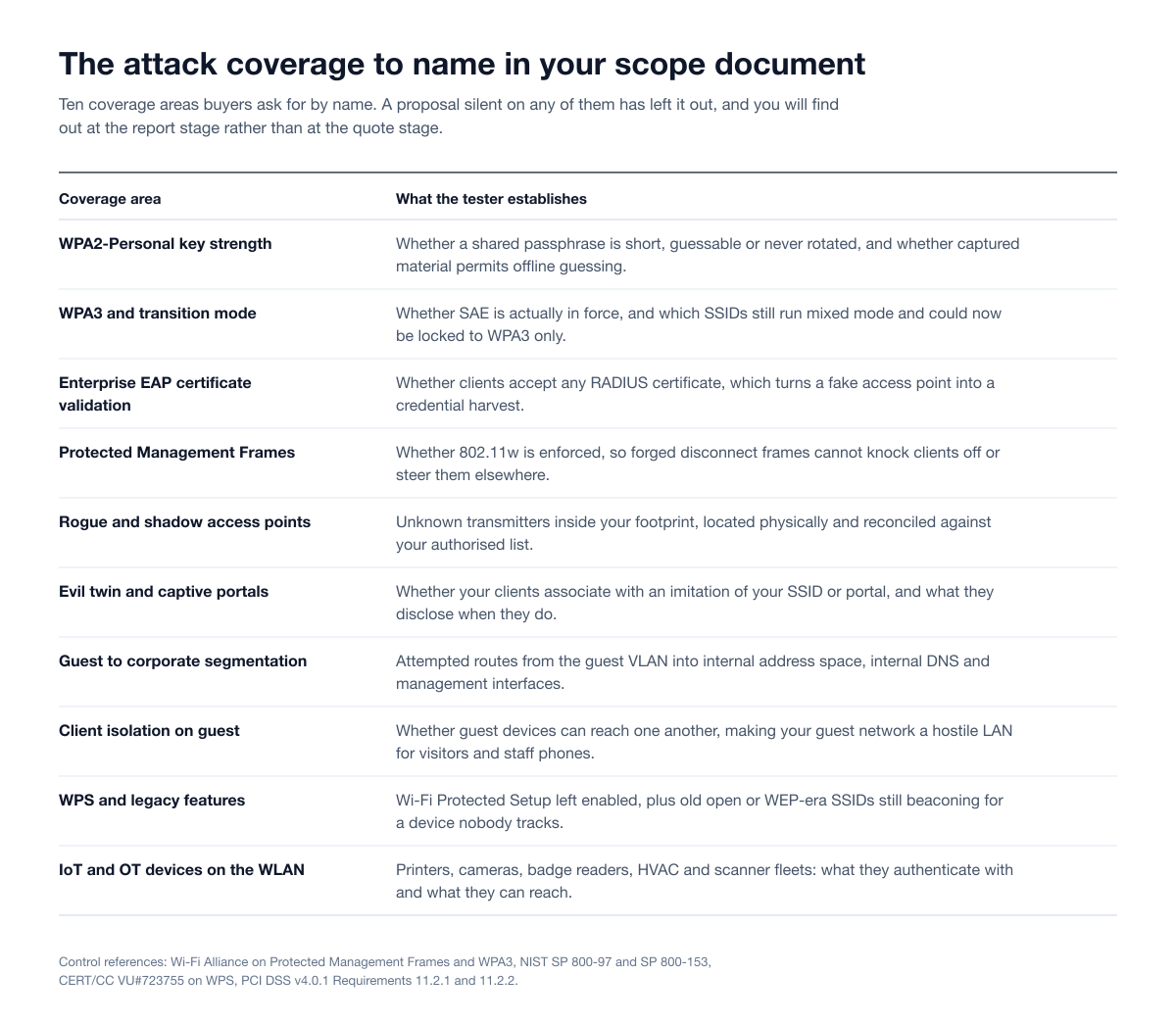
Scope tells a vendor which radios to point at. Coverage tells them what to attempt. These are the ten areas buyers name in their own documents, and a proposal silent on any of them has left it out.
Encryption and key handling: WPA2, WPA3 and transition mode
WPA2-Personal shares one passphrase across everyone in earshot, gives no per-user accountability, and permits offline password guessing from captured handshake material. WPA3-Personal replaces that exchange with SAE, which resists that class of guessing. The test should establish which SSIDs still run WPA2-Personal, how long the key has been in place, and who left the company since it was last rotated.
Transition mode is where most estates actually sit. Running WPA2 and WPA3 together so older clients can still associate is a reasonable migration decision and it keeps the WPA2 surface alive for as long as it lasts. What you want from the test is a per-SSID verdict on which ones can now be locked to WPA3 only, based on what is actually associating rather than what the asset register says.
Enterprise authentication: EAP and server certificate validation
This is the highest-value item on the list and the one most often missing from a quote. In a WPA2 or WPA3-Enterprise deployment, a client that has not been told which RADIUS server certificate to expect will authenticate to whichever server answers. A tester standing in your car park with a matching SSID then becomes a credential collection point, and those credentials are frequently reusable elsewhere.
The fix is a client-side setting, which means it must be enforced by MDM or group policy across every managed device, and verified per device class rather than per SSID. NIST's SP 800-97, Establishing Wireless Robust Security Networks is the underlying reference for how 802.11i authentication is meant to be built. Ask the vendor explicitly whether they will test EAP server certificate validation, and if so against which fleets.
Rogue, shadow and evil-twin access points
Three related but distinct things. A rogue access point is an unauthorised transmitter physically attached to your network, which bypasses your entire wired security stack. A shadow access point is an unknown transmitter inside your footprint that may or may not be yours: a consumer router someone plugged in, a personal hotspot, a vendor appliance with an undocumented radio. An evil twin is an imitation of your SSID operated by an attacker, which never touches your network at all.
A competent test covers all three: sweeping for unknown transmitters and physically locating them, reconciling everything observed against your authorised access point list, and measuring how readily your clients associate with an imitation. That last measurement is the practical value of your client hardening and your wireless intrusion detection coverage, expressed as a number rather than a policy.
Captive portals and guest networks
Guest networks fail in two directions. Outward, a captive portal can be bypassed, cloned to harvest whatever the splash page asks for, or left with an egress path that does not match the intent. Inward, and far more seriously, the guest VLAN can carry a route into internal address space, resolve internal DNS, or reach a management interface.
Guest-to-corporate bridging is the most common high-severity wireless finding, and it is the one that turns a lobby chair into an internal foothold. Insist that the vendor attempts to reach a named internal target from the guest network and reports the attempted paths and outcomes. A firewall rule review is not a segmentation test.
Client isolation
On a guest SSID without client isolation, every visitor device can reach every other visitor device. Your guest network then functions as a hostile LAN for contractors, visitors and the staff personal phones that quietly live on it. It is a one-line configuration change on almost every controller platform and it is missed constantly.
Management frames, deauthentication and availability
802.11 management frames were historically unauthenticated, so forged disconnect frames could knock clients off a network at will. 802.11w Protected Management Frames fixes that, and the Wi-Fi Alliance notes PMF is required for WPA3 and Enhanced Open and lets devices ignore forged disconnect frames (Wi-Fi Alliance). Where PMF is not enforced you have both an availability problem and the setup step for client redirection towards an evil twin.
How a test handles deauthentication is a rules-of-engagement question, not a technical one. Forcing clients off the network to capture a reconnection is disruptive by definition. Agree in the scope document whether it is permitted, at which sites, and inside which windows, or agree that it is excluded and accept the reduced realism.
WPS and legacy features
Wi-Fi Protected Setup remains on consumer-grade equipment in branches and on vendor-installed devices, and the external registrar PIN design has a documented brute-force weakness (CERT/CC VU#723755). Its presence undermines otherwise sound key material. Alongside it, look for orphaned SSIDs: an old open or WEP-era network still beaconing for a scanner fleet, a printer, or a system decommissioned years ago. Free access, no authentication, invisible in the dashboard nobody reviews.
IoT and OT devices on the WLAN
Printers, cameras, badge readers, HVAC and building management controllers, barcode scanners and forklift terminals frequently share a WLAN with people. They often cannot do certificate-based authentication, so they sit on a pre-shared key SSID whose passphrase is stored in plain text in a provisioning profile, and they usually have far more network reach than anyone intended. Name these fleets in the scope document, because testing them is a different exercise from testing laptops.
The finding classes that actually come back
Wireless reports have a stable finding distribution. Below is what a competent test surfaces, at the level a defender needs to act on. Every one is fixable with a configuration change, a key rotation or a firmware upgrade.
Finding class | What it is and why it matters |
|---|---|
Weak or stale pre-shared key | A WPA2-Personal passphrase that is short, guessable, or never rotated after staff leave. One key grants access to everyone in earshot with no per-user accountability, and WPA2-Personal permits offline password guessing from captured material. WPA3-Personal's SAE handshake resists that class |
EAP misconfiguration and missing server certificate validation | Enterprise clients set to accept any RADIUS certificate, or to trust a CA without pinning the expected server name. This turns a rogue access point into a credential harvest and enables relay of those credentials against other services. It is a client setting, so it must be enforced by MDM or group policy on every device |
WPA3 transition mode exposure | Mixed WPA2/WPA3 so older clients can associate. Necessary during migration, but it keeps the WPA2 surface alive. The test shows which SSIDs can now be locked to WPA3 only |
Guest-to-corporate bridging | A guest SSID that lands on a VLAN with a route into internal address space, resolves internal DNS, or reaches management interfaces. The most common high-severity wireless finding, and the one that turns a lobby chair into an internal foothold |
Missing client isolation on guest | Guest devices able to reach one another, which makes your guest network a hostile LAN for visitors, contractors and staff personal devices |
Rogue and shadow access points | Unknown transmitters inside your footprint: a consumer router someone plugged in, a personal hotspot, a vendor appliance with an undocumented radio. These bypass your entire wired security stack |
Evil twin exposure | How readily a device imitating your SSID attracts your clients. Measures the practical value of your client hardening and your wireless intrusion detection coverage |
Client probe leakage | Laptops and phones broadcasting the networks they remember, exposing your corporate SSID alongside hotel and home networks. Useful targeting data for an outsider, and the reason saved-network hygiene and MAC randomisation belong in the scope |
Missing management frame protection | 802.11w Protected Management Frames not enforced, so forged disconnect frames can knock clients off the network. That is an availability issue and the setup for client redirection |
WPS enabled | Wi-Fi Protected Setup left on, typically on consumer-grade gear in branches or vendor-installed equipment. A legacy convenience feature with a long history of weakening otherwise sound key material |
Legacy and orphaned SSIDs | An old open or WEP-era SSID still beaconing for a scanner fleet, a printer, or a system decommissioned years ago. Free access with no authentication, invisible in the dashboard nobody reviews |
Wireless management plane weakness | Default or shared credentials on controllers and APs, management interfaces reachable from a client VLAN, weak RADIUS shared secrets. Compromise here is estate-wide rather than site-local |
Signal bleed beyond the perimeter | Usable corporate signal in the street, car park, adjacent unit or the floor below. Determines whether an attacker needs to enter your building at all |
Two of these drive most of the remediation budget. Guest-to-corporate bridging is a segmentation problem, so the fix sits with the network team. Missing server certificate validation is a fleet configuration problem, so the fix touches every managed device and is a project rather than a change ticket.
Client behaviour is the half of the estate that walks out of the building
Access points sit still. Clients do not, and an assessment that only looks at your APs has tested half the problem.
Client-side scope covers what your devices do away from your APs and what they agree to when they return. Testers examine probe behaviour, meaning how much your laptops and phones broadcast about remembered networks, because a preferred network list naming your corporate SSID plus a set of hotel and home networks is a targeting aid. They check whether MAC address randomisation is actually in effect. They review the Wi-Fi profiles your MDM pushes, because the certificate validation setting above lives there. And, where authorised, they test whether staff devices will associate with an imitation of your SSID and what they disclose when they do.
This is the scope switch that most changes the engagement, because it involves employees' working devices and so needs an explicit decision on notification. Testing without notice gives the honest answer about default device behaviour. Testing with notice is gentler and still validates configuration. Either is defensible; not deciding is not. Where this touches the human layer rather than the device layer, it overlaps with social engineering work and should be scoped alongside it.
The compliance drivers that ask for wireless testing
Wireless sits in an unusual position: one framework is unusually prescriptive about it, and most of the others reach it only indirectly.
PCI DSS is the prescriptive one, and it asks for two separate things. Requirement 11.2.1 is a detection control: test for the presence of wireless access points, detect and identify all authorised and unauthorised access points, and do it at least once every three months. It applies whether or not wireless is authorised in the cardholder data environment, which is the part organisations with a "no wireless" policy routinely miss. Requirement 11.2.2 asks you to maintain an inventory of authorised access points with a documented business justification. Requirement 11.4 is the penetration testing obligation and is separate from both. In practice an in-scope organisation runs a quarterly rogue access point process alongside a periodic wireless penetration test, rather than substituting one for the other. Our PCI DSS penetration testing guide covers Requirement 11.4 in detail.
NIST is the one to cite when you need a cadence and PCI does not apply. SP 800-153 recommends a technical WLAN security assessment at least annually plus periodic assessments at least quarterly, with the quarterly obligation relieved only where continuous monitoring already collects the same attack and vulnerability information. SP 800-97 is the underlying reference for building the network correctly in the first place.
ISO 27001, SOC 2 and NIST SP 800-171 reach wireless indirectly. None names a wireless penetration test or sets a frequency. They ask for network controls, segmentation and evidence that controls are effective, and a wireless assessment is one way to produce that evidence. Auditors accept it as testing evidence; they will not demand it by name. Our comparison of what each framework actually requires sets out which mandate testing and which do not.
A useful rule of thumb: if a physical site processes payments, holds an operational technology estate, or hosts staff who handle regulated data, its wireless network is in scope for someone's audit, whether or not that is written down yet.
Why a wireless test needs someone on site, and what that does to your calendar
Radio has range. A tester must be physically within range of the network being tested, because the medium under assessment is the RF environment itself. There is no remote equivalent of standing in your warehouse and listening. That has direct scheduling consequences:
Travel is part of the engagement. Multi-site estates mean multi-city trips. Sequence sites to minimise travel days and expect travel as a line item.
Testing windows are physical, not logical. A tester covers the ground they can walk. Warehouses and campuses take longer per square metre than an office floor, and racking, cold storage and mezzanines slow coverage further.
After-hours work cuts both ways. Out-of-hours testing reduces disruption but removes the client devices that make client-side testing meaningful. A split schedule usually works best.
Escorts constrain the day. In secure or operational areas the engagement moves at the escort's pace, so confirm availability for the whole window.
On site versus remote-assisted
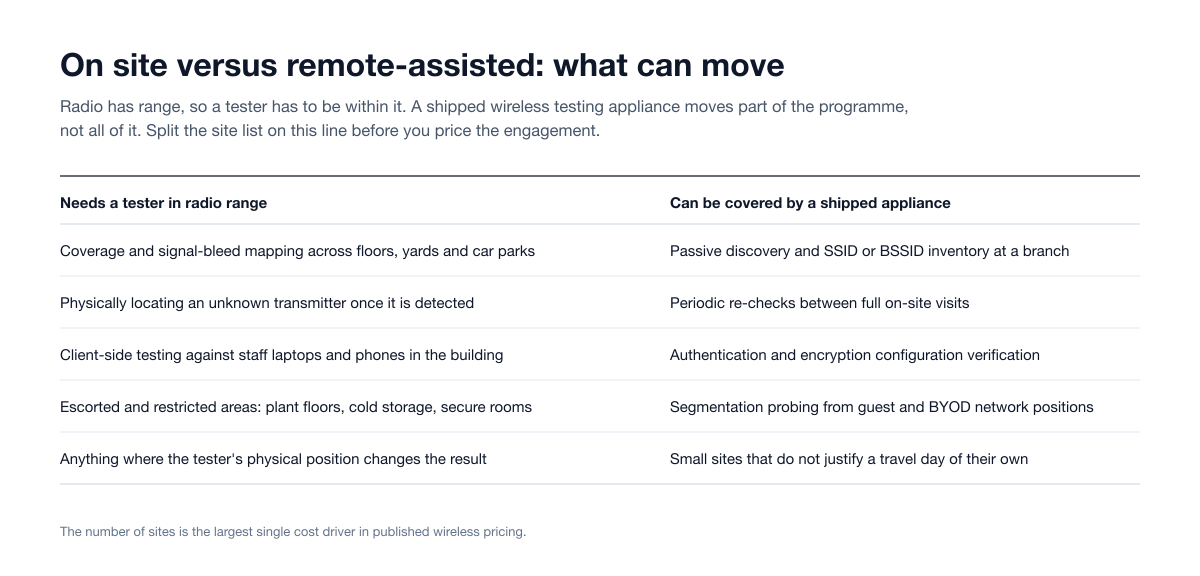
Part of a wireless programme can move off the travel schedule, and it is worth knowing which part before you price a multi-site estate. Stingrai's Wi-Fi security assessment can deploy a purpose-built wireless testing appliance to a site, reporting back to a controlled analysis environment. That cuts travel for multi-site estates and periodic re-testing, and covers branches that do not justify a full visit.
What it does not replace is anything where the tester's physical position is the variable: coverage and signal-bleed mapping, physically locating an unknown transmitter once it has been detected, escorted access to plant floors and secure rooms, and client-side testing against staff devices that are only in the building during working hours. The practical pattern for a large estate is a sampled programme of full on-site visits at representative locations, with shipped-appliance coverage filling in the branches and the between-cycle re-checks.
One point of clarity on delivery. Wireless, network, Active Directory, physical and social engineering engagements at Stingrai are delivered by credentialed penetration testers from a team holding OSCE3, OSCP, OSWE, OSED, OSEP, CREST CRT, CISSP and CRTO certifications. Stingrai is a CREST-accredited penetration testing service provider at firm level, which is a separate accreditation from the individual CREST CRT certifications testers hold.
What you receive: a deliverable that survives an auditor and a network engineer
A wireless report has two audiences. The auditor wants inventory and evidence of a repeatable process. The network engineer wants to know which BSSID on which floor, and what to change. Ask for both.
Executive summary in business terms: what an outsider could reach, from where, and what it would cost you.
Statement of methodology and scope as tested: the standards referenced, the dates, the sites actually walked against the sites agreed, and any location that could not be covered.
Observed SSID and BSSID inventory, reconciled against your authorised AP list. This feeds PCI DSS Requirement 11.2.2, which asks you to maintain an inventory of authorised access points with documented business justification.
Rogue and unknown transmitter list, each with a location estimate and a call on whether it is yours, a neighbour's, or worth investigating physically.
Coverage and rogue-AP map per site and per floor, showing where usable corporate signal extends past your property line. This is the visual that gets remediation approved.
Per-finding technical detail: affected SSIDs and BSSIDs, evidence, a risk rating with its reasoning, and remediation specific to your controller platform.
Segmentation test results: what was reachable from guest and BYOD networks, as attempted paths and outcomes rather than a firewall rule review.
Client-side findings by device class, so each fix can be assigned to whoever owns that fleet.
Detection timeline: what your wireless intrusion detection and your SOC saw. If nothing fired, that is a finding.
Statement of limitations: techniques excluded by agreement, sites deferred, availability-sensitive work not attempted, and anything that interfered with testing.
Prioritised remediation plan plus a retest and attestation letter once fixes land, which is what your auditor or a customer questionnaire will ask for.
On evidence specifically, the standard to hold a wireless report to is the same as any other engagement: each finding should carry the observation, the artefact (a capture summary, a screenshot, a reachability result), a timestamp, and steps precise enough for your network team to reproduce the condition. Our guide to evaluating a penetration test report applies directly here.
What it costs and how long it takes
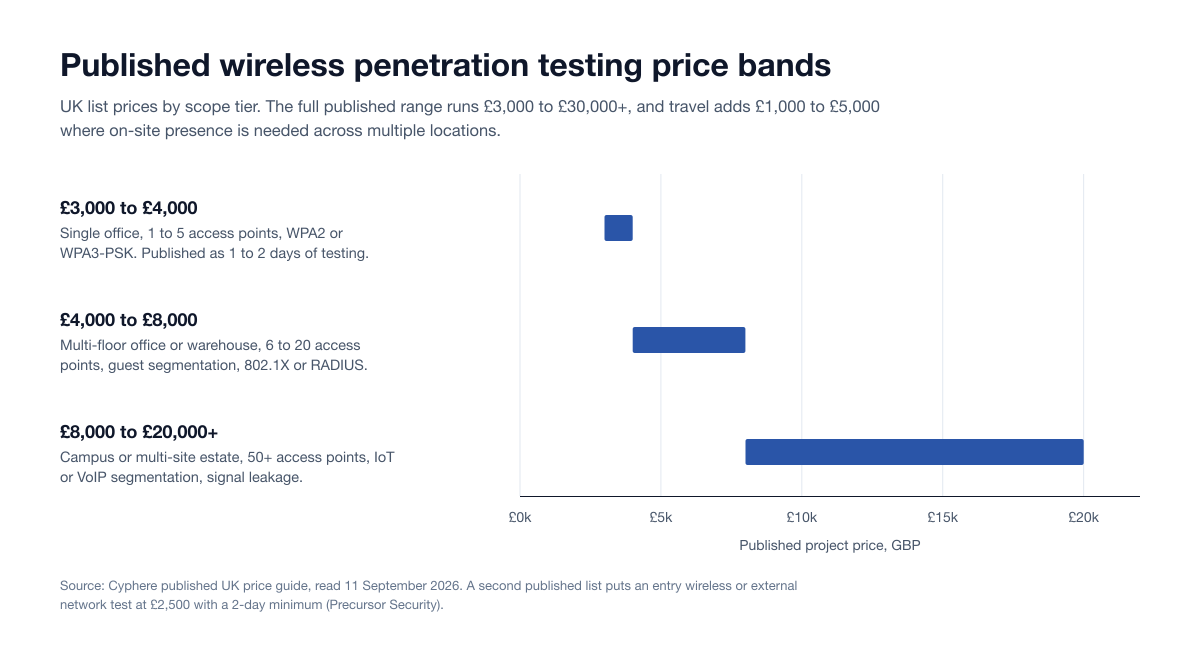
Wireless pricing follows physical geography far more than device count. One office with forty access points is a shorter engagement than three branches with six each. The published bands below come from UK vendor price lists read on 11 September 2026, converted at the 21 August 2026 Federal Reserve H.10 rate of US$1.364 to £1 used in our penetration testing price index.
Scope tier | What it covers | Published band | Approx. USD | Published day count |
|---|---|---|---|---|
Entry | A single small scope, wireless or external network | From £2,500 | From US$3,410 | 2-day minimum |
Small | One office, 1 to 5 access points, WPA2 or WPA3-PSK | £3,000 to £4,000 | US$4,092 to US$5,456 | 1 to 2 days |
Medium | Multi-floor office or warehouse, 6 to 20 access points, guest segmentation, 802.1X or RADIUS, rogue AP detection | £4,000 to £8,000 | US$5,456 to US$10,912 | Not published |
Large | Campus or multi-site, 50+ access points, IoT or VoIP segmentation, recurring signal leakage assessment | £8,000 to £20,000+ | US$10,912 to US$27,280+ | Not published |
Full published range | All wireless engagements | £3,000 to £30,000+ | US$4,092 to US$40,920+ | Not published |
Sources: Cyphere publishes the small, medium, large and full-range bands and the 1 to 2 day figure for small scopes; Precursor Security publishes the £2,500 entry point with a 2-day minimum. Both are UK firms publishing list prices rather than quoting on enquiry, which is why they are citable here.
Three adjustments matter more than the base band:
Travel. Published guidance puts the increase at £1,000 to £5,000 (about US$1,364 to US$6,820) where on-site presence is required across multiple locations, covering travel and accommodation.
Enterprise authentication. Certificate-based 802.1X or MFA adds 1 to 2 testing days, because each authentication path is a separate test route.
Retest. Budget it at the outset. A retest bought later as a separate engagement carries its own travel and mobilisation cost, and for wireless that is the expensive part.
For a day-rate sanity check, the median published penetration testing day rate across 30 UK public-sector rate cards on the G-Cloud 14 framework is £1,000 (US$1,364), with a central band of £800 to £1,200 and network infrastructure work sitting at a median of exactly £1,000. Cyphere separately publishes a wireless day rate of £800 to £2,500. If a quote divides out to materially less than £800 a day, ask who is doing the testing and how much of the engagement is automated. Our guide to comparing penetration testing quotes covers how to normalise before you compare.
On Stingrai specifically: wireless, network, Active Directory, physical and social engineering engagements are quoted individually, because the number depends on the site list rather than a tier. The published figures on the pricing page cover one web application and associated APIs, at US$3,000 or US$6,800 one-time, or US$650 or US$1,275 per month on a 12-month continuous engagement; within that web application scope, Snipe is Stingrai's AI agent for web application penetration testing including the application's APIs, available for autonomous web testing or alongside penetration testers in a Hybrid web engagement. Wireless is not part of that package. Send the address list, approximate size per site, SSID inventory and whether staff devices are in scope with your request and you will get a firm number quickly.
What drives duration and cost
Driver | What to tell your vendor |
|---|---|
Number of physical sites | Full address list with a rough size for each. This is the largest single driver |
Floor area, floor count and layout | Square footage, floors, and whether warehouses, yards or car parks are included |
Number of SSIDs and auth types | SSID list with encryption and EAP method, since each is a separate test path |
Client-side testing in or out | Whether staff devices are in scope, and which fleets |
Segmentation depth | Whether you want the internal path proven or only the boundary probed |
Detection validation | Whether you want the purple team treatment or a silent test |
Out-of-hours or split scheduling | Acceptable testing windows per site |
Operational constraints | Any site needing safety induction, PPE, escorts or restricted-zone access |
Retest inclusion | Whether a retest visit or shipped-appliance re-check is bundled at the outset |
For a single office, plan on a small number of on-site days plus reporting. Multi-site retail, logistics and manufacturing estates are usually scoped as a sampled programme, testing a representative subset of sites per cycle rather than every site every year. That is how most organisations keep wireless coverage sustainable.
What to prepare before test week
Preparation separates a productive on-site week from a tester waiting in reception. Have these ready before kickoff, not during it.
Item | Why it matters |
|---|---|
Written authorisation naming every address | The tester operates in physical space, and shared buildings make this essential |
Landlord or building management notification | Stops facilities escalating an unfamiliar person with unfamiliar equipment |
Badges and named escorts for the full window | The most common cause of lost testing hours |
Safety induction and PPE confirmed early | Warehouses and plants often bar floor access without it |
Authorised access point and SSID inventory | Without it, every unknown radio is an investigation rather than a finding |
Controller platform, model and firmware versions | Makes remediation advice specific rather than generic |
Floor plans, even rough ones | Materially improves the coverage and rogue-AP map |
Agreed testing windows per site | Needed wherever availability-sensitive testing is in scope |
Deconfliction contact reachable during testing | So a genuine incident is separated from the test within minutes |
Decision on staff notification | Drives realism versus disruption for client-side testing |
Guest and corporate test credentials | Removes a day of black-box effort where you already know the answer |
MDM Wi-Fi profile export | The fastest route to confirming certificate validation across fleets |
Change freeze during the window | Firmware upgrades mid-test invalidate findings |
How to tell a real engagement from a scan with a report template
Wireless is easy to fake, because a tool export superficially resembles a report. Put these questions to any proposal.
Does it name physical addresses and per-site hours? A quote produced before the vendor knows your site count and floor area is a guess.
Does it distinguish observed from owned? A credible report separates networks present in the RF environment from networks in your estate. One that lists your neighbour's SSIDs as findings was not read by a human.
Is segmentation actually tested? Ask whether the tester will attempt to reach a named internal target from the guest network, and what evidence you get. A firewall rule review is not a segmentation test.
Is EAP server certificate validation explicitly in scope? It is the single highest-value wireless test and the one most often quietly dropped.
Is client-side testing explicitly in or out? If the proposal is silent, it is out, and you will discover that at the report stage.
Does the deliverable include a reconciled inventory and a coverage map? Both require site work, so their absence signals a remote or automated engagement.
Is there a detection timeline? If the report does not say what your monitoring saw, nobody was watching.
Who is on site, and what do they hold? Ask for the named tester and their certifications, not the firm's logo wall.
Does the vendor say what wireless will not answer? A proposal claiming wireless covers Bluetooth, badge systems and physical entry is selling something it will not deliver.
How Stingrai runs a wireless assessment
Stingrai is a CREST-accredited penetration testing company, accredited for both Penetration Testing and AI-Enabled Penetration Testing, offering fully human-led and hybrid (human penetration testers plus AI agents) penetration tests, delivered by experienced penetration testers who are also world-class security researchers and bug bounty hunters, with OSCE³, OSWE, OSEP and CREST CRT certifications across the team. Founded in Toronto, Canada in 2021, it is trusted by companies from startups to enterprises to meet audit requirements for SOC 2, ISO 27001, CMMC, PCI DSS and HIPAA, with engagements across web, API, mobile, AI and LLM, cloud, network, Active Directory and social engineering penetration tests and red team engagements, with findings posted to its PTaaS portal as they are confirmed, live chat with the assigned testers, Jira and Slack integration, retesting and an attestation letter with every human-led and hybrid report. Wireless assessments are delivered by credentialed penetration testers from a team holding OSCE3, OSCP, OSWE, OSED, OSEP, CREST CRT, CISSP and CRTO, which is what regulated buyers in financial services, healthcare and SaaS are purchasing when a PCI DSS, ISO 27001, SOC 2, NYDFS or HIPAA programme asks for wireless testing evidence. The firm publishes vulnerability research, has 18 published CVEs to its name, and carries a 5.0 out of 5.0 rating across 20 Clutch reviews.
Wireless sits inside the wider network security practice, and the Wi-Fi security assessment page is where to start with a site list. Engagements are available one-time or as part of a continuous testing programme, and retesting is included.
The evidence standard is the same one applied across every engagement type. Across 55 penetration tests and 1,206 verified findings analysed in The State of Penetration Testing 2026, 51 of 55 tests, or 92.7%, surfaced at least one High or Critical issue, and nine findings out of 1,216 logged were declined at review as false positives, a rate of 0.74%. Where resolution time was tracked, Critical findings closed at a median of 10.5 days. Penetration testing from Stingrai supports your PCI DSS, ISO 27001 and SOC 2 programmes by producing the technical evidence they ask for. Worth knowing which actually require testing: PCI DSS v4.0.1 mandates penetration testing across a general population and CMMC requires it at Level 3, while ISO 27001, SOC 2 and NIST SP 800-171 do not mandate it and set no frequency of their own.
Wireless is one of several routes onto a corporate network that never touch the perimeter firewall. The others are covered in internal network penetration testing and, for building access itself, physical penetration testing.
Frequently Asked Questions
What is WiFi penetration testing?
WiFi penetration testing is an authorised, adversarial assessment of wireless networks, performed by a tester within radio range of the sites in scope. Rather than only checking configuration against a baseline, it attempts to gain unauthorised access, cross from guest to corporate space, or capture credentials from wireless clients within agreed rules. The output is proven access paths with evidence, a reconciled inventory of the wireless estate, and a prioritised remediation plan.
How much does a Wi-Fi penetration test cost?
Published UK price bands run £3,000 to £4,000 for a single office with 1 to 5 access points, £4,000 to £8,000 for a multi-floor office or warehouse with 6 to 20 access points and enterprise authentication, and £8,000 to £20,000+ for a campus or multi-site estate, with the full published range reaching £30,000+. Travel adds a published £1,000 to £5,000 where on-site presence is needed across multiple locations, and certificate-based 802.1X adds 1 to 2 testing days. Stingrai quotes wireless individually from the site list, because location count, floor area and travel dominate the number, and its published pricing covers one web application and associated APIs rather than wireless.
How long does a wireless security assessment take?
Published guidance puts a single small office with 1 to 5 access points at 1 to 2 days of testing, plus reporting and quality assurance time. Multi-site estates scale with travel rather than access point count, so three small branches usually take longer than one large headquarters. Warehouses and campuses take longer per square metre because coverage is a walking exercise that racking, cold storage and mezzanines all slow down, and enterprise authentication adds 1 to 2 days on top.
Does a Wi-Fi penetration test have to be done on site?
Largely yes, because the thing being tested is the radio environment and a tester has to be within range to observe it. Parts of a programme can be covered by deploying a purpose-built wireless testing appliance that reports back to a controlled analysis environment, which reduces travel for branch locations and periodic re-testing. On-site presence is still required for physical positioning, escorted areas, coverage mapping and client-side testing against staff devices.
What is the difference between a wireless site survey and a Wi-Fi penetration test?
A wireless site survey is an RF engineering exercise answering whether coverage, capacity, channel planning and roaming are adequate, and its output is heat maps and design recommendations. A Wi-Fi penetration test answers whether someone can get in and how far they can go, and its output is proven access paths with evidence and remediation. They are performed by different specialists, so buying one does not give you the other.
Does PCI DSS require wireless penetration testing?
PCI DSS v4.0.1 Requirement 11.2.1 requires that the presence of wireless access points is tested for and that authorised and unauthorised access points are detected and identified at least once every three months, and it applies even where policy prohibits wireless. That is rogue access point detection, a narrower and more frequent control than a penetration test. PCI DSS separately mandates penetration testing under Requirement 11.4, so organisations in scope usually run a recurring rogue-AP process alongside a periodic wireless penetration test rather than substituting one for the other.
Does WPA3 make wireless penetration testing unnecessary?
No. WPA3-Personal's SAE handshake resists the offline password guessing that WPA2-Personal permits, and WPA3 requires Protected Management Frames, so it closes two real classes of problem. It does nothing about guest-to-corporate bridging, missing client isolation, rogue access points plugged into your network, orphaned SSIDs, weak management plane credentials or signal bleed past your property line, which is where most high-severity wireless findings actually sit. Most estates also run transition mode so older clients can still associate, which keeps the WPA2 surface alive.
Will a Wi-Fi penetration test disrupt our network?
A properly run engagement is scoped so availability-affecting techniques are either excluded or confined to agreed windows, and the rules of engagement should say which applies at each site. Passive discovery, coverage mapping, configuration review and most client-side work carry no meaningful disruption risk. Deauthentication testing is the exception and should be an explicit yes or no in the scope document. Agree the windows up front, provide a deconfliction contact reachable during testing hours, and avoid firmware upgrades during the test so findings stay valid.
What do we need to prepare before a Wi-Fi penetration test?
Written authorisation naming every physical address, site access with badges and named escorts for the whole window, and any safety induction or PPE requirements confirmed in advance. Technically, provide your authorised access point and SSID inventory, controller platform and firmware versions, floor plans even if rough, an MDM export of your Wi-Fi profiles, and test credentials if authenticated testing is in scope. Finally, decide whether staff will be notified, because that shapes how realistic the client-side portion can be.
What does a Wi-Fi penetration test report contain?
It should contain an executive summary in business terms, a statement of methodology and the scope as tested, an observed SSID and BSSID inventory reconciled against your authorised access point list, a rogue and unknown transmitter list with location estimates, a coverage and rogue-AP map per site and floor, per-finding technical detail with evidence and platform-specific remediation, segmentation test results as attempted paths and outcomes, client-side findings broken out by device class, a detection timeline of what your monitoring saw, a statement of limitations, and a prioritised remediation plan with a retest and attestation letter once fixes land.
Related Reading
Internal Network Penetration Testing: Scope and Cost: where a guest-to-corporate finding actually leads.
Physical Penetration Testing: What Actually Happens: the engagement type that pairs most naturally with wireless.
PCI DSS Penetration Testing: Requirement 11.4: the testing obligation that sits alongside quarterly rogue-AP detection.
Penetration Testing Requirements by Framework 2026: which frameworks mandate testing, and at what cadence.
Penetration Testing Price Index 2026: 77 published price points, including the day-rate benchmarks used above.
How to Compare Penetration Testing Quotes: normalising quotes to a day rate before you choose.
Penetration Testing Methodology 2026: the phase structure and standards behind any credible engagement.
How to Evaluate a Penetration Test Report: the reviewer's checklist for the deliverable you get back.
Talk to Stingrai
Send the address list, approximate size per site and SSID inventory, and we will scope the wireless programme and tell you which sites need a visit and which can be covered remotely. Book a free scoping call, get a quote, or read the published pricing.
References
PCI Security Standards Council. PCI DSS. https://www.pcisecuritystandards.org/standards/pci-dss/. Requirement 11.2.1 sets quarterly detection of authorised and unauthorised wireless access points; 11.2.2 the authorised AP inventory; 11.4 the penetration testing obligation.
NIST. SP 800-153, Guidelines for Securing Wireless Local Area Networks (WLANs). February 2012. https://csrc.nist.gov/pubs/sp/800/153/final. Recommends WLAN security assessments at least annually plus periodic assessments at least quarterly unless continuous monitoring already collects the same information.
NIST. SP 800-97, Establishing Wireless Robust Security Networks: A Guide to IEEE 802.11i. https://csrc.nist.gov/pubs/sp/800/97/final. The reference for how WPA2-Enterprise authentication is meant to be built and verified.
Wi-Fi Alliance. Protected Management Frames enhance Wi-Fi network security. https://www.wi-fi.org/beacon/philipp-ebbecke/protected-management-frames-enhance-wi-fi-network-security. PMF is required for WPA3 and Enhanced Open, and lets devices ignore forged disconnect frames.
CERT Coordination Center. VU#723755: WiFi Protected Setup (WPS) PIN brute force vulnerability. https://www.kb.cert.org/vuls/id/723755. The documented weakness in the WPS external registrar PIN design.
Cyphere. Penetration Testing Cost in UK. https://thecyphere.com/blog/penetration-testing-cost/. Published wireless price bands by scope tier, day rate range, travel uplift and the 1 to 2 day figure for a small single-office scope. Read 11 September 2026.
Precursor Security. Penetration Testing Cost UK. https://www.precursorsecurity.com/services/offensive-security/penetration-testing/cost. Publishes an entry wireless or external network test from £2,500 with a 2-day minimum. Read 11 September 2026.
Stingrai. Penetration Testing Price Index 2026. https://www.stingrai.io/blog/penetration-testing-cost-2026#penetration-testing-price-index-2026. Median published day rate of £1,000 across 30 UK public-sector rate cards, with the Federal Reserve H.10 conversion rate used for GBP to USD figures on this page.
Stingrai. The State of Penetration Testing 2026. https://www.stingrai.io/blog/state-of-penetration-testing-2026. 1,206 verified findings across 55 penetration tests, with severity distribution, false-positive rate and remediation timing.