





CVE-2026-123890 is an authentication bypass in the VMware Directory Service inside vCenter that Broadcom rated CVSS 9.8 (Critical) and fixed on 19 November 2026 in VMSA-2026-0009, with no workaround. It was exploited before that: Google Threat Intelligence Group (GTIG) reports that the suspected PRC-nexus espionage actor ARMORY CASTLE used it in early September 2026 to create a vCenter Single Sign-On administrator account and take the key that signs vCenter's login tokens. CISA added it to the Known Exploited Vulnerabilities catalog on 20 November 2026 with a due date of 23 November.
vCenter is the control plane for a vSphere estate: whoever holds it can reach every ESXi host and every virtual machine disk it manages. GTIG's report shows exactly that chain, from vCenter to the hypervisors to the Active Directory database files inside a virtual machine's disk. The flaw does not need the internet. In the intrusion GTIG describes, the attacker reached vCenter from an internal Linux appliance it had already taken over, so a vCenter that sits "safely" on an internal network is still in scope.
Quick answer. CVE-2026-123890 lets anyone who can reach vCenter's directory service on the network bypass authentication. Update to vCenter 9.1.1.0200, 9.0.2.0200 or 8.0 U3m (VMware Cloud Foundation 5.x: vCenter 8.0 U3m through the async patching process, plus SDDC Manager 5.2.5). vCenter 7.0 is affected with no public fix; extended-support customers must request one from Broadcom. Patching for July's CVE-2026-59309 is not enough. Broadcom lists no workaround, so until you patch, restrict who can reach vCenter's management ports, especially TCP 2012, and hunt for new SSO administrator accounts. Stingrai, a CREST-accredited penetration testing company in Toronto, follows a response like this with an internal network test of who can still reach the management plane.
What is CVE-2026-123890?
Broadcom describes it in one sentence: "VMware vCenter contains an authentication bypass vulnerability in the VMware Directory Service", and "a malicious actor with network access to vCenter may exploit this issue to bypass authentication and gain unauthorized access to the system" (VMSA-2026-0009). The table collects the record's facts as of 21 November 2026.
Field | Value | Source |
|---|---|---|
Advisory | VMSA-2026-0009, published 19 Nov 2026; VMSA-2026-0009.1 on 20 Nov 2026 (VMware Tools clarification) | |
Component | VMware Directory Service (vmdir) inside vCenter | Broadcom |
Weakness | CWE-288, authentication bypass using an alternate path or channel | |
Score | CVSS 3.1 9.8 Critical, vector AV:N/AC:L/PR:N/UI:N/S:U/C:H/I:H/A:H | Broadcom, CVE record |
Workaround | None listed | Broadcom |
Reported by | Mandiant | Broadcom |
Exploitation | Active (CISA SSVC, 19 Nov 2026); exploited in early September 2026 per GTIG | |
CISA KEV | Added 20 Nov 2026, due 23 Nov 2026, forensic triage required | |
NVD | Analyzed; shows Broadcom's 9.8 and lists vCenter 7.0, 8.0 to Update 3k, 9.0 and 9.1 below the fixed builds | |
Canada | Cyber Centre advisory AV26-1185, 19 Nov 2026, updated 20 Nov |
Broadcom's own FAQ classes the vCenter fix as an emergency change under ITIL (VMSA-2026-0009 Questions and Answers). CISA's SSVC assessment in the CVE record calls the exploitation "active", the attack "automatable" and the technical impact "total".
How does the flaw work, at the level a defender needs?
GTIG explains the mechanism more fully than the advisory. In its words, CVE-2026-123890 is "an unauthenticated Secure Remote Password (SRP-6a) session key disclosure vulnerability over Distributed Computing Environment/Remote Procedure Calls (DCE/RPC)". Exploiting it gives the attacker a session as administrator@vsphere.local, and with that session the attacker can run commands and take files through the directory service's RPC interface, including data.mdb, the directory database. GTIG locates the flaw in the rpc_srp_verifier service "over port 2012", which it identifies as the control interface RPC for vCenter Single Sign-On.
Three points matter for defenders:
No password is needed. The attacker learns the session key without knowing any account's password, so password strength and MFA on vCenter logins do not stop it.
The prize is the identity system. The directory database holds vCenter's SSO accounts and the Security Token Service (STS) signing key. GTIG says the actor's tool could extract that key, create a backdoor machine account, forge SAML assertions and grant itself Global Administrator on vCenter's root folder. With the signing key an attacker can mint valid logins for any user ("Golden SAML"), which survives a patch and a password reset.
Port 2012, not the web UI. The exploit path runs to TCP 2012. GTIG's hardening table has one row headed "TCP 2010" whose text describes a drop rule on TCP 2012; every other mention in the report, including the attacker's own scans, is 2012. Treat 2012 as the port to control.
How is it different from CVE-2026-59309, fixed in July?
Broadcom fixed a different vCenter directory service authentication bypass, CVE-2026-59309, in VMSA-2026-0006 on 29 July 2026 (vCenter 9.1.0.0300, 9.0.2.0100 and 8.0 U3k, also rated 9.8). Broadcom's FAQ says CVE-2026-123890 "is a new and distinct issue". GTIG explains the difference: CVE-2026-59309 was reached with crafted LDAP traffic to TCP 389 or 636, while CVE-2026-123890 runs over the DCE/RPC interface.
The practical consequence: a vCenter patched in July is still exposed. GTIG says the September exploitation hit "a vCenter server already patched against CVE-2026-59309". It also notes that the exploit tool carries a build timestamp of 13 July 2026, 16 days before the July disclosure, while cautioning that Go build metadata can be altered.
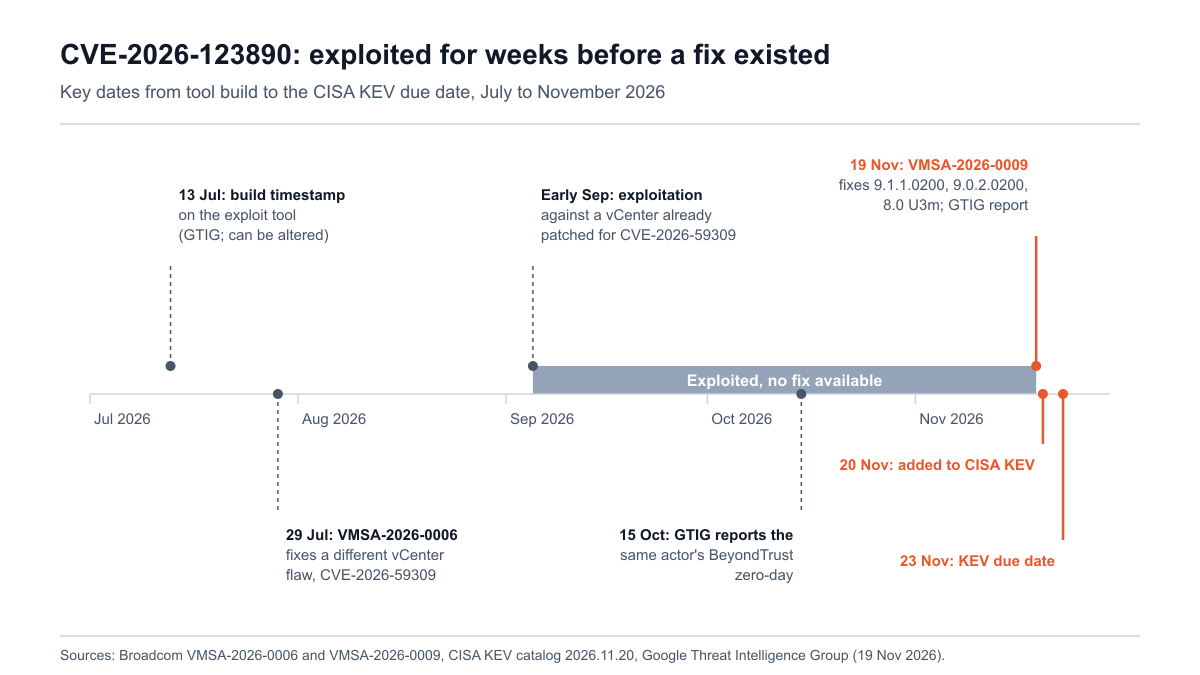
Figure 1: Key dates for CVE-2026-123890, July to November 2026, with the period of exploitation before a fix. Sources: Broadcom VMSA-2026-0006, Broadcom VMSA-2026-0009, CISA KEV and GTIG.
Who is exploiting it, and what did they do?
GTIG attributes the activity to "the suspected PRC-nexus espionage actor ARMORY CASTLE (formerly tracked as UNC5221)". Mandiant, part of Google, reported the flaw to Broadcom. GTIG's report follows an October report on the same actor's BeyondTrust Remote Support zero-day (CVE-2026-102764). The path, as GTIG describes it:
Entry through a remote support appliance, using that BeyondTrust zero-day.
A foothold on an internal Linux appliance. It moved to internal Linux appliances "that lacked endpoint detection and response (EDR) tooling", gained root and staged tools in
/tmp. GTIG also saw it scan the internal network for VMware ports, naming 9080, 5480 and 2012, and visit/sdkand/ui.vCenter through CVE-2026-123890. A Go tool GTIG calls BONESAW used the flaw to copy the directory database, take over the SAML Security Token Service and create an SSO administrator account. A second tool, SAWSNAKE, forged SAML logins.
Into the vCenter shell. The actor created a local administrator account, switched SSH on through the appliance management (VAMI) API, took the vCenter master encryption key file and the PostgreSQL password file, then switched SSH off again.
Onto the ESXi hosts. It logged in to the ESXi Host Client as
vpxuserand over SSH as root, and added its own SSH key to root's authorized keys.Into the virtual machines' disks. Working directly on VMFS volumes, it copied the Active Directory database (NTDS) and registry hives out of a virtual disk and sent archives back out through the appliances.
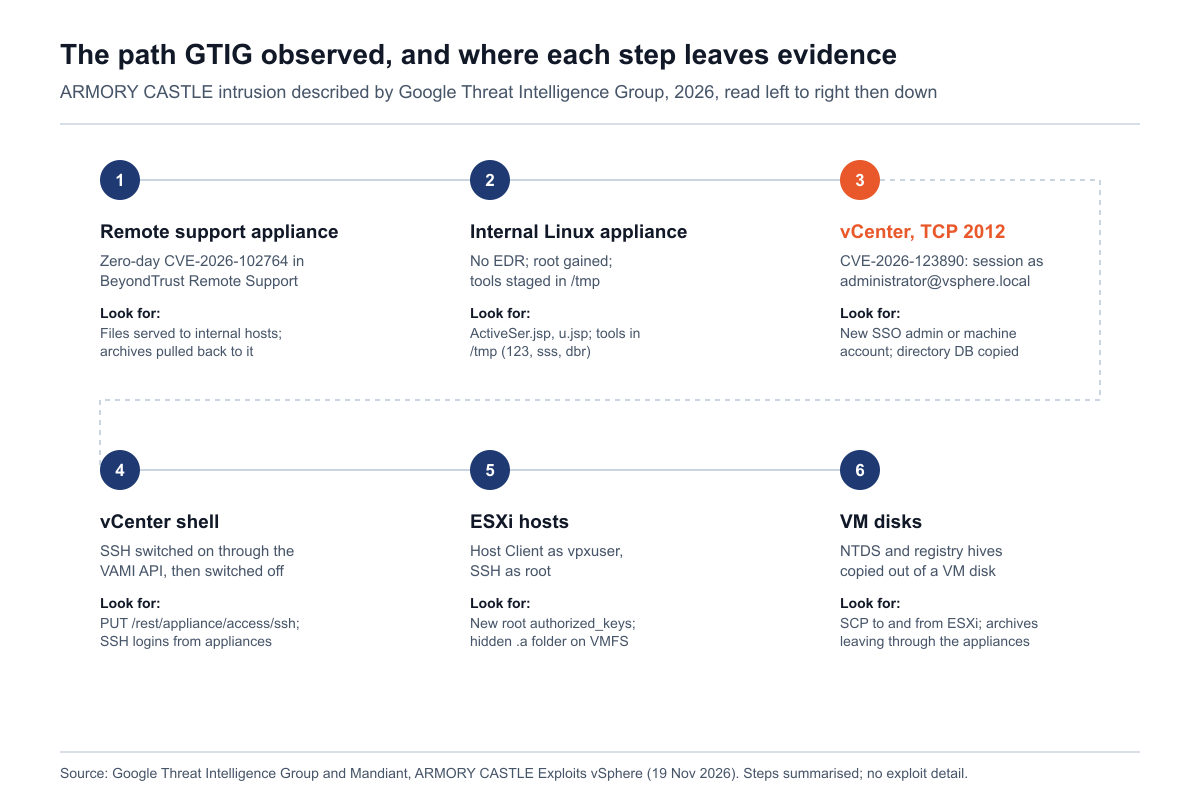
Figure 2: The intrusion path GTIG described, with the evidence each step leaves, 2026. Source: Google Threat Intelligence Group and Mandiant, ARMORY CASTLE Exploits vSphere.
GTIG adds that the tool "achieves full system compromise against vCenter Server 7.x and 8.x appliances". Broadcom's advisory lists 9.0 and 9.1 as affected too, so do not read the 7.x and 8.x wording as a sign that 9.x is safe. The lesson is in step 2: the appliance the attacker used to reach vCenter was an ordinary internal system without EDR. Anything that can reach vCenter's management ports is part of vCenter's attack surface.
Am I affected? A decision table by vCenter line
Find the vCenter line you run, then compare its build with the fixed build. The table reflects VMSA-2026-0009.1, its FAQ, the release notes for each fixed build and Broadcom's build number table (KB 326316), as of 21 November 2026.
What you run | Affected? | Fixed version (build) | Note |
|---|---|---|---|
vCenter 9.1.x (VCF or vSphere Foundation 9.1) | Yes, below 9.1.1.0200 | 9.1.1.0200 (build 25901347) | July's 9.1.0.0300 is not enough |
vCenter 9.0.x (VCF or vSphere Foundation 9.0) | Yes, below 9.0.2.0200 | 9.0.2.0200 (build 25901331) | July's 9.0.2.0100 is not enough |
vCenter 8.0 | Yes, below 8.0 U3m | 8.0 U3m, version 8.0.3.01200 (build 25934264) | Needs 8.0 Update 3; July's 8.0 U3k is not enough |
VMware Cloud Foundation 5.x | Yes, below 5.2.5 | vCenter 8.0 U3m via the async patching guide (KB 88287), SDDC Manager 5.2.5 | SDDC Manager also has three CVEs in this advisory |
vCenter 7.0 | Yes, no public fix | Extended support customers request a patch from Broadcom Support | General support ended 2 Oct 2025 |
vCenter 6.7, 6.5 and older | Presume yes | None | Broadcom: "Presume that it does" |
Telco Cloud Platform 3.0, 4.x, 5.0.x, 5.1.x, 5.2; Telco Cloud Infrastructure 3.0 | Yes | vCenter 8.0 U3m (KB 463116) | Unlisted versions: contact VMware support |
Third-party engineered systems (for example VxRail, SimpliVity) | Treat as yes | The system vendor's qualified release | Broadcom: ask those vendors directly |
ESX (ESXi) hosts | Not affected by this advisory | No ESX update needed | But ESXi is what a compromised vCenter reaches next |
NSX, VCF Operations, VCF Automation | Not affected | None needed | Broadcom FAQ |
Three cases need care:
Enhanced Linked Mode does not change the answer. Broadcom's FAQ says the flaw is in vCenter itself and present "whether or not you use ELM". Every vCenter in a linked group needs the update.
The same advisory fixes four other CVEs. SDDC Manager has an SQL injection (CVE-2026-123891, 8.1), an authenticated command injection (CVE-2026-123892, 7.2) and a local privilege escalation (CVE-2026-123893, 6.7), fixed in 9.1.1.0200, 9.0.2.0100 and 5.2.5. VMware Tools for Windows has a SAML token signature bypass (CVE-2026-123894, 6.7), fixed in 13.1.5.0 and 12.5.5. None of these is the exploited one, but the vCenter maintenance window is a good time to clear them.
Hosted VMware services receive the advisory as a message in their administrative consoles, according to Broadcom; check those consoles for the provider's status.
What if we still run vCenter 7.0?
vSphere 7 reached End of General Support on 2 October 2025, and Broadcom's response matrix for 7.0 reads "Contact Broadcom Support if you have extended support contract." There is no public 7.0 build to download. GTIG's statement that the tool worked against 7.x appliances makes this the riskiest line to leave alone. Stingrai's guidance for 7.0 owners, in order:
With an extended support contract: open a case today, ask for the fix for CVE-2026-123890, and apply the network restrictions below until it arrives.
Without one: treat vCenter 7.0 as permanently vulnerable. Restrict access to its management ports to a small set of administrator workstations, run the compromise hunt in this post, and plan the move to vCenter 8.0 U3m or VCF 9.1, checking ESXi compatibility in Broadcom's interoperability matrix.
Either way: do not count a firewall rule as a fix. Broadcom lists no workaround, and GTIG's attacker came from inside the network.
How do I check whether my vCenter is vulnerable?
Two questions answer it: which build is each vCenter running, and who can reach its management ports. The scripts below do both. They are read-only. Script 1 runs vpxd -v on the appliance. Script 2 sends each vCenter the same unauthenticated version request that a vSphere API client makes before it logs in, and reads back the version and build. Script 3 opens one TCP connection per port and closes it. None sends exploit traffic or credentials, and none changes anything. Run them only against systems you own or are authorised to test.
Stingrai checked the three bash scripts on 21 November 2026 with bash -n and ShellCheck, which reported no issues. No live vCenter was available, so Script 1 was run against a stand-in command printing sample vCenter version strings, Script 2 against local HTTPS test endpoints returning the vSphere API's version response (8.0, 9.1, 7.0, an ESX host and an unreachable endpoint), and Script 3 against a local listener and an unroutable documentation address. The PowerCLI variant was reviewed against the properties Broadcom's FAQ names but could not be run. Test all four against one vCenter you know before relying on them. All sample output below is synthetic.
Script 1: on the appliance (vpxd -v)
Broadcom's knowledge base gives vpxd -v as the command-line way to read a vCenter build (KB 1022196). Use this only where appliance shell access is already part of your maintenance process. Do not enable SSH just to run it: the vSphere Client's Summary tab shows the same build, and GTIG's actor switched SSH on as part of its intrusion. Save as vcsa-local-check.sh and run bash vcsa-local-check.sh. The exit code is 2 if AFFECTED, 1 if it cannot decide, and 0 if PATCHED.
1#!/usr/bin/env bash
2# vcsa-local-check.sh
3# Read-only check for CVE-2026-123890 on one vCenter Server Appliance, run from its own shell.
4# It runs "vpxd -v" and compares the build with the fixed build for that vCenter line.
5# It changes nothing. Use it only where shell access is already part of your maintenance
6# process; do not enable SSH just to run it (the vSphere Client Summary tab shows the same build).
7# Exit codes: 0 PATCHED, 1 CHECK (could not decide), 2 AFFECTED.
8set -u
9
10# Fixed builds from Broadcom VMSA-2026-0009 and the vCenter release notes (19 Nov 2026)
11fixed_build_for() {
12  case "$1" in
13    9.1) echo "25901347 9.1.1.0200" ;;
14    9.0) echo "25901331 9.0.2.0200" ;;
15    8.0) echo "25934264 8.0 U3m" ;;
16    *)   echo "" ;;
17  esac
18}
19
20verdict() { # verdict VERSION BUILD
21  local version="$1" build="$2" line fixed
22  case "$build" in
23    ''|*[!0-9]*) echo "CHECK (build '$build' is not a number)"; return 1 ;;
24  esac
25  line="$(echo "$version" | cut -d. -f1,2)"
26  case "$line" in
27    9.1|9.0|8.0)
28      fixed="$(fixed_build_for "$line")"
29      if [ "$build" -ge "${fixed%% *}" ]; then
30        echo "PATCHED (build $build >= ${fixed%% *}, ${fixed#* })"; return 0
31      fi
32      echo "AFFECTED (build $build < ${fixed%% *}; update to ${fixed#* } or later)"; return 2 ;;
33    7.0)
34      echo "AFFECTED (7.0: no public fix; extended support customers request one from Broadcom)"; return 2 ;;
35    [1-6].*)
36      echo "AFFECTED (presumed: $line is past end of general support)"; return 2 ;;
37    *)
38      echo "CHECK (unrecognised version '$version')"; return 1 ;;
39  esac
40}
41
42if ! command -v vpxd >/dev/null 2>&1; then
43  echo "CHECK: vpxd not found. Run this on the vCenter Server Appliance shell."
44  exit 1
45fi
46
47out="$(vpxd -v 2>/dev/null)"
48version="$(echo "$out" | grep -oE '[0-9]+\.[0-9]+\.[0-9]+' | head -n1)"
49build="$(echo "$out" | grep -oE 'build-[0-9]+' | head -n1 | cut -d- -f2)"
50
51if [ -z "$version" ] || [ -z "$build" ]; then
52  echo "CHECK: could not read version and build from: $out"
53  exit 1
54fi
55
56echo "vpxd reports: $out"
57verdict "$version" "$build"
58exit $?
Sample output (synthetic):
1vpxd reports: VMware VirtualCenter 8.0.3 build-25600417
2AFFECTED (build 25600417 < 25934264; update to 8.0 U3m or later)
The fixed build numbers come from Broadcom's release notes and KB 326316. For 8.0 U3m, that table lists the same build (25934264) in both its VAMI column and its vpxd.log column, so the build vpxd -v prints compares directly. The comparison works within a line because Broadcom's builds rise with each release; a build above the threshold on the same line is a later, cumulative release.
Script 2: an inventory check across many vCenters
Most estates have several vCenters, including the forgotten one in a branch site. Put them in vcenters.txt, one per line, and run bash vcenter-inventory-check.sh --insecure vcenters.txt from an administrator workstation. Use --insecure only if your vCenters present certificates your workstation does not trust, such as VMCA-signed defaults. The output is CSV, so it drops straight into a ticket or a spreadsheet.
1#!/usr/bin/env bash
2# vcenter-inventory-check.sh
3# Read-only CVE-2026-123890 version check across many vCenter servers.
4# For each host it sends one RetrieveServiceContent request to https://HOST/sdk, the same
5# unauthenticated call every vSphere client makes before login, and reads the version and
6# build from the "about" block of the reply. It sends no credentials and no exploit traffic.
7# Usage: bash vcenter-inventory-check.sh hosts.txt            (one host or host:port per line)
8#        bash vcenter-inventory-check.sh --insecure hosts.txt (skip TLS verification, for
9#                                                              appliances with VMCA-signed certs)
10# Only check systems you own or are authorised to test.
11# Output: CSV on stdout. Exit code 2 if any host is AFFECTED, 1 if any needs a manual check.
12set -u
13
14insecure=()
15if [ "${1:-}" = "--insecure" ]; then insecure=(-k); shift; fi
16list="${1:-}"
17if [ -z "$list" ] || [ ! -r "$list" ]; then
18  echo "usage: $0 [--insecure] hosts.txt" >&2
19  exit 1
20fi
21
22# Fixed builds from Broadcom VMSA-2026-0009 and the vCenter release notes (19 Nov 2026)
23fixed_build_for() {
24  case "$1" in
25    9.1) echo "25901347 9.1.1.0200" ;;
26    9.0) echo "25901331 9.0.2.0200" ;;
27    8.0) echo "25934264 8.0 U3m" ;;
28    *)   echo "" ;;
29  esac
30}
31
32verdict() { # verdict VERSION BUILD
33  local version="$1" build="$2" line fixed
34  case "$build" in
35    ''|*[!0-9]*) echo "CHECK (build is not a number)"; return 0 ;;
36  esac
37  line="$(echo "$version" | cut -d. -f1,2)"
38  case "$line" in
39    9.1|9.0|8.0)
40      fixed="$(fixed_build_for "$line")"
41      if [ "$build" -ge "${fixed%% *}" ]; then echo "PATCHED"; else echo "AFFECTED (fix: ${fixed#* })"; fi ;;
42    7.0)     echo "AFFECTED (7.0: no public fix)" ;;
43    [1-6].*) echo "AFFECTED (presumed: unsupported $line)" ;;
44    *)       echo "CHECK (unrecognised version)" ;;
45  esac
46}
47
48body='<?xml version="1.0" encoding="UTF-8"?><soap:Envelope xmlns:soap="http://schemas.xmlsoap.org/soap/envelope/"><soap:Body><RetrieveServiceContent xmlns="urn:vim25"><_this type="ServiceInstance">ServiceInstance</_this></RetrieveServiceContent></soap:Body></soap:Envelope>'
49
50tag() { # tag NAME XML: first <NAME>value</NAME> inside the about block
51  echo "$2" | tr -d '\r\n' | sed -n 's:.*<about>\(.*\)</about>.*:\1:p' \
52    | grep -oE "<$1>[^<]*</$1>" | head -n1 | sed -E "s:</?$1>::g"
53}
54
55rc=0
56echo "host,product,api_type,version,build,verdict"
57while IFS= read -r raw || [ -n "$raw" ]; do
58  h="$(echo "$raw" | sed 's/#.*//' | tr -d '[:space:]')"
59  [ -z "$h" ] && continue
60  reply="$(curl -sS ${insecure[@]+"${insecure[@]}"} --connect-timeout 5 --max-time 20 \
61      -H 'Content-Type: text/xml; charset=utf-8' -H 'SOAPAction: "urn:vim25/7.0"' \
62      --data "$body" "https://$h/sdk" 2>/dev/null)"
63  name="$(tag name "$reply")"; api="$(tag apiType "$reply")"
64  ver="$(tag version "$reply")"; build="$(tag build "$reply")"
65  if [ -z "$ver" ] || [ -z "$build" ]; then
66    echo "$h,,,,,CHECK (no reply or no version; TLS, firewall or not a vSphere endpoint)"
67    [ "$rc" -lt 1 ] && rc=1; continue
68  fi
69  if [ "$api" != "VirtualCenter" ]; then
70    echo "$h,$name,$api,$ver,$build,NOT-VCENTER (ESX hosts are not affected by this advisory)"
71    continue
72  fi
73  v="$(verdict "$ver" "$build")"
74  echo "$h,$name,$api,$ver,$build,$v"
75  case "$v" in
76    AFFECTED*) rc=2 ;;
77    CHECK*)    [ "$rc" -lt 1 ] && rc=1 ;;
78  esac
79done < "$list"
80exit "$rc"
Sample output (synthetic):
1host,product,api_type,version,build,verdict
2vc-prod-01.example.com,VMware vCenter Server,VirtualCenter,8.0.3,25600417,AFFECTED (fix: 8.0 U3m)
3vc-prod-02.example.com,VMware vCenter Server,VirtualCenter,9.1.1,25901347,PATCHED
4vc-dr-01.example.com,VMware vCenter Server,VirtualCenter,7.0.3,24927011,AFFECTED (7.0: no public fix)
5esx-lab-04.example.com,VMware ESXi,HostAgent,8.0.3,24674343,NOT-VCENTER (ESX hosts are not affected by this advisory)
6vc-branch-02.example.com,,,,,CHECK (no reply or no version; TLS, firewall or not a vSphere endpoint)
A CHECK row means the request did not get through (a firewall, an untrusted certificate, or a host that is not vCenter). Resolve every CHECK row manually.
PowerCLI version. Teams that manage vSphere with PowerCLI can run the same inventory with a read-only account. Broadcom's FAQ says that after Connect-VIServer the build is in $global:DefaultVIServer.Build and the version in $global:DefaultVIServer.Version; this script reads the same properties from each connection. If PowerCLI rejects a certificate, fix the trust rather than switching validation off for your whole profile.
1# vcenter-build-inventory.ps1
2# Read-only CVE-2026-123890 build check across many vCenter servers with VMware PowerCLI.
3# Logs in with a read-only account, reads Version and Build from the connection object
4# (the same values Broadcom's VMSA-2026-0009 FAQ points to), and logs out. Changes nothing.
5# Usage: .\vcenter-build-inventory.ps1 -HostList .\vcenters.txt | Export-Csv vcenter-builds.csv -NoTypeInformation
6param(
7    [Parameter(Mandatory = $true)][string]$HostList,
8    [System.Management.Automation.PSCredential]$Credential = (Get-Credential -Message 'Read-only vCenter account')
9)
10
11# Fixed builds from Broadcom VMSA-2026-0009 and the vCenter release notes (19 Nov 2026)
12$fixed = @{ '9.1' = 25901347; '9.0' = 25901331; '8.0' = 25934264 }
13
14foreach ($entry in Get-Content -Path $HostList) {
15    $vc = ($entry -replace '#.*$', '').Trim()
16    if (-not $vc) { continue }
17    $server = $null
18    try {
19        $server = Connect-VIServer -Server $vc -Credential $Credential -ErrorAction Stop
20        $line = (($server.Version -split '\.')[0..1]) -join '.'
21        $build = [int]$server.Build
22        if ($fixed.ContainsKey($line)) {
23            if ($build -ge $fixed[$line]) { $verdict = 'PATCHED' } else { $verdict = 'AFFECTED' }
24        } elseif ($line -eq '7.0') {
25            $verdict = 'AFFECTED (7.0: no public fix)'
26        } elseif ($line -match '^[1-6]\.') {
27            $verdict = 'AFFECTED (presumed: unsupported)'
28        } else {
29            $verdict = 'CHECK'
30        }
31        [pscustomobject]@{ vCenter = $vc; Version = $server.Version; Build = $build; Verdict = $verdict }
32    } catch {
33        [pscustomobject]@{ vCenter = $vc; Version = ''; Build = ''; Verdict = "CHECK: $($_.Exception.Message)" }
34    } finally {
35        if ($server) { Disconnect-VIServer -Server $server -Confirm:$false }
36    }
37}
Script 3: an exposure check of the management ports
GTIG's attacker scanned for vCenter from an internal appliance, so the question is not only "is vCenter on the internet?" but "which internal segments can reach it?". Run this script from each segment that should not manage vCenter: user VLANs, the VPN address pool, the DMZ, ordinary server VLANs and, ideally, an appliance network like the one GTIG's attacker used. It needs timeout from coreutils (gtimeout on macOS).
1#!/usr/bin/env bash
2# vcenter-exposure-check.sh
3# Which vCenter management ports can THIS machine reach? Run it from each network segment
4# that should NOT manage vCenter (user VLANs, VPN pools, DMZ, ordinary server VLANs, a
5# compromised-appliance stand-in) and compare the result with your allow-list.
6# It opens one TCP connection per port and closes it. It sends no data.
7# Usage: bash vcenter-exposure-check.sh vcenters.txt   (one host per line)
8# Only test systems you own or are authorised to test.
9# Exit code 2 if port 2012 or 5480 answers from this segment, otherwise 0.
10set -u
11
12list="${1:-}"
13if [ -z "$list" ] || [ ! -r "$list" ]; then echo "usage: $0 vcenters.txt" >&2; exit 1; fi
14
15# Ports named in Google Threat Intelligence Group's 19 Nov 2026 report on CVE-2026-123890:
16# 443 vSphere Client and API, 5480 appliance management (VAMI), 22 SSH,
17# 2012 vCenter Single Sign-On control RPC (the CVE-2026-123890 path),
18# 389 and 636 the directory service LDAP ports (the CVE-2026-59309 path).
19ports="443 5480 22 2012 389 636"
20
21if command -v timeout >/dev/null 2>&1; then to=timeout
22elif command -v gtimeout >/dev/null 2>&1; then to=gtimeout
23else echo "needs coreutils timeout (gtimeout on macOS)" >&2; exit 1; fi
24
25probe() { # probe HOST PORT -> open or closed-or-filtered
26  if "$to" 3 bash -c "exec 3<>/dev/tcp/$1/$2" 2>/dev/null; then echo open; else echo closed-or-filtered; fi
27}
28
29rc=0
30src="$(hostname 2>/dev/null || echo unknown)"
31echo "source,vcenter,port,state,note"
32while IFS= read -r raw || [ -n "$raw" ]; do
33  h="$(echo "$raw" | sed 's/#.*//' | tr -d '[:space:]')"
34  [ -z "$h" ] && continue
35  for p in $ports; do
36    s="$(probe "$h" "$p")"
37    note=""
38    if [ "$s" = open ]; then
39      case "$p" in
40        2012) note="SSO control RPC (CVE-2026-123890 path) reachable from here"; rc=2 ;;
41        5480) note="VAMI reachable from here"; rc=2 ;;
42        22)   note="SSH reachable from here" ;;
43        389|636) note="directory LDAP reachable from here" ;;
44        443)  note="vSphere Client and API reachable from here" ;;
45      esac
46    fi
47    echo "$src,$h,$p,$s,$note"
48  done
49done < "$list"
50exit "$rc"
Sample output from a user VLAN (synthetic):
1source,vcenter,port,state,note
2ws-user-117,vc-prod-01.example.com,443,open,vSphere Client and API reachable from here
3ws-user-117,vc-prod-01.example.com,5480,open,VAMI reachable from here
4ws-user-117,vc-prod-01.example.com,22,closed-or-filtered,
5ws-user-117,vc-prod-01.example.com,2012,open,SSO control RPC (CVE-2026-123890 path) reachable from here
6ws-user-117,vc-prod-01.example.com,389,open,directory LDAP reachable from here
7ws-user-117,vc-prod-01.example.com,636,closed-or-filtered,
That sample is the common result on flat internal networks: an ordinary workstation can reach every vCenter management service. Which hosts legitimately need each port depends on your design (administrator workstations, ESXi hosts, backup servers, linked vCenters); check the list against Broadcom's Ports and Protocols tool before you block anything.
How do I patch CVE-2026-123890?
Broadcom's fix is the only remediation it lists. Patches are cumulative, so any later build on the same line also fixes this flaw, and you do not need to apply July's VMSA-2026-0006 first. The steps below combine Broadcom's FAQ with Stingrai's guidance on order.
Inventory first. Run Script 2 (or the PowerCLI version) so you have every vCenter, its line and its build before the change window opens.
Take a file-based backup and record the current build of each vCenter, and confirm you can reach the appliance console through the ESXi host in case the update needs recovery.
Check ESXi compatibility. Broadcom says the fixed vCenter is "most likely" compatible with your hosts, but asks you to confirm it in the interoperability matrix, including vSAN if you use it.
Check for a Back-in-Time block if you are mid-upgrade. Broadcom's FAQ says vCenter 8.0 U3m and 9.0.2.0200 block upgrades to VCF 9.1.1 until VCF 9.1.2 ships. If you are part-way through a move to 9.1, the FAQ's two options are to wait, or to upgrade vCenter to 9.1.1 first and then apply 9.1.1.0200.
Apply the update. Use the VAMI or your usual vSphere or VCF update method. The updates are not eligible for vCenter Quick Patch. VCF 5.x uses the asynchronous patching process in KB 88287 for vCenter 8.0 U3m, plus SDDC Manager 5.2.5.
Expect a short management outage, not a workload outage. Broadcom says virtual machines and containers keep running while vCenter updates. The vSphere Client is briefly unavailable, and new encryption and key rotation operations against a Standard Key Provider wait until vCenter is back.
Verify. Rerun Script 2 and confirm PATCHED for every vCenter. Read the build from the running system, not from the change ticket.
Then patch the rest of the advisory: SDDC Manager and VMware Tools for Windows.
Patching does not undo a compromise. If anyone could reach port 2012 on an unpatched vCenter since early September, run the hunt below as well.
What if I cannot patch today? Mitigations
Broadcom lists no workaround. Its FAQ says organizations may have compensating controls such as perimeter and appliance firewalls but "must decide for themselves whether to rely on those protections". These steps are Stingrai's guidance for the hours or days before the update; none of them replaces it.
Cut reachability to TCP 2012 and the management ports. Allow vCenter's management services only from the administrator workstations, ESXi management networks, backup servers and linked vCenters that need them, using network firewalls or segmentation in front of the appliance. Run Script 3 again from each segment to prove it.
Do not rely on the VAMI firewall alone. GTIG explains why: it lacks per-port rules, so trusting a host for 443 often means trusting it for every port, it is managed through port 5480 (so an attacker with VAMI access can turn it off), it does not log denied connections remotely, and it does not control outbound traffic.
Consider kernel-level hardening, with change control. GTIG recommends Mandiant's VCSA Hardening and Logging Tool, which applies a default-deny iptables policy, egress filtering and remote command logging on the appliance. Its README warns that the changes may affect your support agreement and can lock you out without console access, and GTIG advises "rigorous testing and formal change control" first.
Keep SSH and the shell off. GTIG's actor switched SSH on through the VAMI API. Make sure SSH is disabled outside approved maintenance, and alert when it changes.
Watch the systems that can reach vCenter. Put EDR or at least logging on the Linux appliances, jump hosts and backup servers on the vCenter allow-list. GTIG's attacker launched from appliances without EDR.
How do I hunt for a compromise? Detection guidance
CISA marked the KEV entry for forensic triage. Under BOD 26-04, that means federal civilian agencies must remediate within three calendar days and also check whether the system is already compromised. The directive binds only those agencies, but the logic applies to everyone: GTIG says exploitation began in early September, roughly ten weeks before the fix. Look back to at least 1 September 2026. The signals below come from GTIG's report; each can have an innocent cause, so look for them together.
On vCenter (identity and management):
New SSO or local administrator accounts in
vsphere.local, especially names nobody recognises. GTIG's actor created an SSO administrator and a local administrator account (sps-...@vsphere.localin its report).New machine accounts in the directory and new Global Administrator permissions on vCenter's root folder, which GTIG says the exploit tool can create.
SSH switched on and off through the VAMI API (a
PUTto/rest/appliance/access/ssh), particularly a short on-off window. GTIG's detection for Google SecOps customers is named "VMware vCenter VAMI API SSH Enablement".Shell logins to vCenter from appliances or servers rather than administrator workstations, and any access to the vCenter master key or database credentials.
Connections to TCP 2012 from hosts that are not linked vCenters, in firewall or NetFlow logs.
On the appliances that can reach vCenter:
Port scans for VMware ports (GTIG lists 443, 389, 2012, 5480 and 9080) coming from remote support or other internal appliances.
GTIG's file indicators:
ActiveSer.jspandu.jsp(webshells),/tmp/123(BONESAW),/tmp/sss(SAWSNAKE),/tmp/dbr(BEARBONES) and/usr/bin/vmtoolscs(LAZYBONES, persisted as a systemd service), plus the SSH private key GTIG found at/tmp/123.key.An SSH server answering with the banner `SSH-2.0-pulsesecure_23345`, or listeners on TCP 53 or 33992 on a Linux appliance.
Slack API traffic from a server or appliance that has no reason to use Slack. LAZYBONES uses Slack for command and control.
On ESXi hosts:
Host Client logins as `vpxuser` and SSH logins as root, especially from appliance addresses.
New keys in root's authorized keys, hidden directories (GTIG saw
.a) on VMFS volumes, and SCP transfers to or from the host.
Network indicators. GTIG lists 11 addresses as a suspected obfuscation network: 103.147.251.5, 103.190.38.3, 118.174.128.34, 118.174.128.36, 118.174.128.38, 176.9.89.66, 185.71.15.109, 220.121.128.41, 222.108.77.44, 61.216.56.127 and 81.45.89.43. GTIG also publishes YARA rules for each tool (for example G_Hunting_Utility_BONESAW_2 and G_Hunting_Backdoor_LAZYBONES_1) in its report; use them as published. For a wider hardening and detection programme, GTIG points to Mandiant's vSphere and BRICKSTORM Malware: A Defender's Guide (2 April 2026).
What if we find signs of compromise?
If any of these signals check out, treat it as a compromise of the vSphere identity system, not of one server. This is Stingrai's guidance, not a vendor procedure; follow Broadcom support and your incident response provider for the exact steps on your version.
Isolate before you clean up. Restrict the vCenter and the appliances that reached it at the network layer, and preserve disk images and logs before rebuilding anything.
Assume the SAML signing key is gone. GTIG says the exploit tool extracts the STS signing key, which lets an attacker forge logins for any user even after patching. Replace the STS signing certificate, reset
administrator@vsphere.localand every SSO and local account, and remove any account you did not create.Rotate what vCenter holds. ESXi root passwords, the
vpxuserrelationship, service and backup accounts, and any credentials in vCenter's database. Remove unknown SSH keys from ESXi hosts.Follow the data. GTIG's actor copied the NTDS folder, where a domain controller keeps the Active Directory database, out of a virtual disk. If that happened, the Active Directory domain is compromised too, which means a planned krbtgt reset and domain-wide credential rotation.
Rebuild if you cannot be sure. A vCenter that may hold a backdoor account or a modified service is cheaper to redeploy from a known-good build and restore configuration into than to trust.
Also this week: Cisco Expressway CVE-2026-76466 in KEV
CISA added three other entries to KEV on 20 November with the same 23 November due date. One belongs in the same infrastructure queue: CVE-2026-76466 in Cisco Expressway, a hard-coded credentials flaw (CWE-798) that Cisco rates CVSS 9.8 and that lets an unauthenticated remote attacker run commands as root through the database service. Per Cisco's advisory, first published on 21 October 2026, it affects Expressway-C and Expressway-E (virtual and appliance) only when configured in a cluster, is fixed in X15.5.20, has no workaround, and X14 and earlier must migrate to a fixed release. Cisco's advisory, still at version 1.0, says its PSIRT "is not aware of any public announcements or malicious use"; CISA nonetheless added it to KEV on 20 November. Patch clustered Expressways on the same clock. The other two additions were SAP NetWeaver (CVE-2025-42884) and Apache Roller (CVE-2026-129448).
vCenter CVE-2026-123890 response checklist: today, this week, this quarter
This checklist is Stingrai's guidance for CVE-2026-123890; no standard prescribes it.
Today: find every vCenter and read its build. Run the inventory check across all vCenters, including DR, VDI, lab and branch instances, and resolve every CHECK row.
Today: patch or restrict. Update to 9.1.1.0200, 9.0.2.0200 or 8.0 U3m (VCF 5.x: 8.0 U3m and SDDC Manager 5.2.5). Where that cannot happen today, restrict TCP 2012, 5480, 22, 389 and 636 to the hosts that need them, and confirm with the exposure check.
Today: start preserving evidence. Forward vCenter, VAMI and ESXi logs to your SIEM and keep firewall and flow logs from 1 September 2026 onward.
This week: hunt. Review SSO and local accounts, Global Administrator assignments, VAMI SSH toggles, ESXi
vpxuserand root logins, root authorized keys, and GTIG's file and network indicators.This week: close the rest of the advisory. Update SDDC Manager and VMware Tools for Windows, and confirm engineered systems with their vendors.
This week: decide on 7.0. Open an extended support case or schedule the upgrade, and keep 7.0 vCenters restricted until then.
This week: put the vCenter allow-list on record. Name every host allowed to reach each management port, with an owner, and put EDR or logging on each of them.
This quarter: harden the control plane. Evaluate kernel-level appliance hardening under change control, keep SSH off by default, and alert on any change to it.
This quarter: test it. Commission an internal network penetration test or assumed-breach exercise that starts from an ordinary internal host and tries to reach vCenter, ESXi and the identity systems behind them.
Revise the order if Broadcom changes the fixed builds, GTIG or CISA publish new indicators, or a public exploit appears.
What should an internal penetration test cover after this?
A patch does not show which systems can reach the management plane, whether every vCenter took the fix, or what an attacker on an ordinary internal host could do next. GTIG's intrusion was an internal network path, and that is what an internal test should walk.
Management-plane reachability. From user, server, DMZ and appliance segments, which hosts can reach vCenter's 443, 5480, 22, 2012, 389 and 636, and ESXi management? The exposure script answers this for one vantage point; a tester maps it across the estate. Our guide to scoping a vSphere penetration test covers how vCenter, ESXi and the paths between virtual machines are scoped.
Fix verification by evidence. The tester confirms the running build on every vCenter rather than the patch record. A responsible tester does not fire exploit traffic at a production vCenter; if live proof is wanted, it belongs on an isolated copy.
Assumed breach from an appliance. Start the test on an internal Linux appliance or a jump host, the position GTIG's actor held, and see whether it reaches vCenter credentials, ESXi or Active Directory. Our explainer on assumed-breach engagements covers when to start a test from the inside.
Identity paths around vSphere. How vCenter SSO connects to Active Directory, who holds Global Administrator, and whether a vSphere administrator can become a domain administrator, or the reverse. Stingrai's Active Directory testing covers Kerberos, delegation and ACL paths.
The rest of the management plane. Remote support tools, backup servers and out-of-band management sit on the same trust boundary. Our post on the management plane left out of scope lists what usually gets missed.
Where Stingrai fits
Stingrai is a global CREST-accredited penetration testing services company founded in Toronto, Canada in 2021, trusted by companies from startups to enterprises to meet audit requirements for SOC 2, ISO 27001, CMMC, PCI DSS and HIPAA. OSCE³, OSWE, OSEP, CREST CRT certified penetration testers, who are also world-class security researchers and bug bounty hunters. Choose from fully human-led or hybrid (AI agents plus human penetration testers) engagements across web, API, mobile, AI and LLM, cloud, network, Active Directory and social engineering penetration tests and red team engagements. It holds CREST's Penetration Testing and AI-Enabled Penetration Testing accreditations and the CREST AI Charter (CREST Marketplace).
Two named penetration testers from a team holding OSCE³, OSEP, OSWE and CREST CRT certifications work on every human-led engagement. Internal network work covers lateral movement, privilege escalation and segmentation testing, and Active Directory paths to domain admin, and red team engagements include assumed-breach scenarios. Each finding is posted to the PTaaS portal as it is confirmed, with a working proof of concept and remediation guidance, and retesting of fixed findings is included. Every human-led and hybrid report ships with an attestation letter, and the testing supports SOC 2, ISO 27001, PCI DSS and CMMC programs with evidence for the audit. Engagements run as one-time (annual) tests or as continuous programs.
For an event like this, the usual scope is an internal network penetration test that includes the virtualization management plane, or an assumed-breach red team engagement that starts from an internal host. A network penetration test typically costs US$5,000 to US$40,000 and above, driven by live host count, subnet and VLAN count and the depth of Active Directory work. If you also run web applications, Stingrai's Hybrid Pentest covers one web application and associated APIs at US$6,800 per assessment, or US$1,275 per month on a 12-month plan (pricing).
Frequently Asked Questions
Is VMware vCenter CVE-2026-123890 being exploited?
Yes. Google Threat Intelligence Group reports that the suspected PRC-nexus espionage actor ARMORY CASTLE exploited CVE-2026-123890 in early September 2026, before Broadcom's fix on 19 November 2026, to create a vCenter SSO administrator account and take the SAML signing key. CISA added it to the Known Exploited Vulnerabilities catalog on 20 November 2026, and CISA's SSVC entry rates exploitation as active.
Which vCenter versions fix CVE-2026-123890?
vCenter 9.1.1.0200 (build 25901347), 9.0.2.0200 (build 25901331) and 8.0 U3m (version 8.0.3.01200, build 25934264), all released on 19 November 2026. VMware Cloud Foundation 5.x applies vCenter 8.0 U3m through Broadcom's asynchronous patching process and updates SDDC Manager to 5.2.5. Telco Cloud Platform and Telco Cloud Infrastructure also apply 8.0 U3m. Later builds on each line include the fix.
What is the CVSS score of CVE-2026-123890?
Broadcom rates CVE-2026-123890 Critical with a CVSS 3.1 base score of 9.8 and the vector AV:N/AC:L/PR:N/UI:N/S:U/C:H/I:H/A:H: network reachable, low complexity, no privileges and no user interaction needed, with high impact on confidentiality, integrity and availability. The weakness is CWE-288, authentication bypass using an alternate path or channel. NVD shows Broadcom's score.
Is there a workaround for CVE-2026-123890?
No. Broadcom's advisory lists no workaround, and its FAQ says firewall-based compensating controls are each organization's own decision. Until you can patch, restricting which hosts can reach vCenter's management ports, especially TCP 2012, reduces exposure, but it does not fix the flaw and it does not help if an attacker is already on an allowed host.
Is vCenter 7.0 affected by CVE-2026-123890?
Yes. Broadcom's advisory lists vCenter 7.0 as affected, and its FAQ notes that vSphere 7 reached End of General Support on 2 October 2025. There is no public 7.0 fix: customers with an extended support contract must request one through Broadcom Support. Google Threat Intelligence Group says the exploit tool works against 7.x and 8.x appliances. Versions 6.7 and older should be presumed affected.
Do I need to patch ESXi for CVE-2026-123890?
No. Broadcom's FAQ says ESX is not affected by VMSA-2026-0009, and none of its issues is a virtual machine escape. But ESXi is where a compromised vCenter leads: in the intrusion Google Threat Intelligence Group described, the attacker moved from vCenter to ESXi as vpxuser and root. If vCenter may have been compromised, check the ESXi hosts too.
I patched vCenter in July 2026. Am I protected?
No. The July advisory, VMSA-2026-0006, fixed a different directory service flaw, CVE-2026-59309, in builds such as 8.0 U3k and 9.1.0.0300. Broadcom's FAQ calls CVE-2026-123890 a new and distinct issue, and Google Threat Intelligence Group says the September exploitation hit a vCenter that was already patched against CVE-2026-59309. You need 9.1.1.0200, 9.0.2.0200 or 8.0 U3m.
What port does CVE-2026-123890 use?
TCP port 2012. Google Threat Intelligence Group says the flaw is in the rpc_srp_verifier service over port 2012, which it describes as the control interface RPC for vCenter Single Sign-On, and the attacker scanned for 2012 alongside 443, 389, 5480 and 9080. One heading in GTIG's hardening table says TCP 2010, but the text of the same row and the rest of the report say 2012.
What is the CISA KEV deadline for CVE-2026-123890?
CISA added CVE-2026-123890 to the KEV catalog on 20 November 2026 with a due date of 23 November 2026 and marked it for forensic triage. Under BOD 26-04, that binds US federal civilian executive branch agencies to remediate within three calendar days and check whether the system was compromised. Other organizations are not bound by it but should treat the date as a strong signal.
How do I know if my vCenter was compromised?
Look back to at least 1 September 2026 for new SSO or local administrator accounts in vsphere.local, new Global Administrator permissions, SSH being switched on and off through the VAMI API, shell logins to vCenter from appliances, connections to TCP 2012 from unexpected hosts, and on ESXi new root SSH keys or vpxuser and root logins. Check Google Threat Intelligence Group's file and network indicators. If any check out, assume the SAML signing key was stolen.
Related reading
VMware vSphere penetration testing: how to scope vCenter, ESXi and VM paths
The 72-hour clock: CISA's BOD 26-04 and your remediation window
Internal penetration testing: scope, delivery, cost drivers and requirements
Assumed breach engagements: when to start the test from inside
Active Directory security checklist: penetration testers' first checks
Citrix NetScaler zero-days 2026: compromise check and patch checklist
NGINX HTTP/2 vulnerabilities CVE-2026-123007 and CVE-2026-123633: how to check and fix
References
Broadcom. VMSA-2026-0009: VMware vCenter, Tools, and SDDC Manager updates address multiple vulnerabilities. Notification 39495, issued 19 November 2026, updated to VMSA-2026-0009.1 on 20 November 2026. Affected versions, fixed versions, score, workarounds and credits.
Broadcom. VMSA-2026-0009: Questions and Answers. Supplemental FAQ linked from the advisory. Read 21 November 2026.
Broadcom. VMSA-2026-0006: VMware ESX, vCenter, Workstation, and Fusion updates. Notification 38017, 29 July 2026, updated 19 August 2026. CVE-2026-59309 and its fixed builds.
Broadcom. Release notes for vCenter 8.0 Update 3m, vCenter 9.1.1.0200 and vCenter 9.0.2.0200. 19 November 2026. Build numbers.
Broadcom. KB 326316: Build numbers and versions of vCenter Server, KB 1022196: Determining the build number of VMware ESXi and vCenter Server and KB 463116: patch availability for Telco Cloud Platform and Telco Cloud Infrastructure. Read 21 November 2026.
CVE Program. CVE-2026-123890. Published 19 November 2026, updated 21 November 2026. CNA score, CWE and CISA's SSVC assessment.
NIST. National Vulnerability Database: CVE-2026-123890. Analyzed, last modified 21 November 2026.
CISA. Known Exploited Vulnerabilities catalog. Catalog version 2026.11.20, read 21 November 2026.
CISA. BOD 26-04: Prioritizing Security Updates Based on Risk. 10 June 2026. Remediation timelines and forensic triage.
Google Threat Intelligence Group and Mandiant. ARMORY CASTLE Exploits vSphere. 19 November 2026. Exploitation timeline, technical detail, indicators, YARA rules and hardening guidance.
Google Threat Intelligence Group and Mandiant. ARMORY CASTLE Exploits BeyondTrust. 15 October 2026. The same actor's initial access.
Mandiant. vSphere and BRICKSTORM Malware: A Defender's Guide (2 April 2026) and the VCSA Hardening and Logging Tool README.
Canadian Centre for Cyber Security. VMware security advisory (AV26-1185). 19 November 2026, updated 20 November 2026.
Cisco. Cisco Expressway Series Remote Code Execution Vulnerability (cisco-sa-vcs-static-cred-hr7EWZ8t). 21 October 2026, version 1.0.
Talk to Stingrai
To find out which of your networks can still reach vCenter, ESXi and the identity systems behind them, Get a Quote or book a free discovery call. Send the number of vCenters and ESXi hosts, the network segments in scope and whether you want the test to start from an assumed-breach position, so the scope matches your real management plane.