





CVE-2026-123007 and CVE-2026-123633 are two memory corruption flaws in the HTTP/2 module of NGINX that nginx.org fixed on 18 November 2026 in NGINX 1.30.7 (stable) and 1.31.9 (mainline). F5, which assigned both CVEs, scores each one CVSS 4.0 9.2 (Critical) and CVSS 3.1 8.1 (High): an unauthenticated attacker who can reach an HTTP/2 listener can crash an NGINX worker, and can run code where address space layout randomization (ASLR) is disabled or bypassed (F5 K000163926, F5 K000163928).
The flaws sit in NGINX itself, not in the application behind it, so a reverse proxy, a load balancer, a static site, a container image or a Kubernetes ingress controller is exposed the same way if it runs an affected build with HTTP/2 on. HTTP/2 is the deciding condition: a server that only speaks HTTP/1.1 does not reach the vulnerable code.
Quick answer. CVE-2026-123007 (HTTP/2 flow control memory corruption) affects NGINX Open Source 1.9.5 through 1.31.8, and CVE-2026-123633 (HTTP/2 use-after-free when proxying to a backend) affects 1.19.7 through 1.31.8. Both need HTTP/2 enabled. Upgrade to 1.30.7 or 1.31.9, NGINX Plus 37.0.8.1 or 37.3.0.1, or your distribution's fixed package. If you cannot patch today, set
http2 off;and removehttp2fromlistenlines, reload, and confirm old workers have exited. Stingrai, a CREST-accredited penetration testing company in Toronto, follows a rollout like this with an external exposure check and a penetration test of the applications behind the proxy.
What are CVE-2026-123007 and CVE-2026-123633?
Both CVEs live in ngx_http_v2_module, the code that has handled HTTP/2 in NGINX since 1.9.5 in September 2015. They are two different bugs that happen to share a module and a fix date.
CVE-2026-123007 | CVE-2026-123633 | |
|---|---|---|
nginx.org title | Memory corruption in HTTP/2 flow control | Use-after-free in HTTP/2 |
Weakness (CVE record) | CWE-191 integer underflow and CWE-787 out-of-bounds write | CWE-416 use after free |
Affected NGINX Open Source | 1.9.5 to 1.31.8 | 1.19.7 to 1.31.8 |
Conditions (F5) | Any configuration that uses HTTP/2 | HTTP/2 for client connections, requests proxied to a backend, and a worker "running low on worker_connections" |
Fixed in | 1.30.7 stable, 1.31.9 mainline | 1.30.7 stable, 1.31.9 mainline |
NGINX Plus fixed in | 37.0.8.1 or 37.3.0.1 | 37.0.7.1 or 37.2.0.1 |
F5 score | CVSS 4.0 9.2 Critical; CVSS 3.1 8.1 High | CVSS 4.0 9.2 Critical; CVSS 3.1 8.1 High |
nginx.org severity label | Major | Medium |
Exploited in the wild (20 Nov 2026) | Not reported; not in CISA KEV; public PoC since 18 Nov | Not reported; not in CISA KEV |
CVE-2026-123007: memory corruption in HTTP/2 flow control
HTTP/2 lets a client tell the server how much data it may send at once, through a flow control "window" that the client raises with WINDOW_UPDATE frames. F5's advisory says that when NGINX "processes undisclosed traffic, the flow control window can exceed the allowed threshold, potentially resulting in a heap buffer overflow typically followed by an NGINX worker segmentation fault". The fix commit explains the accounting error in one line: data already queued for a stream that is then cancelled was credited back to the connection's window, which let the window pass its maximum. The fix counts queued frames when NGINX validates a client's WINDOW_UPDATE.
F5 names no condition beyond HTTP/2 itself. A backend is not required, so a server that only returns files is in scope if HTTP/2 is on.
CVE-2026-123633: use-after-free in HTTP/2
F5's advisory is narrower: NGINX must use HTTP/2 for client connections and "proxy client requests to a backend", and the use-after-free happens "if this process is running low on worker_connections". The fix commit shows why: an HTTP/2 connection could stay marked as reusable after a stream was created on it, so NGINX could try to close it while a stream was still connecting to an upstream, and memory still in use was freed. The fix marks the connection non-reusable when a stream is created.
The worker_connections condition is not a safe harbour. A busy reverse proxy approaches its limit under ordinary peak load, and an attacker can push a worker toward it by opening connections.
Why do the severity ratings differ?
Scorer | Rating | Note |
|---|---|---|
F5 (CNA), in both CVE records | CVSS 4.0 9.2 Critical; CVSS 3.1 8.1 High | Vector AV:N/AC:H/PR:N/UI:N with high confidentiality, integrity and availability impact |
nginx.org advisory list | Major (123007), Medium (123633) | nginx.org's own labels |
Critical | "an unauthenticated remote attacker could trigger memory corruption" | |
High priority | "This is an RCE" | |
Important | CVSS 3.1 8.1 | |
No NVD score yet | Shows F5's scores as secondary and lists affected products |
The gap is about attack complexity, which F5 rates High: code execution needs ASLR to be off or defeated. The impact a successful attack achieves is not in dispute. For planning, treat any internet-facing HTTP/2 listener on an affected build as critical.
What does the researcher claim?
Xint, the AI security product of Austin-based Theori, published a write-up it calls NGINX2Root on 18 November. It groups five NGINX CVEs from the same release, these two among them. Its claims go beyond the vendor record and are labelled here as claims:
Remote code execution. Xint says that "using only an externally reachable TLS/HTTP/2 port" it demonstrated unauthenticated code execution with NGINX worker privileges through CVE-2026-123007, over public IP addresses on AWS, Google Cloud and Azure.
Root on the host. Xint says it chained that with a separate Linux kernel flaw in the SCTP subsystem to gain root, and that in its tests the chain escaped a Docker container running NGINX. No CVE ID for the kernel flaw appears in the write-up.
Withheld steps. Xint states that it "intentionally omit[s] the final steps needed to reproduce the full exploits". That no longer means no exploit is public: a Rapid7 researcher published proof-of-concept exploit code for CVE-2026-123007 on 18 November, alongside a technical analysis reporting unauthenticated code execution against a freshly started NGINX 1.31.8 Docker container. Rapid7 says the PoC will likely fail against busy servers.
Exposure. Xint counted 56.7 million hosts for
product:nginxon Shodan on 10 November 2026, of which 21.1% showed a version and 98.9% of those were in the CVE-2026-123007 range. Xint itself notes that version strings "don't confirm that a server is vulnerable", because HTTP/2 may be off and distribution builds may carry backported fixes.
F5 credits four reporters for each CVE, with Xint.io on both, and lists one of the four on CVE-2026-123007 as working "using GPT-6 Astra". Xint says a researcher found CVE-2026-123007 and that "a fully automated Xint scan found the other four without human guidance". Several separate teams reporting the same HTTP/2 bugs within weeks suggests the class is being actively searched for, in at least two cases with AI tooling.
Who is affected? An "Am I affected?" decision table
Start with two questions for every NGINX you run: which build is it, and is HTTP/2 on? The table maps the common cases to an answer, as of 20 November 2026.
What you run | Affected? | Fixed version or action | Source |
|---|---|---|---|
NGINX Open Source 1.9.5 to 1.31.8, HTTP/2 enabled | Yes (CVE-2026-123007; also CVE-2026-123633 from 1.19.7 when proxying) | 1.30.7 stable or 1.31.9 mainline | |
NGINX Open Source in that range, HTTP/2 not enabled | Vulnerable code present, attack path closed | Patch anyway; keep HTTP/2 off until you do | |
NGINX Open Source 1.9.4 or older | Not affected by these two (no HTTP/2 code) | Upgrade for every other reason | |
NGINX Plus 37.0.x, 37.1.x, 37.2.x | Yes | 37.0.8.1 or 37.3.0.1 covers both CVEs | |
NGINX Plus R34 to R36 | Yes, no fix on that branch | Move to a fixed 37.x release | F5, same |
Distribution packages (Debian, Ubuntu, RHEL, Amazon Linux, Alpine) | Depends on the package release, not the version nginx -v prints | The distribution's fixed package (table below) | Each distribution's tracker |
Docker official | Yes for tags before 1.30.7 and 1.31.9 | Rebuild on 1.30.7, 1.31.9, | |
Community ingress-nginx controller | Yes: bundles NGINX 1.27.1, HTTP/2 on by default; archived, no fix will ship | Set | |
F5 NGINX Ingress Controller | Yes: 5.0.0 to 5.7.1, 2026-lts-r1 to r10; 4.x and 3.x have no fix | 5.8.0 or 2026-lts-r11 | F5, same |
F5 NGINX Gateway Fabric | Yes: 2.0.0 to 2.8.1; 1.x has no fix | 2.9.0 | F5, same |
Other F5 products built on NGINX | Instance Manager 2.19.0 to 2.24.1, F5 WAF for NGINX 5.9.0 to 5.16.1, F5 DoS for NGINX 4.8.0 to 4.12.0; App Protect WAF and App Protect DoS have no fix | Instance Manager 2.25.0, WAF 5.16.2 or 5.14.4, DoS 4.13.0 | F5, same |
BIG-IP, BIG-IQ, F5OS | Not vulnerable | None needed | F5, same |
Siemens Industrial Edge devices | Yes, all versions; no fix yet | Siemens: disable HTTP/2 on affected listeners | |
Red Hat 3scale APIcast gateway, OpenShift Pipelines console images, Red Hat Hardened Images | Marked affected | Watch the Red Hat CVE page for errata | |
HTTP/1.1-only servers | Not reachable through these two CVEs | Patch for the other eight CVEs in the same release |
Two cases need care. OpenResty had published no advisory or fixed release as of 20 November; a user report on its tracker says the current OpenResty release is built on NGINX 1.31.8, so check the bundled version with openresty -v and keep HTTP/2 off until a fixed release ships. F5 Distributed Cloud and NGINX One Console were still marked "under research" by F5. For any other appliance or product that embeds NGINX, read the vendor's advisory; do not swap the NGINX inside it yourself.
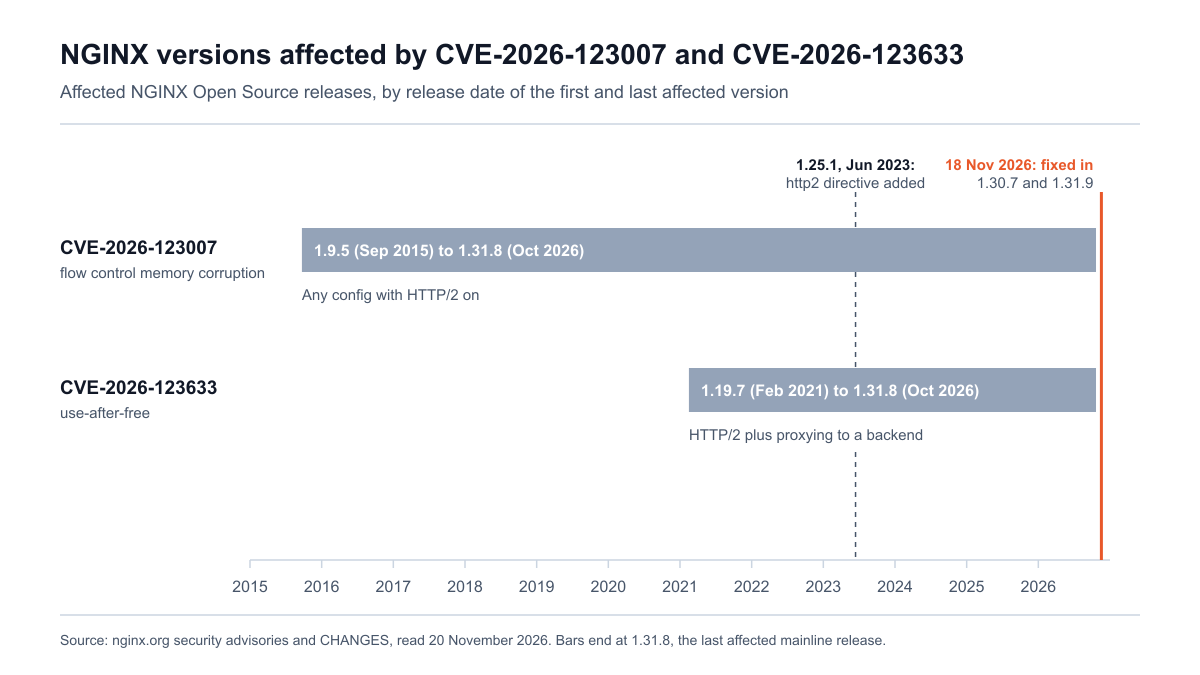
Figure 1: Affected NGINX Open Source versions for each CVE, 2015 to 2026, with the release that added the http2 directive and the fixed releases. Sources: nginx.org security advisories and nginx.org CHANGES.
How do I check whether my NGINX is vulnerable?
Three checks answer the question: the build (version and HTTP/2 module), the configuration (is HTTP/2 switched on), and the exposure (does an outsider get HTTP/2). The scripts below do that. They are read-only: they run nginx -v, nginx -V and nginx -T, one TLS handshake and one HEAD request per host. They send no crafted HTTP/2 frames and contain no exploit code. Run the external check only against hosts you own or are authorised to test.
Stingrai tested these scripts on 20 November 2026 against official NGINX 1.24, 1.30 and 1.31 images, a Debian 12 distribution package and an Alpine-based image, in local containers. The Kubernetes templates were tested against sample pod and ConfigMap data and the ingress-nginx version command inside the ingress-nginx v1.15.1 controller image; run them against a test cluster before you rely on them.
Script 1: host check (version, HTTP/2 module, HTTP/2 in config)
Save as nginx-h2-host-check.sh and run sudo bash nginx-h2-host-check.sh on each Linux host. It finds running master processes and common install paths, reads the version and build flags, dumps the effective configuration with nginx -T, and prints one verdict per binary: AFFECTED, PATCHED, NOT-HTTP2, NOT-AFFECTED or a CHECK line where it cannot decide. It needs bash 4 or later. The exit code is 2 if anything is AFFECTED, 1 if something needs a manual check, and 0 otherwise, so it can feed a fleet tool.
1#!/usr/bin/env bash
2# nginx-h2-host-check.sh
3# Read-only check for CVE-2026-123007 and CVE-2026-123633 on one Linux host.
4# It reads versions, build flags and the configuration. It sends no traffic.
5# Run as root so nginx -T can read every included file: sudo bash nginx-h2-host-check.sh
6set -u
7
8FIX_STABLE="1.30.7"     # fixed stable release (18 Nov 2026)
9FIX_MAINLINE="1.31.9"   # fixed mainline release (18 Nov 2026)
10worst=0
11
12# ver_ge A B: true when version A >= version B
13ver_ge() { [ "$(printf '%s\n%s\n' "$1" "$2" | sort -V | head -n1)" = "$2" ]; }
14
15upstream_fixed() {   # $1 = upstream version such as 1.30.6
16  local v=$1
17  ver_ge "$v" "$FIX_MAINLINE" && return 0
18  case "$v" in 1.30.*) ver_ge "$v" "$FIX_STABLE" && return 0 ;; esac
19  return 1
20}
21
22h2_in_config() {     # $1 = binary, $2 = config file or empty
23  local bin=$1 conf=$2 dump
24  if [ -n "$conf" ]; then dump=$("$bin" -T -c "$conf" 2>/dev/null); else dump=$("$bin" -T 2>/dev/null); fi
25  if [ -z "$dump" ]; then echo "UNKNOWN"; return; fi
26  if printf '%s\n' "$dump" | sed 's/#.*//' \
27     | grep -qE '^[[:space:]]*listen[[:space:]][^;]*[[:space:]]http2([[:space:];]|$)|^[[:space:]]*http2[[:space:]]+on[[:space:]]*;'; then
28    echo "ON"
29  else
30    echo "OFF"
31  fi
32}
33
34package_of() {       # prints "manager package version" for the file, or nothing
35  local f=$1 p
36  if command -v dpkg >/dev/null 2>&1 && p=$(dpkg -S "$f" 2>/dev/null | head -n1 | cut -d: -f1) && [ -n "$p" ]; then
37    echo "dpkg $p $(dpkg-query -W -f='${Version}' "$p" 2>/dev/null)"; return
38  fi
39  if command -v rpm >/dev/null 2>&1 && p=$(rpm -qf --qf '%{NAME} %{EPOCHNUM}:%{VERSION}-%{RELEASE}' "$f" 2>/dev/null) && [ -n "$p" ]; then
40    echo "rpm $p"; return
41  fi
42  if command -v apk >/dev/null 2>&1 && p=$(apk info --who-owns "$f" 2>/dev/null | awk '{print $NF}') && [ -n "$p" ]; then
43    echo "apk $p"; return
44  fi
45}
46
47# 1. Collect binaries: running masters first, then common install paths.
48declare -A seen=()
49declare -a bins=() confs=() pids=()
50for d in /proc/[0-9]*; do
51  args=$(tr '\0' ' ' < "$d/cmdline" 2>/dev/null) || continue
52  case "$args" in "nginx: master process"*) ;; *) continue ;; esac
53  pid=${d#/proc/}
54  exe=$(readlink "$d/exe" 2>/dev/null) || continue
55  conf=$(printf '%s' "$args" | sed -n 's/.* -c \([^ ]*\).*/\1/p')
56  bins+=("$exe"); confs+=("$conf"); pids+=("$pid"); seen["${exe% (deleted)}"]=1
57done
58for b in $(command -v nginx openresty 2>/dev/null) /usr/sbin/nginx /usr/local/sbin/nginx \
59         /usr/local/nginx/sbin/nginx /usr/local/openresty/nginx/sbin/nginx /opt/*/sbin/nginx; do
60  [ -x "$b" ] || continue
61  r=$(readlink -f "$b")
62  [ -n "${seen[$r]:-}" ] && continue
63  seen[$r]=1; bins+=("$r"); confs+=(""); pids+=("-")
64done
65
66if [ ${#bins[@]} -eq 0 ]; then echo "No nginx binary or master process found."; exit 0; fi
67
68printf '%-6s %-34s %-24s %-8s %-7s %s\n' PID BINARY VERSION H2MOD H2CONF VERDICT
69for i in "${!bins[@]}"; do
70  bin=${bins[$i]}; conf=${confs[$i]}; pid=${pids[$i]}; note=""
71  if [[ "$bin" == *" (deleted)" ]]; then
72    note="binary replaced on disk since start: restart nginx to load the new one"
73    bin=${bin% (deleted)}
74  fi
75  [ -x "$bin" ] || { echo "$pid $bin: not executable, skipped"; continue; }
76  vline=$("$bin" -v 2>&1 | head -n1)
77  ver=$(printf '%s' "$vline" | sed -n 's#^nginx version: [a-z-]*/\([0-9][0-9.]*\).*#\1#p')
78  [ -z "$ver" ] && ver="unknown"
79  build=$("$bin" -V 2>&1)
80  mod="absent"; printf '%s' "$build" | grep -q -- '--with-http_v2_module' && mod="present"
81  # nginx.org packages and official Docker images are built with --prefix=/etc/nginx;
82  # distribution packages use another prefix and often backport fixes without changing the version.
83  origin="other"; printf '%s' "$build" | grep -q -- '--prefix=/etc/nginx' && origin="nginx.org"
84  h2=$(h2_in_config "$bin" "$conf")
85  pkg=$(package_of "$bin")
86
87  if printf '%s' "$vline" | grep -qiE 'nginx-plus|openresty'; then
88    verdict="CHECK-VENDOR ($vline): compare with F5 K000163926 and K000163928 or the vendor's advisory"; rc=1
89  elif [ "$ver" = "unknown" ]; then
90    verdict="CHECK-MANUALLY (could not read version)"; rc=1
91  elif ! ver_ge "$ver" 1.9.5; then
92    verdict="NOT-AFFECTED (older than 1.9.5, no HTTP/2 code)"; rc=0
93  elif upstream_fixed "$ver"; then
94    verdict="PATCHED (>= $FIX_STABLE stable or $FIX_MAINLINE mainline)"; rc=0
95  elif [ "$mod" = "absent" ]; then
96    verdict="NOT-HTTP2 (built without the HTTP/2 module; patch anyway)"; rc=0
97  elif [ -n "$pkg" ] && [ "$origin" != "nginx.org" ]; then
98    verdict="CHECK-DISTRO-ADVISORY: package '$pkg' may carry a backported fix; compare it with your distribution's advisory (HTTP/2 in config: $h2)"; rc=1
99  elif [ "$h2" = "OFF" ]; then
100    verdict="NOT-HTTP2 (vulnerable code present, HTTP/2 not enabled; patch before re-enabling)"; rc=1
101  elif [ "$h2" = "UNKNOWN" ]; then
102    verdict="CHECK-CONFIG (nginx -T failed; run as root) and version is in the affected range"; rc=1
103  else
104    cves="CVE-2026-123007"; ver_ge "$ver" 1.19.7 && cves="$cves, CVE-2026-123633"
105    verdict="AFFECTED ($cves): upgrade to $FIX_STABLE or $FIX_MAINLINE, or disable HTTP/2 now"; rc=2
106  fi
107  [ $rc -gt $worst ] && worst=$rc
108  printf '%-6s %-34s %-24s %-8s %-7s %s\n' "$pid" "$bin" "$ver" "$mod" "$h2" "$verdict"
109  [ -n "$pkg" ] && printf '%-6s   package: %s\n' "" "$pkg"
110  [ -n "$note" ] && printf '%-6s   NOTE: %s\n' "" "$note"
111done
112
113# 2. Old workers left from a reload keep serving existing connections on the old config.
114old=$(for d in /proc/[0-9]*; do a=$(tr '\0' ' ' < "$d/cmdline" 2>/dev/null); case "$a" in *"worker process is shutting down"*) echo "${d#/proc/} $a" ;; esac; done)
115if [ -n "$old" ]; then
116  echo; echo "Old workers still draining after a reload (they run the previous config and binary):"
117  echo "$old"
118  [ $worst -lt 1 ] && worst=1
119fi
120exit $worst
Sample output from a vulnerable host (illustrative values):
1PID    BINARY                             VERSION                  H2MOD    H2CONF  VERDICT
21042   /usr/sbin/nginx                    1.30.6                   present  ON      AFFECTED (CVE-2026-123007, CVE-2026-123633): upgrade to 1.30.7 or 1.31.9, or disable HTTP/2 now
3         package: dpkg nginx 1.30.6-1~bookworm
The script does not guess where it cannot know. Distribution packages often carry a backported fix under an old version number, so it prints the full package version for you to compare with the distribution's advisory; NGINX Plus and OpenResty builds go to the vendor's advisory; and nginx -T reads the configuration on disk, which may differ from what running workers loaded.
Script 2: external check (does the endpoint negotiate HTTP/2?)
Run this from outside your network against a list of hostnames. It asks for HTTP/2 during the TLS handshake with openssl s_client -alpn h2, sends one HEAD request with curl --http2, and records the negotiated protocol and the Server header. It works with the stock bash on macOS as well as Linux.
1#!/usr/bin/env bash
2# nginx-h2-external-check.sh
3# From outside your network: does each HTTPS endpoint negotiate HTTP/2, and what Server header does it send?
4# Sends one TLS handshake and one HEAD request per host. No exploit traffic, no crafted frames.
5# Usage: bash nginx-h2-external-check.sh hosts.txt      (one host or host:port per line)
6#        bash nginx-h2-external-check.sh www.example.com api.example.com:8443
7# Only test hosts you own or are authorised to test.
8set -u
9TO=10
10[ $# -eq 0 ] && { echo "usage: $0 hosts.txt | host[:port] ..."; exit 64; }
11targets=()
12if [ $# -eq 1 ] && [ -f "$1" ]; then
13  while IFS= read -r line; do targets+=("$line"); done < <(grep -vE '^[[:space:]]*(#|$)' "$1")
14else
15  targets=("$@")
16fi
17
18run_to() { if command -v timeout >/dev/null 2>&1; then timeout "$TO" "$@"; else "$@"; fi; }
19
20echo "host,port,alpn,curl_http_version,server_header,verdict"
21for t in "${targets[@]}"; do
22  t=${t%%[[:space:]]*}; host=${t%%:*}; port=443
23  [ "$host" != "$t" ] && port=${t##*:}
24
25  alpn=$(run_to openssl s_client -connect "$host:$port" -servername "$host" -alpn h2 </dev/null 2>/dev/null \
26         | sed -n 's/^ALPN protocol: //p; s/^No ALPN negotiated.*/none/p' | head -n1)
27  [ -z "$alpn" ] && alpn="no-handshake"
28
29  resp=$(curl -sk --http2 -I -o /dev/null -D - -w 'HV=%{http_version}\n' \
30         --connect-timeout 5 --max-time "$TO" "https://$host:$port/" 2>/dev/null | tr -d '\r')
31  hv=$(printf '%s\n' "$resp" | sed -n 's/^HV=//p')
32  { [ -z "$hv" ] || [ "$hv" = "0" ]; } && hv="no-response"
33  srv=$(printf '%s\n' "$resp" | sed -n 's/^[Ss]erver: *//p' | head -n1)
34  [ -z "$srv" ] && srv="(hidden or none)"
35
36  if [ "$alpn" = "h2" ] || [ "$hv" = "2" ]; then
37    verdict="H2-OFFERED: check the nginx version behind this endpoint"
38  elif [ "$alpn" = "no-handshake" ] && [ "$hv" = "no-response" ]; then
39    verdict="UNREACHABLE: check the host, port or firewall and retry"
40  else
41    verdict="H2-NOT-OFFERED on this endpoint"
42  fi
43  printf '%s,%s,%s,%s,"%s",%s\n' "$host" "$port" "$alpn" "$hv" "${srv//\"/}" "$verdict"
44done
Sample output (illustrative hosts):
1host,port,alpn,curl_http_version,server_header,verdict
2www.example.com,443,h2,2,"nginx/1.30.6",H2-OFFERED: check the nginx version behind this endpoint
3api.example.com,443,h2,2,"(hidden or none)",H2-OFFERED: check the nginx version behind this endpoint
4legacy.example.com,443,none,1.1,"nginx",H2-NOT-OFFERED on this endpoint
5203.0.113.25,8443,no-handshake,no-response,"(hidden or none)",UNREACHABLE: check the host, port or firewall and retry
Read the result with two cautions. The Server header is only a hint: server_tokens off; hides the version, many sites remove the header entirely, and a CDN replaces it with its own. And a CDN or load balancer answers the handshake for the origin, so H2-OFFERED or H2-NOT-OFFERED at the edge says nothing about the NGINX behind it. As the researcher notes, run the same check directly against the origin's address as well.
Script 3: containers and Kubernetes
A host check misses NGINX inside containers. This script lists running Docker containers and Kubernetes pods that contain an nginx binary, with the version, the number of HTTP/2 lines in the effective configuration, and the running image ID or digest. It also reports the community ingress-nginx controller's release and its use-http2 setting. It needs permission to run docker exec or kubectl exec.
1#!/usr/bin/env bash
2# nginx-h2-containers-check.sh
3# Lists running Docker containers and Kubernetes pods that contain nginx, with the nginx version,
4# whether HTTP/2 is switched on in their config, and the running image ID or digest.
5# Read-only: runs "nginx -v" and "nginx -T" inside each container, nothing else.
6set -u
7H2RE='listen[^;]*[[:space:]]http2([[:space:];]|$)|^[[:space:]]*http2[[:space:]]+on[[:space:]]*;'
8
9if command -v docker >/dev/null 2>&1 && docker info >/dev/null 2>&1; then
10  echo "== Docker: running containers with an nginx binary"
11  for id in $(docker ps -q); do
12    v=$(docker exec "$id" nginx -v 2>&1 </dev/null | head -n1)
13    case "$v" in *"nginx version"*) ;; *) continue ;; esac
14    h2=$(docker exec "$id" nginx -T 2>/dev/null </dev/null | sed 's/#.*//' | grep -cE "$H2RE")
15    printf '%s\t%s\t%s\t%s\thttp2_lines=%s\n' \
16      "$(docker inspect -f '{{.Name}}' "$id")" "$(docker inspect -f '{{.Config.Image}}' "$id")" \
17      "$(docker inspect -f '{{.Image}}' "$id")" "${v#nginx version: }" "$h2"
18  done
19fi
20
21if command -v kubectl >/dev/null 2>&1 && kubectl version --request-timeout=5s >/dev/null 2>&1; then
22  echo "== Kubernetes: containers whose image name suggests nginx, OpenResty or an ingress controller"
23  kubectl get pods -A -o go-template='{{range .items}}{{$ns := .metadata.namespace}}{{$pod := .metadata.name}}{{range .status.containerStatuses}}{{$ns}} {{$pod}} {{.name}} {{.image}} {{.imageID}}{{"\n"}}{{end}}{{end}}' \
24  | grep -iE 'nginx|openresty|ingress' \
25  | while read -r ns pod ctr image imageid; do
26      v=$(kubectl exec -n "$ns" "$pod" -c "$ctr" -- nginx -v 2>&1 </dev/null | head -n1)
27      case "$v" in *"nginx version"*) ;; *) v="no nginx binary found" ;; esac
28      h2=$(kubectl exec -n "$ns" "$pod" -c "$ctr" -- nginx -T 2>/dev/null </dev/null | sed 's/#.*//' | grep -cE "$H2RE")
29      printf '%s/%s/%s\t%s\t%s\t%s\thttp2_lines=%s\n' "$ns" "$pod" "$ctr" "$image" "$imageid" "${v#nginx version: }" "$h2"
30    done
31
32  echo "== Community ingress-nginx controller (archived in March 2026; it receives no fixes)"
33  kubectl get pods -A -l app.kubernetes.io/name=ingress-nginx,app.kubernetes.io/component=controller \
34    -o go-template='{{range .items}}{{.metadata.namespace}} {{.metadata.name}}{{"\n"}}{{end}}' \
35  | while read -r ns pod; do
36      kubectl exec -n "$ns" "$pod" -- /nginx-ingress-controller --version 2>/dev/null </dev/null \
37        | grep -E 'Release|nginx version' | tr -s ' ' | paste -sd ' ' - | sed "s|^|$ns/$pod: |"
38    done
39  kubectl get configmap -A -l app.kubernetes.io/name=ingress-nginx \
40    -o go-template='{{range .items}}{{.metadata.namespace}}/{{.metadata.name}} use-http2={{with .data}}{{index . "use-http2"}}{{end}}{{"\n"}}{{end}}' 2>/dev/null \
41  | sed -E 's/use-http2=(<no value>)?$/use-http2=(unset, default true)/'
42fi
Sample output (illustrative names and digests):
1== Docker: running containers with an nginx binary
2/web-frontend	nginx:1.30.6	sha256:3f1c...e9a0	nginx/1.30.6	http2_lines=1
3== Kubernetes: containers whose image name suggests nginx, OpenResty or an ingress controller
4shop/web-7d9f/nginx	nginx:1.31.9	docker.io/library/nginx@sha256:8a2b...41cd	nginx/1.31.9	http2_lines=1
5== Community ingress-nginx controller (archived in March 2026; it receives no fixes)
6ingress-nginx/ingress-nginx-controller-5c8d: Release: v1.15.1 nginx version: nginx/1.27.1
7ingress-nginx/ingress-nginx-controller use-http2=(unset, default true)
The last two lines are the common Kubernetes finding. The ingress-nginx project retired in March 2026 and its repository is archived; its final controller release, v1.15.1, builds NGINX 1.27.1, and its `use-http2` ConfigMap key defaults to "true". No fixed release will come from the project.
How do I fix CVE-2026-123007 and CVE-2026-123633?
The fix is a patched NGINX, and the patched build only protects you once every worker runs it. Patch, restart, and verify the running process.
NGINX Open Source
Upgrade to 1.30.7 if you track stable or 1.31.9 if you track mainline. Read the changelog before you roll out mainline: 1.31.9 also rejects header lines without a colon, which can break a client or upstream that sends malformed headers. The same release fixes eight other CVEs, including HTTP/3, resolver and mail proxy flaws that disabling HTTP/2 does not touch, which is another reason not to stop at the mitigation.
If you install from the nginx.org RPM repositories, note an open issue reporting that the EL9 repository published 1.30.7 without security update metadata, so hosts that rely on dnf upgrade --security can miss it. Upgrade the package explicitly and check the version afterwards.
After upgrading, verify with nginx -v, then restart the service (a reload starts new workers but leaves old ones serving existing connections, and a binary upgrade needs a restart or NGINX's binary upgrade procedure). Run Script 1 again: a master process whose binary shows as "(deleted)" is still running the old code.
NGINX Plus and F5 products
Move to NGINX Plus 37.0.8.1 or 37.3.0.1; those builds carry the fixes for both CVEs. F5 recommends upgrading "to a version with the fix" where a branch has none. F5's tables list R34 to R36 with no fix, and the CVE records list R33 onward as affected; F5 evaluates only releases still in technical support, so treat R33 and older as affected. For the NGINX Ingress Controller, NGINX Gateway Fabric, Instance Manager, F5 WAF for NGINX and F5 DoS for NGINX, use the fixed versions in K000163926 and K000163928. F5's advisories list the mitigation as "None"; disabling HTTP/2 removes the code path both bugs need, which is why researchers and Siemens recommend it as the interim step.
Distribution packages
Distributions backport the fix into their own version line, so the fixed package keeps an older upstream number. Compare the full package version, not nginx -v.
Distribution | Fixed package (both CVEs) | Advisory |
|---|---|---|
Debian 12 bookworm | 1.22.1-9+deb12u11 | |
Debian 13 trixie | 1.26.3-3+deb13u11 | |
Ubuntu 26.04 LTS | 1.28.3-2ubuntu1.13 | |
Ubuntu 24.04 LTS | 1.24.0-2ubuntu7.20 | Same |
Ubuntu 22.04 LTS | 1.18.0-6ubuntu14.23 | Same |
Ubuntu 20.04, 18.04 and 16.04 | 1.18.0-0ubuntu1.7+esm5, 1.14.0-0ubuntu1.11+esm6 and 1.10.3-0ubuntu0.16.04.5+esm11 (Ubuntu Pro; 16.04 through the Legacy Support add-on) | Same |
Red Hat Enterprise Linux 10 | nginx-2:1.26.3-16.el10_3.3 (RHSA-2026:100744, 20 November) | |
Red Hat Enterprise Linux 8 and 9 | Marked affected; no erratum as of 20 November | Same |
Amazon Linux 2023 | ALAS2023-2026-3494 | |
Amazon Linux 2 (nginx1 extra) | ALAS2NGINX1-2026-018 | Same |
Alpine 3.24 and edge / 3.22 and 3.23 / 3.21 | 1.30.7-r0 / 1.28.3-r8 / 1.26.3-r4 |
Check with dpkg-query -W nginx nginx-core, rpm -q nginx or apk info -v nginx, then restart NGINX.
Containers and images
A running container keeps the NGINX it started with. Rebuild every image whose base is nginx or that installs NGINX, using nginx:1.30.7, nginx:1.31.9 or their Alpine variants (the official tags were published on 19 and 20 November (UTC)), redeploy, and confirm the version inside the running container with Script 3. Record the image digest each workload actually runs, because a floating tag such as stable pulled before 20 November still points at an affected build in your registry cache.
Kubernetes ingress
For the F5 NGINX Ingress Controller, upgrade to 5.8.0 or 2026-lts-r11, both released on 18 November. For the community ingress-nginx controller, no fix will ship: set use-http2: "false" in the controller's ConfigMap now, confirm with the external check that the ingress no longer negotiates HTTP/2, and plan the migration to Gateway API or a maintained controller that the Kubernetes project already recommended. Managed Kubernetes add-ons that are built on ingress-nginx depend on the provider's own image, so check the provider's bulletin.
How do I disable HTTP/2 in NGINX until I can patch?
Turning HTTP/2 off closes the path both CVEs need. It is a stopgap: clients fall back to HTTP/1.1, services that require HTTP/2 (native gRPC, for example) stop working, and the other eight CVEs in the 18 November release stay open.
On NGINX 1.25.1 and later, set http2 off; in every affected server block (and in the http block if http2 on; is there), and remove any legacy http2 parameter from listen lines. Check every server block that shares the same address and port. On 1.9.5 to 1.25.0, remove http2 from the listen lines.
1server {
2    listen 443 ssl;          # was: listen 443 ssl http2;
3    http2 off;               # NGINX 1.25.1 and later
4    server_name www.example.com;
5    ssl_certificate     /etc/nginx/certs/example.crt;
6    ssl_certificate_key /etc/nginx/certs/example.key;
7    # ... rest of the server block unchanged
8}
Then test, reload and verify:
1# 1. Test and reload
2sudo nginx -t && sudo nginx -s reload
3
4# 2. Old workers keep serving connections that were open before the reload,
5#    including HTTP/2 ones, on the old configuration. Wait until none remain.
6ps -eo pid,etimes,args | grep '[w]orker process is shutting down'
7#    If any are still there after your connection timeouts, restart instead:
8#    sudo systemctl restart nginx
9
10# 3. Confirm HTTP/2 is no longer offered (run from outside, and directly against the origin)
11openssl s_client -connect www.example.com:443 -servername www.example.com -alpn h2 </dev/null 2>/dev/null \
12  | grep -E 'ALPN protocol|No ALPN'          # expect: No ALPN negotiated
13curl --http2 -sI -o /dev/null -w '%{http_version}\n' https://www.example.com/   # expect: 1.1
Step 2 matters more than it looks. The NGINX control documentation says that on reload "old worker processes close listen sockets and continue to service old clients". In Stingrai's test, an HTTP/2 download that was open before the reload kept running on a worker marked "is shutting down" while new connections already fell back to HTTP/1.1; only a restart cleared it. A long-lived HTTP/2 connection therefore keeps the vulnerable path open after you think you have closed it. Re-enable HTTP/2 only after the patched build is running everywhere.
What should I look for in logs? Detection guidance
No exploitation had been reported as of 20 November 2026: CISA's assessment in both CVE records, dated 18 November, lists exploitation as "none", neither CVE was in the KEV catalog (version 2026.11.20), but a public proof-of-concept exploit for CVE-2026-123007 has been available since 18 November (Rapid7's analysis), so treat exploitation attempts as a matter of time. Detection is about spotting probing and failed attempts, and about proving a negative for the period before you patched. Each signal below can have an innocent cause, so look for them together.
Worker crashes. A failed attempt at memory corruption usually kills a worker. Search the error log for workers that "exited on signal 11" (a segmentation fault), and check
coredumpctl list nginxand the kernel log for segfault lines from NGINX. A sudden cluster of worker crashes on an internet-facing HTTP/2 listener is the strongest early signal.Programs started by the worker. An NGINX worker has no reason to start a shell or any other program. Where Linux audit is available, a rule on
execvefor the worker's user ID will record any process the worker launches from the moment you add it; the researcher recommends this and calls it the clearest sign of success. It cannot show what happened before the rule existed.Connection pressure. CVE-2026-123633 needs a worker that is low on connections. Alert on the error-log message that worker_connections are not enough, and on sudden jumps in active connections from a single source in
stub_statusor your load balancer metrics.Traffic that does not become requests. The researcher describes floods of HTTP/2 control frames, which show up as many bytes received from one client with few logged requests. Compare bytes in at the load balancer or with
ss -tiagainst the access log for the same client.After patching. A patched build refuses a WINDOW_UPDATE that would push the connection window past its limit and logs "client violated connection flow control" at the
infolog level, per the fix commit. Raisingerror_logtoinfoon one patched canary for a short period can show whether someone is still probing.Keep the evidence. Preserve error logs, core dumps and load balancer logs from 18 November onward before you rotate or rebuild, so a later investigation has something to work with.
If you find a worker that started a program, treat the host as compromised: isolate it, preserve memory and disk, and rotate the TLS keys and any credentials the NGINX host could read, including upstream tokens and certificates.
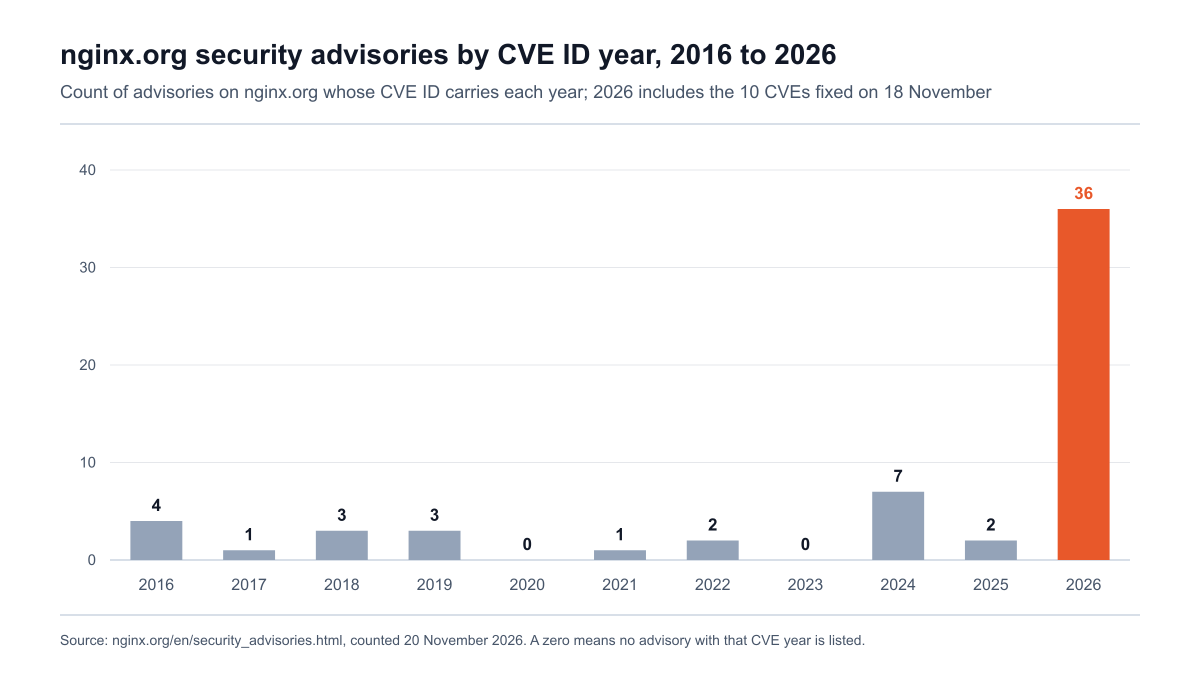
Figure 2: nginx.org security advisories grouped by the year in each CVE ID, 2016 to 2026; 2026 includes the ten CVEs fixed on 18 November. Source: nginx.org security advisories, counted on 20 November 2026.
The trend in Figure 2 is the context for the response plan. nginx.org's advisory list carries 36 entries with a 2026 CVE ID, against 2 with a 2025 ID, and nine mainline releases in 2026, from 1.29.5 in February to 1.31.9 in November, have carried security fixes. An NGINX patch is no longer a once-a-year event, which changes how often the edge needs to be checked.
NGINX HTTP/2 response checklist: today, this week, this quarter
This checklist is Stingrai's guidance for the two CVEs; no standard prescribes it.
Today: find every NGINX that speaks HTTP/2 to the internet. Run the external check against all public hostnames and origin addresses, and the host and container checks on every server and cluster. Start with reverse proxies, API gateways, ingress controllers and load balancers.
Today: patch or switch HTTP/2 off on exposed listeners. Upgrade to 1.30.7, 1.31.9, NGINX Plus 37.0.8.1 or 37.3.0.1, or the distribution's fixed package. Where that cannot happen today, set
http2 off;, reload, and confirm that old workers have exited and the external check shows HTTP/1.1.Today: start keeping evidence. Preserve NGINX error logs, core dumps and load balancer logs from 18 November onward, and add the worker crash and worker process alerts described above.
This week: patch everything else. Internal proxies, staging, build agents and appliances, including NGINX builds that have HTTP/2 off, so it can be turned back on safely. Restart every instance and confirm the running version.
This week: rebuild and redeploy images. Rebuild every image based on or containing NGINX, redeploy, and record the image digest each workload runs.
This week: deal with ingress-nginx and embedded NGINX. Set
use-http2: "false"on any community ingress-nginx controller, and record each vendor product that embeds NGINX with its advisory, fix or workaround, owner and review date.This week: re-enable HTTP/2 only after verification. Turn HTTP/2 back on host by host once Script 1 shows PATCHED and no old workers remain.
This quarter: replace what will never be fixed. Migrate off the community ingress-nginx controller, NGINX Plus R33 to R36 and unsupported distribution releases.
This quarter: test the edge and what sits behind it. Commission an external exposure check and a penetration test of the applications and APIs behind the proxy, and make the NGINX version and HTTP/2 state of every edge service a recorded inventory field.
Revise the order if CISA adds either CVE to its Known Exploited Vulnerabilities catalog, if a working exploit for CVE-2026-123633 or a more reliable one for CVE-2026-123007 is published, or if F5 or your distribution changes its fixed-version guidance.
What should a penetration test or external exposure check cover after this?
Patching closes two bugs. It does not show which HTTP/2 endpoints an outsider can reach, whether each took the fix, or what an attacker on the proxy could reach next.
External exposure check. Enumerate every internet-facing hostname and origin address, record which negotiate HTTP/2 or disclose a version, and find origins that answer directly when they should sit behind the CDN. Our guide to external penetration testing scope and cost covers how that perimeter work is scoped.
Fix verification by evidence. Confirm the fixed build from the running process, the package version and the image digest, as the scripts above do. A responsible tester does not send memory-corrupting traffic at a production proxy; if a live proof is needed, it belongs on a staging copy.
Blast radius. Assume the proxy was compromised and test what follows. An NGINX host holds TLS private keys, upstream credentials and often network paths into internal services that are not exposed anywhere else. An internal and external network penetration test shows whether segmentation holds between the edge and the rest of the network. The same question drove our checklists for the Citrix NetScaler zero-days and Java4Shell.
The applications behind the proxy. NGINX usually fronts the web applications and APIs that hold the data. A web application penetration test or API penetration test examines authentication, authorization across user roles, business logic, injection and session handling, none of which an NGINX upgrade changes.
Where Stingrai fits
Stingrai is a CREST-accredited penetration testing company headquartered in Toronto, holding CREST's Penetration Testing and AI-Enabled Penetration Testing accreditations and the CREST AI Charter. Two named penetration testers from a team holding OSCE³, OSWE, OSEP and CREST CRT certifications work on every human-led engagement. Each finding is posted to the PTaaS portal as it is confirmed, with a working proof of concept and remediation guidance, and retesting of fixed findings is included. Every human-led and hybrid report ships with an attestation letter, and the testing supports SOC 2, ISO 27001 and PCI DSS programs with evidence for the audit. Engagements run as one-time (annual) tests or as continuous programs.
For an event like this the usual scope is an external network test of the perimeter plus web application and API tests of the services behind the proxy. A network penetration test typically costs US$5,000 to US$40,000 and above, driven by host count and network layout.
For the web applications behind the proxy, the closest fit is Stingrai's Hybrid Pentest. Snipe, Stingrai's autonomous agent for web applications and associated APIs, tests the full application while Stingrai's certified penetration testers test the same application manually alongside it and validate Snipe's findings, so coverage is wider and deeper than either gives alone. A one-time Hybrid Pentest is US$6,800 per assessment. The continuous plan is US$1,275 per month on a 12-month plan, with monthly Snipe testing, human-verified, plus a quarterly deep dive by Stingrai's penetration testers. Both cover one web application and associated APIs. The case for continuous testing is in this event's own numbers: nginx.org has published 36 advisories with a 2026 CVE ID against 2 with a 2025 ID, the researcher says an automated scan found four of the five CVEs in its set, and the stack in front of an application now changes under it every few weeks. See pricing, or get a quote for more than one application.
Frequently Asked Questions
Is NGINX HTTP/2 vulnerable to CVE-2026-123007 and CVE-2026-123633?
Yes, if the build is affected and HTTP/2 is enabled. CVE-2026-123007 affects NGINX Open Source 1.9.5 through 1.31.8 in any configuration that uses HTTP/2, and CVE-2026-123633 affects 1.19.7 through 1.31.8 when HTTP/2 client connections are proxied to a backend. F5 scores both CVSS 4.0 9.2 (Critical) and CVSS 3.1 8.1 (High). Both were fixed on 18 November 2026 in NGINX 1.30.7 and 1.31.9.
What version of NGINX fixes CVE-2026-123633 and CVE-2026-123007?
NGINX Open Source 1.30.7 (stable) and 1.31.9 (mainline), both released on 18 November 2026, fix both CVEs. For NGINX Plus, 37.0.8.1 or 37.3.0.1 covers both. Distribution packages keep older version numbers with the fix backported, for example Debian 12's 1.22.1-9+deb12u11 and Ubuntu 24.04's 1.24.0-2ubuntu7.20, so compare the full package version with your distribution's advisory.
How do I disable HTTP/2 in NGINX?
On NGINX 1.25.1 and later, set http2 off; in every affected server block and in the http block if http2 on; appears there, and remove the http2 parameter from listen lines. On older versions, remove http2 from the listen lines. Then run nginx -t, reload, wait until no worker shows as shutting down or restart, and confirm from outside that the endpoint negotiates HTTP/1.1. Re-enable HTTP/2 only after the patched build is running.
How do I check if my NGINX server is vulnerable?
Check three things. First, the build: run nginx -v and nginx -V and confirm the version is between 1.9.5 and 1.31.8 and the HTTP/2 module is present. Second, the configuration: run nginx -T and look for http2 on; or a listen line with http2. Third, exposure: test from outside whether the endpoint negotiates HTTP/2 with openssl s_client -alpn h2 or curl --http2. Distribution packages need a comparison with the distribution's advisory, because the version number does not change when a fix is backported.
My distribution's NGINX shows an old version. Is it still vulnerable?
Not necessarily. Debian, Ubuntu, Red Hat, Amazon Linux and Alpine backport security fixes into their own version line, so nginx -v can show 1.22.1 or 1.24.0 on a fixed system. Compare the full package version from dpkg, rpm or apk with the distribution's advisory. As of 20 November 2026 Debian, Ubuntu, Amazon Linux, Alpine and Red Hat Enterprise Linux 10 had fixed packages, while Red Hat Enterprise Linux 8 and 9 were still marked affected.
Are CVE-2026-123007 and CVE-2026-123633 being exploited in the wild?
No exploitation had been reported as of 20 November 2026. CISA's assessment in both CVE records lists exploitation as none, and neither CVE was in CISA's Known Exploited Vulnerabilities catalog. The reporting researcher withheld its final exploit steps, but a Rapid7 researcher published a proof-of-concept exploit for CVE-2026-123007 on 18 November 2026 that reached unauthenticated code execution against a freshly started NGINX 1.31.8 container. No public exploit for CVE-2026-123633 had been confirmed. Patch or disable HTTP/2 now.
What is the CVSS score of CVE-2026-123007?
F5, which assigned the CVE, scores CVE-2026-123007 at 9.2 (Critical) under CVSS 4.0 and 8.1 (High) under CVSS 3.1, with the vector AV:N/AC:H/PR:N/UI:N and high impact on confidentiality, integrity and availability. CVE-2026-123633 has the same scores. nginx.org labels CVE-2026-123007 major and CVE-2026-123633 medium, Red Hat rates both Critical, and NVD had not published its own score as of 20 November 2026.
Does a CDN or load balancer in front of NGINX protect me?
Only partly. If the edge terminates HTTP/2 and talks to NGINX over HTTP/1.1, attackers who go through the edge do not reach NGINX's HTTP/2 code. But the origin is exposed if its own HTTP/2 listener can be reached directly, and the edge itself may run NGINX. Run the external check against the origin's address as well as the public hostname, and patch the origin either way.
Is the Kubernetes ingress-nginx controller affected?
Yes. The community ingress-nginx controller's final release, v1.15.1, builds NGINX 1.27.1, which is inside both affected ranges, and its use-http2 setting defaults to true. The project was retired in March 2026 and will not ship a fix, so set use-http2 to false in the controller ConfigMap now and migrate to a maintained controller. The separate F5 NGINX Ingress Controller is fixed in 5.8.0 and 2026-lts-r11.
What is nginx2root?
nginx2root, or NGINX2Root, is the name the research team at Xint gave to five NGINX CVEs fixed on 18 November 2026, including CVE-2026-123007 and CVE-2026-123633, plus a separate Linux kernel flaw it says can be chained with them to gain root on the host. Disabling HTTP/2 blocks the two HTTP/2 CVEs but not the other three, which involve the resolver, HTTP/3 and the mail proxy. Upgrading to NGINX 1.30.7 or 1.31.9 fixes all five.
Related reading
Java4Shell (CVE-2026-114938): what is confirmed, who is exposed and how to fix it
PHP2Shell: enterprise patch and verification plan for PHP's critical release
Citrix NetScaler zero-days 2026: compromise check and patch checklist
External penetration testing: network and infrastructure scope, process and cost
Cloud and Kubernetes penetration testing: how to scope it and what drives the cost
References
nginx.org. nginx security advisories. Read 20 November 2026. Titles, severity labels, affected and fixed versions for every CVE; the basis for Figure 2.
nginx.org. News: nginx-1.30.7 stable and nginx-1.31.9 mainline released. 18 November 2026.
nginx.org. CHANGES and CHANGES-1.30. Release notes for 1.31.9 and 1.30.7, and release dates for 1.9.5, 1.19.7 and 1.25.1.
nginx.org. Module ngx_http_v2_module, the listen directive and Controlling nginx. Read 20 November 2026.
nginx (GitHub). Fix for CVE-2026-123007 and fix for CVE-2026-123633. Commit messages describe each root cause and fix.
nginx (GitHub). Issue 2002: security advisory metadata for nginx.org RPM repositories. Opened 18 November 2026.
F5. K000163926: NGINX ngx_http_v2_module vulnerability CVE-2026-123007. Published 18 November 2026. Product table, fixed versions, scores, mitigation and credits.
F5. K000163928: NGINX ngx_http_v2_module vulnerability CVE-2026-123633. Published 18 November 2026.
CVE Program. CVE-2026-123007 and CVE-2026-123633. Published 18 November 2026, updated 20 November 2026. CNA scores, CWE and CISA's SSVC assessment.
NIST. National Vulnerability Database entries for CVE-2026-123007 and CVE-2026-123633. Last modified 20 November 2026.
CISA. Known Exploited Vulnerabilities catalog. Catalog version 2026.11.20, read 20 November 2026.
Debian. Security tracker for CVE-2026-123007 and CVE-2026-123633. DLA-4918-1 and DSA-6642-1.
Canonical. Ubuntu pages for CVE-2026-123007 and CVE-2026-123633.
Red Hat. CVE-2026-123007 and CVE-2026-123633. Severity, RHSA-2026:100744 and affected products.
Amazon Web Services. Amazon Linux Security Center entries for CVE-2026-123007 and CVE-2026-123633.
Alpine Linux. Security tracker for CVE-2026-123007 and CVE-2026-123633.
Docker Hub. nginx official image. Tags 1.30.7 and 1.31.9 published 18 to 20 November 2026.
Kubernetes. Ingress NGINX Retirement: What You Need to Know. 11 November 2025.
Kubernetes ingress-nginx (GitHub, archived). Repository, NGINX build script and ConfigMap reference.
F5 NGINX (GitHub). NGINX Ingress Controller releases. v5.8.0 and 2026-lts-r11, 18 November 2026.
Siemens ProductCERT. SSA-935812: NGINX2Root Vulnerability in Industrial Edge. V1.0, 20 November 2026.
OpenResty (GitHub). Issue 1165: CVE-2026-123633 and CVE-2026-123007. User report, 18 November 2026.
Xint (Theori). NGINX2Root: New Remote Code Execution Vulnerabilities in nginx Require Urgent Patching. 18 November 2026. The researcher's claims, exposure estimate, detection advice and timeline.
Rapid7 (research). CVE-2026-123007: Critical NGINX HTTP/2 Integer Underflow Leads to RCE (FIXED). 18 November 2026, updated 20 November 2026. Technical analysis and the status of its proof-of-concept.
Talk to Stingrai
For an external exposure check of your HTTP/2 edge and a penetration test of the applications behind it, Get a Quote or book a free discovery call. Send the list of internet-facing hostnames, the proxies and ingress controllers in front of them, and the environments in scope, so the test matches your real exposure.