





Gitea 1.26.4 and every earlier release let an ordinary team member with admin rights on a single repository attach their entire team to that repository through the API, even when the organization had switched that power off. The flaw is tracked as CVE-2026-58433 and GitHub advisory GHSA-m6qc-j894-7h9r, rated high severity and classed as CWE-862 Missing Authorization. Gitea fixed it in version 1.27.0, and the advisory was published on 13 July 2026.
Quick answer. Self-hosted Gitea at 1.26.4 or earlier is affected; 1.27.0 and later are fixed. The risk is quiet access creep: someone trusted with admin on one private repository can hand it to every current and future member of a team they belong to. Upgrade, then review team-to-repository links, per-repository admin grants and your HTTP access logs. Neither the advisory nor the CVE record reports exploitation in the wild.
Snipe, Stingrai's autonomous AI agent for web applications and their APIs, found this vulnerability. Victor Villar, a Senior Penetration Tester at Stingrai, validated the finding and reported it to Gitea. The GitHub advisory credits two reporters: Victor Villar (GitHub user chucrutis) and de3erve.
This is a defender briefing. It explains the flaw at the level of the published advisory and stops there: no request sequence, no proof of concept.
What the flaw is, in plain words
Gitea organizations group people into teams, and a team can be granted access to repositories. Who may change those links is an organization-level decision. The setting is called RepoAdminChangeTeamAccess, labelled in the organization settings as "Repository admin can add and remove access for teams", and it is off by default. With it off, only organization owners should be able to decide which teams reach which repositories.
Gitea's API offers two routes that perform the same change:
The repository-side route,
PUT /api/v1/repos/{owner}/{repo}/teams/{team}, checks the organization setting. With the default, a repository admin who is not an owner is refused.The team-side route,
PUT /api/v1/teams/{id}/repos/{owner}/{repo}, checked only that the caller was a member of the team and had admin access on the repository. In the advisory's words, the check "says nothing about whether the org allows repo admins to attach teams in the first place."
So an account with two ordinary properties, admin rights on one private repository and membership of some team in the same organization, could link that whole team to the repository. The advisory notes that per-repository admin is "a very common role to hand out to trusted external contributors on a single private repo", and that the team then gets whatever access level it carries, "up to Write/Admin", for "every current and future member of that team."
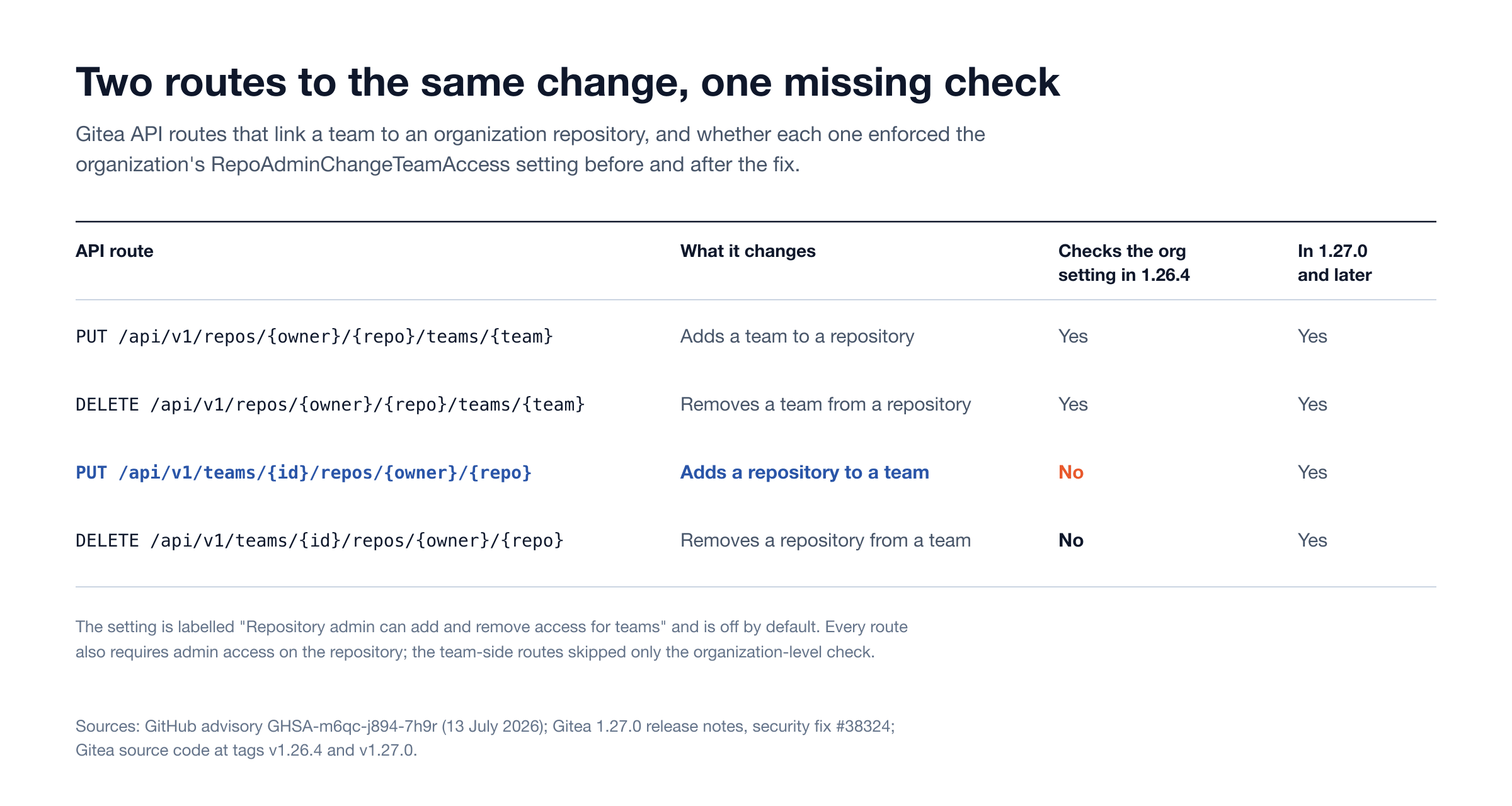
Figure 1: The two repository-side routes enforced the organization setting in 1.26.4; the two team-side routes did not. Sources: GHSA-m6qc-j894-7h9r, Gitea 1.27.0 release notes and Gitea's source code at the v1.26.4 and v1.27.0 tags.
The reporter's advisory also flagged that the matching removal route "likely has the same gap". Gitea's fix, pull request #38324 ("harden access checks and migration validation", listed under SECURITY in the 1.27.0 changelog), adds the same organization-level check to both the add and the remove handlers on the team side.
Who is affected
Question | Answer |
|---|---|
Product | Gitea, the self-hosted Git service (Go module |
Affected versions | 1.26.4 and earlier |
Fixed version | 1.27.0 and later |
Severity | High (Gitea's rating); CWE-862 Missing Authorization |
Who can trigger it | An authenticated account that is admin on an organization repository and a member of a team in that organization |
Most exposed setups | Organizations that keep |
Not meaningfully changed | Organizations that already turned the setting on, because repository admins were allowed to change team access anyway |
The CVE record adds a second severity view. CISA's enrichment on CVE-2026-58433 scores it 9.1 (critical) under CVSS 3.1 with "privileges required: none", and its SSVC entry records exploitation as "poc" (the advisory itself includes a proof of concept). The advisory's own prerequisites are an authenticated account with repository admin and team membership, so rank it against who in your organization actually holds that combination. NVD lists the record as deferred, with no NVD score of its own.
How to tell whether you are exposed
1. Check the version. The Site Administration dashboard shows it, and the API's GET /api/v1/version returns it. Anything at 1.26.4 or below is vulnerable. Gitea did not publish a 1.26.5; according to the GitHub releases list, 1.26.4 (21 June 2026) was the last 1.26 release, so the fix requires moving to the 1.27 line or later.
2. Check the organization setting. In each organization's settings, look at "Repository admin can add and remove access for teams". If it is off (the default), you were relying on a control that one route did not enforce.
3. Find the accounts that could have used it. List every non-owner who holds admin on an organization repository (GET /api/v1/repos/{owner}/{repo}/collaborators shows collaborator permissions) and cross-reference them with team membership (GET /api/v1/teams/{id}/members). Pay particular attention to external contributors and service accounts.
4. Review the current team-to-repository links. For each team, list its repositories in the web UI (Teams, then Repositories) or with GET /api/v1/teams/{id}/repos. Compare against what organization owners intended. A team with write or admin access attached to a private repository nobody remembers granting is the finding to chase.
5. Look for who made the change. The Gitea 1.27.0 release notes list no audit log for team changes, so the evidence lives in HTTP logs. Gitea's own access log is off by default (logger.access.MODE is empty in the example configuration); when enabled, its NCSA format records the user identity, method, path and status. Search your reverse-proxy or Gitea access logs for successful PUT and DELETE requests to /api/v1/teams/<id>/repos/ paths, and check each identity against your organization owners. A non-owner on that list, with the setting off, is a bypass.
How to fix it
Upgrade to Gitea 1.27.0 or later. The 1.27.0 announcement says the release "ships a large number of security fixes, so we strongly recommend upgrading as soon as possible", and it fixes several other CVEs alongside this one. At the time of writing, the newest releases on GitHub are 1.27.3 (29 August 2026) and 28.2.0 (18 October 2026). Move to the newest release your upgrade path supports, and confirm the running version from the instance after restart, not from the package you queued.
Then repeat steps 3 to 5. Patching closes the route; it does not remove a team link that was already created. Remove links you did not intend, and record why each remaining link exists.
Interim mitigations if the upgrade has to wait
Block the team-side write routes at the edge. Deny
PUTandDELETEon/api/v1/teams/*/repos/*at your reverse proxy, keepingGETopen. Organization owners can still manage team access through the web UI or the repository-side route, which enforces the setting. Check first that no owner automation depends on the team-side route.Shrink the population that can use it. Give external collaborators Write instead of Admin where they do not need repository settings, and remove team memberships from accounts that only need one repository.
Watch the logs daily for the requests described in step 5 until the upgrade lands.
Why scanners miss bugs like this
This is an authorization-parity bug: two routes perform the same state change, and only one of them enforces the policy. Nothing about the vulnerable request looks wrong. It is authenticated, well formed and returns a normal success response. No payload, error message or signature gives it away, which is why vulnerability scanners and generic dynamic testing pass over it.
Finding it requires a different question: "for this action, is every route that can perform it guarded by the same rule, for every role, under every policy setting?" Answering that means modelling the application's roles (organization owner, team member, repository admin, outside collaborator), enumerating every route that reaches the same state, toggling the policy settings, and comparing outcomes route by route. The advisory text says as much: the second, correctly guarded route "is how I noticed the gap."
The same shape appears well beyond Gitea: a mobile API that skips a check the web API enforces, a v1 endpoint left alongside a hardened v2, a bulk-update route that bypasses per-object ownership checks. Our measurement of 3,806 GitHub Advisory Database fix commits found that access control fixes change a median of 25 code lines once tests, documentation and lockfiles are set aside, about the same as injection fixes at 23. Here, Gitea added one shared check to two handlers. The hard part is finding the gap.
This is the class Snipe is built to hunt: broken authorization, insecure direct object references and business logic flaws, the classes where generic AI scanners stop short. Snipe was trained on 6,000+ HackerOne Hacktivity disclosure reports and on Stingrai's penetration testers' methodology. It tests authenticated across roles, reviews source code when it is provided, and generates AutoFix pull requests for confirmed vulnerabilities. CVE-2026-58433 is an open-source example of what that looks like in practice.
Disclosure timeline
Date (2026) | Event | Source |
|---|---|---|
30 June | CVE-2026-58433 reserved by Gitea as CVE Numbering Authority | CVE record |
10 July | Fix #38324 merged to main and backported to the 1.27 release branch (#38400) | Gitea pull requests |
12 July | Gitea's 1.27.0 announcement, listing CVE-2026-58433 as fixed by #38324 | |
13 July | Gitea 1.27.0 published on GitHub; GHSA-m6qc-j894-7h9r published | |
13 August | CVE record published | |
14 August | CISA adds its CVSS 3.1 and SSVC enrichment | CVE record |
Test your own applications for authorization gaps
Stingrai is a global CREST-accredited penetration testing services company founded in Toronto, Canada in 2021, trusted by companies from startups to enterprises to meet audit requirements for SOC 2, ISO 27001, CMMC, PCI DSS and HIPAA. OSCE³, OSWE, OSEP, CREST CRT certified penetration testers, who are also world-class security researchers and bug bounty hunters. Choose from fully human-led or hybrid (AI agents plus human penetration testers) engagements across web, API, mobile, AI and LLM, cloud, network, Active Directory and social engineering penetration tests and red team engagements.
For a web application, two fixed-price packages point Snipe at the authorization, IDOR and business logic classes behind this bug. Each covers one web application and associated APIs, and each is available as a one-time test or a 12-month continuous plan (pricing):
Autonomous Pentest: Snipe alone, US$3,000 one-time or US$650 per month on a 12-month plan. Delivers a pentest report.
Hybrid Pentest: Snipe and Stingrai's certified penetration testers testing together throughout, US$6,800 one-time or US$1,275 per month on a 12-month plan. Includes a human-validated report and an attestation letter for SOC 2, HIPAA, PCI DSS and similar audits.
Larger scopes, such as a self-hosted developer platform like Gitea together with the cloud and network around it, run as human-led engagements with two named testers; the application layer follows Stingrai's web application penetration testing methodology. Confirmed findings appear in the portal with a proof of concept as they are found, and retesting of fixes is included.
Frequently Asked Questions
What is CVE-2026-58433?
CVE-2026-58433 (GHSA-m6qc-j894-7h9r) is a high-severity missing-authorization flaw (CWE-862) in Gitea 1.26.4 and earlier. The team-side API route that adds a repository to a team ignored the organization's RepoAdminChangeTeamAccess setting, so a non-owner with admin on one repository could grant a whole team access to it. Gitea fixed it in 1.27.0.
Which Gitea versions are affected, and which version fixes it?
Gitea 1.26.4 and earlier are affected. Version 1.27.0, released on 13 July 2026, is the first fixed release, and there is no 1.26.x patch. Upgrade to 1.27.0 or the newest release your upgrade path supports.
Who found CVE-2026-58433?
Snipe, Stingrai's autonomous AI agent for web applications and their APIs, found the vulnerability. Stingrai Senior Penetration Tester Victor Villar validated the finding and reported it to Gitea. The GitHub advisory credits two reporters: Victor Villar (GitHub user chucrutis) and de3erve.
How do I check whether my Gitea instance was abused?
Confirm the version, check whether "Repository admin can add and remove access for teams" is off, list non-owners who hold repository admin and also belong to a team, and review every team's repository list for links nobody intended. Then search reverse-proxy or Gitea access logs for successful PUT and DELETE requests to team-side repository routes made by non-owners.
Is there a workaround if I cannot upgrade yet?
Block PUT and DELETE requests to the team-side repository routes at your reverse proxy while keeping GET open, since owners can still manage team access through the web UI or the repository-side route. Also reduce per-repository admin grants and watch the access logs until the upgrade is done.
Why do scanners miss authorization bugs like this?
The vulnerable request is authenticated, well formed and returns a normal success response, so there is no error or signature to detect. Finding it means comparing every route that performs the same action, for every role and policy setting, which is what authorization-focused testing does.
Related reading
API authorization test matrix: what a buyer should ask to see
How big is an authorization fix? Patch size by weakness family
Self-managed GitLab penetration testing: enterprise scope guide
AI-attributed CVEs of 2026: a tracker with verified vendor credits
Who found the bug? Why the CVE record cannot say "an AI did it"
References
Talk to Stingrai
Want to know whether your own application has two routes to the same change? Get a quote or book a discovery call to scope an authorization-focused test of one web application and associated APIs, or a wider human-led engagement.