



A Microsoft Fabric OneLake shortcut points to data at another storage location without becoming the target itself. Microsoft distinguishes the place where the shortcut appears from the target path it references. It also documents different authentication modes for same-tenant, cross-tenant and external shortcuts. A data platform buyer should therefore specify the exact shortcut and query path before commissioning a security assessment. Microsoft Learn, OneLake shortcuts Microsoft Learn, OneLake shortcut security
Quick answer. Test a OneLake shortcut by naming the consumer workspace and item, the target path, the connection identity, the OneLake security roles, and the engine that reads the data. Run allowed and denied cases for representative users against synthetic tables or folders. Stingrai can scope a human-led cloud and application/API assessment around the customer-owned Fabric and connected storage boundaries.
The procurement question is simple to state but easy to answer badly: can a user or workload reach data through the shortcut that the business intended to keep out of reach? A broad workspace screenshot cannot answer it. OneLake access can combine Fabric workspace and item permissions, OneLake data roles, the permissions of a source or connection identity, and engine-specific rules. The test should show where the decision occurred and what a neighboring unauthorized user observed.
Define the exact shortcut transaction
Before requesting bids, have the data platform owner list each shortcut to be assessed. For each, name its type, consumer workspace, Fabric item, shortcut path, target path, source owner, connection and authentication mode. Then list the ways users reach it: OneLake API, Spark, SQL analytics endpoint, DirectLake semantic model or another approved route. Microsoft describes shortcuts as independent objects that can appear as folders in OneLake, and notes that Fabric workloads and services with OneLake access can use them. Microsoft Learn, OneLake shortcuts
The same logical data can be read through more than one route. A result from Spark does not automatically establish the result from a delegated SQL analytics endpoint. A workspace Viewer and a workspace Contributor have different effective privileges. A shortcut to another OneLake item may pass the caller's identity through, while an external shortcut uses a connection credential. These distinctions make a generic “Fabric pentest” line item hard to compare. The SOW should say which routes, roles and target types are included.
Inventory field | Example of what the buyer should supply | Why it matters |
|---|---|---|
Shortcut path | Consumer lakehouse and folder or table path | Identifies what the user can discover and access |
Target path | Producer OneLake item or external storage path | Identifies the actual data owner and source control |
Authentication mode | Passthrough or delegated | Determines which identity reaches the target |
Consumer roles | Viewer, item reader, Contributor and approved exceptions | Defines expected allowed and denied people |
OneLake roles | Table or folder grants, with row and column rules by producer or consumer side | Defines the data each reader may see on paths that enforce those roles |
Query path | Spark, API, SQL endpoint or semantic model mode | Determines where an engine may apply identity and data rules |
Test data | Synthetic rows and folders with distinct entitlements | Lets the provider prove decisions without exposing sensitive data |
The buyer owns the expected outcome. Write it in words before the test starts: “A viewer assigned to the finance subset may read only the synthetic finance table through this shortcut,” and “a viewer in another department may not read it.” The provider then identifies the permission and query route that made each result. That is more useful than a report that merely lists roles found in the workspace.
Separate shortcut creation from data access
Microsoft says creating a shortcut requires write permission on the Fabric item where the shortcut is placed and read access to the target. It documents separate permission combinations for reading and writing through the shortcut. A security test should therefore distinguish who can create or replace a shortcut from who can read its target, and who can write through it. Microsoft Learn, OneLake shortcut security
This distinction matters during a rollout. A platform administrator may safely create a cross-workspace shortcut and share a narrow read path with analysts. If an ordinary maker can replace the shortcut target or grant a broader data role, the user's effective view may change even when the consuming report or notebook has not been edited. Ask the tester to identify which principals can create, update, delete and read the shortcut in the customer-owned test environment. Changes should be made only to a synthetic shortcut approved in the rules of engagement.
Do not confuse item Read permission with access to underlying data. Microsoft's Fabric permission model says sharing an item grants Read by default, but item Read does not by itself permit direct access to underlying SQL or OneLake data. OneLake roles and other compute permissions can be needed. Microsoft Learn, Fabric permission model A denied query from a Viewer may be correct, even if the person can see a report or lakehouse item in the portal. The test report should distinguish metadata visibility from actual table or file access.
Ask which identity reaches the target
Microsoft documents two shortcut authentication models: passthrough and delegated. Same-tenant OneLake-to-OneLake shortcuts can use either, with passthrough the default. Cross-tenant OneLake-to-OneLake shortcuts and shortcuts to external sources use delegated authentication. In passthrough mode, the caller's identity is sent to the target system. In delegated mode, an intermediate credential, such as an organizational account, service principal or account key, accesses the target. Microsoft Learn, OneLake shortcut security
For a same-tenant passthrough shortcut, test the intersection of the consumer path and the target path with an entitled and a denied synthetic user. Microsoft states that the most restrictive permissions at the shortcut and target paths govern ordinary shortcut access. A buyer should ask for evidence from both sides of the path, not just a screenshot of the consumer workspace. Microsoft Learn, OneLake shortcut security
For a delegated shortcut, record the configured connection principal and the permissions it has on the source. Then test what each consumer sees through OneLake security on the shortcut. A connection with broad source access does not mean every consumer is meant to receive broad access. Microsoft says delegated shortcuts can have OneLake security roles defined for them. It also says row-level security can be set on the producer side, but not the consumer side, of a delegated shortcut; column-level security can be set on both. Microsoft Learn, OneLake shortcut security
For a cross-tenant OneLake shortcut, Microsoft says the configured identity must be in the producer tenant and the shortcut is delegated. The buyer should name both tenant owners and obtain written authorization for the test accounts in each. A failed cross-tenant query might be caused by source role assignment, consumer permissions or an expired connection. The report should identify the actual denial rather than treating every failure as evidence of a secure design. Microsoft Learn, Create a cross-tenant OneLake shortcut
For an external source such as a customer-owned cloud storage account, the shortcut uses delegated authentication. The SOW should include the source account owner and the scope of any cloud credential being used. Test a permitted object and a denied neighboring object with synthetic content, then verify the corresponding OneLake role behavior on the consumer side. Do not infer that a storage account policy was tested merely because a Fabric query returned data.
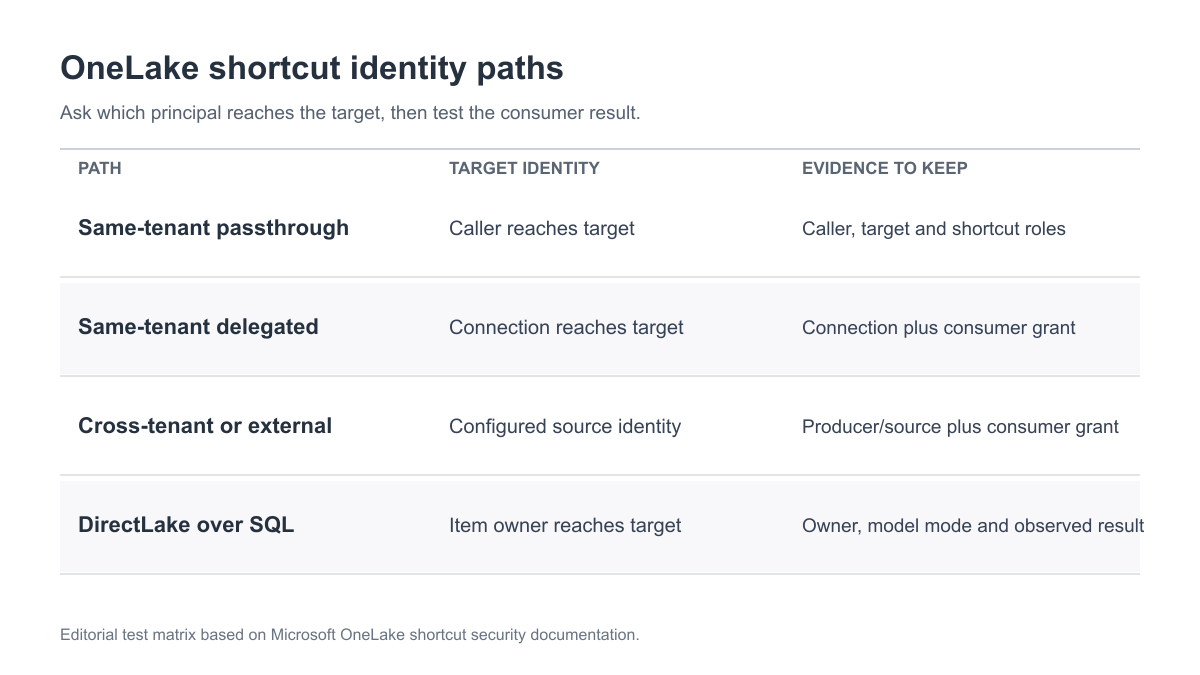
Figure 1: Four query paths a buyer can put into a test matrix. This is an editorial model of the identity and data decisions described in Microsoft's OneLake shortcut security documentation. Microsoft Learn, OneLake shortcut security.
Test workspace roles and OneLake roles separately
Microsoft describes Admin, Member, Contributor and Viewer as Fabric workspace roles. Its shortcut security guide says OneLake security roles do not restrict shortcut data access for Admins, Members and Contributors in the same way they do for Viewers or users with item Read. Those elevated users still need access to the shortcut and target paths. Microsoft Learn, Fabric permission model Microsoft Learn, OneLake shortcut security
A useful test set includes a Viewer with a narrow OneLake role, a Viewer without that role, and an elevated workspace user whose access is intentionally broader. The buyer should not classify the elevated user's expected access as a vulnerability after the fact. Decide whether that role assignment is an acceptable business privilege, then verify the observed data. If a reporting team requires a narrow dataset, granting Contributor merely to solve a query failure may erase the boundary the project was trying to preserve.
OneLake roles can grant access to selected tables or folders, and Microsoft documents row-level and column-level rules on tables. It also says its roles are grant-only rather than deny rules. Microsoft Learn, How OneLake security controls data access The test should capture the specific grant and the synthetic rows or columns expected to appear. A user who is denied one table may still have another role granting it. The provider should report effective access across the relevant role assignments, not treat a single missing role as proof of denial.
Separate DirectLake over SQL from a delegated SQL endpoint
Microsoft's shortcut security guide says that Power BI semantic models using DirectLake over SQL and T-SQL engines configured for delegated identity use the item owner's identity at the shortcut target. That guide says OneLake roles then filter what the end user can see. Permissions configured directly for the end user at the target are not the target-side check for those routes. Microsoft Learn, OneLake shortcut security
Microsoft's more specific SQL analytics endpoint troubleshooting guide, however, says that an endpoint in delegated identity mode does not honor OneLake security roles. It tells owners to enforce the intended restrictions at the SQL layer with RLS, CLS, DDM or GRANT/REVOKE, or use user identity mode so OneLake rules are evaluated. These two Microsoft pages differ as written. A buyer should not assume OneLake-role filtering for a delegated SQL endpoint from the broader shortcut guide. Microsoft Learn, Troubleshoot OneLake security for SQL analytics endpoints
Treat a DirectLake over SQL semantic model and a delegated SQL analytics endpoint as separate test cases. Record the item owner and target grant for each. For DirectLake over SQL, record the model mode and test the end user's intended OneLake-role result as described in the shortcut guide. For a delegated SQL endpoint, record its access mode and SQL-layer permissions or policies, then test the same synthetic allowed and denied rows through that endpoint. Compare with a direct OneLake API or Spark read if useful, but do not treat that comparison as proof that the SQL path enforces the same rule.
Microsoft's SQL analytics troubleshooting guidance also describes a design limit: a delegated-mode shortcut can be blocked when source tables have OneLake row, column or object-level rules. The assessment should record this as an observed compatibility or design decision, not automatically as a security finding. A team may choose user identity mode or an explicitly reviewed consumer-side policy depending on its data architecture. The provider should not try to disable source security merely to make a test pass. Microsoft Learn, Troubleshoot OneLake security for SQL analytics endpoints
Turn the architecture into a small evidence matrix
The buyer does not need every possible Fabric permission combination in one engagement. It needs the combinations that govern the business data being shared. Create a matrix before testing, and add one neighboring denied case for each allowed path. The matrix below is a procurement template, not a claim that Microsoft requires an independent test of each row.
Path | Expected allowed result | Neighboring denied result | Evidence to keep |
|---|---|---|---|
Same-tenant passthrough | Entitled Viewer reads selected synthetic table through shortcut | Viewer without target grant cannot read it | Consumer role, target role, query result |
Delegated same-tenant | Authorized consumer reads only the subset granted on shortcut | Consumer outside subset cannot use connection privilege to read it | Connection identity, shortcut role, result |
Cross-tenant delegated | Approved consumer reaches producer-owned test data | Unapproved consumer cannot reach it | Producer identity/role and consumer decision |
External delegated | Approved user reads permitted object through connection | Neighboring object or user is denied | External credential scope and OneLake role result |
DirectLake over SQL | Model returns intended synthetic rows | User outside the intended role sees no protected rows | Model mode, item owner, OneLake role and result |
Delegated SQL analytics endpoint | SQL query returns intended synthetic rows | User without SQL-layer access sees no protected rows | Endpoint mode, item owner, SQL policy or grant and result |
Each row should record the exact item and dataset rather than a generic “lakehouse.” If the target is a third-party managed storage account, document its separate authorization. If a report consumes the same data through a semantic model, include the model's identity mode or put that route explicitly out of scope. “Not tested” is an acceptable outcome where the buyer chose a narrow engagement; it should never be reported as a pass.
The evidence packet should contain the shortcut and target path, the relevant workspace and item permissions, the connection identity where one exists, the applicable OneLake roles or SQL-layer controls, the query engine mode and a sanitized result for each allowed and denied case. A named data owner should approve the expected answers before the provider runs them. This avoids arguing over whether a successful query was intended after a tester has already seen data.
Set safe rules of engagement for data-platform testing
Use synthetic tables, folders and principals in a customer-owned workspace that reproduces the permission model to be deployed. The rules of engagement should identify the Fabric tenant and workspaces, source accounts, allowed test users, query routes, request budget, monitored contacts and stop condition. If a source belongs to another organization, obtain that owner's authorization before any test traffic reaches it. Do not export production records to demonstrate a permission problem.
Start with access reviews and low-impact reads. A write-path test is appropriate only when the buyer explicitly includes it and supplies a synthetic target that can be safely changed. Microsoft separately documents permission requirements for writing through a shortcut; a read-only assessment cannot conclude that write access is constrained. Microsoft Learn, OneLake shortcut security
The provider should also state how it will handle screenshots, role exports and query results. A report can prove a row- or column-level failure with marker values and a redacted count rather than a copy of sensitive data. Access to the test workspace and evidence repository should be removed at the agreed time. This operational discipline matters because a data-platform report may contain more information about locations and permissions than the final business users should see.
Compare quotes by trust edge, not workspace count
A useful quote names the shortcut types, target systems, identity modes and query engines in scope. Testing five shortcuts with the same permission model may require less distinct work than testing two shortcuts that span a cross-tenant producer, an external cloud account and a delegated SQL endpoint. Ask each vendor to price the same matrix of user personas and allowed and denied cases. That gives procurement a basis to compare scope, rather than comparing a flat “Fabric security assessment” line item with an entirely different engagement.
The SOW should specify design review, controlled execution, evidence, remediation support and retest. It should name the cloud account or API owner if an external source is involved. Ask who will validate OneLake role assignments and who will validate source storage or database permissions. The same person may not own both. A finding that the connection identity is too broad belongs to the source or platform owner; a finding that an unintended Viewer received data through a shortcut may belong to the Fabric item owner.
After remediation, rerun the exact path that failed and one valid path that must continue to work. If a role was narrowed, recheck the denied user and the intended reader. If the engine mode or item owner changed, rerun the semantic model or SQL endpoint query rather than only a direct API read. If a delegated SQL endpoint was changed, retest its SQL-layer policy through that endpoint. If a shortcut was replaced, verify its new target and delete the old test object. This is how a retest becomes evidence of the changed control instead of a general statement that the issue appears fixed.
Where Stingrai fits
Stingrai is a CREST-accredited penetration testing service provider. Its cloud penetration testing can examine IAM and connected storage boundaries, while API testing can examine customer-owned application access to data. A human-led engagement can follow an approved OneLake shortcut from consumer identity through Fabric permissions to a synthetic target, documenting the exact authorization result and a retest. The SOW should state whether external cloud accounts, semantic models, SQL endpoints and write paths are included.
A one-time assessment can support a launch or acquisition of a new data platform. An annual or continuous program can retest changed shortcuts, connection identities and role assignments. The price is quoted for the selected data paths and test environment; the Get a Quote form is the right place to share a sanitized inventory and rollout timetable.
Frequently Asked Questions
What should a OneLake shortcut penetration test cover?
It should verify the consumer path, target path, workspace and item permissions, authentication mode, OneLake roles and query engine used to read the data. Require allowed and denied cases on synthetic tables or folders, with evidence of the decision at each boundary.
Do OneLake shortcuts copy the target data?
No. Microsoft describes a shortcut as a pointer to another storage location. The security test should follow access through the pointer to the target and should also check the permissions on the shortcut path.
Does a same-tenant shortcut always use the reader's identity?
No. Microsoft says same-tenant OneLake-to-OneLake shortcuts can use passthrough or delegated authentication. Identify the configured mode and test the corresponding user or connection identity at the target.
What changes for a cross-tenant OneLake shortcut?
Microsoft says cross-tenant OneLake shortcuts use delegated authentication with a configured identity in the producer tenant. Test the producer identity's grants and the consumer's OneLake roles with accounts authorized by both tenant owners.
Can a Viewer with item Read see every table through a shortcut?
No. Item Read alone does not grant underlying OneLake data access. A Viewer or item reader also needs the applicable OneLake security grant for the data and the shortcut path, subject to the documented target and engine rules.
Why do DirectLake over SQL and delegated SQL endpoints need separate tests?
Microsoft's shortcut guide describes item-owner target access with OneLake-role filtering for DirectLake over SQL. Its SQL analytics endpoint troubleshooting guide says delegated endpoint mode does not honor OneLake roles and calls for SQL-layer controls. Test each configured path with synthetic allowed and denied results.
What evidence belongs in the final report?
Record the shortcut and target paths, effective roles, connection or item-owner identity, query mode, expected and observed allowed and denied results, remediation owner and the precise retest.
Related reading
References
Talk to Stingrai
Share a sanitized shortcut inventory through Get a Quote, or book a free discovery call to agree on the identities, query routes and targets to test.