



Epic's app registration process assigns separate non-production and production client IDs and requires customer-specific steps before an app can be used in an Epic community member environment. A security assessment before go-live should follow those actual deployment boundaries. It should examine the application the developer owns, the SMART OAuth flow it implements, the patient or clinician identity it maps, and the configuration the customer will activate. A successful demonstration against example data is useful integration evidence, but it is not evidence that the production app keeps users, patients and health systems apart.
Quick answer. Scope an Epic SMART on FHIR app security assessment around developer-owned launch and callback endpoints, sessions, token storage, granted scopes, patient or provider identity, tenant isolation, separate client IDs and customer activation records. Epic's current terms say its website and Materials are not intended and should not be used for security testing, so do not target its public sandbox. Stingrai's human-led web and API penetration testing can assess the app-owned web application and associated APIs, with an integrated customer environment only when the necessary customer and Epic approvals and written rules of engagement exist.
This guide is for digital health product owners, health system implementation leads, security teams and procurement reviewers in Canada and the United States. Its decision is specific: what must be evidenced before an Epic-connected SMART app moves from development to an activated customer deployment? The related FHIR API penetration testing scope guide covers generic FHIR resource and server authorization across implementations. Here, the focus is the app developer's release path through Epic registration, customer download, environment configuration and go-live.
Define what the assessment may touch
The first procurement question is ownership. The developer can normally authorize an assessment of its own application code, hosting account, web front end, callback route, APIs, database, token store, administrative portal and deployment pipeline. It can provide an isolated staging instance with synthetic patients and users, or a controlled replica of the integration using simulated FHIR responses. The tester can verify that the app's controls enforce the documented policy at those surfaces without directing security tests at an Epic-hosted endpoint.
Epic's open.epic Terms of Use, last updated October 31, 2025, draw a sharp distinction. The terms describe a testing sandbox for sample or synthetic data, but also state that the website and Materials are not intended and should not be used for performance, scalability or security testing. Those Materials include testing sandboxes and documentation under the terms' definition. Routine functional development against the public sandbox does not turn it into an authorized penetration testing target. A statement of work should name the public sandbox and Epic-controlled services as excluded from security testing.
The same terms say direct access to Epic software, including a community member's system, can be granted only with approval from both the community member and Epic. If a customer requests integrated security work, obtain the applicable approvals, identify the precise customer environment and endpoints, and record the agreed operations, data and time window before testing. A customer purchase order alone should not be treated as permission to probe every Epic service the app can reach. Where authorization cannot be established, test the developer-owned side and record the integrated boundary as an exclusion.
Use a boundary sheet with four columns: asset, owner, permitted activity and evidence location. The developer's callback service may be in scope for authenticated security testing. A customer-controlled non-production environment may be in scope only under written authorization. Epic's public sandbox may be used for ordinary integration development under its terms, but not as a security test target. An Epic production environment is a separate approval decision, with live patient data and care workflows that require a much narrower plan. The final report should preserve these distinctions so a later reviewer does not mistake a developer-side finding for a finding in Epic software.
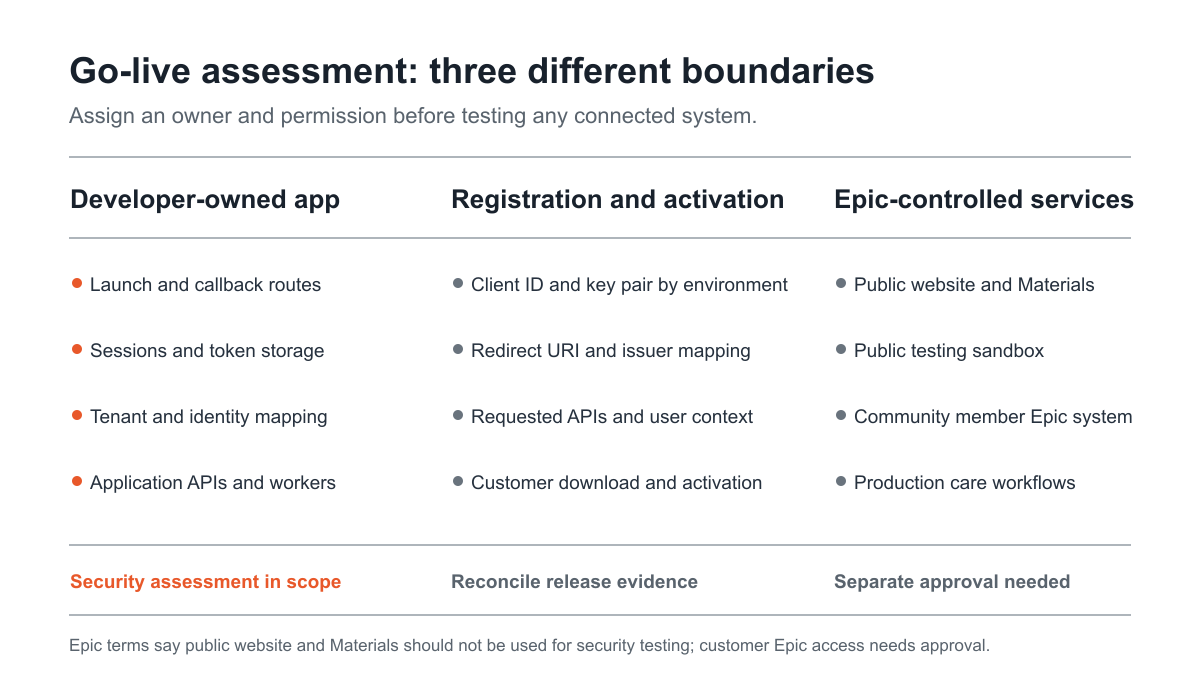
Figure 1: The owner and authorization boundaries for a go-live assessment. Source: Epic, open.epic Terms of Use; Epic, App Creation & Request Process Overview.
Reconstruct the real app path before testing
Epic's OAuth 2.0 tutorial describes two user-facing paths. In a standalone launch, the app initiates an Epic login. In an EHR launch, Epic initiates the app launch and supplies context, including a patient when configured. The app may also have a backend component for operations without direct end-user interaction. These are different trust paths, even when they share a codebase. The scope should state which ones will ship for each customer and which ones are disabled.
Ask the product owner for a deployment drawing showing the entry point, FHIR base URL, authorization server, launch route, callback route, app session service, token store, tenant resolver, downstream app APIs and any queue or background worker. Mark which identifiers arrive from Epic, which are generated by the app and which are configured by the customer. This drawing is not decorative. It tells the tester where the app accepts identity or clinical context and which component must reject a mismatched value.
In an EHR launch, the browser reaches the app with iss and launch parameters. Epic's EHR launch documentation says iss identifies the FHIR endpoint and recommends an allowlist of known values. The app should use its configured customer-to-issuer mapping, rather than treating an arbitrary inbound issuer as a trusted health system. The test can examine the app-owned handler's behavior using controlled, synthetic requests. It need not probe the issuer itself to determine whether the app accepts an unrecognized tenant or binds a launch to the wrong customer.
The callback is another boundary. HL7 SMART App Launch 2.2.0 specifies a pre-registered redirect URI, state tied to the user's session and PKCE parameters in the authorization flow. The app should associate the incoming response with the session and launch that initiated it before issuing its own authenticated session. The assessment should review the app's implementation and produce redacted positive and negative evidence for this binding. It should also establish whether the application uses a server-side or client-side OAuth library, since Epic's tutorial notes that a client-side library secures the EHR connection but cannot protect an app web server by itself.
Many teams document only a happy path, then discover at cutover that the production callback, customer-specific hostname or embedded viewer differs from their development path. Add those variations to the assessment inventory before the tester begins. The point is to assess the release configuration, not an unrepresentative local demonstration. A reviewer should be able to trace a user from launch through consent, code exchange, app session creation, a permitted action, logout or expiry, and revocation handling where the product supports it.
Treat registration as a security decision
The Epic on FHIR app creation process asks for the app's consumer type, applicable APIs, default FHIR version, redirect URIs and whether it will use the confidential client profile. Those fields are security inputs. The consumer type informs the intended user context. The API selection affects what the client can request. Redirect URIs define where authorization responses can be delivered. The confidential client decision affects credential handling and refresh-token use. Freeze a copy of the approved registration values for the assessed release.
Epic assigns both production and non-production client IDs when the app is registered. Epic's deployment guidance says production servers should use the production client ID and that non-production and production environments should use separate key pairs. The assessment should compare actual deployment configuration with that intended split. A screenshot of two IDs in a registration portal is insufficient if the production application still reads a staging ID from its runtime environment or points a production callback to a test hostname.
Create an environment matrix for each customer activation. It should contain the client ID type, registered app version, FHIR base URL, launch and callback URLs, key or JWK Set URL, required API list, user context, requested SMART scopes, owner and approval status. Do not put secrets or live tokens in the matrix. Reference them by vault path or control record instead. For a cloud app serving multiple health systems, include the customer-specific routing key and the expected issuer for each tenant. For an on-premises deployment, identify which organization owns the app host, key material and update process. Both patterns need a clear answer to the same question: could non-production registration or credentials reach a production workflow?
Registration has a release consequence. Epic's process guide says an app must be marked Ready for Production before it can be used in a community member's non-production or production environment. It also says most technical changes after that point require a new app, with exceptions for adding redirect URIs and modifying JWK Set URLs. Therefore, complete the security review of app type, APIs and architecture before this registration milestone, and separately verify any later change against the actual Epic process. Do not assume that an editable field in the developer's own release dashboard changes the registered Epic client.
Customer activation adds another transition. Epic says the developer activates for non-production before production and can enter customer-specific endpoint or redirect URIs while managing a download request. The buyer should ask for a record of which organization requested the client, which environment was activated, which endpoint values were approved, and whether the app runtime uses matching values. The assessment should reconcile the registration record, customer request and deployment configuration. This is valuable even when no penetration test of Epic systems is authorized, because the mismatch can sit entirely in the developer's own configuration.
Keep patient, provider and backend identities separate
Epic's user-context guidance identifies patient, clinician or staff, and backend system contexts. A product that supports more than one context may require separate app or client registrations. The security assessment should not treat all successful logins as equivalent. For each shipped workflow, the product owner should define the expected actor, allowed action, patient relationship and data that may leave the app. Then a tester can check whether the developer-owned application preserves that distinction after OAuth completes.
A patient-facing app should tie a patient identity established in the launch or authorization response to the app account and the selected chart. A provider-facing app should tie the Epic user identity to the app's organization, role and active patient context. Neither should silently reuse a prior user's context in a shared browser, a long-running tab or a background job. The tester needs distinct synthetic identities and patients so the difference can be observed. This is about the app's own state and authorization decisions; it does not require guessing or altering records in an Epic production system.
In a multi-customer product, do not use a patient ID as a global key by itself. The app should carry the issuing health system or FHIR base URL as part of the identity and record mapping, because two organizations can use their own identifiers. The test should include at least two simulated tenants with intentionally similar local identifiers and distinct app sessions. Observe whether a customer switch, copied link, report export, background callback or cached search response ever resolves against the other tenant. The expected result must come from the app owner's documented policy, not from an assumption that the FHIR server will correct every app-side routing error.
Backend access deserves explicit review. HL7 SMART scopes distinguish patient/, user/ and system/ authorization contexts, while Epic advises using the authorizing user's OAuth token when one is available. A service-level credential may be appropriate for a genuinely background workflow, but the application then owns the logic that decides which human can trigger it and what data it returns. Ask the developer to identify every route from an end-user action to a backend worker. Assess the app's own authentication, session and authorization controls on those routes, especially where the backend has broader access than the current user.
The review should distinguish identity data from clinical context. openid and fhirUser identify an authenticated user when the request and grant support them; launch and launch/patient concern launch context; patient or user resource scopes concern data access. HL7 documents these separately. A patient in context is not, by itself, proof that a clinician may take every action on that chart. A provider identity is not, by itself, proof that a specific patient was selected. The app's own authorization layer must connect the pieces required for its workflow.
Review OAuth and session behavior on the app side
The test plan should begin with an app-owned threat model. For an EHR launch, identify where iss and launch arrive, where the authorization request is built, which callback receives the response, where the code is exchanged, and how the app session is issued. For a standalone launch, identify the app entry route and the same callback and session steps. For a backend component, identify the service identity and which app function can invoke it. This creates a testable chain without turning a general OAuth checklist into a claim that every Epic implementation behaves identically.
SMART's authorization specification requires an app to send a registered redirect URI and use state to prevent cross-site request forgery or session fixation. It also describes PKCE for the current profile. The assessment should inspect the implementation and confirm that the app binds each launch and callback to the initiating user session, rejects mismatched or stale state, and does not merge a response from one customer into another customer's session. Record the implemented SMART version and deployed Epic configuration, because a standard's current text and a particular customer's enabled capabilities may differ.
After authorization, compare requested and granted scopes. HL7 notes that the scope returned in a token response can differ from the request. A safe application should build its enabled features from the grant it actually received and the local user policy. It should not simply display a feature because a scope was requested or because the UI assumed that every customer had activated the same APIs. The assessment can use a controlled authorization stub or approved test fixtures to observe the app's response to reduced, denied and changed grants on its own side.
Token handling should be evidenced in the developer's environment. Map where access and refresh tokens are stored, which service reads them, how logs and telemetry redact them, and what happens when a session ends or a credential is rotated. For a cloud application, a tenant boundary in the token store matters as much as a role boundary in the UI. For a mobile or browser client, state which data is stored on the device and why. Epic's OAuth tutorial discusses server-side session creation and cautions that client-side OAuth libraries do not secure the app's server. An assessment should judge the actual architecture, not assume that choosing a well-known library solves session and authorization design.
Error handling is part of the security boundary. A denied authorization, missing patient context, changed issuer, expired code or insufficient grant should fail closed in the app without exposing a previous patient's data or leaving a half-authenticated session. Test these conditions against the app-owned handler with synthetic inputs. The report should show the expected and observed app behavior, with secrets and clinical content redacted. It need not include live token values or operational instructions for reaching an Epic endpoint.
Make the scope match the customer's release
One product may be configured differently for each Epic community member. Epic's process lets an organization request the app's client record and allows customer-specific settings while managing activation. A buyer should therefore ask for a release-specific assessment, not a generic letter saying the vendor tested “the Epic integration.” The evidence must identify the app build, hosting configuration, client ID type, supported launch mode, customer-specific endpoint rules and APIs in scope.
The pre-go-live review should have three views. The product view covers the common app code and shared services. The customer view covers tenant registration, expected issuer, redirect URI and activated API list for that organization. The operational view covers deployment, monitoring, rollback and incident ownership. These views can be assessed in one engagement if the rules of engagement state which systems are authorized and if the tester receives representative fixtures. They may require separate work where customer configuration or data handling materially differs.
Ask the implementation team to present an approved non-production journey before the production cutover. The journey should show that a specific customer requested and activated the client, the app uses the intended non-production ID and credentials, a synthetic patient or provider can complete the intended launch, and the app refuses an out-of-policy context. A functional journey alone does not prove security, but it prevents the tester from confusing a misconfigured integration with a control failure. The tester then checks app-owned negative cases against the same configuration, under the agreed scope.
The production cutover should have an explicit change record. Confirm that the production client ID, production key pair, production redirect URI, customer activation and production issuer mapping are all the values in the release matrix. Record who approved the mapping and when it was promoted. Verify that non-production credentials, endpoints and data are not accidentally carried into the production deployment. If the app uses a deployment template, review the template and a rendered configuration for the named customer; an abstract template may conceal an incorrect environment value.
Where live integrated testing is authorized, keep a narrow safety plan. Use approved test accounts and synthetic or agreed test records, a named customer contact, fixed hours, rate limits, stop conditions and a path for reporting unexpected clinical effects. Avoid broad scanning of Epic or patient data. If the necessary approvals are unavailable, complete the app-side assessment and clearly state that integrated behavior remains unverified. This is an honest limit, not a reason to stretch authorization.
Evidence a security reviewer can actually use
An effective report is a map of decisions, not only a vulnerability list. It should name the assessed build, app-owned domains and APIs, deployment model, launch mode, SMART and FHIR versions used, identity contexts, test accounts, synthetic fixtures, client ID type, customer activation status and exclusions. Each finding should state the expected boundary, observed behavior, impact in the app's clinical workflow, remediation and retest outcome. Sensitive tokens and patient data should be redacted from the evidence.
The release owner should be able to answer these questions from the evidence pack: Which component was assessed? Which customer configuration did it represent? Which actors and patient contexts were tested? What was the expected access rule? Did the test include denial cases as well as successful use? Were Epic-controlled endpoints excluded or separately authorized? Which findings were fixed, retested or accepted for a documented reason? A document that says only “SMART OAuth tested” leaves too much for a clinical reviewer to infer.
Include a configuration reconciliation table, even if every row passes. A useful row identifies an environment, client ID type, issuer, redirect URI, key set, activated API group, app build and owner. The table can show values in a protected appendix or use stable references where the distribution copy should not reveal internal hostnames. The point is traceability across registration, deployment and customer request. A penetration test cannot substitute for a release owner checking the production values, but it can validate the app controls that make those values safe to use.
For procurement, ask whether the vendor will provide named testers, a written rules of engagement, an architecture review, authenticated role coverage, clear exclusions, redacted technical findings, an executive summary and retesting. Ask how it handles a disputed finding involving a customer environment. These are practical contract questions because each party controls a different part of the integration. The deliverable should say when customer or Epic participation is needed and who will obtain it.
ASTP/ONC's standardized API test method concerns certification of health IT modules under § 170.315(g)(10). It is useful context for interoperability capabilities, but it is not a blanket requirement that an app vendor commission a penetration test before each Epic activation. A security assessment is a buyer's assurance decision and may support contractual, risk-management or audit evidence needs. Keep that distinction in the procurement memo so the team does not present a chosen testing practice as a regulatory mandate.
A sample statement of work for the app owner
A compact scope can start with the following paragraph: “Assess the vendor-owned SMART on FHIR web application and associated APIs at the named staging build, including EHR and standalone launch modes that will ship, OAuth callback and session handling, patient and provider identity mapping, tenant isolation, token storage, reduced-grant behavior and production configuration controls. Use synthetic identities and records. Exclude Epic's public website, public sandbox and Epic-controlled systems from security testing. Include a customer non-production environment only after documented customer and Epic approval and a separate rules of engagement.” The parties should tailor that language to the product, local agreement and authorized environment.
The scope appendix should then list assets rather than broad categories. Name the app domains, APIs, test builds, repository access if supplied, cloud accounts if supplied, mobile package if relevant, identity fixtures and integration stubs. Name the Epic-connected customer environment only if approved. Put third-party endpoints in an exclusion column unless permission is affirmative and specific. Name the authorized test data source and the person who can stop a test if a clinical workflow is affected. This avoids an ambiguous request to “pentest Epic,” which could refer to software the developer does not own.
Define acceptance criteria for the assessor's evidence. For each launch mode, request a successful authorized journey and selected negative cases that test the app's session, identity and tenant boundaries. For each customer configuration, request a comparison of intended and deployed client ID type, redirect URI, issuer and keys. For each finding, require a reproducible account of the app-owned behavior, a remediation owner and a retest result. For exclusions, require the reason and the decision maker. These criteria let a buyer compare proposals on coverage instead of counting generic test days.
The timing should follow actual release decisions. Review architecture and registration fields before the app is marked Ready for Production. Assess the deployed non-production build and the customer-specific configuration before production activation. Reconcile production values at cutover. Retest after material changes to authentication, identity routing, token handling or customer activation logic. Epic's own process limits some post-readiness technical changes, so a new registered app or customer activation may also call for a new evidence baseline. A buyer should decide the recurrence based on change and risk, not assume one report is permanent.
Where Stingrai fits
Stingrai is a CREST-accredited penetration testing company serving healthcare and other regulated organizations. Its human-led web and API work covers authenticated roles, business logic, session handling and object authorization. For an Epic-connected SMART app, the engagement can assess the developer-owned application, associated APIs and deployment boundaries using approved synthetic fixtures, then produce redacted findings and remediation evidence for the buyer's security and compliance program. The rules of engagement should record Epic and customer authorization separately wherever an integrated environment is proposed.
Stingrai assigns two named penetration testers to human-led engagements, with findings reviewed by a team lead and engagement partner. Findings are posted to the engagement portal as confirmed, and retesting of remediated findings is included. A buyer can use those delivery features to resolve app-side issues before a go-live decision. The healthcare owner still supplies the intended clinical access policy and the customer-specific activation facts. The testers can evaluate enforcement against that policy, but should not invent it.
For a smaller web application and associated APIs, ask for a scoped proposal; for a multi-tenant platform with mobile, cloud or customer-specific environments, identify each surface and authorization boundary in the quote request. Bring the client ID and activation matrix, not secrets, to the kickoff. The clearest proposal will state what is testable in the developer-owned environment, what requires separate permission and what evidence the release committee will receive.
Frequently Asked Questions
What should an Epic SMART on FHIR app security assessment cover before go-live?
It should cover the developer-owned app's SMART launch and callback handling, OAuth state and PKCE implementation, app sessions, token storage, patient or provider identity mapping, tenant isolation, separate client IDs and keys, and customer-specific activation evidence. The report should state which integrated environments were authorized and which Epic-controlled services were excluded.
Can a penetration tester use Epic's public sandbox for security testing?
No. Epic's current open.epic Terms of Use say the website and Materials should not be used for security testing. The public sandbox supports functional development with sample or synthetic data under those terms, but an app security assessment should target developer-owned systems or a separately approved customer environment.
What approval is needed to test an Epic customer environment?
Epic's terms say direct access to Epic software, including a community member's system, can be granted only with approval from both the community member and Epic. Obtain the applicable approvals and a written rules of engagement that identifies the environment, endpoints, data, test window and stop conditions before integrated testing.
Why do production and non-production client IDs need separate review?
Epic assigns both IDs at registration and says production servers should use the production client ID with separate key pairs for production and non-production. A go-live review should reconcile the registered IDs, keys, redirect URIs and issuer mappings with the deployed configuration and the customer's activation record.
Is an app marked Ready for Production already live at a customer?
No. Epic says Ready for Production is needed before the app can be used in a community member's non-production or production environment. Customer download, environment-specific configuration and activation are further steps. A release record should distinguish these statuses.
How should patient and provider identity be tested?
Use distinct synthetic patients, clinicians and app sessions to verify that the app maps the authorized user and current patient context to the intended organization and permitted action. Include tenant-switch and session-change cases on the app-owned side. Do not infer a patient's identity solely from a reused local identifier or a stale launch context.
Does ONC's standardized API certification rule require this penetration test?
No. ASTP/ONC's § 170.315(g)(10) test method addresses certification of health IT modules for standardized API capabilities. It does not create a universal per-activation penetration testing mandate for third-party SMART apps. Buyers may commission an assessment to support their own security, contract and audit evidence needs.
Related reading
References
Epic, open.epic Terms of Use, last updated October 31, 2025.
ASTP/ONC, Standardized API for Patient and Population Services test method.
Talk to Stingrai
Bring the app architecture, registered client types, customer activation matrix and proposed test boundary to Get a Quote, or book a free discovery call to scope the app-owned assessment and required approvals.