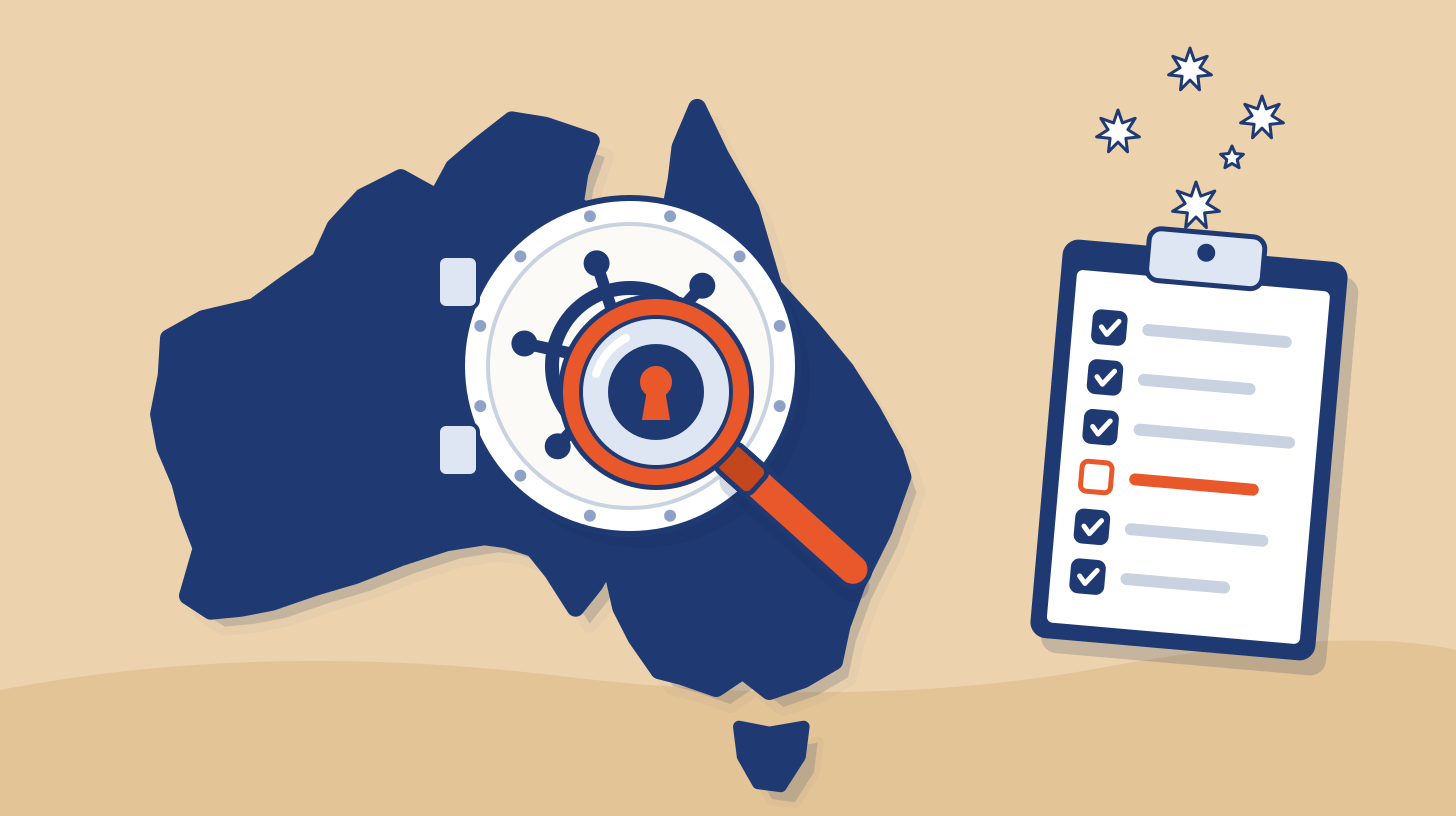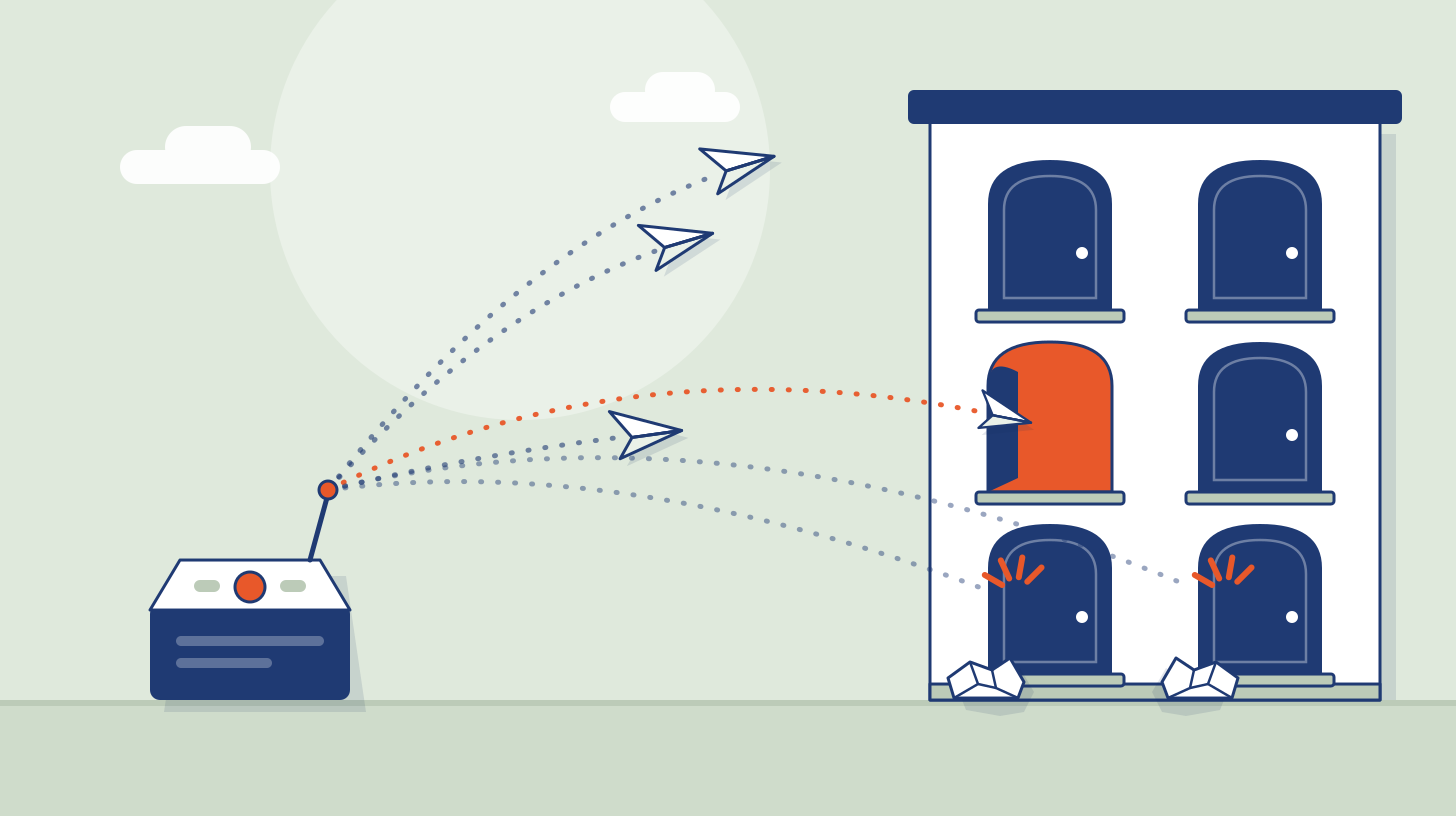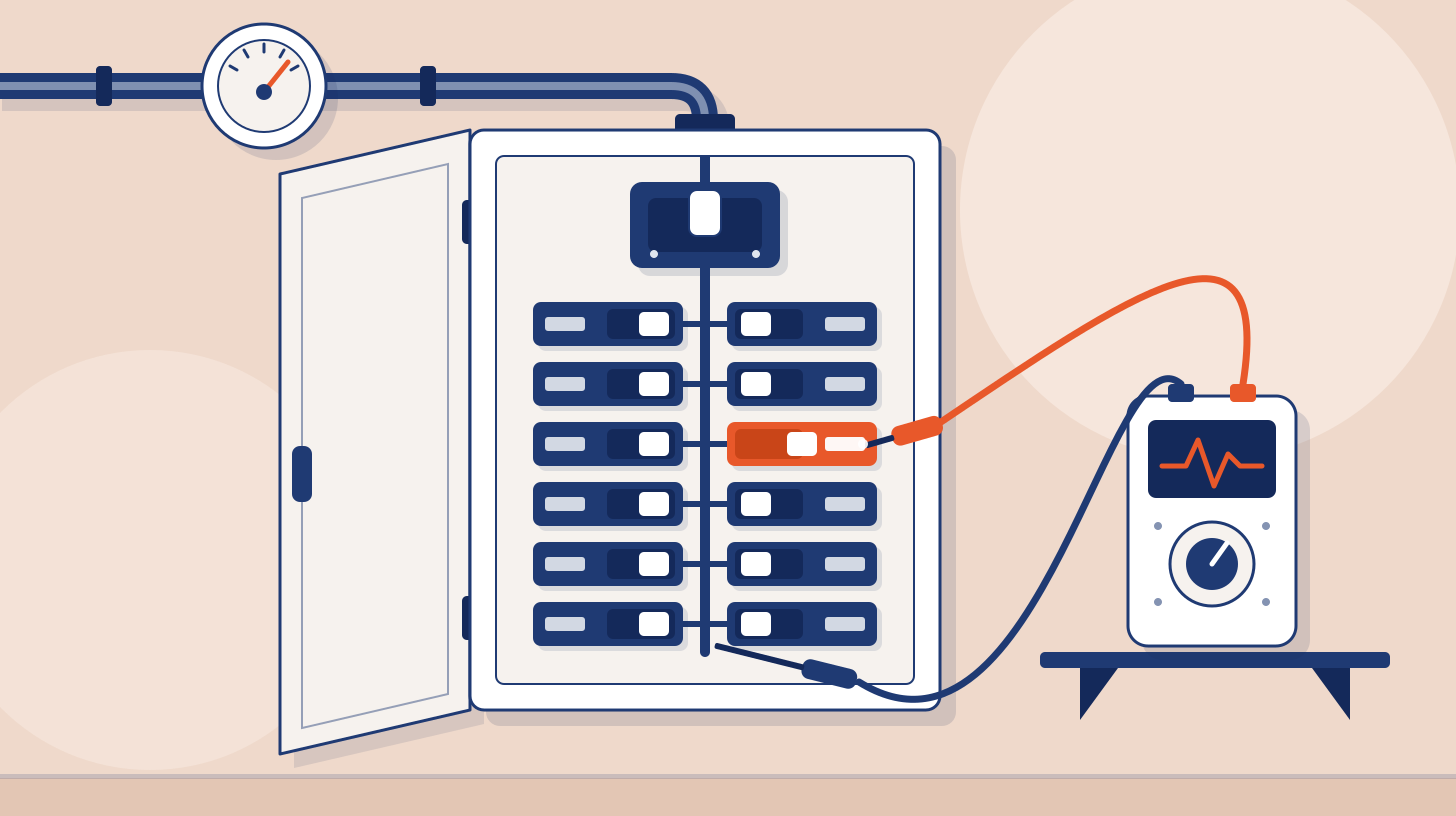





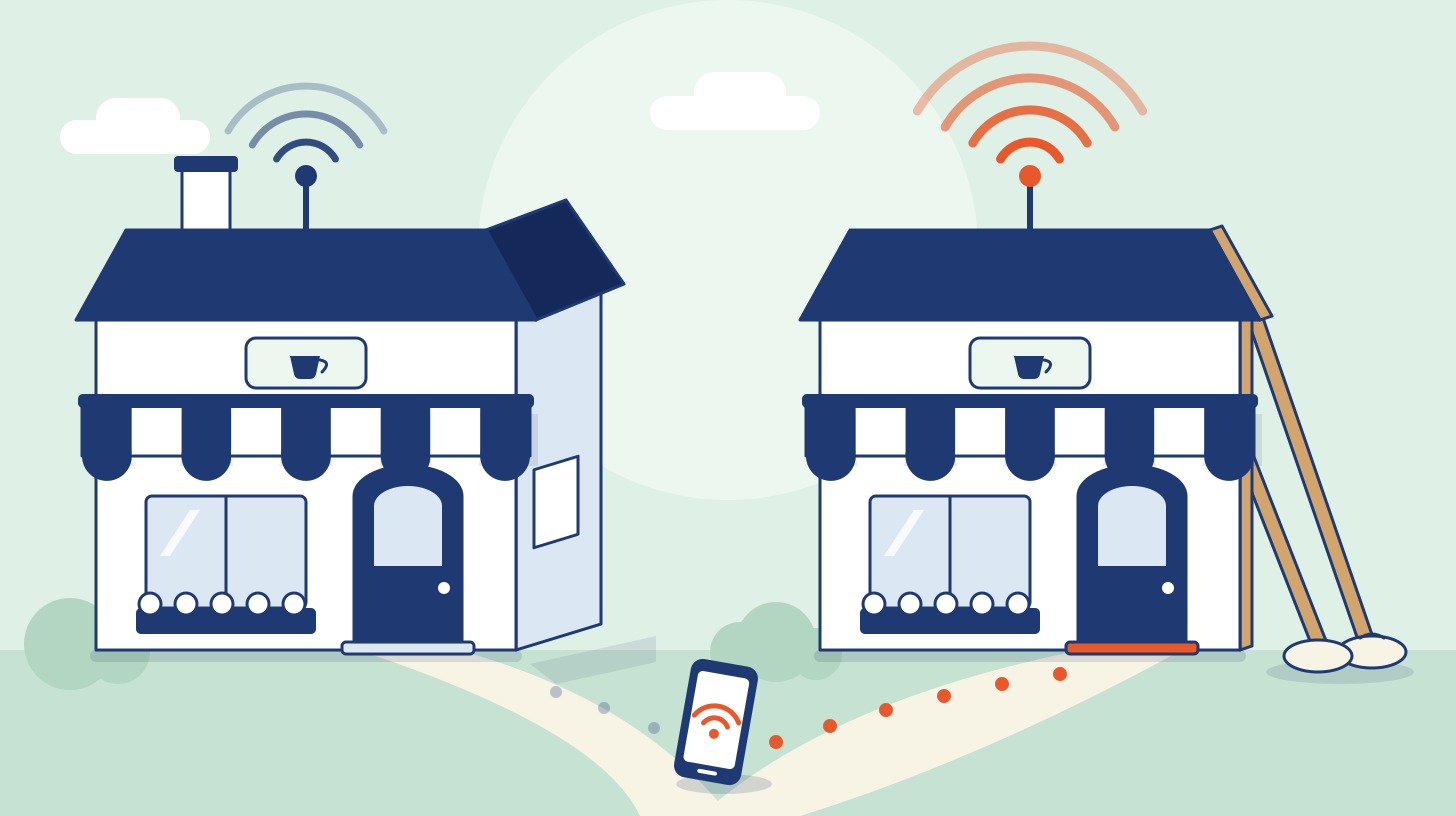
An evil twin attack is a fake Wi-Fi access point that copies the name of a network people already trust, so that phones and laptops join the attacker's network instead of the real one. Once a device is connected, the attacker can show it a fake sign-in page, collect the credentials the device offers, or read and change any traffic that is not encrypted. It is prosecuted as a crime: on 28 November 2025 the Perth District Court sentenced a 44-year-old man to seven years and four months in prison for offenses that included running evil twin networks at Australian airports and on domestic flights, according to the Australian Federal Police.
There are two kinds, and they matter to different people. The public kind (airports, cafes, hotels, captive portals) is what most people mean by the term. The enterprise kind targets company Wi-Fi that signs users in with their directory account, and it is the one a Wi-Fi security assessment is usually bought to measure. This guide covers both: how each works, the court records and research behind the risk, how a tester checks for it, how to detect it and how to fix it. It describes the attack at the level a defender needs and does not include attack commands.
Evil twin attacks at a glance
Question | Short answer |
|---|---|
What is it? | A fake access point that imitates a legitimate network's name (its SSID). MITRE ATT&CK tracks it as T1557.004, a form of adversary-in-the-middle. |
Where does it happen? | Anywhere the target's devices are in radio range: an airport gate, a hotel, a cafe, an office lobby or the parking lot outside. |
What does the attacker get? | On open networks, whatever is typed into a fake sign-in page plus any unencrypted traffic. On enterprise networks, user names and password challenge-responses from devices that do not check the server certificate. |
Why does it work? | A network name is not proof of identity. Open networks have no proof at all. Enterprise networks have one, the server certificate, and it only helps if every device checks it. |
How is it detected? | Wireless intrusion detection that sees your network name coming from a radio you do not own. Your authentication server sees nothing. |
What stops it? | Certificate-based sign-in (EAP-TLS), server certificate and name checks enforced on every device, no user prompts, and guest portals that never ask for account passwords. |
What is an evil twin attack?
An evil twin is an access point set up to look like one the victim already trusts. MITRE ATT&CK published it as sub-technique T1557.004 in version 16 on 31 October 2024 (the entry itself is dated 17 September 2024) and describes adversaries hosting Wi-Fi access points that look genuine in order to get users onto a malicious network, where they can sniff traffic, change data in transit or capture input. CISA's 2021 guidance on wireless networks describes the same thing from the user's side: an adversary gathers information about a public access point, sets up a system to impersonate it, and uses a stronger signal so that people connect to the copy.
Three terms get mixed up, and the difference decides who can see the problem:
Rogue access point: an unauthorized transmitter plugged into your own network. NIST's SP 800-153 notes that this can give an attacker a backdoor into the wired network that bypasses the firewall.
Evil twin: an imitation of your network name run on the attacker's own equipment. It never touches your network, so nothing on the wired side will find it.
Shadow access point: an unknown transmitter inside your footprint that may or may not be yours, such as a personal hotspot or a vendor device.
Our WiFi penetration testing guide covers how all three are scoped in a wireless assessment.
How an evil twin attack works
Every evil twin has the same three parts, whatever the setting.
Copy the name. A network name is broadcast in the clear and nothing stops a second radio from using it. On an open network there is nothing else to copy.
Get devices to join. Phones and laptops remember networks and rejoin them without asking. The Australian Federal Police described the device in the Perth case listening for the network names that nearby devices were asking for and answering with a matching network, which those devices then joined automatically. A stronger signal than the real access point has the same effect, and MITRE notes that attackers may also block access to the real network to push devices toward the copy.
Use the position. The attacker now sits between the device and the internet. What happens next depends on the kind of network being imitated.
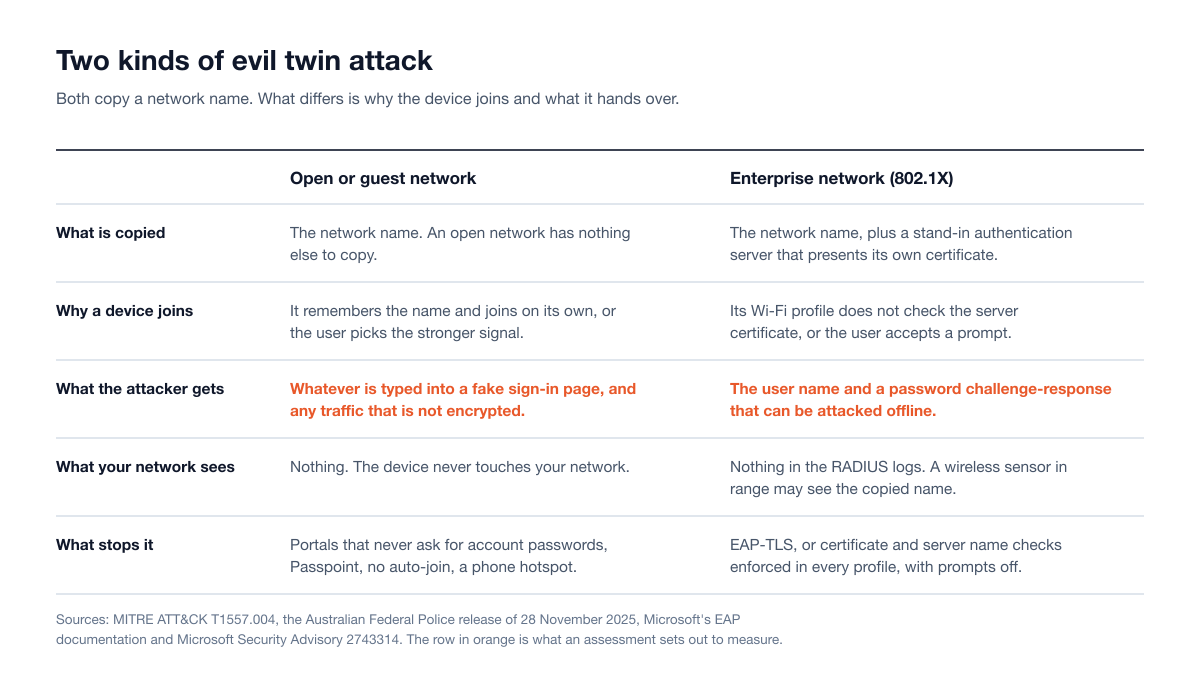
On an open or guest network, the next step is usually a fake captive portal. On an enterprise network, the device starts its normal sign-in and, if it does not check who it is talking to, sends the attacker material that can be turned back into a password.
Evil twin cases on the record: what the court and police documents say
Most writing about evil twins is hypothetical. The first record below is an evil twin prosecution. The second is a set of close access Wi-Fi operations that MITRE classifies under the same technique.
Australia, 2024 and 2025. The Australian Federal Police opened an investigation in April 2024 after an airline reported that its employees had noticed a suspicious Wi-Fi network during a domestic flight. On 19 April 2024, investigators searched a passenger's hand luggage at Perth Airport and seized a portable wireless access device, a laptop and a phone. The man, then 42, was charged in May 2024 and was due in Perth Magistrates Court on 28 June 2024 to face nine charges. According to the police, the fake networks took people to a web page that asked them to sign in with an email or social media account, and the details were saved to his device. Investigators tied the fake pages to airports in Perth, Melbourne and Adelaide and to domestic flights. He pleaded guilty, and on 28 November 2025 the Perth District Court sentenced him to seven years and four months, with parole eligibility after five years. The sentence also covered breaking into women's online accounts to steal intimate material and trying to destroy evidence.
The GRU close access teams, 2016 to 2018. On 4 October 2018 the US Department of Justice announced charges against seven officers of Russia's military intelligence agency, the GRU. The indictment alleges that when remote hacking efforts failed to capture login credentials, teams of officers traveled to where their targets were and hacked into Wi-Fi networks used by victim organizations and their staff, including hotel Wi-Fi networks. In Rio de Janeiro in August 2016, an operation against Wi-Fi networks used by anti-doping officials captured an International Olympic Committee official's user name and password. In Lausanne on 19 September 2016 the team compromised a hotel's Wi-Fi network to get into the laptop of a senior official of the Canadian Centre for Ethics in Sport. In April 2018 the team parked a rental car beside the Organisation for the Prohibition of Chemical Weapons in The Hague, with equipment in the trunk that the indictment says was capable of intercepting Wi-Fi signals and harvesting Wi-Fi user credentials, before Dutch military intelligence disrupted the operation. These are allegations, not findings of a court, and neither the indictment nor the Justice Department's release uses the words evil twin or describes an imitation network. That classification is MITRE's: MITRE ATT&CK lists the group, which it tracks as APT28, as its procedure example for the evil twin technique, citing this indictment, which lists a Wi-Fi Pineapple among the equipment the team abandoned in The Hague.
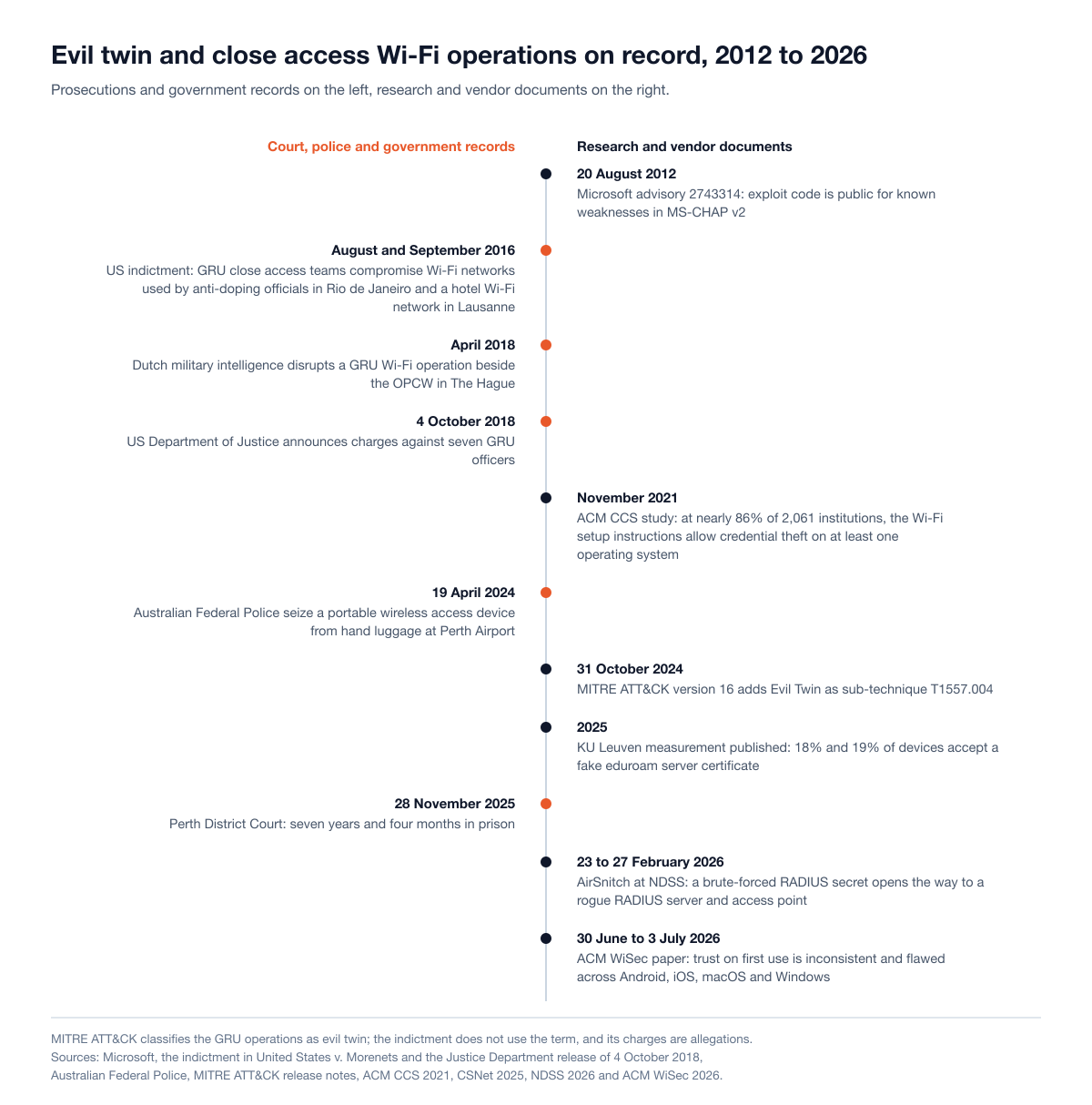
Two things stand out. Most of this happened at airports, on flights and in hotels, away from the victim organizations' premises, where no corporate wireless sensor could have seen it. The exception, a car parked beside the target's building, is the scenario an office has to plan for. And wherever the records describe a result, the Wi-Fi was a means to an end: what was taken was account credentials.
Evil twin attacks on public Wi-Fi: airports, cafes and captive portals
The risk on public Wi-Fi has changed, and it helps to be exact about how.
What encryption fixed. Reading other people's traffic on an open network used to be the main worry. Most websites and apps now encrypt their traffic, and the US Federal Trade Commission's consumer guidance, dated February 2023, says that because of the widespread use of encryption, connecting through a public Wi-Fi network is "usually safe".
What encryption did not fix. A fake sign-in page is a phishing page delivered over Wi-Fi. The victim types a password into a form the attacker controls, so encryption between the browser and the page protects nothing. That is what the Perth case was: the portal asked for an email or social media login and saved it. The police advice after the sentence was that a network asking for personal details such as an email or social media account should be avoided.
What devices still do on their own. A phone that has joined an open network called "Airport Free WiFi" once will, unless it is told to forget it, join anything with that name again. The Australian police advice was to switch Wi-Fi off in public places, so devices do not connect to a hotspot on their own, and to make devices forget public networks after use. The NSA's guidance for teleworkers, issued on 29 July 2021, goes further and recommends avoiding public Wi-Fi in favor of a personal or corporate mobile hotspot, or using a VPN where public Wi-Fi cannot be avoided.
For a company, the public kind matters in two places. Staff who travel are exposed in hotels and airports, where nothing in the office will detect it. And if your own guest portal asks people to sign in with a work account, an imitation of the portal will collect that password. It is the same problem as adversary-in-the-middle phishing, reached over the air instead of by email.
Evil twin attacks on enterprise Wi-Fi: the certificate check
This is the kind an IT or security lead has to own: the corporate network that every managed laptop, phone and scanner joins at every site. Enterprise Wi-Fi (WPA2-Enterprise or WPA3-Enterprise, built on 802.1X) is designed to resist imitation. Before a device sends anything secret, the network's authentication server, usually a RADIUS server, presents a certificate. The device is supposed to check that certificate and stop if it is wrong. Apple's deployment guide puts the requirement plainly: the RADIUS server's certificate has to be trusted by the device, either by anchoring trust to a particular certificate or to a list of expected host names.
The design holds only if the check happens. Microsoft's EAP documentation says that if the server certificate is not validated, the client cannot be sure it is talking to the correct server and may "unknowingly connect to a rogue network". The check fails in four ways:
Validation is switched off. On Android 11 and earlier, users could pick "Do not validate" for the server certificate, according to the Android Open Source Project. Windows profiles have a checkbox that does the same.
The user is asked, and says yes. When a device meets a certificate it does not know, many show a prompt. A user who wants to get online accepts it. Operating systems call the first-connection version of this trust on first use.
The authority is trusted but the server is not named. Microsoft documents that when no server names are specified, the client only verifies that the certificate was issued by a trusted root authority. If that authority is a public one, the profile will also accept servers that are not yours.
The device was set up from written instructions. Phones and personal laptops are often configured by their owners. A 2021 study presented at the ACM CCS conference collected 7,275 setup instructions from 2,061 universities and colleges and found that most led to insecure configurations: at nearly 86% of those institutions, users could have credentials stolen on at least one operating system.
What the attacker receives
Many enterprise networks still sign users in with a user name and password inside a protected tunnel, most often PEAP with MS-CHAPv2. A device that accepts the wrong server builds that tunnel with the attacker and then answers a password challenge. The answer is not the password, but it is derived from it. Microsoft's Security Advisory 2743314, published on 20 August 2012 and written about VPNs, warned that exploit code was public for known weaknesses in MS-CHAP v2 and that an attacker who obtained the authentication traffic could use that code to recover a user's credentials. The same exchange sits inside PEAP once a device accepts the wrong server. Microsoft's current Credential Guard documentation says Wi-Fi and VPN endpoints based on MS-CHAPv2 are subject to similar attacks as NTLMv1 and recommends moving to certificate-based authentication such as EAP-TLS.
Where the RADIUS server checks passwords against the company directory, which is the common arrangement, the Wi-Fi password is the directory password. The result of an evil twin in the parking lot of any one site is then a working domain account, obtained without touching the network. That account is where an internal network test begins, and it opens whatever else accepts the same password: VPN, email, single sign-on. Our posts on compromised credentials and password spraying cover what attackers do with one valid account.
How many devices fail the check
In a paper presented at the CSNet conference in 2025, researchers at KU Leuven ran a rogue access point that imitated eduroam, the roaming network used by universities, and counted how many devices accepted its certificate. In the first run, 53 of 296 devices (18%) went far enough to set up the encrypted tunnel with the fake server. In the second, 51 of 268 (19%) did. The authors' summary is that "one in five devices do not properly validate the server certificate". The experiment stopped before the password exchange, so no credentials were collected. More than 90% of devices also sent the real user name in the clear before the tunnel was built, which lets an observer track a person even when the device randomizes its hardware address.
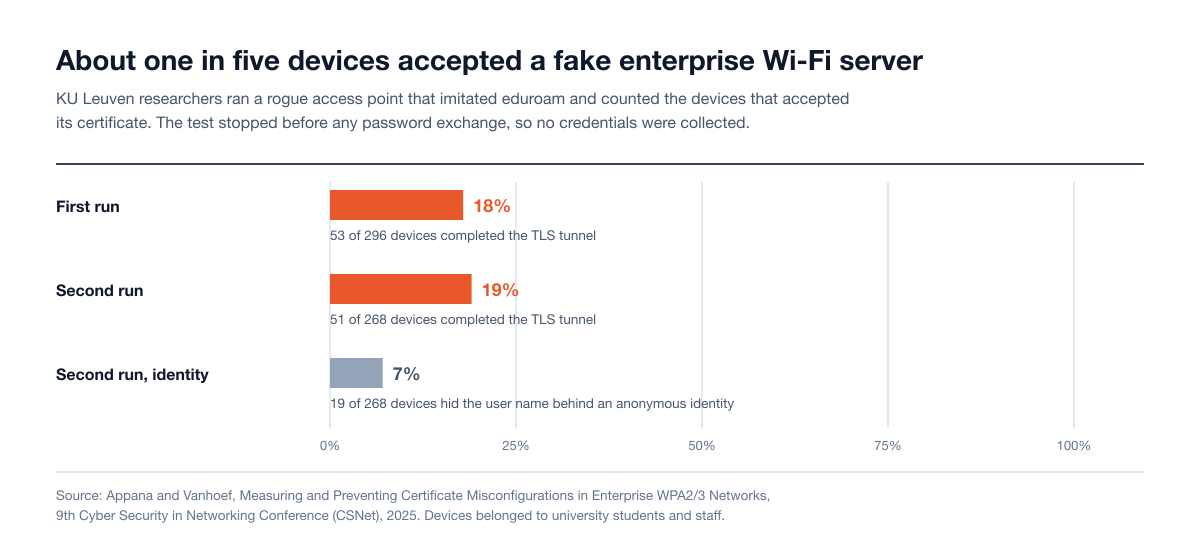
A company that manages its laptops should beat a university, where most devices are personal. In a multi-site estate the gaps to look for are the device classes outside the main laptop profile: phones, warehouse scanners, meeting-room equipment, contractor laptops and sites that arrived through an acquisition with their own RADIUS setup. The same paper found usability shortcomings in the certificate prompts of several operating systems, and any device that joins without a managed profile depends on such a prompt.
What the operating systems have changed
The platforms have tightened the defaults, which helps new devices and leaves old profiles as they were.
Android. Android 12 introduced a requirement for server certificate validation on enterprise networks, and Android 13 added trust on first use, according to the Android Open Source Project.
Windows. Microsoft's notes on Windows 11 say that in Windows 10, under certain circumstances, PEAP and EAP-TLS could validate a server based only on a trusted root certificate being present on the machine. Windows 11 made the logic consistent across methods and in line with the WPA3-Enterprise specification. Separately, Windows 11 version 22H2 turns on Credential Guard by default on eligible devices, which breaks single sign-on for MS-CHAPv2 connections, and Microsoft's advice is to move those networks to certificates.
Trust on first use is not a full answer. A 2026 paper at ACM WiSec tested trust on first use on Android, iOS, macOS and Windows and found the implementations inconsistent and flawed. None of the clients it tested rechecked certificate expiry on networks they already trusted.
The network side has its own gap. AirSnitch, presented at the NDSS Symposium in February 2026, verified in an enterprise test bed that an attacker who intercepted traffic between an access point and its RADIUS server could brute-force the shared secret, which would let them set up a rogue RADIUS server and access point that legitimate clients connect to. The same research is item 10 in our top 10 network security vulnerabilities for 2026.
Does WPA3 stop evil twin attacks?
Partly. WPA3 closes some of the routes and leaves the central one in place.
WPA3-Personal. Everyone on the network shares one passphrase, so anyone who knows it can build a convincing copy. The AirSnitch authors note that an attacker can still clone the access point because WPA3 still uses a shared passphrase.
Protected Management Frames. The Wi-Fi Alliance requires PMF on WPA3 networks, which protects management frames from forgery, so spoofed disconnect frames no longer knock devices off the real network. The AirSnitch authors note that an attacker can still induce clients to connect to a rogue access point by other means.
WPA3-Enterprise. The specification requires the device to trust the server certificate, and Microsoft says Windows will not continue the sign-in if server validation fails. The weak point moves to the prompt: where the user is allowed to accept an unknown certificate, the protection is only as good as that decision.
Transition mode matters as well. Networks that run WPA2 and WPA3 side by side for older devices keep the WPA2 behavior available for as long as that lasts.
Who is exposed
Network or situation | Exposed when |
|---|---|
Open guest or public Wi-Fi | Always possible to imitate. The exposure is what the portal asks for and what devices send without encryption. |
WPA2 or WPA3 with a shared passphrase | Anyone who knows the passphrase can imitate the network. |
802.1X with passwords (PEAP-MSCHAPv2, EAP-TTLS) | Any device class skips the server certificate check, trusts an authority without naming the server, or lets the user accept a prompt. |
802.1X with certificates (EAP-TLS) | No password is sent, so there is nothing to crack. A device that skips the server check can still be drawn onto the attacker's network. |
Staff devices away from the office | They remember open networks, or they carry a corporate Wi-Fi profile that does not validate the server. The attacker does not need to be near your building. |
Unmanaged and personal devices | They were configured by their owner, from instructions or from a prompt. |
How a Wi-Fi security assessment tests for evil twin exposure
The question an assessment answers is narrow: which of your devices will start signing in to a network that is not yours, and what do they hand over when they do? A Wi-Fi security assessment answers it in a fixed order.
Authorization and rules. The scope names the network names to be imitated, the sites, the device classes and whether staff devices are included. It also settles two things in writing: whether the tester may force devices to reconnect, which is disruptive, and how captured material is handled. Running an imitation network against people who have not agreed to it is the conduct behind the Perth convictions. Our rules of engagement checklist covers the clauses to expect.
Profile review. Before anything is transmitted, the tester reads the Wi-Fi profiles your device management and Group Policy push to each device class: the sign-in method, the trusted authority, the server names and whether prompts are allowed. Most of the exposure is visible here.
Passive survey. The tester records which network names your access points advertise, how each is secured, and which names nearby devices ask for.
Controlled imitation. The tester runs an access point with the in-scope network name at agreed locations and records, per device class, which devices ignore it, which show a prompt, which reject the certificate and which accept it. The test can stop at the point a device accepts the certificate, as the KU Leuven researchers did, or continue to show that a captured challenge-response yields a usable password, if the scope allows it.
Guest portal check. The tester reviews what your guest portal asks for and whether an imitation would collect work credentials. Putting a fake portal in front of staff is a social engineering test and needs its own approval.
Detection check. The tester notes when the imitation started and compares it with what your wireless intrusion detection reported, who was alerted and whether anyone came looking.
What the account reaches. Where it is in scope, the tester shows what a captured account can sign in to, which connects the wireless finding to the rest of the network.
The report should list results by device class, because the fix belongs to whoever manages that class: laptops, phones, scanners, meeting-room equipment.
Stingrai's wireless assessments run on site, or remotely with a Wi-Fi Pineapple shipped to the location. A shipped appliance stays where it is plugged in, so it tests the devices that come within its range. Walking the parking lot and the upper floors, and physically finding a transmitter, need a tester on site.
How to detect an evil twin access point
Detection is possible inside your premises and difficult everywhere else.
Wireless intrusion detection. NIST SP 800-153 describes wireless intrusion detection and prevention sensors that can detect a device attempting to spoof the identity of another, and recommends being able to locate a detected threat by comparing its signal strength across sensors so that someone can be sent to it. MITRE's detection guidance for T1557.004 lists the signals: your network name broadcast with a stronger signal, from an unexpected hardware address, or with security settings that do not match yours. Cisco Meraki's Air Marshal documentation, for example, classifies an access point that impersonates your network name as a spoof and says it should be "treated with the highest level of severity".
What you will not see. Your RADIUS server logs nothing, because the device is talking to the attacker's server and not yours. Sensors cover your buildings and not the hotel, the airport or an employee's street. An imitation that runs for an hour between quarterly scans leaves no trace in a scan. PCI DSS v4.0.1 Requirement 11.2.1 requires testing for wireless access points and identifying authorized and unauthorized ones at least once every three months, which is a floor and not continuous monitoring.
What shows up afterward. A captured account gets used. Sign-ins from unfamiliar locations or devices, and VPN or mail logins that do not match the user's pattern, are often the first visible sign. That is identity monitoring.
Be careful with containment. Many wireless systems can "contain" a rogue access point by sending disconnect frames to its clients. Meraki's documentation warns that containment can have legal implications when used against neighboring networks and notes that it does not work in the 6 GHz band, where management frames are protected. In the United States, Marriott agreed to pay a US$600,000 civil penalty after a 2014 FCC investigation into its use of a Wi-Fi deauthentication protocol to block guests' personal hotspots, and the FCC's enforcement advisory of 27 January 2015 states that willful or malicious interference with Wi-Fi hotspots is illegal. The safe response to a suspected evil twin is to locate it and have it removed, and to reset the credentials of any account whose device connected.
How to prevent evil twin attacks
For enterprise networks, the fixes are configuration, and most of them are set once and pushed.
Fix | What it stops | Where it is set |
|---|---|---|
Move to EAP-TLS with device or user certificates | No password or password-derived response is sent, so there is nothing to capture and crack | RADIUS policy, certificate authority, device management |
Enforce server validation in every Wi-Fi profile: a named trusted root and the expected server names | Devices refuse a server that is not yours | Group Policy, Intune or other device management profiles |
Turn user prompts off | A user cannot accept an attacker's certificate | The same profiles |
Deliver profiles by management, never by written instructions | Removes manually configured devices | Onboarding process |
Use an anonymous outer identity | The real user name is not sent in the clear | The same profiles |
Protect the link between access points and RADIUS | An attacker cannot recover the shared secret and stand up a rogue server | Long random secrets, or RADIUS over TLS |
Keep password-based devices on their own network with limited reach | A captured account from a scanner or printer network opens little | Network design, account permissions |
Microsoft's Intune Wi-Fi settings reference shows where these live for Windows: certificate server names, root certificates for server validation, and a setting that disables user prompts for server validation. For networks that must let unmanaged devices join, Microsoft documents a certificate policy that tells WPA3-Enterprise clients never to offer the user an override.
For guest and public-facing Wi-Fi:
Never ask for a work or personal account password in a captive portal. Use a voucher, a sponsor approval or a click-through.
Consider Passpoint for regular visitors and staff devices. The Wi-Fi Alliance describes Passpoint as automating network authentication with WPA3 security, so devices are not joining an open network by name.
Know what Enhanced Open does. The Wi-Fi Alliance describes it as unauthenticated data encryption. It encrypts traffic on an open network but does not prove whose network it is.
Replace shared passphrases on staff networks. Where a passphrase network must stay, treat the passphrase as known to everyone who ever had it.
For staff away from the office: remove remembered open networks and turn off automatic joining through device management, prefer a phone hotspot, require the VPN on untrusted networks, and protect accounts with phishing-resistant sign-in so that a captured password is not enough. Our MFA bypass statistics explain why the method matters.
Evil twin defender checklist
List every Wi-Fi network name you operate and how each one signs devices in.
Export the Wi-Fi profile for each device class and check four things: sign-in method, trusted root, server names, prompts.
Find the devices that have no managed profile and decide how they will get one.
Set a date to move password-based 802.1X to EAP-TLS, starting with laptops.
Check what your guest portal asks for.
Confirm your wireless intrusion detection alerts on your own network names from unknown radios, and that someone receives the alert.
Write down what happens when it fires: who locates the device, and whose credentials are reset.
Remove remembered open networks from managed devices.
Include evil twin testing by name in your next wireless assessment scope, with device classes listed, and retest after the profiles change.
Where Stingrai fits
Stingrai is a CREST-accredited penetration testing company offering fully human-led and hybrid (human penetration testers plus AI agents) penetration tests, delivered by experienced penetration testers who are also world-class security researchers and bug bounty hunters. It was founded in Toronto, Canada in 2021 and works with companies from startups to enterprises.
Wireless work is human-led and is usually scoped with network testing. In the Wi-Fi security assessment, Stingrai's penetration testers list the wireless attack surface at each location, including corporate, guest and rogue access points, and then test the in-scope networks: pre-shared key strength, WPA2 and WPA3 downgrade, WPS, evil twin access points against your clients, and segmentation between guest, corporate and production networks.
How it is delivered: on site, or remotely with a pre-configured Wi-Fi Pineapple shipped to each location, so a company with many offices, branches or warehouses can test every site or a representative sample without a trip to each one.
Who does the work: penetration testers from a team holding OSCE³, OSEP, OSWP and CREST CRT certifications, with 18 published CVEs across the team.
How findings arrive: each confirmed finding is posted to the PTaaS platform with evidence and remediation guidance your network and endpoint teams can act on, and a retest confirms the fix.
What it connects to: a captured account is the starting point for an internal network penetration test, and a close access scenario can form part of a red team engagement or sit beside a physical security assessment.
Engagements run as one-time annual tests or as continuous programs. Wireless work is scoped per engagement from the list of sites, network names and managed device classes, on its own or alongside an internal and external network penetration test.
Frequently Asked Questions
What is an evil twin attack?
An evil twin attack is a fake Wi-Fi access point that copies the name of a trusted network so that devices join it instead of the real one. The attacker can then show a fake sign-in page, collect the credentials a device offers, or read traffic that is not encrypted. MITRE ATT&CK tracks it as sub-technique T1557.004 under adversary-in-the-middle.
How does an evil twin attack work?
The attacker broadcasts a network name that nearby devices already know. Devices join because they remember the name, because the copy has a stronger signal, or because they were pushed off the real network. On an open network the attacker then presents a fake sign-in page. On an enterprise network the device begins its normal sign-in and, if it does not check the server certificate, sends a password challenge-response to the attacker.
What is the difference between an evil twin and a rogue access point?
A rogue access point is an unauthorized device plugged into your own network, which gives an outsider a way in behind the firewall. An evil twin is an imitation of your network name that runs on the attacker's equipment and never touches your network. Wired-side scans can find the first and cannot find the second, which needs wireless monitoring.
Can an evil twin attack steal passwords on WPA2-Enterprise or WPA3-Enterprise?
Yes, where a device signs in with a password and does not validate the server certificate. The device builds its encrypted tunnel with the attacker's server and answers a password challenge, and that answer can be attacked offline. Devices that enforce the certificate and server name check refuse the connection, and networks that use EAP-TLS send no password at all.
Does a VPN or HTTPS protect against an evil twin?
Both protect traffic in transit, and the US Federal Trade Commission says that because most websites now encrypt traffic, connecting through public Wi-Fi is usually safe. Neither protects a password typed into a fake Wi-Fi sign-in page, because the page itself belongs to the attacker. Neither protects enterprise Wi-Fi credentials either, since those are exchanged before any VPN starts.
Does WPA3 stop evil twin attacks?
Partly. WPA3 requires Protected Management Frames, which stops forged disconnect frames, and WPA3-Enterprise requires the device to trust the server certificate. A WPA3-Personal network can still be copied by anyone who knows the shared passphrase, and a WPA3-Enterprise device that lets the user accept an unknown certificate is only as safe as that decision.
How do you detect an evil twin access point?
Wireless intrusion detection can alert when your network name is broadcast from a radio you do not own, with a stronger signal or different security settings, and can estimate where it is. Your authentication server will not log anything. Away from your premises there is nothing to watch, so the practical signal is unusual sign-ins by the captured account afterward.
How do you prevent evil twin attacks?
On enterprise Wi-Fi, move to EAP-TLS, or enforce the server certificate and server name check in every device profile and turn user prompts off. Push profiles through device management instead of written instructions. On guest Wi-Fi, never ask for an account password in a captive portal. For staff who travel, remove remembered open networks and use a hotspot or VPN.
Is running an evil twin access point illegal?
Running one against other people without permission is a crime in the cases on record. An Australian man was sentenced to seven years and four months in November 2025 for offenses that included evil twin networks at airports and on flights. A penetration tester runs the same test only with the network owner's written authorization, against named networks and sites.
Does a Wi-Fi penetration test check for evil twin exposure?
It should, and the scope should say so by name. The test reviews the Wi-Fi profiles on each device class, runs a controlled imitation of the in-scope network, and records which devices accept it, which prompt the user and which refuse. It also checks whether your wireless intrusion detection noticed.
Related reading
WiFi Penetration Testing (2026): Wireless Security Assessment Scope, Cost and Methodology
Internal Penetration Testing (2026): Scope, Delivery, Cost Drivers and Requirements
Adversary-in-the-Middle: The Phishing That Beats MFA, and How to Detect It (2026)
Password Spraying: How the Attack Works, Detection and Defense (2026)
Kerberoasting Explained: How the Attack Works, Detection and Fixes (2026)
Physical Penetration Testing: What Actually Happens During an Assessment
Red Team Rules of Engagement: What to Demand Before You Sign
Network Penetration Testing: What It Is, Types, Process and Cost (2026)
Talk to Stingrai
Want to know which of your devices would sign in to a network that is not yours? Send the list of sites and network names and Stingrai will scope a Wi-Fi security assessment, on site or remote, with a retest included, as a one-time engagement or part of a continuous program. Get a quote.