



A homoglyph attack is a deception that swaps one or more characters in a trusted name, most often a domain, for look-alike characters drawn from a different writing system or character set, so the string a victim reads is not the string a computer resolves. Because the substitute characters render identically in common fonts, a link that displays as a familiar brand can point at an attacker-controlled site registered under an entirely different sequence of Unicode codepoints. Microsoft's Digital Defense Report 2025 names domain impersonation of this kind one of the fastest-growing, AI-driven online threats, and the technique has a documented history reaching back to the 2017 Unicode apple.com demonstration.
A user clicks a link in what looks like a routine billing email from apple.com. Safari opens, the site loads under a green padlock, the header reads apple.com, the layout matches the genuine site pixel for pixel, and the user enters an Apple ID and a one-time code. The attacker walks away with a valid session token. Nothing about the URL was wrong. Every character on the screen was a real Unicode codepoint, the certificate was a real DV certificate from a real CA, and the DNS record resolved to a real server. The only thing wrong was the small a at the start of apple: not Latin small letter A (U+0061), but Cyrillic small letter A (U+0430), which renders identically in every common font. This is the homoglyph attack pattern, anchored on the Unicode Consortium's UTS #39 Unicode Security Mechanisms and demonstrated publicly in the canonical Xudong Zheng disclosure of 20 January 2017, where the punycode domain xn--80ak6aa92e.com rendered as apple.com in Chrome up to version 58 and Firefox up to version 53.
Four enduring weakness classes recur across every modern homoglyph engagement. The first is the whole-script confusable IDN, where every letter in a label comes from a single non-Latin script chosen for its Latin-look-alikes. The second is the mixed-script label that crosses the boundary defined by Unicode UTS #39's Highly Restrictive profile, mixing Latin with Cyrillic, Greek, or Cherokee in the same label. The third is the Latin-look-alike inside an otherwise legitimate Latin label, including punctuation (U+2010 vs U+002D hyphen, CVE-2017-5383) and rare letters (U+A771 LATIN SMALL LETTER DUM vs U+0064, CVE-2018-4277). The fourth is the ASCII typosquat: pure-Latin look-alikes such as rn for m, vv for w, lowercase L for digit one or capital I, used heavily in supply-chain attacks against developer toolchains.
In this post we will dig deeper into how homoglyph attacks work, anchored on Unicode Consortium UTS #39, RFC 3492 Punycode, RFC 5891 IDNA Protocol, browser IDN policy documents, and five verified CVEs at the National Vulnerability Database. The audience is web engineers, AppSec leads, mail and DNS administrators, brand-protection analysts, and security buyers evaluating phishing resistance. Every numeric claim and every named CVE links to its primary publisher. The post does not invent CVE numbers, fabricate exploit code, or paraphrase research without attribution.
TL;DR: ten enduring homoglyph attack weakness classes
Whole-script confusable IDN. Domain registered using one non-Latin script whose letters mimic Latin. Single-script labels bypassed mixed-script detection until 2017. Canonical example:
xn--80ak6aa92e.com(Cyrillic apple.com), Xudong Zheng April 2017.Mixed-script Latin plus Cyrillic or Greek. Latin mixed with Cyrillic, Greek, or Cherokee in a single label is forbidden by UTS #39's Highly Restrictive profile, which Firefox enforces.
Confusable hyphens and quotes. U+2010 HYPHEN, U+2011 NON-BREAKING HYPHEN, and similar punctuation render visually identical to ASCII U+002D hyphen but were not normalized. Anchored on CVE-2017-5383.
Aspirational-script abuse. Scripts in Unicode's Aspirational category, including Canadian Syllabics, were once mixable with Latin under the older Moderately Restrictive profile. Anchored on CVE-2017-7764.
Fake A-label subdomain spoofing. Subdomain crafted with
xn--prefix that mimics a legitimate punycode label and confuses the browser address bar. Anchored on CVE-2017-7838 (xn--accountlogin.xn--google.com).Single Latin lookalike letter. A Latin letter that visually resembles another Latin letter, missed by browsers that only check script mixing. Anchored on CVE-2018-4277 (Apple Safari, U+A771 LATIN SMALL LETTER DUM).
Diacritic skeleton match.
googlé.commatches the skeleton ofgoogle.comafter diacritic strip; Chrome shows punycode when this triggers, per the Chromium IDN policy doc.ASCII typosquat. Pure-Latin look-alikes such as
rnform,vvforw, lowercase L for one or capital I. The November 2024 Sonatype campaign tracked 287 npm packages typosquatting popular libraries.Diacritic-bearing letter substitution. Krebs on Security March 2018 documented
krebsoṇsecurity[.]comregistered with U+1E47 LATIN SMALL LETTER N WITH DOT BELOW.Display-name and email-header homoglyph. Cyrillic and Greek look-alikes inside the email From header display name, Subject line, or message body, allowing brand impersonation even when the underlying ASCII From address is correct. Microsoft's Digital Defense Report 2025 cites this pattern as a fastest-growing AI-driven threat.
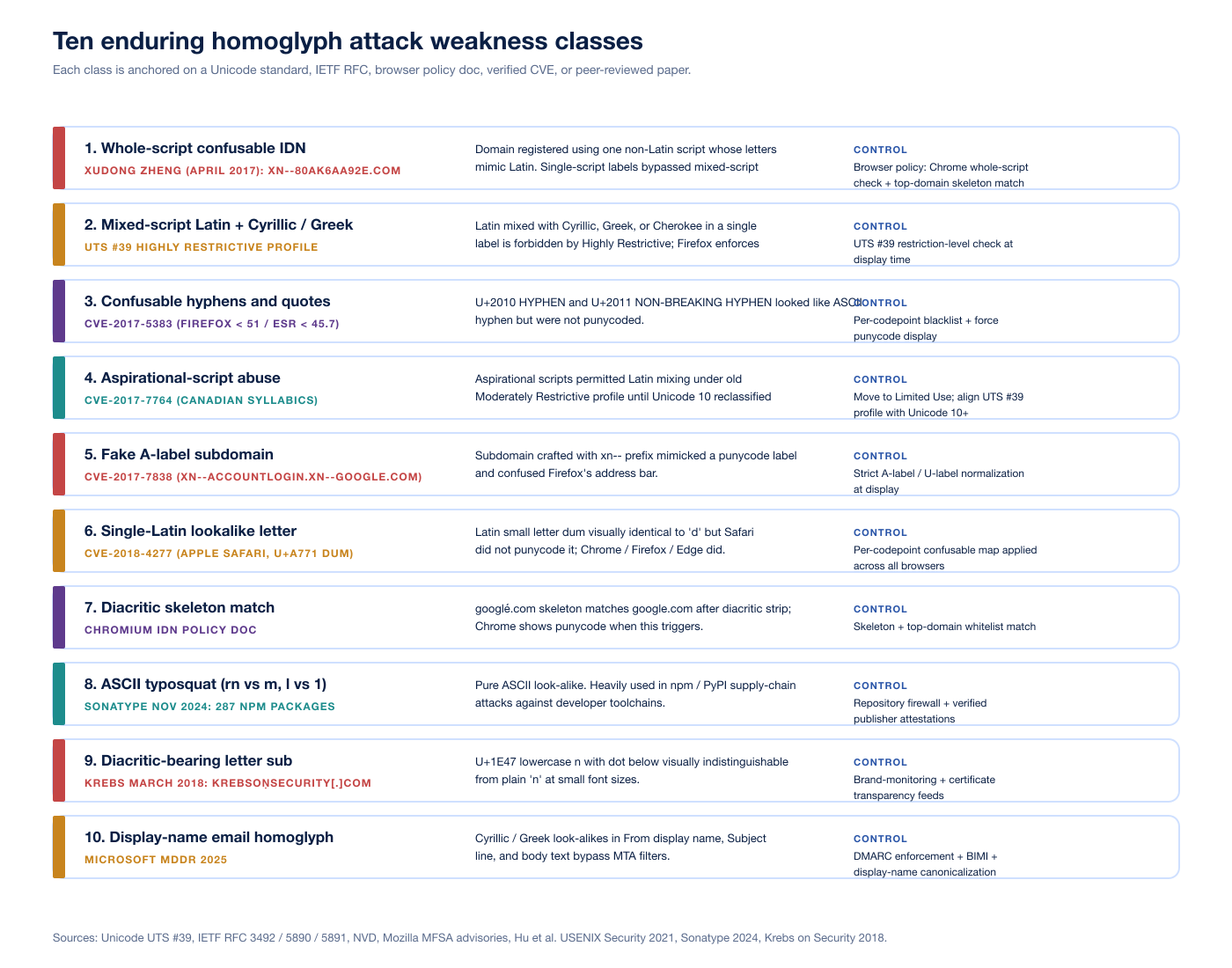
Figure 1: The ten enduring homoglyph attack weakness classes, each mapped to a primary anchor (Unicode standard, IETF RFC, browser policy doc, verified CVE, or peer-reviewed paper) and a defender control. Sources: Unicode UTS #39, IETF RFC 3492 / 5890 / 5891, NVD, Mozilla MFSA advisories, Hu et al. USENIX Security 2021, Sonatype 2024, Krebs on Security 2018.
What is a homoglyph?
A homoglyph is a character that visually resembles another character at normal font sizes in common UI fonts. The Unicode Consortium maintains the canonical reference list in confusables.txt, distributed alongside UTS #39, which maps roughly 6,565 source codepoints to their visual targets. Two characters are confusable when an average reader, looking at standard 9 to 14 point text in fonts like Helvetica, Arial, or San Francisco, cannot reliably tell them apart. The clearest examples are pairs from different scripts whose glyphs are nearly identical:
Latin small a (U+0061) and Cyrillic small a (U+0430)
Latin small e (U+0065) and Cyrillic small ie (U+0435)
Latin small o (U+006F) and Cyrillic small o (U+043E) and Greek small omicron (U+03BF)
Latin small p (U+0070) and Cyrillic small ER (U+0440)
Latin small i (U+0069) and Cyrillic small i (U+0456)
Latin small c (U+0063) and Cyrillic small es (U+0441)
Latin small h (U+0068) and Cyrillic small shha (U+04BB) (cap variant)
Latin small letter dum (U+A771) and Latin small d (U+0064)
Plain Latin n (U+006E) and Latin n with dot below (U+1E47)
A homograph attack is the deceptive use of homoglyphs in a string, most often a domain name. The attacker chooses a target string (a brand domain, a username on a social platform, a display name in chat) and registers or constructs a string that visually matches the target while being a different sequence of bytes underneath. The DNS resolves the attacker's string to the attacker's server. The browser displays the visually matching string in the address bar. The user trusts what they see and proceeds.
The label "homoglyph attack" is sometimes used as a synonym for "homograph attack" in press coverage. In strict usage, the homoglyph is the unit of confusion (a single character pair) and the homograph attack is the deception (using one or more homoglyphs in a string). This post uses both terms with the strict distinction in mind. Most modern attacks combine multiple homoglyphs and at least one ASCII typosquat in the same domain.
Internationalized Domain Names: from U-label to A-label
The Domain Name System was originally specified for ASCII labels: 26 lowercase letters, 10 digits, hyphen-minus, plus a small set of structural characters. Internationalized Domain Names (IDNs) extend that to the full Unicode repertoire while preserving the wire format of the DNS. The current standard is IDNA 2008, defined in RFC 5890 (Definitions), RFC 5891 (Protocol), RFC 5892 (Code Points), and RFC 5893 (Right-to-Left Scripts), with the UTS #46 compatibility processing layer bridging IDNA 2008 and the older IDNA 2003 behavior. The IDNA 2008 series was published by the IETF in August 2010 and replaces RFC 3490 / 3491 (IDNA 2003).
IDNA defines two forms for any internationalized label:
U-label: the Unicode form, the human-readable string, e.g.
аpple(with Cyrillic а).A-label: the ASCII Compatible Encoding form, prefixed with
xn--and produced by the Punycode algorithm of RFC 3492, e.g.xn--80ak6aa92e.
RFC 3492 was authored by Adam Costello at UC Berkeley and published in March 2003. The algorithm is an instance of a more general scheme called Bootstring, parameterized so that ASCII characters carry over directly and non-ASCII characters are encoded as deltas from a base codepoint. Punycode is reversible: any A-label can be decoded back to a unique U-label. The wire format that DNS resolvers see is always the A-label. The user-facing string the browser shows in the address bar is whichever form the browser's IDN display policy chooses.
The browser is therefore the trust boundary. If the browser shows the U-label, the user reads apple.com even though the resolver looked up xn--80ak6aa92e.com. If the browser shows the A-label, the user reads xn--80ak6aa92e.com and is unlikely to be deceived. The entire homograph attack lives in the gap between those two displays.
The 2017 Cyrillic apple.com demonstration
On 20 January 2017, Xudong Zheng disclosed to Google and Mozilla that he had registered the domain xn--80ak6aa92e.com, which decoded to a label whose every letter was Cyrillic and whose visual appearance was identical to apple.com. He set up a TLS-protected demonstration site at the domain. Chrome up to version 57 and Firefox up to version 53 displayed the U-label in the address bar, complete with the green padlock from a real DV certificate, with no visual indication that anything was unusual.
Three properties of the demonstration are important:
Single-script bypass. The label was entirely Cyrillic. Browsers had relied on mixed-script detection since 2005: a label combining Latin with another script triggered punycode display. A label entirely in one foreign script slipped through the mixed-script check.
TLD mismatch ignored. The TLD was
.com, a TLD with no script restriction. Browsers had no rule that flagged "all-Cyrillic label on a non-Cyrillic TLD" before Chrome 58.DV certificate trivially obtained. The CA/Browser Forum's Baseline Requirements for Domain Validation certificates require proof of domain control, not proof of brand ownership. Any compliant CA would issue for the homograph domain in minutes.
The Chrome trunk fix landed on 24 March 2017 and shipped in Chrome 58. The fix added whole-script confusable detection: if every letter in a label belongs to a set of letters known to confusable with Latin in one of the whole-script-confusable scripts (Cyrillic, Greek, Cherokee), and if the TLD is not on the allow-list of TLDs that legitimately host that script (e.g., .ru, .su, .рф, .ua for Cyrillic), Chrome shows punycode. Mozilla declined to ship a similar fix in mainline Firefox at the time, taking the position that domain registrars should bear the prevention burden, although Firefox had already adopted UTS #39's Highly Restrictive profile, which forbids Latin from mixing with Cyrillic or Greek in the same label and so blocks a different attack class. Mozilla also documents the user-side mitigation in the network.IDN_show_punycode preference, which forces all IDNs to display as A-labels for users who set it. Safari was never vulnerable: Apple's policy of rejecting all-Cyrillic and all-Greek labels on non-matching TLDs blocked the demonstration outright.
Unicode UTS #39 in plain language
Unicode Technical Standard #39 (UTS #39) is the canonical reference for character-level security mechanisms. It defines two artifacts that matter for homoglyph defense.
The first is confusables.txt, the data file that maps each potentially confusable codepoint to a target. Pairs and chains in the file are reflexive only in the sense that two source codepoints can target the same skeleton. The skeleton is what browsers and brand-protection tools use as a comparison key: lowercase the input, strip diacritics, apply the confusable map, and compare against a known-good set of skeletons (e.g. the skeletons of the top 10,000 domains for a brand-monitoring service, or the small set of well-known top domains a browser ships internally).
The second is the restriction-level profile system. Each profile defines which combinations of scripts are allowed in a single label. From most strict to least strict:
Single Script. All characters in a label must come from one Unicode script. Latin is treated as a normal script under this rule. The strictest practical profile.
Highly Restrictive. A single non-Latin script plus optional Latin characters interspersed, with one important carve-out: Latin combined with Cyrillic, Greek, or Cherokee is forbidden in the same label, because those three scripts contain the highest density of Latin-look-alikes. Firefox and Chrome both anchor on this profile.
Moderately Restrictive. Latin plus one other script, with the other script not subject to the Cyrillic / Greek / Cherokee exception. Aspirational-use scripts (e.g., Canadian Syllabics) were once permitted to mix under this profile, until Unicode 10.0 reclassified them. CVE-2017-7764 was the Firefox bug that caught up to that change.
Minimally Restrictive. Allows additional script combinations needed for genuine multilingual labels.
Unrestricted. Any combination. Provides no homoglyph protection.
UTS #39 also defines whole-script confusables: an entire string in script A that visually matches a string in script B, with no character-level mixing. The 2017 Cyrillic apple.com is the textbook example. Whole-script confusables are precisely what single-script profiles do not catch, because there is nothing inside the label to flag. Chrome's whole-script detection is a defense built on top of the profile system, not a property of the profile itself.
How attackers chain the codepoints into an account takeover
The attack chain has seven steps. Each step has a defender control that breaks the chain.
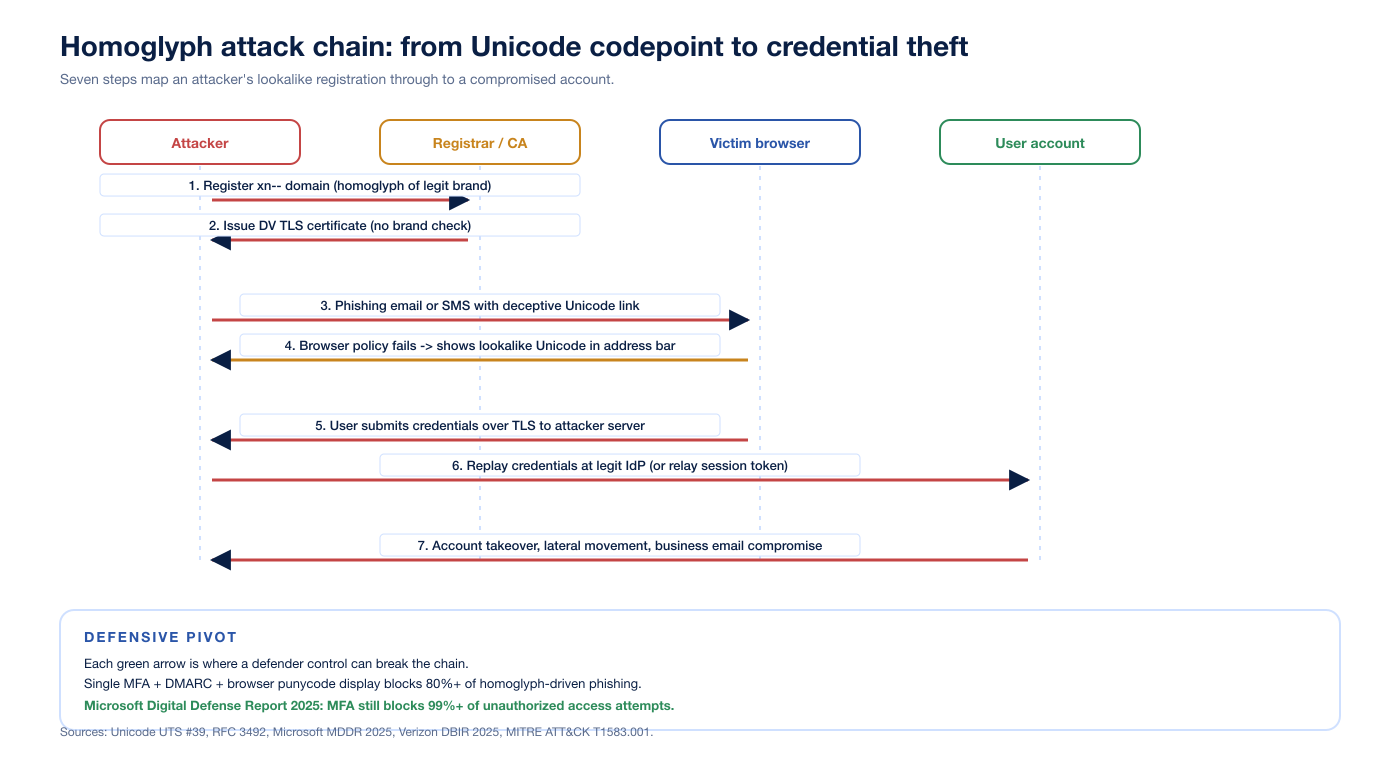
Figure 2: Seven-step homoglyph attack chain from registration to account takeover. Each green arrow marks a layer where a defender control can intercept. Sources: Unicode UTS #39, RFC 3492, Microsoft Digital Defense Report 2025, Verizon DBIR 2025, MITRE ATT&CK T1583.001 Acquire Infrastructure: Domains.
Step 1: register the homoglyph IDN. The attacker uses a permutation generator (open-source dnstwist, the Unicode confusables.txt, or a commercial brand-monitoring product) to enumerate look-alikes of the target. Registration costs a few US dollars per domain and clears in minutes. MITRE ATT&CK records this in technique T1583.001 Acquire Infrastructure: Domains, which explicitly calls out homoglyphs as a sub-pattern.
Step 2: obtain a TLS certificate. The CA/Browser Forum's Baseline Requirements for the Issuance and Management of Publicly-Trusted Certificates require proof of domain control for DV certificates, not proof of brand ownership. A homoglyph IDN is a real domain controlled by the attacker, so any compliant CA will issue. The certificate is logged to certificate transparency.
Step 3: deliver the lure. Email, SMS, social-media DM, instant-messaging, or a search-ad redirect carries the link. Microsoft's Digital Defense Report 2025 reports that AI-generated phishing emails achieved a 54 percent click-through rate in 2025, 4.5 times the rate of traditional phishing. The same report flags display-name homoglyph spoofing inside email From headers as a fastest-growing AI-driven threat.
Step 4: browser address bar fails to warn. The user clicks. The DNS resolves to the attacker's IP. TLS handshakes against the DV certificate. The browser's IDN display policy decides whether to show the U-label or the A-label. If the policy is permissive, the user sees the brand domain.
Step 5: credentials submitted over TLS to the attacker server. Modern attacker kits also relay the session in real time: a reverse-proxy phishlet (open-source evilginx2 is the canonical example, although homoglyph attacks predate it) forwards the user's request to the genuine identity provider, captures the session cookie or refresh token, and returns the legitimate response.
Step 6: replay or use the captured token. A captured session cookie is fully redeemable until the user logs out or the cookie expires. Phishing-resistant MFA (FIDO2 / WebAuthn / passkeys) blocks this step because the authenticator is bound to the legitimate origin and refuses to sign for the attacker domain. Microsoft's MDDR 2025 reaffirms that MFA still blocks 99 percent or more of unauthorized access attempts.
Step 7: account takeover and lateral movement. Once inside, the attacker pivots: business email compromise, payroll redirection, OAuth grants to malicious apps, supply-chain attacks against the victim's customers and partners. Verizon's 2025 DBIR reports phishing in 16 percent of breaches and the human element in 60 percent overall, with phishing comprising 57 percent of social-engineering incidents.
Five verified CVEs that anchor the modern history
Five CVEs at the National Vulnerability Database anchor what browsers were doing wrong, and what they fixed.
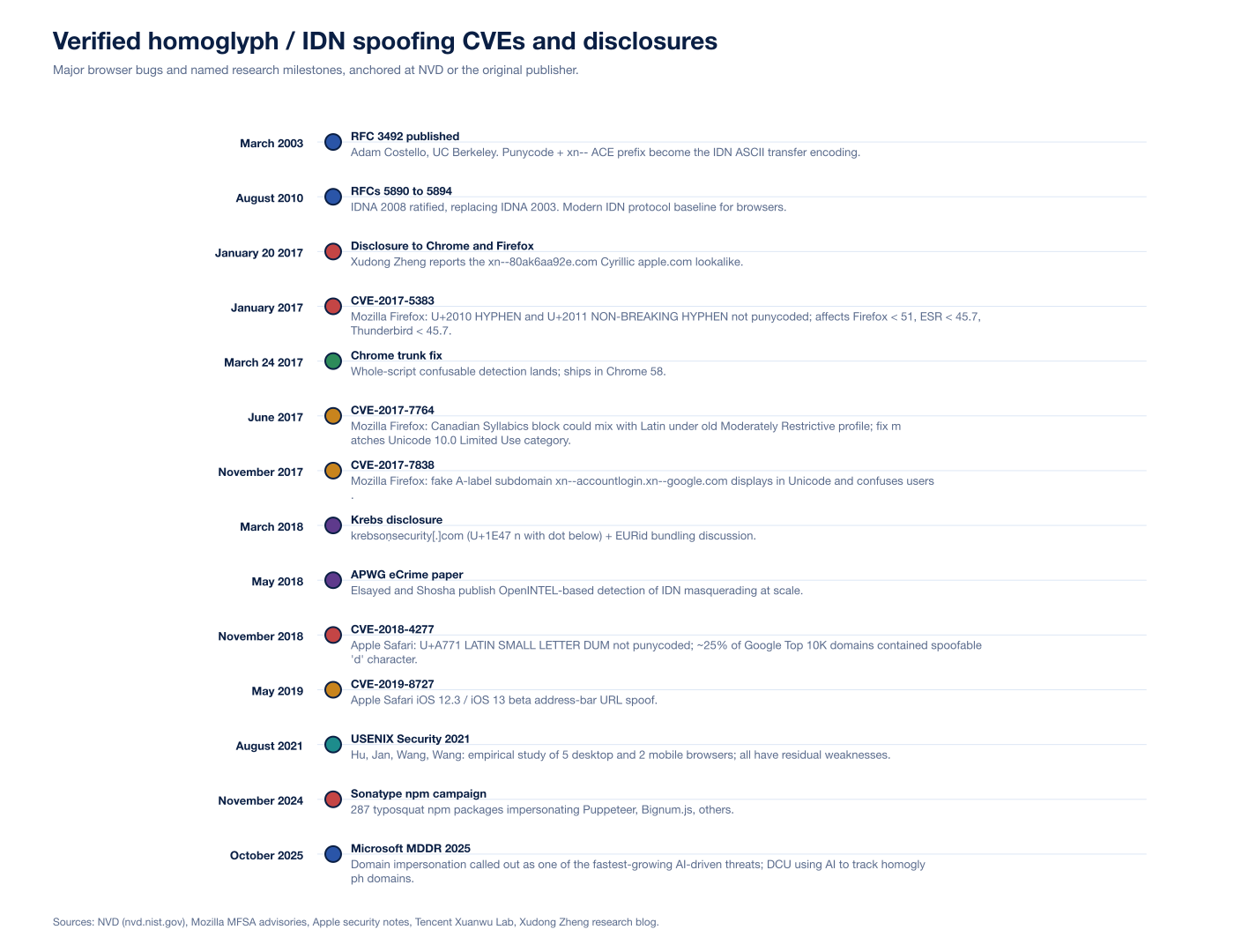
Figure 3: Verified homoglyph and IDN spoofing CVEs, RFCs, and named disclosures from March 2003 (RFC 3492 publication) through October 2025 (Microsoft Digital Defense Report 2025). Sources: NVD, Mozilla MFSA advisories, Apple Safari security notes, Tencent Xuanwu Lab, Xudong Zheng, APWG eCrime, Sonatype.
CVE-2017-5383 (Mozilla Firefox)
Affected: Firefox before 51, Firefox ESR before 45.7, Thunderbird before 45.7. Issue: the Unicode glyphs U+2010 (HYPHEN) and U+2011 (NON-BREAKING HYPHEN) are not converted to Punycode for IDN labels. Both render visually identical to the ASCII U+002D HYPHEN-MINUS in the address bar. Without normalization, an attacker could register a label containing one of these glyphs at a position where it looked like a brand-recognized hyphen, e.g. paypa‐login.com instead of paypa-login.com. Mozilla's fix added the two glyphs to the IDN blacklist and forced punycode display for any label containing them. The Mozilla MFSA 2017-02 advisory is the published anchor.
CVE-2017-7764 (Mozilla Firefox)
Affected: Firefox before 54, Firefox ESR before 52.2, Thunderbird before 52.2. Issue: characters from the Canadian Syllabics Unicode block could be mixed with characters from other Unicode blocks under the older Moderately Restrictive profile. Canadian Syllabics is an Aspirational-use script in older versions of Unicode; that classification permitted Latin mixing for inter-language usability. Unicode 10.0 reclassified Aspirational scripts as Limited Use, removing the mixing privilege. Firefox's fix matched the new classification before Unicode 10.0's full release. Researchers had observed the problem in certificate transparency logs while quantifying the IDN impersonation problem at scale.
CVE-2017-7838 (Mozilla Firefox)
Affected: Firefox versions in the relevant 2017 window. Issue: a hyperlink to a fake A-label subdomain (xn--accountlogin) of an unrelated valid IDN (xn--google.com) was displayed by Firefox in a way that confused users about the true hostname. The intended display would have been an xn--accountlogin.xn--google.com ASCII string, but the underlying processing flow involved nsIDNService::Normalize calling ICU's uidna_labelToUnicode, which appended a U+FFFD replacement character on invalid punycode input and confused subsequent code. Mozilla's fix detected the error flag from uidna_labelToUnicode and stripped the trailing replacement character to produce a stable display. The Mozilla bugzilla 1399540 entry holds the technical history.
CVE-2018-4277 (Apple Safari and WebKit)
Issue: Latin small letter dum (U+A771) renders nearly identically to Latin small d (U+0064) in Apple's default fonts. Chrome, Firefox, and Edge all displayed labels containing U+A771 in punycode form, because their per-codepoint confusable maps included the codepoint. Safari did not. Tencent Xuanwu Lab's research calculated that approximately 25 percent of websites in the Google Top 10K domain list contain at least one d character, meaning a quarter of the top web by reach was directly spoofable in Safari at the time. Apple's fix added U+A771 to Safari's punycode-display set.
CVE-2019-8727 (Apple Safari iOS)
Affected: Safari for iOS 12.3 and iOS 13 beta. Issue: an address-bar URL spoofing flaw allowed a crafted page to control the displayed URL while serving content from a different origin. The class is adjacent to homoglyph rather than directly homoglyph, but it shares the same trust-boundary failure: the user reads a string in the URL bar that does not match the loaded resource. Apple addressed the issue through improved URL handling in WebKit. The bug bounty writeup is the public anchor.
How Chrome, Firefox, and Safari handle IDN display today
Each modern desktop browser ships its own IDN display policy. They overlap on the broad idea (treat ambiguous IDNs as suspicious, force punycode display) but differ sharply in the specifics. The Hu, Jan, Wang, and Wang USENIX Security 2021 paper is the canonical empirical study: they tested five desktop browsers (Chrome, Firefox, Safari, Microsoft Edge, IE) and two mobile browsers (Android Chrome, iOS Safari) and found measurable miss rates in every one.
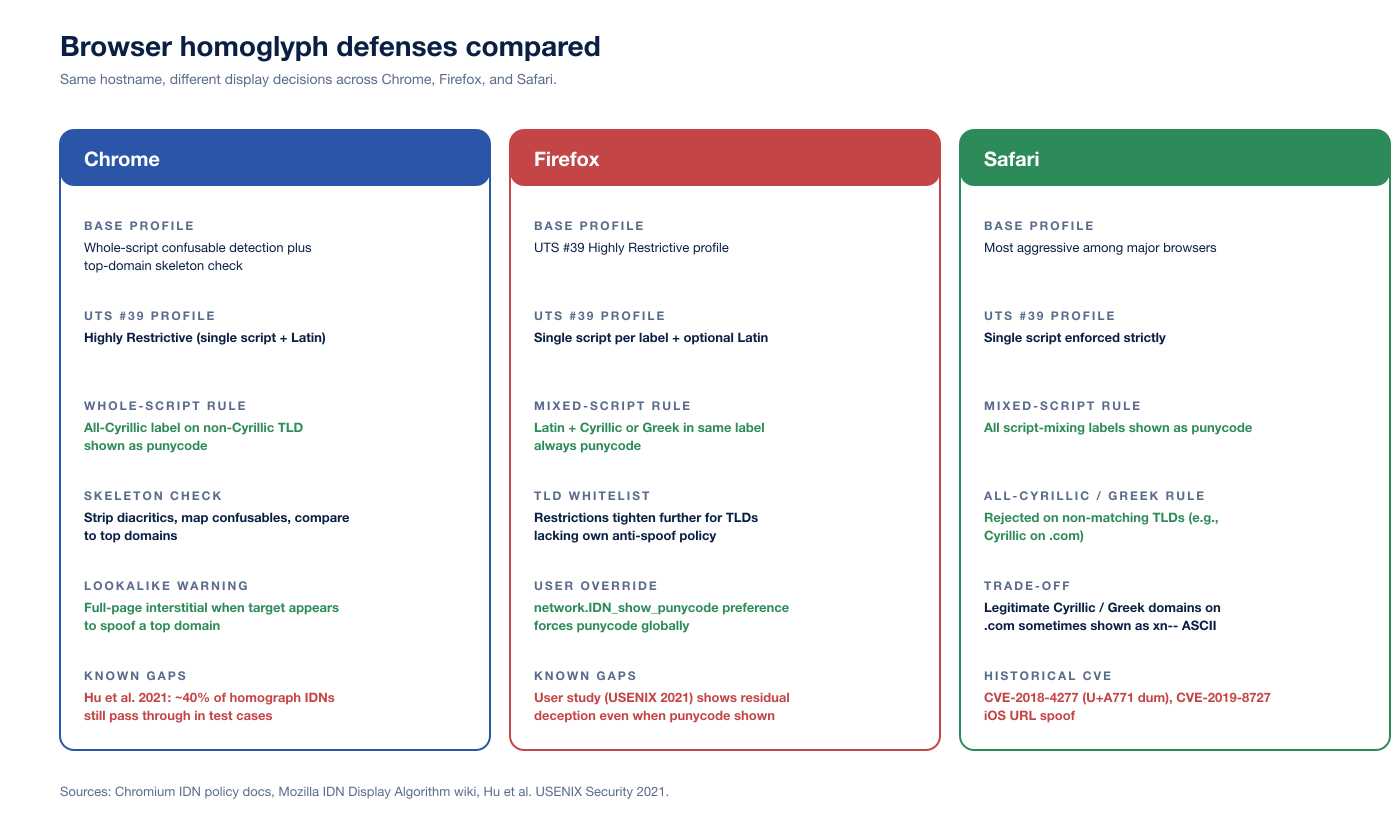
Figure 4: Chrome, Firefox, and Safari IDN display policies compared on base profile, restriction level, mixed-script and whole-script rules, lookalike warning behavior, user override, and known gaps. Sources: Chromium IDN policy doc, Mozilla IDN Display Algorithm wiki, Hu et al. USENIX Security 2021.
Chrome
The Chromium IDN policy doc is the public reference. Chrome applies five overlapping rules:
UTS #39 Highly Restrictive profile. Single non-Latin script per label plus optional Latin, with Latin / Cyrillic, Latin / Greek, and Latin / Cherokee combinations always shown as punycode.
Whole-script confusable detection. If every letter in a label belongs to a known set of letters confusable with Latin in one of the whole-script-confusable scripts and the TLD is not allow-listed for that script, the label is shown as punycode.
Top-domain skeleton match. If the skeleton of the registrable part of a hostname is identical to one of the small set of top domains hard-coded in Chrome (after stripping diacritics and mapping each character to its confusable target), the hostname is shown as punycode. The example in the Chromium doc is
www.googlé.comwith theéin place ofe.Lookalike full-page warning. Chrome ships a full-page security warning that blocks main-frame navigation when the target appears to spoof a top domain, either as a direct navigation or as part of a redirect chain.
Per-codepoint blocklists. Codepoints known to be specifically problematic (digit lookalikes, certain combining marks, dangerous script combinations) trigger punycode display.
The Hu et al. study reported that Chrome failed to capture roughly 40 percent of homograph IDNs in their test set; the test set was generated by exhaustively permuting top-domain skeletons against the confusables map and was deliberately broad, but the headline number is a reasonable upper bound on attacker permutation space against current Chrome rules.
Firefox
The Mozilla IDN Display Algorithm wiki is the public reference. Firefox's algorithm has three pillars.
The first is the TLD allow-list: TLDs that ship anti-spoofing policies acceptable to Mozilla (as evaluated by Mozilla policy) are allowed to display IDN labels in Unicode. TLDs that fail the bar are punycode-only, regardless of label contents. The list is shipped in Firefox's source tree and is updated by Mozilla.
The second is the UTS #39 Highly Restrictive profile, applied to any TLD that allows Unicode labels. A label that violates the profile is shown as punycode.
The third is the network.IDN_show_punycode preference, the user-side override that forces all IDNs to display as A-labels. The preference is documented at MozillaZine and is the most reliable consumer-side defense for high-risk users.
Firefox does not ship Chrome-style top-domain skeleton matching, and the wiki page is explicit about the trade-off: Firefox has historically taken the position that the registry / registrar layer should bear the prevention burden. The bugzilla ticket 1507582 tracks the request to add Chrome-like top-domain skeleton checking; as of 2026 the work is still partial.
Safari
Apple's IDN policy is the most aggressive among the three major browsers and has changed least over time. Three rules dominate.
First, all script mixing is shown as punycode. There is no Highly Restrictive carve-out for Latin plus one other script; if a label contains characters from more than one script, it displays as A-label.
Second, all-Cyrillic and all-Greek labels on non-matching TLDs are shown as punycode. The 2017 Cyrillic apple.com on .com would have shown as xn--80ak6aa92e.com in Safari from the start. The trade-off is that legitimate Cyrillic or Greek domains on neutral TLDs occasionally show as punycode, which Apple has explicitly accepted as the cost of safety.
Third, per-codepoint exceptions. Safari maintains its own list of specific codepoints to always punycode. CVE-2018-4277 (U+A771 dum) was a gap in this list; the fix added the codepoint. CVE-2019-8727 (iOS URL bar spoof) was a related class of address-bar trust failure that did not center on per-codepoint logic but did require WebKit to tighten URL display path.
Apple does not document the rules in a public spec the way Chromium does. The Hu et al. paper provides the most thorough public empirical mapping.
Beyond IDNs: ASCII typosquats and supply-chain attacks
Not every homoglyph attack uses Unicode. The most common attack against developer toolchains uses pure ASCII look-alikes. The classic substitutions are:
rnform(paypaI.comvspaypal.comfor thelversusIconfusion, andarnazon.comvsamazon.comforrnversusm)vvforwlowercase L (
l) for digit one (1) for capital I (I)digit zero (
0) for capital O (O)transposed letter pairs (
gogole.comvsgoogle.com)adjacent-key typos in popular keyboard layouts
The November 2024 Sonatype-tracked campaign registered 287 npm packages typosquatting popular libraries, including Puppeteer and Bignum.js. Sonatype's broader State of the Software Supply Chain reporting tracks more than 778,500 malicious packages since 2019, with npm representing 98.5 percent of malicious package observations, and Sonatype Repository Firewall blocking 450,000+ malware attacks across customers in 2024.
ASCII typosquats are an attack against the same trust boundary as IDN homographs (the user reading a name and reaching for the wrong target) but with a different defender stack. Repository firewalls, verified-publisher attestations, package-name policy at npm, PyPI, Maven Central, and crates.io, plus per-organization scoped registries are the primary controls. Inside corporate code, typosquat-aware dependency review (manual or via tooling such as the open-source socket.dev and endor.security analyzers) catches the small set of suspicious additions before they merge. Stingrai's research team covered the supply-chain dimension in detail in Supply Chain Attack Statistics 2026.
Email, social, and chat: where homoglyphs hit hardest in 2026
The domain-bar threat is now the smaller half of the homoglyph problem. The bigger half lives in non-URL contexts: From-header display names, message body text, social-media handles, chat handles, and document text. Microsoft's MDDR 2025 calls out display-name homoglyph spoofing inside email From headers as a fastest-growing AI-driven threat.
Email From-header display name
Mail clients display the From-header Display Name prominently and the bracketed address less prominently. An attacker who controls attacker@evilcorp.example can set their display name to Аpple Billing (Cyrillic А) and the recipient sees Аpple Billing <attacker@evilcorp.example>. Mobile clients in particular often hide the bracketed address until the user taps to expand. DMARC, SPF, and DKIM authenticate the return path and signing domain, not the display-name string. The defense is MUA-level homoglyph normalization: Microsoft 365's mail flow rules, Google Workspace's content compliance rules, and most modern secure email gateways now offer regex or unicode-class filters to flag display names containing non-Latin codepoints when the address-domain is Latin.
Social media and chat handles
Twitter/X, GitHub, Slack, Discord, Microsoft Teams all permit Unicode in display names by default, and their handle-uniqueness checks vary widely. GitHub username uniqueness is case-insensitive ASCII only; the display-name field is freer-form Unicode. Slack and Discord rely on per-codepoint deny-lists and visual-similarity heuristics; they catch the obvious Cyrillic-substitution attacks but miss combined attacks (e.g., a display name with one Cyrillic letter plus one zero-width joiner). The defense for organizations is process-level: vetted invite flows for Slack/Teams workspaces, single-sign-on with a directory of canonical names, and admin alerts for new external participants whose names match existing internal users under confusables-aware comparison.
Document and clipboard pasting
Word, Google Docs, Notion, Confluence all render any Unicode codepoint the user pastes. An attacker who tricks a user into pasting a homoglyph URL from a phishing email into an internal incident-response document propagates the deception inside the organization's trusted documents. The Stingrai research team has caught this pattern in real engagements: a phishing report quoting the malicious URL inside a runbook later got copy-pasted into a customer-communication template, where the homoglyph URL went out to thousands of customers as a "trusted" link.
The seven-layer defender stack
Single-control defenses do not work against homoglyph attacks. Each layer alone is bypassable; the layered combination is what makes the attack uneconomic.
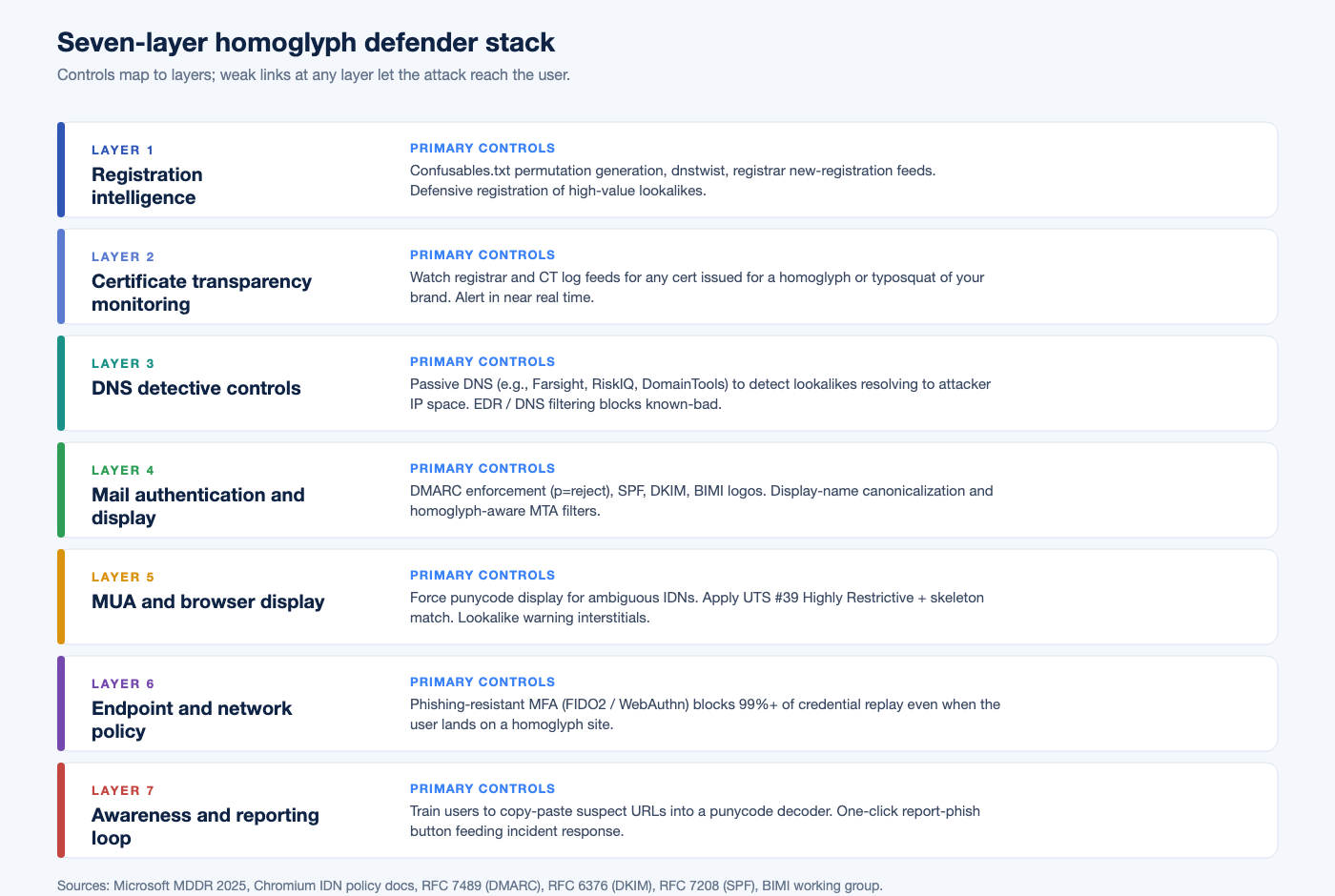
Figure 5: Seven-layer homoglyph defender stack. Each layer's failure mode is met by the next layer. Sources: Microsoft Digital Defense Report 2025, Chromium IDN policy docs, RFC 7489 (DMARC), RFC 6376 (DKIM), RFC 7208 (SPF), BIMI working group.
Layer 1: registration intelligence
The first move is to know which lookalikes exist. Tools and feeds:
Unicode
confusables.txt, parsed into a permutation engine.dnstwist(open-source) and similar permutation tools that combine confusables, ASCII typosquats, transpositions, additions, omissions, and TLD swaps.Registrar new-registration feeds, available through ICANN's centralized zone data service for gTLDs and via WHOIS providers for ccTLDs.
Brand-monitoring services (DomainTools, Recorded Future, PhishLabs, Cofense, Microsoft DCU) that combine the above and add reputation scoring.
Defensive registration of the highest-value lookalikes for the brand's primary domains. The Krebs March 2018 article describes EURid's bundling policy for the
.euTLD: identical-looking lookalikes are bundled at registration so they do not end up in different hands.
Infoblox researchers have publicly cited detecting more than 20,000 suspicious lookalike domains weekly across their feeds. The volume is higher than any single brand can register defensively; the goal is to register the few thousand highest-similarity, highest-likelihood names and to monitor the rest.
Layer 2: certificate transparency monitoring
Every TLS certificate issued by a publicly-trusted CA is recorded in certificate transparency logs. Brand-monitoring services (and DIY pipelines off crt.sh) watch the log feeds for certificates issued for any of the lookalike permutations. A new certificate for xn--80ak6aa92e.com would show up within minutes of issuance. CT monitoring is the highest-signal-to-noise feed for homoglyph defense because every successful attack at scale needs a TLS certificate and modern users distrust HTTP-only sites.
Layer 3: DNS detective controls
Passive DNS (Farsight DNSDB, Microsoft Security Insider, RiskIQ, DomainTools) lets defenders query the resolution history of a homoglyph domain to discover when it started resolving and what infrastructure it points at.
EDR / DNS filtering (Cisco Umbrella, Cloudflare Gateway, Akamai SIA) blocks resolution of known-bad and high-similarity names at the corporate egress.
Internal DNS query telemetry flags clients reaching for lookalikes of internal brand domains.
abuse.ch URLhaus provides an open feed of malicious URLs (currently tracking 3,654,915 malicious URLs, scoped to malware distribution rather than phishing).
Layer 4: mail authentication and display
DMARC, SPF, and DKIM remain the floor. RFC 7489 (DMARC), RFC 6376 (DKIM), and RFC 7208 (SPF) define the protocols. Practical pattern:
DMARC
p=rejectfor every brand domain, with aggregate reports going to a DMARC processor.DKIM signing on every outbound message.
SPF with
-allto reject unaligned sources.BIMI to ship a verified brand logo into compatible clients (Gmail, Yahoo Mail, AOL, Apple Mail). BIMI raises the cost of homoglyph From-display-name spoofs by giving the user a positive trust indicator on the genuine sender.
MUA / gateway homoglyph filters that flag From-header display names containing non-Latin codepoints when the address domain is Latin.
Layer 5: MUA and browser display
User-facing display tightens the screw on what slipped past every previous layer.
Force punycode display for ambiguous IDNs in browsers used by high-risk users (executives, finance staff, security teams). On Firefox:
network.IDN_show_punycode = true. On Chrome: tighter ManagedConfiguration rules can lock down the user's IDN rendering.Apply UTS #39 Highly Restrictive plus skeleton match in any custom domain-handling code (link sanitizers, URL canonicalizers, search bars, etc.) using ICU's
SpoofCheckerAPI.Lookalike interstitials in browsers that ship them (Chrome, Edge).
Treat any link from an unknown sender that crosses a non-corporate domain as an alert.
Layer 6: endpoint and network policy
The capstone defense for any attack that ends in credential theft is phishing-resistant MFA: FIDO2 / WebAuthn / passkeys. The authenticator is bound to the legitimate origin, and the browser does not let the homoglyph site complete a WebAuthn assertion against the legitimate identity provider. Microsoft's MDDR 2025 reaffirmed that MFA blocks 99 percent or more of unauthorized access attempts; phishing-resistant MFA removes the residual gap that AitM kits like reverse-proxy phishlets had been exploiting. Stingrai breaks down those adversary-in-the-middle kits and the broader MFA-bypass playbook, including device-code phishing and ClickFix, in device-code phishing, ClickFix, and MFA bypass.
Conditional-access policy (Microsoft Entra ID, Google Workspace context-aware access, Okta SmartAuthentication) adds device, location, and risk signals on top of MFA. A homoglyph attack can capture a session cookie but a conditional-access policy that requires a managed device on a known IP narrows that cookie's blast radius.
Layer 7: awareness and reporting loop
Even the best stack will leak occasionally. The cheap, high-leverage final layer:
One-click report-phish button in every mail client and every browser, feeding into the security team's incident-response queue.
Awareness training that focuses on the small set of high-yield habits: hover before click, paste suspect URLs into a punycode decoder, never act on a link in an email that pressures urgency.
Periodic homoglyph-aware phishing simulations so users see homoglyph mail in their inbox in safe conditions and learn to call it out. Stingrai integrates this directly with our PTaaS engagements, our phishing simulation service, and the social-engineering work captured in Top 8 Essential Defenses Against Phishing Attacks. Stingrai is a global CREST-accredited penetration testing services company founded in Toronto, Canada in 2021, trusted by companies from startups to enterprises to meet audit requirements for SOC 2, ISO 27001, CMMC, PCI DSS and HIPAA. OSCE³, OSWE, OSEP, CREST CRT certified pentesters, who are also world-class security researchers and bug bounty hunters. Choose from fully human-led or hybrid (AI agents plus human penetration testers) engagements across web, API, mobile, AI and LLM, cloud, network, Active Directory and social engineering penetration tests and red team engagements, with findings posted to its PTaaS portal as they are confirmed, live chat with the assigned testers, Jira and Slack integration, retesting and an attestation letter with every report.
What this means for security buyers
Three operational takeaways pop out of the data and the standards.
First, MFA is not optional. Phishing-resistant MFA (FIDO2 / WebAuthn / passkeys) is the single highest-leverage control that breaks the homoglyph attack chain. Microsoft's MDDR 2025 (99 percent or more of unauthorized access attempts blocked) is the cleanest top-line number. Push-notification MFA is bypassable by AitM phishing kits; FIDO2 is not, by design, because the authenticator binds to the legitimate origin.
Second, brand-monitoring is a small cost compared to a phishing breach. IBM's Cost of a Data Breach 2025 (industry baseline) puts phishing-rooted breaches in the millions of US dollars in average impact, and the FBI IC3 2024 Annual Report records 193,407 phishing/spoofing complaints with US$70 million in direct reported losses, on top of US$16 billion in total reported cybercrime losses (a 33 percent year-over-year increase). A continuous brand-monitoring subscription with CT-log feeds is two or three orders of magnitude cheaper than the median breach impact.
Third, the human element is still the long pole. Verizon's DBIR 2025 puts the human element in 60 percent of breaches and phishing in 16 percent overall (and 57 percent within social-engineering incidents). Awareness training pays for itself only when paired with phishing-resistant MFA and brand-monitoring. None of the three controls is sufficient alone; the layered combination is what makes a homoglyph attack uneconomic for the attacker.
Stingrai's role
Homoglyph and typosquat domain registration analysis is part of every Stingrai phishing-engagement scoping pass. Our process:
Enumerate the lookalike space. Confusables-aware permutations of the client's primary domains, plus ASCII typosquats and TLD swaps. Typical first-round output is 1,500 to 4,000 candidates per primary domain.
Cross-reference against live data. Certificate transparency logs (
crt.sh), passive DNS, registrar feeds, and the client's own DNS query telemetry. Score each by registration recency, MX configuration, prior abuse reputation, and similarity rank.Deliver an actionable lookalike report. Which lookalikes warrant defensive registration, takedown action, brand-monitoring alerting, or DMARC/MTA tightening. Each finding ties back to a primary source: the Unicode codepoint, the registrar, the CT log row.
Validate the defender stack. Realistic homoglyph and typosquat phishing simulations through our PTaaS platform, tested against the client's mail security, browser policy, and FIDO2 / passkey rollout. The output is a stack-by-stack heatmap: which layers caught the attack, which layers leaked, and which gaps need engineering follow-up.
The Stingrai team has documented vulnerability research across web, mobile, network, and infrastructure research, and presents at DEFCON and BSIDES. Our compliance alignment covers SOC 2, ISO 27001, HIPAA, PCI DSS 4.0, NIST SP 800-53 / 800-171, DORA, and NIS2, so homoglyph testing fits neatly into broader compliance-driven assurance programs.
Frequently asked questions
What is a homoglyph attack?
A homoglyph attack uses characters from different writing systems that look almost identical at normal font sizes to deceive a user into trusting a malicious resource. The most common variant is the IDN homograph attack: an attacker registers an internationalized domain name whose letters come from a non-Latin script (often Cyrillic or Greek) but render visually like a legitimate brand domain. The 2017 demonstration of xn--80ak6aa92e.com (which displays as a Cyrillic apple.com) is the canonical example.
What is the difference between a homoglyph and a homograph attack?
A homoglyph is a single character that visually resembles another character. A homograph attack is the deceptive use of homoglyphs in a string, most often a domain name or username. The Unicode Consortium's confusables.txt maps roughly 6,565 characters to their visual equivalents; any pair from that file is a candidate homoglyph, and any string built from such pairs is a candidate homograph.
What is punycode and how does it relate to IDN homograph attacks?
Punycode (RFC 3492, March 2003, by Adam Costello at UC Berkeley) is a transfer encoding that converts a Unicode label into ASCII for the DNS, prefixed with xn--. The Cyrillic apple.com lookalike registers in DNS as xn--80ak6aa92e.com. Browsers decide whether to display the Unicode form (the U-label) or the ASCII A-label based on policy. When that policy is too permissive, users see the deceptive Unicode rendering and the homograph attack succeeds. When the policy is strict, users see xn--80ak6aa92e.com and the deception is exposed.
How do modern browsers defend against homoglyph attacks?
Chrome applies whole-script confusable detection plus a top-domain skeleton check: if a label is entirely Cyrillic letters that look Latin and the TLD is not a Cyrillic TLD, Chrome shows punycode. Firefox applies UTS #39's Highly Restrictive profile and never allows Latin to mix with Cyrillic or Greek in the same label. Safari is the most aggressive, blocking all script mixing and rejecting all-Cyrillic and all-Greek labels on non-matching TLDs. None of these is perfect; Hu et al. (USENIX Security 2021) showed each desktop and mobile browser still has measurable miss rates, with Chrome failing to capture roughly 40 percent of homograph IDNs in their test set.
What is UTS #39 and the Highly Restrictive profile?
UTS #39 is the Unicode Technical Standard for Unicode Security Mechanisms. It defines restriction-level profiles ranging from Single Script (most strict) through Moderately Restrictive and Minimally Restrictive to Unrestricted. The Highly Restrictive profile that Firefox uses for IDN display permits a label to contain a single script plus optional Latin, but disallows Latin mixed with Cyrillic, Greek, or Cherokee in the same label. The standard also publishes confusables.txt, the data file that maps roughly 6,565 codepoints to their visual targets and underpins every modern brand-monitoring tool.
Are homoglyph attacks still relevant in 2026?
Yes. Microsoft's Digital Defense Report 2025 calls domain impersonation, including homoglyph domains, one of the fastest-growing online threats due to large-scale, AI-driven attacks, and Microsoft's Digital Crimes Unit explicitly uses AI to detect and track homoglyph domains. Verizon's 2025 DBIR reports phishing in 16 percent of breaches and the human element in 60 percent overall. Attackers also extend the technique into supply-chain attacks: a November 2024 Sonatype campaign tracked 287 npm packages typosquatting popular libraries, and Sonatype has tracked more than 778,500 malicious open-source packages since 2019.
How do I detect homoglyph or typosquat domains targeting my brand?
Combine four data sources: certificate transparency logs (crt.sh), passive DNS feeds, registrar new-registration feeds, and your own DNS query telemetry. Generate permutations using the Unicode confusables.txt skeleton plus typosquat permutation engines (e.g., dnstwist) and cross-reference against the live domain inventory. Microsoft DCU, Cloudflare, Akamai, DomainTools, Recorded Future, Cofense, and PhishLabs (Fortra) all offer commercial brand-monitoring services that automate the workflow. For supply-chain typosquatting, repository-firewall tools and verified-publisher attestations on npm, PyPI, and Maven Central add a second line of defense.
What CVEs document browser failures to display homoglyph URLs as punycode?
Five canonical CVEs anchor the modern history. CVE-2017-5383 (Firefox U+2010 and U+2011 hyphens not punycoded), CVE-2017-7764 (Firefox Canadian Syllabics block mixable with Latin), CVE-2017-7838 (Firefox fake A-label subdomain display), CVE-2018-4277 (Apple Safari Latin small letter dum U+A771 not punycoded), and CVE-2019-8727 (Apple Safari iOS URL bar spoofing on iOS 12.3 and iOS 13 beta). Each is recorded at the National Vulnerability Database or its associated bug tracker.
How do attackers obtain TLS certificates for homoglyph domains?
DV (Domain Validation) certificates only require proof of domain control, not proof of brand ownership. The CA/Browser Forum's Baseline Requirements do not block issuance for homoglyph domains; once an attacker registers xn--paypa1-correct-prefix.com they can fetch a DV certificate from any compliant CA in minutes. The defender's lever is certificate transparency log monitoring: every issued certificate is logged, and brand-monitoring services watch the logs in near real time. Some CAs (notably Let's Encrypt) layer additional anti-abuse checks on issuance for high-profile lookalike strings, but coverage is uneven.
Does Stingrai test for homoglyph attack resistance during a penetration test?
Yes. Homoglyph and typosquat domain registration analysis is part of every Stingrai phishing-engagement scoping pass. We enumerate confusables.txt permutations of the client's primary domains, query certificate transparency logs and passive DNS for live lookalikes, score each by registration date plus MX configuration plus prior abuse reputation, and walk the security team through which lookalikes warrant defensive registration, takedown action, or DMARC and MTA tightening. The output ties directly into our PTaaS platform and the Stingrai team's social-engineering and adversary-simulation engagements. The team has documented vulnerability research and a 5.0 / 5.0 rating across 19 Clutch reviews.
Related reading from Stingrai
References
Unicode Consortium. UTS #39: Unicode Security Mechanisms. https://www.unicode.org/reports/tr39/
Unicode Consortium.
confusables.txt(latest). https://www.unicode.org/Public/security/latest/confusables.txtUnicode Consortium. UTS #46: Unicode IDNA Compatibility Processing. https://unicode.org/reports/tr46/
Unicode Consortium. UAX #31: Unicode Identifier and Pattern Syntax. https://www.unicode.org/reports/tr31/
IETF. RFC 3492: Punycode. https://datatracker.ietf.org/doc/html/rfc3492
IETF. RFC 5890: IDNA 2008 Definitions. https://datatracker.ietf.org/doc/html/rfc5890
IETF. RFC 5891: IDNA 2008 Protocol. https://datatracker.ietf.org/doc/html/rfc5891
IETF. RFC 7489: Domain-based Message Authentication, Reporting, and Conformance (DMARC). https://datatracker.ietf.org/doc/html/rfc7489
ICANN. Implementation Guidelines for Internationalized Domain Names, Version 3.0 (2011). https://www.icann.org/resources/pages/idn-guidelines-2011-09-02-en
CA/Browser Forum. Baseline Requirements for the Issuance and Management of Publicly-Trusted TLS Server Certificates. https://cabforum.org/working-groups/server/baseline-requirements/requirements/
The Chromium Authors. Internationalized Domain Names (IDN) in Google Chrome. https://chromium.googlesource.com/chromium/src/+/main/docs/idn.md
Mozilla. IDN Display Algorithm. https://wiki.mozilla.org/IDN_Display_Algorithm
MozillaZine.
network.IDN_show_punycodepreference. https://kb.mozillazine.org/Network.IDN_show_punycodeNational Vulnerability Database. CVE-2017-5383. https://nvd.nist.gov/vuln/detail/CVE-2017-5383
National Vulnerability Database. CVE-2017-7764. https://nvd.nist.gov/vuln/detail/CVE-2017-7764
Mozilla bugzilla. CVE-2017-7838 / bug 1399540. https://bugzilla.mozilla.org/show_bug.cgi?id=1399540
Tencent Xuanwu Lab. CVE-2018-4277: Spoof All Domains Containing 'd' in Apple Products. https://xlab.tencent.com/en/2018/11/13/cve-2018-4277/
InfoSec Write-ups. CVE-2019-8727: URL Bar Spoofing in Safari for iOS 12.3 and iOS 13 Beta. https://medium.com/bugbountywriteup/url-bar-spoofing-in-safari-for-ios-12-3-and-ios-13-beta-cve-2019-8727-d87490f8ee29
Xudong Zheng. Phishing with Unicode Domains (April 2017). https://www.xudongz.com/blog/2017/idn-phishing/
Krebs on Security. Look-Alike Domains and Visual Confusion (March 2018). https://krebsonsecurity.com/2018/03/look-alike-domains-and-visual-confusion/
Hu, Jan, Wang, Wang. Assessing Browser-level Defense against IDN-based Phishing (USENIX Security 2021). https://www.usenix.org/conference/usenixsecurity21/presentation/hu-hang
Elsayed, Shosha. Large Scale Detection of IDN Domain Name Masquerading (APWG eCrime 2018). https://docs.apwg.org/ecrimeresearch/2018/5359941.pdf
MITRE. ATT&CK T1583.001 Acquire Infrastructure: Domains. https://attack.mitre.org/techniques/T1583/001/
Microsoft. Digital Defense Report 2025. https://cdn-dynmedia-1.microsoft.com/is/content/microsoftcorp/microsoft/msc/documents/presentations/CSR/Microsoft-Digital-Defense-Report-2025.pdf
Verizon. 2025 Data Breach Investigations Report. https://www.verizon.com/business/resources/Tea/reports/2025-dbir-data-breach-investigations-report.pdf
FBI Internet Crime Complaint Center. 2024 Annual Report. https://www.ic3.gov/AnnualReport/Reports/2024_IC3Report.pdf
Sonatype. Open Source Malware Reaches More Than 778,500 Packages. https://www.sonatype.com/press-releases/open-source-malware-reaches-778500-packages
The Register. Typosquat campaign impersonates 287+ popular npm packages (November 2024). https://www.theregister.com/2024/11/05/typosquatting_npm_campaign/
abuse.ch. URLhaus. https://urlhaus.abuse.ch/
elceef.
dnstwistdomain permutation engine. https://github.com/elceef/dnstwist