




Introduction
When it comes to the "Kerberos Double Hop Problem," many people simply repeat, in a superficial way (and almost always explain it incorrectly), something like: "WinRM does not work for a second hop because Kerberos does not store the password." That does point in the right direction, but it is still far from explaining the real reason and what is happening under the hood.
The issue is not simply that "WinRM is bad," nor that "Kerberos has a problem." What exists is a direct consequence of Kerberos' security model, combined with the way Windows creates remote sessions, populates LSASS, and decides whether that session will (or will not) have reusable authentication material to access other network resources.
In this article, the idea is to break this topic down in a technical and organized way. We are going to connect the dots between Kerberos, TGT, TGS, WinRM, klist, logon session, second hop, delegation, NTLM reuse, and practical behavior during lateral movement. The goal here is not to give you a superficial explanation; it is to give you a technically coherent and detailed one.
Double Hop
Double Hop happens when a user authenticates to a first host and, from that host, tries to access a remote resource (a remote host or a service on a remote host) using the same context (session), but authentication fails even though the user has permission to do so. The classic flow is this:
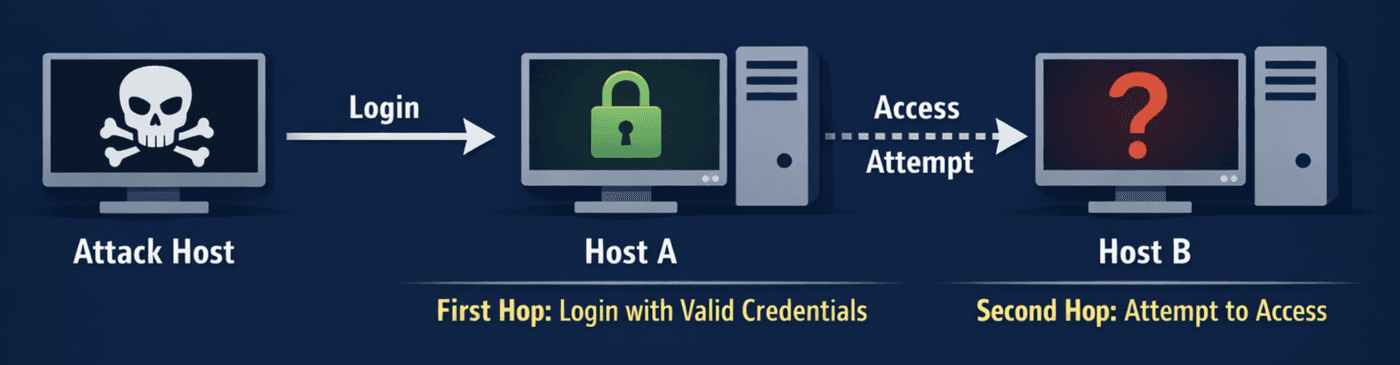
You enter Host A (first hop) using valid credentials. Then, from within that session, you try to access Host B (second hop). In many scenarios this fails with generic access denied messages, operation errors, or authentication failures. The user has permission, the resource exists, the network is up, but even so, the second hop dies.
This happens very often when using WinRM/PowerShell Remoting to enter a server and, from there, trying to query the domain, access an SMB share, talk to LDAP, pull data from the DC, or interact with any other host on the network. The problem becomes more evident when a remote shell is used through WinRM and, inside it, you try to execute tools that depend on additional network access. The correct explanation starts with a simple but vital distinction.
Hello Kerberos
A lot of confusion comes from the false idea that, once you authenticate with Kerberos, "Windows knows who you are" and can prove that to any other system. That is not how it works.
In Kerberos, authentication revolves around tickets issued by a service called the KDC (Key Distribution Center), which, in Windows environments, is part of the Domain Controller. In simplified terms, there are two main artifacts that you need to distinguish:
The TGT (Ticket Granting Ticket) proves to the KDC that you have already been authenticated and that you may request additional tickets for services on the network without needing to authenticate again. It is, so to speak, the authorization ticket in Kerberos.
The TGS (Ticket Granting Service) is a ticket for a specific service on a specific host, such as
HTTP/host,CIFS/host,LDAP/dc,HOST/server, and so on. It is not a universal pass. It is valid for that service, under that service identity, in that context.
This distinction is the heart of Double Hop.
Another important point to keep in mind is that, to generate a TGS for a specific service, the user must present the TGT to the KDC and it, in turn, returns a TGS for the requested service. That TGS is what the user presents to the service when trying to access it (remember this: the TGS is sent, not the TGT).
When you establish a remote session through WinRM, what normally appears on the remote host is a ticket for the HTTP service of that host (the TGS required for the WinRM session), because that is the path through which WinRM is being consumed. This allows you to access that service on that host. But, just to reinforce it, that does not mean the remote host received your TGT so that it can go around requesting other TGSs on your behalf for any other resource on the network.
In other words: the first hop authenticated you to the remote service; it did not necessarily give the remote host the power to continue representing you on the second hop.
The phrase "the TGT was not sent" is useful from a teaching perspective, but it needs to be read carefully so it does not hide what that actually means. The important technical point is that the session created on the remote host does not, by default, have the material necessary to request new tickets for other services on your behalf, unless there is explicit delegation or some other way of supplying credentials again.
WinRM Impacted
WinRM is often framed as the culprit, but in practice it is only the scenario where the "problem" appears most clearly. When you connect through WinRM to a domain host, the default flow tends to use Kerberos. The ticket presented to the remote host is normally a TGS for the HTTP service of that host, something like HTTP/dev01.domain.local.
If you run the klist command in that session, in many cases you will see only that ticket, or only a minimal set of tickets related to that connection. That matches the classic symptom exactly: you can execute commands on the host you are connected to (first hop), but you cannot use that same context to query the DC directly, access \\server\share, or run tools that need to talk to LDAP or CIFS on another server.
From the system's point of view, this is expected. The remote host (in the example above: dev01) is able to validate that you are authorized to use its WinRM service. What it did not receive, by default, is unrestricted authorization to go around representing you before other services.
That is why the Double Hop "problem" shows up so often with WinRM: the remoting is real, the shell opens, the process is running under your user context, but authentication for additional resources does not automatically follow the session. The process knows "who you are" on the local system, but that does not imply that it can prove that identity to third parties using Kerberos without delegation or without credentials being presented again.
RDP Is Not Impacted
A natural question is: if WinRM breaks, why is the situation usually different when using RDP to the same host? A practical way to understand the problem is to observe what is stored in LSASS depending on the authentication type and the logon type.
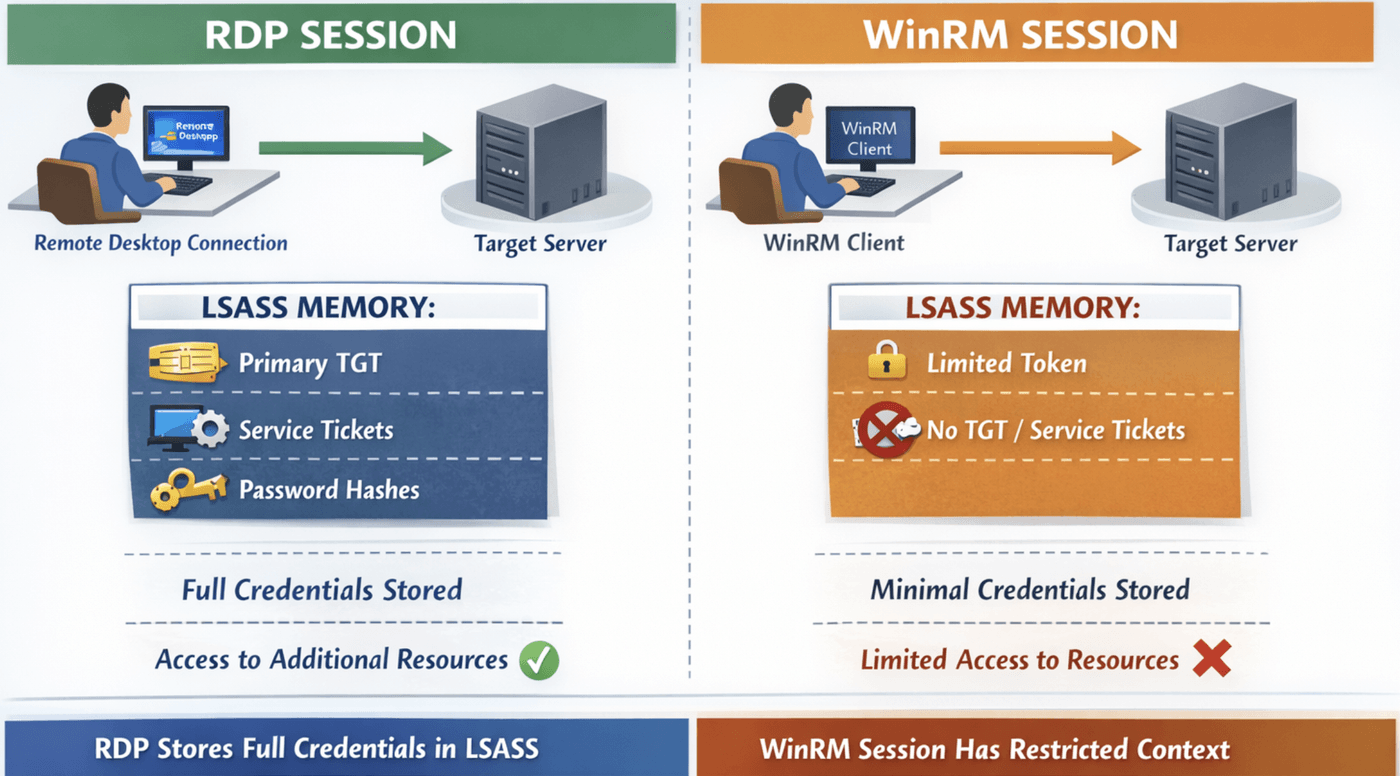
When you perform a traditional interactive logon, such as at the console or through RDP, the system normally builds a much more "complete" session from the standpoint of credentials and tickets. You tend to have:
a primary TGT in the Kerberos cache,
service tickets being obtained as needed,
and, depending on the scenario, additional material in LSASS that allows reauthentication or transparent use of the identity in new network accesses.
In a typical WinRM session, however, what often appears is a much more restricted context. You have enough to use the current remote service (on the first hop), but not necessarily enough to extend that identity to additional resources. The practical result is that commands that need to talk to the DC or to another host fail, even when the user has the proper permissions in AD.
That is where the didactic phrase that so many people use comes from: "the password is not in memory." The spirit of that phrase is correct, but the exact technical meaning is: by default, the remote session does not have the set of reusable artifacts that would allow the remote host to authenticate again to other resources as if it were you.
TGT and TGS
It is worth repeating these points here because this is the core of what many people consider to be the Double Hop "problem":
The TGT is used to talk to the KDC and request other tickets (for example, service tickets). It is the basis for continuity of Kerberos identity.
The TGS is used to access a specific service. It is granular and limited.
When you enter DEV01 through WinRM, the remote host normally sees something equivalent to a ticket for that server's HTTP service. But when, from there, you try to talk to the DC through LDAP or access a share through CIFS, the remote service would need to act on your behalf and prove your identity to those other services. For that, it is not enough to have the TGS you used for the first host. It would be necessary to obtain new tickets for the services on the second destination, or to receive credentials again, or to operate under an authorized delegation scenario. Without that, the second hop dies.
This is the correct meaning of the classic formulation: the TGS for the first service does not solve access to the second service, and the intermediate host did not receive, by default, the means to continue the Kerberos flow on your behalf.
Exec-based Tools
Now comes the comparison that generates half of the wrong interpretations. Many people learn in practice that, through PsExec or other methods, the second hop tends to work better, and conclude: "oh, so PsExec uses NTLM and WinRM uses Kerberos."
That sounds correct, but at the same time it is far too simplistic. The right question is not "which tool" was used. The right question is: what kind of authentication was used, what kind of logon session was created, and what authentication material became available on the first hop for reuse?
In several scenarios involving SMB, RPC, or methods that use password authentication or NTLM, Windows ends up with a context that allows reauthentication to new resources with much less friction. In practical terms: the host is able to reuse material present in the session to authenticate to other destinations. In WinRM with Kerberos, on the other hand, the flow tends to create a session in which this does not happen automatically.
So the contrast perceived by the operator is real, but the correct formulation is this: it is not the tool alone that defines the phenomenon; it is the combination of protocol, authentication mode, logon type, available tickets, and delegation policy.
Logon Type
To understand why two sessions "with the same user" behave differently, you need to know the Windows logon types. Windows classifies the way a logon was created, and that strongly influences the behavior of the session from the standpoint of tokens, credentials, tickets, and reuse.
Logon Type 2 is interactive logon. This is the classic case of local login or scenarios that the system treats as more complete interactive authentication. This type of session tends to have a much richer context for subsequent authentication.
Logon Type 3 is network logon. Several remote accesses to services fall into this category. This type of session is usually much more restricted, and it is exactly where the Double Hop "problem" tends to show up strongly.
Logon Type 9 is NewCredentials. It appears in scenarios such as
runas /netonly, in which you keep a local context but provide credentials that will only be used when accessing network resources. This type is particularly interesting for understanding pivots and "on-demand" identities.
The reason this matters is simple: it is not enough to know "which user" is executing something; you need to know "how that session was created." The logon type helps explain why a remote session may appear authenticated and yet still be unable to perform a second hop.
Analyzing Tickets with klist
An excellent way to diagnose the phenomenon is klist. In a WinRM session affected by the Double Hop "problem," it is common to see only one ticket related to the remote host's service, typically the HTTP service. You see something like this:
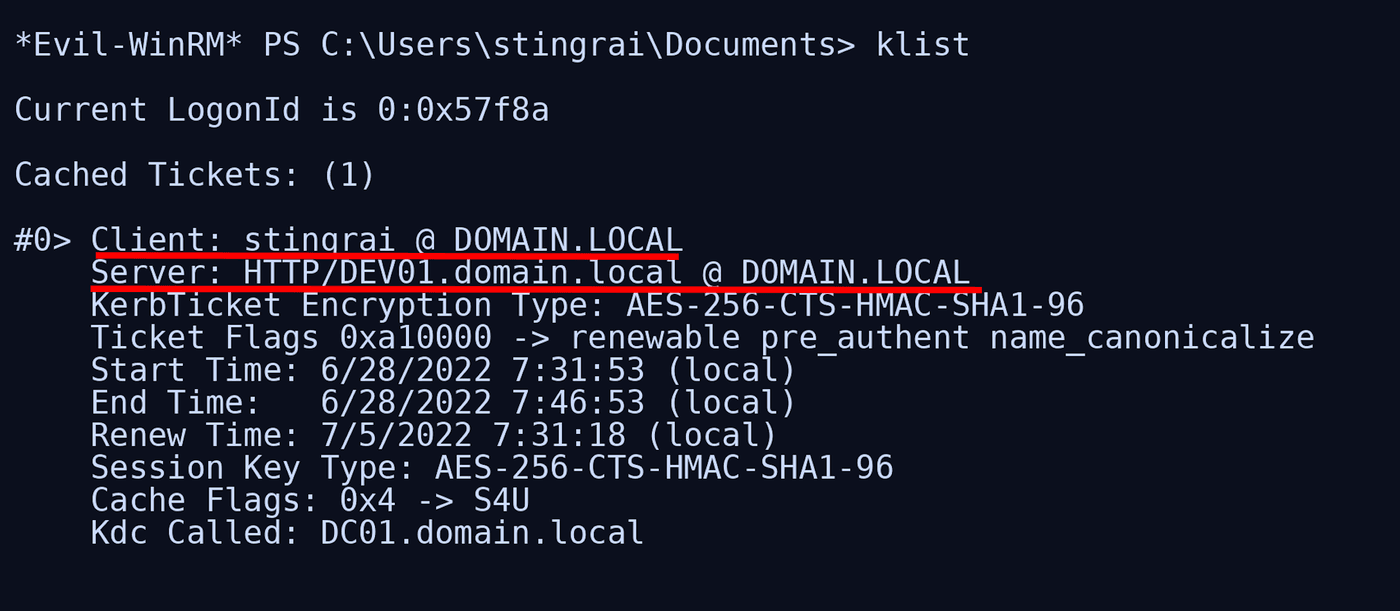
And nothing indicating a reusable primary TGT or additional tickets for services such as LDAP/DC, CIFS/DC, and similar ones. In practice, that explains the behavior: you are authenticated to that service. Period.
Now compare that with a more complete interactive session, such as RDP or local logon. In that scenario, it is much more common to see in klist a richer set, including krbtgt/REALM as the primary ticket and other service tickets (TGSs) being acquired as you interact with domain resources. When that exists, the host is already able to operate with your identity much more broadly, and the Double Hop "problem" ceases to exist or becomes much less noticeable.
This contrast is didactically powerful because it visualizes exactly the difference between "having only one service ticket for the first hop" and "having a Kerberos session complete enough to continue obtaining tickets."
Full Delegation
Many people ask: "if this gets in the way so much, why doesn't Windows just delegate everything by default?" The answer is simple: because that would be a security nightmare.
The conservative design of Kerberos exists precisely to prevent any remote service you authenticate to from going around impersonating you before other services. If every first hop already received your means of authentication for all subsequent hops, intermediate compromises would be even more devastating.
That is why mechanisms such as Constrained Delegation and Unconstrained Delegation exist as explicit architectural and policy choices, and not as universal default behavior. They solve legitimate multi-hop remoting cases, but at the cost of increasing the intermediate host's power over your identity.
So yes: the Double Hop "problem" is annoying from an operational point of view. But it exists to protect the environment, because the alternative without this "problem" would be far worse for the security of the environment.
Offensive Solutions
1. PSCredential
One of the classic workarounds consists of creating a PSCredential object and explicitly passing the credentials in every operation that needs to access another resource. Many people use this with PowerShell tools that accept a -Credential parameter (for example, PowerView).
Why does this work? Simple: because you are effectively presenting credentials again to the second destination. Instead of depending on the remote session already having a reusable TGT or delegation permission, you are delivering again the authentication elements required for the new access to occur.
2. Register-PSSessionConfiguration
Another known workaround is to register a new PowerShell session configuration with -RunAsCredential and then open a session using that custom endpoint.
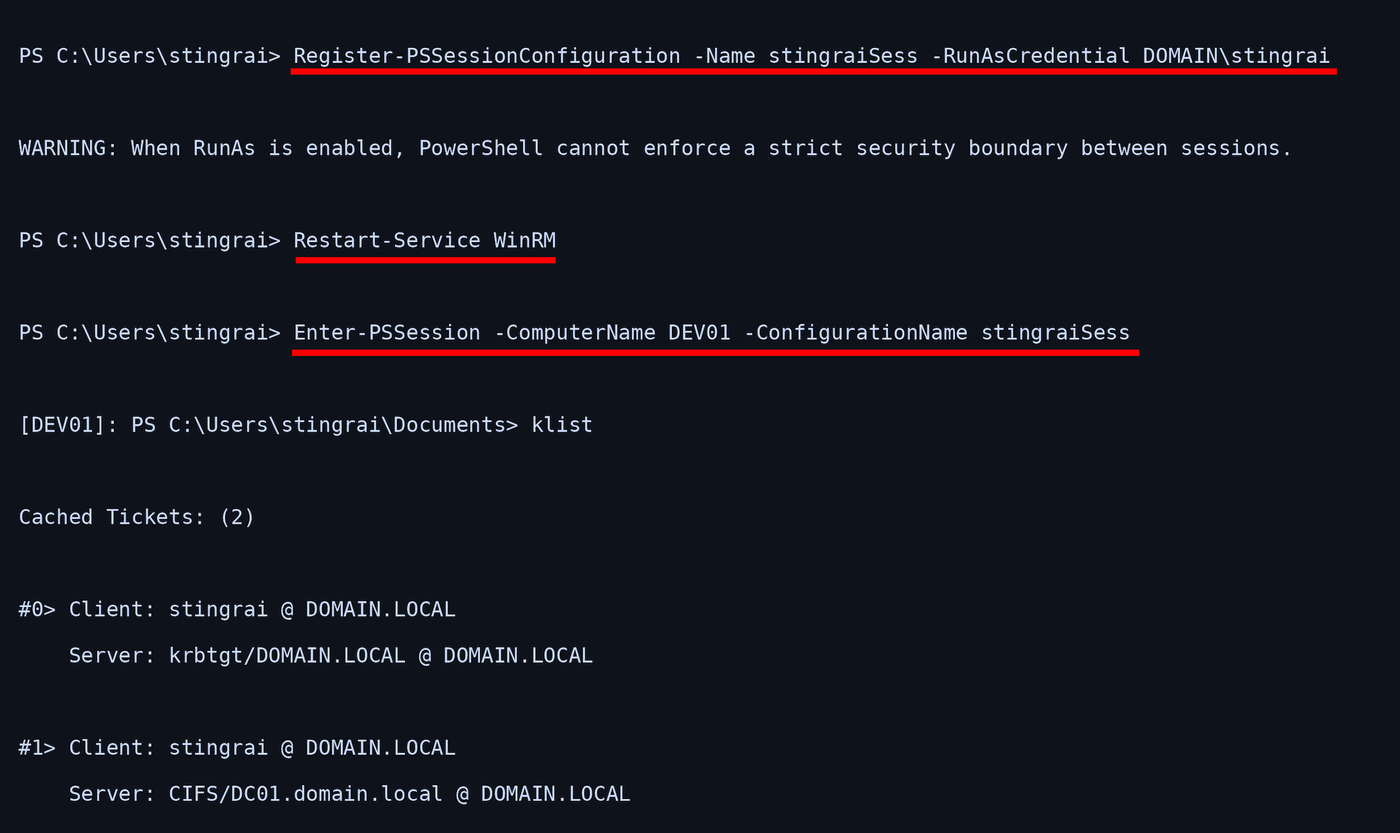
This method is not a "magic PowerShell trick"; it changes the nature of the context under which that session starts to operate. By doing that, you can often create an environment in which the remote host effectively works with a richer context for the specified account, including obtaining a primary TGT that allows it to reach other services without needing to resend credentials on every command.
That is why klist afterward tends to show something very different: instead of only an HTTP/host ticket, you start seeing a primary krbtgt/REALM ticket, and the session begins to behave more like an identity context capable of continuing to obtain tickets. The practical effect is clear: tools that previously died trying to query the DC start working normally.
Connecting the Knowledge
You have credentials for a domain account that is a member of Remote Management Users on DEV01. From your attack host, you open a WinRM session on DEV01. The shell comes up normally. You can navigate the system, import modules, and run local commands.
Now you try to use a tool that needs to query the domain directly, such as an LDAP enumeration against the DC. The command fails.
If you run klist inside the WinRM session, you will typically see only one ticket for HTTP/DEV01. That confirms that your session is authenticated only to that remote service.
Then you create a PSCredential with the same account and repeat the command while explicitly passing -Credential. Now it works. That happens because you provided the credentials again for the new operation, and it no longer depends on transparent reuse from the first hop.
Alternatively, you log in through RDP to DEV01 with the same account. Now klist starts to show a much more complete Kerberos context, including a primary TGT. The same domain query that failed in the WinRM session starts working normally.
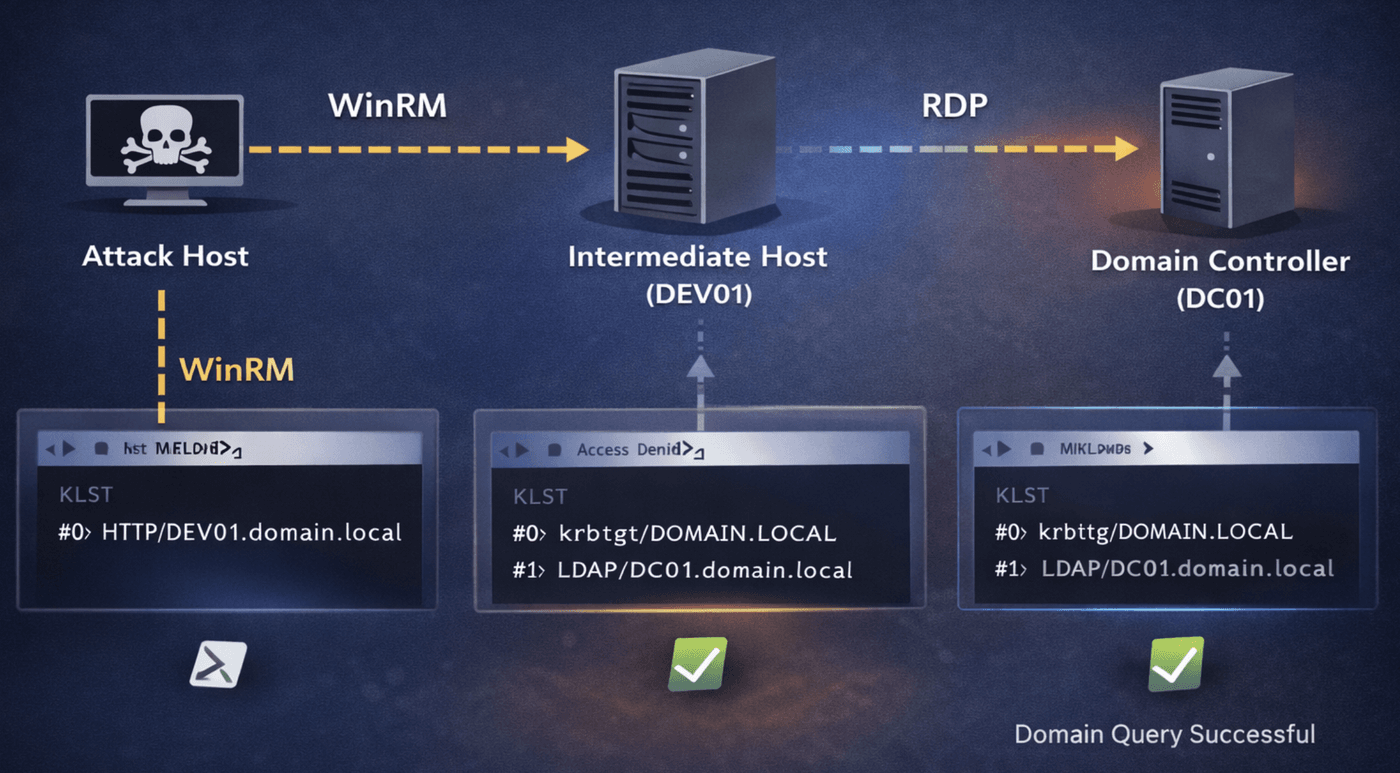
This lab crystallizes the entire theory. The user is the same. The intermediate host is the same. The final target is the same. What changes is the nature of the session and the authentication material available in it.
Conclusion
Now it is possible to answer, in technical terms, that the Double Hop "problem" is, in reality, a problem of incorrect expectations about what it means to "be authenticated" on a Windows host.
Being authenticated to a remote service does not mean that the remote host received your password, your hash, your reusable primary TGT, or unrestricted permission to continue representing you before other services. In many cases, all it received was enough to validate the first hop.
That is why WinRM opens the shell but fails on subsequent network access. That is why klist in a typical WinRM session shows only the ticket for the current host's HTTP service. That is why, through RDP or another more complete interactive context, the story changes. And that is why PSCredential, RunAs, and delegation solve the problem: all of them, in one way or another, provide the second step with the means that the default remote session did not have.
If you keep only one sentence from this article, keep this one:
"Double Hop exists because the first hop via Kerberos normally authenticates you to a specific service, but does not automatically transfer to the intermediate host the ability to continue acting on your behalf on the second hop."
That is the essence of what people call the Double Hop "problem."
Frequently Asked Questions
What is the Kerberos double-hop problem?
The Kerberos double-hop problem appears when a user successfully authenticates to a first host but fails to access a second host using the same session, despite having the right permissions. It is fundamentally a reflection of incorrect expectations about what it means to be authenticated on a Windows host. Kerberos tickets are not credentials, and the first hop does not automatically grant the remote host the power to keep representing the user on a second hop.
Why does WinRM show the double-hop problem more clearly than RDP?
WinRM sessions typically create network logons with a restricted context that contains only service tickets for the immediate host. RDP interactive logons produce richer credential contexts including a primary TGT, which enables broader delegated access to downstream resources.
What is the difference between a TGT and a TGS?
The TGT (Ticket Granting Ticket) proves authentication to the KDC and authorizes requesting additional tickets. The TGS (Ticket Granting Service ticket) is issued for a specific service on a specific host and is not universal, so it cannot be reused to reach a different downstream service.
Why doesn't Windows delegate credentials everywhere by default?
Delegating everywhere by default would be a security nightmare. The conservative design of Kerberos exists precisely to stop a remote service you authenticate to from impersonating you before other services, because if every first hop already held your means of authentication for all subsequent hops, intermediate compromises would be far more devastating. Constrained and Unconstrained Delegation therefore exist as explicit architectural and policy choices rather than universal defaults.
How do offensive operators work around the double-hop problem?
Two common approaches are passing explicit credentials with PSCredential so every downstream network call carries usable credentials, and using Register-PSSessionConfiguration with -RunAsCredential to establish a custom endpoint whose sessions run with a richer Kerberos context.