




HTML smuggling in phishing rose 85.6% between November 2024 and February 2025, overtaking other obfuscation methods as the dominant way attackers hide a payload from scanners (KnowBe4 Threat Labs, Phishing Threat Trends Report). It works because the malicious file never crosses your network as a file. The HTML that lands in an inbox looks benign, and the browser on the endpoint quietly reassembles the payload from data embedded in the page. HP Wolf Security measured the downstream effect directly: 12% of email threats evaded gateway security in its telemetry, and 39% of threats arrived inside archives that gateways struggle to open (HP Wolf Security, Threat Insights Report, September 2024). The pattern is consistent across vendors: adversaries are moving detection off the wire and onto the host, where perimeter tools cannot follow.
Four forces make HTML smuggling the initial-access technique of 2026. First, it is a structural blind spot: Microsoft notes that network defenses "only see... benign HTML and JavaScript traffic" because the malicious file is built only after the page loads on the endpoint (Microsoft Security Blog). Second, it pairs with container files (ISO, VHD, LNK, OneNote) that historically stripped Mark-of-the-Web, the Windows tag that gates risky downloads (Microsoft Learn). Third, generative AI is now writing the delivery code: HP Wolf found a real smuggling chain whose scripts carried clear GenAI authoring telltales. Fourth, delivery has moved beyond email to compromised websites, as the JS#SMUGGLER campaign that dropped NetSupport RAT showed in December 2025 (Securonix Threat Research). This guide is written for security engineers, SOC analysts, and the CISOs who own initial-access risk.
This post is the Stingrai research team's canonical 2026 reference for defending against HTML smuggling. It draws on seven named primary publishers, MITRE ATT&CK, Microsoft, KnowBe4, HP Wolf Security, and Securonix among them, and every figure is attributed inline. Lead data is full-year 2024 and 2025 telemetry, the freshest available: primary publishers had not released full-year 2026 threat reports as of July 2026, so the numbers here carry their exact reporting windows. One frequently repeated statistic on average HTML attachment size could not be traced to a named primary report on verification and was dropped rather than estimated. Every stat below links back to its publisher so any claim can be audited inline.
TL;DR: HTML smuggling in 2026
HTML smuggling growth in phishing (Nov 2024 to Feb 2025): up 85.6%, the top payload-hiding technique in the window (KnowBe4 Threat Labs).
Email threats that evaded gateway security (Q2 2024): 12% reached the endpoint anyway (HP Wolf Security).
Threats delivered inside archives (Q2 2024): 39%, a format gateways struggle to inspect (HP Wolf Security).
What it is: MITRE ATT&CK technique T1027.006, a sub-technique of Obfuscated Files or Information (MITRE ATT&CK).
Why the perimeter misses it: the file is assembled in the browser, so gateways see only benign HTML and JavaScript (Microsoft).
Who uses it: APT29, QakBot, Mekotio, Trickbot, and NOBELIUM-linked activity are documented users (MITRE ATT&CK, Microsoft).
The container pairing: smuggled payloads are often ISO, VHD, LNK, or OneNote files that historically bypassed Mark-of-the-Web (Microsoft Learn).
Where you get signal: file creation after a browser Blob write, then rapid execution, plus Zone.Identifier inspection (MITRE ATT&CK).
The endpoint controls that stop it: Microsoft's attack surface reduction rules block script-launched downloads and obfuscated scripts (Microsoft Learn).
The 2025 escalation: GenAI-written delivery code and compromised-site delivery, seen in the JS#SMUGGLER NetSupport RAT campaign (Securonix).
Key takeaways
Your perimeter was never going to catch this, and that is by design. HTML smuggling exists specifically to defeat network and email content inspection. The payload is data, not a file, until the browser reassembles it on the host. Microsoft states plainly that gateways "only see... benign HTML and JavaScript traffic" during delivery (Microsoft). Budgeting more perimeter scanning against this technique buys very little.
Detection lives on the endpoint and in the browser, not at the gateway. The moment of truth is when the reconstructed file is written to disk, tagged (or not tagged) with Mark-of-the-Web, and executed. MITRE's own detection guidance for T1027.006 centers on file creation following a Blob write and Zone.Identifier inspection (MITRE ATT&CK).
Mark-of-the-Web is the single highest-leverage control, and container files are how attackers evade it. MOTW is why Office blocks internet macros and why SmartScreen warns on unknown downloads. Smuggled payloads are frequently packaged as ISO, VHD, or LNK precisely because those formats historically failed to propagate the tag to their contents (Microsoft Learn).
The delivery is getting cheaper and more automated. HP Wolf found smuggling code with generative-AI authoring telltales, and the JS#SMUGGLER campaign moved delivery onto compromised legitimate websites (HP Wolf Security, Securonix). Assume more volume and more variation, not less.
You cannot manage what you have not tested. The only way to know whether your email controls, browser policy, MOTW enforcement, and endpoint rules actually catch a smuggled payload is to safely emulate the delivery and watch what your stack does. That validation, not another product, is where most programs have a gap.
Methodology
This post synthesizes primary threat-intelligence and vendor-engineering sources, each cited inline with its publication date and reporting window:
MITRE ATT&CK, T1027.006 (HTML Smuggling): technique definition, documented procedure examples, mitigations, and detection analytics. Retrieved 2026.
Microsoft Security Blog (11 November 2021): the reference analysis of how HTML smuggling assembles payloads on the host and evades network inspection, with observed actors and recommended defenses.
KnowBe4 Threat Labs, Phishing Threat Trends Report (March 2025): phishing-technique trend data for the November 2024 to February 2025 window.
HP Wolf Security, Threat Insights Report (September 2024, reporting Q2 2024): measured gateway-evasion and archive-delivery rates, plus a documented HTML smuggling to AsyncRAT chain.
Securonix Threat Research (December 2025): the JS#SMUGGLER campaign delivering NetSupport RAT from compromised websites.
Microsoft Learn: current engineering documentation for attack surface reduction rules (updated May 2026), Mark-of-the-Web and internet-macro blocking (updated December 2025), Safe Attachments (updated May 2026), and Microsoft Defender SmartScreen (updated April 2026).
Research cutoff was 1 July 2026. Where a figure could not be reached on at least one verification pass against a named primary source, it was dropped rather than estimated. One widely repeated statistic on average HTML attachment file size was removed for that reason. This post is a conceptual and defensive reference. It deliberately omits any operational detail that would help build a smuggled payload, and concentrates on detection and defense.
What HTML smuggling actually is
HTML smuggling is catalogued as MITRE ATT&CK technique T1027.006, a sub-technique of Obfuscated Files or Information. MITRE defines it as adversaries who "smuggle data and files past content filters by hiding malicious payloads inside of seemingly benign HTML files" (MITRE ATT&CK). The technique abuses features that every modern browser supports for entirely legitimate reasons: the ability to construct a file object in memory from encoded data, and the ability to save that object to the user's device.
The important mental model for a defender is this. A normal malware delivery ships a file, and your controls inspect that file in transit. HTML smuggling ships a recipe instead of a meal. What travels to the user is an HTML document, sometimes an attachment and sometimes a link, containing encoded data and a small amount of script. Nothing in transit is a Windows executable, an archive, or a container. When the user opens the page, the browser follows the recipe locally and produces the file on the endpoint. Microsoft describes the result precisely: "malicious files are created only after the HTML file is loaded on the endpoint through the browser" (Microsoft).
This is not a fringe technique used by a single crew. MITRE documents APT29 embedding an ISO file inside an HTML attachment, the EnvyScout loader extracting an encoded blob from an HTML body and writing it to disk, and QakBot delivered in ZIP files via HTML smuggling (MITRE ATT&CK). Microsoft separately observed the banking trojan Mekotio, Trickbot, and NOBELIUM-linked spear-phishing using it (Microsoft). It spans commodity crimeware and nation-state tradecraft because it solves the same problem for both: getting a file onto a host without that file being inspected on the way in.
Why your perimeter tools are structurally blind
Secure email gateways, web proxies, and network content inspection all share one assumption. They assume the thing they need to judge, the malicious file, will pass through them. HTML smuggling breaks that assumption at the root.
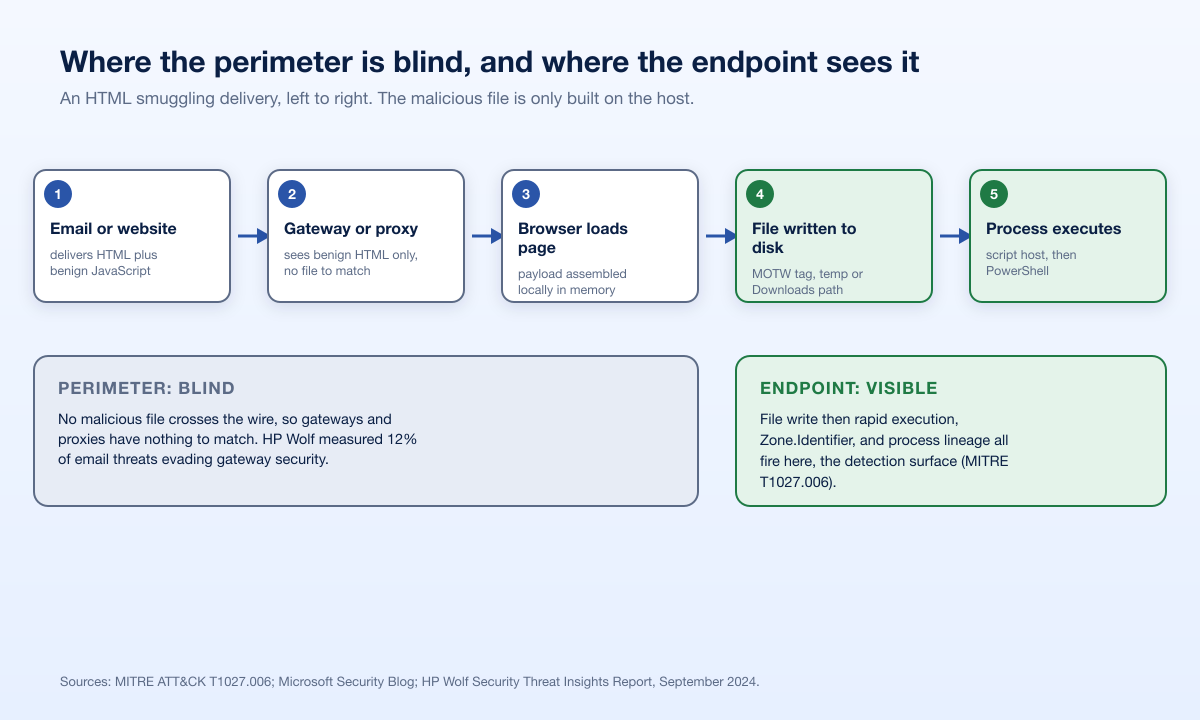
Walk the delivery from left to right. At the gateway, the artifact is an HTML file or a link, plus benign-looking JavaScript. There is no executable to detonate, no archive signature to match, and the script can be encoded so that even static inspection of the HTML reveals little. This is why a smuggled file can carry a zero-detection score on multi-engine scanners even with a clearly embedded download, a point KnowBe4 makes in its trend reporting (KnowBe4 Threat Labs). HP Wolf's measured 12% gateway-evasion rate is the same phenomenon expressed as a number (HP Wolf Security).
Two design realities make it worse. Archives are a routine wrapper, and gateways often cannot fully open nested, large, or password-protected archives, which is why 39% of threats arrived in archives in HP Wolf's data (HP Wolf Security). And delivery no longer requires an email at all. In the JS#SMUGGLER campaign, the smuggling logic was injected into compromised legitimate websites, so there was no attachment for an email gateway to see in the first place (Securonix). The lesson is not that gateways are useless. It is that they are the wrong layer to rely on for this specific technique.
The container-file pairing and Mark-of-the-Web
To understand the defense, you have to understand the one control HTML smuggling most wants to avoid: Mark-of-the-Web (MOTW).
When Windows saves a file from the internet, it attaches a small hidden marker called a Zone.Identifier alternate data stream that records the file came from an untrusted zone. Microsoft documents the zone values directly, where a ZoneId of 3 means the Internet zone (Microsoft Learn). Applications read this marker and change their behavior. Office blocks macros in MOTW-tagged files by default, SmartScreen weighs reputation on tagged downloads, and endpoint rules can treat tagged files with suspicion. MOTW is, in effect, the operating system whispering "this came from outside, do not trust it yet" to every app that will handle the file.
Two properties of MOTW matter enormously for this technique. First, Microsoft notes MOTW "only applies to files saved on an NTFS file system, not files saved to FAT32" (Microsoft Learn). Second, and more importantly, container formats historically did not carry the tag through to the files inside them. This is the reason smuggled payloads are so often packaged as ISO, VHD, IMG, or LNK files, and why OneNote had its moment as a delivery vehicle. Package the real payload inside a container, and the file that finally executes may arrive without the "downloaded from the internet" marker that would otherwise gate it.
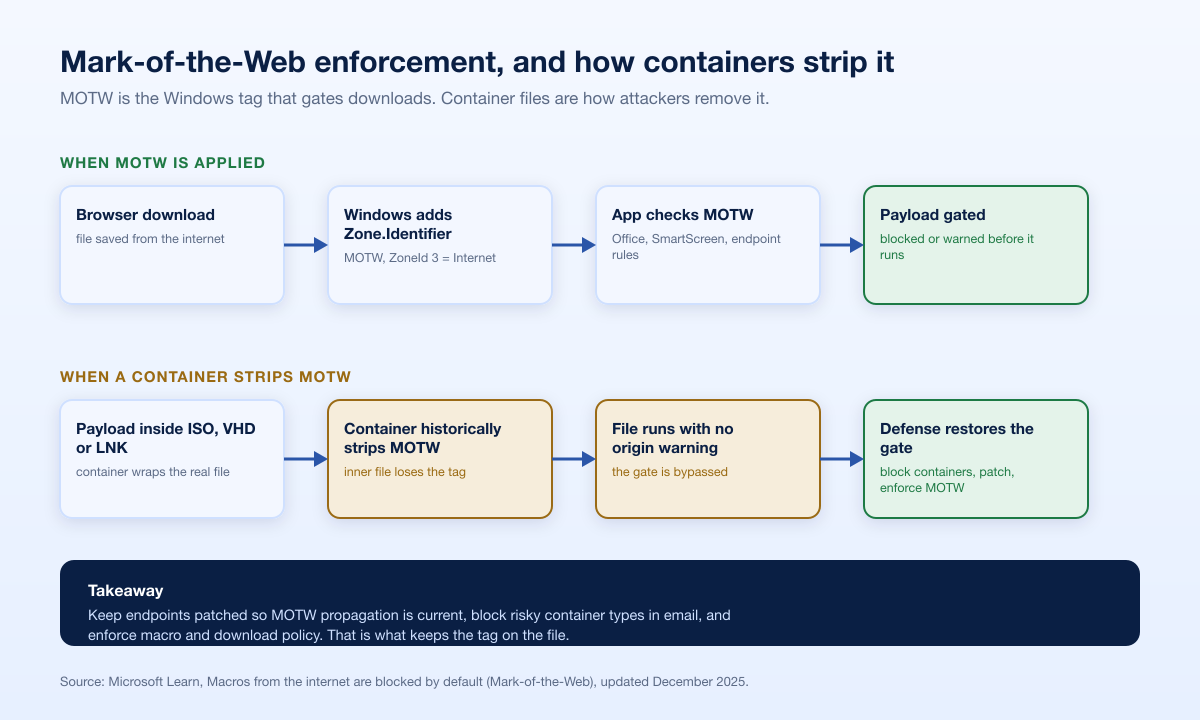
Microsoft has hardened MOTW propagation over successive releases, so newer Windows builds carry the tag into more container types than older ones did. That is exactly why patch level and configuration matter here. The defensive takeaways are concrete: keep endpoints current so MOTW propagation improvements are actually in force, block or gate the risky container types that add no business value in email, and make sure your macro-blocking and download policies are enforced rather than merely available.
Where defenders actually get signal
HTML smuggling moves the fight to the endpoint. The good news is that the endpoint is where the technique finally has to do something observable: write a file and run it. MITRE's detection guidance for T1027.006 is built around exactly these moments (MITRE ATT&CK). Below are the surfaces worth instrumenting, ordered roughly by signal quality.
Detection surface | What to look for | Why it fires on smuggling |
|---|---|---|
Endpoint file-write telemetry | A browser process writing a file to Downloads or a temp path, immediately followed by execution of that file | MITRE describes detection of file creation following an HTML or JavaScript Blob write, then rapid execution (MITRE ATT&CK) |
Mark-of-the-Web / Zone.Identifier | Files that should carry MOTW but do not, or a HostUrl value pointing at unexpected domains | MITRE calls out inspecting Zone.Identifier for HostUrl indicators; missing MOTW often means a container stripped it (MITRE ATT&CK) |
Process lineage | Browser spawning a script host, or a script host spawning PowerShell, from a user-writable path | JS#SMUGGLER ran an HTA loader via mshta.exe that launched PowerShell stagers (Securonix) |
Browser download behavior | Downloads produced without a corresponding network fetch, unusually large HTML files, or Blob and data-URI driven saves | The file is built locally, so the download appears with no matching inbound object |
Email content analytics | HTML attachments containing large encoded blobs, or lures that ask the user for a password to open the content | HP Wolf documented a smuggled HTML invoice that prompted the user for a decryption password (HP Wolf Security) |
The single most durable detection is the behavioral pair: a browser writes a fresh file to a user-writable location, and that file executes within seconds. Signatures do not matter to that logic, which is why it survives the obfuscation, the encoding, and the AI-written variation that defeats static rules. Zone.Identifier inspection is the close second, because a payload that runs without the MOTW it should have is a strong anomaly on its own.
Layered defenses that stop smuggled payloads
No single control stops HTML smuggling, because the technique deliberately routes around the layer most organizations lean on. A defensible posture stacks controls at the browser, the endpoint, the mail flow, and the human. The table maps each control to what it actually does and the authority behind it.
Layer | Control | What it stops | Source |
|---|---|---|---|
Endpoint | ASR rule: Block JavaScript or VBScript from launching downloaded executable content | Script loaders that fetch and run a payload | |
Endpoint | ASR rule: Block execution of potentially obfuscated scripts | The obfuscated scripts smuggling relies on | |
Endpoint | ASR rule: Block executable content from email client and webmail | Executable and script content propagating from mail | |
OS | Mark-of-the-Web enforcement and current patch level | Payloads running without an internet-origin warning | |
OS / Browser | Microsoft Defender SmartScreen reputation checks | Unknown or low-reputation downloads and URLs | |
Safe Attachments detonation in a virtual environment | Malicious attachments caught by dynamic analysis before delivery | ||
Mail / File | Block or gate risky container and attachment types (ISO, VHD, IMG, LNK) | The container formats used to strip MOTW | |
Browser | Enterprise browser download policy and content disarm | Automatic saves and risky file types at the point of download | |
Human | Awareness of password-protected attachment lures | The social step that gets the user to open and run the content |
A few notes on sequencing. Deploy the attack surface reduction rules in audit mode first, review what would have been blocked, then move to block mode. Microsoft's own guidance is that these rules can be noisy on line-of-business scripting, so measure before you enforce (Microsoft Learn). Treat SmartScreen and Safe Attachments as valuable but incomplete: SmartScreen explicitly "doesn't protect against malicious files on internal locations or network shares" (Microsoft Learn), and Safe Attachments only helps for attachments that pass through a mail flow it inspects (Microsoft Learn). Content disarm and reconstruction, which rebuilds files to strip active content rather than trying to detect it, is a strong complement for the container problem because it removes the risky structure instead of guessing at intent.
What the 2024 and 2025 cases teach us
Three documented chains show the technique as it is actually used, and each points at a specific detection opportunity.
HP Wolf, HTML invoice to AsyncRAT (Q2 2024). HP Sure Click isolated a French-language HTML attachment posing as an invoice. Opening it in the browser prompted the user for a password, the payload was encrypted inside the JavaScript itself rather than in an attached archive, and the chain ended in AsyncRAT. Notably, the code carried consistent comments and naming that pointed to generative-AI authorship (HP Wolf Security). Detection opportunity: the password-prompt lure and the browser-to-file-to-execution behavior, neither of which depends on recognizing the specific malware.
Securonix, JS#SMUGGLER to NetSupport RAT (December 2025). Obfuscated JavaScript injected into compromised websites profiled the visitor's device, branched between mobile and desktop paths, and ran an HTA loader through mshta.exe that launched PowerShell stagers, ending in NetSupport RAT (Securonix). Detection opportunity: mshta.exe spawning PowerShell is a high-value process-lineage alert, and it fires regardless of the delivery site.
APT29 and QakBot (ongoing). MITRE documents APT29 nesting an ISO inside an HTML attachment and QakBot arriving in ZIP files via smuggling (MITRE ATT&CK). Detection opportunity: the container pairing itself. A mounted ISO or an extracted archive that yields an executable running without MOTW is the anomaly to hunt.
The common thread is that the malware family changes but the delivery shape does not. That is precisely why behavior-based detection outperforms signatures against this technique. For the post-execution side of the problem, where an operator tries to blind or bypass your endpoint agent after landing, our companion analysis of EDR bypass and evasion techniques covers the detection surfaces that matter once the payload runs.
What this means for defenders
Move your detection budget off the wire and onto the host. Prioritize endpoint file-write-then-execute analytics and Zone.Identifier inspection over additional perimeter scanning, which structurally cannot see a browser-assembled file (MITRE ATT&CK).
Turn on the three attack surface reduction rules, in audit then block. Blocking script-launched downloads, obfuscated scripts, and executable content from mail closes the most common execution paths (Microsoft Learn).
Enforce Mark-of-the-Web and cut risky containers. Keep endpoints patched so MOTW propagation is current, and block ISO, VHD, IMG, and LNK in email where they add no business value (Microsoft Learn).
Alert on process lineage, not payloads. A browser spawning a script host, or mshta.exe spawning PowerShell, is worth a high-fidelity alert on its own (Securonix).
Validate the whole chain, do not assume it. The only way to know your controls fire is to safely emulate delivery through execution and measure what your stack catches. Pair that with ongoing user testing, and use our eight essential defenses against phishing as a control checklist. Stingrai is a global CREST-accredited penetration testing services company founded in Toronto, Canada in 2021, trusted by companies from startups to enterprises to meet audit requirements for SOC 2, ISO 27001, CMMC, PCI DSS and HIPAA. OSCE³, OSWE, OSEP, CREST CRT certified pentesters, who are also world-class security researchers and bug bounty hunters. Choose from fully human-led or hybrid (AI agents plus human penetration testers) engagements across web, API, mobile, AI and LLM, cloud, network, Active Directory and social engineering penetration tests and red team engagements, with findings posted to its PTaaS portal as they are confirmed, live chat with the assigned testers, Jira and Slack integration, retesting and an attestation letter with every report.
How Stingrai validates your defenses against smuggled payloads
Knowing the theory of HTML smuggling and knowing whether your own stack catches it are two very different things. Stingrai, a Toronto and London based offensive-security firm founded in 2021 and a CREST-accredited penetration testing service provider, closes that gap by safely emulating the delivery, not by handing anyone an attack kit.
Our social engineering and phishing simulation service runs controlled campaigns that mirror how a smuggled payload would be delivered, so you can measure whether your email controls, browser policy, and user awareness hold up under a realistic lure rather than a generic test message. Our adversary simulation and red and purple teaming practice takes it further, replicating documented initial-access-to-execution chains mapped to MITRE ATT&CK and giving your SOC per-technique feedback on what its detection logic caught and what it missed. We emulate the behavior that matters, the browser-to-file-to-execution sequence and the process lineage, so you validate the exact detections this article describes.
The output is evidence. Adversary simulation and phishing testing produce the kind of documented, technique-level results that support your SOC 2, ISO 27001, PCI DSS 4.0, and DORA programs, showing auditors and boards that your initial-access defenses were tested against a current, real technique rather than a checklist. You can see engagement scopes and packages on the Stingrai pricing page.
Frequently asked questions
What is HTML smuggling and why is it hard to detect?
HTML smuggling is a malware delivery technique, catalogued as MITRE ATT&CK T1027.006, in which a benign-looking HTML page or attachment carries encoded data that the victim's browser reassembles into a malicious file on the endpoint (MITRE ATT&CK). It is hard to detect at the perimeter because no malicious file crosses the network. Microsoft notes gateways "only see... benign HTML and JavaScript traffic" during delivery, so detection has to move to the endpoint and browser (Microsoft).
Why do email gateways and proxies miss HTML smuggling?
Gateways inspect files in transit, but HTML smuggling ships a recipe, not a file. The executable, archive, or container is built locally by the browser after the page loads, so there is nothing malicious to match on the wire (Microsoft). HP Wolf Security measured 12% of email threats evading gateway security and 39% arriving inside archives that gateways struggle to open (HP Wolf Security).
What is Mark-of-the-Web and how does it help stop smuggled payloads?
Mark-of-the-Web (MOTW) is a hidden Zone.Identifier marker Windows adds to files saved from the internet, recording that they came from an untrusted zone (Microsoft Learn). Applications use it to gate risky content: Office blocks macros in MOTW-tagged files and SmartScreen weighs download reputation. Attackers pair smuggling with container files like ISO and VHD because those formats historically failed to carry MOTW to the files inside, so keeping endpoints patched and blocking those containers restores the control.
Which endpoint controls block HTML smuggling execution?
Microsoft's attack surface reduction rules are the most direct controls: "Block JavaScript or VBScript from launching downloaded executable content," "Block execution of potentially obfuscated scripts," and "Block executable content from email client and webmail" (Microsoft Learn). Deploy them in audit mode first to measure impact on legitimate scripting, then move to block mode. Pair them with SmartScreen and MOTW enforcement.
How has HTML smuggling changed in 2025 and 2026?
Two shifts stand out. Delivery code is increasingly written with generative AI, which HP Wolf observed directly in a smuggling chain that ended in AsyncRAT (HP Wolf Security). And delivery has expanded beyond email onto compromised legitimate websites, as the JS#SMUGGLER campaign delivering NetSupport RAT showed in December 2025 (Securonix). KnowBe4 measured the technique's use in phishing rising 85.6% in the November 2024 to February 2025 window (KnowBe4 Threat Labs).
How can we test whether our controls catch a smuggled payload?
Emulate the delivery safely and watch what your stack does. A controlled phishing simulation tests your email controls and user response, while an adversary simulation replicates the initial-access-to-execution behavior and gives your SOC per-technique feedback on detection gaps. The goal is to confirm the file-write-then-execute and process-lineage detections in this article actually fire in your environment.
References
MITRE ATT&CK. Obfuscated Files or Information: HTML Smuggling (T1027.006). Retrieved 2026. https://attack.mitre.org/techniques/T1027/006/. Technique definition, procedure examples (APT29, EnvyScout, QakBot), mitigations, and endpoint detection analytics.
Microsoft Security Blog. HTML smuggling surges: Highly evasive loader technique increasingly used in banking malware, targeted attacks. 11 November 2021. https://www.microsoft.com/en-us/security/blog/2021/11/11/html-smuggling-surges-highly-evasive-loader-technique-increasingly-used-in-banking-malware-targeted-attacks/. Reference analysis of how smuggling assembles payloads on the host and evades network inspection.
KnowBe4 Threat Labs. Phishing Threat Trends Report. March 2025. https://www.knowbe4.com/resources/reports/phishing-threat-trends-report. Phishing-technique trend data, including HTML smuggling growth for the November 2024 to February 2025 window.
HP Wolf Security. Threat Insights Report, September 2024 (reporting Q2 2024). https://threatresearch.ext.hp.com/wp-content/uploads/2024/09/HP_Wolf_Security_Threat_Insights_Report_September_2024.pdf. Gateway-evasion and archive-delivery rates, plus a documented HTML smuggling to AsyncRAT chain with GenAI authoring telltales.
Securonix Threat Research. JS#SMUGGLER: Multi-Stage Hidden Iframes, Obfuscated JavaScript, Silent Redirectors and NetSupport RAT Delivery. December 2025. https://www.securonix.com/blog/jssmuggler-multi-stage-hidden-iframes-obfuscated-javascript-silent-redirectors-netsupport-rat-delivery/. Compromised-site delivery chain using obfuscated JavaScript, mshta.exe, and PowerShell.
Microsoft Learn. Attack surface reduction rules reference. Updated May 2026. https://learn.microsoft.com/en-us/defender-endpoint/attack-surface-reduction-rules-reference. Verbatim ASR rule names and configuration details relevant to script and mail-borne execution.
Microsoft Learn. Macros from the internet are blocked by default in Office (Mark-of-the-Web). Updated December 2025. https://learn.microsoft.com/en-us/microsoft-365-apps/security/internet-macros-blocked. Zone.Identifier and MOTW behavior, zone values, and NTFS-only application.
Microsoft Learn. Safe Attachments in Microsoft Defender for Office 365. Updated May 2026. https://learn.microsoft.com/en-us/defender-office-365/safe-attachments-about. Attachment detonation in a virtual environment and Dynamic Delivery.
Microsoft Learn. Microsoft Defender SmartScreen overview. Updated April 2026. https://learn.microsoft.com/en-us/windows/security/operating-system-security/virus-and-threat-protection/microsoft-defender-smartscreen/. Reputation-based checks on downloaded files and URLs, and their limits on internal shares.
MITRE ATT&CK. Obfuscated Files or Information (T1027). Retrieved 2026. https://attack.mitre.org/techniques/T1027/. Parent technique covering the obfuscation and encoding methods that smuggling combines with.
Ready to find out whether a smuggled payload would reach execution in your environment? Stingrai's adversary simulation and phishing simulation safely emulate the delivery so you can validate your email, browser, and endpoint detections against a current technique. See packages and pricing to scope an engagement.